
Evoke joins Minimal Audio‘s lineup as their flagship vocal processor, combining the playful character of their other plugins with a genuinely unique approach to vocal manipulation that doesn’t really exist anywhere else.
For me, what makes this plugin stand out is how it reframes what a vocal plugin can actually be. You’re not just adding effects to a vocal, you’re transforming the fundamental character of the voice itself, turning simple takes into choirs, robots, liquid textures, or entirely alien sounds with a few knob twists.
So, is Minimal Audio Evoke worth it? Yes. The combination of real-time resynthesis, 15 distinct character modes, and genuinely deep modulation makes it one of the most creative vocal tools I’ve come across, and it’s doing things with vocals that honestly weren’t possible before.
From the Pluginerds Store
Before you go — if you're putting together or upgrading a home studio setup, we run our own store alongside the blog at Pluginerds Shop. Everything on it is picked by people who actually make music, not sorted by whoever paid for placement on a marketplace. Worth a look if you're filling in the gaps in your setup.
Visit Pluginerds ShopInterface and Workflow
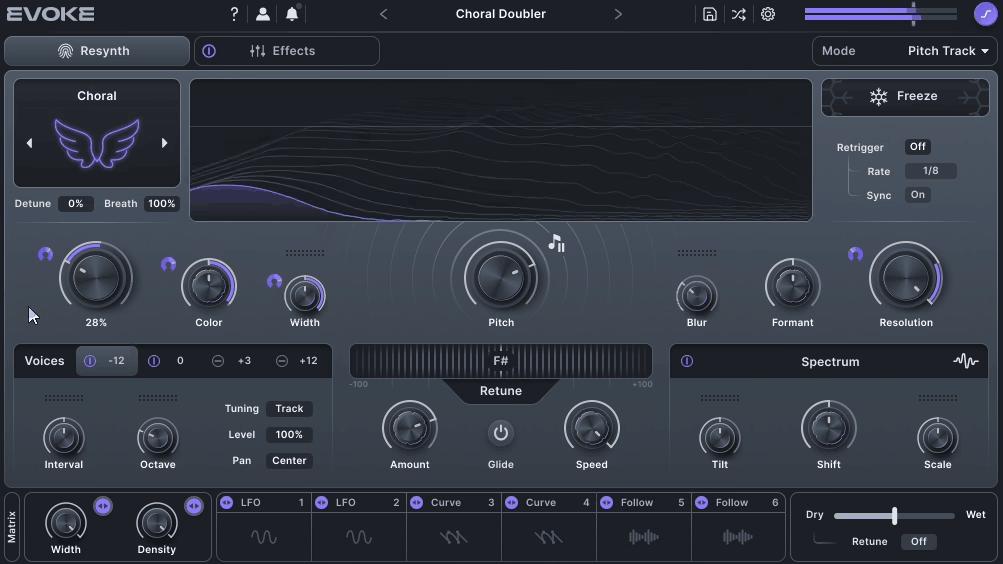
The interface of this plugin organizes everything into three main areas: Resynthesis, FX Rack, and Modulation. Each section is visually distinct, which makes it easy to know what’s shaping your sound at any given moment.
A first-time walkthrough guides you through the plugin when you open it, and Tooltip mode (activated via the question mark icon) gives you specific information about each control as you hover over it. These workflow details make the plugin genuinely approachable despite its depth.
I want to note that the interface can feel overwhelming at first glance. There’s a lot happening on screen, and if you’re coming from simpler vocal plugins, the initial learning curve is real.
That said, once you understand the three-section layout and how the modulators connect to parameters, the plugin becomes genuinely intuitive to use. The visual feedback and spectral display stay smooth even during heavy processing, which is useful during long sessions or live performance situations.

“Evoke is doing things with vocals that I didn’t think were possible.”
Get the Free Plugin Starter Kit
The genuinely useful free DAWs and plugins worth installing. No filler. Straight to your inbox.
The Sound
The sound is where Evoke really justifies its reputation, because the resynthesis engine produces vocal transformations that honestly don’t exist in any other plugin.
Dialed in subtly, the plugin delivers genuinely natural-sounding pitch correction and formant shifting that holds up beautifully in modern pop and R&B productions. The resynthesis approach means the processing stays cohesive even when you push it hard, rather than breaking up into obvious digital artifacts.
Push the Character Modes harder, and things move into completely different territory. A spoken vocal becomes a robotic, metallic voice.
A sung phrase morphs into a glitchy, unstable texture that sounds like data being corrupted. Any voice can be turned into liquid, static noise, or choral pad tones that feel genuinely otherworldly.
What I found most impressive is how cohesive the sound stays even during extreme transformations. Traditional vocal processing tends to fall apart once you push it past certain limits, whereas this one seems to just keep getting more interesting the further you push it.
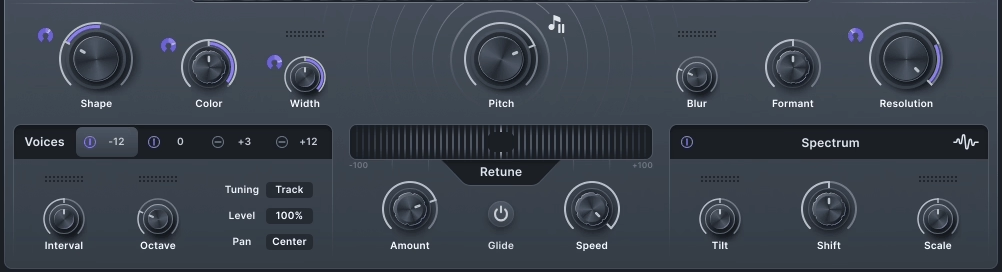
The four-voice harmonizer is also worth calling out because the harmonies feel musical rather than synthetic. You can use it for subtle thickening effects on lead vocals, dense multi-part harmony arrangements, or wide-panned vocal stacks that feel like modern R&B and EDM crossover productions.
The Character Modes
The 15 Character Modes sit at the heart of what makes this plugin so creatively inspiring, and the modes break down into three distinct families based on the kind of transformation they produce.
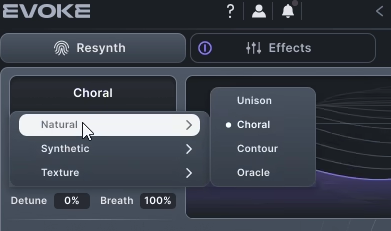
- Natural:
The Natural family includes Unison, Choral, Contour, and Oracle modes. These are the most musical and least synthetic-sounding Character Modes, producing choir-like layers, subtle pitch thickening, and natural vocal ensemble effects.
I love using these for backing vocal stacks, pad-like vocal layers, and modern pop vocal enhancement where you want the processing to stay transparent.
- Synthetic:
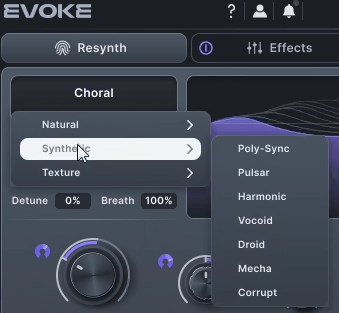
The Synthetic family covers Poly-Sync, Pulsar, Harmonic, Vocoid, Droid, Mecha, and Corrupt modes. This is where the plugin gets into classic vocoder territory and beyond, producing everything from bright sync-based leads to robotic voices, metallic harmonic textures, and glitchy corrupted sounds.
These modes work beautifully for modern electronic, EDM, and experimental vocal production where you want that unmistakable synthetic character.
- Texture:
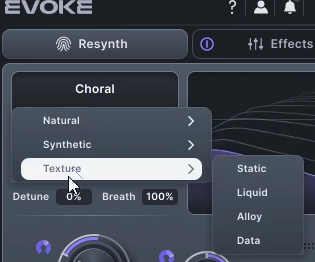
The Texture family includes Static, Liquid, Alloy, and Data modes, which are the most extreme transformations available. These turn input audio into noise textures, flowing liquid-like sounds, metallic alloys, and glitchy data-corruption effects that sound more like sound design than vocal processing.
For ambient producers, film composers, and experimental electronic artists, these modes are genuinely unique tools that don’t exist anywhere else.
Each mode also has shape, color, formant, resolution, and width controls that let you fine-tune the specific flavor of the transformation. This means each of the 15 modes is really a starting point rather than a fixed sound, because you can shape any of them significantly with those additional parameters.
The Effects Rack and Modulation
Beyond the resynthesis engine, Evoke includes a genuinely deep effects rack and modulation system that turns it into a complete vocal processing environment rather than just a transformation tool.
The FX Rack holds up to 12 processors drawn from 8 effect types. You get chorus, multiband compression, delay, distortion, filter, reverb, EQ, and a frequency shifter.
These aren’t simplified versions of generic effects, they’re compact implementations of the kind of processors Minimal Audio is known for from their other plugins. The frequency shifter in particular stands out for adding subtle width and dreamy motion to vocals and synths.
There’s also a Spectral EQ that acts more like a tone shaper than a traditional equalizer. You can shift spectral focus, randomize curves, or modulate parameters for subtle phasing effects.
I found that adding slow modulation to the Spectral EQ creates gentle motion that keeps vocals feeling fresh without crowding the mix.
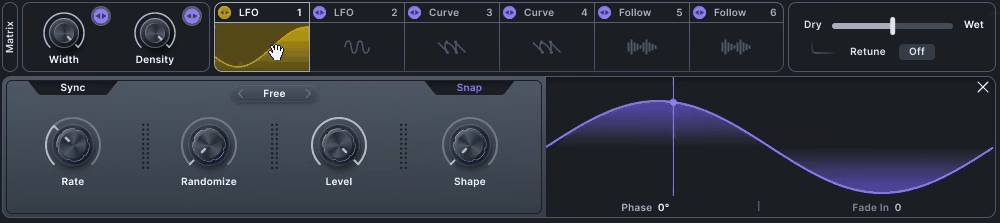
The six modulators are where the plugin really becomes a sound design playground. You get LFOs for periodic motion, curves for custom rhythmic patterns, and envelope followers for reactive dynamics.
Assign them to nearly any parameter with a simple drag, and you can animate formants, reverb sizes, harmonizer levels, or pretty much anything else in the plugin.
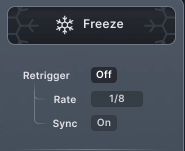
On top of all that, the Freeze control captures the current state of the audio and holds it indefinitely, similar to features in spectral processors. Combined with the modulation and effects, this opens up serious creative territory for building evolving vocal textures and atmospheric layers.
Why to Choose Evoke
Vocal plugins have come a long way, but most of them still fall into predictable categories. You’ve got pitch correctors like Antares Auto-Tune and Waves Tune, harmonizers like Waves Harmony and Antares Harmony Engine, and vocoders like Zynaptiq Orange Vocoder and Polyverse Manipulator.
Evoke doesn’t really fit into any of those buckets, and that’s what makes it exciting. At its core, the plugin uses vocal resynthesis. The input signal gets broken down into pitch, spectral envelope, and timbre, and each of those elements can be manipulated independently before being recombined into an entirely new signal.
The end result feels more like sound design than traditional vocal processing. Here’s what sets it apart and who it’s actually built for:
- Unique Resynthesis Approach:
Rather than processing the input, this plugin builds a completely new signal from your vocal’s core features. That opens up transformations traditional effects simply can’t reach, placing the plugin in a category of its own.
- Deep Creative Toolkit:
You get 15 Character Modes, a four-voice harmonizer with per-voice level, pan, and glide controls, a 12-slot FX Rack covering chorus, delay, reverb, distortion, filter, EQ, multiband compression, and frequency shifting, plus six modulators with LFOs, curves, and envelope followers. Over 350 presets across 8 packs round out the starting points.
- Built for Modern, Experimental Genres:
The synthetic character works best for hyperpop, EDM, modern R&B, experimental electronic, and bass music, where vocals get treated as textural elements rather than traditional lead parts. Ambient producers and sound designers working on film or games will also find real use for the texture-based modes that turn vocals into abstract, alien material.
What I love most is how the plugin balances sound design depth with an approachable workflow. Drop it on a track, grab a preset, and you’ve got something usable right away, or dig into the deeper parameters and modulation to build something completely custom.
One thing worth noting: if you work on acoustic singer-songwriter material, traditional rock, or retro-inspired music, this one probably isn’t for you. Even at its most natural settings, Evoke carries a futuristic quality that doesn’t blend easily with vintage or acoustic aesthetics.
Pros and Cons
Pros
- Unique Resynthesis Engine:
The vocal resynthesis approach produces transformations that don’t exist in any other plugin, opening up creative territory that was previously unreachable.
- 15 Character Modes:
A genuinely diverse range of transformation algorithms covers everything from natural pitch correction to liquid, metallic, and glitchy textures.
- Deep Modulation System:
Six modulators with drag-and-drop assignment to nearly any parameter creates serious sound design potential.
- Massive Preset Library:
Over 350 presets across 8 stylized packs give you plenty of starting points regardless of your genre or production context.
Cons
- Steep Initial Learning Curve
- CPU-Heavy
- No Resynthesis Bypass
Final Thoughts
To me, Evoke is one of the most genuinely creative vocal processors I’ve used in a long time, and it’s a plugin that reframes what vocal processing can actually be.
Put together, the vocal resynthesis, 15 Character Modes, four-voice harmonizer, 12-slot FX rack, deep modulation, and 350+ presets create a plugin that works equally well as a subtle pitch corrector, a creative vocal effect, a sound design tool, or a full vocal transformation environment.
I’d say the resynthesis engine alone justifies the plugin for anyone working in modern electronic or experimental production.
Also, I want to note that this one isn’t designed to be your only vocal plugin. If you need transparent pitch correction for traditional pop productions, dedicated tuning tools like Melodyne or Auto-Tune still have their place.
For pristine de-essing or natural-sounding vocal mixing effects, those workflows call for more specialized tools.
That said, for producers who want to push vocals into genuinely new territory, this plugin is one of the more inspiring investments you can make. The sound quality is stunning, the workflow is deep but approachable, and the creative possibilities keep opening up the longer you work with it.
For modern electronic producers, hyperpop artists, experimental musicians, sound designers, and anyone who treats vocals as a textural element rather than just a lyrical lead, I’d recommend Evoke as one of those plugins that genuinely expands what’s possible in your productions rather than just replacing what you were already doing.
More Info & Price: Minimal Audio Evoke (Trial Available)
Or Buy Here: Minimal Audio Evoke (Support Pluginerds)
Get the Free Plugin Starter Kit
The genuinely useful free DAWs and plugins worth installing. No filler. Straight to your inbox.

Hello, I’m Viliam, I started this audio plugin focused blog to keep you updated on the latest trends, news and everything plugin related. I’ll put the most emphasis on the topics covering best VST, AU and AAX plugins. If you find some great plugin suggestions for us to include on our site, feel free to let me know, so I can take a look!