
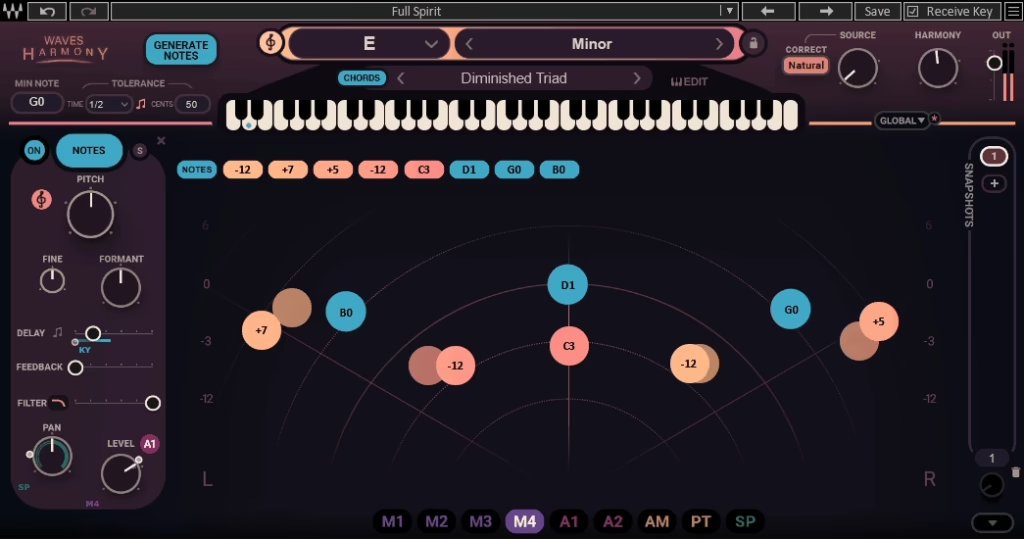
Vocal harmonizer plugins aren’t a new concept. Antares has Harmony Engine, Eventide has their legendary harmonizers, and MeldaProduction has MHarmonizerMB. What separates Waves Harmony from those options is how well it balances ease of use with genuine depth.
Most harmonizer plugins force you to choose between simplicity and control. Either you get a plug-and-play tool that sounds okay but feels limited, or you get a deep sound design environment that takes hours to understand. This one gives you both, and the transition between the two approaches feels genuinely natural.
From the Pluginerds Store
Before you go further into this list, something that will make more difference to your vocal sound than any plugin on it. Vocal plugins can only work with what you give them — a clean, dry recording is worth more to your vocal chain than any processing.


Here’s what sets Harmony apart:
- Three Workflow Modes:
You can work in Automatic mode, where the plugin generates harmonies based on your vocal’s pitch. Or use Playable mode with a MIDI keyboard to perform harmonies in real time. Or dive into Graphical mode and draw harmonies manually on the visual display. Each mode targets a different production scenario.
- Up to Eight Voices:
Generate up to eight harmony voices from a single vocal take, which gives you enough layers for full choir-style arrangements, dense doubling effects, or classic two and three-part harmonies.
- Smart Note Generation:
Hit the Generate Notes button and the plugin automatically analyzes your vocal and creates harmonies that follow the changing pitch and intensity of the performance. This alone saves hours of manual harmony work.
- Real-Time Capable:
With no perceptible processing delay, the plugin works equally well in studio production and live performance contexts, which is rare for something this sophisticated.
- Deep Per-Voice Control:
Each of the eight voices has independent control over pitch, formant, delay, filtering, panning, and level, letting you sculpt each harmony individually rather than treating them as a single block.
I love how the plugin doesn’t force you into one way of working. Whether you’re a beginner who just wants instant results or a seasoned engineer who wants to sculpt every voice precisely, both approaches feel equally natural.
“What separates Waves Harmony from those options is how well it balances ease of use with genuine depth.”
Get the Free Plugin Starter Kit
The genuinely useful free DAWs and plugins worth installing. No filler. Straight to your inbox.
The Sound
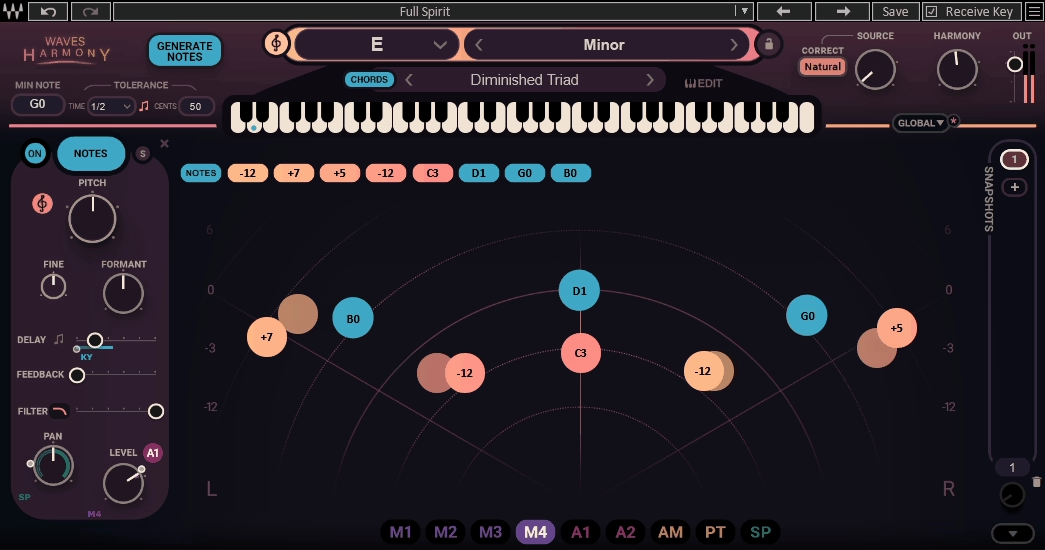
The sound quality is where Waves Harmony really earns its place in a session, because harmony generation lives or dies on how natural the voices actually sound.
The pitch-shifting engine produces harmonies that hold up to scrutiny in a real mix context. Formant correction is applied automatically to keep the shifted voices sounding like actual voices rather than obvious pitch-shifted artifacts, and the quality genuinely rivals manual tracking in a lot of situations.
I’ve found that the plugin responds differently to different vocal types, which is worth knowing. Smooth, sustained vocals tend to translate beautifully through the harmonizer, while vocals with lots of breath noise, throat sounds, or aggressive performance elements can sound slightly more processed.
Keeping formant shifting to a minimum (maybe one or two clicks in either direction) tends to give the most natural results across most vocal types.
Where the plugin really shines is when you layer simple detuned copies of the main vocal with small delay and formant offsets. This creates that classic thickening effect where the lead feels fuller and more present without obviously sounding like harmony vocals. You get the richness of a doubled vocal take without actually needing the singer to perform it twice.
For more obvious harmony work, stacking thirds and sixths with a fifth at low level and maybe a sub-octave creates the kind of rich ensemble sound that defines contemporary pop, R&B, and rock productions. Add a touch of delay and reverb on top, and the harmonies blend into the mix with genuine believability.
Workflow Modes
The three workflow modes are what make it genuinely flexible, because they cover almost every scenario you’d encounter in vocal production.
Automatic mode is where most producers will start. You hit the Generate Notes button at the top of the plugin window, and smart algorithms analyze the incoming vocal, working out the best harmony based on the key and scale you’ve set.
The harmonies follow the changing pitch and intensity of the lead vocal in real time, which means you don’t have to worry about the harmony drifting out of context when the performance shifts.
Graphical mode (Main Graph) gives you a visual display where you manually draw and arrange harmonies on a radar graph. You can position voices anywhere in the stereo field, adjust their volume, and modify them across different sections of a song using the snapshots system.
I find this mode most useful for producers who want pinpoint control over specific harmony arrangements.
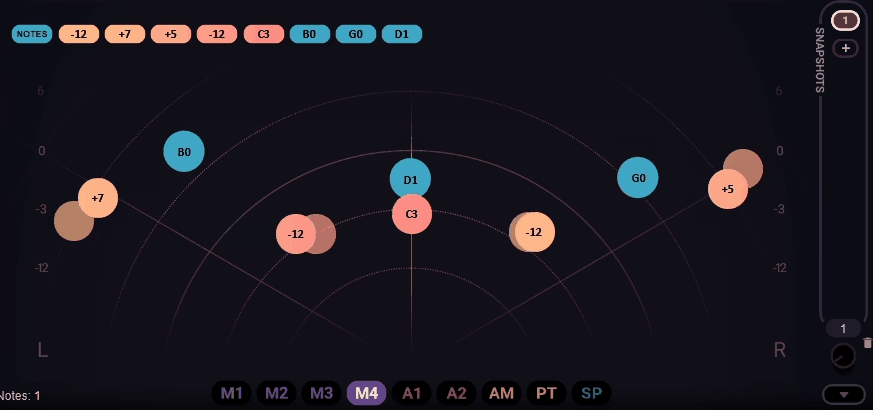
The really smart thing is that you can combine these modes. Set up automatic harmony generation as the baseline, then override specific moments with MIDI input when you want a particular voicing. This hybrid approach gives you the speed of automatic harmonies with the precision of manual control exactly when you need it.
Playable mode connects to a MIDI keyboard and lets you perform the harmonies yourself in real time. Once you’ve set the key and scale, the plugin snaps your played notes to musical positions, so you can’t play a wrong note even if you try. This is ideal for producers who want more creative control than automatic generation offers, or for live performance situations where you want to improvise harmonies on stage.
Modulation and Voice Control
Beyond the basic harmony generation, Waves Harmony includes a genuinely deep modulation system that prevents the harmonies from sounding static or overly processed.
The modulation section offers up to nine modulation sources, including LFOs, ADSR envelopes, and sequencers, with or without DAW sync. You assign modulation by dragging a modulator button onto any control, which is refreshingly simple compared to the complex routing matrices some harmonizers use.
What I appreciate most is the Spreader control, which sets a specific modulation value for each incoming note. The result is that each harmony voice gets unique modulation variations rather than all eight voices being affected identically. This subtle difference prevents the harmony stack from sounding mechanical and adds the kind of natural variation you’d get from actual human singers.
You can modulate pitch, harmony voice positions, pan, formant, and pretty much any other parameter, which opens up genuinely creative territory. Beyond standard vocal harmonies, the plugin can generate modulated melodies, thick vocal beds, Bon Iver-style auto-tuned counter-melodies, and creative vocal effects that go far beyond traditional harmonization.
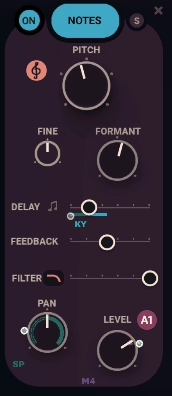
Each individual voice also has its own pitch, formant (both Coarse and Fine), delay (either in milliseconds or note divisions), feedback, filter (high-pass, low-pass, or band-pass), pan, and level controls.
Dialing in small variations between the voices, maybe 40 or 50 ms of delay on the outer harmonies with a hint of detuning and opposing formant offsets, creates the kind of subtle character differences that make the harmonies feel like different singers rather than identical copies.
Note Map Editor
The Note Map Editor is one of those features in Waves Harmony that sits under the surface but genuinely opens up the plugin once you understand what it’s doing. It’s where you take control over exactly which harmonies play when specific notes come in, whether those notes are sung by the vocalist or played in from a MIDI keyboard.
Rather than relying entirely on scale and chord presets, the Note Map Editor lets you define your own mapping logic.
Each note on the keyboard can trigger up to eight different notes at once, which means you can quantize the pitch of incoming vocals to a specific scale, build custom chord shapes that play from a single note, or create unique mapping presets that save for later use across different songs.
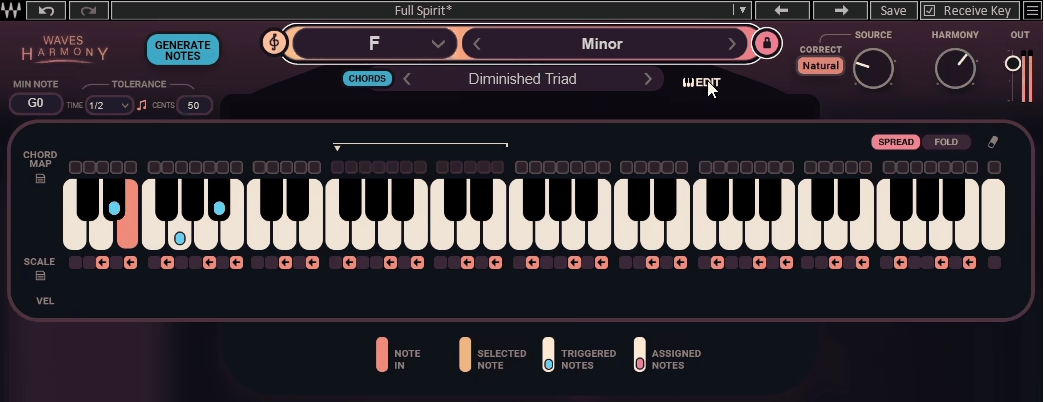
Here’s how the mapping interface actually works in practice:
- Assignment Mode:
Click the box above the key you want to edit, and it enters assignment mode. From there, any key you click on the editor keyboard (or play on your MIDI keyboard) gets assigned to that selected note. Click the box again to exit assignment mode when you’re done.
- Selected Note (Yellow Key):
Shows which key is currently in assignment mode, waiting for you to assign notes to it. This is the note you’re building the harmony chord around.
- Played Note (Pink Key):
Any note triggered by the input vocal or MIDI input gets highlighted pink in real time. If an entire chord plays, every note in it lights up simultaneously, and each one triggers its properly mapped harmonies.
- Assigned Note (Purple Dot):
Notes that you’ve assigned to the selected note appear as purple dots on the keyboard, giving you a clear visual map of how each input note will be harmonized.
What I appreciate about this feature is how it gives you genuine creative control beyond the built-in chord and scale options. You can build custom harmony voicings for specific songs, create unusual non-traditional note mappings for experimental production, or fix harmony issues on tracks where standard scale-based generation doesn’t quite fit the music.
For advanced users, the ability to save your own mapping presets means you can build a library of custom harmony approaches that matches your specific production style, and then recall them across different sessions without having to rebuild the logic from scratch.
Presets and Live Use
One of the things that makes Waves Harmony so practical is how deep the preset library goes. You get over 450 preset packs organized into folders covering ensembles, doublings, choirs, harmonies, creative vocal effects, and signature starting points from professional engineers.
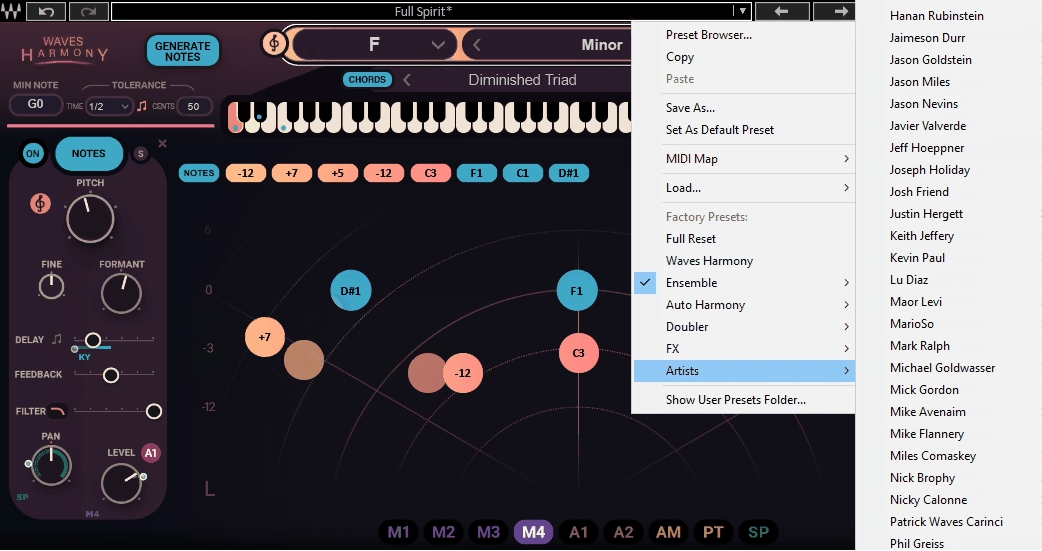
The chord preset menu sits below the keyboard display and organizes chord types by musical genre, including several EDM-specific variations. This is genuinely useful if you’re not deeply fluent in music theory, because the plugin handles the musical decisions for you while still sounding correct.
The Snapshot system on the right side of the interface lets you save specific settings and recall them instantly via automation or MIDI. This turns the plugin into a legitimately powerful live performance tool, because you can switch between completely different harmony arrangements between songs or even between sections of a single song without any manual adjustment.
I’ve found the snapshot system genuinely useful for studio work too, especially on songs with key changes or sections that need completely different harmony treatments. Save a snapshot for the verse, another for the chorus, and another for the bridge, then automate the switches so everything flows naturally through the song.
For touring musicians, the combination of real-time processing and instant snapshot recall makes this one of the more practical vocal enhancement tools for stage use. The plugin handles audio fast enough that there’s no perceptible latency, which is essential for live vocal processing.
Pros
- Three Workflow Modes:
The combination of Automatic, Playable, and Graphical modes covers pretty much every scenario you’d encounter in vocal production, from instant results to detailed manual harmony arrangement.
- Up to Eight Voices:
Generate up to eight harmony voices from a single vocal take, which gives you enough layers for dense arrangements without needing to track multiple performances.
- Smart Automatic Generation:
The Generate Notes function analyzes your vocal and creates musical harmonies based on key, scale, and performance dynamics, which saves real time compared to manual harmony work.
- Convincing Sound Quality:
The pitch-shifting and formant correction produce harmonies that hold up in real mix contexts, especially on smoother vocal types where the processing stays transparent.
- Real-Time Capable:
With no perceptible processing delay, the plugin works equally well in studio production and live performance, making it genuinely versatile for touring musicians.
Cons
- More CPU-Hungry:
The plugin puts more load on your system, especially with multiple instances stacking full eight-voice harmonies across a session. Running it on every vocal track isn’t practical on most setups.
- Voice-Dependent Results:
Vocals with lots of breath noise, throat artifacts, or aggressive performance elements can sound slightly processed, while smoother vocals translate better. Keeping formant shifts minimal helps, but not every vocal type works equally well.
- Requires Accurate Pitch:
Automatic mode specifically needs a well-pitched vocal source to generate correct harmonies. If your vocal is inconsistent, you’ll get less reliable automatic results and may need to use MIDI or graphical input instead.
- Learning Curve for Deep Features:
While the plugin is genuinely easy at the surface level, the modulation system and advanced voice editing take time to fully understand if you want to unlock the plugin’s full potential.
Final Thoughts
Waves Harmony has become one of those plugins that genuinely changes the way you approach vocal production, whether you’re working in the studio or performing live.
The combination of three workflow modes, deep per-voice control, smart modulation, and a massive preset library makes it one of the most practical vocal harmonizers available. I’d say the automatic mode alone saves enough time on typical sessions to justify the plugin for busy producers, while the graphical and playable modes offer enough depth for engineers who want complete control over every harmony.
I want to note that it’s more CPU-hungry compared to simpler vocal effects, so it’s not something you’ll want to run on dozens of tracks simultaneously. On a modern computer, running a few instances across a vocal-heavy session is manageable, but keep in mind that stacking eight voices with full modulation will put real load on your system.
Also, keep in mind the plugin isn’t a replacement for professional session singers performing real harmonies. A skilled vocalist tracking multiple takes will always have a unique quality that digital harmonization can’t fully replicate.
But for home producers, bedroom songwriters, podcast producers, demo writers, and touring musicians who need convincing harmonies quickly, this plugin delivers genuinely usable results faster than any alternative I’ve tried.
I would recommend Harmony especially for producers working on pop, R&B, indie, electronic, and modern singer-songwriter productions, where thick vocal layers are a core part of the sound. For those producers, this plugin earns its place in your session template rather than sitting unused, and the creative possibilities keep opening up the longer you work with it.
Check here: Waves Harmony
Get the Free Plugin Starter Kit
The genuinely useful free DAWs and plugins worth installing. No filler. Straight to your inbox.

Hello, I’m Viliam, I started this audio plugin focused blog to keep you updated on the latest trends, news and everything plugin related. I’ll put the most emphasis on the topics covering best VST, AU and AAX plugins. If you find some great plugin suggestions for us to include on our site, feel free to let me know, so I can take a look!