I need to be straight with you from the start. MXXX isn’t a plugin you’re going to understand in ten minutes. Actually, I think that’s putting it mildly, because honestly, you could spend weeks with this thing and still discover new routing possibilities or modulation tricks you hadn’t considered before. But that’s kind of the whole point of what MeldaProduction has created here.
When I first opened Melda MXXX, I realized I was looking at something fundamentally different from the typical multi-effect plugins out there. This isn’t just a few processors chained together with some preset buttons.
What I found was a modular processing environment containing over 70 individual effect modules pulled directly from Melda’s entire plugin catalog. That includes everything from basic EQ and compression to spectral dynamics, harmonizers, and even MPowerSynth. The sheer scope of what’s available is overwhelming at first glance.
Now, let’s talk about whether it’s actually worth the money. The full version sits around $1,075 to $1,174 depending on where you buy it, which is a substantial investment by any measure. But here’s the thing, if you were to purchase all 70+ individual Melda plugins separately, you’d be looking at well over double that amount.
So from a pure value perspective, if you plan to use even half of the included processors regularly, the math actually works in your favor. Plus, you get free lifetime updates, which means whatever improvements Melda makes to these processors down the line come to you at no additional cost.
I think the real question is whether you need this much processing power in one place. If you’re a sound designer, experimental producer, or someone who regularly builds complex effect chains, then honestly, MXXX could replace a significant portion of your plugin collection.
On the other hand, if you mostly stick to basic mixing tasks and rarely venture into creative processing territory, this might be overkill for your needs. What seals the deal for me is that combination of the preset library and the modular flexibility, because you’re getting both instant gratification and deep customization in one package, which is rare at any price point.
What Makes MXXX Different
The modular approach changes everything about how you think about processing audio. Instead of being locked into a fixed signal path like most multi-effect units, MXXX gives you a 96-slot routing matrix arranged in six lanes.
You can drop any effect module into any slot, route signals between lanes however you want, and even create feedback loops if that’s your thing. I found this level of flexibility both exciting and slightly terrifying because the possibilities genuinely feel endless.
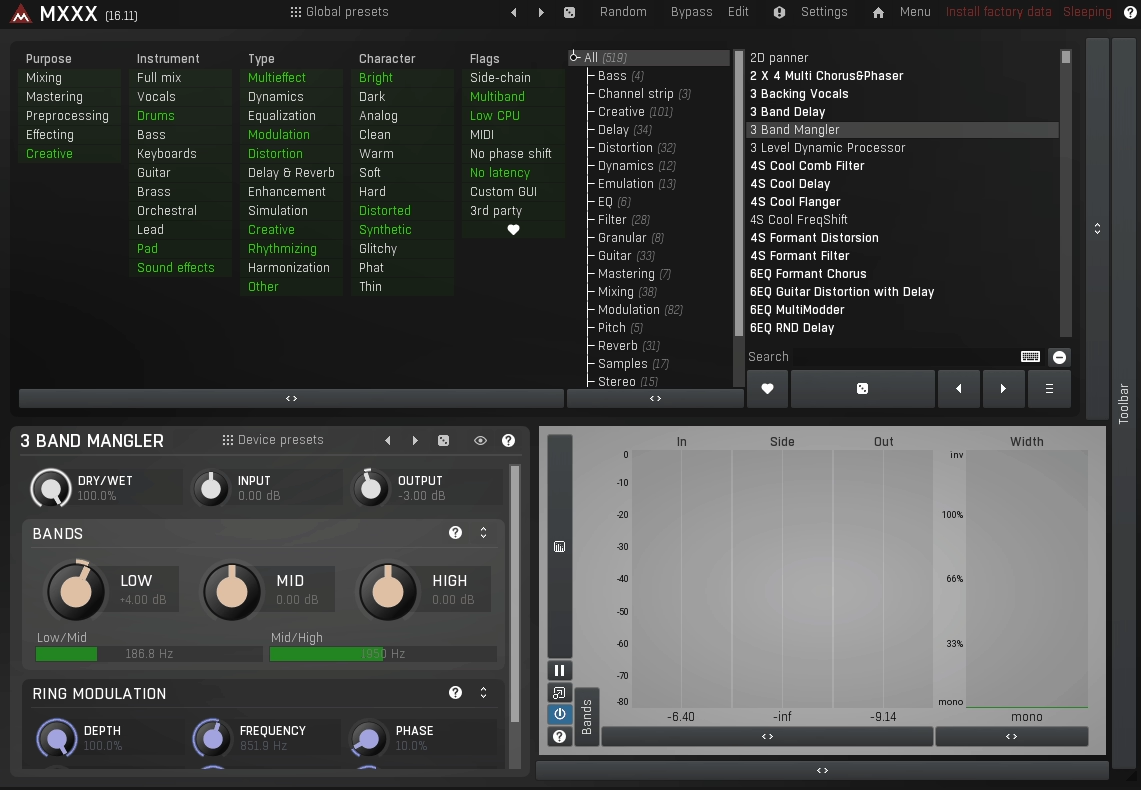
What really stands out to me is how MeldaProduction handled the complexity issue. They’ve included two distinct interface modes. The Easy mode presents you with a preset browser and a controller pane, which is basically where you’ll live if you just want quick results.
The Edit mode, on the other hand, drops you into the full routing matrix where you can build your own effect chains from scratch. I think this dual-interface approach was a smart move because it means you’re not constantly staring at that massive routing matrix when you just want to tweak a preset.
The Preset Library is Actually Useful
I’m usually skeptical of preset libraries, but MXXX comes with over 500 active presets that feel genuinely thoughtful. What I mean is, these aren’t just random effect combinations someone threw together. Each preset was created by users in the Melda community and then refined by the company itself.
They’re organized into practical categories like Purpose, Instrument, Type, Character, and Flag. So if you need something for mastering, or you’re working on vocals, or you specifically need something with sidechain functionality, you can filter down to exactly what you’re looking for.
What I appreciate is that these presets don’t just sit there looking pretty. Each one comes with its own set of MultiParameter controls, which are essentially macro knobs that the preset designer has already mapped to the most important parameters. Sometimes you get individual controls for things like threshold and ratio on a compressor. Other times, you might get one knob that affects multiple parameters simultaneously. I found this really practical because you can dive as deep or stay as shallow as you want depending on what the project needs.
Understanding The Routing System
The routing matrix sounds intimidating on paper, but in practice, it’s more intuitive than you’d expect. When you add a new module, MXXX uses smart automatic routing that connects inputs and outputs to the most logical destinations. Of course, you can override this and create your own signal flows, which is where things get interesting. You can send modules to multiple destinations, create parallel processing chains, or build complex multiband setups where each frequency range has its own dedicated processing chain.
Speaking of multiband processing, the Band Editor at the top of the interface lets you split your signal into up to six frequency bands, and each band gets its own complete routing matrix. I mean, think about that for a second. You could have entirely different effect chains processing your low end versus your high end, with independent modulation for each frequency range. That’s the kind of surgical processing capability that normally requires multiple plugins and careful gain staging.
Modulation Goes Deep
The modulation system in MXXX is where things get really creative. You get up to 16 modulation sources including LFOs, envelope followers, random generators, and pitch detectors. Any of these can be routed to virtually any parameter across any of the effect modules in your chain. I found myself using the envelope followers a lot for dynamic processing tasks where I want the effect intensity to respond to the input signal’s amplitude.
What I love about the modulation setup is how visual it is. When you assign modulation to a parameter, you can see exactly how it’s affecting the sound through the graphical displays.
Plus, there’s an arpeggiator that can trigger modulation events in rhythmic patterns, which opens up all sorts of possibilities for rhythmic effects and generative processing.
The Randomization Feature Actually Works
I have to say, I was skeptical about the randomization functions at first because random parameter changes usually just create nonsense. But MXXX offers smart randomization that only alters parameters likely to produce musical results.
There’s also a minor variation mode that makes small tweaks to existing settings, which I found useful when I had something close to what I wanted but needed slight adjustments. Of course, if you want total chaos, the full randomization mode is there too.
Practical Considerations
From a workflow perspective, MXXX can save you a lot of time once you get comfortable with it. Instead of loading multiple individual plugins and routing audio between them, you’re working within a single environment where everything is already connected.
The plugin includes automatic gain compensation so you’re not constantly fighting level changes as you add processors. There’s also a safety limiter at the output stage, which I appreciate because when you’re experimenting with extreme settings, it’s easy to create digital clipping.
The CPU usage is reasonable considering what’s happening under the hood, though obviously, loading up dozens of high-quality effect modules simultaneously will tax your system. You get adjustable oversampling up to 16x, which matters when you’re stacking multiple processors that might otherwise introduce aliasing artifacts.
Who This Is Actually For
I think MXXX makes the most sense for sound designers and producers who regularly need creative effects processing. If you’re the type who enjoys building custom processing chains and experimenting with unconventional routing, this plugin will feel like home.
For mixing and mastering engineers who prefer surgical precision over creative chaos, you might find the interface a bit much, though the preset library does contain plenty of professional mixing and mastering tools.
As I said before, full version gives you access to all 70+ effect modules, but there’s also MXXX Core which only unlocks modules for Melda plugins you’ve purchased separately.
Personally, I feel like the Core version somewhat defeats the purpose because a huge part of MXXX’s value is having that complete palette of processors available.
The Interface Situation
I won’t sugarcoat this part. MXXX’s interface is functional but not particularly beautiful. It’s got that utilitarian Melda look with lots of panels, menus, and sub-windows. You can resize the whole thing and customize some visual aspects through the settings menu, but at the end of the day, it’s designed for power users who care more about capability than aesthetics. If you’re coming from plugins with gorgeous photorealistic interfaces, this might feel like a step backward visually.
That being said, once you spend time with it, the interface makes sense. Everything is laid out logically, and the different sections are organized in a way that actually supports your workflow rather than getting in the way. The metering is comprehensive, giving you per-channel levels, mid/side analysis, and stereo width readouts.
There’s even a Difference mode that lets you hear only the processed portions of your signal, which is incredibly useful for understanding exactly what each processor is doing.
Sound Quality and Character
The effects themselves sound excellent because they’re based on MeldaProduction’s full plugin range, which has always been known for transparent, high-quality processing. When you need clean, surgical EQ or compression, it’s there.
When you want aggressive distortion or wild modulation effects, those are available too. The versatility of the sound palette is genuinely impressive, covering everything from subtle mastering adjustments to experimental sound design that would be impossible with traditional tools.
Final Thoughts
At the end of the day, MXXX multi effect plugin is a commitment. It’s not a plugin you’ll master in a weekend, and honestly, you might not even scratch the surface of what it can do in your first few months of use. But for me, that’s actually part of what makes it interesting. In a world where most plugins do one or two things really well, MXXX gives you this massive creative playground where the limits are basically your imagination and CPU power.
I would say this isn’t for everyone, and that’s perfectly okay. If you prefer simple, focused tools that do one job exceptionally well, stick with dedicated plugins.
But if you’re the kind of person who gets excited about routing audio through multiple processing chains, modulating parameters in complex ways, and building custom processing environments, MXXX delivers on that promise. It’s essentially asking you to think of effects processing as a modular system rather than a fixed chain, and that shift in perspective can open up creative possibilities you didn’t know existed.
The learning curve is real, but the depth is equally real. Whether that tradeoff makes sense for your workflow is something only you can determine based on how you actually make music.

Hello, I’m Viliam, I started this audio plugin focused blog to keep you updated on the latest trends, news and everything plugin related. I’ll put the most emphasis on the topics covering best VST, AU and AAX plugins. If you find some great plugin suggestions for us to include on our site, feel free to let me know, so I can take a look!