
Fuzz is probably the most misunderstood effect in guitar and bass production. A lot of producers treat it like distortion with the gain turned up, but that’s not really what’s happening. Real fuzz circuits clip the signal in a way that’s fundamentally different from overdrive or distortion, generating dense harmonic content that can sound thick and woolly at one extreme or sputtery and gated at the other.
The specific character depends on the transistor type (germanium versus silicon), the circuit topology, and how the pedal interacts with whatever it’s feeding into. Getting that right in a plugin is harder than it sounds.
I’ve gone through a lot of fuzz plugins over the years, and the range in quality is wider than with most other effect categories. Some sound flat and lifeless, missing the reactive, touch sensitive behavior that makes a good fuzz pedal feel alive under your fingers. Others nail the harmonic character but don’t clean up properly when you roll back the guitar volume.
The ones on this list are the ones that actually feel like playing through a real pedal, or at least get close enough to be useful in a production context.
Here are ten fuzz plugins covering everything from vintage Fuzz Face and Big Muff emulations to extreme doom metal tools and a couple of solid free options.
1. Canvas Audio Violet Fuzz
A newer entry in the fuzz plugin market, Canvas Audio Violet Fuzz is a dual mode fuzz with more tone shaping flexibility than you’d expect from a compact plugin. It gives you two distinct fuzz circuits that you switch between on the fly, plus a 3 band EQ and Contour control that let you sculpt the fuzz character far beyond the typical single tone knob approach that most fuzz pedals and plugins offer.
I discovered Violet Fuzz when Canvas Audio launched their initial plugin range, and what keeps me using it is the Contour control. Most fuzz plugins give you a tone knob and that’s it for tonal shaping. The Contour knob on the Violet Fuzz changes the fundamental voice of the fuzz circuit, and combined with the three band EQ, you can dial in sounds that range from smooth and dark to bright and aggressive without ever feeling like you’re fighting the plugin.
- Dual Fuzz Modes
Two switchable fuzz circuits give you fundamentally different distortion characters. Mode I produces an open, classic fuzz sound with natural dynamics. Mode II delivers tighter, gated fuzz with a compressed, almost synth like quality. Switching between them on the same source material produces noticeably different results, and I find Mode II particularly useful on bass where the gated compression keeps the low end from getting muddy.
- Contour Knob
The Contour control reshapes the fuzz circuit’s overall voice independently of the EQ section. It changes the harmonic balance and midrange character in a way that feels like swapping between different physical pedals rather than just adjusting a filter. This control is what separates Violet Fuzz from simpler one knob fuzz plugins.
- Clean Blend
A Blend control mixes the fuzzed signal with the clean input, maintaining the attack clarity and note definition of the dry signal underneath the fuzz. For bass work, this is practically essential. Running a bass through heavy fuzz without any clean blend tends to lose all the low end definition, and the Blend control solves that without needing a separate parallel routing setup.
- 4x Oversampling
Built in 4x oversampling reduces digital aliasing at extreme gain settings, keeping the distortion character smooth and analog feeling even when you’re pushing the fuzz hard. The processing remains lightweight despite the oversampling.
Available in VST3, AU, and AAX formats.
2. Kuassa Efektor FZ3603 Fuzz
Where most fuzz plugins model a single pedal, Kuassa Efektor FZ3603 gives you three complete fuzz circuits in a single plugin: a germanium Fuzz Face, a silicon Fuzz Face, and a Tone Bender variant. The difference between these circuit types is substantial.
Germanium transistors produce warmer, more compressed fuzz with temperature dependent behavior. Silicon transistors generate a brighter, more aggressive sound with tighter dynamics. The Tone Bender sits in its own territory with a distinctive midrange growl.
I appreciate that Kuassa included all three circuits rather than forcing you to buy three separate plugins. In practice, I find myself switching between the germanium and silicon models depending on the source material and the mix context.
The germanium sounds right on blues and classic rock leads. The silicon works better for aggressive rhythm parts and heavier genres. Having both available in a single plugin interface saves a lot of A/B testing with separate plugins.
- Three Fuzz Circuits
The germanium Fuzz Face, silicon Fuzz Face, and Tone Bender circuits each model distinct hardware pedals with their own transistor types, biasing behavior, and harmonic characteristics. Switching between them changes the fundamental character of the fuzz from warm and compressed (germanium) to bright and aggressive (silicon) to midrange heavy and growling (Tone Bender).
- Bias Control
A Bias knob adjusts the transistor operating point, which affects how the fuzz clips and how much sputtery, dying battery behavior you get. Low bias settings produce the classic “velcro” fuzz sound where notes decay into gated silence. Higher settings produce a smoother, more sustained fuzz. This control is one of the most important parameters on any Fuzz Face style pedal, and I’m glad Kuassa made it easily accessible.
- Volume Cleanup
The circuits respond to guitar volume roll off in a way that models the real pedal behavior, where reducing your instrument’s volume cleans up the fuzz into a lighter overdrive rather than just getting quieter. This touch sensitivity is one of the hallmarks of a good Fuzz Face emulation, and the FZ3603 handles it better than many competitors I’ve tried.
- Cabinet Simulation
A built in cabinet section provides basic speaker simulation for situations where you’re using the fuzz plugin without a separate amp sim. The included cabinet models are functional for quick demos and monitoring, though I typically bypass them in favor of a dedicated amp sim for final mixes.
- Pre and Post EQ
Separate pre fuzz and post fuzz EQ sections let you shape the signal going into the fuzz circuit and the output coming out. The pre EQ is particularly useful for controlling how much bass hits the fuzz input, which dramatically affects the low end behavior and overall feel of the distortion.
- Noise Gate
An integrated noise gate tames the background noise that high gain fuzz circuits generate, which is especially welcome on the germanium circuit where the higher gain settings can introduce noticeable hiss. The gate is simple but effective.
Available from Kuassa in VST, VST3, AU, and AAX formats.
3. Audiority Doomagorgon
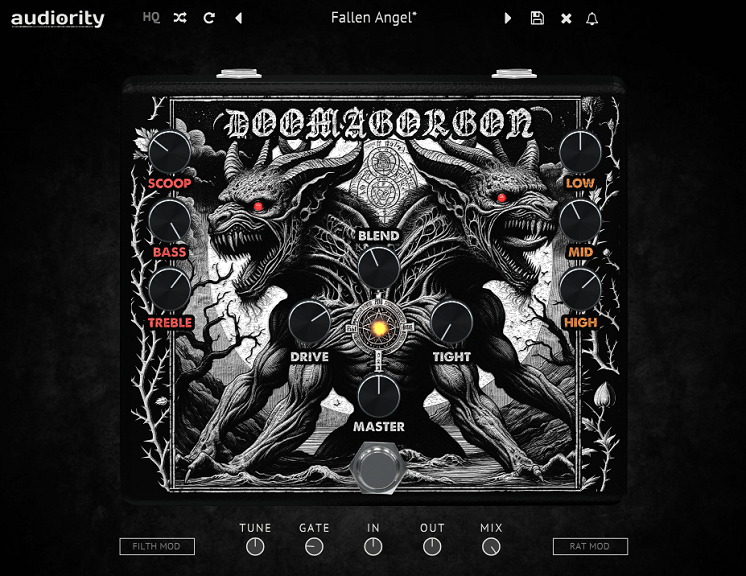
If your idea of fuzz involves downtuned guitars, crushing sustain, and the kind of low end weight that makes furniture vibrate, Doomagorgon was built specifically for you. It combines a Boss FZ-2 style octave fuzz channel with an HM-2 style chainsaw distortion channel, creating a two headed monster that covers the full range from doom and sludge to Swedish death metal tone.
The thing about Doomagorgon is that it’s not trying to be subtle or versatile in the traditional sense. It’s a specialized tool for heavy music, and within that niche, it’s very good at what it does.
The octave fuzz channel produces thick, syrupy doom tones. The chainsaw channel delivers that buzzing, scooped mid death metal sound. And the crossfade between them lets you find spots in between that neither channel produces on its own.
- Dual Channel Design
The Octave Fuzz channel (based on the Univox SuperFuzz side of the FZ-2) and the Chainsaw channel (based on the HM-2) can be blended via a crossfade control. This isn’t just two pedals in series. It’s a blend between two fundamentally different distortion characters that produces tones neither circuit generates alone.
- Filth and RAT Mods
The FILTH MOD doubles down on distortion and midrange scoop for the fuzz channel, pushing it into more extreme territory. The RAT MOD switches the chainsaw channel from smooth overdrive into RAT style hard clipping distortion. These switchable mods extend the range of both channels without cluttering the interface with extra controls.
- Built In Transposer
A pitch transposer lets you drop or raise the octave fuzz effect, which is useful for creating sub octave doom tones or octave up fuzz sounds without a separate pitch shifting plugin. Combined with the fuzz processing, the transposed signal has a thick, syrupy quality that works well for bass drops and heavy breakdowns.
Available from Audiority in VST3, AU, AAX, and CLAP formats.
4. Safari Audio Cobra Fuzz
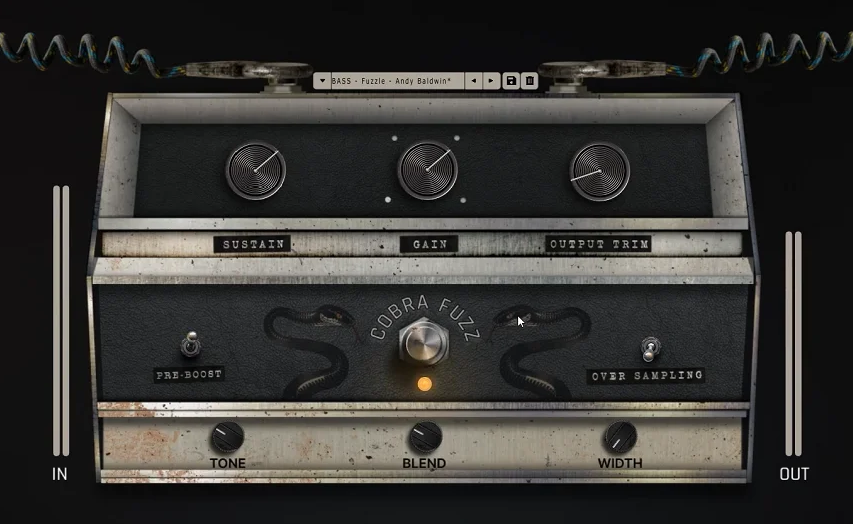
Safari Audio Cobra Fuzz approaches fuzz design with a focus on flexibility and modern production needs rather than strict vintage emulation. It offers a wide gain range from mild saturation to full blown fuzz destruction, with enough tone shaping to work on bass, guitar, synths, and even vocals if you’re into that kind of thing.
I reach for Cobra Fuzz when I want fuzz as a production tool rather than a strict guitar pedal emulation. It sits well on electronic bass lines, adds grit to synth leads, and handles low tuned guitar without losing clarity in the way that simpler fuzz circuits tend to. The design philosophy seems to be “fuzz for the mix” rather than “fuzz for the pedalboard,” and that perspective makes it more useful in a broader range of production contexts.
- Wide Gain Range
The gain control covers everything from mild harmonic enhancement at low settings to full saturation at high settings, with the character of the distortion changing smoothly across the range. This means you can use it as a subtle tone enhancer on a vocal bus or crank it for heavy guitar tones without needing different plugins for different intensity levels.
- Tone Sculpting
Multiple tone shaping controls go beyond a single tone knob, letting you adjust the fuzz character across different frequency ranges. The ability to independently shape the low, mid, and high frequency content of the fuzz means you can keep the low end tight on bass while letting the highs fizz and spit, or roll off the top for a darker, more vintage feel.
- Flexible Routing
The plugin’s signal flow is designed for integration into complex processing chains, with input and output level controls that let you manage gain staging before and after the fuzz. This prevents level jumps when switching the effect on and off, which is a practical consideration that some fuzz plugins overlook.
Available from Safari Audio in VST, VST3, AU, and AAX formats.
5. MMS The Fuzz
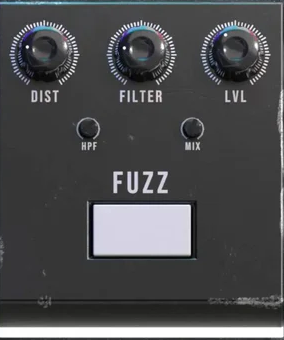
Sometimes you just want a fuzz pedal that does one thing and does it well. MMS The Fuzz is a straightforward, no frills fuzz plugin that captures a thick, saturated fuzz tone without burying you in options and controls. The interface is minimal, the controls are limited to the essentials, and the sound is fat and aggressive in a way that works on guitar and bass without much tweaking.
I wouldn’t call The Fuzz the most versatile option on this list. It doesn’t have multiple fuzz circuits, cabinet simulation, or extensive EQ. But the core sound is solid and it gets you to a usable fuzz tone faster than more complex plugins where you can spend twenty minutes adjusting parameters. If you know you want a specific kind of thick, saturated fuzz and you don’t need a lot of options, this does the job.
- Simple Interface
The control set is pared down to the essential fuzz parameters without unnecessary extras. You get gain, tone, and volume, and that’s about it. The simplicity is intentional and welcome for situations where you want to load a fuzz, dial it in quickly, and get back to working on the track.
- Saturated Character
The fuzz algorithm produces a dense, harmonically rich saturation that sits in the thick, woolly end of the fuzz spectrum rather than the bright, sputtery end. The tone has weight and sustain that works well for power chords and sustained lead lines.
- Low End Performance
The plugin handles low frequency content without the muddy, undefined quality that some fuzz emulations produce on bass or downtuned guitar. The low end stays tight enough to remain useful in a mix context, even at high gain settings.
Available in VST, VST3, AU, and AAX formats.
6. Audiority Blue Face
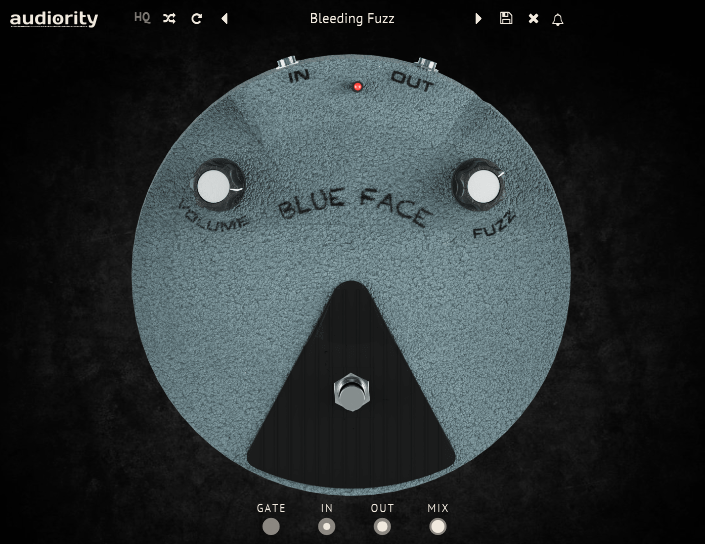
A classic Fuzz Face emulation based on the BC108 silicon transistor version from the late 1960s, Audiority Blue Face models the specific circuit that made the Fuzz Face one of the most recognized fuzz pedals in rock history. This is the silicon variant, which has a brighter, more aggressive character than the germanium version that Hendrix famously used, and it’s the version that many players actually prefer for its tighter, more defined distortion.
What I find useful about the Blue Face is how it responds to the input signal. The circuit modeling captures the way a real Fuzz Face reacts to volume knob changes and picking dynamics, which is the whole point of this style of fuzz pedal. Roll back the guitar volume and it cleans up into a chimey overdrive.
Dig in hard and it compresses and saturates. That interactive behavior is what makes a Fuzz Face more than just a distortion box, and Audiority captures it well at a very reasonable price.
- BC108 Silicon Circuit
The modeling is based on the specific BC108 silicon transistor Fuzz Face circuit, capturing the brighter, more defined distortion character that distinguishes the silicon version from the warmer, more compressed germanium models. The silicon Fuzz Face has more bite and presence, which makes it better suited to cutting through a dense mix.
- Modified Circuit
Audiority modified the original circuit slightly to get more bite even at minimum settings, addressing a common complaint about vintage Fuzz Faces where the lowest gain settings could sound thin and anemic. The modification means the plugin remains useful and characterful across its entire gain range rather than only sounding good past the midpoint.
- XY Scope
A built in XY oscilloscope display shows how the fuzz is affecting the signal waveform in real time. This is both educational (you can literally see the clipping behavior change as you adjust the controls) and practical (it gives you visual confirmation of how hard you’re pushing the circuit).
- Pre/Post Gain and Mix
Independent pre fuzz gain, post fuzz gain, and wet/dry mix controls provide complete gain staging flexibility. The pre gain adjusts how hard you’re hitting the fuzz input, which changes the distortion character. The post gain controls the output level. The mix blends fuzzed and clean signal for parallel processing.
- Noise Gate
An integrated noise gate addresses the hiss that high gain settings generate, keeping the fuzz sound clean between notes and phrases. The gate is adjustable and responds well to the signal dynamics, opening cleanly on note attacks and closing smoothly during pauses.
Available from Audiority in VST, VST3, AU, AAX, and CLAP formats. Priced at $20.
7. Nembrini Audio Big Stuff (Free)
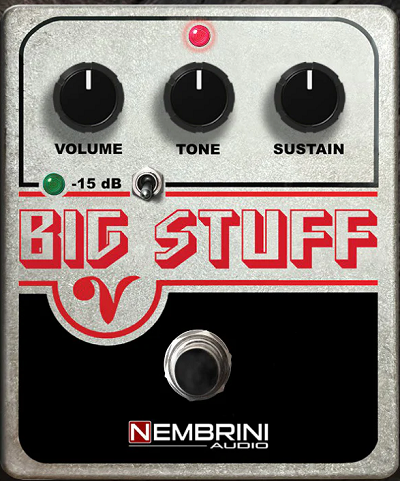
For a free plugin, Nembrini Audio Big Stuff delivers a surprisingly convincing Big Muff style fuzz that handles the classic duties of thick rhythm sustain and singing lead tones. The Big Muff circuit is one of the most beloved fuzz designs in rock history, used on everything from Smashing Pumpkins riffs to David Gilmour solos, and Nembrini captures its essential character without charging you a cent.
I keep Big Stuff installed as a quick access Big Muff whenever I need that specific thick, sustained fuzz tone and don’t want to spend time tweaking a more complex plugin. It does the one thing it’s designed to do, and it does it well enough for most production contexts. The tone control covers the useful range of the Big Muff’s tonal palette, from the scooped mid character to a more full range sound.
- Big Muff Circuit
The modeling captures the classic Big Muff Pi signal path with its characteristic four transistor clipping stages that produce thick, sustained fuzz rich in even and odd harmonics. The sustain has the creamy, violin like quality that Big Muffs are known for on lead lines.
- Simple Controls
The Volume, Tone, and Sustain knobs mirror the hardware pedal’s control layout, keeping the interface familiar for anyone who’s used a physical Big Muff. The simplicity means you’re making music within seconds of loading the plugin.
- Free Download
Completely free with no registration requirements or in app restrictions. For producers who want a solid Big Muff sound without any financial commitment, this is the obvious starting point.
Available from Nembrini Audio in VST, VST3, AU, and AAX formats. Free.
8. Audiority Big Goat
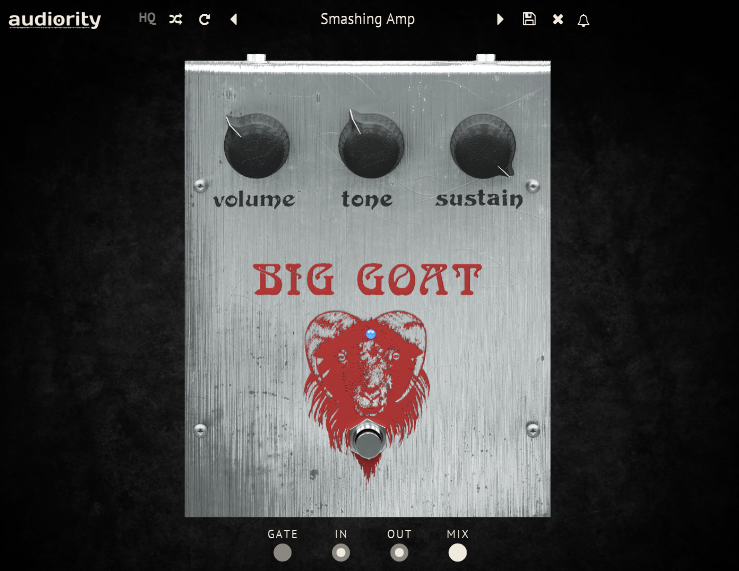
Audiority Big Goat is another Big Muff style emulation, but with more control than the Nembrini and a slightly different take on the circuit. It models the mid 1970s EHX Big Muff Pi with a four stage cascaded amplifier design that produces the thick, harmonically dense fuzz the original is famous for. Compared to the free Big Stuff, the Big Goat offers more tone shaping flexibility and a slightly more refined sound.
If you’re serious about Big Muff tones and you want a bit more control than a free plugin provides, the Big Goat is worth the modest price. The addition of independent low and high tone controls rather than a single tone knob gives you more precise control over the EQ balance of the fuzz, which makes a practical difference when fitting the fuzz into a mix alongside other instruments.
- Dual Tone Controls
Independent Low and High tone controls replace the standard single Tone knob, giving you separate control over the bass and treble content of the fuzz output. The standard Big Muff tone knob blends between two filter networks, but having independent controls lets you boost both lows and highs simultaneously, which the original circuit can’t do.
- Pre/Post Gain Staging
Separate pre and post effect gain controls let you manage the signal level hitting the fuzz input and the output level independently. The pre gain affects how the fuzz circuit responds and distorts, while the post gain controls the final output. This separation is more useful than a single volume control because it lets you adjust the distortion character without changing the output level.
- Mix Control
A wet/dry blend enables parallel fuzz processing, maintaining clean signal clarity underneath the distortion. As with most fuzz plugins that include this control, it’s essential for bass work where you need the fuzz character without losing low end definition.
- HQ Mode
An optional high quality processing mode increases the oversampling for reduced aliasing at the cost of additional CPU usage. At normal quality, the plugin is very light on resources. Engaging HQ mode cleans up the high frequency response for situations where you want the smoothest possible fuzz tone.
Available from Audiority in VST, VST3, AU, AAX, and CLAP formats.
9. Kuassa Efektor Moon Muffin
Kuassa Efektor Moon Muffin takes the Big Muff concept further than any other plugin on this list by including 10 popular circuit modifications that represent different eras and variants of the Big Muff design. The original Big Muff has been manufactured in dozens of versions over the decades, from the original NYC triangle knob to the Russian green and black models to boutique modified versions, and each one sounds noticeably different.
What makes the Moon Muffin valuable to me is the variety. Instead of buying five separate Big Muff plugins to cover different variants, you get ten circuit models in one plugin that you can switch between instantly. The Russian mode sounds darker and woolier than the NYC mode. The Ram’s Head mode has more midrange presence. The Civil War mode sits somewhere in between. Having all of these accessible from a single interface makes A/B comparison fast and practical.
- 10 Circuit Mods
Ten switchable models represent different Big Muff versions and popular modifications, covering decades of the pedal’s production history. Each model has distinct gain characteristics, EQ curves, and clipping behavior that reflect the specific circuit components and topology of the variant it’s based on. Switching between models on the same source material reveals how much the “same” pedal can vary.
- Tone Stack Variants
Each circuit mod includes its own tone stack behavior, meaning the Tone knob responds differently in each model. This is faithful to how the real pedals work, where the tone circuit’s component values differ between versions and produce different frequency response curves at the same knob position.
- Mids Control
An additional midrange control addresses the Big Muff’s notorious mid scoop, letting you add mids back in for better mix presence. The classic Big Muff tone is scooped in the midrange, which sounds great in isolation but can disappear in a full band mix. The Mids control solves this without needing a separate EQ plugin.
- Gate and Blend
A built in noise gate and wet/dry blend control provide practical mix integration features. The gate handles the noise that high sustain settings generate, and the blend enables parallel processing for bass and other applications where you need clean signal underneath the fuzz.
- Cabinet Section
An integrated cabinet simulation provides basic speaker emulation for direct recording or monitoring situations. Multiple cabinet models are available, and while they won’t replace a dedicated amp sim, they’re useful for quick tracking and demo work.
Available from Kuassa in VST, VST3, AU, and AAX formats.
10. Audio Damage FuzzPlus3 (Free)

This one has been around for years and remains one of the most popular free fuzz plugins in circulation. It models a germanium Fuzz Face with a warm, compressed character that responds well to playing dynamics. The interface is clean and minimal, the controls are straightforward, and the sound quality holds up respectably against paid alternatives.
For a free plugin, FuzzPlus3 is hard to fault. It doesn’t have the multiple circuit options of the Kuassa plugins or the extended tone shaping of Violet Fuzz, but the core germanium Fuzz Face sound is solid and usable. I’ve used it on released tracks when the simpler, warmer fuzz character was exactly what the part called for. If you’re just getting into fuzz plugins and want to try the Fuzz Face sound before investing in a paid option, this is the place to start.
- Germanium Character
The modeling captures the warmer, more compressed germanium transistor Fuzz Face character, with the softer clipping and dynamic response that distinguishes germanium circuits from their silicon counterparts. The sound is round and musical at moderate gain settings, becoming more compressed and saturated as you push it harder.
- Input Impedance
The circuit models the low input impedance behavior of the original germanium Fuzz Face, which affects how the fuzz interacts with whatever is feeding it. This impedance interaction is a significant part of the real pedal’s character and is often missing from simpler fuzz emulations.
- Body and Gate Controls
A Body control adjusts the low frequency content of the fuzz, and a Gate control manages the noise between notes. These two additions to the basic Fuzz Face layout provide just enough extra control to make the plugin practical for different sources without overcomplicating the interface.
- Zero Cost
Completely free from Audio Damage with no registration or account required. The plugin has been available for years and has proven stable across multiple operating system versions and DAW updates.
Available from Audio Damage in VST, AU, and AAX formats. Free.

Hello, I’m Viliam, I started this audio plugin focused blog to keep you updated on the latest trends, news and everything plugin related. I’ll put the most emphasis on the topics covering best VST, AU and AAX plugins. If you find some great plugin suggestions for us to include on our site, feel free to let me know, so I can take a look!