
If you’ve ever spent way too long tweaking an amp sim just trying to get something that sounds halfway decent before you even start tracking, you know exactly what kind of problem Waves was trying to solve here. The amp sim market is genuinely overcrowded at this point, so when something new drops you’d be forgiven for rolling your eyes a little. But I think what Waves pulled off with Voltage Amps is worth talking about, because the whole approach is different from what most of these plugins are trying to do.
Rather than going for the ultra-complex, micro-control-over-everything kind of experience, it leans fully into being a bare-bones, immediately usable tool, and I realized that’s actually a really underserved space in the amp sim world. For most producers and guitarists who just need a solid, believable amp tone without the deep-dive rabbit hole, this hits the mark pretty well. I’d say it’s worth it if speed and simplicity are priorities for you, especially considering it frequently drops to well under $40 on sale.
From the Pluginerds Store
Before you go — if you're putting together or upgrading a home studio setup, we run our own store alongside the blog at Pluginerds Shop. Everything on it is picked by people who actually make music, not sorted by whoever paid for placement on a marketplace. Worth a look if you're filling in the gaps in your setup.
Visit Pluginerds ShopAmp Lineup
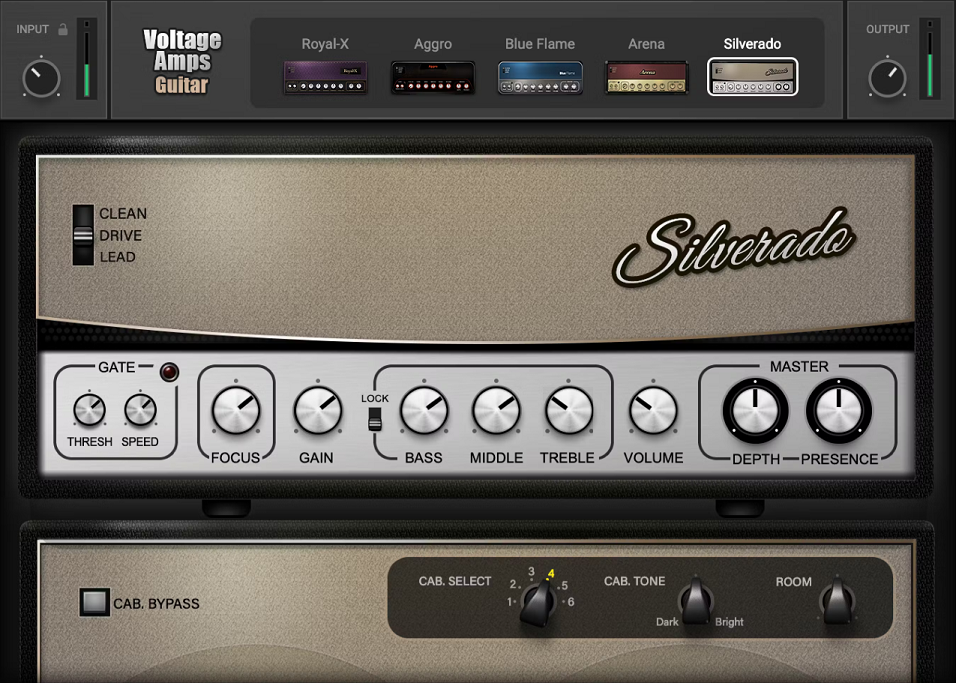
There are seven amp models total, covering both guitar and bass, and the sounds range from super clean all the way to aggressively distorted, informed by classic UK and US amp types without being marketed as exact emulations of specific amplifiers. I appreciate that honesty, because it sets realistic expectations from the start.
For guitar, here’s what you’re working with:
- Silverado – classic American clean tones with punchy drive channels, think Fender territory
- Arena – the stadium rock sound of the 70s and 80s, British crunch all the way
- Royal-X – jangly, chimey British character ranging from vintage Beatles to modern indie
- Blue Flame – boutique high-gain covering hard rock through scorching fusion tones
- Aggro – the full metal model, high-gain and vicious when you need it
And on the bass side, Vintage Velvet delivers vintage-style warmth while Dark Mass goes for modern full-spectrum punch with plenty of low-end authority. I found that each model has a genuinely distinct character, and switching between them actually feels like switching amps rather than just swapping a filter curve, which isn’t always a given at this price point.
Get the Free Plugin Starter Kit
The genuinely useful free DAWs and plugins worth installing. No filler. Straight to your inbox.
The Focus Control
This is the feature I want to spend some real time on, because I think it’s the most practically useful thing in the whole plugin. The Focus control is designed to compensate for your guitar’s pickup type, helping match the amp’s response whether you’re running bright single coils or thick-sounding humbuckers, and essentially you just turn it until you like what you hear.
That sounds almost too simple, and honestly it is simple, but it works. I believe this is the kind of control that experienced players will immediately get the point of, because pickup mismatch is a real issue when you’re going direct. Running a hot humbucker into an amp model dialed in for single coils can sound congested and muddy, and Focus addresses that without making you dig into settings you might not fully understand.
The control layout across all seven amps is completely identical: a global Input with a clip meter, plus Focus, Volume, Gain, a three-band EQ, and a noise gate with variable threshold and time settings, along with three switchable modes for Clean, Overdrive, and Lead. The uniformity is a deliberate choice and I think it’s a smart one. You learn the layout once and you’re done with it across the whole plugin.
Cabinet Section and Room
Each amp can be paired with one of six IR-based cabinet setups, with each selection comprising two IRs and a Dark/Bright knob to balance between them, and the cab stage can be bypassed entirely if you’re running into a separate cab emulator or feeding a physical speaker.
There’s also a Room dial that I noticed makes a bigger difference than you’d expect. It functions essentially as a short room reverb that gives the amps the air and life needed for realism, and without it, dry amp sims can sound lifeless and boxy in a mix. I’d recommend not sleeping on this control because even a small amount of room goes a long way toward making a DI recording feel like it was actually tracked in a real space.
One more thing worth mentioning: when the Lock switch is engaged next to the EQ, each amp’s individual settings are maintained as you switch between models or channel types, which makes comparisons fast and genuinely meaningful rather than having to re-dial everything each time.
Creative Uses
The preset library includes over 400 patches from some well-known names, including Butch Vig who produced Nirvana and the Foo Fighters, and Dave Mustaine of Megadeth, alongside producers who’ve worked with Taylor Swift, Doja Cat, Radiohead, Coldplay, and others. For me, that’s a solid starting point especially if you’re newer to amp sims and want reference points from real professional sessions.
Beyond guitars and bass, I must say the creative applications here are underrated. Voltage Amps works surprisingly well for thickening drum loops, adding attitude and warmth to synths, and adding grit to kicks or presence to vocals and generally anywhere you want that amp character applied to sources beyond guitar. I’ve used amp sims on drum room mics and parallel chains for years, and this one is light enough on CPU that you can throw it across multiple tracks without worrying about it.
The near-zero latency and very CPU-friendly performance is something other amp plugins can genuinely lack, and on a modern Apple Silicon Mac it barely registers on the meter. That alone makes it a realistic choice for live tracking sessions where you need real-time monitoring without the plugin eating your processing headroom.
Full price sits at $99, though it goes on sale regularly for around $29 to $35, and it’s also included in Waves’ subscription plans if you’re already in that ecosystem.
Check here: Waves Voltage Amps
Get the Free Plugin Starter Kit
The genuinely useful free DAWs and plugins worth installing. No filler. Straight to your inbox.

Hello, I’m Viliam, I started this audio plugin focused blog to keep you updated on the latest trends, news and everything plugin related. I’ll put the most emphasis on the topics covering best VST, AU and AAX plugins. If you find some great plugin suggestions for us to include on our site, feel free to let me know, so I can take a look!