
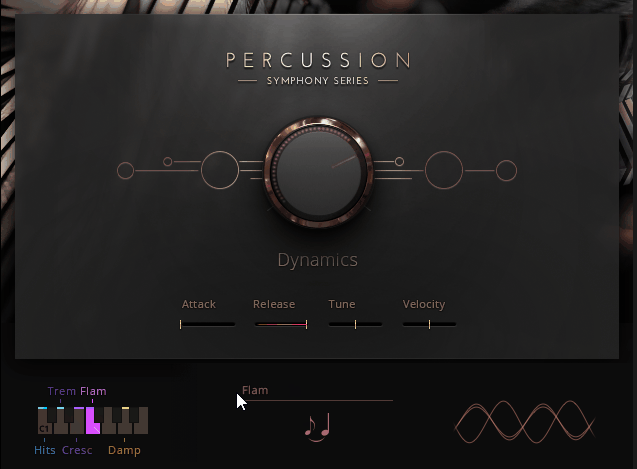
Native Instruments Symphony Series: Percussion takes a classical approach to orchestral percussion that fills a very specific gap in the sampling world.
Instead of chasing the massive, hybrid, trailer-ready sound that libraries like Heavyocity Damage 2 or Spitfire HZ Percussion specialize in, this collection focuses on traditional, concert-hall-style orchestral percussion recorded in a natural acoustic space.
Developed through a partnership between Native Instruments and Sonuscore (the same team behind the beloved Action Strikes), this library rounds out the Symphony Series family alongside the strings, woodwinds, and brass collections.
You get the full range of standard orchestral percussion plus tuned mallet instruments, all wrapped in one of the cleaner Kontakt interfaces available.
For me, what makes this library stand out isn’t its specialty in epic or cinematic modern production, but rather its ability to deliver convincing, classical-style percussion that fits genuinely well in traditional orchestral arrangements.
If you’re chasing the sound of John Williams, Max Steiner, or Jerry Goldsmith rather than Hans Zimmer or Brian Tyler, this is the percussion library that actually matches that aesthetic.
From the Pluginerds Store
If this article has you thinking about what's missing from your setup, our own shop is worth a browse. We stock the practical side of a home studio — the accessories, stands, and interfaces that reviews rarely cover but every setup eventually needs.
Visit Pluginerds ShopThe Interface and Workflow
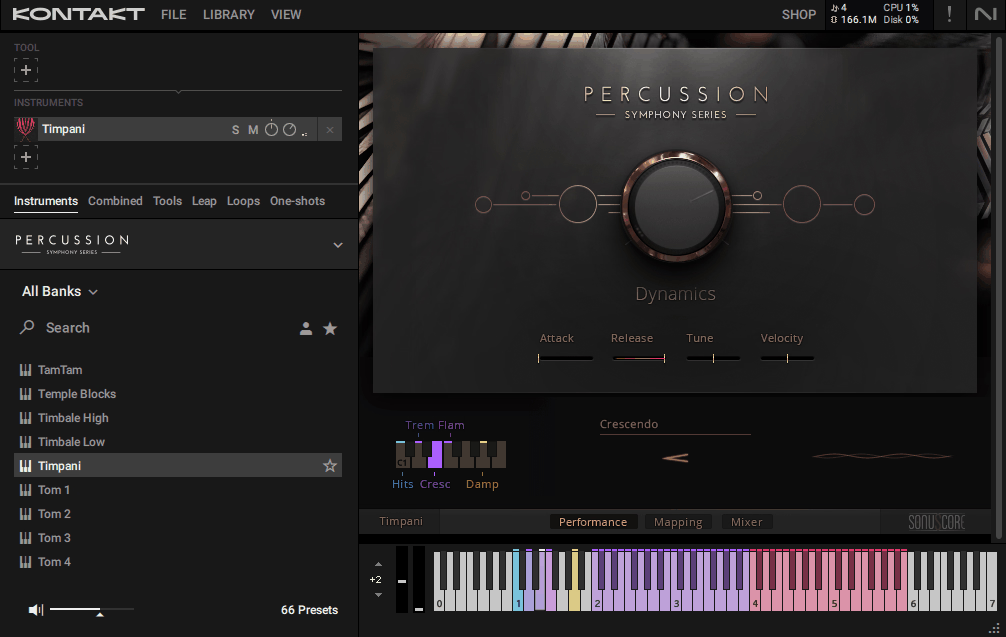
Honestly, the interface here is one of the better ones you’ll find in the orchestral sample library world, and for me, it’s one of the stronger reasons to work with this library despite a few sound limitations worth flagging.
Everything sits on a single page with clean, clear organization. Articulation names, keyswitch mappings, round-robin cycling, dynamic settings, all visible at a glance without needing to dig through multiple tabs or menus.
Attack controls are available on every patch, and they genuinely come in handy when you’re trying to match percussion hits to specific musical moments. Need that timpani to speak instantly for a sharp accent? Dial the attack tighter. Want cymbals to bloom gently for ambient texture? Just soften it up. Simple stuff, but the kind of detail that makes a real difference when you’re in the middle of a session.
On the microphone side of things, you get serious control over the spatial character of your sounds, at least if you own the full version. With the complete Symphony Series edition, close, mid, far, and spot mics are all available to blend however you like. The Essentials version ships with just one microphone position baked in, which is honestly a real limitation for anyone who needs spatial flexibility in their workflow.
Get the Free Plugin Starter Kit
The genuinely useful free DAWs and plugins worth installing. No filler. Straight to your inbox.
What’s Inside
The library covers traditional orchestral percussion comprehensively, which is honestly rarer than you might expect at this price point. Most dedicated percussion libraries either focus on huge cinematic drums or lean into tuned mallet instruments, whereas this one gives you both sides of the orchestral percussion spectrum.
Here’s what you actually get:
- Rhythmic Orchestral Percussion:
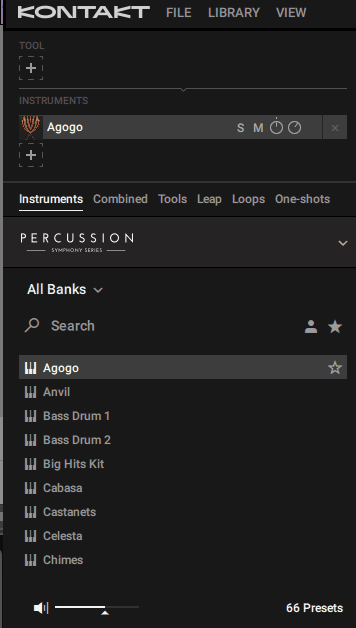
The full traditional lineup is here, including timpani, concert bass drums, snare drums, toms, cymbals, gongs, triangle, tambourine, and various auxiliary instruments. Each one gets deep sampling with multiple round-robins and dynamic layers, which keeps repeated hits from sounding mechanical.
- Tuned Percussion Instruments:
You get celeste, vibraphone, xylophone, glockenspiel, chimes, low piano hits, and other tuned mallet instruments. These cover the full melodic percussion needs of traditional orchestral writing, from delicate celeste passages to punchy xylophone runs.
- Percussion Kits:
Preset kits map different instruments across the MIDI keyboard for quick rhythmic writing. Really useful when you want to build grooves or patterns without loading multiple patches, and they give you immediate starting points for different orchestral contexts.
- Deep Microphone Control:
Multiple microphone positions let you shape the spatial character of your sounds, from close spot mics for dry, detailed tones to full hall mics for that natural concert-hall ambience. The full Symphony Series version includes all mic positions, while the Essentials version only includes one.
- Expression and Attack Controls:
Tweakable attack parameters for each instrument let you dial in the perfect response for your arrangements. This kind of control often gets overlooked in percussion libraries, so having it here is a real plus.
What I appreciate most about the design is how clean and organized everything feels. No confusing menus or buried features, just immediate access to what you need for orchestral writing.
The Sound
The sound is where this library makes its case, and also where you need to know what you’re actually getting before making a decision.
Traditional concert-hall percussion is the core identity here. The recordings capture the natural acoustics of a large scoring stage, with plenty of hall ambience baked into the samples. For producers chasing authentic classical orchestral percussion, this is exactly the sound you want.
A few things stand out sonically:
- Powerful Timpani:
The timpani hits and rolls are among the highlights of the library. Rich tone, convincing dynamic range, and natural-sounding crescendo rolls give you orchestral timpani that holds up in exposed solo passages as well as full ensemble work.
- Punchy Snares and Cymbal Swells:
Snare drums deliver tight, orchestral punch rather than the massive cinematic thunder you’d get elsewhere. The CC1-controllable cymbal swells are particularly useful for building dramatic moments without needing separate crescendo and decrescendo samples.
- Useful Kits Across the Keyboard:
Mapped kits make it easy to program complex orchestral percussion parts quickly. Instead of layering multiple patches, you can play entire sections of percussion from a single keyboard layout, which saves real time during scoring sessions.
I want to note that this library is recorded wet, meaning the hall ambience is part of the sound. For some producers, that’s a plus because it fits seamlessly into traditional orchestral arrangements without needing heavy reverb processing. For others who want more control over the acoustic space, enabling close mics and spot mics lets you dial out most of that natural reverb.
One thing worth flagging is that the tuned percussion (celeste, vibraphone, xylophone, glockenspiel) has noticeably more room noise than you’d expect in their default stereo mix. Switching to close or spot mics and adding your own reverb tends to give cleaner, more usable results for exposed melodic lines.
Mixer Section and Effects
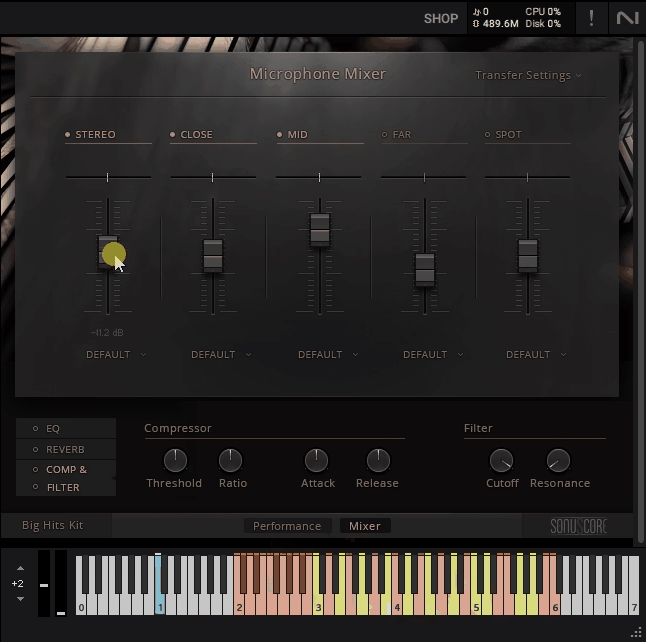
The Mixer page is where you shape the overall sound of your percussion, and it’s one of the more thoughtfully designed features in the library.
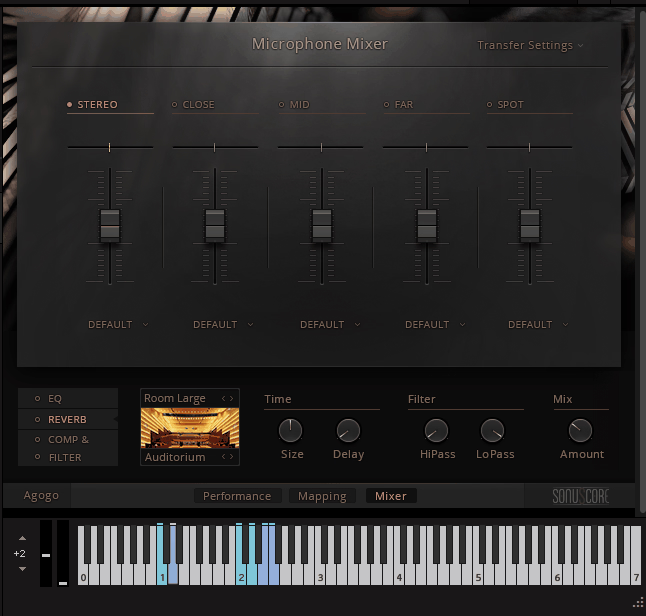
You get four distinct microphone positions: Close, Mid, Far, and Spot, plus a production-ready Stereo mix that combines all four. The Stereo option is honestly great for most situations because it saves CPU and RAM while still delivering a polished sound, but when you need more control, the individual mic positions give you serious flexibility.
Each microphone position has its own on/off switch, panorama slider, volume fader, and output routing selector. The signals are phase-aligned, which means you can blend any combination of microphones without running into phase cancellation issues. Deactivating the mics you aren’t using also saves real system resources, which matters when you’re running multiple instances across a big orchestral template.
Beyond the microphone controls, the Mixer page includes three built-in effects that sit on the master output:
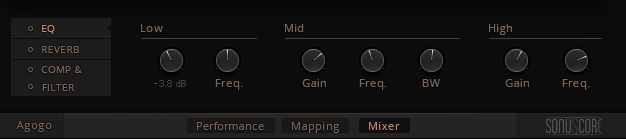
- Parametric EQ:
A three-band equalizer with Low, Mid, and High bands. The Low and High bands are bell curves with 18dB of boost or cut and adjustable Gain and Freq controls, while the Mid band is fully parametric with adjustable bandwidth (1/3 octave to 3 octaves). Great for carving out space in busy orchestral mixes where percussion competes with other sections.
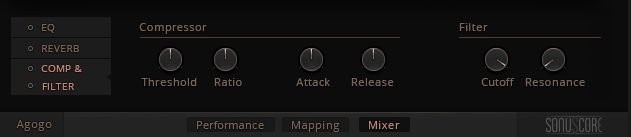
- Compressor and Filter:
The combined COMP and FILTER module gives you dynamic control plus tonal shaping in one panel. The Compressor has Threshold, Ratio, Attack, and Release controls for either reducing dynamic range or creatively shaping envelopes. The Filter adds Cutoff and Resonance controls, which can either add aggressive bite or soften the sound for special effects.
One handy feature is the Transfer Settings drop-down in the top right corner. This lets you save your current mixer configuration and load it onto a different Percussion instrument, which keeps your ensemble sound consistent across a full orchestral template without needing to recreate settings from scratch.
For Kit instruments specifically, you also get per-drum controls on the Performance page including Volume, Pan, and Tune for each drum or articulation in the kit. This lets you balance individual instruments within a kit rather than being stuck with the default mix.
I’d say the Mixer design strikes a nice balance between being genuinely useful and not overwhelming. The effects aren’t meant to be surgical mixing tools, but rather finishing touches for an already polished sound, and that’s exactly what they deliver.
- Convolution Reverb:
You get a genuinely wide range of spaces to work with here, split across two main categories of impulse responses.
The first one covers bigger, more dramatic environments like Cathedral, Chamber, Room Large, Room Small, Hallway, Underground, Outdoor, and Forest, along with two creative options called FX Long and FX Short for when you want something more stylized.
The second category leans into more intimate, real-world spaces including Auditorium, Carport, Classroom, Gallery A, Gallery B, Library A, Library B, Room Large, Lunchroom, and Workshop.
On top of choosing the space, you get control over Time (Size and Delay), Filter (HiPass and LoPass), and Mix (Amount), which together give you plenty of flexibility for placing your percussion in whatever environment fits your arrangement.
You’re right, I missed it. Here’s a section on Mapping:
Mapping Section
Every Single Instrument in the library includes a dedicated Mapping page that shows you exactly where each articulation sits on the keyboard. It’s a simple, non-interactive reference display, but honestly, it’s one of those features you end up relying on more than you’d expect, especially when you’re working with an instrument you haven’t loaded in a while.
What you see on the Mapping page is the full layout of articulations across the MIDI keyboard, including keyswitches for articulation changes, playable note ranges, and variation controls (like center hits versus edge hits on drums). Any articulation that’s affected by the variation selection is marked with diagonal lines on the display, which gives you a quick visual cue for what’s going to change when you switch variations.
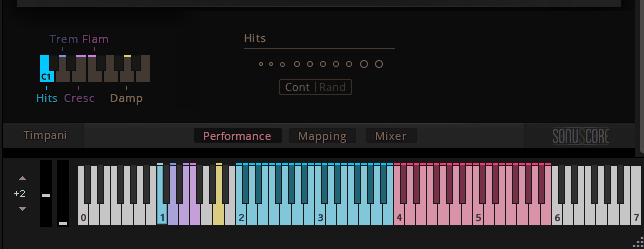
Some instruments also include a section labeled Vel Layers, which maps different velocity samples to individual keys rather than relying on MIDI velocity. This is genuinely useful if you want precise control over the intensity of a drum hit without depending on how responsive your MIDI keyboard is. Instead of worrying about nailing the right velocity every time, you just play the key that triggers the specific layer you want.
For Kit instruments, the variation indicator shows up as a small box of diagonal lines near the articulation controls, letting you know at a glance which parts of the kit respond to variation changes.
I’d say the Mapping page isn’t something you’ll stare at for hours, but it’s the kind of reference tool that saves real time when you’re trying to figure out where a specific articulation lives without digging through documentation. Load an instrument, click the Mapping tab, and you’ve got everything you need to start playing right away.
The Essentials vs Full Symphony Series Difference
This is worth spending a moment on because it genuinely affects what you’re getting depending on which version you own or plan to buy.
The Symphony Essentials Percussion version comes included with higher-tier Komplete Ultimate bundles. It covers the basic articulations and gives you a single microphone position (which happens to be the default stereo mix with the heaviest room sound).
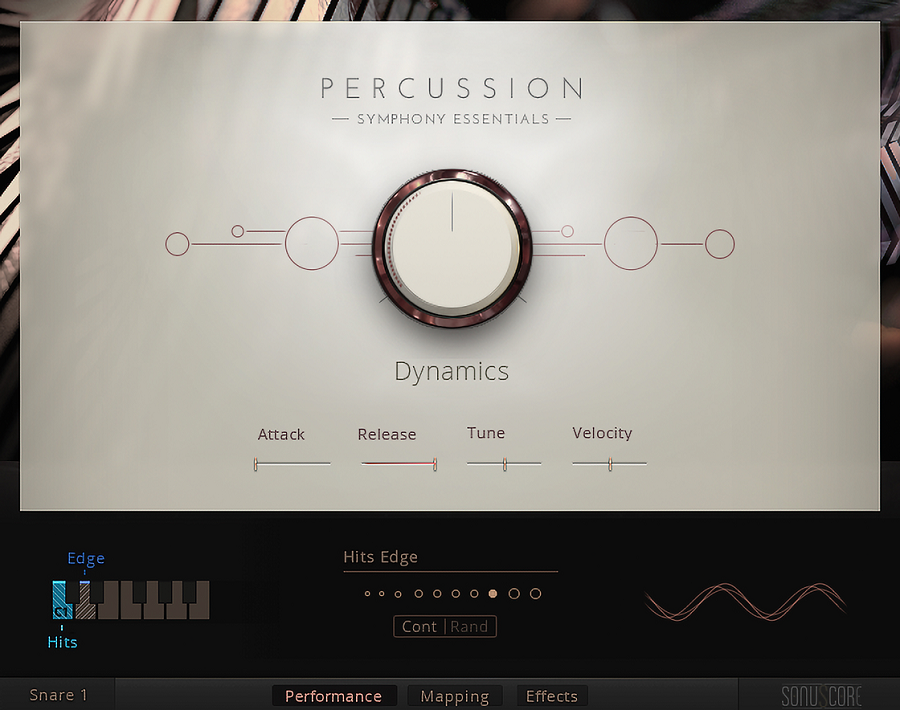
The full Symphony Series Percussion version is the complete edition, including:
- Additional articulations and playing techniques
- All microphone positions (close, spot, tree, hall, and more)
- Extended sample content and deeper round-robins
- More advanced features and controls
If you’re serious about orchestral scoring, the upgrade from Essentials to the full version genuinely matters. The ability to blend microphone positions alone transforms how the library fits into your mixes, and the extra articulations give you performance range that Essentials simply can’t match.
Who it’s great for
This library fits a specific type of composer, and being honest about that helps you decide whether it’s right for your work.
- Traditional film and media composers writing in the style of classical Hollywood scoring will find real value here. The sound genuinely matches what you’d hear in a concert performance of a John Williams or Jerry Goldsmith score, which makes it the right choice for scoring work that leans classical rather than modern cinematic.
- Concert music composers writing for orchestra, wind ensemble, or chamber groups get a percussion library that actually sounds like percussion in a concert hall. The natural ambience and traditional recording approach fit beautifully with other classical-style orchestral libraries.
- Game and TV composers working on projects that call for traditional orchestral scoring rather than hybrid modern sound will find this library covers most of their percussion needs with a single purchase.
- Budget-conscious composers who need broad orchestral percussion coverage without investing in multiple specialized libraries get genuine value here. The sheer amount of content relative to the price is hard to argue with.
- Music enthusiasts and hobbyist composers who simply love the sound of a real orchestra and want to experiment with classical-style percussion will also get a lot out of this library. You don’t need to be a professional scorer to appreciate what it offers, and the intuitive interface means you can start writing meaningful orchestral parts without a steep learning curve.
If your work involves epic trailer music, modern cinematic hybrid scoring, Hans Zimmer-style bombast, or massive taiko walls, this library probably isn’t your first pick. It’s specifically built for the traditional end of the orchestral percussion spectrum, and trying to force it into modern cinematic territory won’t give you what you’re after. A library like Heavyocity Damage 2 or Spitfire HZ Percussion fits those needs far better.
Pros and Cons
Pros
On the strengths side, the large amount of content at an accessible price makes this one of the best-value orchestral percussion libraries available. You get both rhythmic and tuned percussion covered comprehensively, which saves you from buying multiple specialized libraries to cover the full orchestral palette.
The clean, intuitive interface genuinely stands out in the Kontakt orchestral library world, making it easy to work quickly without fighting menus or hidden features. Features like attack control, dynamics on tremolo rolls, and CC1-controllable cymbal swells reflect thoughtful design that composers will actually appreciate during real sessions.
Traditional orchestral arrangements feel genuinely natural with this library, and the sounds blend well with other concert-hall-recorded orchestral sample collections. The timpani and punchy orchestral snares in particular sound excellent and hold up in exposed contexts.
Cons
On the other side, there are limitations worth knowing about before you commit. This library won’t do epic or trailer-style percussion, so if that’s what you need, you’ll still want to invest in a separate library for those sounds. Even with serious processing, you can’t really push this collection into Hans Zimmer territory convincingly.
The baked-in hall reverb from the wet recordings is both a strength and a weakness depending on your needs. For traditional orchestral writing it works beautifully, but for producers who prefer dry samples with added reverb, the natural ambience can feel limiting. The built-in convolution reverb gives you plenty of impulse responses to play with, but it can’t undo the hall sound already baked into the samples themselves.
There’s also a high amount of room noise in some of the tuned percussion instruments, particularly at their default mic settings. Enabling close or spot mics and adding your own reverb does eliminate this, but having to route around it in every session is a minor workflow annoyance.
Finally, the Symphony Essentials version is significantly less capable than the full version, with only one microphone position available. If you own Essentials and are considering whether the upgrade is worth it, the answer depends heavily on how much spatial control you need in your workflow.
Final Thoughts
Native Instruments Symphony Series Percussion is a genuinely solid orchestral percussion library that earns its place in a specific type of composer’s toolkit rather than trying to be everything for everyone.
Together, the combination of deeply sampled traditional orchestral instruments, tuned mallet percussion, intuitive interface, extensive microphone control, and useful kit layouts creates a library that covers the full classical orchestral percussion spectrum at a price that’s hard to beat. For composers working in traditional orchestral styles, this library covers needs that cinematic-focused collections simply can’t.
I want to note that this isn’t a do-everything percussion library, and trying to use it outside its specialty just won’t give you great results. If your work is primarily hybrid, cinematic, trailer-focused, or modern electronic-orchestral, you’ll want dedicated tools for those jobs.
For traditional orchestral composers, classical media scorers, and anyone building a concert-style orchestral template, I’d recommend Symphony Series Percussion as a thoughtful, well-designed library that covers genuine compositional needs. The combination of breadth, quality, and interface design makes it a practical choice rather than a specialty purchase, and it earns its place in orchestral scoring sessions where authenticity matters more than modern cinematic bombast.
More info & Price: Native Instruments Symphony Series Percussion
Check here: Manual for detailed info
Get the Free Plugin Starter Kit
The genuinely useful free DAWs and plugins worth installing. No filler. Straight to your inbox.

Hello, I’m Viliam, I started this audio plugin focused blog to keep you updated on the latest trends, news and everything plugin related. I’ll put the most emphasis on the topics covering best VST, AU and AAX plugins. If you find some great plugin suggestions for us to include on our site, feel free to let me know, so I can take a look!