
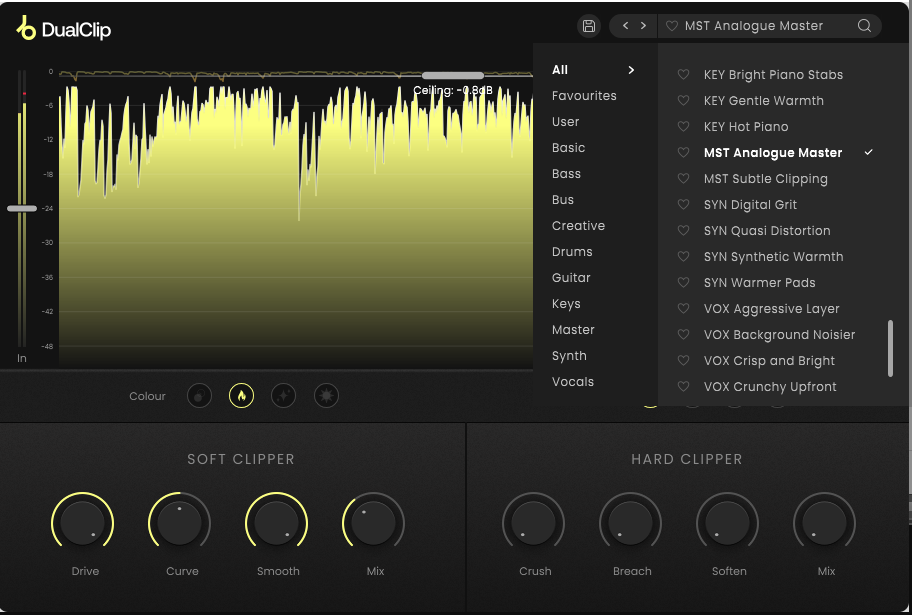
The clipper plugin category has gotten genuinely crowded in recent years, with solid options at every price point from tools like Kazrog KClip 3, Venn Audio V-Clip 2, Yum Audio Crispy Clip, and Brainworx bx_clipper all competing for a slot in mixers’ and mastering engineers’ toolboxes.
Most of these do one thing really well, either soft clipping for warmth and saturation or hard clipping for aggressive loudness and grit, but rarely both in a way that feels cohesive and purposeful.
DualClip from Plugin Boutique is built around the idea that you should be able to cover the full range of clipping character in a single well-designed plugin, and the two-section architecture it uses to accomplish that is genuinely clever.
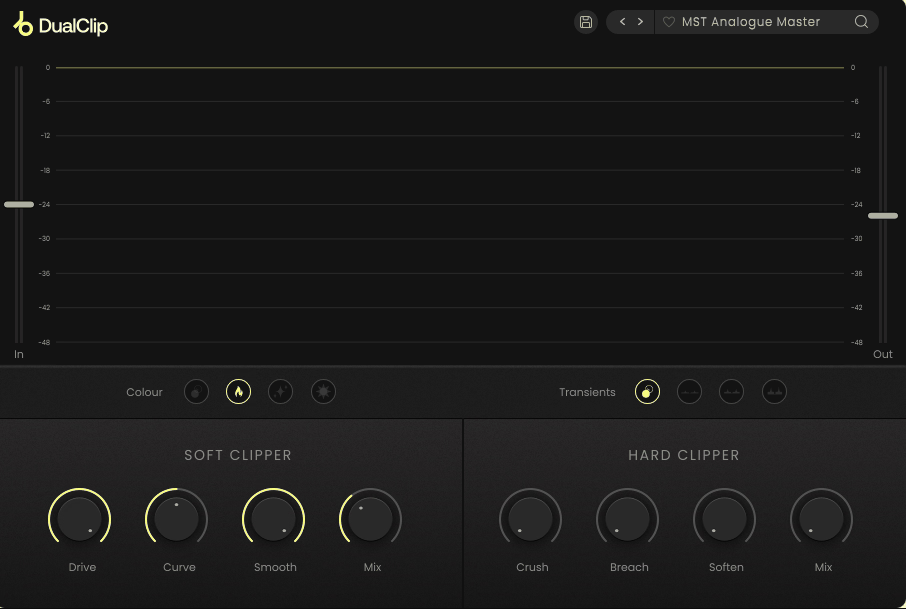
The plugin combines a 16-band soft clipper and a single-band hard clipper in a unified interface, each accessible through their own dedicated tabs and each with their own set of independent controls. The soft clipper is where you go for warm, analog-style saturation and harmonic content that breathes life into a track without announcing itself.
The hard clipper is where things get aggressive, creating what Plugin Boutique describes as a bitcrusher-style character that adds gritty drive and edge at heavier settings. These two sections sit in series, feeding into a built-in brick wall limiter at the end of the signal chain to catch anything that pushes too hard through both stages.
I believe DualClip is worth its price for producers and mixing engineers who want a versatile clipping tool that genuinely covers both ends of the tonal spectrum without requiring two separate plugins in their chain. The 75 presets designed by engineers covering everything from drum buses to master bus applications give you a strong starting library to pull from, and the real-time waveform and gain reduction display keeps you informed visually throughout the process.
The Soft Clipper Section
The 16-band design underneath the soft clipper is what gives it more nuance than a straightforward single-band soft clipper, since it can process different frequency regions with more independence and produce a result that feels more like analog saturation than like a fixed waveshaper applied uniformly across the spectrum. The controls you’ll spend most of your time with are:
- Drive: how hard you’re pushing the signal into the soft clipper, which determines the amount of saturation and warmth introduced
- Curve: a really useful control that shifts the focus of the clipping effect toward lower or higher frequencies, so you can make the saturation more bass-heavy and thick or more presence-forward and bright depending on the material
- Smooth: adjusts the release time of the clipper, with higher values producing a more gradual, polished-sounding result and lower values keeping the effect tighter and more responsive to transients
- Mix: lets you blend the clipped signal with the dry signal for parallel processing, which is often the most musical approach on buses and full mixes
The Curve control is the one I found myself reaching for most consistently, because it lets you shape where the saturation is most active without needing an EQ before or after the clipper. I noticed that dialing it toward higher frequencies on a drum bus added the kind of top-end crunch and presence that makes a mix feel alive without muddying the low end, while pulling it the other way on a bass track gave the sub more fullness without touching the mids.
Colors are distrupted only on GIF image
Get the Free Plugin Starter Kit
The genuinely useful free DAWs and plugins worth installing. No filler. Straight to your inbox.
The Hard Clipper Section
This is where the plugin’s character shifts considerably, and I think it’s important to understand that the hard clipper is not just a more aggressive version of the soft clipper but a genuinely different sonic tool. The waveform truncation it applies creates harmonic content that is brighter, harder-edged, and more dissonant than what comes out of the soft section, and at higher drive levels it does indeed start approaching that bitcrusher-adjacent territory the developer describes.
The key controls here are Crush, which sets the intensity of the hard clipping, and Breach, which is one of the more thoughtfully designed controls in the plugin because it lets you preserve the transients of the input signal rather than having them flattened by the clipping.
I found Breach invaluable on drums, where hard clipping the body of the sound for grit and energy without wrecking the attack of the initial transient keeps the kit sounding punchy rather than smashed. The Soften control then lets you dial back the harshest edges of the hard clipper’s character when you want the edge without the full aggression of pure hard clipping at the same setting.
Coloration and Transient Modes
Beyond the two main clipping sections, DualClip includes some additional tone-shaping tools that add flexibility without adding complexity:
- Warm, Clean, and Bright coloration options: three character choices that affect the overall tonal profile of both clipping sections together, letting you lean the result toward a full and rounded analog character, a more neutral and transparent output, or a brighter and more forward sound
- Low, Mid, and High transient emphasis modes: three options for where the transient enhancement is focused, which is useful for situations where you want the clipping to enhance the punch of a specific frequency range
- Built-in brick wall limiter: sits at the end of the signal chain as a safety net, catching any peaks that push through both clipping stages
I appreciate the transient modes specifically because they address a real problem with aggressive clipping, which is that heavy processing can soften the attack of sounds in ways that feel unnatural. Having a quick way to reintroduce transient emphasis in a targeted frequency range without adding a separate transient shaper plugin keeps the workflow compact.
Formats: VST, VST3, AU, AAX
Works with: macOS and Windows, compatible with major DAWs including Ableton Live, Pro Tools, FL Studio, and Logic Pro
Price: $35 (frequently discounted from $79)
Check here: PluginBoutique DualClip
Get the Free Plugin Starter Kit
The genuinely useful free DAWs and plugins worth installing. No filler. Straight to your inbox.

Hello, I’m Viliam, I started this audio plugin focused blog to keep you updated on the latest trends, news and everything plugin related. I’ll put the most emphasis on the topics covering best VST, AU and AAX plugins. If you find some great plugin suggestions for us to include on our site, feel free to let me know, so I can take a look!