
Unlike other plugin bundles that try to cover every conceivable processing category, Output focuses on creative effects tools built around rhythm, texture, and transformation, which gives their collection a coherence of purpose that broad toolkits tend to lack.
The FX Bundle brings together three plugins: a granular effect processor, a multiband distortion tool, and a rhythm-based modulation engine. I think what makes this specific combination compelling is that all three of them approach sound in a similar way: they treat audio as raw material to be reshaped rather than a signal to be corrected or enhanced, and that shared philosophy shows in the results they produce.
For producers working in cinematic scoring, electronic music, and any context where textural processing and rhythmic movement are central creative tools, this bundle is worth serious consideration. Each of the three tools covers creative territory that’s difficult to access with conventional processing, and together they form a genuinely complementary set of instruments for transforming sound.
Portal

Granular effects processing at the plugin level rather than the synthesizer level is the territory that Portal occupies, and what makes it distinct from granular synthesis plugins is that it operates as an effect applied to incoming audio in real time rather than as an instrument generating its own content.
Any audio passing through it gets broken into grains and processed through granular manipulation parameters that can turn anything from a clean vocal to a dense orchestral texture into something fundamentally different from what it started as.
- Granular Processing
The core of the plugin is its granular engine, which breaks the incoming signal into tiny fragments and processes them independently before reassembling them at the output. What you control is how those grains behave: grain size determines how long each fragment is, with smaller grains producing a smoother, more cloud-like texture and larger grains producing a more fragmented, stuttering quality.
Density controls how many grains are playing simultaneously, ranging from sparse and atmospheric through to dense and saturated. The position parameter scans through the audio input at different rates and in different directions, creating the sense that the sound is exploring its own possibilities rather than playing through linearly.
At slower scan rates the granular output feels suspended and evolving; at faster rates it produces a more chaotic, glitchy quality. Understanding how these three parameters interact with each other is where most of the creative depth in Portal lives.
- Grain Pitch and Randomization
Each grain can be transposed independently through the pitch control, which adds the specific shimmering, detuned quality that distinguishes high-quality granular processing from simpler pitch effects. The randomization parameters introduce controlled unpredictability across grain size, pitch, and timing, and this is where Portal starts to feel genuinely alive.
A small amount of randomization makes the output feel organic and imprecise in a natural way, while heavier randomization produces results that are unpredictable from one moment to the next. I love how the randomization is distributed across parameters rather than applied as a single global control, because it lets you be precise about which aspects of the granular behavior you want to be unpredictable and which you want to remain stable.
- Freeze and Performance
The freeze mode captures the current granular state and sustains it indefinitely regardless of what the input is doing, which turns any momentary audio event into a continuous atmospheric texture that you can hold as long as the arrangement needs it. This is particularly effective on transitions, where freezing a chord or a texture at the exact moment of peak density creates a sustained pad that bridges two sections without requiring additional instrument tracks.
Portal also responds well to real-time performance manipulation: adjusting grain parameters while audio plays through it produces evolving transformations that feel more like playing an instrument than adjusting a plugin. The visual particle display showing grain activity in real time makes that performance feel tangible rather than abstract.
Thermal

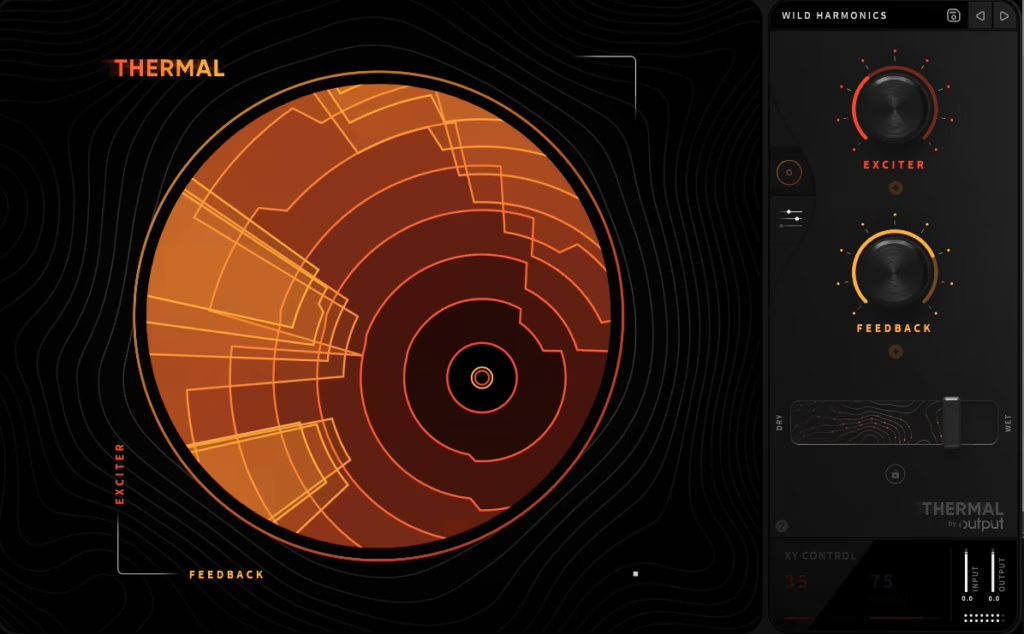
The most versatile distortion tool in Output’s collection is Thermal, and what separates it from a standard distortion plugin is the combination of a multiband architecture with an effects chain built specifically for distortion-centered processing. Rather than applying a single distortion algorithm to the full frequency spectrum, you get independent control over how different frequency ranges are driven and saturated, which produces results that are significantly more musical and controlled than single-stage distortion at equivalent intensity settings.
- Multiband Distortion Architecture
The multiband design divides the frequency spectrum into independently processable bands, and what makes this genuinely useful rather than just technically impressive is how it changes the musical results you can achieve. You can drive the low-mids of a synthesizer aggressively to add harmonic weight and body while keeping the high frequencies clean and open, or saturate the entire frequency spectrum with different distortion characters per band so that the result has complexity and variation across the spectrum.
The crossover points between bands are adjustable, which means you can configure the bands to match the specific frequency distribution of whatever source you’re processing rather than working with a fixed division. This flexibility is what makes Thermal genuinely useful across different source types rather than having a single optimal configuration that works for everything.
- Distortion Algorithms
Multiple distortion types are available across the bands, covering soft clipping with tube-like even harmonic emphasis, hard clipping with its more aggressive odd harmonic character, tape saturation with its specific compression-alongside-saturation behavior, and more creative algorithms that produce results beyond standard analog emulation territory. I believe the algorithm variety is what makes Thermal useful across genuinely different production contexts: the tube mode works for subtle warmth on a mix bus, the hard clip mode works for aggressive industrial or EDM distortion.
Switching between algorithms on the same source material produces dramatically different results, which means there’s genuine exploration value in the interface beyond just finding one good setting and leaving it. The more experimental algorithms are worth spending time with specifically in sound design contexts where the distortion is the creative event rather than an enhancement of the source.
- Built-in Effects Chain
What distinguishes Thermal further from a standalone distortion plugin is the built-in effects chain that follows the distortion processing: filtering, compression, and reverb are all available within the plugin itself, processing the distorted signal before the output. This means you can shape the frequency response of the distorted output, control the dynamics of the distorted signal, and even add spatial depth to the distortion, all within a single plugin instance.
I found this particularly valuable for sound design applications where you want the distortion to have its own defined character rather than simply adding harmonics to the source and letting the rest of the processing chain deal with the results. The compression within the effects chain is especially useful because distortion tends to increase perceived loudness unevenly, and having a compressor post-distortion to manage that before the output stage keeps the results controlled and usable.
- Visual Feedback
The waveform display showing the input and output of the distortion processing is more useful than it might initially seem, because it lets you see exactly how aggressively the signal is being clipped and how the harmonic content is changing. At subtle settings the waveform changes are barely visible, which helps calibrate subtle saturation applications where your ears might struggle to distinguish between “just right” and “slightly too much.”
At more aggressive settings the clipping behavior is clearly visible, and the difference between soft-knee and hard-knee clipping in the display matches exactly what you hear in the output. This visual confirmation is particularly useful when you’re working at high monitoring volumes where ear fatigue can make fine distinctions harder to catch by listening alone.
Movement
Rhythm and modulation applied to effects rather than to pitch or melody is what makes Movement a genuinely distinct kind of creative tool. It’s built around the concept of a rhythm engine that drives a chain of effects processing in sync with the project tempo, creating output that breathes, pulses, and evolves in ways that conventional static effects don’t produce.
I mean that in a literal sense: the modulation targets are not just volume and panning but the parameters of the effects themselves, so the reverb size, filter cutoff, chorus depth, and stereo width can all be animated in sync with the groove simultaneously. That distinction is what separates Movement from a standard modulation plugin.
- The Rhythm Engine
The core modulation system is what makes Movement more than just a collection of effects with an LFO attached. You can build complex rhythmic patterns that drive multiple effect parameters independently, with each modulation curve having its own shape, depth, and phase offset relative to the tempo grid.
Standard LFO waveforms are available for simpler continuous modulation, but the step sequencer-style pattern editor is where the more interesting results come from: you can draw specific volume and parameter envelopes that create rhythmic accent patterns, syncopated movement, and pulse shapes that feel composed rather than automated. The pattern length is configurable independently of the tempo, which allows polyrhythmic relationships between the modulation and the beat that add complexity and forward motion to sustained sounds.
- Effects Chain
The effects that the rhythm engine drives include reverb, delay, filter, chorus, and compression, all of which are quality tools in their own right beyond their role as modulation targets. The reverb is genuinely useful as a standalone spatial effect, the filter covers multiple modes with analog-character resonance, and the delay handles tempo sync and feedback in the expected ways.
But the real value of the effects chain is in combination with the rhythm engine: a filter with its cutoff driven by a rhythmic envelope that accents the downbeat feels completely different from the same filter at a static setting, and the specific way the envelope shapes interact with the filter’s resonance creates a musical quality that static parameter settings can’t replicate. This is where spending time with Movement pays off most clearly.
- Sidechain and Macro Controls
The sidechain input allows the modulation to be driven by an external audio source rather than from the internal clock, which creates dynamics-reactive rhythmic effects where the modulation follows the energy of a kick drum, a bass line, or any other rhythmic reference. This is a genuinely different kind of modulation from tempo sync because it locks the effects movement to the feel of a performance rather than to a metronomic grid.
The macro controls provide real-time performance adjustment across multiple parameters simultaneously through a single knob assignment, which makes Movement a practical live performance tool as well as a production plugin. I appreciate the macro system specifically because it means you can set up a configuration and then actually play with it during tracking or performance rather than treating it as a set-and-forget effect.
Final Thoughts
What holds the Output FX Bundle together as a collection is that all three tools approach processing from the same creative direction. Portal transforms audio through granular manipulation, Thermal reshapes it through multiband distortion and saturation, and Movement animates it through rhythm-synced effects modulation, and none of them are designed to be transparent or corrective.
I suggest the bundle most specifically for producers who already have their standard processing toolkit sorted out and are looking for creative tools that go beyond what conventional processors offer. The combination of granular transformation, multiband distortion, and rhythm-driven modulation covers three distinct approaches to making sound more interesting, and having all three from a single developer with a consistent interface philosophy means the learning investment in one tool carries over to the others.
Check here: Output FX Bundle

Hello, I’m Viliam, I started this audio plugin focused blog to keep you updated on the latest trends, news and everything plugin related. I’ll put the most emphasis on the topics covering best VST, AU and AAX plugins. If you find some great plugin suggestions for us to include on our site, feel free to let me know, so I can take a look!