
FabFilter Pro-C has been one of those plugins that almost every mixing engineer has an opinion about, and version 3 continues the tradition of being the go-to compressor for anyone who values precision, flexibility, and genuinely musical results across a huge range of material. I want to walk you through what actually makes this compressor worth your attention rather than just listing features you could find on the product page.
For context, FabFilter has been building plugins since the early 2000s, and their design philosophy has always emphasized clear visual feedback, deep parameter control, and musical-sounding algorithms rather than emulating specific vintage hardware.
Pro-C 3 continues that tradition while introducing several genuinely useful additions that push it further ahead of the pack.
Is Pro-C 3 worth it? I’d say absolutely yes for anyone doing serious mixing work, and the eight compression styles, real-time waveform display, and external sidechain filtering make it one of the most versatile single compressors you can own. For me, this is the kind of plugin that earns its place on nearly every channel, and once you’re used to it, reaching for anything else feels like a step backward.
Overview
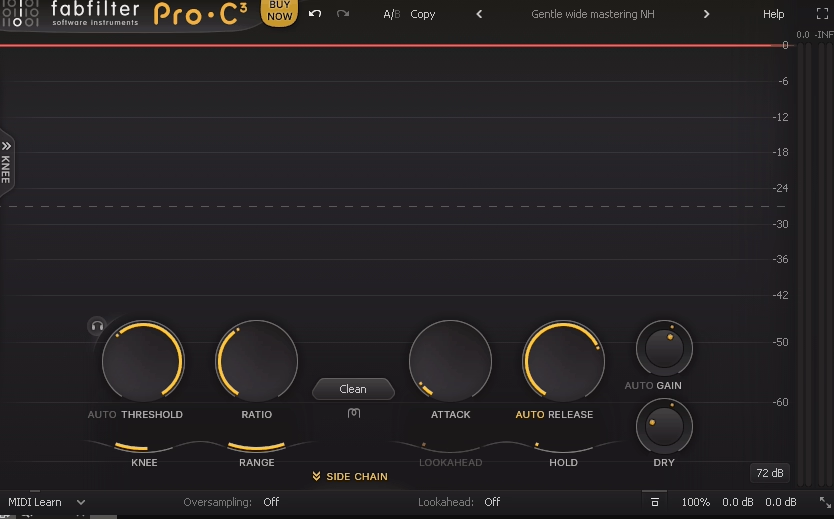
Pro-C 3 is a single-band compressor plugin that covers the entire range of compression tasks you’d encounter in modern mixing, from transparent bus compression all the way through to aggressive vocal and drum treatment.
It runs as a VST3, AU, and AAX plugin across both Mac (Apple Silicon native and Intel) and Windows, and the CPU usage remains impressively light even when you’re running many instances across a full mix session.
What separates Pro-C 3 from the crowd is that it isn’t trying to be a faithful emulation of any specific hardware unit. Instead, FabFilter has built a modern, algorithm-driven compressor that gives you access to eight distinct compression characters, each designed to excel at specific mixing tasks rather than ticking a “vintage vibe” box.
“A compressor that genuinely earns its place on nearly every channel in a modern mix.”
The compressor ships with a substantial library of factory presets covering common mixing tasks, and the workflow is designed to get you from loading the plugin to a usable starting point in seconds rather than minutes.
Interface & Workflow
The interface is one of those things that FabFilter consistently gets right, and Pro-C 3 is no exception.
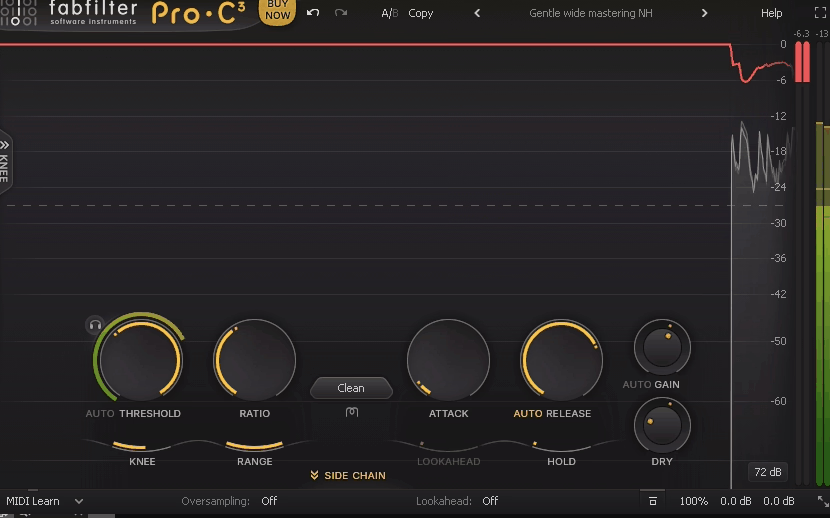
At the heart of the plugin sits a large, clear display showing real-time waveform visualization alongside the gain reduction trace, which means you can see exactly how the compressor is responding to your audio as it plays.
I love how the display lets you instantly identify whether you’re catching transients properly, over-compressing sustained material, or missing dynamic moments you actually wanted to control. This kind of visual feedback is the feature that spoils you for other compressors once you’ve gotten used to it.
Key interface elements worth highlighting:
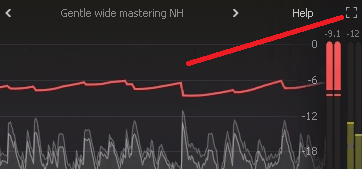
- Full-screen mode:
Resizing the plugin to take up your whole display gives you an incredibly detailed view of the compression behavior, which I’ve found invaluable when working on critical mix bus compression where subtle adjustments matter.
- Interactive display:
You can drag the threshold, ratio, knee, and other parameters directly on the visual display rather than hunting for knobs, and the feedback loop between what you hear and what you see is faster than with any hardware-emulated plugin.
- HiDPI scaling:
The interface looks crisp on 4K monitors and scales properly across modern displays, which shouldn’t be worth mentioning in 2026 but remains a distinguishing feature given how many plugins still handle this poorly.
- Color-coded visual language:
Gain reduction appears in a different shade than the input waveform, making it genuinely effortless to read the compressor’s behavior at a glance even when multiple elements are overlapping.
The parameter layout along the bottom of the interface is clean and logical, with threshold, ratio, attack, release, knee, and makeup gain laid out in the order you actually use them during a typical mixing session.
Eight Compression Styles
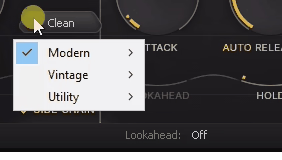
This is where Pro-C 3 genuinely differentiates itself from most single-band compressors, and I want to walk through what each style actually does and when you’d reach for it.
- Clean:
Transparent, precise compression designed for situations where you want to control dynamics without adding any sonic character to the signal. This is my default for mix bus work and acoustic instruments where the goal is dynamic control rather than tonal shaping.
- Classic:
A general-purpose style that adds a subtle warmth and cohesion to the signal, sitting somewhere between clean and opto styles in terms of character. For me, this is the one I reach for on vocals and bass when I want a touch of character without committing to a specific vintage vibe.
- Vocal:
Specifically tuned for vocal material with a slightly forward, present character that helps vocals sit on top of a mix without requiring aggressive EQ work. I’ve found this genuinely useful on lead vocals where transparency combined with just a touch of flattering color makes the performance feel more polished.
- Mastering:
A very transparent style designed for bus and mastering work where any coloration would be unwelcome, with carefully tuned attack and release defaults that behave predictably across a wide range of program material. This is what I reach for on stereo mix bus and when I need gentle dynamic control on a finished master.
- Opto:
Modeled after the smooth, program-dependent response of classic optical compressors, this style works beautifully on vocals and bass where you want gentle, natural-feeling level control. The attack and release curves feel musical in a way that’s hard to achieve with more surgical compression styles.
- Bus:
Optimized for glueing a group of sources together, this style emphasizes cohesion and punch rather than surgical control. Drum bus, strings bus, backing vocals bus, I tend to use this style when the goal is making a group feel like a unified element rather than controlling individual dynamics.
- Punch:
Designed for transient-focused material where you want to preserve the attack while controlling the sustain, making it particularly effective on drums and percussive sources. The character here is aggressive but musical, and the style genuinely delivers on its name when you want kicks and snares to hit harder.
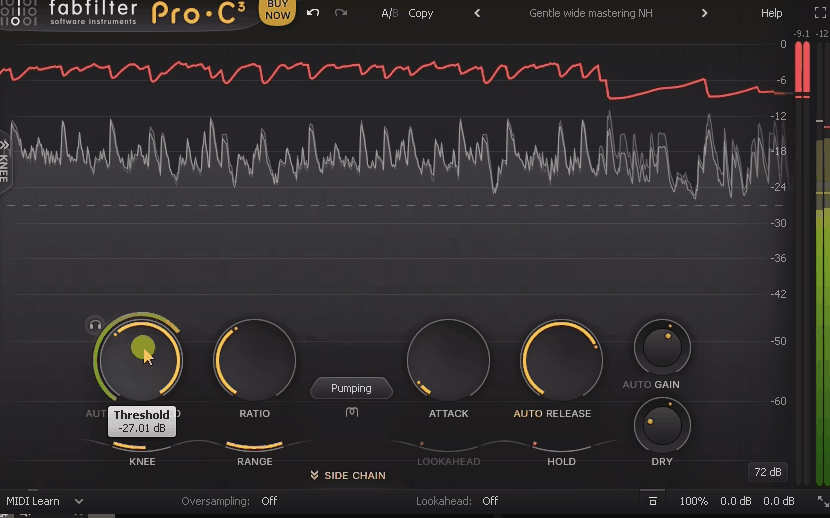
- Pumping:
An intentionally colored, expressive style that leans into the pumping and breathing artifacts that most compressors try to avoid, which makes it surprisingly useful for electronic music and creative effects work. I’ve used this on synth basses and sidechained elements where the compression itself becomes a rhythmic element of the track.
Being able to switch between these styles without losing your other settings means you can audition different characters on the same source in seconds, which is the kind of workflow feature that saves real time during mixing sessions.
Sound Character & Performance
Beyond the compression styles, the core sound quality of Pro-C 3 is genuinely excellent.
I found the compressor behaves predictably across a wide range of material, and the algorithms have been refined enough that you rarely hear the compressor itself, just its effect on the audio.
For me, the star of the show is how the different styles respond to aggressive settings without immediately falling apart. Many compressors sound great at moderate gain reduction but start introducing artifacts when you push them hard.
Pro-C 3’s styles handle heavy compression (10dB+ of gain reduction) while still sounding musical, which matters when you’re working on heavily processed genres or doing aggressive parallel compression.
“The algorithms have been refined enough that you rarely hear the compressor itself, just its effect on the audio.”
The lookahead feature (up to 20ms) is genuinely useful for catching transients cleanly, and the oversampling options (up to 4x) reduce aliasing artifacts when you’re pushing the compressor aggressively on high-frequency material. I’ve found the auto-gain feature saves real time during critical listening because it automatically matches the output level to the input, letting you A/B the processed and unprocessed signal without the louder signal fooling you into thinking it sounds better.
Key Features
Pro-C 3 packs a substantial feature set into its compact interface, and I want to highlight the ones that actually matter during day-to-day mixing work.
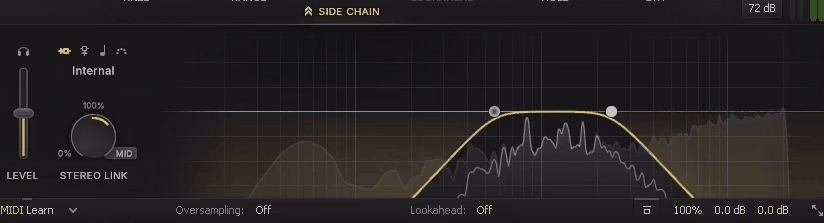
- Advanced sidechain section:
Full external sidechain support with high-pass and low-pass filtering built into the sidechain path, which means you can tell the compressor to ignore bass frequencies or target only specific ranges. Essential for ducking techniques and frequency-specific compression without needing additional plugins in the chain.
- Mid-side processing:
The compressor can process mid and side channels independently, which opens up useful stereo-field techniques like compressing only the center of a mix while leaving the sides untouched, or controlling stereo dynamics separately from the mono content.
- Stereo linking:
Adjustable from fully linked (both channels treated identically) to fully unlinked (channels treated independently), with continuous control between the two extremes for handling stereo material with unusual balance characteristics.
- Hold and range parameters:
Hold keeps the compressor engaged for a specified time after the signal drops below threshold, and range limits the maximum gain reduction the compressor will apply. Both are useful for advanced dynamic shaping beyond simple threshold/ratio work.
- External sidechain trigger:
Any audio source in your DAW can trigger the compressor, enabling classic ducking effects (typically kick drum ducking bass) and more creative rhythmic effects.
- Dry/wet mix control:
Full parallel compression is available directly within the plugin via the wet/dry mix knob, eliminating the need for separate bus routing when you want the blended-in compression character.
- MIDI learn:
Any parameter can be mapped to MIDI CC for hardware controller integration, which matters for engineers who prefer tactile control over certain parameters during mixing.
- Multi-level undo/redo:
The plugin remembers your parameter changes across a session, so you can step back through adjustments to compare earlier settings against your current state.
Presets
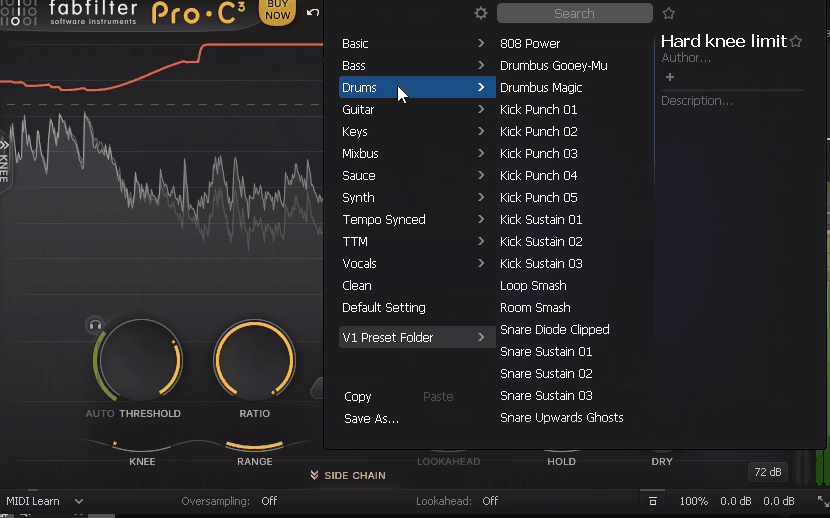
The preset library in Pro-C 3 is one of those things that quietly elevates the plugin from “great tool” to “genuinely fast to work with,” and I want to give it proper coverage because the factory content is more useful than most stock preset libraries I’ve worked with.
What you get out of the box is a substantial collection of presets organized by source type, with dedicated folders for Vocals, Drums, Bass, Guitars, Keys & Synths, Mix Bus, Mastering, and Creative Effects. Each category contains multiple starting points that differ meaningfully from each other rather than being subtle variations on the same settings.
I found the Vocals folder particularly well put together, with separate starting points for Lead Vocal, Background Vocals, Aggressive Vocal, Smooth Vocal, and Vocal Bus, each dialed in with appropriate style, ratio, attack, and release defaults that get you 80% of the way to a usable vocal compression sound in a single click.
For me, the Mastering Bus Compression preset has become a reliable starting point for gentle mix bus work, needing only minor adjustments to threshold and release to fit the material at hand.
- Source-specific categories:
The Vocals, Drums, Bass, Guitars, and Keys & Synths folders each contain five to ten carefully tuned starting points that cover the most common compression scenarios you’d encounter during a mix session.
- Mix Bus and Mastering collections:
Dedicated presets for group compression and final mix bus work with gentle ratios and carefully chosen attack/release times that feel appropriate for subtle dynamic control rather than aggressive shaping.
- Creative Effects:
A set of intentionally aggressive presets designed for sidechain pumping, parallel destruction, and rhythmic compression effects, particularly useful for electronic music production where the compressor itself becomes part of the creative sound.
- Mid-Side Presets:
A smaller but genuinely useful collection of starting points that demonstrate the mid-side capabilities of the plugin, including stereo widening via side-channel compression and center-focused dynamic control for mastering contexts.
Beyond the stock content, saving your own presets is straightforward, and the A/B comparison slots at the top of the interface let you quickly toggle between two different states of the compressor without losing either one.
I like how the preset browser remembers your recently used presets and lets you mark favorites for faster recall during active sessions, which is the kind of small quality-of-life feature that adds up over hundreds of mixing sessions.
One thing worth mentioning: the presets are genuinely good starting points rather than finished settings, and I’d recommend treating them as a way to skip the “blank plugin” problem rather than as one-click solutions. The real skill still lies in adjusting from the starting point based on what the specific source material needs, but having a credible baseline to work from consistently speeds up the mixing process.
In the Mix
Theory is one thing, but how does Pro-C 3 actually perform when you drop it on real mix material? I want to share specific experiences from my recent work rather than generic claims.
On lead vocals, I’ve been reaching for the Vocal style with moderate settings (4:1 ratio, -18dB threshold, fast attack, medium release) and getting results that sit forward in the mix without sounding obviously compressed. The transient handling is clean enough that consonants retain their clarity while the sustain feels controlled.
For drum bus glue compression, the Bus style at gentle settings (2:1 ratio, 2-3dB of gain reduction) has become my default starting point, and the way it tightens up a multi-track drum mix without killing the dynamics is genuinely impressive. I’ve compared this directly against several classic bus compressor plugins, and Pro-C 3 consistently sits in the “transparent but musical” sweet spot I’m usually aiming for.
On bass guitar and synth bass, the Opto style brings out a smooth, controlled low end that sits in the mix without needing aggressive EQ work afterward. I’ve found this particularly useful on fingerstyle bass recordings where dynamic range can swing dramatically between passages.
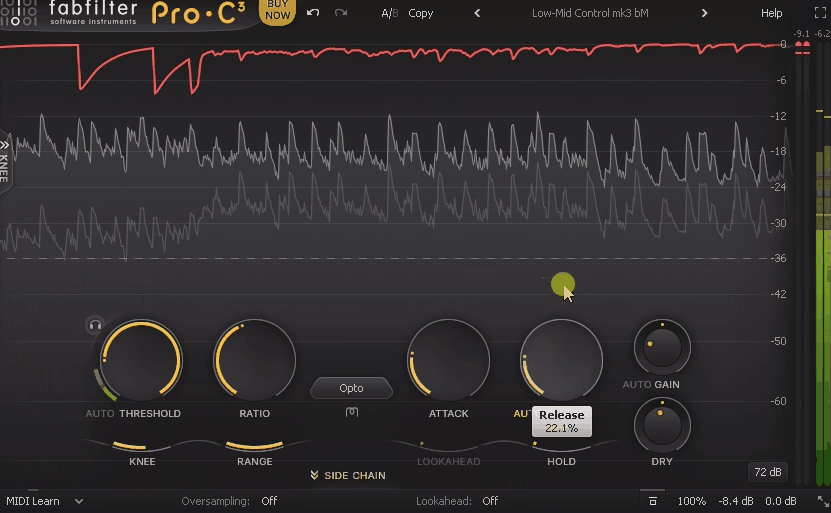
The Punch style has become my go-to for parallel drum compression because it adds aggression and energy to a drum bus without crushing the natural dynamics, especially when blended at around 30-40% with the original signal through the wet/dry control.
Mix bus work has been where I’ve been most impressed, actually. The Mastering style at very gentle settings (1.5:1 ratio, 1-2dB of gain reduction) adds a subtle cohesion to a final mix that’s hard to describe in words but immediately noticeable when you bypass the plugin.
Pros & Cons
– Pros
- Eight distinct compression styles that genuinely cover different sonic territories rather than being variations on a theme
- Best-in-class visual feedback with real-time waveform and gain reduction display
- Sidechain filtering built directly into the plugin for frequency-specific compression
- Mid-side processing for advanced stereo field control
- Auto-gain feature that makes A/B comparisons honest
- Very efficient CPU usage even with many instances across a session
- HiDPI scaling works perfectly across modern displays
- Excellent factory preset library covering common mixing tasks
- Parallel compression available directly via wet/dry control
- Full-screen mode for detailed critical listening
– Cons
- Not a vintage emulation, so if you specifically want the character of a specific hardware unit (1176, LA-2A, etc.), you’ll need a different plugin
- Upgrade pricing from Pro-C 2 can feel steep for what is ultimately an iterative update
- Learning curve on all eight styles takes some time to internalize for newer engineers
- Lacks some creative features found in more experimental compressors (transient shaping, multiband capability, etc.)
Value
Pro-C 3 is available as a standalone purchase, with upgrade pricing available for existing Pro-C 2 owners. FabFilter also offers bundle pricing through the Mastering & Mixing Bundle and the Total Bundle, which can significantly reduce the per-plugin cost if you’re already planning to invest in multiple FabFilter tools.
Is the pricing justified? I’d say yes, but with context.
Pro-C 3 costs more than many competing single-band compressors, and you can find perfectly usable compression plugins for a fraction of the price. What you’re paying for here is workflow speed, visual feedback quality, and the flexibility of eight genuinely distinct styles in a single plugin.
For working engineers, the time saved by having one compressor that handles every situation versus loading different specialized plugins adds up across projects. For hobbyists, the investment is harder to justify if you’re not doing enough mixing work to benefit from the workflow advantages.
“What you’re paying for here is workflow speed, visual feedback quality, and the flexibility of eight genuinely distinct styles in a single plugin.”
The FabFilter licensing model is also worth mentioning: you get lifetime use of the version you purchase, and updates within major versions are free. Major version upgrades (Pro-C 2 to Pro-C 3) do cost money, but the upgrade pricing is reasonable and the development pace has been steady over the years.
Final Thoughts
Pro-C 3 is one of those plugins where the value becomes obvious only after you’ve used it on real projects for a while. On first use, it seems like a clean, well-designed compressor with nice visual feedback.
After a few months of regular use, you realize you’ve gradually stopped reaching for other compressors on most sources, and your mixes are getting done faster because you’re not spending time experimenting with multiple plugins to find the right character. The combination of musical algorithms, excellent visual feedback, flexible styles, and genuine workflow efficiency makes it one of the most useful single plugins.
With that said, for anyone serious about mixing who doesn’t already own a go-to modern compressor, Pro-C 3 is as close to a must-have as software gets in this category. If you’re happy with your current compression setup and you’re not finding it limiting, the upgrade from Pro-C 2 is useful but not essential. For everyone else, this is the kind of plugin that genuinely changes how you approach dynamics in your mixes.
Check here: FabFilter Pro-C 3 (Trial Available)

Hello, I’m Viliam, I started this audio plugin focused blog to keep you updated on the latest trends, news and everything plugin related. I’ll put the most emphasis on the topics covering best VST, AU and AAX plugins. If you find some great plugin suggestions for us to include on our site, feel free to let me know, so I can take a look!