
A tuner plugin is probably the least exciting thing in your plugin folder, but it’s also one of the most important. If your instrument isn’t in tune, nothing else you do in the session matters. The best EQ, the most expensive compressor, the most creative effects chain in the world won’t fix a guitar that’s 15 cents sharp on the G string. I keep a tuner as the first insert on every instrument track in my template, and I use it more often than I use most of my “exciting” plugins.
The differences between tuner plugins might seem trivial at first. They all tell you whether a note is sharp or flat, so what’s there to compare? In practice, the differences matter more than you’d expect. Tracking speed, accuracy on low pitched instruments, display readability, polyphonic versus monophonic detection, and whether the plugin adds latency to your signal chain. These details determine whether tuning is a quick, painless part of your workflow or an annoying interruption that breaks your creative momentum.
Here are seven tuner plugins that I’ve used and can recommend, ranging from a full featured vocal pitch correction tool to stripped down chromatic tuners that do one thing and do it well. Three of them are completely free.
1. Softube Vocal Tuner (Pitch Correction)

I should clarify upfront that Softube Vocal Tuner is not a chromatic instrument tuner in the traditional sense. It’s a real time automatic pitch correction plugin designed primarily for vocals, which puts it in a different category from the other tuners on this list. I’m including it because pitch correction is a form of tuning, and if you work with vocals at all, you need a dedicated tool for this job that does more than just show you whether a note is sharp or flat.
What drew me to Softube Vocal Tuner over more established alternatives is how clean the correction sounds when used subtly. A lot of pitch correction plugins introduce artifacts that are fine for the obvious “tuned” effect but sound unnatural when you’re trying to make gentle, transparent corrections. Softube’s processing handles those subtle adjustments without the warbling or robotic quality that other tools sometimes introduce on sustained notes.
- Classic and Modern Modes
Two distinct correction algorithms give you different approaches to pitch correction. Classic delivers the traditional automatic pitch correction sound that you’re familiar with from decades of pop production. Modern uses a more advanced pitch shifting algorithm that preserves vocal formants during tuning, keeping the natural timbre of the voice intact even with significant correction applied. I tend to use Modern for transparent work and Classic when I want the correction to be more audible as an effect.
- Tone Enhance
The Tone Enhance slider adds dynamic processing and EQ to the corrected signal, instantly polishing the vocal without loading a separate plugin. It’s a subtle effect at low settings that adds presence and clarity. I find it useful as a quick sweetener, though you need to be careful not to overdo it or the vocal starts sounding overly processed.
- Octave Layering
Built in octave up and octave down generators can be mixed with the corrected vocal to create a thicker, layered sound. Each octave has its own gain control, letting you blend in just a hint of sub octave weight or high octave shimmer. This is handy for creative vocal production without setting up additional tracks.
- Sub 1ms Latency
The Low Latency mode achieves under 1 millisecond of reported latency, making it usable during live tracking. The vocalist can hear the corrected pitch in their headphones while performing without the disorienting delay that many pitch correction plugins introduce. This makes a practical difference for singers who need pitch feedback in real time.
Available from Softube in VST3, AU, and AAX formats. Priced at $199.
Get the Free Plugin Starter Kit
The genuinely useful free DAWs and plugins worth installing. No filler. Straight to your inbox.
2. Submission Audio LockOn (Precision Instrument Tuner)
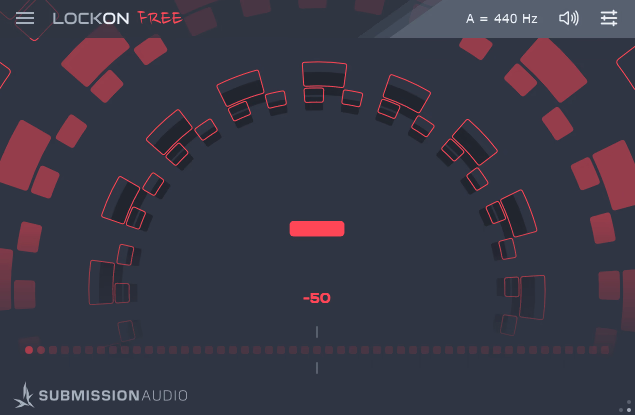
If you play guitar or bass in drop tunings and you’ve been frustrated by tuner plugins that can’t track low notes reliably, Submission Audio LockOn was built specifically to solve your problem. It tracks pitch down to 16 Hz, which means even the lowest notes on an 8 string guitar or a 5 string bass in drop tuning register cleanly and quickly. Most competing tuners start to wobble and hesitate below about 40 Hz, which makes tuning low B and lower strings a frustrating guessing game.
I started using LockOn after spending too many sessions watching my DAW’s built in tuner flicker uncertainly while I tried to tune a bass in drop A. The difference was immediate. The needle locked on (hence the name, I assume) and stayed stable, even on notes that made other tuners completely lose their minds. The fact that there’s a free version with full functionality (just with a small in app banner) makes it easy to try before deciding whether the Pro version’s clean interface is worth the small upgrade cost.
- Dual Display
The interface shows both a strobe display and a cents meter simultaneously, giving you the precision of a hardware strobe tuner alongside the intuitive readability of a standard LED style meter. The strobe display is vector based and runs at a high frame rate, making it responsive and smooth. You don’t have to choose between display types the way you do with most tuners.
- Fast and Slow Modes
A tracking mode switch lets you choose between fast response (for quick tuning during sessions) and slow, error rejecting response (for precise, stable readings when accuracy matters more than speed). Fast mode responds immediately to pitch changes but can be twitchy on noisy signals. Slow mode filters out noise and instability for a rock solid reading.
- Ultra Low Tracking
Pitch detection extends down to 16 Hz, covering the entire range of any standard or extended range guitar, bass, or baritone instrument. The low frequency tracking remains clean and decisive where other tuners become unreliable. For anyone working with 7 or 8 string guitars, drop tuned basses, or baritone instruments, this capability alone justifies the plugin.
- Resizable Interface
The window is infinitely resizable, letting you make the tuner as large or small as you need. Blown up full screen, it’s readable from across a room during tracking. Shrunk down, it tucks into a corner of your screen without taking up workspace. The vector graphics stay crisp at any size.
- Mute Output
A Mute button silences the audio output while tuning, preventing the open string noise from reaching your monitors or headphones. This is a small but practical feature for live tracking situations where you don’t want tuning sounds in the performer’s headphone mix.
- Reference Frequency
The adjustable reference pitch lets you calibrate to any base frequency, not just standard A = 440 Hz. If you’re working with an ensemble tuned to 432 Hz or 442 Hz, or matching a piano that’s slightly off standard, you can set the reference accordingly.
Available in VST3, AU, and AAX formats. Free version available with full functionality.
3. tc electronic PolyTune (Polyphonic Tuner)
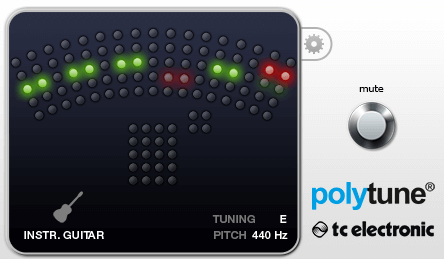
The hardware version of tc electronic PolyTune changed how guitarists tune by letting you strum all six strings at once and seeing which ones are out. The plugin version brings that same polyphonic tuning capability to your DAW, and it works just as well as the pedal. Strum all your strings, and the display immediately shows you the tuning status of each string simultaneously.
I find the polyphonic mode most useful during tracking sessions where I’m checking tuning between takes. Instead of picking each string individually, one strum gives me a complete picture in about a second. That said, the chromatic single note mode is what I use for precise tuning, since the polyphonic display is more of a quick check than a precision tool. Both modes work well for what they’re designed to do.
- Polyphonic Mode
Strum all strings simultaneously and the display shows the tuning status of each string at once. Strings that are in tune show green. Strings that are sharp or flat are indicated with directional arrows. This gives you a complete tuning overview in a single strum, which is faster than checking strings one at a time.
- Chromatic Mode
The standard chromatic single note mode provides a traditional tuning display with higher precision than the polyphonic view. A needle style meter shows the exact deviation in cents from the target pitch. For final tuning precision, I always switch to this mode after using polyphonic for the initial check.
- Familiar Interface
The plugin mirrors the hardware pedal’s visual design, which is immediately familiar to any guitarist who’s used a PolyTune on a pedalboard. The display is clean, large, and easy to read at a glance. If you already know how to use the pedal, you know how to use the plugin.
Available in VST, AU, and AAX formats.
4. MathAudio Chromatic Tuner
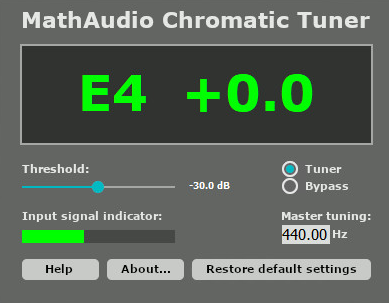
MathAudio Chromatic Tuner is a straightforward, no frills tuning plugin that does its job with a level of accuracy that belies its simple appearance. It uses a high resolution pitch detection algorithm that the developer claims is more precise than standard FFT based methods, and in my experience the readings do settle faster and more cleanly than many competitors, particularly on sustained notes where some tuners wander.
I wouldn’t say this plugin does anything flashy or unique. It’s a chromatic tuner with a clean display, accurate detection, and minimal CPU usage. But sometimes that’s exactly what you need. Not every plugin has to reinvent the wheel. MathAudio Chromatic Tuner is a reliable tool that gives you accurate pitch information without any unnecessary complexity, and there’s real value in that.
- High Resolution Detection
The pitch detection algorithm provides accuracy to fractions of a cent, which is more precision than most players will ever need but is appreciated for studio work where intonation matters. The reading settles quickly on sustained notes and doesn’t waver the way some FFT based tuners do on harmonically rich signals.
- Clean Display
The interface presents pitch information in a large, readable format with clear indication of note name, octave, and deviation from target. The design is utilitarian rather than decorative, which I appreciate in a tool that I’m glancing at quickly during sessions.
- Low Resource Usage
The plugin uses negligible CPU and introduces no measurable latency, making it safe to leave on an insert permanently. You can keep it active on every instrument track without affecting your session’s performance, which is how I prefer to work rather than loading and unloading a tuner every time I need it.
- Reference Calibration
Adjustable reference frequency supports non standard tuning references beyond A = 440 Hz. This is useful for orchestral work, historical performance tuning, or matching instruments that are calibrated to different standards.
Available in VST and AU formats.
5. GVST GTune (Free)
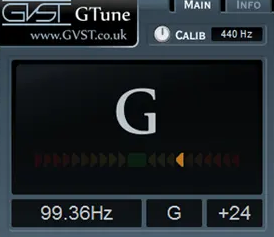
GVST GTune is about as simple as a tuner plugin can get, and that’s exactly why it’s been a staple in budget studios for years. It’s free, it’s tiny, it works, and it stays out of your way. If you need a chromatic tuner that shows you the note name and how far off you are from it, and you don’t need anything beyond that, GTune handles the job without any fuss.
I used GTune as my primary tuner for a long time before upgrading to LockOn, and it served me well on standard guitar and bass tuning. Where it falls short is on very low pitched instruments and on harmonically complex signals, where the detection can be less stable than the paid options on this list. For standard 6 string guitar and 4 string bass at standard or moderately low tunings, it’s perfectly adequate.
- Minimal Interface
The display shows note name, octave, and a simple deviation indicator with no unnecessary controls or visual clutter. The entire interface is compact and takes up minimal screen space. There’s nothing to configure and nothing to get confused by.
- Zero Cost
GTune is completely free with no registration, no email signup, and no in app advertising. You download it, install it, and it works. For beginners building their first plugin collection, having a functional tuner that costs nothing is genuinely useful.
- Broad Compatibility
The plugin has been around long enough that it works in virtually every DAW and host on both Windows and Mac. It’s one of those plugins that just works everywhere without compatibility issues, which is worth more than you might think when you’re troubleshooting a new setup.
Available as a free download in VST format.
6. MeldaProduction MTuner (Free)
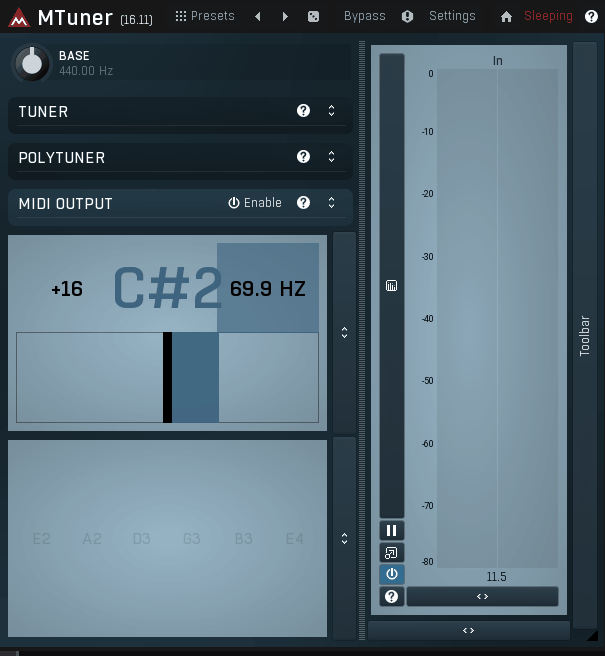
This is the most capable free tuner on this list, offering features that some paid tuners don’t include. MTuner supports both monophonic and polyphonic tuning modes, provides a pitch history display that shows tuning drift over time, and includes the kind of configurability that MeldaProduction is known for across all their plugins. If you want a free tuner that goes beyond the basics, this is it.
I should mention that MTuner shares the same interface conventions as all MeldaProduction plugins, which means it’s more configurable than most people will ever need. You can adjust the display, change the appearance, resize the window, and modify detection parameters. This flexibility is either a strength or a distraction depending on your temperament. If you just want to see whether you’re in tune, the defaults work fine without touching any settings.
- Polyphonic Detection
MTuner can analyze multiple simultaneous pitches, showing the tuning status of several notes at once. This is useful for checking chord intonation or quickly assessing whether all strings on a guitar are in the right ballpark. The polyphonic mode isn’t as refined as tc electronic’s implementation, but it’s functional and it’s free.
- Pitch History
A scrolling pitch display shows how the detected pitch changes over time, letting you see tuning drift, vibrato width, and intonation consistency across a passage. This is more useful than you might expect for identifying instruments that drift sharp or flat over the course of a take, which a static tuner display wouldn’t reveal.
- Configurable Display
The interface supports multiple display modes, color schemes, and window sizes following MeldaProduction’s standard customization framework. You can strip it down to a minimal view or expand it to show detailed pitch analysis. The tuner also displays frequency in Hz alongside the note name and cent deviation for users who think in terms of absolute frequency.
- Microtuning Support
MTuner supports custom tuning scales and microtuning beyond standard 12 tone equal temperament. If you’re working with alternative temperaments, just intonation, or non Western tuning systems, MTuner can be configured to display deviation from those custom reference points rather than standard chromatic pitches.
- Zero Latency
The plugin introduces no latency to the signal path and uses minimal CPU, making it suitable for permanent placement on insert channels. The detection responds in real time without adding delay that would affect monitoring or downstream processing.
Available from MeldaProduction in VST, VST3, AU, and AAX formats. Completely free as part of the MFreeEffectsBundle.
7. Nembrini Audio Chromatic Tuner (Free)
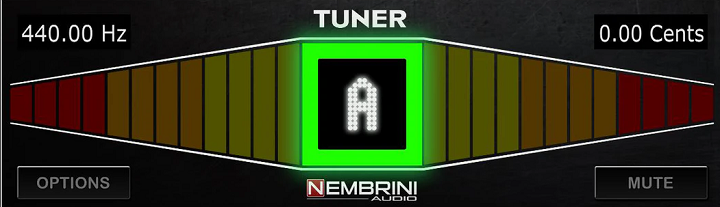
Sometimes you want a tuner that looks and feels like the hardware tuner sitting on your pedalboard. Chromatic Tuner delivers exactly that, with a photorealistic pedal style interface that mimics the experience of glancing down at a floor tuner during a session. It’s free, it’s accurate for standard tuning applications, and the visual design makes it immediately intuitive for any guitarist.
I keep Nembrini Chromatic Tuner in my collection specifically because the visual feedback is so clear and immediate. The large note display and the color coded sharp/flat indicators register in my peripheral vision faster than the more analytical displays on plugins like MTuner or MathAudio. For quick tuning checks during tracking, that visual clarity matters more than extra features I’m not going to use in the moment.
- Pedal Style Interface
The photorealistic hardware pedal design provides a familiar visual reference for guitarists and bassists who are used to reading floor tuners on stage. The note name is displayed large and central. The tuning indicator uses clear color coding, green for in tune, red for sharp or flat, with directional arrows showing which way to adjust.
- Accurate Detection
The chromatic detection handles standard guitar and bass tuning reliably across the normal frequency range of both instruments. The response is quick enough for practical use during sessions, and the display settles cleanly on sustained notes without excessive flickering.
- Bypass and Mute
A true bypass mode passes the signal through unprocessed, and a mute mode silences the output while tuning. The mute function is useful during live tracking when you don’t want open string noise reaching the monitors.
Available as a free download in VST, VST3, AU, and AAX formats.
Get the Free Plugin Starter Kit
The genuinely useful free DAWs and plugins worth installing. No filler. Straight to your inbox.

Hello, I’m Viliam, I started this audio plugin focused blog to keep you updated on the latest trends, news and everything plugin related. I’ll put the most emphasis on the topics covering best VST, AU and AAX plugins. If you find some great plugin suggestions for us to include on our site, feel free to let me know, so I can take a look!