
If you’ve ever spent way too long trying to get a usable bass tone in your DAW by stacking amp sims, compressors, EQs, and cab loaders one on top of another, you already know how frustrating that process can be. The signal chain gets bloated, the low end gets muddy, and somewhere in the mess you lose the punch you were actually chasing. I think that’s exactly the problem Aurora DSP had in mind when they built Mammoth, because this plugin handles the whole thing in one place, and it does it really well.
At its core, Mammoth is a parallel bass processing plugin built around a dual-band signal architecture, meaning it splits your signal into two independent tracks with a variable crossover frequency. The low track focuses on preserving and enhancing your sub end, while the high track is where all the grit and character gets shaped. That separation is what makes everything feel so controlled and intentional, even when you’re pushing the drive pretty hard.
I’d say if you’re on the fence about whether this is worth picking up, the answer is pretty clearly yes, especially considering the price point sits around $59. For what you’re getting in terms of tone shaping, flexibility, and workflow speed, it punches well above what you’re paying for it.
The Drive Section
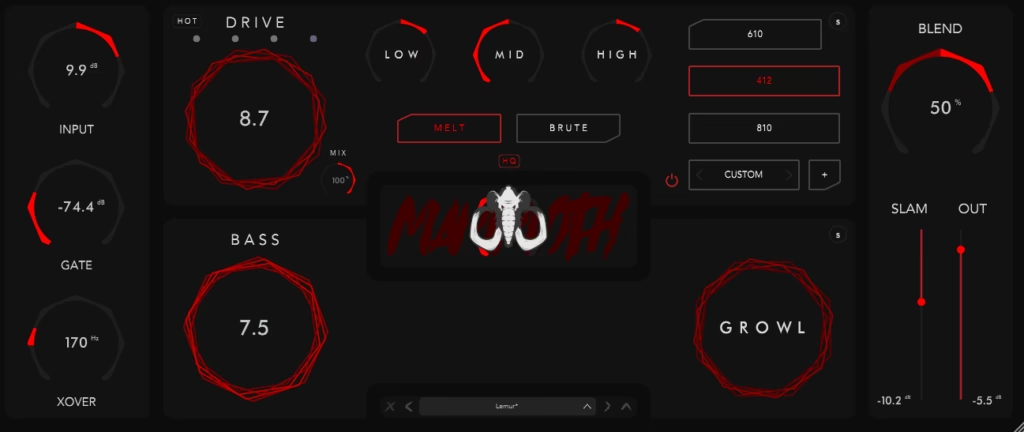
I mean, let’s be real, this is probably where your eyes are going first. Mammoth gives you four drive channels to choose from: Green (Classic Bass Preamp), Red (V4 Head), Purple (AC30 Bass Head), and Blue (B7K Preamp). Each one has its own personality, and I found the differences between them to be genuinely meaningful rather than just cosmetic. The Green channel is cleaner and more transparent, which makes it a solid choice if you want to add some warmth without completely changing the character of your bass. The Blue, on the other hand, is more aggressive and mid-forward, which works really well if you’re trying to cut through a dense guitar-heavy mix.
I noticed right away that even with the gain turned up fairly high, the low end doesn’t collapse the way it sometimes does in other drive plugins. That’s a direct benefit of the dual-band processing doing its job underneath.
Get the Free Plugin Starter Kit
The genuinely useful free DAWs and plugins worth installing. No filler. Straight to your inbox.
The Tone Stack and Low End Controls
The EQ section is simple enough that you won’t overthink it, with three bands at 100Hz, 500Hz, and 1600Hz, plus a MELT/BRUTE toggle that shifts the overall character from warm and rounded to something much more aggressive. I really appreciate how Aurora DSP kept this approachable without making it feel limited, because those three frequencies cover the most important zones for bass in a mix pretty effectively.
On the low end side, you’ve got a bass maximizer and a low-frequency saturator working on that second signal track. The SLAM control lets you push the low end into the mix more assertively without losing definition, and I believe that’s one of the more underrated features here because getting the subs to sit right without getting flabby is genuinely hard to do.
The Mammoth Knob is one I want to note specifically because it doesn’t come with a lot of explanation, and honestly that’s kind of the point. Aurora DSP describes it as their “secret sauce” for a more aggressive and transparent tone. I’d suggest turning it up gradually rather than cranking it right away, because it does bite, and depending on your mix it can either be exactly what you needed or slightly too much very quickly.
Here’s a quick breakdown of what you’re working with across the full plugin:
- 4 drive channels modeled after classic preamps and amp heads
- 3-band EQ with Melt/Brute character toggle
- Bass maximizer and low-frequency saturator on the parallel low track
- Variable crossover frequency to set where the signal splits
- Built-in cabinet simulations plus support for loading your own IRs
- 16 custom IRs across 4 packs designed specifically for this plugin
- Artist presets curated by Kristian Kohle, Scott Eliot, and Taylor Danke
- Standalone version included so you don’t even need to open your DAW
Presets and Cabinet Options
For me, the preset library is actually a really solid starting point, especially if you’re new to parallel bass processing and you’re not sure where to begin. The presets were curated by real artists and producers, and I found most of them to be genuinely usable rather than the typical showcase-only patches that sound great in isolation but fall apart in a real mix. You can grab one, make a few small adjustments, and be done in a few minutes, which I think is exactly the kind of workflow this plugin was designed to support.
The cabinet simulations are built in, and the three included IRs cover a solid range of tones, but what I appreciate even more is that you can load your own IRs if you want to go deeper. That flexibility means you’re not stuck with the defaults if your mix calls for something more specific.
Usability
I have to say, Aurora DSP really thought about the workflow here. The main window keeps everything accessible so you can make quick, broad adjustments without digging into menus, and then the expanded sections are there when you actually want to get granular. The plugin is also available as a standalone application, which is genuinely useful for practice, demos, or any situation where you just want to plug in and play without routing everything through a session. It supports VST3, AU, and AAX, so you’re covered regardless of what DAW you’re working in, and activation is handled through iLok, with soft activation available so you don’t necessarily need the physical dongle.
I realized that one of the things I kept coming back to while testing this was just how quickly you can get from a dry DI signal to something that sounds finished and ready for a mix. That kind of speed matters a lot in a real production environment, and Mammoth delivers on it consistently.
Check here: Aurora DSP Mammoth
Get the Free Plugin Starter Kit
The genuinely useful free DAWs and plugins worth installing. No filler. Straight to your inbox.

Hello, I’m Viliam, I started this audio plugin focused blog to keep you updated on the latest trends, news and everything plugin related. I’ll put the most emphasis on the topics covering best VST, AU and AAX plugins. If you find some great plugin suggestions for us to include on our site, feel free to let me know, so I can take a look!