
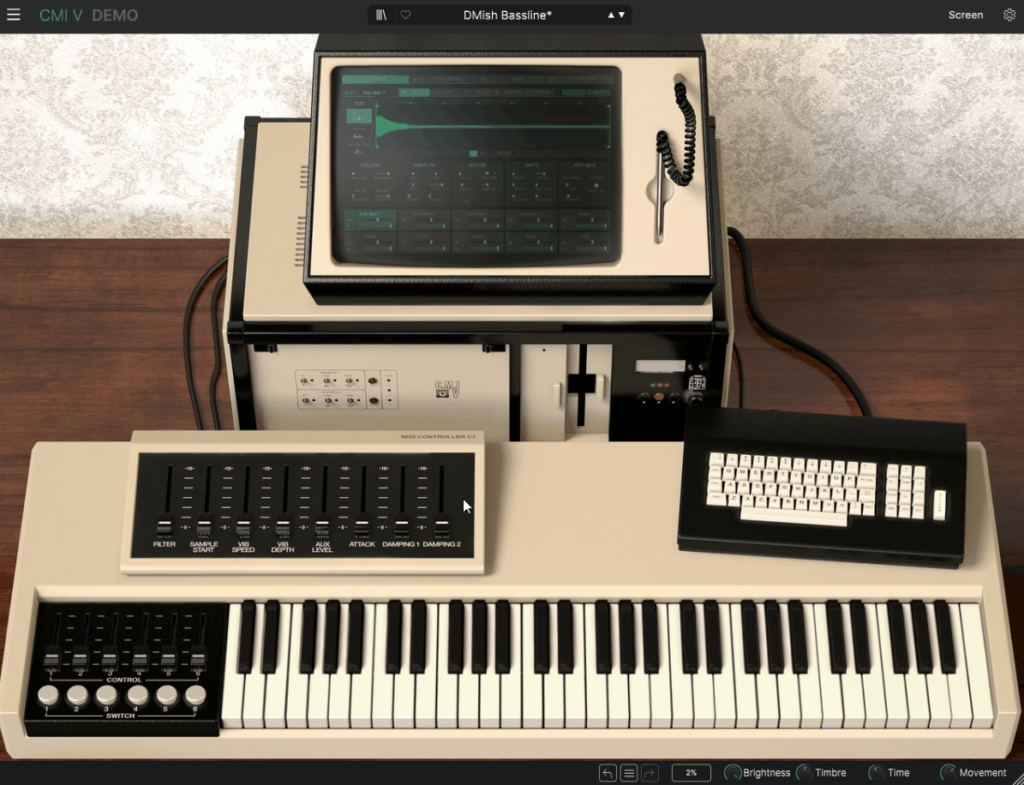
Arturia CMI V is honestly one of those plugins that carries serious historical weight.
The original Fairlight CMI (Computer Musical Instrument) was the first commercially available digital sampler when it launched in 1979, and it basically defined the sound of 80s pop and film scoring through artists like Peter Gabriel, Kate Bush, Depeche Mode, Herbie Hancock, Duran Duran, and producer Trevor Horn.
Rather than just slapping some samples into a preset browser and calling it done, Arturia built a genuinely faithful recreation of the classic Series IIx model, complete with all three original synthesis engines plus a couple of modern additions that expand what the original machine could ever do.
You get the sampling engine that defined the concept, the additive synthesis engine that controlled individual harmonics over time, and new tools like Spectral Synth that weren’t possible back in the day.
From the Pluginerds Store
A quick mention: alongside the blog, we run Pluginerds Shop, our own store for studio hardware and accessories. Everything on it is there because someone on this team actually uses gear like it, not because it was the cheapest thing to list.
Visit Pluginerds ShopThe Interface and Controls
The interface keeps things genuinely intuitive without losing the visual personality of the original hardware.
You get a faithful reproduction of the classic CMI look with modern real-time controls added on top. A velocity-sensitive virtual keyboard at the bottom of the interface lets you click lower on keys for higher velocities, which is a nice touch for quick auditioning without needing a physical keyboard connected.
The original Series II had three sliders and two switches, while this plugin expands that to six sliders and six switches, all assignable in the expanded interface mode. A dedicated bank of eight sliders covers the most-used parameters: Filter, Sample Start, Vibrato, Effects Send, and Envelopes, putting your most common tweaks right where you need them.
The Advanced Screen Panel mode gives you access to all settings for sound parameters, synthesis, instrument slot controls, sequencing, and the mixer. Fully resizable UI means it looks crisp on any display from standard monitors to UHD and Retina screens.
One thing I want to note is that the plugin’s resizable window is genuinely useful for DAW workflows where screen real estate matters.

Get the Free Plugin Starter Kit
The genuinely useful free DAWs and plugins worth installing. No filler. Straight to your inbox.
The Sound
Let’s talk about what you’re actually hearing when you start playing this plugin, because the character is genuinely distinctive.
The signature 8-bit grunge from the original CMI comes through beautifully, capturing that lo-fi digital texture you’ve heard on countless hit records. Variable bit depth and sample rate controls let you dial in exactly how much character you want, from pristine modern samples to full-on vintage crunch.
The 600 original CMI samples included in the plugin give you immediate access to the classic sounds that defined the era. You also get 360 presets crafted by expert sound designers, covering everything from recognizable vintage tones to modern textures that push the instrument into contemporary territory.
What I love about the sound is how it fits into modern productions without feeling out of place. You can use it for retro nostalgia, but the additive synthesis and spectral engines also deliver sonic territory that works beautifully in EDM, hip-hop, neo-disco, ambient, and cinematic scoring.
Three Synthesis Modes
The heart of the plugin is three distinct sound modes/engines, each bringing something different to the table.
- Sampling is where the historical magic lives. You get complete control over start time, length, loop points, envelopes, filters, and vibrato, with samples displayed in a three-dimensional waveform view that makes precise editing genuinely intuitive. You can import your own samples up to 30 seconds in length, and adjustable sample rates from 2.1kHz to 44.1kHz let you capture that specific digital character.
- Time Synth handles the additive synthesis side of things. You can draw your own envelopes for up to 32 independent harmonics, giving you incredibly detailed control over how sounds evolve over time. An integrated oscilloscope provides real-time visualization, which honestly makes additive synthesis way less abstract than it normally feels.
- Spectral Synth is the modern addition that wasn’t possible on the original hardware. Rather than working with individual harmonics one by one, you can paint in broader strokes across the entire harmonic series at once, which opens up creative territory that the original CMI simply couldn’t reach.
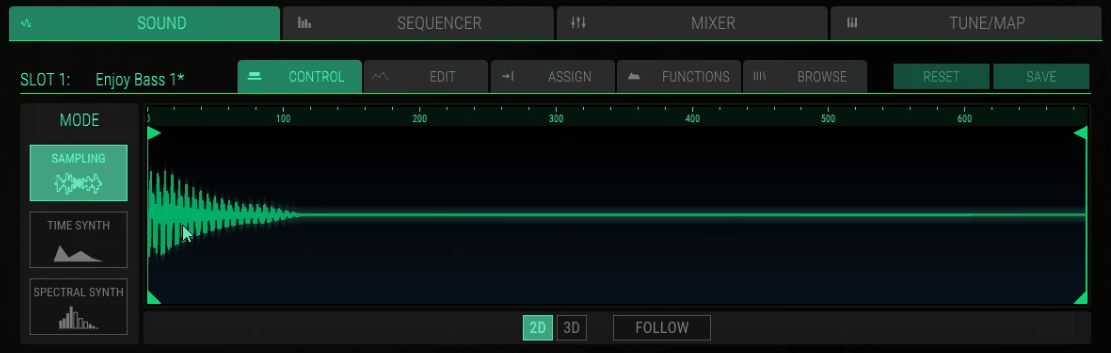
A particularly cool feature is the ability to convert any sampled sound to a synthesized one, and vice versa, with a single click. This genuinely changes how you approach sound design, because you can start with a real-world sample and transform it into pure synthesis territory or the other way around.
Ten Instrument Slots
One of the biggest modern enhancements in this plugin is the expansion to ten instrument slots with 32-voice polyphony per slot, up from the original machine’s eight instrument capacity.
Each slot can load a completely different sample or synthesized sound, with independent control over filtering, vibrato, envelope, effects, and more. You can mix, layer, split, and sequence all ten instruments within a single instance of the plugin, which essentially turns it into a complete digital workstation rather than just a single-sound instrument.
For me, this is where the plugin starts to feel genuinely powerful for modern production workflows. You can build entire arrangements inside a single CMI V instance, layering cinematic textures, bass tones, lead sounds, pads, and rhythmic elements into one cohesive preset.
The Sequencer
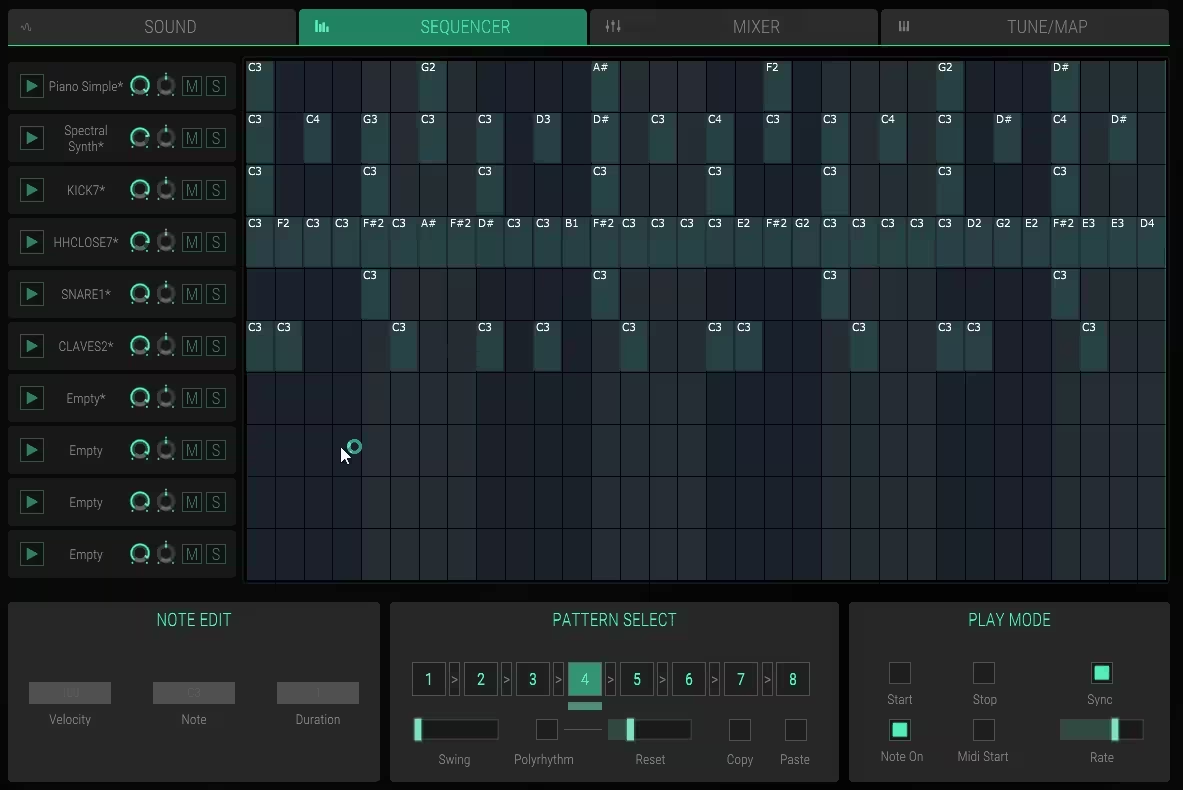
The 32-step sequencer is based on the classic Page R from the original hardware, bringing graphical step sequencing into modern production.
You get ten instrument tracks with pattern chaining, making it practical to build complete arrangements right inside the plugin. The sequencer supports polyrhythmic patterns where different tracks can have different step lengths, creating complex rhythmic interplay that honestly sounds more interesting than straight grid-based sequencing.
I’ll be honest, the sequencer has a bit of a learning curve because it doesn’t behave exactly like modern DAW-style sequencers. The polyrhythm feature in particular takes a minute to understand, but once it clicks, the creative possibilities genuinely open up.
For producers who love that vintage drum machine programming feel, this sequencer captures that same tactile quality while adding modern flexibility.
Modulation and Effects
Beyond the core synthesis, the plugin includes 24 modulation sources per track for control parameters, giving you serious depth for creating evolving, dynamic sounds.
High-quality output effects with full mixing capabilities mean you can polish your sound without leaving the plugin. Insert FX on every instrument slot let you craft entire compositions inside a single instance, which is genuinely impressive for a plugin that started as a faithful vintage recreation.
The Mixer Mode
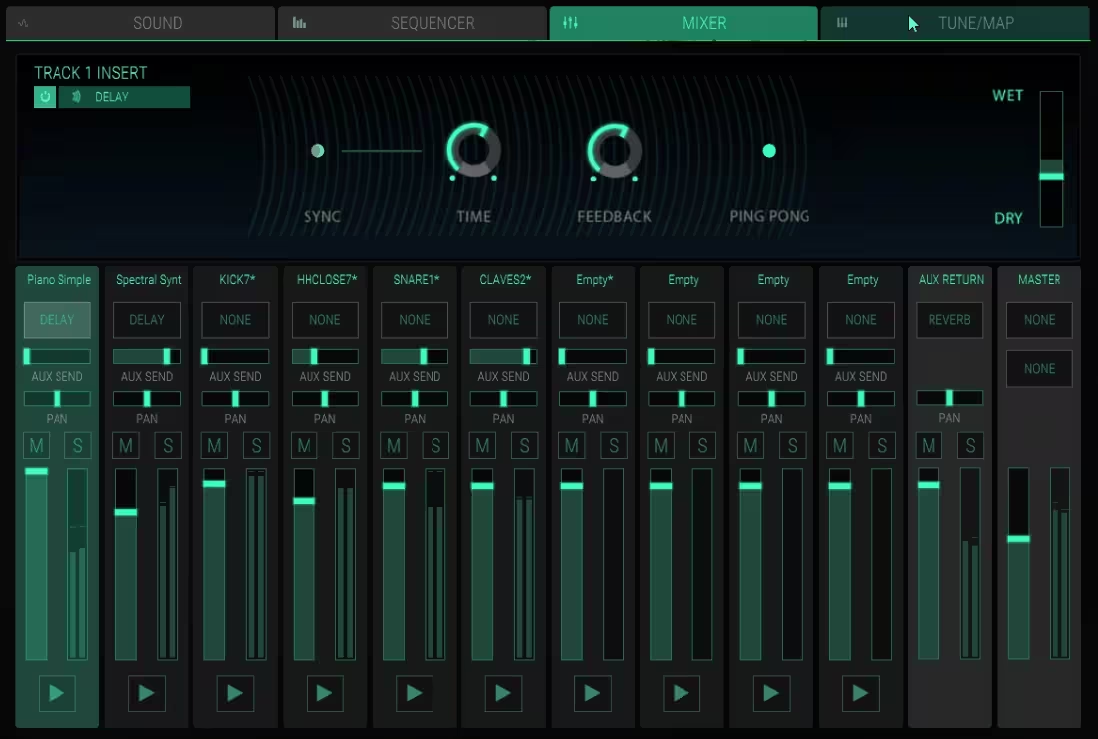
Beyond the synthesis engines and sequencer, the plugin includes a dedicated Mixer mode that handles the final sonic shaping stage across all ten instrument slots. This is where the plugin really earns its “complete digital workstation” label, because you can finish entire productions inside a single instance without ever needing to route through external processing.
Each of the ten instrument slots gets its own channel strip with independent level, pan, and effects controls, so you can balance the mix of a layered preset exactly how you want it. The mixer lives in the Advanced Screen Panel mode alongside the rest of the deeper controls, giving you easy access when you need to tweak relationships between instruments without leaving the plugin.
What I appreciate most about the Mixer mode is how it brings insert FX on every track, meaning you can process each slot individually rather than just applying effects to the main output. Need a tight room reverb on one instrument while another sits dry? Easy. Want to drive the bass slot hard while keeping the lead clean? Also simple.
The high-quality output effects on the master bus cover the finishing touches you’d normally handle in your DAW, from delay and reverb to modulation and saturation. Combined with the per-slot insert FX, you genuinely can build polished, production-ready patches that sit in your mix without needing additional processing plugins loaded on the channel.
For me, this mixer design turns the plugin into something closer to a complete multi-instrument workstation than a typical vintage recreation. You can build layered cinematic beds, sequenced rhythmic patterns, and melodic elements, then mix them all inside one instance before routing the final result back to your DAW.
Why you should use it
There are a few genuinely compelling reasons to add this plugin to your template, and most of them come down to what it offers that other tools simply don’t.
If you work on 80s-inspired productions, synthwave, retrowave, or neo-disco, you get exactly that authentic 8-bit digital character that’s genuinely hard to replicate with any other tool. The signature CMI grunge fits these genres like nothing else.
- Film and game composers benefit from the cinematic textures and evolving soundscapes the additive engines can create. Film scores were a major application for the original CMI, and that lineage carries through beautifully in the software version.
- For experimental producers and sound designers, the three synthesis engines combined with the ten-slot architecture open up serious creative depth. You can push digital synthesis into unusual territory that clean modern tools just don’t reach.
- Hip-hop and electronic producers chasing that specific digital crunch for drums, vocal chops, or melodic elements get authentic character that pure modern synthesis can’t quite capture.
I’d also suggest giving this plugin a serious look if you want a complete digital workstation in a single instance. Ten instrument slots, pattern chaining, a built-in sequencer, and full mixing with effects mean you can build entire compositions without leaving the plugin, which is honestly rare among vintage-inspired tools.
One more thing worth noting is that the convert samples to synthesis and vice versa with one click workflow genuinely changes how you approach sound design. Starting with a real-world sample and transforming it into pure synthesis territory, or the other way around, opens up creative possibilities most plugins just don’t have.
Pros and Cons
Pros
The three synthesis engines (Sampler, Time Synth, Spectral Synth) deliver genuinely unique sonic territory that other plugins simply don’t cover in the same way. Having ten instrument slots with 32-voice polyphony turns the plugin into a complete digital workstation rather than just a single-sound instrument.
600 original CMI samples and 360 expert-designed presets provide immediate inspiration and authentic vintage character right out of the box. The ability to convert samples to synthesis and vice versa with one click adds genuinely creative sound design workflows.
Variable bit depth and sample rate controls let you dial in exactly the right amount of vintage grit, while the fully resizable UI looks crisp on any display. The 32-step sequencer with pattern chaining adds compositional power, and high-quality output effects mean you can finish productions without leaving the plugin.
Cons
The sequencer has a real learning curve, particularly the polyrhythm features, and it doesn’t sync to MIDI quite the way modern sequencers do. Documentation could be more detailed in places, so figuring out certain features requires real experimentation.
The specific character of the plugin limits its usefulness for clean modern productions that don’t want any vintage coloration. CPU usage can get demanding when running multiple instances with all ten slots filled, especially when combined with other heavy plugins.
Additionally, the plugin doesn’t quite capture every nuance of the original hardware due to the fundamental difficulty of replicating true variable sample rate behavior in software, so purists chasing 100% authentic CMI sound may notice subtle differences.
Is Arturia CMI V worth it?
I’d say yes, especially if you work on 80s-inspired productions, film scoring, retro synthwave, ambient music, or any style where that distinctive 8-bit digital grit adds genuine character. There’s really no other plugin that captures the CMI experience this completely, and the sonic territory it covers is genuinely unique compared to modern clean synthesizers.
For me, what makes this instrument so compelling is how it bridges two worlds at once. You get the nostalgic, gritty digital character of the original hardware, but with modern editing flexibility, high-resolution graphics, and sound design tools that genuinely push beyond what the original machine could do.
Final Thoughts
Arturia CMI V is genuinely one of those plugins that earns its place in specific production contexts rather than trying to be everything for everyone.
Together, the combination of three synthesis engines, ten instrument slots, 32-voice polyphony, 600 original samples, 360 expert presets, a 32-step sequencer, and full mixing with effects creates a complete digital workstation that honors the original hardware while adding genuine modern functionality.
For 80s-inspired producers, film composers, sound designers, and anyone chasing that distinctive digital character, this plugin delivers what no other tool quite captures. The learning curve is real but worth it, and the sonic territory you can explore keeps revealing itself the longer you spend with the instrument.
I love how the plugin treats the Fairlight legacy as a starting point rather than a limitation. You get the authentic vintage character when you want it, plus the flexibility to push sounds into territory the original hardware could never reach, which is honestly the best of both worlds.
Check it out here: Arturia CMI V (Trial Available)
Get the Free Plugin Starter Kit
The genuinely useful free DAWs and plugins worth installing. No filler. Straight to your inbox.

Hello, I’m Viliam, I started this audio plugin focused blog to keep you updated on the latest trends, news and everything plugin related. I’ll put the most emphasis on the topics covering best VST, AU and AAX plugins. If you find some great plugin suggestions for us to include on our site, feel free to let me know, so I can take a look!