
Most synth plugins you’ll encounter fall into two broad categories: subtractive, where you start with a harmonically rich waveform and sculpt it by filtering frequencies away, and additive, where you build sounds by stacking and manipulating individual harmonics.
Both approaches have been around for decades in hardware form, and both have distinct strengths. Subtractive synthesis tends to produce warmer, more immediately musical results. Additive gives you surgical control over every harmonic component of a sound, which opens doors to textures and timbres that subtractive methods simply can’t reach.
In practice, many modern synths blur the line between these categories or combine them with other approaches like granular, wavetable, and FM synthesis. That’s reflected in this list. Some of these plugins are purely additive or purely subtractive, while others are hybrids that use additive resynthesis alongside more conventional engines.
The common thread is that each one does something genuinely useful and sounds good enough to earn a permanent spot in your production toolkit.
What you’ll find here are eight plugins ranging from free and open source options to premium workstations, covering the full spectrum from focused, specialized tools to sprawling multi engine synthesizers that happen to include excellent additive and subtractive capabilities among their many features.
1. Image Line Harmor (Additive + Subtractive)
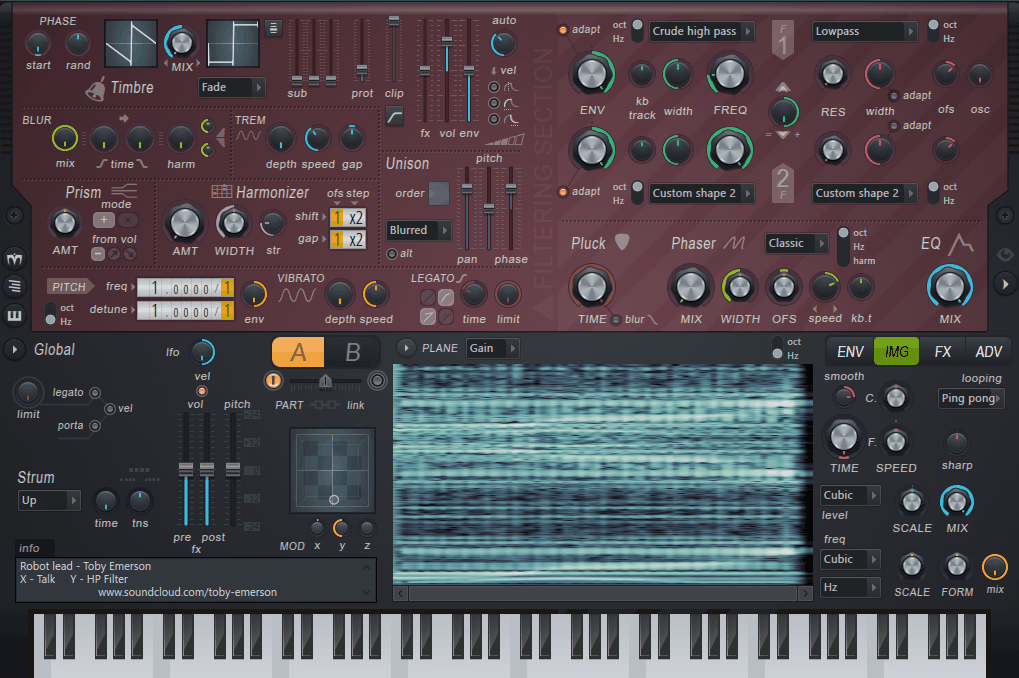
Image Line Harmor is one of those synths that looks deceptively simple on the surface but goes absurdly deep once you start exploring. At its core, it’s an additive/subtractive hybrid that represents sound as a series of individual partials, which you can then manipulate using familiar subtractive style controls like filters and envelopes.
The result is a synth that feels approachable if you’ve used any standard subtractive instrument but offers a level of timbral control that purely subtractive synths can’t match.
I should be upfront about one significant limitation: Harmor is only available for FL Studio users as a native Image Line plugin. If you’re working in Ableton, Logic, or any other DAW, this one isn’t an option for you.
That said, if you are an FL Studio user, Harmor is one of the most capable and underrated synths in the entire plugin market, and I think a lot of producers overlook it simply because it doesn’t get the marketing push that standalone third party synths receive.
- Additive Resynthesis
Harmor can import audio files and resynthesize them as a series of additive partials, letting you manipulate imported sounds using the synth’s full parameter set. You can import a vocal recording and then apply filter sweeps, pitch manipulation, and harmonic reshaping to it in ways that a sampler couldn’t achieve. The resynthesis quality is surprisingly good, and this feature alone makes Harmor worth exploring.
- Image Based Editing
The harmonic editor displays partials as a visual image where the X axis represents time and the Y axis represents frequency. You can literally draw and paint harmonic content, creating evolving spectral patterns by hand. This is unlike anything in a conventional subtractive synth and opens up sound design possibilities that are genuinely unique to this architecture.
- Subtractive Filtering
Despite the additive engine underneath, Harmor provides a familiar subtractive filter section with multiple filter types that operate on the partial data. This means you get the precision of additive synthesis with the workflow of subtractive, which makes the synth far more accessible than most purely additive instruments.
- Prism and Blur
The Prism control shifts the harmonic series, stretching or compressing the relationship between partials to create inharmonic, metallic, or bell like tones. The Blur control smears harmonic content over time, creating smooth, evolving pad textures from sharp source material. Both are additive specific tools that have no real equivalent in subtractive synthesis.
Available as a native FL Studio plugin. Not available in VST/AU format for other DAWs.
Get the Free Plugin Starter Kit
The genuinely useful free DAWs and plugins worth installing. No filler. Straight to your inbox.
2. Native Instruments Razor by Errorsmith (Additive)
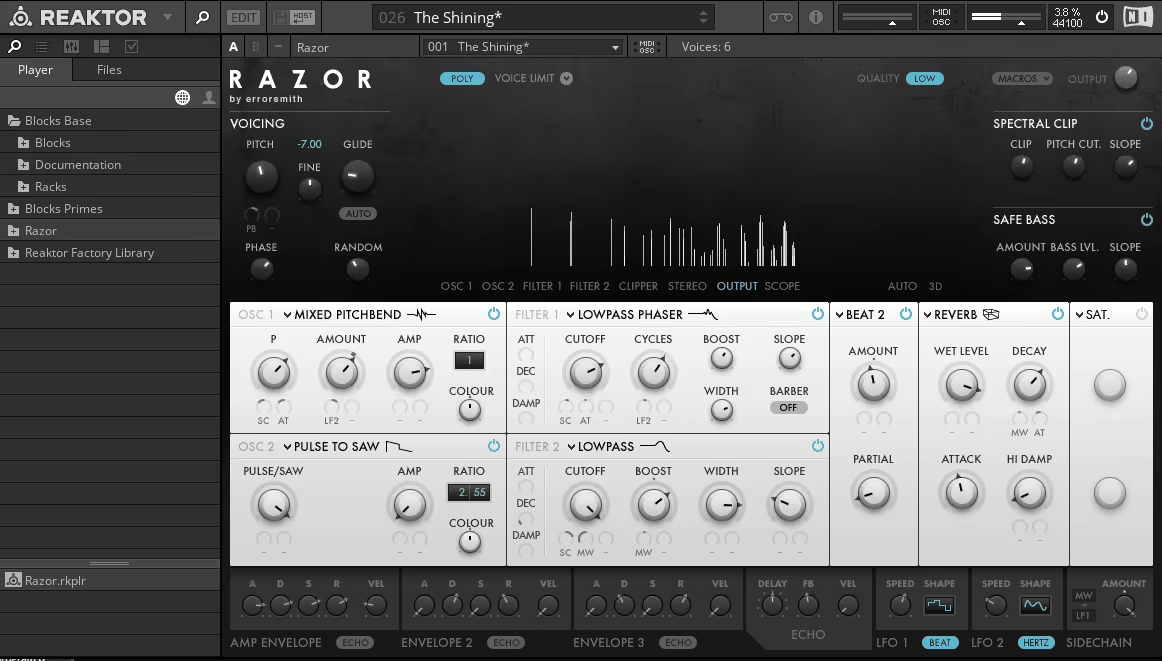
Native Instruments Razor takes a radically different approach to additive synthesis compared to everything else on this list. Designed in collaboration with Berlin based sound designer Errorsmith, Razor generates its entire signal path, including filters, effects, and even its distortion, from pure additive synthesis. There are no samples, no wavetables, and no conventional DSP effects. Everything you hear is constructed from nothing but sine wave partials, and the result is a synth that sounds completely unlike anything else.
I want to be honest about Razor’s limitations: it’s a Reaktor based instrument that requires Native Instruments Reaktor 6 (or the free Reaktor Player) to run, and its interface is unconventional enough that it takes some time to get comfortable with. The sound palette is also very specific. You won’t get warm analog pads or realistic acoustic tones from this synth. What you will get are some of the most aggressive, cutting, and texturally complex sounds I’ve heard from any software instrument, which is exactly what Errorsmith designed it to do.
- Additive Signal Path
Every element of Razor’s signal path is built from up to 320 additive partials, including the oscillators, filters, and effects. The “filters” don’t actually filter in the traditional sense. They reshape the additive partial structure, which produces filter sweeps and resonance that sound fundamentally different from conventional subtractive filtering. This is what gives Razor its distinctive, hyper detailed sonic character.
- Errorsmith Oscillators
The oscillator section provides unique waveform types designed by Errorsmith that go well beyond standard additive sine stacking. These include formant based oscillators, noise based partials, and dynamic spectral shapes that evolve over time. Each oscillator type has its own personality and responds differently to the filter and modulation systems.
- Additive Effects
The built in effects, including reverb, chorus, and distortion, are all generated from additive partials rather than conventional DSP algorithms. This gives them a quality that’s hard to describe but immediately recognizable. The distortion in particular sounds different from any standard waveshaper because it’s reshaping the individual harmonics rather than clipping the composite waveform.
- Macro Performance
A macro page provides eight performance controls that can be mapped to any combination of parameters for real time sound manipulation. The macro system is designed for live performance, letting you make dramatic timbral changes with a single knob movement. Given Errorsmith’s background as a live performer, this focus on playability makes sense.
- Visual Feedback
A real time spectral display shows exactly what the additive partials are doing at any moment, giving you visual confirmation of how your parameter changes affect the harmonic content. For understanding additive synthesis, this visual representation is genuinely educational.
- Partial Count Control
You can adjust the number of active partials from a small handful to the full 320, which directly affects both the timbral complexity and CPU usage. Lower partial counts produce rawer, grittier tones. Higher counts create smoother, more detailed spectra. This control acts as both a creative tool and a practical CPU management feature.
Requires Native Instruments Reaktor 6 or Reaktor Player (free). Available for VST, AU, and AAX hosts.
3. FRMS by Imaginando (Additive, Subtractive, Granular and FM)
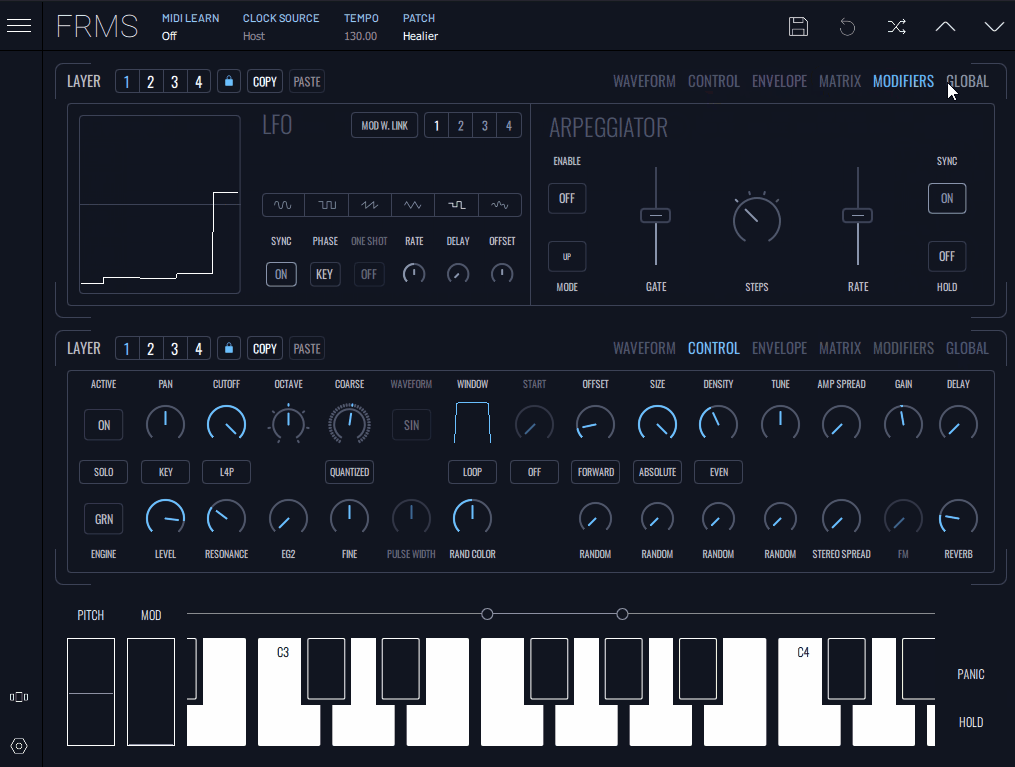
FRMS by Imaginando is a multi synthesis platform that combines additive, subtractive, granular, and FM engines into a single instrument with a visual, modular interface. What makes it interesting is how it approaches synthesis as a visual, almost tactile experience rather than the knob heavy interfaces most synths present.
If you’re someone who thinks about sound in terms of shapes and movement rather than technical parameters, FRMS might click with you in a way that more conventional synths don’t.
I’ll say upfront that FRMS is less well known than many plugins on this list, and that’s partly because Imaginando is a smaller developer. The tradeoff is a lower price point and a design philosophy that prioritizes experimentation and visual feedback over raw feature count.
It’s not trying to compete with Pigments or Vital on depth of features. It’s offering a different way to interact with synthesis that some producers will find more creatively stimulating.
- Visual Modular Interface
FRMS presents synthesis as a visual, node based system where you connect sound sources, processors, and modulators by linking visual elements on screen. The interface encourages experimentation by making signal flow immediately visible and intuitive. You can see how different modules interact and adjust connections by dragging between nodes.
- Multi Engine Design
Four synthesis types, additive, subtractive, granular, and FM, are available within the same environment and can be combined freely. This means you can use an additive oscillator as the source and process it through a subtractive filter, or apply granular processing to an FM generated waveform. The combinations are open ended.
- Touchscreen Optimized
FRMS was designed with touchscreen devices in mind and is available on both desktop and iOS platforms. The visual interface translates well to touch interaction, making it a good option for producers who work on tablets or touch enabled laptops. The cross platform functionality lets you start a project on one device and continue on another.
Available in VST, AU, AAX formats for desktop, and as an iOS app.
4. Arturia Pigments 7 (Multi Engine Synthesizer)

Arturia Pigments 7 isn’t strictly an additive or subtractive synth, but its Harmonic engine provides genuine additive synthesis capabilities alongside its wavetable, virtual analog, granular, sample, and physical modeling engines.
If you want one synth that covers additive, subtractive, and practically everything else, Pigments is probably the most complete single plugin solution available right now. It’s also one of the most approachable despite its depth, which is no small achievement.
What keeps me coming back to Arturia Pigments 7 isn’t any single engine but the way they all work together. You can run two engines simultaneously, route them through an extensive filter and effects section, and modulate everything with a color coded drag and drop system that makes complex patches easy to understand at a glance.
Version 7 adds new experimental filters like Rage, Ripple, and Reverb, a Corroder distortion effect, and improved CPU efficiency. The free updates for existing owners are a nice touch that not every developer offers.
- Harmonic Engine
The additive Harmonic engine gives you direct control over individual partials, letting you shape the harmonic content of a sound with precision that the other engines can’t provide. You can create tones that start additive and then process them through the subtractive style filter section, combining both synthesis approaches in a single patch.
- Twin Engine Architecture
Two engines run simultaneously from a selection of wavetable, virtual analog, harmonic (additive), granular, sample, and utility types. This twin architecture lets you layer an additive harmonic tone with a virtual analog oscillator, or blend granular textures with sample playback. The routing between engines and through the filter and effects sections is flexible.
- Modulation System
The drag and drop modulation system is the best I’ve used in any synth. Color coded sources (LFOs, envelopes, random generators, function generators) can be assigned to any parameter by simply dragging from source to destination. Modulation depth rings on version 7 now show actual parameter values rather than percentages, which makes precise modulation work much more practical.
- Play View
The redesigned Play View in version 7 provides a simplified performance interface with audio reactive animations and quick edit macro controls. This is useful when you want to perform or make quick adjustments without navigating the full synthesis interface. It’s inspired by Arturia’s Analog Lab approach but with more detail and control.
Available in VST, VST3, AU, AAX, and standalone formats. Free updates for existing owners.
5. Image Line Morphine (Additive)
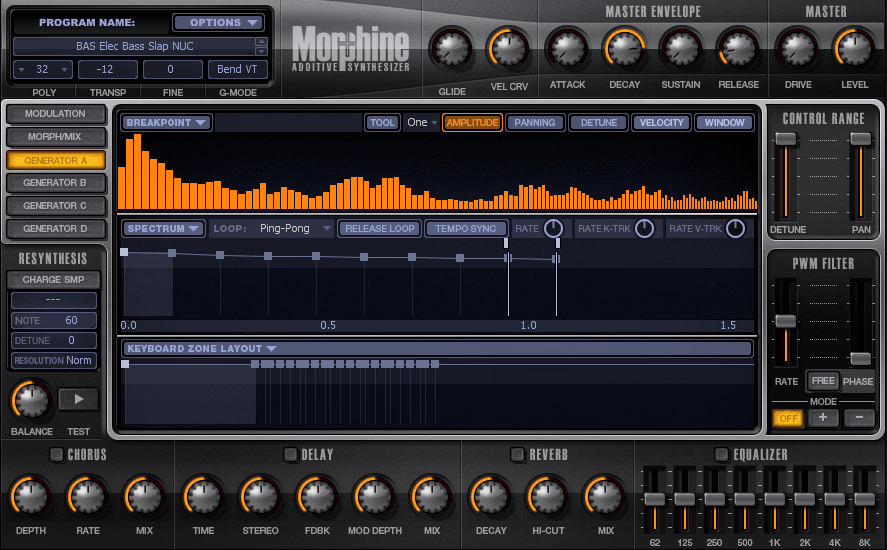
Like Harmor, Morphine is only available for FL Studio users, which limits its audience. But if you have access to it, Morphine offers a take on additive synthesis that’s both educational and creatively useful. The ability to morph smoothly between four different timbral snapshots gives you evolving, animated sounds that are difficult to create with any other synthesis method. It’s not the most modern or feature packed synth on this list, but the sounds it produces have a quality that’s distinctly its own.
- 4 Spectrum Morphing
The core creative feature is the ability to define four spectral snapshots (A, B, C, D) and morph smoothly between them using an X/Y pad. Each snapshot can have a completely different harmonic structure, and the morphing interpolates between them in real time. Automating the morph position creates evolving textures that shift continuously between different tonal characters.
- Visual Spectrum Editor
Each of the four spectral snapshots is edited through a visual partial editor where you can draw harmonic levels directly. The interface shows each partial as a vertical bar, and you can shape the overall spectrum by drawing curves across the partial array. Resynthesis from imported audio is also possible, letting you use real world sounds as starting points.
- Harmonic Filtering
Rather than conventional subtractive filters, Morphine provides harmonic region filters that attenuate or boost specific ranges of the partial spectrum. This gives you tonal shaping that’s native to the additive domain rather than bolted on from subtractive synthesis. The results can sound similar to standard filtering but with more precise harmonic control.
Available as a native FL Studio plugin. Not available for other DAWs.
6. Matt Tytel Vital (Hybrid Spectral/Additive Synth)

The free tier gives you the complete synthesis engine with all features unlocked. The paid versions add more presets and wavetables, but nothing about the core synth is restricted. For producers on a budget, this is hard to argue with.
I use Vital alongside more expensive synths, and it holds its own in terms of sound quality. The wavetable engine is clean and flexible, the modulation system is solid, and the spectral warping features let you reshape harmonic content in ways that feel more additive than traditional wavetable. It’s not purely additive the way Harmor or Razor are, but the spectral tools give you control over individual frequency components that goes beyond what most wavetable synths offer.
- Spectral Warping
Vital includes spectral processing modes that manipulate the frequency content of wavetables at the individual partial level. This bridges the gap between wavetable and additive synthesis, letting you reshape harmonic content in ways that standard wavetable morphing can’t achieve. The spectral warping can be modulated over time for evolving, organic textures.
- Wavetable Editor
A built in wavetable editor lets you create custom wavetables from scratch or by importing audio. You can draw waveforms, generate them from mathematical functions, or use the spectral editor to build wavetables partial by partial. This editor gives Vital genuine sound design capabilities beyond just browsing presets.
- Modulation Visual
Every modulation assignment is displayed as a visual overlay directly on the parameter it’s controlling, showing the modulation range and behavior in real time. This makes complex modulation routing immediately understandable at a glance, which is valuable for learning synthesis as much as for practical sound design.
- Free Full Engine
The free version includes the complete synthesis engine with no feature restrictions: three oscillators, all filter types, all effects, full modulation system, and the wavetable editor. The paid tiers ($25 and $80) add preset packs and additional wavetables but don’t gate any synthesis features behind a paywall.
- Drag and Drop Modulation
The modulation system supports drag and drop assignment from any modulation source (LFOs, envelopes, macro controls, random generators) to any parameter. The visual feedback when dragging makes it immediately clear what you’re connecting and how much modulation depth you’re applying. For producers learning synthesis, this visual approach removes a lot of the confusion that text based mod matrices create.
Available in VST, VST3, AU, AAX, CLAP, and standalone formats. Free version with full engine access.
7. Surge XT (Free Subtractive)

If you’re looking for a capable subtractive synth and you don’t want to spend anything, Surge XT is the obvious answer. But even if budget isn’t a concern, it’s worth trying because the oscillator section and filter architecture are genuinely good. The interface is functional rather than beautiful, and the learning curve is steeper than something like Vital, but the sonic results justify the time investment.
Surge XT provides multiple oscillator algorithms including classic analog waveforms, FM synthesis, wavetable, window oscillator, and string/twist types. The classic mode handles standard subtractive duties well, but the additional algorithms extend the synth well beyond basic subtractive territory into experimental sound design.
- Filter Architecture
The dual filter section offers a wide selection of filter models including ladder filters, SVF types, COMB filters, and nonlinear feedback circuits. Filters can be routed in serial, parallel, or ring modulation configurations, and each filter type has a distinctly different character. The variety here is comparable to what you’d find in commercial synths costing $100 or more.
- Open Source Development
As an open source project, Surge XT benefits from community contributions and transparent development. New features, bug fixes, and improvements are released regularly by a dedicated team of volunteer developers. The source code is publicly available, and the project has a healthy, active development community.
Available in VST3, AU, AAX, CLAP, and standalone formats. Completely free.
Got it. Here’s the corrected version:
8. u-he Hive 2 (Subtractive/Wavetable)
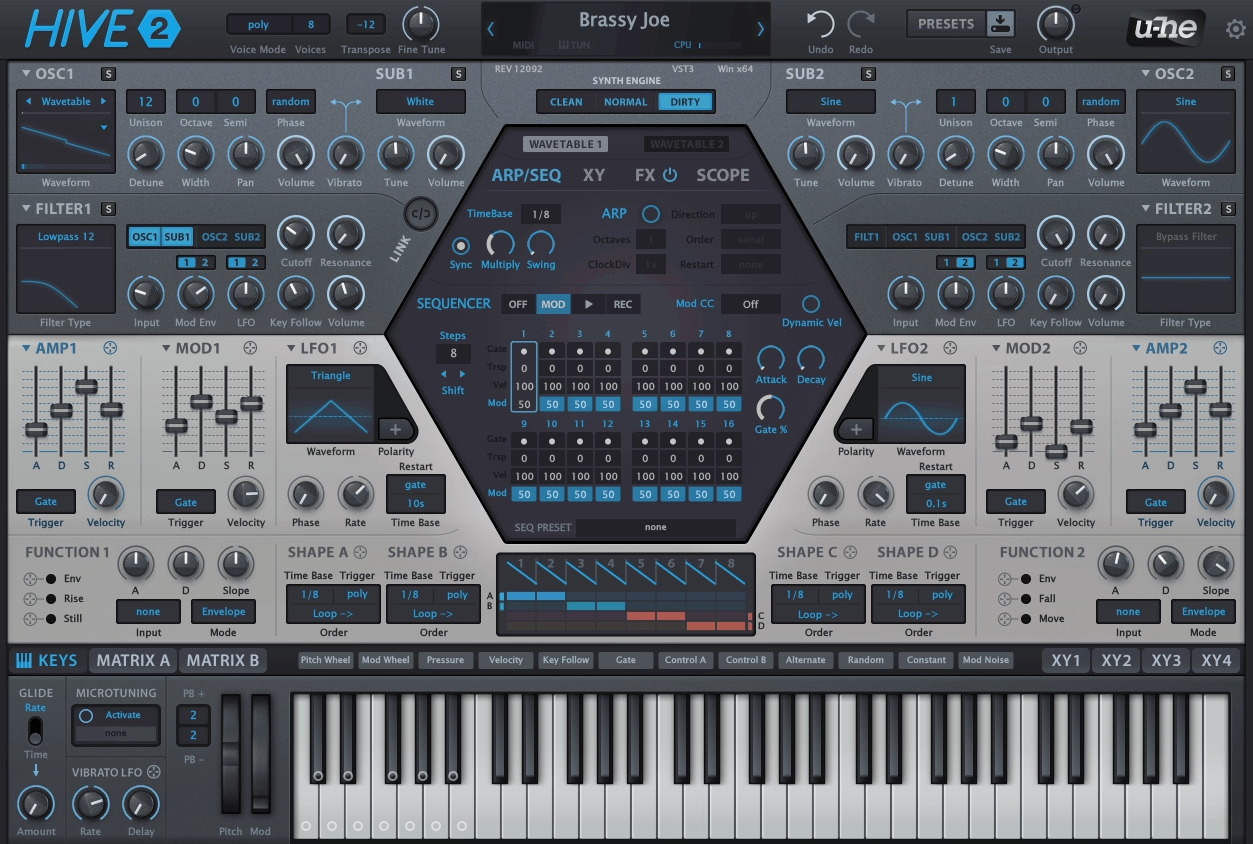
If you’ve ever used Diva and loved the sound but winced at the CPU meter, you already understand the problem that u-he set out to solve here. The goal was straightforward: deliver the filter quality and modulation depth that u-he is known for, but in a package light enough to stack multiple instances without your session grinding to a halt.
u-he Hive 2 is the result of that effort, a wavetable and virtual analog hybrid that runs remarkably lean while still sounding like a proper u-he instrument.
What I appreciate about Hive 2 is that it doesn’t try to impress you with complexity. The interface fits on a single screen, the signal flow is logical, and you can get from an initialized patch to something usable in a couple of minutes.
That might sound unremarkable, but in a market full of synths that need a tutorial series just to understand the interface, Hive’s approach to keeping things visible and accessible is worth something. It’s not the deepest synth u-he makes, but it might be the one you actually reach for when you need to work quickly.
- Specialty Filters
Beyond the standard filter types, Hive 2 includes three specialty filter modes that act almost like their own synthesis engines. Dissonant is an inharmonic resonator for metallic, bell like tones. Reverb is a tuned reverberator that produces lush, resonant textures at higher settings.
Sideband is a frequency shifter that creates sweeping, liquid tonal movement. These filters are where Hive does things that other synths in its price range simply can’t.
- Shape Sequencer
The 8 step Shape Sequencer with 4 independent outputs generates rhythmic modulation patterns that go beyond what a standard step sequencer can produce. Each step holds a drawable shape that can be manipulated individually, and the four outputs can drive different parameters simultaneously.
Combined with the arpeggiator and step sequencer running in parallel, you can create layered rhythmic motion that gives patches a sense of life without touching an LFO.
- Function Generators
Two Function Generators combine envelope, LFO, slew limiter, and gate control into single modular style modules. They can be triggered by other modulators and can trigger each other, creating feedback loops and interactive modulation behaviors that are unusual for a synth at this level. Each Function Generator has three assignable outputs with drag and drop targeting.
- Three Engine Characters
A global engine selector switches between Normal, Dirty, and Clean modes that change the fundamental character of the oscillators and filters. Normal is the balanced default. Dirty adds analog style grit and saturation.
Clean produces a more precise, digital response. Switching engines on the same patch produces noticeably different results, effectively tripling the tonal range of every preset without adjusting a single parameter.
Available from u-he in VST, VST3, AU, AAX, and CLAP formats. Over 2,400 factory presets included.
Get the Free Plugin Starter Kit
The genuinely useful free DAWs and plugins worth installing. No filler. Straight to your inbox.

Hello, I’m Viliam, I started this audio plugin focused blog to keep you updated on the latest trends, news and everything plugin related. I’ll put the most emphasis on the topics covering best VST, AU and AAX plugins. If you find some great plugin suggestions for us to include on our site, feel free to let me know, so I can take a look!