
Your monitors are lying to you. I don’t say that to be dramatic. Every room has acoustic problems that color what you hear, whether it’s a bass buildup in the corners, a midrange notch caused by reflections off the desk, or a high frequency roll off from soft furnishings absorbing energy.
These problems mean the “flat” response your monitors promise gets distorted before it reaches your ears, and every mix decision you make is based on that distorted picture.
The good news is that room calibration and speaker correction software has matured to the point where it can make a genuine, measurable difference in how accurately you hear your mixes. Some of these tools measure your actual room and create custom correction curves. Others simulate professional studios on headphones so you can mix without speakers at all. A few even calibrate live PA systems for touring engineers.
We’ve put together ten plugins that cover every approach to monitoring correction you might need. Whether you’re working in an untreated bedroom, a professional studio that needs fine tuning, or mixing on headphones during a late night session, there’s a tool here that will help your mixes translate better across every playback system.
1. Waves Abbey Road Studio 3 (Headphone Studio Simulation)
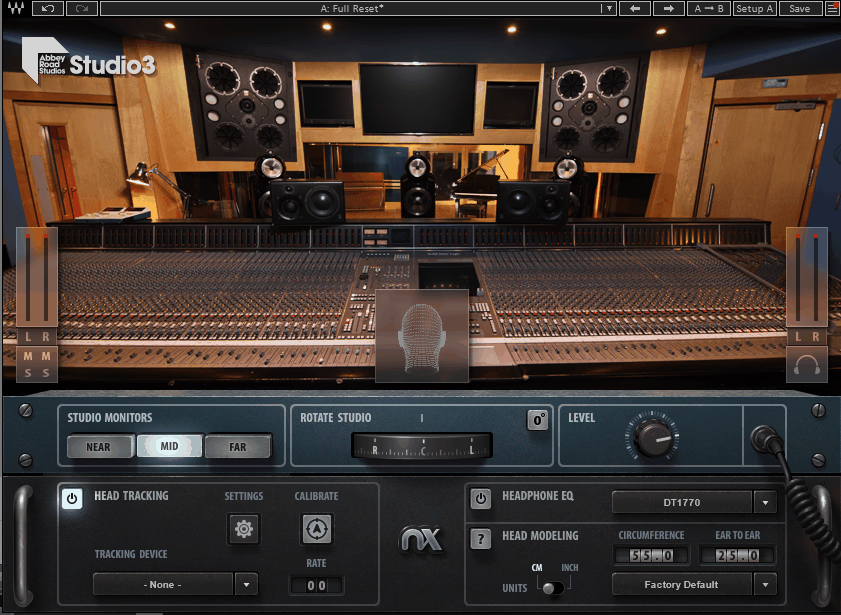
There’s a reason that Abbey Road Studio 3 has produced some of the greatest records in music history, and it’s not just the equipment. The room itself has been acoustically refined over decades to provide a monitoring environment that produces mixes which translate perfectly to the outside world. Waves Abbey Road Studio 3 puts you inside that room through your headphones, using Nx 3D audio technology combined with precise acoustic modeling of the actual space.
The first time I loaded Waves Abbey Road Studio 3 and put on my headphones, the effect was genuinely startling. Music that had been flat and “inside my head” suddenly had width, depth, and a spatial quality that felt like I was sitting in front of real speakers in a real room. It completely changed my relationship with headphone mixing, and I went from avoiding headphones for critical decisions to actually preferring them for certain tasks.
- Room Acoustic Modeling
The plugin recreates the actual acoustic characteristics of Abbey Road Studio 3, including the room’s specific reverb decay, early reflection patterns, and frequency response. This isn’t a generic “room simulation.” IK and Waves (in their respective products) took entirely different approaches. Waves meticulously measured the actual studio using their Nx technology, capturing how sound behaves in that specific legendary space.
- Three Monitor Pairs
You can switch between three iconic monitoring systems installed in the real Studio 3: the B&W 800 D3 main monitors, NS-10M nearfields, and a third reference pair. Each set responds differently within the room model, giving you multiple reference points for checking your mix just as you would in a real studio by switching between monitor pairs.
- Head Tracking
The Nx head tracking system uses your webcam or the Waves Nx Head Tracker device to follow your head movements, adjusting the stereo image in real time so the phantom center stays locked in position as you move. This makes the spatial illusion dramatically more convincing because the soundstage responds to your head position just as real speakers would.
- Headphone Correction
A built in headphone calibration section compensates for the frequency response of your specific headphones from a list of supported models. This ensures the room simulation isn’t colored by your headphones’ inherent tonal characteristics, giving you a more accurate representation of what the monitors in Studio 3 would actually sound like.
- Sweet Spot Control
Adjustable listening position lets you move your virtual location within the room, changing the balance between direct speaker sound and room reflections. Moving closer to the speakers increases the direct to reverberant ratio. Moving back introduces more room character. This is useful for checking how your mix behaves at different listening distances.
- Bass Focus
A bass management control adjusts how low frequencies are presented through the headphone simulation, which is critical because headphones and speakers present bass fundamentally differently. This control lets you calibrate the low end perception to match what you’d expect from real monitors in a room.
Available from Waves in VST, VST3, AU, and AAX formats.
Get the Free Plugin Starter Kit
The genuinely useful free DAWs and plugins worth installing. No filler. Straight to your inbox.
2. dSONIQ Realphones 2 (Headphone Monitoring)
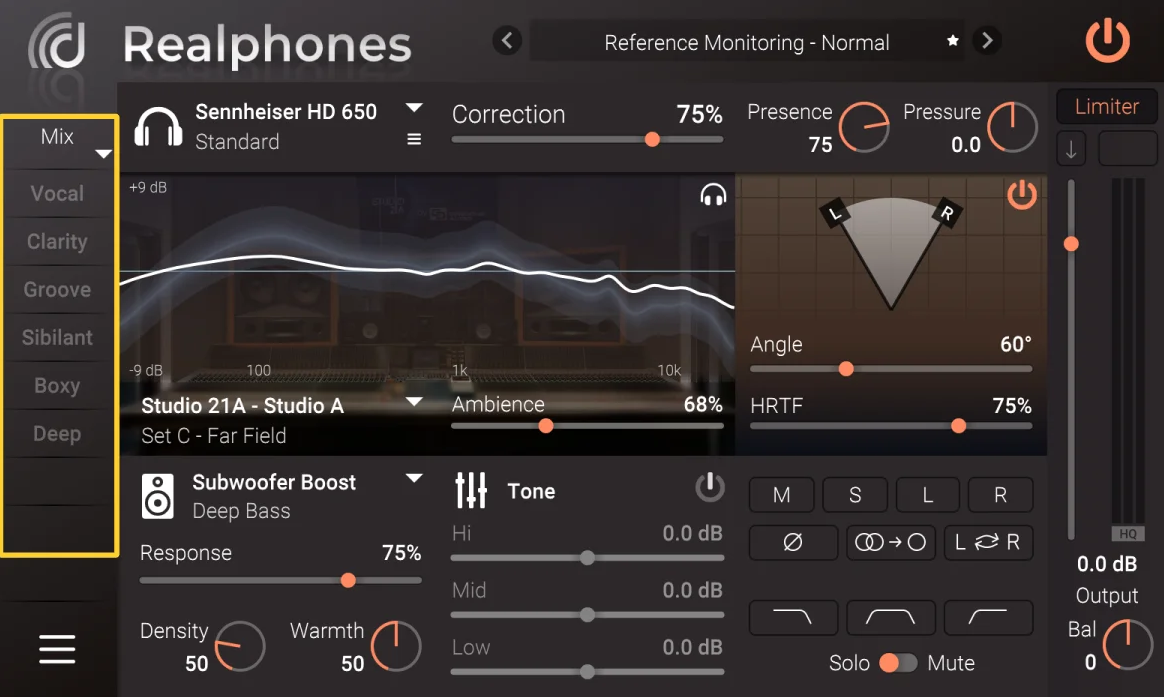
Image: dSONIQ
Most headphone simulation plugins give you one or two rooms and a handful of speaker models. dSONIQ Realphones 2 gives you an entire building full of options, with a level of customization that’s almost overwhelming until you realize how powerful it is. You can combine different room acoustures, speaker models, positions, and headphone corrections to build a virtual monitoring environment that matches exactly how you like to work.
What sets dSONIQ Realphones 2 apart for me is the sheer flexibility. Instead of being locked into one famous studio’s acoustics, you can design your own ideal monitoring situation from the ground up. Maybe you want the room ambience of a mastering suite with the monitors from a mixing room positioned slightly wider than default. Realphones 2 lets you build that exact scenario, and once you’ve dialed it in, you save it as a preset and never think about it again.
- Modular Room Builder
The plugin provides a modular system where you independently select and combine room models, speaker emulations, speaker placement angles, and headphone correction profiles. Each module can be adjusted independently, giving you thousands of possible combinations. This is fundamentally different from plugins that offer pre baked “studio in a box” presets with no customization.
- Speaker Position Control
Full control over the virtual speaker angle, distance, and elevation lets you position your monitoring exactly where you want it in the stereo field. If you prefer wider monitoring, you push the speakers out. If you want a more focused center image, you bring them in. The spatial rendering updates in real time as you adjust.
- 200 Plus Headphone Profiles
An extensive library of over 200 headphone correction profiles covers models from all major manufacturers. The correction is applied before the room simulation, ensuring the acoustic modeling isn’t colored by your headphones’ tonal characteristics. You can also import custom measurement files if your headphones aren’t in the library.
- Reference Check
A built in reference comparison system lets you quickly switch between your full monitoring simulation and different consumer playback emulations like car speakers, laptop speakers, and phone speakers. This check translation feature is immediately accessible without loading separate plugins or switching presets.
- Standalone Operation
Realphones 2 works as both a DAW plugin and a standalone system wide application that processes all audio from your computer. The standalone mode is particularly useful for referencing streaming music, watching tutorials, or checking commercial releases through the same corrected monitoring chain you use for mixing.
Available in VST, VST3, AU, and AAX formats. Standalone version included.
3. ToneBoosters Morphit (Headphone EQ Correction)
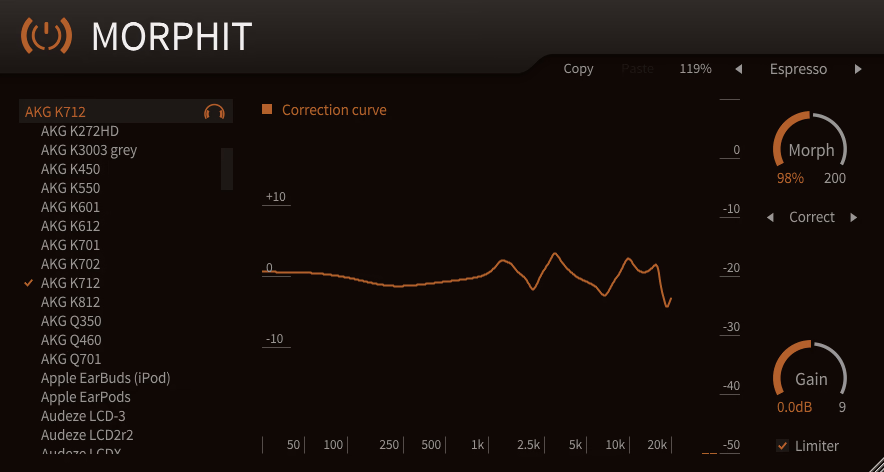
Not every producer needs a full studio simulation with room modeling and virtual speakers. Some just want their headphones to sound accurate and flat. ToneBoosters Morphit handles this specific task with elegant simplicity: it corrects the frequency response of your headphones to a flat target, and that’s essentially it. No room simulation, no 3D spatial processing, no virtual studios. Just accurate headphone correction at a price point that makes the competition look almost embarrassingly expensive.
I keep ToneBoosters Morphit installed as my lightweight option for sessions where I don’t want the CPU overhead or complexity of a full room simulation. When I’m editing, doing rough arrangements, or just need honest frequency response from my headphones without the bells and whistles, Morphit is the fastest path to accurate monitoring I’ve found.
- Headphone Database
Morphit includes correction profiles for over 400 headphone models from virtually every major manufacturer. Each profile is based on measured frequency response data and applies precise EQ correction to flatten the headphone’s response to a target curve. The database is regularly updated as new headphone models are released.
- Target Curve Selection
Multiple target curves are available beyond just “flat,” including diffuse field, free field, Harman, and speaker simulation targets. Each target produces a different tonal balance, and you can blend between them. I find the Harman curve works best for my ears on most headphones, but having the option to switch is valuable for different use cases.
- Headphone to Headphone
A unique transform mode lets you make one pair of headphones sound like another pair. If you’ve developed your mixing instincts on a specific model but need to work on a different set, Morphit can map the response of your current headphones to match the characteristics of your preferred pair. This is surprisingly useful when traveling or working in different studios.
- Minimal CPU Impact
The processing is pure EQ correction with virtually zero CPU usage and no latency, making it suitable for tracking and monitoring situations where processing overhead matters. You can leave it running on your master bus permanently without affecting your session’s performance.
Available in VST, VST3, AU, and AAX formats. One of the most affordable options in this category.
4. Waves Nx Ocean Way Nashville (Studio Simulation)
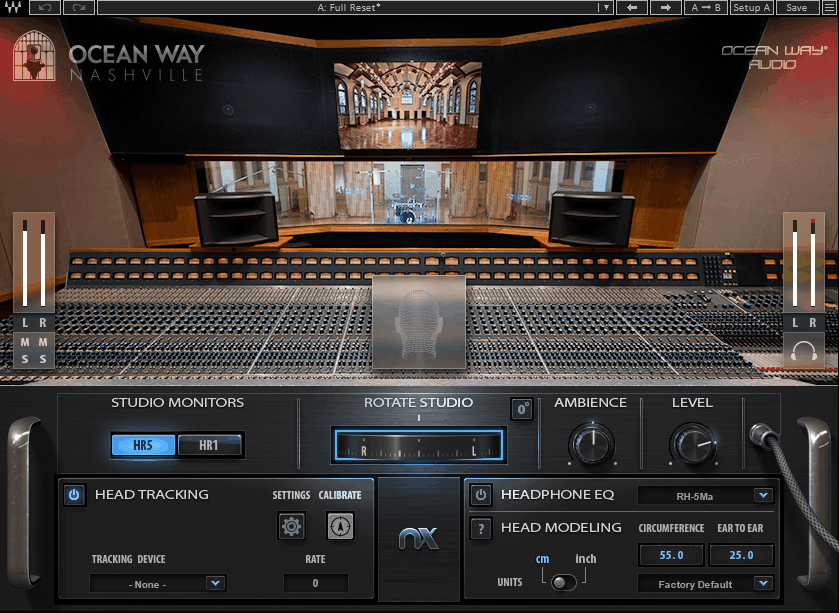
Ocean Way Nashville transports you inside one of the most revered recording studios in country, rock, and pop music. Ocean Way Nashville’s Studio A is famous for its massive live room and a control room that’s been the mixing environment for countless platinum records. Where Abbey Road Studio 3 gives you the British classic rock monitoring experience, Ocean Way Nashville provides the American big room sound that’s defined Nashville’s recording output for decades.
I find Waves Nx Ocean Way Nashville particularly useful as a second reference alongside Abbey Road Studio 3. Every control room sounds different, and having access to two legendary rooms means I can check my mixes in fundamentally different acoustic environments without leaving my desk. If a mix sounds good in both rooms, I know it’s going to translate well in the real world.
- Studio A Control Room
The plugin models the actual acoustics of Ocean Way Nashville’s Studio A control room, including the specific dimensions, surface treatments, and speaker positioning that make the room sound the way it does. The acoustic character is distinctly different from Abbey Road. It’s a bigger, more open sounding space with a different low frequency response and a wider stereo image that reflects the room’s larger dimensions.
- Multiple Monitor Selections
Several iconic monitoring systems are available within the virtual room, letting you switch between the studio’s main monitors and nearfields. Each monitor set interacts with the room acoustics differently, providing varied perspectives on your mix just as switching monitors in a real control room would.
- Nx Head Tracking
Full head tracking support through webcam or the Nx Head Tracker hardware maintains the spatial illusion as you move. The tracking is the same proven technology used in Abbey Road Studio 3, keeping the virtual soundstage locked in physical space regardless of head movement.
- Virtual Listening Position
You can adjust your position within the room, moving closer to or further from the monitors and shifting left or right. This affects the balance between direct sound and room reflections, and it’s useful for checking how your mix sounds at different spots in the control room.
- Headphone EQ Compensation
Built in correction for supported headphone models ensures the room simulation accurately represents what you’d hear on the actual monitoring system rather than being colored by your headphones’ frequency response. The correction is applied transparently before the room processing.
- Bass Management
Low frequency controls address the fundamental difference between how headphones and speakers reproduce bass. The bass management section lets you calibrate the sub 200 Hz range to match the physical sensation of hearing low frequencies through real monitors in a real room, which headphones inherently struggle to reproduce accurately.
Available from Waves in VST, VST3, AU, and AAX formats.
5. Acustica Audio Sienna (Headphone Studio Simulation)
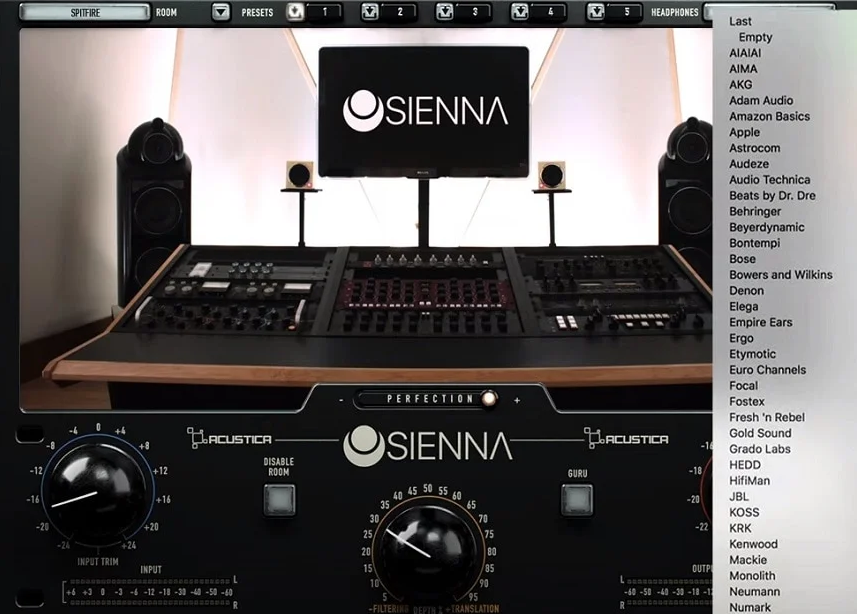
Where other headphone simulation plugins use standard convolution or algorithmic room modeling, Acustica Audio Sienna employs the company’s proprietary dynamic convolution sampling technology to capture studio control rooms with a depth of detail that borders on obsessive. Acustica is known for creating some of the most accurate hardware emulations in the plugin world, and they brought that same meticulous approach to room and speaker modeling.
What makes Acustica Audio Sienna genuinely different from competing products is the quality of the speaker emulations. Most plugins simulate speakers by capturing their frequency response, which is important but incomplete. Sienna also models speaker harmonics and distortion behavior, which means you can hear how your mix sounds on monitors pushed to high volume levels, including the subtle compression and saturation that real speakers exhibit when driven hard. No other headphone simulation I’ve tested captures this behavior.
- Speaker Distortion Modeling
Sienna is the only plugin in this category that accurately emulates speaker harmonics and distortion at different volume levels. This lets you hear how your tracks sound on real monitors pushed to wall shaking levels, even through headphones. You can check whether bass holds up, whether the stereo image collapses, and whether the music loses impact when the speakers are working hard.
- Sampled Control Rooms
Multiple real world studios have been captured using Acustica’s dynamic convolution process, including the HOG Studio control room and Acustica’s own mixing facility. Each room sounds distinctly different, with unique reverb characteristics, early reflection patterns, and tonal signatures that reflect the actual acoustic properties of the space.
- 200 Plus Headphone Profiles
Over 200 headphone correction profiles cover models from all major brands, each individually measured and fine tuned by ear by Acustica’s audio team. The correction goes beyond simple frequency response flattening, with a proprietary Magic Q algorithm that optimizes each headphone’s overall behavior specifically for use with the room emulations.
- Guru Mode
The advanced Sienna Guru interface provides deep controls including Width, Depth, Focus, and Pan parameters that let you shape the virtual mixing space to your exact preferences. Width adjusts virtual speaker angle. Depth controls the side signal level. Focus balances between direct speakers and room ambience. These controls let you create a truly customized monitoring environment.
- System Wide Standalone
Sienna System Wide runs outside of your DAW as a standalone application, processing all audio output from your computer through the room simulation. This means you can reference streaming music, YouTube content, and commercial releases through the same corrected monitoring chain you mix with, ensuring consistency between your creative and reference listening.
Available in VST3, AU, and AAX formats. Sold in expandable volumes starting with Volume A.
6. Sonarworks SoundID Reference (Room & Headphone Correction)
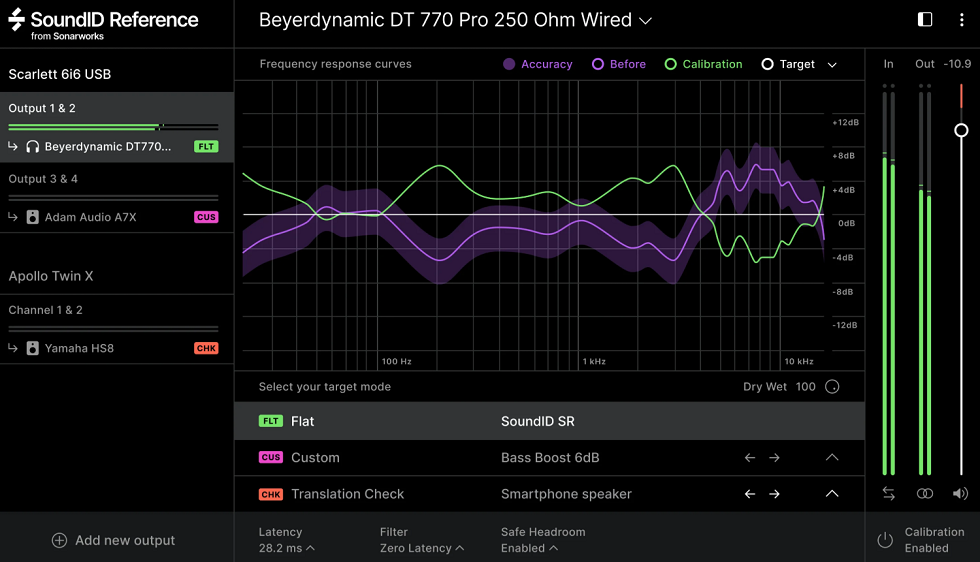
Image: Sweetwater
Sonarworks SoundID Reference (formerly Reference 4) is probably the most widely adopted room correction tool in bedroom and project studios, and that popularity isn’t accidental. It combines speaker calibration via measurement microphone with headphone correction in a single package that’s straightforward enough for beginners but capable enough for professionals. If you’ve never used any room correction before, this is arguably the easiest place to start.
I think the reason SoundID Reference succeeded where earlier room correction systems struggled is that it doesn’t require you to understand acoustics. You run the measurement wizard, follow the on screen instructions, and the software handles everything else. The correction is applied transparently, and the first time you hear your monitors with the correction active, the improvement is usually obvious and immediate, especially in the low end where room problems are most severe.
- Guided Measurement
The measurement process walks you through a series of positions around your listening area using the included calibration microphone, and the software builds a correction profile automatically. The wizard handles everything from signal generation to analysis, and the entire process takes about 15 minutes. No acoustic engineering knowledge is required.
- Headphone Profiles
An extensive library of headphone correction profiles lets you flatten the response of supported models for accurate monitoring on headphones. The same plugin handles both speaker and headphone correction, switching between modes with a single click. A custom measurement option lets you create profiles for headphones not in the database.
- System Wide Mode
A standalone application applies correction to all audio output from your computer, not just audio from your DAW. This means reference listening, streaming music, and video playback all go through the same corrected monitoring path. For producers who spend significant time referencing commercial material, this consistency between mixing and listening is invaluable.
Available in VST, VST3, AU, and AAX formats, plus standalone system wide application.
7. Waves Nx Germano Studios (Studio Simulation)
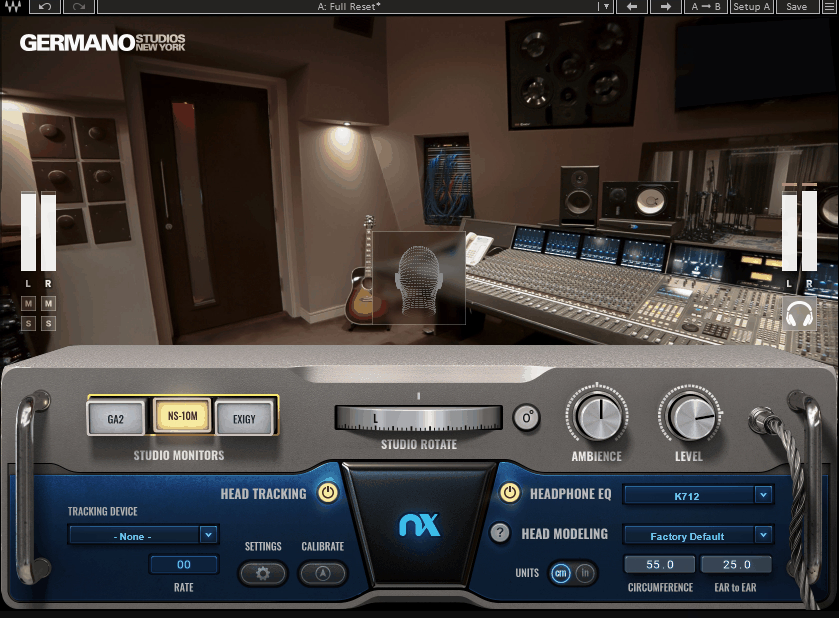
Nx Germano Studios New York transports you inside one of New York City’s most respected mixing rooms, a studio that’s been home to sessions for artists across hip hop, R&B, pop, and rock. While Abbey Road represents the British tradition and Ocean Way the American Nashville sound, Germano Studios gives you the New York mixing room aesthetic that’s shaped the sound of urban and contemporary music for decades.
Having a third virtual studio available alongside Abbey Road and Ocean Way gives me something I couldn’t easily achieve otherwise: the ability to reference my mix in three acoustically distinct professional environments without leaving my chair. Each room reveals different things about a mix, and problems that hide in one room often become obvious in another.
- Germano Studios Acoustics
The plugin models the specific acoustic signature of Germano Studios’ mixing room, including the room’s unique dimensions, surface treatments, and monitoring geometry. The space has a tighter, more controlled feel than the larger Ocean Way room, with a midrange clarity that’s particularly revealing on vocal focused material.
- Monitor Switching
Multiple monitoring systems within the virtual room provide different perspectives on your mix. The main monitors and nearfield pairs each interact with the room model differently, and switching between them reveals how your frequency balance and stereo image translate across different playback systems.
- Head Tracking Integration
Full Nx head tracking through webcam or hardware tracker maintains spatial accuracy as you move. The technology is identical to the other Waves Nx studio plugins, ensuring a consistent spatial experience across all three virtual rooms.
- Headphone Calibration
The built in headphone correction applies before the room simulation to ensure accurate representation. Combined with the room modeling and head tracking, the complete processing chain delivers a convincing sense of mixing in the actual studio.
Available from Waves in VST, VST3, AU, and AAX formats.
8. Waves CLA Nx (Studio Simulation)
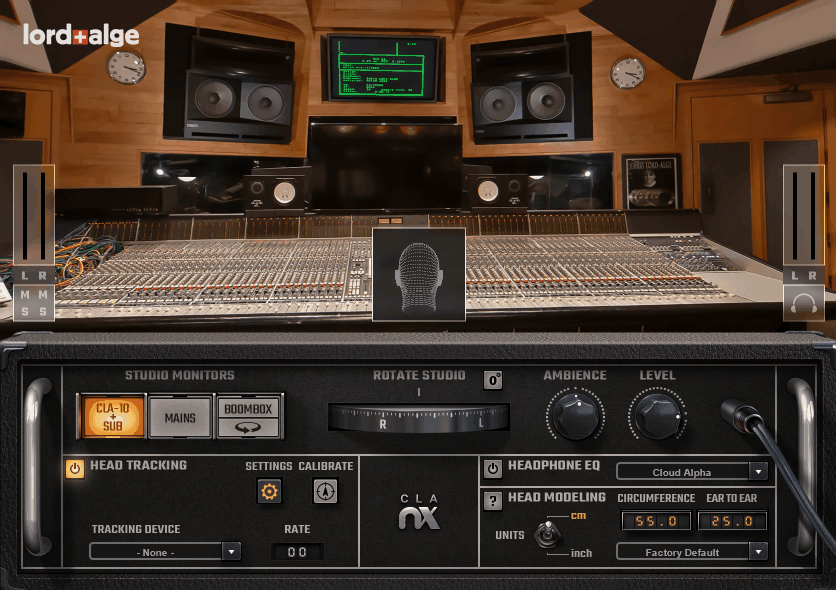
Waves CLA Nx puts you inside the personal mixing studio of Chris Lord-Alge, one of the most successful and recognizable mix engineers in rock and pop history. His mixing room at Mix LA has been the birthplace of mixes for Green Day, Muse, My Chemical Romance, and countless other major artists. Where the other Nx plugins model famous commercial studios, CLA Nx models a private mixing room designed around one specific engineer’s preferences.
There’s something uniquely valuable about hearing your mix through the monitoring setup that a legendary mixer actually uses every day. It’s not just about the room acoustics. It’s about understanding how your mix would sound in the environment where someone with CLA’s track record makes their decisions. For rock and pop producers in particular, this perspective is eye opening.
- CLA’s Mix Room
The plugin recreates the specific acoustics and monitoring setup at Mix LA, Chris Lord-Alge’s personal studio. The room has been tuned and refined over years of high profile mixing sessions, and its character reflects the preferences of an engineer known for punchy, powerful, translation friendly mixes. The acoustic signature is tighter and more controlled than larger commercial rooms.
- NS-10 and Main Monitors
CLA’s famous reliance on Yamaha NS-10 nearfield monitors is captured alongside the room’s main monitoring system. Switching between the two gives you the perspective of an engineer who built his career checking mixes on what many consider the most important reference monitors in mixing history. The NS-10 emulation is particularly useful for evaluating midrange balance and vocal presence.
- Nx Head Tracking
Full head tracking maintains the spatial illusion through webcam or hardware tracker. The same proven tracking technology from the entire Waves Nx lineup ensures the virtual soundstage responds naturally to head movement, keeping the phantom center locked in physical space.
- Bass and Room Controls
Adjustable bass management and room perception controls let you customize how the low frequencies and room ambience are presented through your headphones. These controls account for the inherent differences between headphone and speaker bass reproduction, ensuring the virtual monitoring feels physically convincing.
- Headphone Correction
Built in headphone compensation for supported models ensures the studio simulation accurately represents CLA’s monitoring rather than being filtered through your headphones’ tonal characteristics. The correction is applied transparently as the first stage of processing.
Available from Waves in VST, VST3, AU, and AAX formats.
9. Waves TRACT Sound System Calibration (Live & Studio System Tuning)
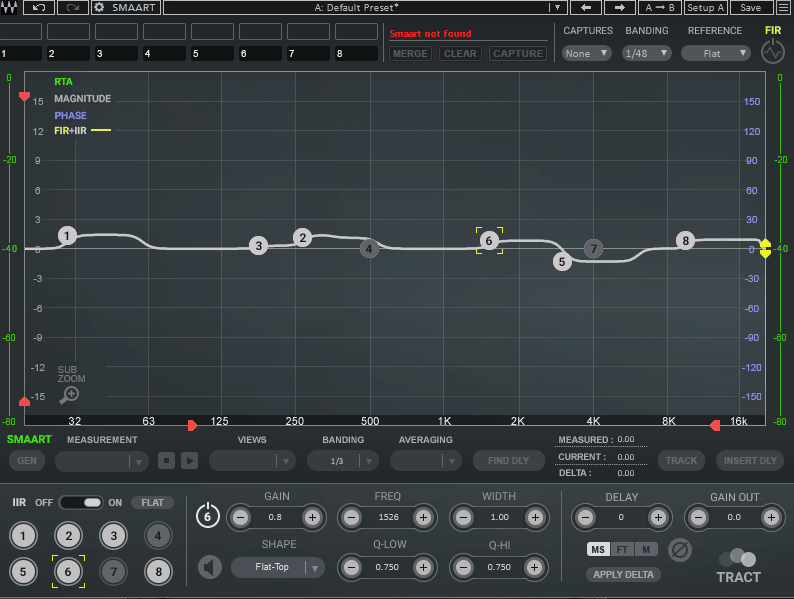
Everything else on this list corrects your monitoring at the software level. Waves TRACT Sound System Calibration takes a fundamentally different approach: it integrates with Smaart, the industry standard audio analysis software from Rational Acoustics, to measure and correct the actual frequency response and time alignment of any physical speaker system. If you’re working in live sound, calibrating a studio with hardware processors, or tuning a monitoring system that sits outside your DAW, TRACT is the professional tool for the job.
I included Waves TRACT because room calibration isn’t just about bedroom studios and headphones. Touring engineers, installed system designers, and studio builders all need to measure and correct speaker systems, and TRACT is the tool most of them reach for. It’s also the most technically sophisticated option on this list, designed for users who understand acoustic measurement and system alignment at a professional level.
- Smaart Integration
TRACT integrates directly with Smaart v8, v9, and Di to receive real time measurement data and automatically calculate corrective EQ curves based on the measured response. You can capture and merge up to 8 measurement snapshots from different positions to create a correction curve that compensates for the widest possible listening area rather than optimizing for a single sweet spot.
- FIR and IIR EQ
The plugin provides both minimal phase FIR correction (low latency, minimal phase distortion) and linear phase FIR (perfect phase coherence) components. An additional 8 bands of IIR parametric EQ with multiple filter shapes, including bell, shelving, flat top, tilt, Butterworth, and Linkwitz Riley curves, lets you supplement the automatic correction with manual adjustments.
- Time Alignment
Automatic delay detection and alignment synchronizes multiple speaker systems, including mains, front fills, delays, and subwoofers. The Sub Zoom function provides detailed low frequency phase alignment to prevent the phase cancellation between subs and tops that robs a system of low end impact. This is essential for any multi speaker system.
- Live and Studio Flexibility
TRACT works within any major DAW, with the Waves eMotion LV1 mixer, or through MultiRack for live console integration. This versatility means the same tool handles studio monitor calibration, live PA tuning, and installed system optimization, making it a single solution for engineers who work across multiple contexts.
Available from Waves in VST, VST3, AU, and AAX formats. Requires Smaart (sold separately) for automatic measurement and correction.
Extra: IK Multimedia ARC X (Room Correction)
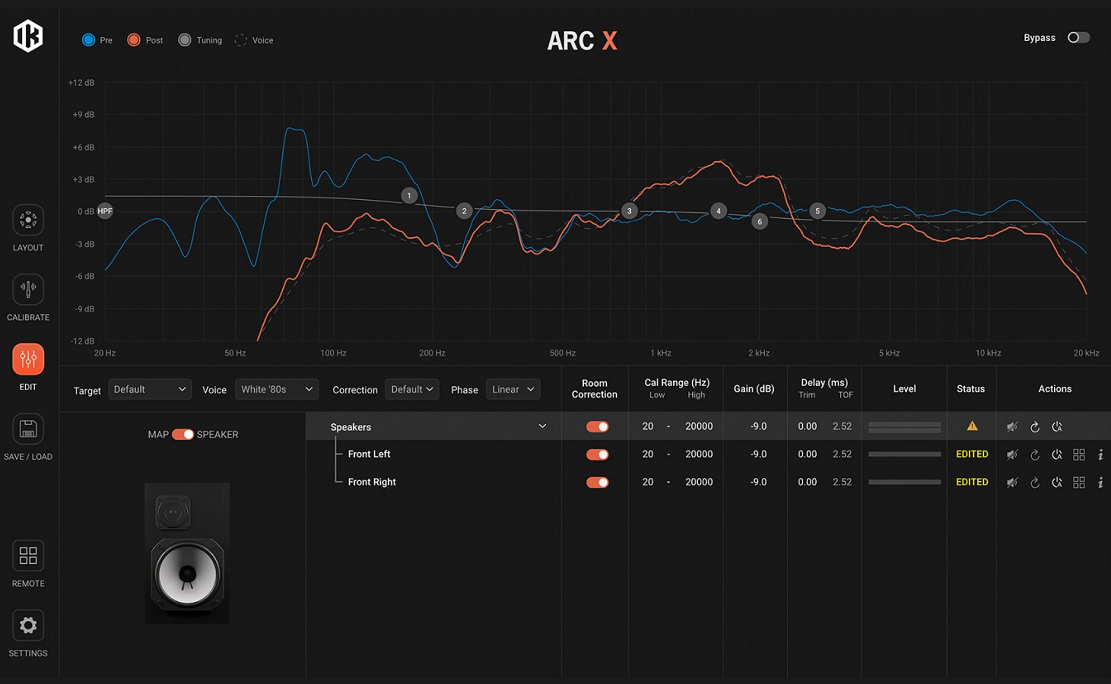
Image credit: IK Multimedia
If I could recommend only one room correction tool, IK Multimedia ARC X would be it. Built on IK’s proprietary VRM (Volumetric Response Modeling) technology, ARC X doesn’t just take a single measurement at your listening position and call it a day. It captures a 3D acoustic snapshot of your room by measuring at multiple heights and positions, which gives the correction algorithm a much more complete picture of your room’s behavior than single point measurement systems.
What I find most compelling about ARC X is how natural the correction sounds. A lot of room correction systems produce results that feel “processed” or overly clinical, like they’ve solved the frequency problems but removed the life from the monitoring in the process. ARC X’s algorithm resolves frequency and phase inconsistencies without overprocessing, and the result genuinely feels like you’ve upgraded to better speakers in a better room rather than having a computer forcibly flatten your response curve.
- VRM 3D Measurement
The measurement system captures your room at multiple heights and positions (1, 3, 7, or 21 point scans) to build a three dimensional model of the acoustic environment. This is fundamentally more accurate than single point systems because it accounts for how sound behaves differently at ear level versus above or below. The guided measurement process takes about 10 minutes with the included calibration microphone.
- 9 Target Curves
Rather than forcing a perfectly flat response, ARC X offers 9 expertly designed target curves including flat, warm tilt, bright tilt, and a Dolby Atmos optimized profile. You can also create custom target curves to match your personal taste or the sonic signature of a specific reference room. I typically use a slight warm tilt because perfectly flat monitoring can feel fatiguing over long sessions.
- Virtual Monitor Emulation
Over 20 virtual monitor profiles let you audition your mix through emulations of iconic studio monitors and consumer playback systems without switching physical speakers. You can hear how your mix translates on small monitors, hi fi speakers, laptop speakers, and mobile devices, all from your primary monitoring setup.
- Advanced Metering
Built in metering tools powered by T-RackS technology display Peak, RMS, LUFS, and Dynamic Range simultaneously. Having these measurements available right in the correction plugin eliminates the need for a separate metering plugin on your master bus.
Available in VST3, AU, and AAX formats. The software only version is $49, or $199 bundled with the measurement microphone.
Get the Free Plugin Starter Kit
The genuinely useful free DAWs and plugins worth installing. No filler. Straight to your inbox.

Hello, I’m Viliam, I started this audio plugin focused blog to keep you updated on the latest trends, news and everything plugin related. I’ll put the most emphasis on the topics covering best VST, AU and AAX plugins. If you find some great plugin suggestions for us to include on our site, feel free to let me know, so I can take a look!