
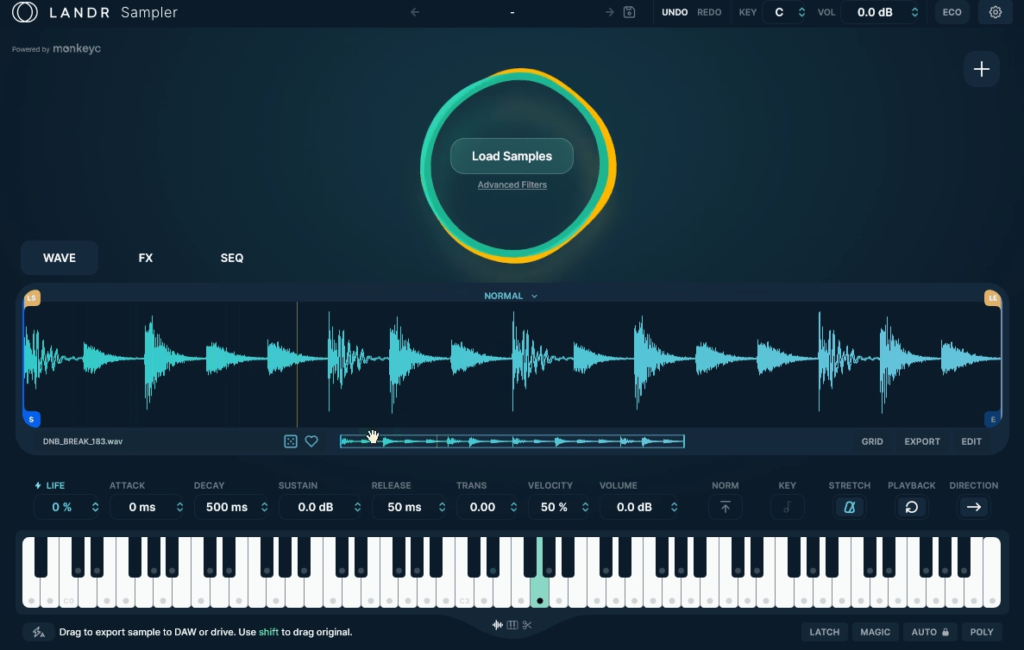
LANDR Sampler takes on a problem most producers genuinely struggle with, which is that massive, disorganized sample library sitting on your hard drive full of forgotten sounds you paid money for but never actually use. Rather than being just another sampler plugin, this tool combines intelligent sample management with AI-powered organization and a full creative sampling engine into one unified workflow.
Developed by LANDR (the same Montreal-based company behind the popular AI mastering service and sample marketplace), the plugin is built in collaboration with MonkeyC Audio, the team behind the well-regarded Rando sampler. If the layout looks familiar, that’s because it borrows heavily from Rando while adapting the concept for the broader LANDR ecosystem of production tools.
For me, what makes this library so compelling is how it genuinely transforms the way you interact with your sample collection. Instead of scrolling through endless folders hunting for that one kick you half-remember from a pack you bought two years ago, you get instant search, AI-powered similar sound suggestions, and a workflow that keeps you in creative flow rather than constantly breaking to hunt for sounds.
From the Pluginerds Store
A quick mention: alongside the blog, we run Pluginerds Shop, our own store for studio hardware and accessories. Everything on it is there because someone on this team actually uses gear like it, not because it was the cheapest thing to list.
Visit Pluginerds ShopThe Interface
The interface keeps things genuinely organized without feeling cluttered, which matters a lot when you’re working with massive sample libraries.
Everything lives across a single main view with clear sections for browsing, playback, effects, and sequencing. You can see your current sample, its waveform, playback controls, and the built-in effects all at a glance rather than having to switch between multiple pages.
The scalable UI means it looks crisp on modern high-resolution displays, which sounds like a small thing but actually matters a lot when you’re staring at it for hours during long sessions.
Essential controls like sample loading, playback mode switching, effects activation, and the XY-pad all sit where you can reach them quickly. For producers used to cluttered sample browsers and confusing sampler interfaces, this design feels refreshingly modern and focused.

Get the Free Plugin Starter Kit
The genuinely useful free DAWs and plugins worth installing. No filler. Straight to your inbox.
The Sampler Modes
Four distinct playback modes give you serious flexibility depending on what kind of work you’re doing.
- Normal Mode plays samples as straightforward one-shots, perfect for drum hits, vocal chops, and any sound you want to trigger with a single key press. Simple, clean, and exactly what you need for beat-making workflows.
- Chromatic Mode turns any sample into a fully playable instrument mapped across your keyboard. Load a vocal sample, a synth stab, or even a found sound, and suddenly you can play melodies with it. The note choke groups feature prevents notes from overlapping when you don’t want them to.
- Slice Mode chops samples into playable segments, letting you assign each slice to a different MIDI key. This is perfect for breakbeat editing, vocal chops, or building custom drum kits from longer loops.
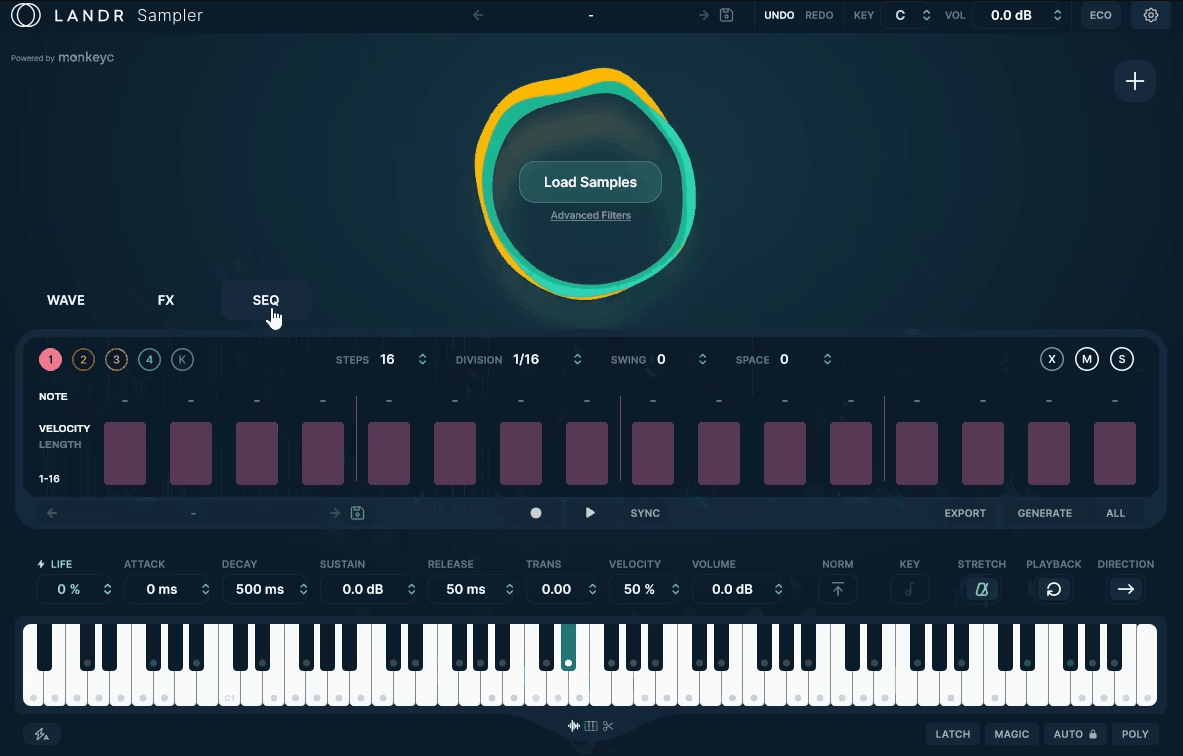
- Sequence Mode brings a built-in step sequencer with up to five lanes for building patterns directly inside the plugin. You can sequence samples without leaving the sampler, which speeds up beat-making dramatically when you’re in a creative flow state.
Between these four modes, you have coverage for pretty much every sampling workflow you might throw at the plugin.
Sample Management
The sample management side is honestly where this plugin earns its keep for most producers.
When you first install it, you point it at your sample folders (or individual folders for specific projects), and the plugin scans everything while automatically adding metadata and tags to every file. The AI is trained on LANDR’s massive sample collection, so it can intelligently categorize sounds by type, genre, instrument, and character without you having to manually tag anything.
From there, finding sounds becomes dramatically faster. You can use free-text search to find anything by name, apply filters by loop type, category, or length, or browse through the auto-generated tag system.
The Similar Sound Swap feature genuinely changes how you work with samples. Love the kick drum you’ve got loaded but want to hear alternatives? Click the swap button and the AI pulls similar kicks from your library instantly. This keeps inspiration flowing when you’d otherwise break momentum hunting through folders.
For producers with thousands of samples spread across dozens of sample packs, this organization alone is worth the price of entry. Suddenly, those hidden gems you forgot about years ago become instantly accessible again.
Sample Manipulation Tools
Beyond the effects, the core sample manipulation tools cover everything you’d expect from a professional sampler.
You get full ADSR envelope controls for shaping attack, decay, sustain, and release. Start and end point adjustment lets you trim samples to exactly the length you need, while time stretching keeps samples in tempo with your project regardless of their original BPM.

Reverse playback adds that classic reversed-sample effect with one click, pitch adjustment and key transposition let you tune samples to your project’s key, and velocity sensitivity makes performances feel musical rather than robotic.
For Chromatic mode specifically, note choke groups and key cutoffs prevent notes from playing over one another when you don’t want them to, which is genuinely useful for keeping performances clean.
Effects and Sound Shaping
The effects section is honestly more capable than you’d expect from a plugin that’s primarily about sample management.
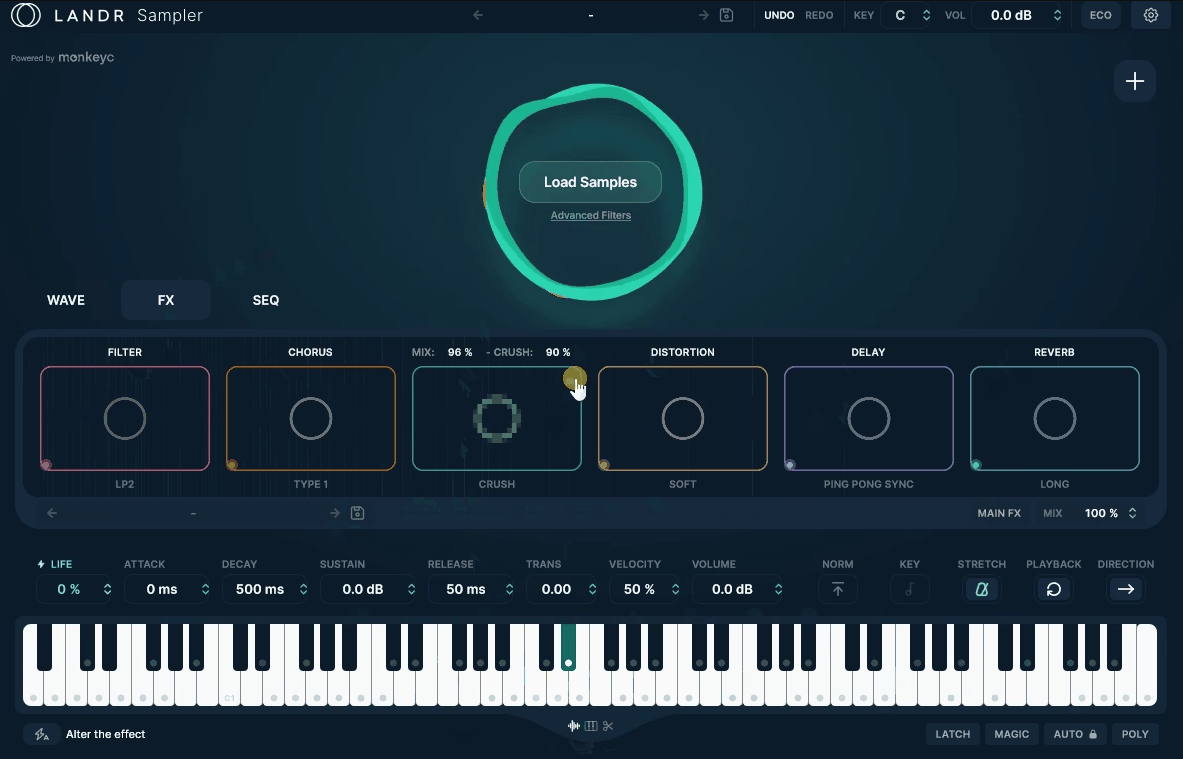
You get six built-in effects covering all the essentials, starting with a chorus for thickening up single sounds and adding stereo width, a delay with tempo sync and feedback controls that handles everything from subtle slapbacks to washed-out rhythmic textures, and a crush effect for adding grit, vintage character, and that lo-fi feel to clean sounds.
On top of that, you’ve got drive for warming things up or pushing samples into aggressive saturation territory, plus a reverb that covers ambient space creation with multiple algorithm options depending on the vibe you’re chasing.
What really impressed me is the ability to change the algorithm for each effect, which genuinely transforms the character of the processing. For example, you can switch between a long, dreamy reverb for pads and a tight, room reverb for snares all within the same plugin, without needing to load separate instances.
The XY-pad control is honestly where things get fun, letting you modulate multiple parameters simultaneously in real time. Combined with the creative presets, you can take samples from raw to production-ready without ever reaching for external processing.
Workflow Integration
This is honestly where the plugin stops being just another sampler and becomes a real production tool.
Drag and drop export lets you move processed audio, MIDI patterns, or rendered samples directly into your DAW without bouncing through file folders. Build a pattern in the sequencer, process it through the effects, and drag the finished result straight onto a DAW track.
The magic controls feature automatically aligns samples so they work together cohesively, which saves real time when you’re layering drums or stacking melodic elements from different sources.
For me, this integration philosophy genuinely changes how I work. Instead of juggling between multiple plugins and bouncing samples through different tools, everything happens in one place with a clean path back to my DAW.
Pros and cons
The AI-powered sample organization genuinely changes how you interact with your library, turning thousands of forgotten sounds into a searchable, accessible resource. The Similar Sound Swap feature keeps inspiration flowing when you’d otherwise break momentum hunting through folders.
Four distinct playback modes (Normal, Chromatic, Slice, Sequence) cover pretty much every sampling workflow you might need, and the integrated five-lane step sequencer lets you build full patterns without leaving the plugin. Six effects with swappable algorithms provide genuine sound design depth, while the XY-pad control adds expressive real-time modulation.
Complete sample manipulation tools including start/end points, ADSR envelopes, time stretching, reverse playback, and chromatic mapping cover everything you’d expect from a professional sampler. The scalable UI looks crisp on modern displays, and the drag and drop export for processed audio, MIDI, and rendered samples integrates seamlessly with any DAW workflow.
On the flip side, there are some limitations worth knowing about. The plugin requires a decent amount of disk space and system resources to properly scan and index large sample libraries, so older machines might struggle with massive collections.
Some producers have noted the similarity to Rando by MonkeyC Audio, which could feel like a rebadging rather than something fundamentally new if you already own that plugin. The ecosystem integration with LANDR services might not appeal to producers who prefer standalone tools without any subscription-related touchpoints.
For users on older macOS versions (like 10.14 Mojave), the plugin won’t run, so you’ll need a relatively modern system to use it at all. And while the AI organization is impressive, it occasionally mis-tags samples, which means you’ll sometimes need to manually adjust categorizations for accuracy.
Final Thoughts
LANDR Sampler is genuinely one of those plugins that solves a real problem most producers don’t even realize they have until they start using it.
Together, the combination of AI-powered sample organization, four distinct playback modes, six effects with swappable algorithms, an integrated five-lane sequencer, XY-pad modulation, and seamless DAW integration creates a tool that doesn’t just play samples but fundamentally improves how you work with them.
For beat makers, electronic producers, film and game composers, and anyone working with extensive sample libraries, this plugin fills a genuinely useful space in your template. The organization alone saves real time, the creative tools keep inspiration flowing, and the workflow integration means you spend less time managing files and more time actually making music.
I love how the plugin treats sample management as a creative tool rather than a chore. Turning your library into an accessible, searchable resource changes how you approach production, and that shift in perspective alone makes this tool valuable.
More info & Price: LANDR Sampler
Get the Free Plugin Starter Kit
The genuinely useful free DAWs and plugins worth installing. No filler. Straight to your inbox.

Hello, I’m Viliam, I started this audio plugin focused blog to keep you updated on the latest trends, news and everything plugin related. I’ll put the most emphasis on the topics covering best VST, AU and AAX plugins. If you find some great plugin suggestions for us to include on our site, feel free to let me know, so I can take a look!