
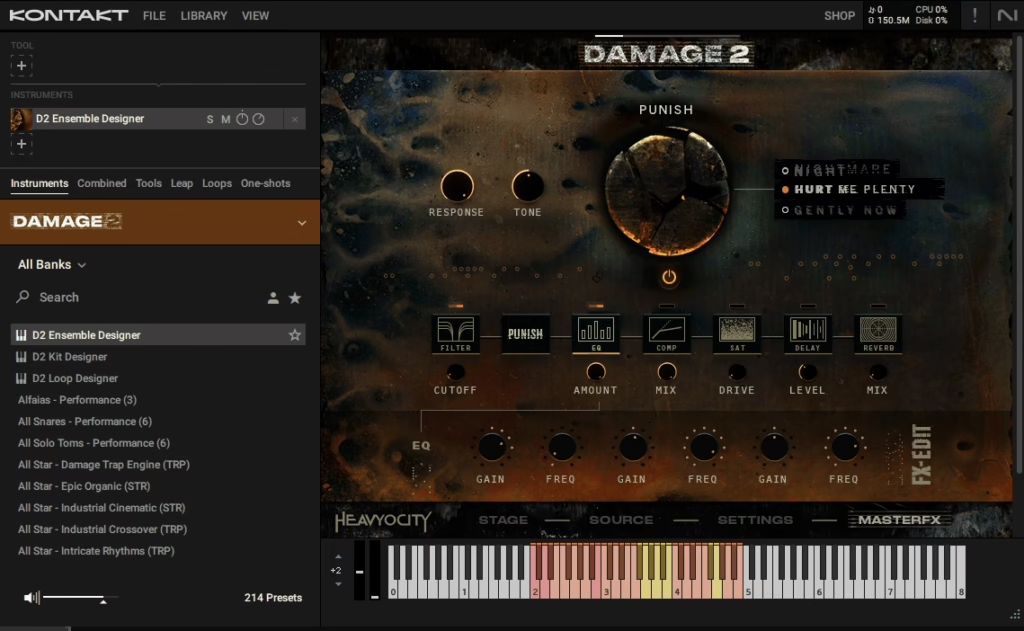
Heavyocity Damage 2 is one of those sample libraries that essentially defined a genre when the original dropped back in 2011. The Damage 1 library became the go-to percussion tool for trailer composers, film scorers, and producers working on anything that needed hard-hitting cinematic drums, and its sounds have been featured in literally thousands of movies, TV shows, video games, and trailer cues over the years.
This follow-up isn’t an update or a reboot, it’s a completely new library recorded from scratch at Skywalker Sound, the legendary scoring stage at George Lucas’s famous facility in California. Heavyocity flew their entire creative team across the country and spent weeks capturing fresh percussion, found sounds, and ethnic drums through 84 microphones, alongside two truckloads of heavy percussion instruments and a rented metal dumpster.
Is this library worth it? I’d say absolutely yes, especially if you work in film scoring, trailer music, hybrid orchestral production, or cinematic electronic music. It’s an astonishing leap forward from the original, with deeper sampling, smarter design tools, and sounds that feel both massive and musical at the same time.
For me, what makes Damage 2 so special is how it balances the brutal, face-melting percussion you’d expect with surprisingly nuanced quiet hits, subtle rolls, and atmospheric textures. You’re not just getting loud, you’re getting a genuine cinematic percussion instrument that covers everything from delicate detail work to wall-shaking sonic impacts.
From the Pluginerds Store
A quick mention: alongside the blog, we run Pluginerds Shop, our own store for studio hardware and accessories. Everything on it is there because someone on this team actually uses gear like it, not because it was the cheapest thing to list.
Visit Pluginerds ShopFirst Impressions & Interface
Opening the library for the first time, you notice right away how much cleaner and more thoughtful the interface feels compared to the original. Gone are the slightly cluttered layouts of older Heavyocity libraries, replaced with something that feels modern, focused, and genuinely fun to work with.
Three main patches organize everything: Ensemble Designer, Kit Designer, and Loop Designer. Each one handles a different approach to percussion programming, and you can run multiple instances side by side when you need to layer different styles or sonic characters.
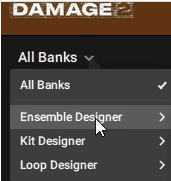
The visual feedback is excellent throughout. When you press a key, the corresponding drum lights up on the interface, so you always know which sound you’re triggering and where it lives on the keyboard.
Color coding helps you navigate the three one-octave banks in both Ensemble Designer and Loop Designer, and the auto-audition feature lets you click on any sound source to hear it before committing.
I realized pretty quickly that the design philosophy here is about giving you deep customization without burying you in menus. Most of what you need sits on screen at any given moment, and drilling into deeper features feels natural rather than intimidating.

Get the Free Plugin Starter Kit
The genuinely useful free DAWs and plugins worth installing. No filler. Straight to your inbox.
Workflow
The workflow across all three main patches follows a consistent logic once you understand how the banks work.
Ensemble Designer lays out sounds across three one-octave zones from C2 to B4, with twelve sound sources per zone. You can load presets that come with everything already assigned, or head to the Source tab at the bottom of the interface and drag sounds manually into any slot in any zone.
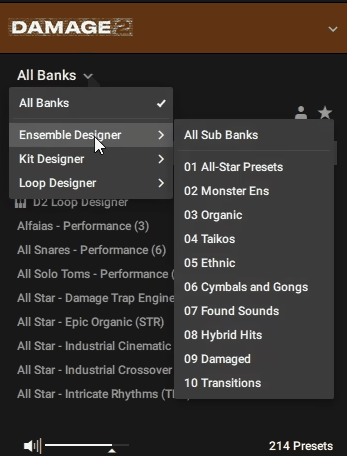
Browsing sounds happens through the nine category folders: Monster Ensembles, Organic Percussion, Taikos, Ethnic, Cymbals & Gongs, Found Sounds, Hybrid, Damaged, and Transitions. Each folder contains dozens of source sounds, and the audition feature lets you preview anything before assignment.
Customization goes surprisingly deep once you have your ensemble loaded. Each individual drum can be adjusted for volume, tuning, low and high tone, attack, and decay, all from per-drum controls that appear when you select a source.
One feature I keep coming back to is the ability to freeze your preset into a saved user preset, so the exact custom ensemble you built becomes immediately reloadable across sessions. Combined with the snapshot system, this makes building your own library of custom ensembles practical rather than something you only do for single projects.
The Sound
The sound is where everything comes together, and honestly, this is what separates this library from most cinematic percussion options on the market.
Every drum sits in a perfectly balanced sweet spot between polished and raw. You get the kind of pristine recording quality that fits seamlessly into professional film and TV scores, but without losing the aggressive character and punch that makes cinematic percussion actually impactful.
A few sonic highlights genuinely stand out:
- Massive Ensemble Drums:
Eight-player snare ensembles crack like rifle shots. Six-player bass drum ensembles produce what the developers call “grand slams”, and the 60-inch mega low taiko delivers cavernous, timpani-like sustains that feel like physical impacts rather than just audio.
- The 70-Inch Gran Casa:
Probably the single most impressive instrument in the library, this massive orchestral bass drum sounds like slamming a giant iron gate in an aircraft hangar at full velocity. Stroked gently with a rubber ball mallet, the same drum produces ghostly moans that show up throughout the sound design patches.
- Ethnic and World Percussion:
The library includes genuinely rare instruments like Brazilian surdos, West African dunun, Middle Eastern darbukas, Persian tombaks, and Indian dhol drums. Many of these aren’t just thrown in for variety, they’re deeply sampled with multiple playing techniques and velocity zones.
- Hybrid and Damaged Kits:
The processed sounds go way beyond distorted drums. You get apocalyptic sub-bass impacts, glitchy electronic percussion, crushed hi-hats, and reverse swells that work beautifully in modern hybrid scoring and cinematic electronic production.
10 velocity layers across the multisamples give you dynamic range that most percussion libraries simply can’t match. Play softly and you get intimate, ominous hushed booms, then hit hard and everything opens up into full cinematic impact territory.
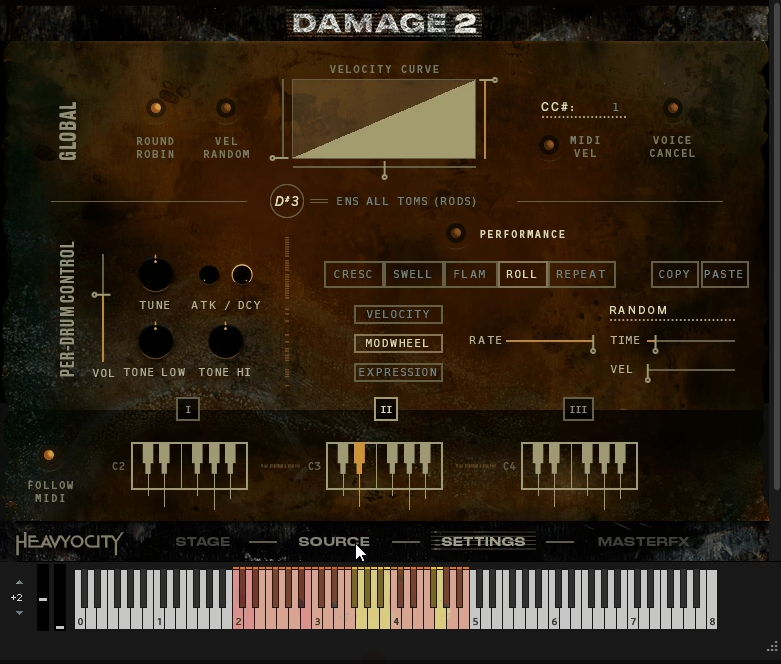
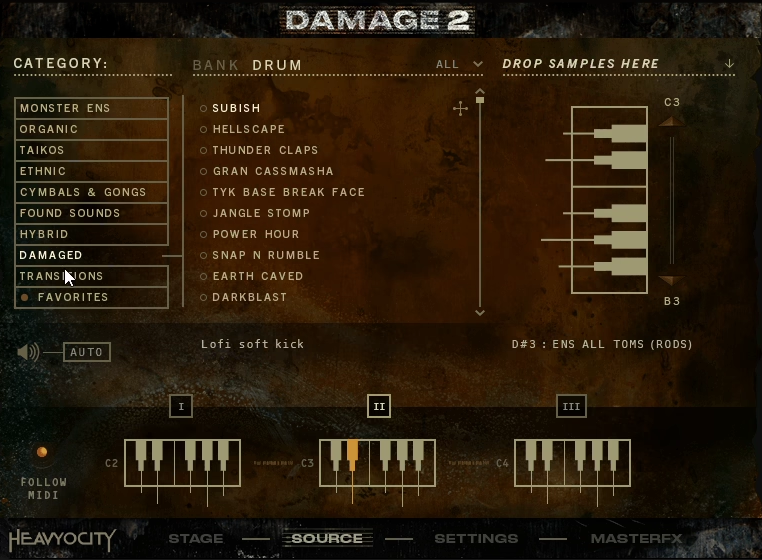
The Source Page
Diving into the Source page reveals where the real customization power of the library lives, and it’s one of the features I find myself using constantly once I move past the factory presets.
This is where you browse all 1,600+ sound sources organized by category, audition anything before committing, and drag individual drums or complete pre-made banks into your chosen keyboard zones. The layout feels genuinely intuitive, with category folders on one side, available sounds listed in the middle, and the destination banks on the right showing exactly where everything will land.
What I love most is how the audition system works. Click any sound and it plays immediately, letting you quickly scroll through dozens of options without having to load anything into your ensemble first.
When you find something that works, drag it to the keyboard zone you want, and it’s instantly playable. You can swap sounds in and out on the fly, build entirely custom ensembles from scratch, or start with a preset and gradually replace individual pieces until you’ve got something unique to your project.
For producers who want to get their hands dirty with sound design rather than just relying on snapshots, the Source page is essentially a sample browser, ensemble builder, and creative starting point all rolled into one panel. Once you get comfortable with the workflow here, building custom percussion kits becomes genuinely fast rather than feeling like a chore.
The FX Rack
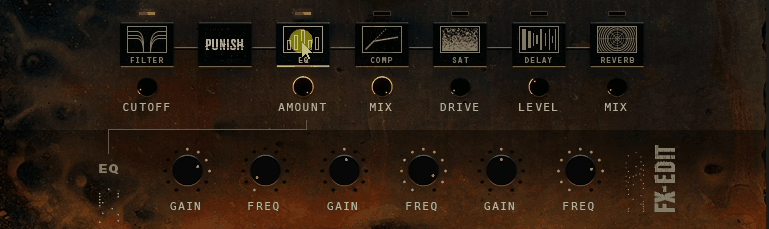
The Master FX rack works like a channel strip you can rearrange to your liking. Eight processors handle pretty much every shaping need you’d want for cinematic percussion:
- Filter:
A tweakable filter module for high-pass, low-pass, and band-pass shaping. Useful for creating tonal variations, fitting drums into busier mixes, or sculpting the overall tone of a kit.
- Parametric EQ:
A flexible equalizer for precise tonal adjustment. I find this particularly useful for adding punch to low drums or taming harsh high frequencies on processed hits.
- Compressor:
Handles dynamic control and glue, especially important when you’re pushing ensembles hard or layering multiple processed sources together.
- Saturation:
Adds warmth, harmonic density, and analog character that can transform sterile samples into something with genuine grit and presence.
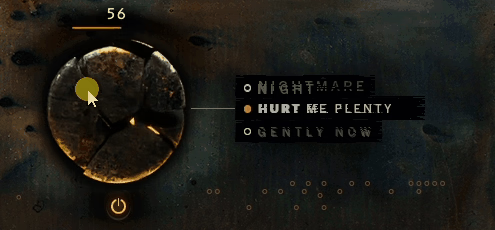
- Punish Knob (Three-Mode Distortion):
Delivers Gently Now, Hurt Me Plenty, and Nightmare severity settings. I love how this control can take an already powerful drum and push it into speaker-destroying territory when you need that trailer-style brutality.
- Delay and Reverb:
Built-in time-based effects for adding space and depth. They’re not as pristine as dedicated third-party reverbs, but they work well for quick setups and sound design applications.
The ability to reorder the effects chain is a small detail that matters more than you might expect. Putting saturation before compression versus after gives you completely different character, and being able to experiment with signal flow without leaving the plugin makes creative exploration fast.
“Damage 2 is a beast of a percussive instrument and truly pushes the boundaries of what can be done with Kontakt.”
Preset Library
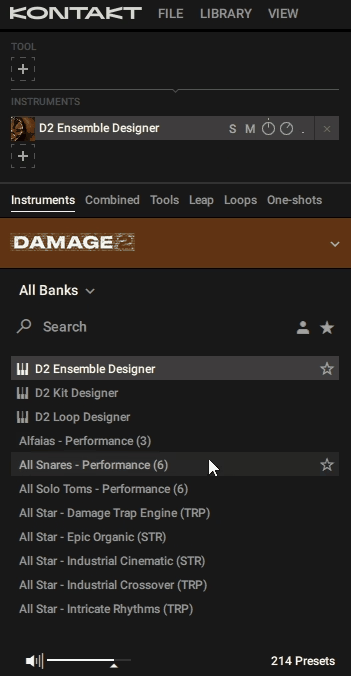
The preset situation here deserves its own discussion because 208 snapshot presets across 20 sonic categories ship with the library, and quality is consistently high across the board.
Snapshots load full configurations including sound sources, stage positions, FX settings, and performance settings. These aren’t just quick starting points, they’re genuinely finished, production-ready sounds crafted by professional sound designers who understand how cinematic percussion actually gets used.
All-Star Presets are where I recommend starting. This folder contains hand-picked favorites from the design team that showcase the library’s range, from massive ensemble percussion to atmospheric textures to aggressive hybrid kits.
Kit Designer presets lean harder into processed, hybrid territory. Faces like World Destroyer, Digital Deluxe, and Damaged Goods deliver the distorted, crunchy, aggressive drums that fit perfectly in modern trailer scoring and hybrid electronic music.
Industrial Cinematic and Manhattan Car Chase bring driving, aggressive action rhythms, while Modern Mystery delivers atmospheric, suspenseful loops perfect for investigation scenes or tension cues.
One small thing worth flagging is that the original library included MIDI file versions of its loops, letting you rearrange slice order in your DAW. This successor doesn’t include those files, though you can edit loop start, end, and internal points within the plugin itself.
CPU & RAM Requirements
Running a library this large comes with real system demands, so it’s worth knowing what you’re getting into.
The full library takes up roughly 24GB of disk space after installation (around 60GB uncompressed), which means you’ll need plenty of free storage before you start the download process. Heavyocity’s Portal application handles the download and installation, while Native Access registers the library for use inside Kontakt 6.2.2 or later, including the free Kontakt Player.
RAM usage depends heavily on which patches you load and how many instances you run simultaneously. A single Ensemble Designer patch with full multisampling engaged can eat through several gigabytes of RAM, while Kit Designer patches run more efficiently because they load fewer sound sources.
CPU load stays reasonable on modern systems (I tested across both Apple Silicon and Intel machines without issues), but stacking multiple instances with active FX chains and complex MIDI performance triggers can get heavy during real-time playback. For most production workflows, freezing tracks after you’ve programmed your percussion parts is a practical approach.
I want to note that purging unused samples inside Kontakt helps significantly if you’re running into RAM limitations. You don’t need all 1,600 sound sources loaded for every project, so purging the ones you’re not using frees up serious memory.
Who Is Damage 2 Best For?
This library is built for specific types of production, and being honest about that helps you decide whether it fits what you actually need.
- Film and TV Composers:
The cinematic quality, depth of sampling, and orchestral-grade ensemble sounds make this essential for scoring work. You get everything from intimate quiet hits for dialogue scenes to massive orchestral percussion for climactic moments.
- Trailer Music Producers:
Honestly, you can’t really make modern trailer music without a library like this one. The hybrid kits, Damaged category, and massive ensemble drums give you exactly the palette that defines contemporary trailer percussion.
- Video Game Composers:
Hybrid orchestral and electronic scoring has become the dominant sound of AAA game soundtracks, and this collection fits that territory perfectly. The loops also work beautifully for gameplay music where you need rhythmic beds that feel cinematic.
- Hybrid Orchestral and Neoclassical Producers:
Anyone blending acoustic orchestra with electronic elements will find this library genuinely essential. The organic recordings blend beautifully with real orchestral libraries, while the processed kits give you the electronic edge.
- Electronic and Hip-Hop Producers:
Beyond the obvious cinematic applications, the Kit Designer delivers hard-hitting drums that work brilliantly in industrial, dubstep, hybrid trap, and aggressive electronic production. Producers working in these genres will find plenty of usable material.
For producers working in traditional pop, rock, or acoustic folk genres, I’d say this library probably isn’t the best fit. It’s specifically designed for cinematic, aggressive, and hybrid applications, and the sounds can feel oversized when they’re not used in contexts that give them room to breathe.
Strengths and Weaknesses
Heavyocity Damage 2 has real strengths that make it one of the most capable cinematic percussion libraries available, alongside a few areas where it shows its focus as a specialized tool rather than a do-everything solution.
On the strengths side, the sound quality is genuinely exceptional, with the Skywalker Sound recordings delivering depth and power that simply wasn’t possible in the original. The three-NKI structure (Ensemble Designer, Kit Designer) gives you flexibility for different workflows without forcing you into one approach.
MIDI Performance tools produce realistic crescendos, rolls, and swells that sound remarkably natural. The massive sample count (41,395 samples total) across deep-sampled instruments with up to 10 velocity layers means you get expressive range that covers everything from whisper-quiet hits to wall-shaking impacts.
The stage positioning system with five microphone positions handles spatial design elegantly, and the 208 production-ready snapshots give you immediate starting points without requiring extensive programming work.
On the weakness side, there are a few things worth knowing. The 24GB disk size means you’ll need real storage space before installation, and RAM usage can get heavy when you’re running multiple instances simultaneously.
Unlike the original library, MIDI file versions of loops aren’t included, which takes away some rearrangement flexibility if that’s a feature you relied on. The built-in reverb and delay effects work, but they’re not as polished as dedicated third-party plugins (most serious producers will want to route to external reverbs instead). The specialized focus on cinematic and aggressive percussion means this isn’t going to be your go-to library for traditional pop, rock, or acoustic genres. F
inally, while MPE support is technically present, the implementation has some limitations that make it less useful than it could be for expressive controller performances.
Final Verdict
Heavyocity Damage 2 stands as one of the most impressive cinematic percussion libraries available right now, and it genuinely earns the hype that came with its release.
Everything that made the original library a must-have for scoring work comes back stronger here, including the deep sampling, the famous Punish distortion, the hard-hitting kits, and the production-ready loops. On top of that, you get significant new capabilities like the MIDI Performance tool, the stage positioning system, the three-designer structure, and the massive 41,000+ sample count recorded at Skywalker Sound.
I want to note that this library isn’t cheap, and the system requirements are real. If you’re working on a starter setup with limited RAM or storage, you’ll want to plan accordingly before investing. Likewise, if you primarily produce traditional pop, rock, or acoustic singer-songwriter material, the sounds here will feel oversized and inappropriate for most of your work.
That said, if you write film scores, trailer music, video game soundtracks, hybrid orchestral compositions, or any form of cinematic electronic music, Damage 2 earns its place as one of the most valuable tools you can add to your arsenal. The sound quality is exceptional, the design philosophy is thoughtful, and the library covers territory that simpler percussion collections just can’t reach.
For composers, trailer producers, and hybrid scoring specialists, I’d recommend this library as a genuine investment that pays off across projects rather than just sitting in your session template unused. You’ll hear these sounds in action blockbuster trailers and cinematic productions for years to come, and once you have them in your own workflow, you’ll understand why.
Check More info & Price: Heavyocity Damage 2
Get the Free Plugin Starter Kit
The genuinely useful free DAWs and plugins worth installing. No filler. Straight to your inbox.

Hello, I’m Viliam, I started this audio plugin focused blog to keep you updated on the latest trends, news and everything plugin related. I’ll put the most emphasis on the topics covering best VST, AU and AAX plugins. If you find some great plugin suggestions for us to include on our site, feel free to let me know, so I can take a look!