
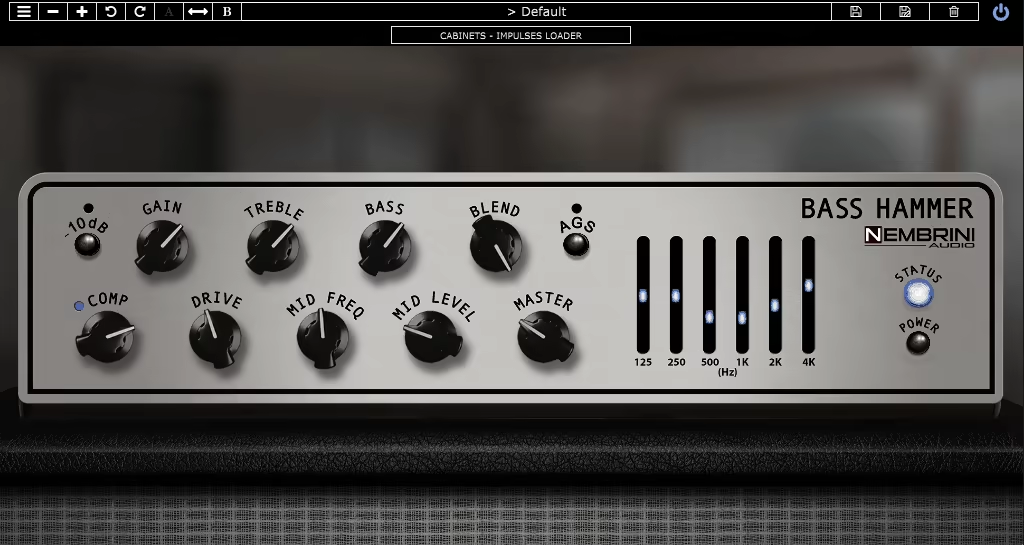
If you’ve spent any real time chasing that warm, punchy, studio-ready bass tone inside your DAW, you’ve probably run into the frustration of plugins that sound thin, digital, or just plain fake. Nembrini Audio has built a strong reputation in the amp sim world for doing things differently, and their Bass Hammer is a pretty clear statement of what that means for bass players specifically.
Modeled after the Aguilar Tone Hammer, one of the most beloved bass preamp/DI pedals in the business, this plugin brings that legendary hardware character into a fully digital format without leaving behind what made it special in the first place.
I think what makes this release stand out right away is who it’s built for. Whether you’re a session bassist tracking remotely, a producer layering electronic low-end, or someone who just wants a reliable signal chain without hauling gear, the Bass Hammer covers a lot of ground without feeling overwhelming. I noticed pretty quickly that Nembrini didn’t just slap the Aguilar name on something generic here. The modeling goes deep, and you can feel it the moment you start dialing things in.
I’d say if you’re looking for a bass amp plugin that genuinely sounds like something you’d want to use on a real record, this one is worth your money. The combination of authentic amp character, flexible EQ, and a full recording chain in a single plugin means you’re not piecing together five different tools just to get a usable tone.
The AGS Switch
The feature that I think defines the Bass Hammer more than anything else is the AGS, or Adaptive Gain Sculpting. This is Nembrini’s take on how the real Aguilar hardware behaves, and honestly, I love how they’ve handled it. When you engage the AGS switch, it dynamically transforms your signal’s EQ curve and gain structure, and crucially, it changes the behavior of the MID control in a way that feels musical rather than surgical. You’re not just boosting a frequency, you’re reshaping how the amp responds to your playing.
For me, this is where the plugin stops feeling like a plugin. The way the midrange opens up or tightens depending on your gain settings gives it that organic, reactive quality that most amp sims completely miss. I’d also say it’s one of those features that’s worth spending some time with before you form any opinions because it’s not immediately obvious how dramatic the difference can be until you start pushing the Drive and watching how the whole character shifts underneath it.
Get the Free Plugin Starter Kit
The genuinely useful free DAWs and plugins worth installing. No filler. Straight to your inbox.
EQ and Tone Shaping
Beyond the AGS, you’ve got a seriously comprehensive EQ situation here, and I appreciate that Nembrini gave you two separate ways to approach it. On the front panel you get a three-band EQ with sweepable mids, which mirrors exactly how the hardware Tone Hammer works: Treble adjusts up to ±18 dB at 4 kHz, Bass delivers up to ±18 dB at 40 Hz, and the Mid control is the one that reacts to the AGS switch. That alone gives you a massive tonal range to work with.
Then there’s the six-band Graphic EQ, with bands centered at 125 Hz, 250 Hz, 500 Hz, 1 kHz, 2 kHz, and 4 kHz. I found this is where you do the more precise, mix-ready shaping once you’ve already set the overall character with the main controls. The two together give you a level of control that I’d usually expect from a much more complicated signal chain. It works incredibly well for everything from cutting boom out of a muddy low-B string to adding presence and grind for a more aggressive, modern sound.
The Cabinet
This is where it gets genuinely useful as a complete production tool. The plugin includes:
- Four bass cabinet simulations with four microphone emulations to pair with them
- A parallel D.I. signal with a console-style compressor built in
- Ambient reverb blending so the cab sounds feel like they’re actually in a room
- An Impulse Response loader that lets you bring in up to two external IRs and blend them together, either pre or post the DI signal
- A Bypass mode that cuts the entire cabinet section so you can run your own IR loader or go straight into a real power amp
I want to note that the IR loader alone makes this significantly more flexible than it might look on the surface. If you’ve already got a collection of bass cab IRs you love, you don’t have to abandon them, you just feed them in and blend. That’s a smart design decision and it’s one I believe a lot of players will genuinely appreciate once they dig into it.
There’s also a noise gate on board with threshold, range, and speed controls, and a 10 dB pad on the input for active basses running hot. The plugin does include factory presets as well, accessible directly from the top toolbar, which is a solid starting point if you want to explore the range of sounds before you start building your own.
Compatibility/pricing
The plugin runs as VST2, VST3, AU, and AAX on both Mac and Windows, and there’s an AUv3 version for iOS as well. System requirements are pretty light: you need macOS 10.13 or newer, or Windows 7 and up, with a 64-bit DAW and at least 1 GB of RAM. It requires a free iLok account but no iLok dongle, which is the way it should be. The desktop version is regularly priced at $137, though it frequently shows up at introductory pricing that makes it a much easier call. The iOS version sits at a much lower price point as well, making it surprisingly accessible if you work on mobile.
In my opinion, the pricing at its regular rate is fair for what you’re getting when you consider this is a full recording chain in a single plugin. A real Aguilar Tone Hammer hardware unit runs several hundred dollars on its own, and you still need cabs, mics, and preamps on top of that. Here you get all of it in one place, and it holds up in an actual mix.
Check here: Nembrini Audio Bass Hammer
Get the Free Plugin Starter Kit
The genuinely useful free DAWs and plugins worth installing. No filler. Straight to your inbox.

Hello, I’m Viliam, I started this audio plugin focused blog to keep you updated on the latest trends, news and everything plugin related. I’ll put the most emphasis on the topics covering best VST, AU and AAX plugins. If you find some great plugin suggestions for us to include on our site, feel free to let me know, so I can take a look!