
If you’re streaming with your laptop’s built-in mic and audio, you already know how bad it sounds. Background noise bleeds in, your voice sounds thin and distant, and the moment you try to mix game audio with your microphone, everything falls apart.
A dedicated USB audio interface fixes all of this by giving you proper microphone preamps, headphone monitoring so you hear what your audience hears, and the routing flexibility to combine multiple audio sources without the nightmare of virtual audio cables and software workarounds.
What makes a good streaming interface different from a standard recording interface is the routing.
Streamers need loopback functionality (so your computer audio feeds back into the interface alongside your mic), multiple monitoring options, and ideally some form of onboard processing like compression and noise gating so your voice sounds polished without taxing your CPU.
I’ve picked nine USB audio interfaces that handle streaming well, from dedicated broadcasting units through to versatile studio interfaces that double effectively for stream use.
Some of these are built specifically for content creators, while others are studio-focused interfaces with routing flexible enough to serve streamers alongside their primary recording duties.
1. 2-Channel USB Audio Interface Mixer — $68.99

Before the streaming-optimised interfaces below, one option from the Pluginerds store for streamers who need clean audio starting this session rather than waiting for the next sale.
The 2-Channel USB Audio Interface Mixer gives you two inputs for microphone or instrument use, 48V phantom power for condenser microphones, direct monitoring for zero-latency headphone playback, and USB-C connectivity at $68.99. For streaming specifically, the two inputs cover the standard setup: microphone on channel 1, audio return or second source on channel 2. Phantom power means any condenser mic works without a separate power supply. What the specialist streaming interfaces below add is visual feedback software, scene switching integration, and dedicated mix controls for separating game audio from voice — features worth having as your stream setup matures.
- Two Inputs
Two XLR/instrument combination inputs handle the standard streaming audio setup without requiring more channels than the majority of streamers ever use.
One microphone channel for your voice, one line-level return for monitoring game audio in your headphones while streaming — the two-input format covers the entire basic streaming signal chain. More inputs only become relevant when you add co-hosts or multiple microphones.
- Direct Monitoring
Direct monitoring sends your microphone signal back to your headphones without passing through the computer, which means you hear yourself at zero latency rather than with a slight delay that disrupts natural speech delivery.
For streamers who need to talk naturally while monitoring their own voice, direct monitoring is the feature that makes the difference between sounding confident and sounding distracted by your own audio.
- Phantom Power
48V phantom power activates the condenser microphones that produce cleaner, more detailed voice capture than the dynamic microphones that streaming gear often defaults to.
Condenser microphones require phantom power to operate. Having it built into the interface at this price means you can use any standard studio condenser mic immediately, without limitation.
Shop at Pluginerds — 2-Channel USB Audio Interface Mixer $68.99
Get the Free Plugin Starter Kit
The genuinely useful free DAWs and plugins worth installing. No filler. Straight to your inbox.
2. Rode RODECaster Pro II
Built from the ground up for content creation rather than adapted from a studio recording interface.
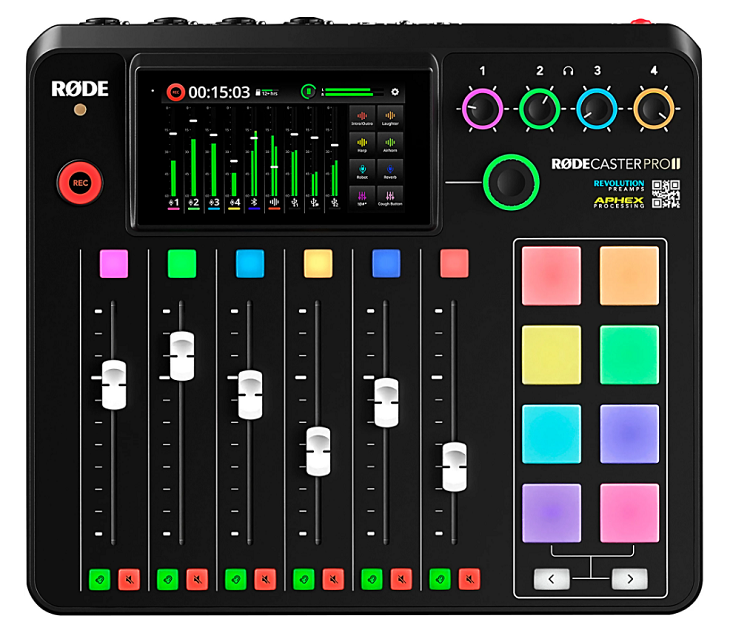
Rode RODECaster Pro II combines a touchscreen mixer, four microphone preamps with phantom power, physical faders, customizable sound pads, Bluetooth phone connectivity, and multitrack USB audio in a unit designed to handle every aspect of streaming, podcasting, and content production from a single piece of hardware.
What makes the RODECaster Pro II genuinely different from other interfaces on this list is the all-in-one approach. You don’t need separate mixer software, virtual audio cables, or a physical mixer alongside your interface.
Everything lives inside one box with a touchscreen that shows you exactly what’s happening with every audio source.
- Touch Mixer
The 4.3-inch color touchscreen gives you visual mixing control that no other interface at this level provides. You see your levels, adjust EQ, apply compression, and route audio sources by tapping and swiping on the screen rather than navigating menus or switching between software windows.
For streamers who need to manage multiple audio sources while also engaging with their audience and playing a game, the visual mixer means you make adjustments in seconds without breaking your flow.
- Sound Pads
Eight programmable SMART pads can trigger sound effects, music beds, jingles, or voice effects during your stream. Each pad is fully customizable with color coding and can hold multiple sounds organized into banks.
For streamers who use sound effects for audience interaction, transitions, or humor, the physical pads provide instant, reliable triggering that’s faster and more intuitive than keyboard shortcuts or mouse clicks on a soundboard app.
- Bluetooth Input
Bluetooth connectivity lets you bring phone calls and mobile audio directly into your stream mix without cables. You connect your phone wirelessly, and the caller’s audio appears as a dedicated channel on the RODECaster’s mixer.
For streamers who take listener calls, interview remote guests via phone, or want to play audio from their phone during a stream, the Bluetooth connection handles it cleanly without the audio quality degradation that speakerphone setups cause.
- Voice Processing
Onboard APHEX processing including a compressor, noise gate, de-esser, exciter, and big bottom provides broadcast-quality voice enhancement without CPU overhead.
The processing runs on the RODECaster’s hardware rather than your computer’s processor, which matters for streamers who are already pushing their CPU with game rendering and streaming encoding. You set the processing once, and your voice sounds professionally treated on every stream without additional software.
3. Focusrite Vocaster Two
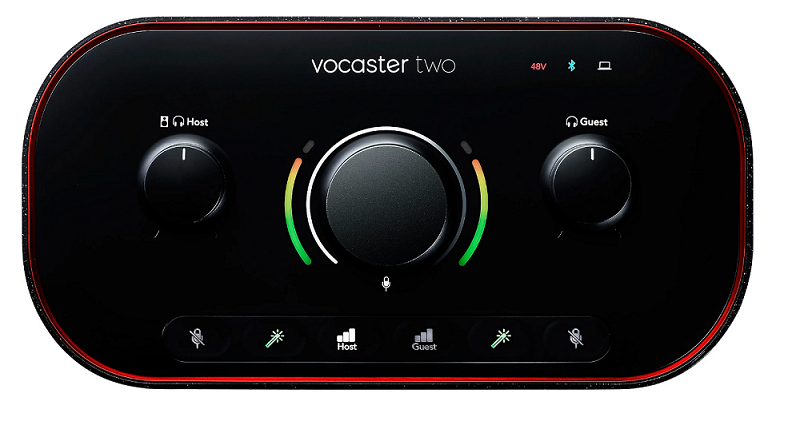
Designed specifically for podcasters and streamers by the company that makes the world’s best-selling audio interface range. Focusrite Vocaster Two features two XLR inputs with Focusrite’s preamp technology, Auto Gain that sets your levels automatically, Enhance processing for instant voice polish, a Bluetooth input for phone guests, USB-C connectivity with loopback, and the Focusrite Vocaster Hub software for advanced audio routing.
I appreciate that Focusrite built the Vocaster specifically for voice-first content rather than trying to market one of their Scarlett recording interfaces as a streaming solution.
The Auto Gain and Enhance features mean you can sound good on stream within two minutes of unboxing, which is exactly what most streamers want.
- Auto Gain
The Auto Gain function analyzes your voice level and automatically sets the preamp gain for optimal volume without clipping. You press the button, speak for a few seconds at your normal volume, and the Vocaster sets the gain correctly.
For streamers who aren’t comfortable manually adjusting preamp gain or who simply want to get streaming faster, Auto Gain eliminates one of the most common audio setup mistakes that plagues beginner streams.
- Enhance Button
A single-button Enhance function applies a curated combination of compression, EQ, and noise reduction to your voice signal for an instantly polished, broadcast-ready sound.
The Enhance processing is designed to make untreated voices sound professional without requiring you to understand what compression ratios or EQ curves do. You press one button and your voice goes from raw microphone signal to produced, radio-style audio.
- Vocaster Hub
The Vocaster Hub software provides advanced audio routing, loopback configuration, and stream setup that goes beyond the hardware controls. The software handles the complex routing that streaming requires, like sending your mic audio and computer audio to your streaming platform while monitoring a different mix in your headphones.
For streamers who use OBS, Streamlabs, or similar software, the Vocaster Hub integrates cleanly with the routing those platforms expect.
- Phone Connect
Bluetooth connectivity with dedicated mix control brings remote callers into your stream without additional hardware or software. The phone audio gets its own mix control, which means you independently adjust the volume of your remote guest relative to your own voice and your computer audio.
For interview-style streams and call-in content, the dedicated phone channel provides clean integration that software-based phone call solutions handle poorly.
- Loopback Built-In
The integrated loopback routing sends your computer audio back through the interface as a virtual input that your streaming software can capture. Without loopback, getting game audio, music, and alerts into your stream alongside your microphone requires third-party virtual audio cables that add complexity and potential audio issues.
The Vocaster’s built-in loopback handles this natively, which means your stream captures everything your audience needs to hear without additional software.
- Mute Control
A dedicated physical mute button with clear LED status indication lets you silence your microphone instantly during a stream. The mute function is immediate with no latency, and the LED shows you definitively whether your mic is live or muted.
For streamers who need to cough, talk to someone off-stream, or take a moment without their audience hearing, a reliable hardware mute is more trustworthy than software-based mute functions.
4. Universal Audio Volt 276 USB Recording Studio
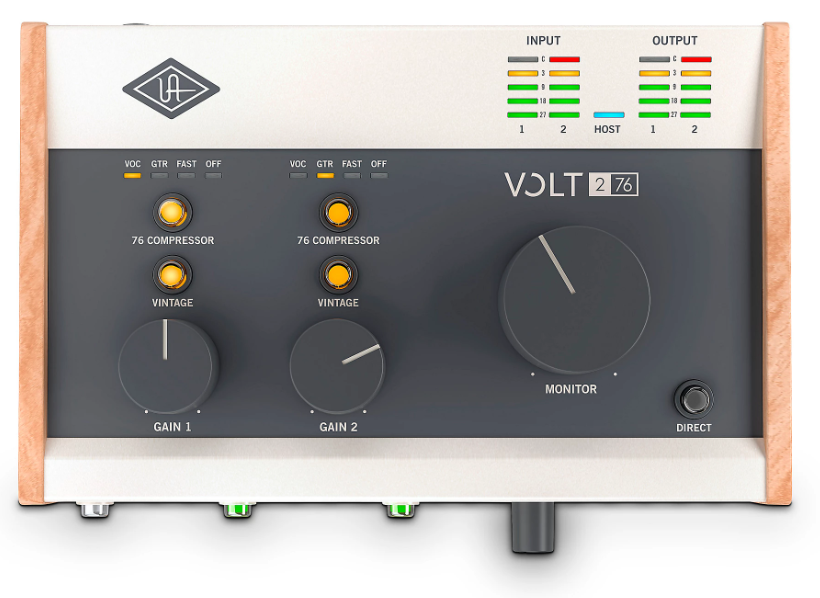
A recording-focused interface that brings classic analog character to streaming through Universal Audio’s vintage preamp modeling. UAD Volt 276 features two mic/line inputs, a built-in 1176-style compressor, UA’s Vintage preamp mode, and a studio bundle that includes headphones and a condenser microphone in a complete package.
The Volt 276 appeals to streamers who also make music or record audio content beyond streaming, because the analog compressor and vintage preamp mode give your voice a warmth and polish that purely digital processing can’t replicate. The 1176-style compression is the same circuit topology used on countless professional records.
- 1176 Compressor
The built-in analog compressor modeled on the classic 1176 provides real hardware compression on your voice before it hits the digital domain. The compressor smooths out volume variations and adds the subtle harmonic character that the 1176 circuit is famous for, giving your stream audio a professional, broadcast quality that software compression approximates but doesn’t fully replicate. For streamers who want their voice to sound like it’s coming through a radio station’s processing chain, the hardware compressor delivers that polished consistency.
- Vintage Mode
UA’s Vintage preamp mode adds harmonic warmth and subtle saturation to your microphone signal, modeling the character of classic analog recording equipment. The vintage processing gives your voice a richness and presence that clean digital preamps don’t provide, making your stream audio sound warmer and more engaging without post-processing. You toggle vintage mode on or off depending on whether you want the colored or clean character.
- Studio Bundle
The complete recording studio bundle includes a condenser microphone, closed-back headphones, and the Volt 276 interface, providing everything a new streamer needs to produce professional audio from a single purchase. The bundle eliminates the research and compatibility concerns of buying components separately, and the included components are matched to work well together.
5. Audient EVO 8
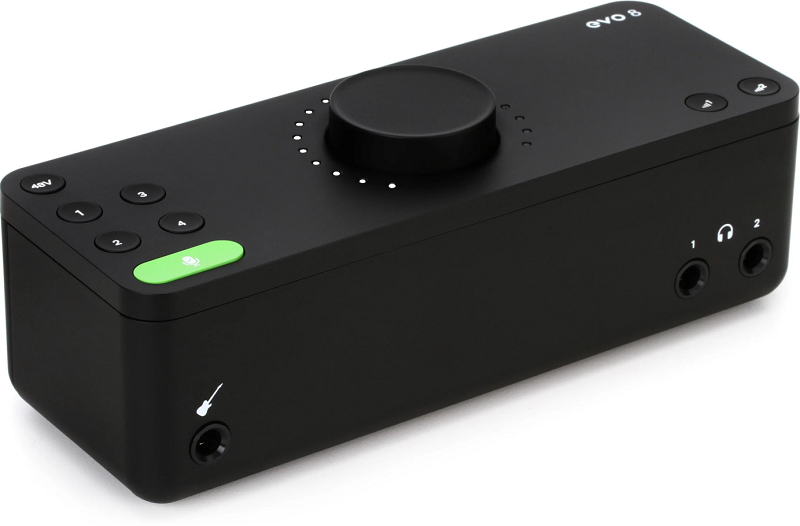
British audio engineering in a streaming-friendly format, with Audient’s professional-grade preamps and a smartly designed interface that simplifies complex audio tasks. Audient EVO 8 provides four mic/line inputs, a Smartgain function for automatic level setting, loopback routing for streaming, and Audient’s acclaimed preamp technology in a compact desktop unit with a single large control knob.
The EVO 8’s four inputs give you more flexibility than two-input interfaces, which matters for streamers who want to run two microphones for co-streaming, or a microphone plus instruments for music streams. The Smartgain function makes setup fast, and the preamp quality means your audio is genuinely cleaner than what budget interfaces deliver.
- Smartgain
The Smartgain automatic level setting analyzes your audio sources and sets the preamp gain for each input simultaneously. You activate Smartgain, make noise on all your connected sources, and the EVO 8 sets every input to the correct level at once. For streamers who connect multiple sources and don’t want to manually calibrate each one, Smartgain eliminates the most tedious part of stream audio setup.
- Four Inputs
Four mic/line inputs provide connectivity for co-streaming, interview setups, or music streaming where you need more than the typical two inputs. You can run two microphones for a co-hosted stream while simultaneously connecting instruments or external audio sources, all through a single interface. The additional inputs future-proof your setup for when your streaming needs grow beyond solo voice.
- Audient Preamps
The preamp technology comes from Audient’s professional console heritage, providing the same signal quality found in their high-end studio consoles at a fraction of the cost. The preamp quality directly affects how your voice sounds to your audience, and Audient’s preamps deliver a clarity and detail that distinguishes your stream audio from the muddy, noisy sound of cheaper interfaces.
- Single Knob
The large central control knob with automatic function assignment simplifies the interface to one primary control that does whatever you need based on context. When you select an input, the knob controls that input’s gain. When you select headphones, it controls headphone volume. The design philosophy reduces the learning curve to practically zero, which means you spend time streaming rather than learning your hardware.
6. IK Multimedia iRig Stream Pro
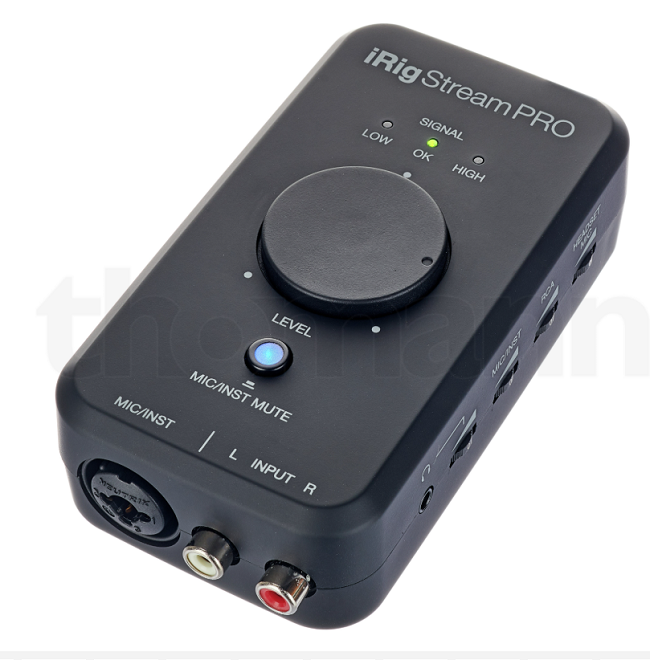
Purpose-built for mobile and desktop streaming with features that no studio recording interface bothers to include. IK Multimedia iRig Stream Pro features loopback audio, headphone monitoring with separate source/stream mix control, MIDI connectivity, and compatibility with both desktop and mobile streaming on iOS and Android in a pocket-sized format.
The iRig Stream Pro is the interface I’d recommend if you stream from a phone or tablet rather than a desktop computer. Most audio interfaces work with mobile devices as an afterthought, but the iRig Stream Pro was designed for mobile streaming from the start, with the desktop compatibility added rather than the reverse.
- Mobile First
The native iOS and Android compatibility with dedicated mobile streaming features makes the iRig Stream Pro the strongest mobile streaming interface available. The interface connects directly to phones and tablets without adapters or dongles, and the routing handles the specific requirements of mobile streaming apps that desktop-focused interfaces don’t address. For streamers who broadcast from phones, tablets, or switch between mobile and desktop, the iRig Stream Pro works natively with both platforms.
- Source/Stream Mix
A dedicated mix control lets you blend your monitoring between the direct input signal and the stream output, so you hear exactly what your audience hears or a custom mix that emphasizes your own voice. The separate monitoring means you can check the actual stream audio quality without switching away from your streaming software, which helps you catch audio problems in real time.
- Pocket Size
The ultra-compact form factor fits in a pocket or small bag, making the iRig Stream Pro genuinely portable for streaming from locations outside your studio. The small size combined with mobile device compatibility means you can produce a professional-quality stream from a coffee shop, event, or outdoor location with just your phone and the interface.
7. Lewitt Connect 2
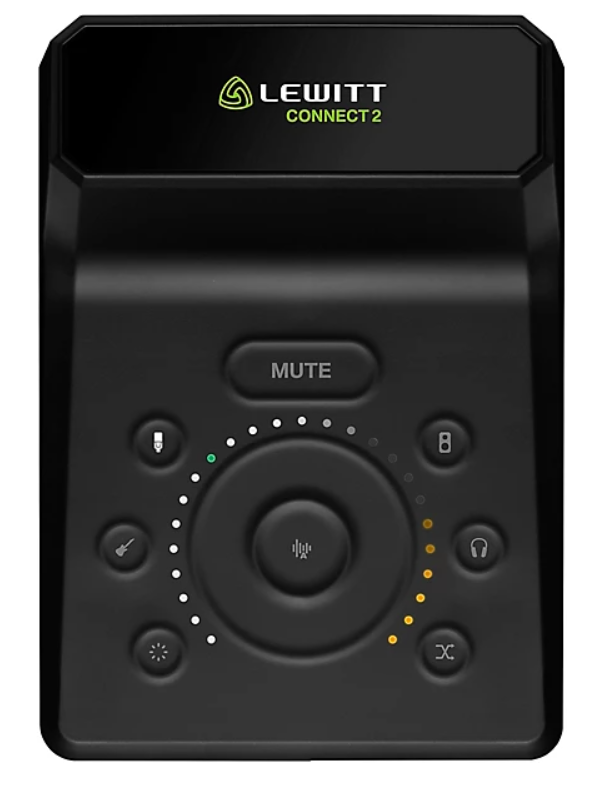
The interface built around the idea that audio setup should take seconds, not minutes. Lewitt Connect 2 features a touch-based control surface, Autosetup that configures your entire signal chain automatically, Clipguard anti-distortion protection, three selectable preamp characters, onboard Denoiser and Compressor, and a loopback channel for streaming, all controlled through Lewitt’s Control Center software.
What drew me to the Connect 2 is how aggressively it simplifies the setup process. You press Autosetup, speak into your mic and strum your guitar, and the interface sets the gain, applies processing, and gets you ready to stream in about ten seconds. For streamers who don’t want to become audio engineers just to sound decent, the Connect 2 removes more technical barriers than any other interface I’ve used.
- Autosetup
The Autosetup function guides you through a brief calibration that automatically configures gain levels, processing settings, and monitoring for your specific microphone and environment. The system goes beyond simple auto-gain by also recommending and applying Clipguard, compression, and noise reduction based on what it detects. For streamers who just want to sound good without understanding signal chains, Autosetup delivers professional results from a ten-second process.
- Clipguard
Clipguard anti-distortion technology monitors your input signal in real time and automatically reduces the level before clipping occurs. During a stream, unexpected volume spikes from laughing, shouting, or getting excited about a game moment would normally cause harsh digital distortion that ruins the audio. Clipguard catches those spikes before they clip, keeping your stream audio clean regardless of how dynamic your voice gets.
- Preamp Characters
Three selectable preamp sounds (Clean, Warm, and Vivid) let you choose a tonal character for your microphone signal that matches your voice and your content style. Clean provides uncolored transparency, Warm rolls off the high end for a vintage feel, and Vivid adds presence and articulation for voices that need more energy. The preamp characters function like EQ presets but operate at the DSP level with zero latency, giving you instant tonal shaping without software processing.
- Touch Controls
The capacitive touch interface with LED metering provides level adjustment and channel selection through smooth touch gestures rather than physical knobs. The touch controls feel modern and responsive, with LED rings showing your current levels at a glance. For streamers who value aesthetics on camera, the Connect 2’s clean design with illuminated touch controls looks professional on a desk cam.
- Streaming Mode
A dedicated streaming mode optimizes the interface’s routing for streaming platforms by mapping the loopback channels to the inputs that streaming software expects. The streaming mode eliminates the routing confusion that many interfaces cause when you try to combine microphone audio with computer audio for a stream. You enable streaming mode and everything routes correctly without manually configuring virtual audio cables or wrestling with OBS audio settings.
8. Universal Audio Volt 2 USB
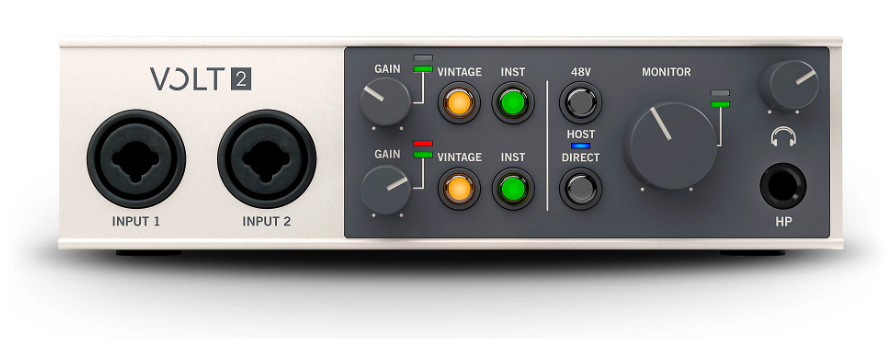
The simpler sibling of the Volt 276 for streamers who want Universal Audio’s analog character without the built-in compressor. Universal Audio Volt 2 gives you two mic/line inputs, UA’s Vintage preamp mode for analog warmth, USB-C connectivity, and a clean, straightforward interface that handles streaming duties without overwhelming you with features.
I think the Volt 2 serves streamers who want better audio quality than budget interfaces provide but don’t need the hardware compressor that the 276 adds. The Vintage preamp mode still gives your voice that warm, professional character, and the build quality feels substantial without being overly complex.
- Vintage Warmth
UA’s Vintage preamp mode adds the same analog harmonic character as the Volt 276, giving your streaming voice warmth and presence that clean digital preamps lack. The processing happens in the analog domain before digital conversion, which means the warmth is genuine analog coloration rather than a digital approximation. For streamers who want their voice to sound rich and engaging without post-processing, the Vintage mode delivers that character from the hardware itself.
- Clean Design
The straightforward two-input layout with clearly labeled controls means you understand the entire interface within seconds of unboxing it. There are no hidden menus, no software dependencies for basic operation, and no confusion about what each knob does. For streamers who want reliable audio without complexity, the Volt 2’s simplicity is its strength.
- Build Substance
The metal construction and weighted feel give the Volt 2 a physical presence that budget plastic interfaces don’t match. The unit stays put on your desk, the knobs feel precise, and the overall build communicates quality that you can feel every time you adjust a setting. The build quality matters practically because a stable interface doesn’t slide around when you reach for a knob mid-stream.
9. Rode RODECaster Duo
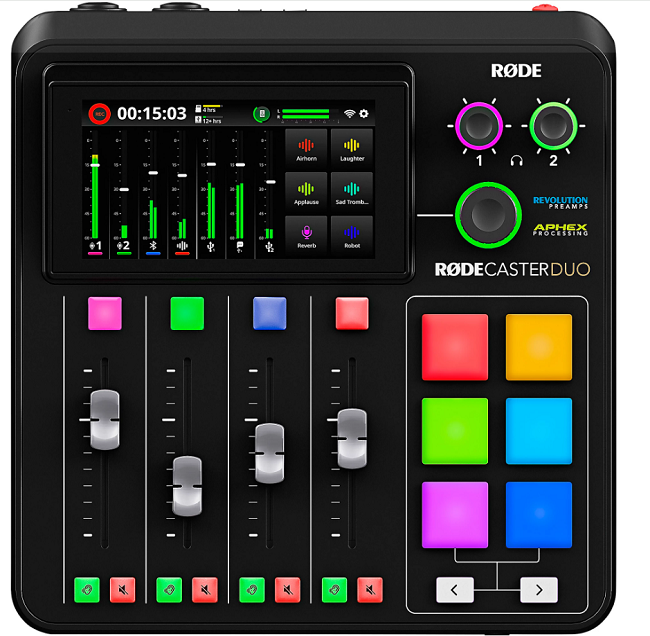
The two-person version of Rode’s content creation platform, providing the same touchscreen mixing and processing as the Pro II in a more compact format. Rode RODECaster Duo features a touchscreen mixer, two microphone inputs with Rode’s preamp technology, physical faders, SMART pads, Bluetooth connectivity, and USB audio with loopback in a unit designed for solo streamers and two-person shows.
The Duo gives you the RODECaster experience at a lower cost and smaller footprint than the Pro II. If you stream solo or with one guest and don’t need four microphone inputs, the Duo provides the same touchscreen mixing, processing, and sound pad functionality in a format that fits tighter desk setups.
- Duo Format
The two-channel design provides everything solo streamers and two-person shows need without the additional inputs and physical size that the Pro II adds. The reduced channel count means the interface is physically smaller, costs less, and doesn’t waste desk space on inputs you don’t use. For streamers who realistically only need one or two microphones, the Duo is the right-sized RODECaster.
- Touch Mixing
The touchscreen mixer provides the same visual mixing capability as the Pro II, including per-channel EQ, compression, and effects adjustment through an intuitive touch interface. You see your levels, adjust processing, and manage routing by tapping the screen rather than navigating software menus. The visual feedback makes audio management accessible during a live stream when you can’t afford to look away for long.
- SMART Pads
Programmable SMART pads trigger sound effects, music beds, and audio clips during your stream with physical buttons that respond immediately. The pads are customizable with different sounds per bank and visual color coding for quick identification. For streamers who use sound effects as part of their content, the physical pads are faster and more reliable than software soundboard solutions.
- Stream Processing
Onboard APHEX voice processing provides the same broadcast-quality compression, noise gating, de-essing, and exciter effects as the Pro II, running on the hardware’s DSP rather than your computer. The processing polishes your voice to broadcast standards without CPU overhead, which keeps your computer’s resources available for game rendering and stream encoding. You set the processing once during setup, and every stream benefits from consistent, professional voice treatment.
10. Audient EVO 16

The expanded version of Audient’s EVO series for streamers who need serious input count and routing flexibility. Audient EVO 16 provides eight mic/line inputs, Smartgain across all channels, comprehensive loopback routing, Audient’s professional preamp technology, and a large single-knob interface in a unit that handles complex streaming setups involving multiple microphones, instruments, and audio sources simultaneously.
The EVO 16 is the choice for streamers whose shows have grown beyond what a two or four-input interface can handle. If you run a multi-person stream, combine music performance with commentary, or need to manage many audio sources during your broadcast, the eight inputs and professional routing give you the connectivity to support complex productions.
- Eight Inputs
Eight mic/line inputs provide the connectivity for multi-person streams, band performances, or complex audio setups that smaller interfaces can’t accommodate.
You can run four microphones for a group stream while simultaneously connecting instruments, playback devices, and external audio sources through the remaining inputs. The input count supports the kind of ambitious streaming productions that content creators grow into as their channels develop.
- Smartgain Scale
Smartgain automatic level setting works across all eight inputs simultaneously, analyzing every connected source and setting optimal gain for each one in a single calibration pass.
The automatic setup saves significant time when you’re connecting multiple sources before a stream, because manually setting gain on eight inputs is tedious and error-prone. For complex streaming setups, the multi-channel Smartgain is a practical time saver that gets you streaming faster.
- Console Preamps
The Audient preamp technology provides the same signal quality across all eight inputs that the company’s professional studio consoles deliver.
The preamp consistency means every microphone and instrument connected to the EVO 16 benefits from the same clean, detailed signal path regardless of which input it’s on. For multi-person streams where audio quality needs to be consistent across all participants, the matched preamp quality ensures nobody sounds worse than anyone else.
- Routing Depth
The comprehensive software mixer and loopback routing handles the complex audio management that multi-source streaming requires. The routing capabilities let you create separate mixes for your stream output, your monitoring, and your recording, each with different balances of the connected sources.
For streamers who need game audio in their stream but not in their headphones, or who want to record a clean multitrack alongside their live stream mix, the routing flexibility accommodates these scenarios without third-party software.
- Monitor Control
The large central control knob with context-sensitive assignment provides quick access to the most frequently adjusted parameter at any moment. The knob automatically controls whatever function is most relevant, whether that’s headphone volume, monitor output, or input gain, based on what you’ve selected. The immediate physical control means you make adjustments mid-stream without taking your eyes off your content.
Get the Free Plugin Starter Kit
The genuinely useful free DAWs and plugins worth installing. No filler. Straight to your inbox.

Hello, I’m Viliam, I started this audio plugin focused blog to keep you updated on the latest trends, news and everything plugin related. I’ll put the most emphasis on the topics covering best VST, AU and AAX plugins. If you find some great plugin suggestions for us to include on our site, feel free to let me know, so I can take a look!