
Mastering used to feel like the part of music production that required a separate career, a dedicated room, and five figures worth of hardware. And while that’s still an option, the gap between free tools and professional ones has narrowed to the point where the plugins on this list can genuinely hold their own in a real mastering chain.
What’s notable here is the range: you’re looking at a precision EQ pulled directly from iZotope’s flagship mastering suite, an all-in-one mastering system with analog emulation baked into a three-knob workflow, a spectrum analyzer that engineers have used daily for well over a decade, a soft clipper that beats paid alternatives in blind tests, and tools in between for imaging, dynamics, and top-end enhancement.
None of these are demo versions or feature-locked trials. They’re simply free, and they’re very good.
From the Pluginerds Store
Before you get into the plugins on this list, something most mixing and mastering guides do not mention. A compact IEM pair as a second reference at low volume catches what your main headphones are smoothing over.


1. iZotope Ozone EQ

The free Ozone EQ is pulled directly from iZotope’s full Ozone mastering suite, and it shows. This is not a stripped-down version or a taster of something larger — it’s the complete EQ module with every major feature intact, available through the Komplete Start bundle and Native Instruments’ ecosystem.
Switching between Analog and Digital modes changes the filter behavior and phase response of each band, giving you access to the warmth and natural roll-off of vintage EQ modeling alongside the precision and phase control of modern digital processing.
In Digital mode you can actually manipulate the phase shift manually and monitor the Phase Response and Phase Delay in the spectrum view, which is a deeply nerdy and surprisingly useful feature for mastering work.
- Transient and Sustain Channel Modes:
This is the headline new feature: Transient/Sustain mode lets you EQ the attack portion and the sustain portion of a signal independently. If you want to brighten the attack of a snare without adding harshness to the body, or add warmth to a pad’s sustain without muddying its initial transient, this is how you do it. It’s the kind of feature that used to require a very specific combination of paid tools, and it’s now just here, for free.
- Delta Monitoring:
The Delta button lets you hear only the frequencies the EQ is currently boosting or cutting, isolating the EQ’s effect from the unprocessed signal in real time. This makes identifying problem frequencies by ear dramatically faster and more reliable than working with the spectrum display alone. I found it particularly useful when trying to locate subtle resonances in a mix that were hard to pin down by frequency number.
- Gain Match:
Louder almost always sounds better, even when it shouldn’t, and the Gain Match function compensates for that by keeping the output level approximately equal to the input level as you make EQ adjustments. This is standard practice in professional mastering workflows and is genuinely rare to find in a free plugin. Without it, every boost sounds like an improvement even when it isn’t one.
Get the Free Plugin Starter Kit
The genuinely useful free DAWs and plugins worth installing. No filler. Straight to your inbox.
2. Analog Obsession BUSTERse

As the most important glue tool in a mastering chain, the bus compressor needs to be right, and for free options, nothing beats BUSTERse. It was covered in the compressor article in detail, but it earns a place on this list specifically for mastering because the combination of sidechain filter control, Turbo mode, transformer coloring, and dry/wet mix gives you more mastering-relevant flexibility than the hardware it emulates.
- SSL-Style VCA Compression:
BUSTERse is based on the SSL 4000 G-series bus compressor, which has defined what a cohesive mix sounds like for forty years.
The familiar ratio options (1.5:1, 2:1, 3:1, 4:1, 5:1, 10:1) with six attack and five release choices plus Auto mode cover every compression scenario from subtle glue at 2:1 with a slow attack to hard limiting at 10:1. The auto release mode tracks program material intelligently, which is the setting that most mastering scenarios call for.
- Three-Band Sidechain Filter:
The sidechain filter section gives you an HPF from 20 to 500Hz, a Mid control around 1.5kHz, and an HF cut at 10kHz that makes the compressor respond less to low-frequency content and more to the mid and high-frequency material you want to control. On a master bus, this means the kick drum and bass don’t trigger excessive gain reduction on every beat, which is the fundamental problem that makes inexperienced mastering chains pump.
- Transient Sidechain Section:
Beyond the filter, the Transient section adds a Boost knob that increases compressor sensitivity to peaks with a simultaneous Tilt control to target specific frequency ranges. This is a hardware modification that doesn’t exist on the original SSL G-comp, and it turns BUSTERse into a transient-aware processor that can respond more aggressively to percussion without applying the same sensitivity to sustained elements.
- Turbo Mode and XFORMER:
Turbo opens the compressor to the full frequency range rather than its default mid-focused behavior, while XFORMER replaces the ICs with transformer-based stages for added harmonic character and impedance interaction. Both change the sound significantly, and XFORMER in particular adds a warmth that makes the master feel less clinical.
- 4x Oversampling and Dry/Wet Mix:
4x oversampling is engaged by clicking the logo, and the dry/wet Mix knob enables parallel compression directly within the plugin without external routing. For mastering, I rarely go fully wet with a bus compressor, and having Mix available as a single control makes parallel mastering compression effortless.
- Resizable GUI and AAX Support:
The plugin is resizable from 50 to 200% and supports VST3, AU, and AAX formats, meaning Pro Tools users have access to one of the most capable free bus compressors available.
3. bx_masterdesk Classic
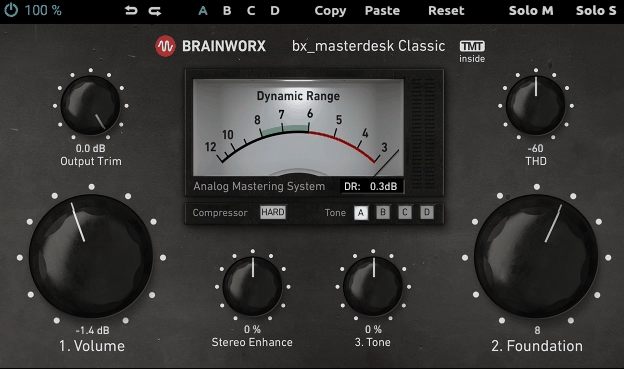
The full bx_masterdesk from Brainworx and Plugin Alliance is a paid product used by mastering engineers around the world, and bx_masterdesk Classic is the free, more compact version of it.
The Classic version shares the same underlying processing chain with fewer individual controls, replacing granular parameter adjustment with macro-level knobs that cover the essential decisions in a three-step workflow. For producers who want to master quickly and confidently without building their own chain from scratch, it’s the most practical single plugin on this list.
- Three-Step 1-2-3 Workflow:
The entire plugin is organized around three primary controls labeled 1, 2, and 3. Volume drives the input into the compressor and limiter chain. Foundation is a tilt EQ with the fulcrum around 2kHz, setting the overall balance between low and high energy.
Tone provides the overall character from dark to bright. These three decisions cover 90% of what mastering involves, and the plugin’s internal calibration means that almost any position of those knobs produces a usable result.
- TMT Compression with Parallel Mix:
The compressor inside bx_masterdesk uses Brainworx’s Tolerance Modeling Technology, the same component variation modeling found in their high-end console strip emulations, with four selectable TMT compression modes ranging from hardest to most gentle. The Comp Mix knob enables parallel compression between 85% and 100% wet, or bypasses compression entirely.
Because the attack and release are calibrated by Brainworx to mastering-appropriate settings, you don’t need to adjust them.
- Dynamic Range VU Meter:
The Dynamic Range VU meter shows the difference between peak and RMS levels in real time, and Brainworx has calibrated it so that keeping the needle between 6 and 8 puts the master in a sweet spot: 8 is appropriate for streaming services, 6 for louder CD masters. This single meter communicates more useful mastering information than most loudness displays I’ve used.
4. Slate Digital Fresh Air
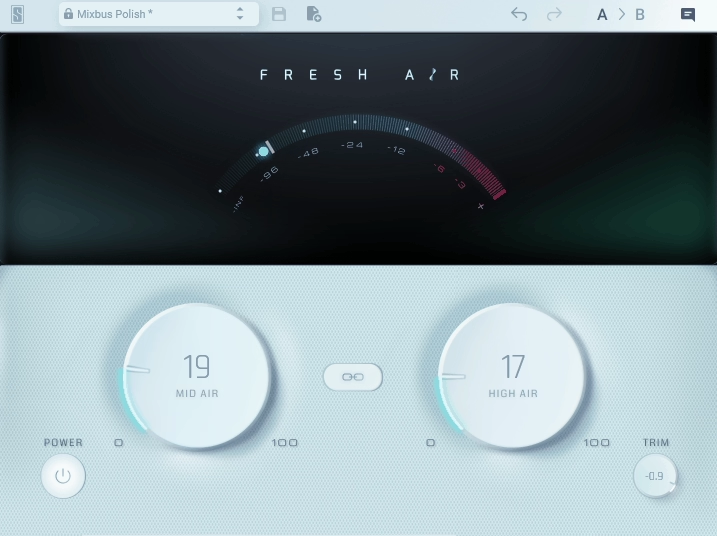
Created in collaboration with Grammy-winning mixer Chris Lord-Alge, Fresh Air is a dynamic high-frequency processor built on vintage exciter circuits and advanced dynamics processing.
It does something very specific: it adds upper-frequency presence and air to audio without the harshness that EQ boosts at the same frequencies would introduce. One user on Gearspace put it simply by saying that after using it, turning it off felt like “a blanket on the speakers,” which is about as clear a description of what it does as any technical explanation could manage. It’s one of those plugins that enters the chain and silently becomes something you can’t mix without.
- Mid Air and High Air Knobs:
Mid Air targets the upper midrange presence frequencies, helping vocals and instruments cut through without becoming aggressive. High Air lifts the top-end shimmer and air above that, adding the quality that makes recordings sound open and airy rather than closed and boxed-in. The two knobs work in the same frequency neighborhood but with different characters, and using both at modest amounts is different from using either one alone at a higher setting.
- Dolby-A Style Exciter Circuit:
The processing behind FreshAir is based on a Dolby-A style exciter effect, modeled on a technique from the 1960s and early 1970s that was used to enhance the perceived top end of recordings. The difference from a simple EQ boost is that the exciter generates harmonics dynamically, responding to the content of the signal rather than applying a static lift. This is why it adds brilliance without harshness: it’s not boosting what’s already there, it’s creating complementary content that the ear interprets as presence.
- Link Switch and Preset Library:
A Link switch ties Mid Air and High Air together for one-knob operation when you want to treat both frequency ranges equally, and the plugin includes presets for common scenarios including Vocal Air, Mixbus Sparkle, and others. Both the presets and the Link function make this genuinely fast to apply, which is part of why it’s landed on so many mastering chains as a default final-stage processor.
- Track and Bus Applications:
FreshAir is equally effective on individual tracks as it is on the master bus, and the sensitivity of the dynamic processing means that the amount of enhancement it applies adapts to the content. Heavy use on a full mix can quickly become audible, so I treat it as a finishing touch: a light application is usually all it takes, and the difference is clear when you A/B it.
- iLok Account Required:
The one friction point worth knowing: FreshAir requires an iLok account for activation, though it doesn’t need the physical USB dongle. Creating a free iLok account and using the iLok License Manager is a few minutes of setup, and some users have flagged this as cumbersome for what is otherwise a completely free plugin. Once activated, it’s fully portable across computers tied to the same iLok ID.
5. iZotope Ozone Imager 2
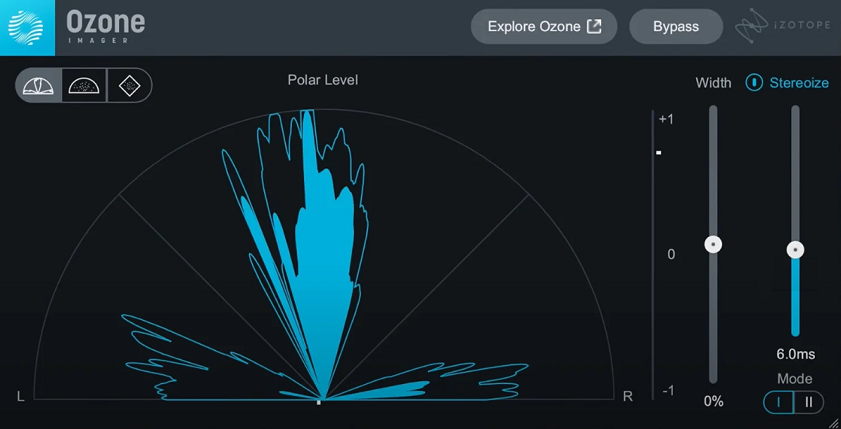
Stereo width is one of the most impactful and least understood dimensions of mastering, and Ozone Imager 2 makes it approachable without hiding what’s happening. Alan Meyerson, the scoring mixer for The Dark Knight and Gladiator, uses Ozone’s imaging technology in his mastering chain.
That’s the same technology this free standalone plugin is built on. The fact that you can use it on individual tracks as well as the master bus, and that it includes three vectorscope monitoring modes alongside the actual width controls, makes it considerably more useful than simpler stereo wideners that offer no visual feedback about what they’re doing to the stereo image.
- Width Control:
The main fader adjusts the stereo width from mono all the way to maximum width, letting you narrow a mix that’s too wide for consistent playback on mono systems, or expand content that’s too narrow and sounds thin in stereo. The visual display shows the effect in real time, which makes it much easier to find the point where width enhancement becomes excessive.
- Stereoize I and II Modes:
Two stereoize modes can convert a mono source into stereo without reverb or doubling, with different characters. Stereoize I applies a colorful phasing effect that works well as a creative effect on synths, guitars, and vocals.
Stereoize II was added in version 2 and offers a more subtle, phase-friendly enhancement more suited to mastering applications where you want width without introducing audible coloring.
- Three Vectorscope Monitoring Modes:
The plugin offers Polar Sample, Polar Level, and Lissajous vectorscope displays that give you different ways to visualize the stereo field. The correlation meter at the bottom shows whether the stereo content is in phase, which is the critical check before finalizing any master. If the correlation drops consistently below zero, the mix has serious phase problems that stereo widening will make worse.
- Fully Resizable Interface:
The plugin window scales freely, which makes it particularly useful as a metering tool on a second monitor during mastering sessions where you want a persistent view of the stereo field without it taking up primary screen space. This was added in version 2 and makes a practical difference in actual workflow.
6. Voxengo SPAN
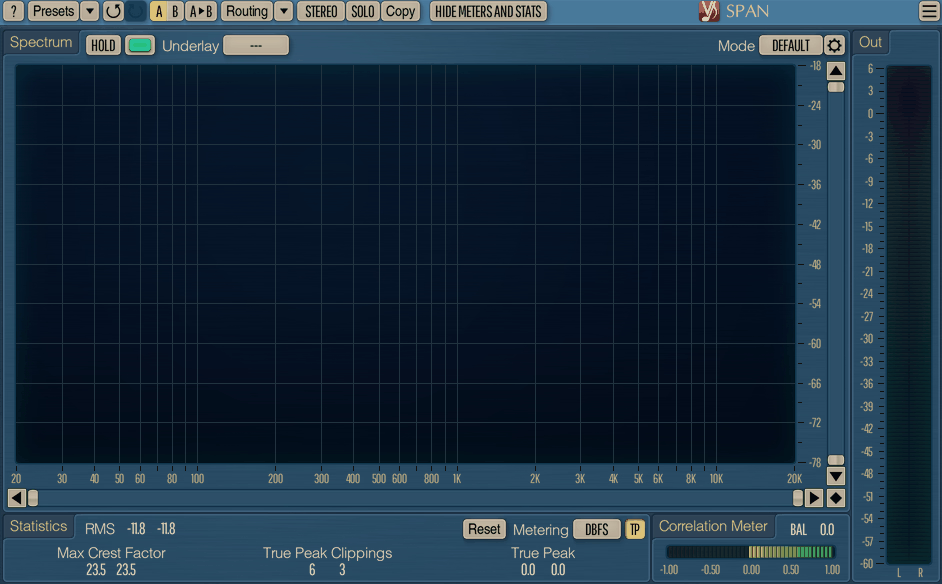
There are analyzers you use, and there is SPAN. Voxengo SPAN is a real-time FFT spectrum analyzer that has been the industry standard free analysis tool for so long that it’s genuinely surprising to be reminded it costs nothing. It’s a nominee in KVR Audio’s Readers’ Choice Awards consistently, which reflects how many producers have it in every project.
Every channel. Every bus. Every master. I’ve been using it for longer than I can remember, and I’ve never had a reason to replace it with anything paid because it simply does everything an analyzer needs to do and then some.
- Flexible FFT Mode System:
SPAN gives you control over Fourier block size, FFT window overlap percentage, spectrum visual slope, and smoothing — all of which change how the spectrum display responds to the audio. A longer block size gives you better frequency resolution at the cost of temporal response, and the visual slope control lets you display the spectrum with any tilt you prefer rather than forcing a flat display that makes bass-heavy music look alarming.
- Secondary Spectrum Display:
Beyond the primary spectrum, you can enable a secondary spectrum overlay of a desired type such as real-time maximum or all-time maximum. The all-time maximum display accumulates the highest levels seen at each frequency across the entire playback, which is useful for spotting which frequencies are consistently hottest in a mix and for identifying spectral imbalances that don’t show up in any single moment of playback.
- Multi-Channel Analysis and Dual Display:
SPAN supports multi-channel analysis and can display spectrums from two different channels or channel groups simultaneously, with individually colored traces. Routing both the master bus and a reference track through two instances and comparing them directly is one of the most practical things you can do in mastering, and SPAN makes this workflow as frictionless as possible.
- EBU R128 and K-System Metering:
Beyond the spectrum, SPAN includes EBU R128 integrated loudness metering alongside K-system metering with calibration support, covering the two primary loudness standards used in broadcast and music delivery. Clipping detection and peak hold are both available, plus a correlation meter for checking mono compatibility. This is a complete analysis and metering tool, not just a spectrum display.
7. Variety Of Sound Density mkII
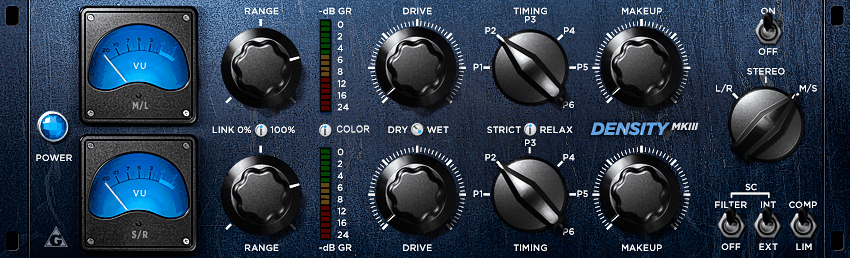
Density mkII from Variety of Sound’s developer Bootsy is a bus compressor not modeled on any single piece of hardware, which is rare in freeware where vintage emulation is almost always the default approach. Instead, Bootsy combined what he described as “proven dynamic shaping approaches from the past with more modern concepts.”
The result is a compressor with its own character that users have compared favorably to UAD and Waves SSL offerings since its original release, which tells you something about the quality. It is Windows VST only, and that remains the limit. But for Windows producers doing mastering or stereo bus work, Density mkII has been a legitimate go-to for well over a decade.
- True Dual Channel M/S Mode:
The compressor operates in L/R stereo with linked controls, L/R with unlinked operation, or true dual-channel M/S mode where mid and side are genuinely processed as separate channels with independent Range controls per channel. The M/S Range controls make balancing mid and side compression tractable in a way that M/S processing in single-channel compressors doesn’t, because you can independently limit how much gain reduction each channel sees.
- Six Fixed Timing Presets:
Rather than user-adjustable attack and release knobs, Density mkII uses six preset timing modes (P1 through P6) inspired by the program-dependent approach of the Fairchild 670. P5 and P6 specifically introduce genuine program-dependent release behavior. The RELAX control further adjusts timing within the selected preset. Bootsy’s rationale was that fixed, well-calibrated timings are more usable for bus and mastering work than manual adjustment, and in practice that holds up.
- Stateful Saturation and VCA Color:
The mkIII revision of this plugin added an explicit Color control, but the mkII has its own internal saturation circuit that provides subtle analog character without hard clipping or obvious coloration. Users consistently describe it as having a sound that is “clean, but alive” — digital precision in the dynamics with just enough harmonic texture to avoid sterility.
- Limiter Mode with Sidechain HPF:
Limiter mode applies stricter dynamics control that Bootsy describes as “more strict but not brickwall,” sitting between a standard compressor and a true peak limiter. The dedicated sidechain HPF, optimized to decouple frequencies below 90Hz, prevents subsonic content from triggering gain reduction during mastering.
- External Sidechain:
An external sidechain input supports sidechain-driven compression for any workflow that requires a separate triggering source, including frequency-selective compression via multiband routing.
- Windows VST Only:
Density mkII is Windows-only, available as 32-bit and 64-bit VST. An x64 build was released in 2021. Mac users need to look elsewhere, but for Windows producers the quality and versatility here are difficult to match for any price.
8. Analog Obsession Dynasaur
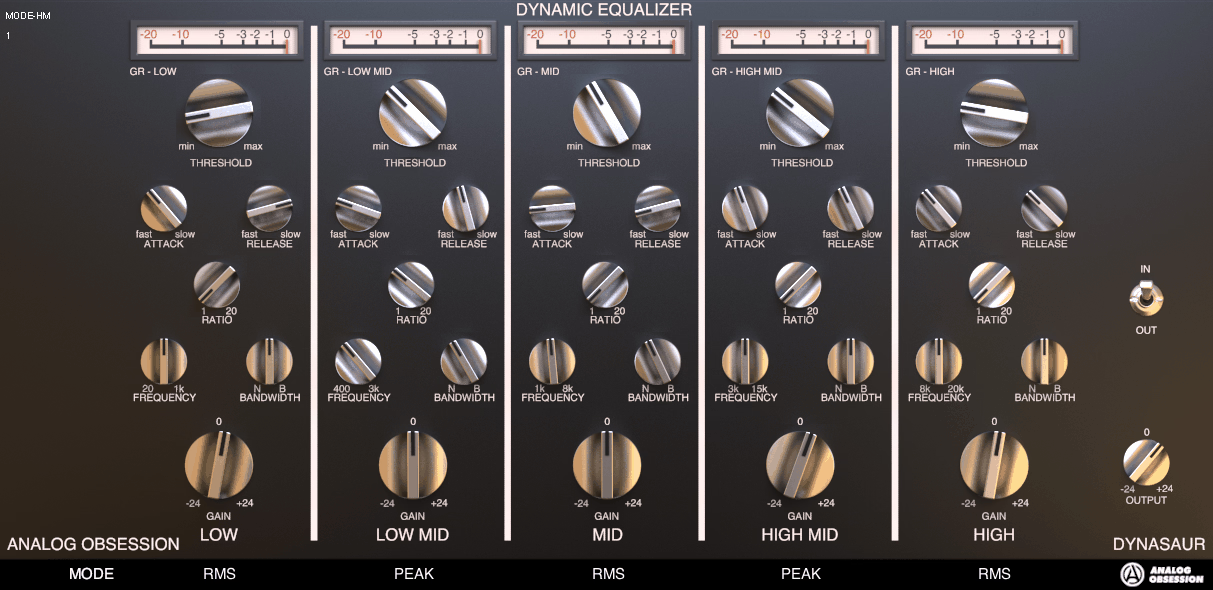
Where a bus compressor controls the overall dynamic level, Dynasaur works band by band. This dynamic EQ gives you five frequency bands each with their own threshold, ratio, attack, release, and a unique choice between RMS and PEAK detection mode.
The developer describes the internal design as “motorized potentiometers” driven by a circuit derived from the 1176 compressor’s sidechain, which means the plugin is controlling frequency-specific gain dynamically rather than compressing the signal in the traditional sense.
The practical effect is that it can act as a de-esser, multi-band compressor, or peak rider, covering most of the dynamic frequency control scenarios that mastering requires.
- Five-Band Architecture with Frequency Ranges:
The five bands cover Low Shelf (20Hz to 1kHz), Low Mid (400Hz to 3kHz), Mid (1kHz to 8kHz), High Mid (3kHz to 15kHz), and High Shelf (8kHz to 20kHz), with bandwidth control on all three peak bands and shelf energy control on the low and high shelves. The frequency overlap between adjacent bands is deliberate, giving you flexibility in where each band acts.
- RMS and PEAK Detection Per Band:
Each band independently selects between RMS and PEAK detection. The developer’s own guidance is to use RMS on low-frequency bands because low end has more sustained energy and fewer sharp transients, while PEAK mode on mids and highs catches the sharper dynamics that RMS detection would be too slow to control. I found this guidance accurate in practice: switching the low band to RMS gave better control of bass dynamics without over-squashing, while PEAK on the highs catches harsh transients precisely.
- Attack, Release, and Ratio Per Band:
Attack runs from 1ms to 50ms, release from 30ms to 3 seconds, and ratio from 1:2 to 1:20 independently per band, with a 60dB threshold range. The near-limiting ratios up to 1:20 mean that Dynasaur can function as a frequency-selective limiter on problematic bands while applying gentle control to others. Static gain of +/-24dB per band means it can also work as a conventional parametric EQ when no dynamic processing is desired.
- Static Boost for Gain Recovery:
The +/-24dB static boost per band can add gain back after dynamic reduction, useful for situations where you want to tame a resonant frequency dynamically but recover some of the fundamental body it contributes. This combination of cut with recovery is what distinguishes dynamic EQ from multiband compression in practical use.
- 4x Oversampling:
Clicking the Analog Obsession logo engages 4x oversampling, recommended when using aggressive settings or faster attack times where the nonlinear behavior of the dynamic EQ might otherwise introduce high-frequency artifacts.
9. Venn Audio Free Clip 2

Soft clipping is one of the most effective loudness tools available to a mastering engineer, and Free Clip 2 from Venn Audio is the most capable free clipper that exists.
The original Free Clip was so well regarded that one user on KVR stated it made “commercial alternatives unnecessary,” and the follow-up version adds more shapes, better controls, and part of Venn’s broader Free Suite bundle.
Hard, Quintic, Cubic, Hyperbolic Tan, Algebraic, and Arctangent shapes progress from most transparent to most saturated. Hard clip introduces no saturation and is the most transparent option for mastering. Arctangent is the most colored and functions as a saturation/distortion tool. The three middle shapes allow for varying degrees of soft knee behavior between those extremes, and the developer explicitly recommends Hard, Quintic, or Cubic for mastering applications.
- Up to 32x Oversampling:
Oversampling from 1x up to 32x is available to suppress high-frequency aliasing artifacts generated by the clipping process. Higher rates significantly increase CPU load, with 16x and 32x described by Venn as appropriate for audiophile and mastering scenarios rather than real-time mixing. For final bounce or export where CPU performance is not the constraint, 32x gives the cleanest result.
- Input, Output, and Ceiling Controls:
A sliding ceiling control that visually aligns with the level meter next to it makes setting the clipping threshold intuitive rather than numerical. Separate input and output gain controls let you drive more signal into the clipper for greater density or recover level at the output after the ceiling has trimmed the peaks.
The visual alignment between the ceiling slider and the level meter is one of those small design decisions that makes Free Clip 2 faster to use than plugins with separate threshold and output knobs.
Get the Free Plugin Starter Kit
The genuinely useful free DAWs and plugins worth installing. No filler. Straight to your inbox.

Hello, I’m Viliam, I started this audio plugin focused blog to keep you updated on the latest trends, news and everything plugin related. I’ll put the most emphasis on the topics covering best VST, AU and AAX plugins. If you find some great plugin suggestions for us to include on our site, feel free to let me know, so I can take a look!