
LMMS has a reputation for being the DAW people grow up with: free, cross-platform, powerful enough to produce real music, and wide open for VST plugins that dramatically extend what the built-in instruments and effects can do.
If you’re working in LMMS and you’re wondering which free plugins are actually worth loading up, this is the list. Some of these are instruments, some are processing tools, and one is a reverb that’s become something of a reference point even against plugins that cost real money.
All of them are genuinely free, all of them run on Windows and most on Mac and Linux too, and all of them add something to LMMS that no built-in option can fully replace.
From the Pluginerds Store
Before you get into the plugins on this list, something that changes how reliably reverb and delay decisions translate. The room around you contributes more to what you hear than most producers realise — acoustic treatment at the first reflection points reduces that.


1. Matt Tytel: Vital

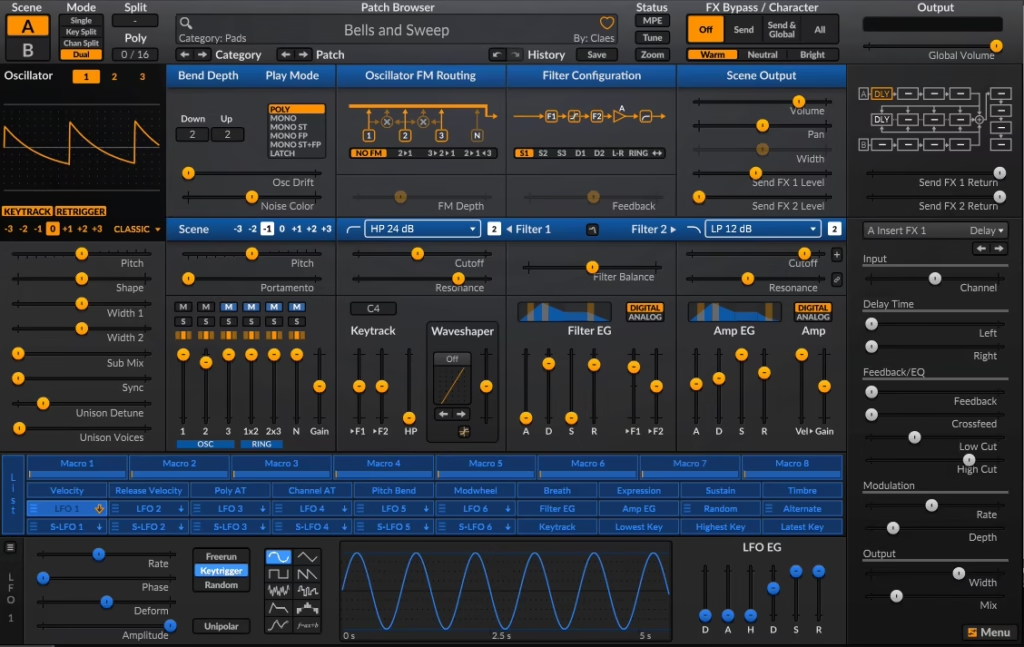
Few plugin releases have landed quite the way Vital did when Matt Tytel dropped it in late 2020. Within days the community had started calling it “the free Serum,” which undersells what it actually is. At its core, Vital is a spectral warping wavetable synthesizer, and the free Basic tier gives you the complete synthesis engine with 75 presets and 25 wavetables.
Nothing is locked or crippled in the core synth functionality. Paid tiers add more content, but the synthesis itself is identical at every tier. GameFromScratch confirmed it is “compatible with most modern DAWs such as LMMS and Reaper,” and it runs as VST2, VST3, and AU across Windows, Mac, and Linux.
For LMMS users on Windows, the VST2 version loads cleanly into VeSTige.
I love how every modulation assignment is immediately visible as an animated arc around the destination parameter, running at 60 frames per second on GPU so your CPU stays free for audio. That visual feedback alone changes how quickly you understand what’s happening in a patch.
- Three Wavetable Oscillators with Spectral Warping:
Vital’s three full wavetable oscillators are each equipped with two warp modes: a standard warp and a spectral warp that manipulates the harmonic makeup of the wavetable itself.
Spectral warping lets you stretch, shift, smear, and skew harmonics up and down the spectrum, producing timbres that a standard wavetable oscillator simply cannot achieve. A dedicated sample slot adds a fourth voice for noise or texture importing on top of the three oscillators.
- Thirty-Two Filter Types with Audio-Rate Modulation:
The two filter slots support 32 different filter types, including analog low-pass models, Dirty types that mimic the Korg MS-20’s self-oscillating resonance behavior, comb filters, and vowel filters.
What makes Vital’s filter section stand out is that the filters can be modulated at audio rate, meaning LFOs and envelopes can run at the same speed as the audio signal itself, which enables FM-like interactions and much more complex timbral movement than a standard modulation rate allows.
- Drag-and-Drop Modulation:
Rather than navigating a matrix or dropdown menu, you grab any modulation source and drag it directly onto any parameter. Before you release the connection, Vital shows you a preview of what the modulation will sound like so you can experiment without committing. LFO shapes are fully customizable, four run at audio rate, and random sources include Perlin noise and Lorenz Attractor for organic-feeling modulation that never repeats exactly.
- Custom Wavetable Import and Editor:
The built-in wavetable editor lets you draw waveforms from scratch, import any audio file and convert it to a wavetable using pitch-splice or vocode methods, and even generate wavetables from text on the Pro and subscription tiers. For the free tier, importing your own audio samples as wavetables is fully available, which means the sonic library accessible to you expands to anything you own or can record.
Get the Free Plugin Starter Kit
The genuinely useful free DAWs and plugins worth installing. No filler. Straight to your inbox.
2. Ample Bass P Lite II
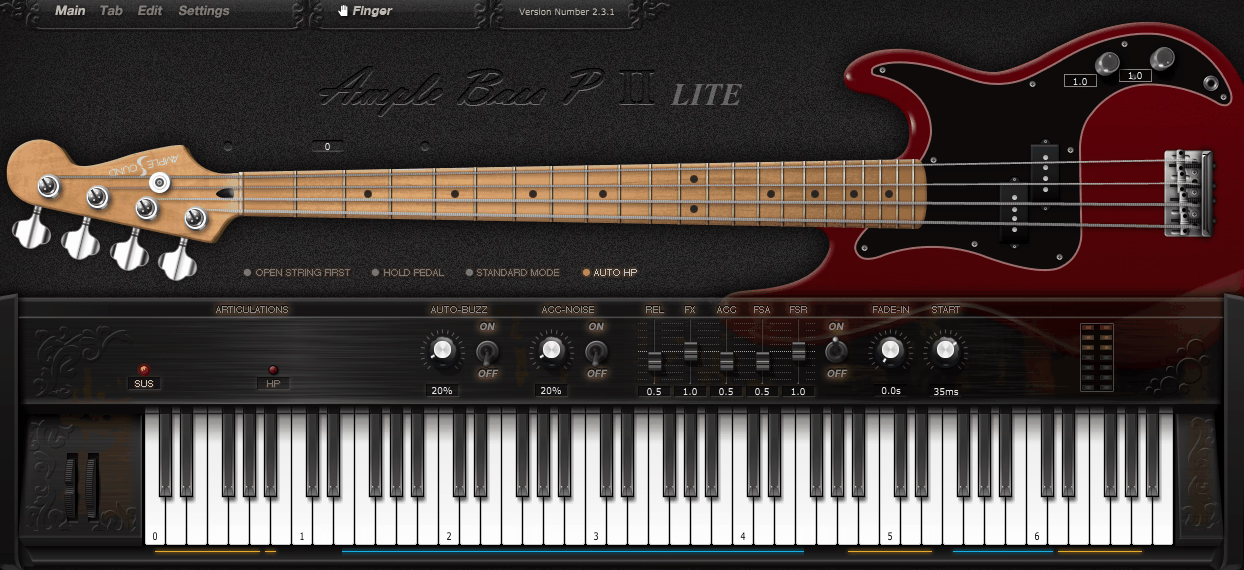
If your productions need a convincing Fender Precision Bass and you’re not ready to pay for one, Ample Bass P Lite II from Ample Sound is the answer. It’s completely free, runs as a standard VST in LMMS on Windows, and what it delivers is a realistic bass guitar sampler built on hundreds of multi-sampled recordings of an actual P-bass played across every string position with multiple velocity layers.
The sample quality is recorded at 16-bit 44.1kHz, and the plugin uses DFD (Direct From Disk) streaming so the memory footprint stays manageable. The library itself weighs in at around 450 MB with 443 HD samples, so it’s not a quick download but it’s a one-time install.
- Fender Precision Bass Sampling with Multiple Articulations:
ABPL II samples every note position on the bass with articulations including Sustain, Hammer On and Pull Off, Accent, Slide, Palm Mute, Natural Harmonic, Pop and Slap, and Mute.
The Rich Fingering Noise system adds subtle string noise to played notes so the sound has the micro-detail of a real performance rather than a static sample playback. Each cycle of sampling uses a different cycle per note and velocity layer, which reduces the machine-gun effect that plagues cheaper samplers.
- Tab Player with Tablature File Support:
A built-in Tab Player loads and plays standard guitar and bass tablature file formats directly inside the plugin. You can load a tab from any external source, display it inside the instrument window, play back specific tracks from the file, and export them as audio from within your DAW.
The Tab Player automatically adds realistic articulations based on its understanding of bass guitar playing logic, including slaps and string noise, without you having to program them individually.
- Capo Logic and MIDI CC Control:
The Capo function transposes the instrument without touching your MIDI notes, which is genuinely useful when you’re working in a key that doesn’t suit the default tuning and don’t want to manually shift every note in the pattern.
Every button, knob, and parameter in the plugin can be assigned to MIDI CC or automation, meaning you can control articulation switching, dynamics, and effect parameters from your LMMS piano roll or automation tracks.
- Built-In Amp Simulator:
Ample Bass P Lite II includes a built-in bass amp simulator with both classic and modern amp models, so you get a processed, mixed-ready tone without needing a separate amp sim plugin in your chain. This is particularly useful in LMMS where routing through multiple effects plugins requires some manual setup, making a self-contained instrument with its own processing a meaningful workflow advantage.
- Poly Legato, Slide Smoother, and Open String Logic
- DFD Streaming and Free Without Feature Locks
Ample Sound built ABPL II using DFD (Direct From Disk) sample streaming, which means the plugin reads audio off your drive rather than loading everything into RAM at once.
3. TDR Nova
Dynamics processing is one of the areas where LMMS’s built-in tools can leave you wanting more, and TDR Nova from Tokyo Dawn Labs addresses that directly.
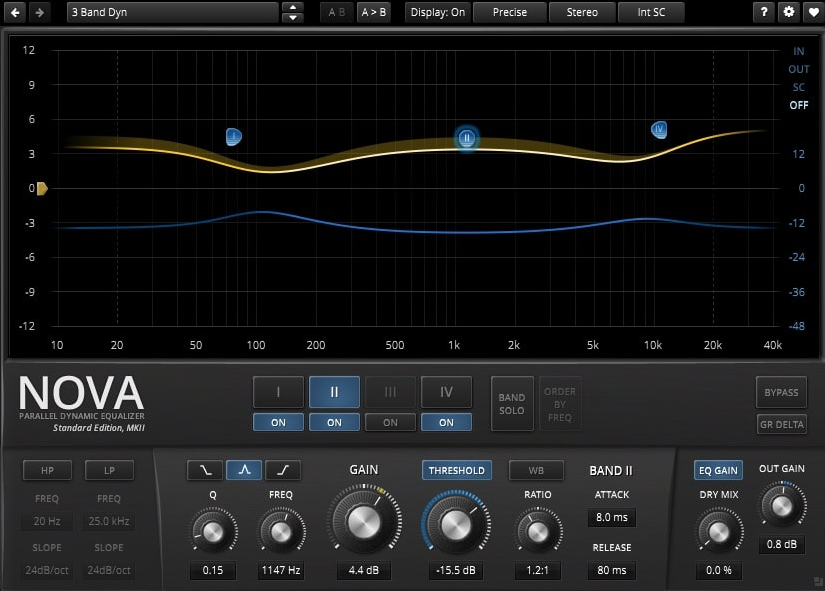
It’s a parallel dynamic equalizer, which means each of its four EQ bands can function as a standard static EQ band, a dynamic EQ band that compresses or expands only when the signal exceeds a threshold in that frequency region, or both at once. On top of that, there’s a wideband compressor that operates independently of the band structure.
- Four Dynamic EQ Bands with Per-Band Compression:
Each of the four parametric bands includes a full dynamics section with Threshold, Ratio, Attack, and Release controls, so every band can independently react to the signal level in its frequency region.
This is genuinely useful for problem-solving: taming a boomy kick drum, controlling harsh sibilance, or adding density to specific frequency areas without affecting the rest of the signal. The behavior can range from gentle limiting to multiband expansion depending on how you set the ratio direction.
- Wideband Compressor:
Beyond the per-band dynamics, Nova includes a separate wideband compressor that operates across the full frequency range.
You access it by deactivating the band selection and engaging the Threshold control in the global section. The wideband compressor can be linked to the band dynamics via the WB button, and the Sticky mode (Alt-click on the Threshold button) lets you exclude individual bands from the wideband compression, effectively building a multiband compressor inside a single plugin.
- GR Delta Monitoring and Dry Mix:
A GR Delta switch lets you monitor only the gain reduction signal rather than the processed output, which gives you direct insight into how much the dynamics section is working and on which frequencies. A global Dry Mix control blends the unprocessed input signal back in for parallel processing without an external routing setup, which matters in LMMS where parallel compression setups require some extra work.
4. Analog Obsession BUSTERse

The SSL G-series bus compressor has shaped the sound of pop, rock, and electronic music since the 1980s, and BUSTERse from Analog Obsession is one of the most convincing free emulations available.
I’d say this one works particularly well in LMMS on the master bus or a drum submix, where its knack for pulling elements together into a coherent whole comes through most clearly. The Turbo and Xformer switches are the features that turn it from a competent emulation into something with genuine personality.
The compressor section delivers the classic SSL parameter set: Threshold from +15 to -15 dB, Attack in six stepped positions from 0.1 to 30 ms, Release from 0.1 to 1.2 seconds plus Auto, and Ratio settings of 1.5, 2, 3, 4, 5, and 10. A Makeup Gain knob and a parallel Dry/Wet Mix control round out the compressor section. The stepped Attack and Release controls are consistent with the hardware, which means if you’ve ever used a physical SSL bus compressor or paid emulation, the behavior here will feel immediately familiar.
- Sidechain Filter Section:
BUSTERse adds a sidechain filter section that doesn’t exist on the original hardware: a high-pass filter sweeping from 20 to 500 Hz, a Mid band at around 1500 Hz with +/-6 dB of cut or boost, and a high-frequency control at 10 kHz that mimics an optical-tube compressor by reducing the compressor’s sensitivity to high-frequency content. The HPF in particular is immediately practical since it prevents kick drum and bass energy from triggering the compressor disproportionately, giving you glue without pumping.
- Transient Sidechain Section:
A dedicated Transient section adds 0 to 10 dB of boost to transient content in the sidechain, with a Tilt control centered around 1 kHz that lets you focus that boost on a specific frequency range rather than all transients. Engaging the Transient boost makes the compressor more sensitive to attack events specifically, which shapes the compression character toward transient shaping rather than pure dynamics control.
- Turbo Mode and XFORMER Transformer Emulation:
Turbo mode bypasses the internal frequency focus of the compressor so it affects the full signal spectrum evenly, rather than the default mid-frequency emphasis that reflects original hardware behavior.
The XFORMER switch replaces the input and output ICs with a transformer circuit model, which affects impedance, introduces harmonic character, and changes the overall sound in a way that’s audible on the output. Both modes add meaningful sonic options beyond the baseline emulation. 4x oversampling is available by clicking the Analog Obsession logo, and the interface is resizable from 50% to 200%.
5. ujam Usynth DRIVE
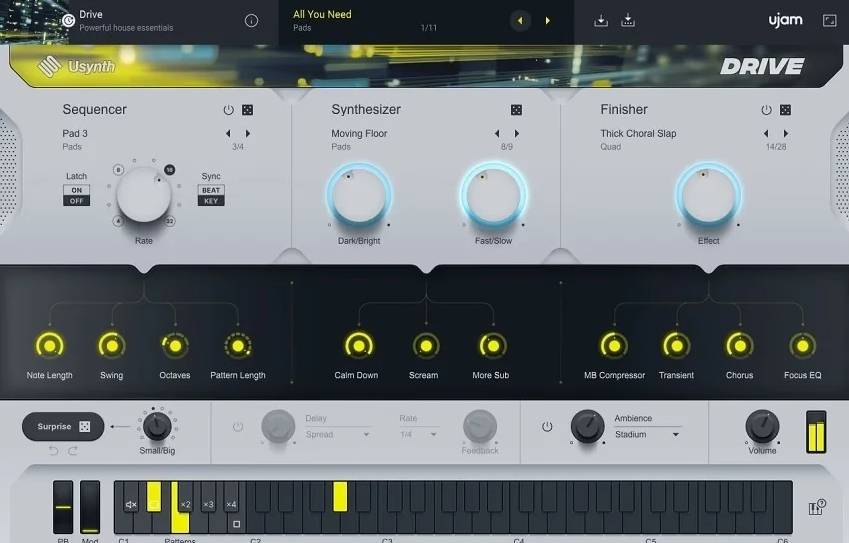
Image credit: Integraudio
Usynth DRIVE from UJAM, a company co-founded by Pharrell Williams and Hans Zimmer, takes a fundamentally different approach to synthesis than any other instrument on this list.
Under the hood it runs Virtual Analog, Wavetable, FM, and Multisample synthesis in two layers per voice, with a 12-way modulation matrix, multi-mode filter, five-stage envelopes, and LFOs. None of that is what you see when you open it.
What you see is a clean, focused interface UJAM designed around the philosophy of “Instagram filters for music,” where complex sound design decisions are condensed into ready-to-use presets and a small set of intuitive controls.
For LMMS users specifically, the efficient interface means fewer parameters to automate and a faster path to a completed sound. I found the Surprise button particularly useful when I’m stuck and need a starting point rather than a specific preset.
- 100 Synth Modes and 90 Finisher Effects Chains:
The Synthesizer section contains 100 Synth Modes covering basses, pads, polys, and leads, each adjustable with Brightness and Speed controls for immediate tonal variation. The Finisher section contains 90 Finisher Modes, which are complete processing chains you control with four macro knobs. Combining any Synth Mode with any Finisher Mode creates a combination that can radically transform the character, turning a basic pad into something processed and unexpected within seconds.
- 25 Sequencer Patterns:
The Sequencer section functions as both an arpeggiator and a phrase player, with 25 preset sequencing options in five categories and a Rate knob that adjusts the sequence speed without requiring manual pattern editing.
For LMMS users who are building beats and patterns in the pattern editor, this internal sequencer means you can trigger the plugin with a sustained note and let the sequencer create the rhythmic motion, reducing the MIDI programming required in the piano roll.
- Surprise Randomization:
A dedicated Surprise button generates a completely randomized preset in either a “small” or “big” randomization mode, controlling how far the result deviates from the current settings. Unlike generic randomizers that produce unusable noise, UJAM’s heavy curation of the underlying preset banks means Surprise results are generally musically plausible, even if they’re unexpected.
- Free, No Strings Attached:
DRIVE is completely free with no time limit, no watermarking, and no feature locks. It requires the UJAM App for installation and authorization, and it uses VST2, VST3, and AAX formats on Windows and Mac. On LMMS for Windows, the VST2 version is the most reliable path. UJAM released it as a “present to friends old and new” when the other Usynth titles in the series retail at $79 each.
6. Surge XT

If there’s a single plugin on this list that has made the strongest case for what free and open-source software can achieve, it’s Surge XT from the Surge Synth Team.
Originally a commercial plugin from Vember Audio, it went open-source in 2019 and has since been expanded by a community of developers into something that rivals, and in some respects surpasses, commercial instruments costing hundreds of dollars.
Surge XT runs as VST3, AU, LV2, and CLAP across Windows, Mac, and Linux, making it one of the most format-comprehensive instruments on any platform.
I’ve used it for everything from analog-style leads to granular textures to physical modeling-inspired strings, and I’ve found it genuinely hard to reach the edges of what it can do.
- Twelve Oscillator Algorithms Including Physical Modeling and FM:
Surge XT ships with twelve oscillator types: Classic (morphable pulse/saw/dual-saw with sub-oscillator and hard sync), Modern, Wavetable with 614 included wavetables, Window, Sine, FM2, FM3, String (physical modeling inspired), Twist, Alias, S&H Noise, and Audio Input.
Three oscillators are available per scene. This is not twelve variations of the same algorithm but twelve genuinely distinct synthesis architectures producing fundamentally different raw material.
- Two Scenes Per Patch:
Every Surge XT patch contains two complete, independent synthesis scenes that share only the effects chain. Each scene runs its own full set of oscillators, filters, envelopes, LFOs, and modulation routing.
The two scenes can be used for layered or split patches, giving you the equivalent of two complete synth voices within a single instance, which is particularly useful in LMMS where adding additional instrument tracks increases the complexity of your project structure.
- MSEG and Formula Modulator:
The modulation system includes a Multi-Segment Envelope Generator with up to 128 nodes and a large variety of curve types, and beyond that a Formula Modulator using Lua scripting for completely custom mathematical modulation output.
The Lua formula modulator is the kind of feature usually found only in modular software environments, and the fact that it exists in a free plugin is remarkable. Almost every continuous parameter in the synth can be modulated.
- Massive Filter Selection Including Open-Source Borrowings:
The filter section includes K35 and Diode Ladder types borrowed from Odin 2, multimode filters from OB-Xd, and unusual additions like Cutoff Warp, Resonance Warp, and Tri-Pole filters developed by Jatin Chowdhury.
All filters support self-oscillation and respond very quickly to cutoff changes, which makes percussive filter sweeps feel snappy rather than lagged.
- Nearly 30 Effect Types with Formula Modulator Integration:
Surge XT includes nearly 30 effect types in its effects engine, covering reverb, delay, chorus, flanger, phaser, distortion, EQ, ring modulation, and more unusual processors.
The effects can themselves be modulated by the same modulation sources available to the synthesis engine, including the MSEG and Formula modulator, meaning you can program complex, time-varying effect behavior directly from within the instrument.
- MPE, MTS-ESP Microtuning, and CLAP Format:
Surge XT supports MPE for expressive controllers like the Roli Seaboard, MTS-ESP microtuning through Scala and KBM files for playing in non-standard scales, and the newer CLAP plugin format in addition to the standard VST3, AU, and LV2.
The combination of microtuning and MPE support in a free instrument is extremely unusual and reflects the open-source community’s commitment to modern synthesis standards.
7. Valhalla Supermassive

Calling Valhalla Supermassive a reverb undersells what it actually is. It’s completely free, no subscriptions, no watermarks, no lite nonsense, and it currently features 22 distinct reverb and delay modes, with Valhalla continuing to add new ones through free updates.
The most recent update at the time of writing added the Sirius mode, which they describe as a “workhorse” algorithm capable of clear short to long reverbs. ProSoundPicks gave it a 10/10 and called it “a must-have free plugin that delivers massive, creative reverbs and delays unlike anything else.” I agree.
- Twenty-Two Named Modes from Gemini to Sirius:
Each of Supermassive’s 22 algorithms has a distinct personality and behavior. Gemini has fast attack and high echo density for tight, spacious effects. Andromeda has the slowest attack and very long decay for the most ambient, evolving spaces. Pleiades was designed for “the smoothest, most natural reverbs yet found in Supermassive.” Sirius is tuned to remain clear throughout its decay.
The Large Magellanic Cloud and Triangulum modes produce long repeating echoes with reverb tails underneath, which cross into territory that sounds nothing like conventional reverb and much more like a cascading delay system.
- WARP Control:
The WARP knob transforms simple echoes into lush reverbs by increasing the diffusion of the delay network. At low Warp values you hear discrete echoes. As Warp increases those echoes blur and smear, eventually becoming a fully diffuse reverb tail.
- Feedback-Based Architecture with Delay EQ:
Supermassive uses feedback delay networks where each delay line can be up to two seconds long, which is what enables its characteristic slow-blooming, endlessly evolving reverb tails.
- Density and Width Controls:
The Density control adjusts the perceived number of echoes in the output, going from sparse and discrete at low settings to densely diffuse at maximum. Combined with the Feedback control (which sets how long the decay runs), Density is the primary way you shape the difference between a clean delay and a fully diffused reverb.
Width controls the stereo spread of the output, from mono at 0% to maximum stereo at 100%, with negative values reversing the left and right channels for special effects.
Get the Free Plugin Starter Kit
The genuinely useful free DAWs and plugins worth installing. No filler. Straight to your inbox.

Hello, I’m Viliam, I started this audio plugin focused blog to keep you updated on the latest trends, news and everything plugin related. I’ll put the most emphasis on the topics covering best VST, AU and AAX plugins. If you find some great plugin suggestions for us to include on our site, feel free to let me know, so I can take a look!