
Most producers know Plugin Boutique as a store where you buy third party plugins, but the company also develops and publishes their own line of instruments and effects that are worth knowing about. These aren’t afterthought products designed to fill a storefront.
Several of them solve specific production problems in ways that I haven’t found better alternatives for, and a couple have become permanent fixtures in my mixing and sound design workflows.
The Plugin Boutique product line tends toward focused, practical tools rather than feature heavy mega plugins. You’ll find a stereo imaging toolbox, a kick drum designer, a clipper, a limiter, a synth, a delay, and a handful of other processors that each do one or two things well.
The pricing is generally lower than the big name competitors, and a few options are completely free. What you won’t find is a lot of unnecessary complexity or inflated feature lists.
Here are ten plugins from the Plugin Boutique ecosystem that I think deserve a closer look, covering both creative instruments and mixing/mastering effects.
From the Pluginerds Store
A quick mention: alongside the blog, we run Pluginerds Shop, our own store for studio hardware and accessories. Everything on it is there because someone on this team actually uses gear like it, not because it was the cheapest thing to list.
Visit Pluginerds Shop1. Plugin Boutique PeakLimit (Limiter)
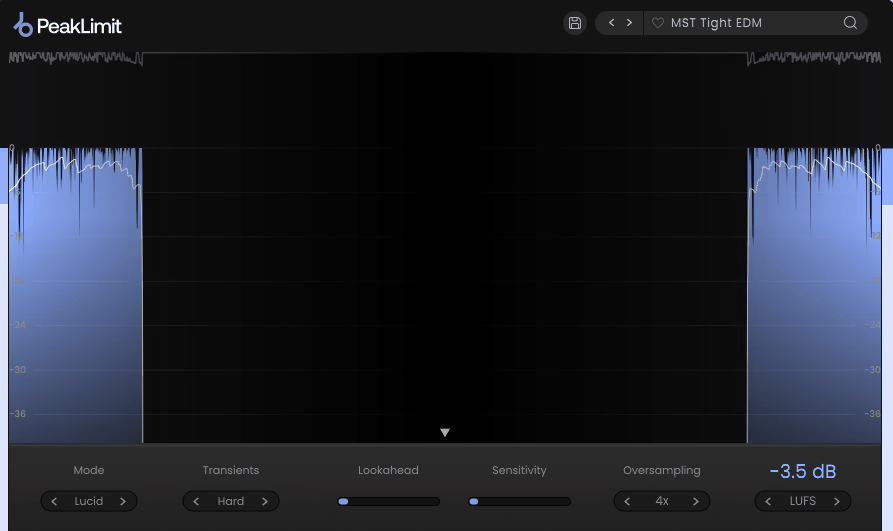
A good limiter is one of those plugins you don’t think about until you need one, and then the quality difference between a decent limiter and a bad one becomes immediately obvious. PeakLimit provides a transparent, clean brickwall limiter designed for the final stage of your mastering chain or for controlling peaks on individual tracks.
The design philosophy is simplicity: you set the ceiling, adjust the input gain, and the limiter handles the rest without adding obvious pumping or distortion.
What I appreciate about PeakLimit compared to some of the more complex mastering limiters on the market is that it doesn’t try to be ten tools at once. There’s no multiband processing, no loudness matching, no AI assisted analysis.
You get a clean, reliable limiter that controls peaks transparently and lets you push the volume without audibly degrading the signal. For producers who want a straightforward limiter that does the job without a learning curve, this is a practical option at a reasonable price.
- Transparent Limiting
The algorithm is designed for minimal coloration, controlling peaks without introducing the pumping, breathing, or tonal changes that aggressive limiters produce. At moderate gain reduction levels, the limiting is essentially inaudible, which is exactly what you want on a master bus where the goal is loudness without artifacts.
- Ceiling Control
A precise output ceiling with fine resolution lets you set the exact maximum output level for your master. The ceiling control is critical for streaming and distribution where specific loudness targets and true peak limits need to be met consistently.
- Visual Metering
A gain reduction meter shows exactly how much limiting is being applied in real time, which is essential for keeping the processing in a range where it’s working transparently. When you can see the gain reduction climbing above 3 or 4 dB, you know you’re pushing into territory where artifacts might become audible.
- Auto Release
An automatic release mode adjusts the recovery time based on the incoming signal, producing smoother limiting behavior than a fixed release time. The auto release prevents the limiter from releasing too quickly on sustained material (which causes distortion) or too slowly on dynamic material (which causes pumping).
Available from Plugin Boutique in VST, VST3, AU, and AAX formats.
Get the Free Plugin Starter Kit
The genuinely useful free DAWs and plugins worth installing. No filler. Straight to your inbox.
2. Plugin Boutique StereoSavage 2 (Stereo Imaging)
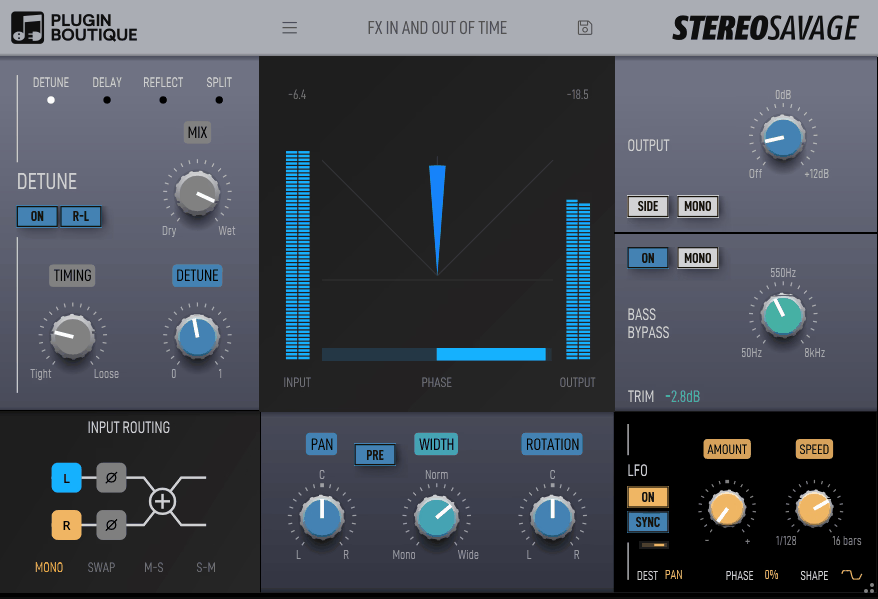
If you could only have one stereo manipulation plugin, StereoSavage 2 would be a strong contender because it combines so many different stereo techniques into a single interface. Designed and coded by Credland Audio for Plugin Boutique, it handles mono to stereo conversion, stereo widening, rotation, auto panning, and LFO modulated stereo effects alongside comprehensive metering that shows you exactly what’s happening to your stereo field.
I keep StereoSavage 2 loaded on a few tracks in nearly every session because the combination of tools it offers eliminates the need for three or four separate plugins. The Vox mode creates convincing double tracked vocals from a single take. The Expand mode widens stereo sources naturally. The Rotation pans the center content while leaving the sides intact, which is useful for repositioning elements within a stereo recording. Having all of these techniques available in one plugin with proper metering means you’re making informed decisions about stereo processing rather than guessing.
- Vox Mode
The Vox stereo generator creates a convincing double tracked effect from a single mono or stereo vocal by introducing subtle pitch and timing differences between left and right channels. The result sounds like a natural double take rather than a processed effect, and you can use it on vocals, guitars, synths, or any mono source that needs width.
- Multiple Modes
Beyond Vox, the plugin includes Delay, Expand, and Split modes for generating stereo from mono sources, each using a different technique with distinct sonic characteristics. Delay uses Haas effect timing differences. Expand uses early reflections for spatial width. Split separates frequency bands to left and right channels. Having multiple approaches means you can choose the technique that sounds best on each specific source.
- Rotation Control
The Rotation knob pans the center (mid) content of a stereo signal while leaving the side information in place. This is different from standard panning which moves everything, and it’s useful for repositioning vocals or lead instruments within an existing stereo mix without disturbing the ambient content.
- Bass Bypass
An adjustable crossover applies stereo processing only above a set frequency, keeping the low end mono and focused while widening the mids and highs. You can also use the mono bass feature to sum everything below the crossover to a single centered signal, essential for maintaining translation across different playback systems.
- LFO Modulation
A sync able LFO modulates the stereo processing parameters over time, creating auto panning, tremolo, and rhythmic stereo effects. The LFO adds motion and excitement to static sounds, and the tempo sync keeps the movement locked to your track.
- Stereo Metering
A real time goniometer alongside phase correlation and input/output level meters shows you exactly what the stereo processing is doing to your signal. The phase correlation meter is particularly important for catching mono compatibility issues before they become problems on consumer playback systems.
Available from Plugin Boutique in VST, AU, and AAX formats.
3. Plugin Boutique ShapeMod (Modulation Effect)
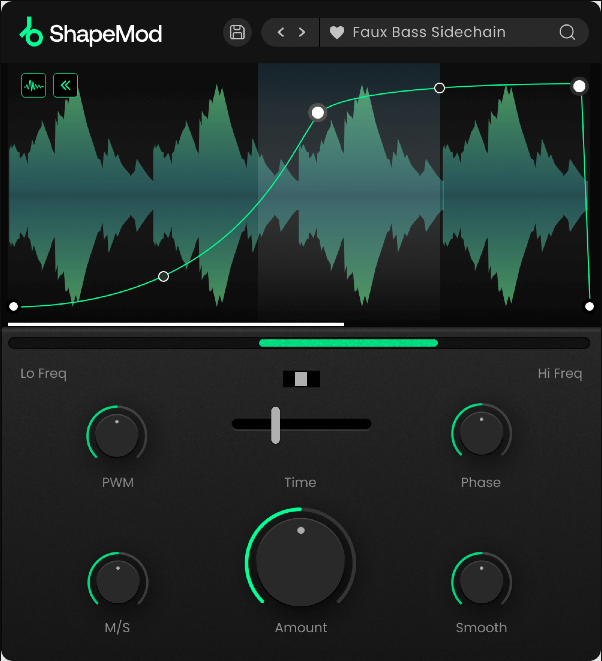
ShapeMod is a multi shape LFO modulation tool that applies rhythmic, tempo synced modulation to volume, filter, and other parameters. Think of it as a dedicated tremolo, auto filter, and rhythmic gating tool in a single plugin. The core idea is simple: draw or select an LFO shape, sync it to your DAW tempo, and let it modulate the signal.
Where ShapeMod earns its place is in the rhythmic sound design department. I use it primarily for creating sidechain style pumping without an actual sidechain input, and for adding rhythmic movement to pads and sustained sounds that feel static. The shape drawing interface lets you create custom modulation curves that go beyond the standard sine, triangle, and square LFO shapes that most synths and effects offer.
- Shape Drawing
A graphical editor lets you draw custom modulation shapes freehand or select from preset curves. The ability to create asymmetric, multi segment shapes means you can design specific rhythmic behaviors that standard LFO waveforms can’t produce, like a slow build followed by a sharp drop.
- Tempo Sync
The modulation locks to your DAW tempo with adjustable rate divisions, keeping the rhythmic effects perfectly aligned with your track. The sync ensures that volume ducking, filter sweeps, and gating patterns stay in time regardless of tempo changes.
- Multiple Targets
The modulation can be applied to volume, filter cutoff, and panning simultaneously or independently, creating complex rhythmic effects from a single LFO shape. Modulating volume and filter together creates more interesting rhythmic textures than either parameter alone.
Available from Plugin Boutique in VST, VST3, AU, and AAX formats.
4. Plugin Boutique Exceed (Exciter/Enhancer)
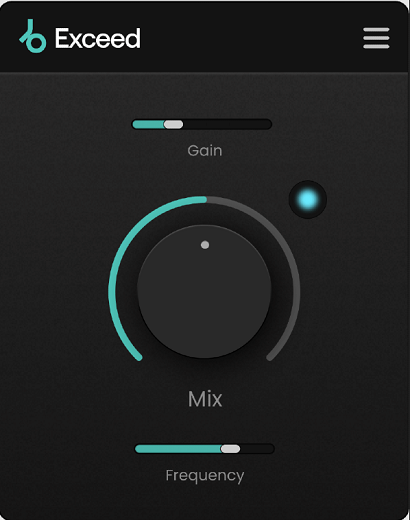
Adding presence, air, and harmonic excitement to a track is a common mixing task, and Plugin Boutique Exceed provides a harmonic exciter that generates new high frequency content from your signal. The plugin uses multiband processing to target the excitation to specific frequency ranges, giving you more control over where the enhancement is applied than single band exciters that brighten everything indiscriminately.
I find Exceed most useful on vocals, acoustic guitars, and the mix bus where I want more presence and clarity without simply boosting the existing high frequencies with EQ. The difference between excitation and EQ is that an exciter generates new harmonic content while EQ only amplifies what’s already there. For signals that are dull or lack sparkle, excitation can add detail that no amount of EQ boosting will produce.
- Multiband Excitation
The harmonic generation is applied across separate frequency bands, letting you target specific ranges for enhancement while leaving others untouched. You can excite the air frequencies for sparkle without adding harshness to the upper midrange, or enhance the midrange presence without affecting the highs.
- Harmonic Generation
The plugin creates new harmonic content musically related to the input signal rather than simply boosting existing frequencies. This produces a sense of detail and presence that EQ alone can’t achieve, because you’re adding information to the signal rather than just amplifying what’s already there.
- Saturation Character
The harmonic generation includes a saturation component that adds warmth alongside the brightness. The saturation prevents the excitation from sounding thin or harsh, which is a common problem with cheaper exciters that add high frequency content without corresponding warmth in the lower harmonics.
- Parallel Blend
A wet/dry mix lets you dial in the exact amount of excitation your material needs. For subtle enhancement, low mix settings add presence without obvious processing. For more dramatic effect, higher settings produce noticeable brightness and energy that can bring a dull recording to life.
Available from Plugin Boutique in VST, VST3, AU, and AAX formats.
5. Plugin Boutique Carbon Electra (Synthesizer)
Carbon Electra is Plugin Boutique’s own four oscillator subtractive synthesizer, and it’s a more capable instrument than you might expect from a retailer’s house brand plugin. The four oscillators with multiple waveforms, dual multimode filters, and comprehensive modulation routing provide enough synthesis depth to handle everything from simple pads and leads to complex, evolving sound design.
What draws me to Carbon Electra for certain tasks is the straightforward workflow combined with enough depth to produce interesting sounds. It doesn’t try to compete with the feature density of synths like Serum or Pigments, but for bread and butter subtractive synthesis, clean pads, analog style leads, and warm bass patches, it covers the ground competently. The four oscillator design gives you layering options that two oscillator synths don’t offer, and the sound quality is clean and professional.
- Four Oscillators
Four independent oscillators with multiple waveforms provide more layering options than the standard two oscillator design. Each oscillator has its own tuning, waveform, and level controls, and layering all four with slight detuning produces the thick, wide sounds that subtractive synthesis is valued for.
- Dual Filters
Two multimode filters with multiple filter types (low pass, high pass, band pass, notch) can be configured in series or parallel routing. The dual filter architecture lets you apply different filter characters to different parts of the signal simultaneously, which opens up tonal options that single filter synths can’t match.
- Modulation Matrix
A flexible modulation routing system connects LFOs, envelopes, and other sources to any parameter in the synth. The modulation depth and routing flexibility let you create animated, evolving patches that go beyond static subtractive tones into territory that feels alive and responsive.
Available from Plugin Boutique in VST, VST3, AU, and AAX formats.
6. Plugin Boutique DriveLE (Saturation & Drive)
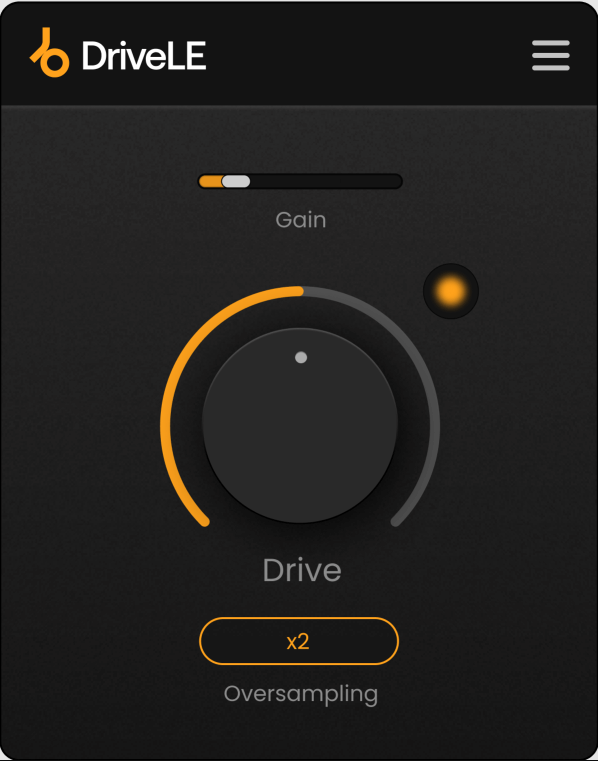
Saturation plugins are everywhere, but most of them either try to do too many things or cost more than the job warrants. Plugin Boutique DriveLE takes the opposite approach with a focused drive and saturation effect that provides several distinct distortion algorithms in a clean, minimal interface. You choose a drive type, set the amount, and adjust the tone. That’s essentially the workflow, and for many applications, that’s all you need.
The reason I keep DriveLE in my plugin folder is because it loads fast, uses minimal CPU, and sounds good on the sources where I use it most: drums, bass, and synths that need a bit of grit and harmonic weight. It’s not going to replace a multiband saturation plugin like FabFilter Saturn 2 for detailed work, but when I want to add some drive to a snare or thicken a bass line without opening a complex interface, DriveLE does the job in about five seconds.
- Drive Algorithms
Multiple distortion types provide different saturation characters, from subtle analog warmth to more aggressive overdrive. Each algorithm responds differently to the input level and produces distinct harmonic content, so switching between types on the same source gives you meaningfully different results.
- Tone Shaping
A tone control adjusts the frequency balance of the saturated signal, letting you brighten or darken the distortion character. The tone knob is important because distortion without any tone shaping often produces results that are either too dark or too harsh, and a simple brightness adjustment solves both problems.
- Input/Output Gain
Independent input and output gain controls let you drive the saturation harder while compensating for the level increase. Proper gain staging through a saturation plugin is essential for making accurate comparisons between processed and unprocessed signals.
- Mix Blend
A wet/dry mix enables parallel saturation, blending the driven signal with the clean original. Parallel saturation is one of the most useful mixing techniques for adding warmth and weight without losing transient clarity, and having the blend built into the plugin eliminates the need for a separate parallel bus.
- Minimal CPU
The lightweight processing means you can run DriveLE on multiple tracks simultaneously without meaningful impact on your system performance. This matters because saturation is the kind of processing you often want on many channels at once, not just a single insert.
Available from Plugin Boutique in VST, VST3, AU, and AAX formats.
7. Plugin Boutique BigKick (Kick Drum Designer)
Designing custom kick drums from scratch normally means layering samples, shaping transients, adding sub bass with a synth, and processing the result with EQ and compression across multiple tracks. BigKick condenses all of that into a single dedicated kick drum designer that lets you build kicks from a combination of sampled clicks and transients paired with a synthesized sub bass body.
I reach for BigKick in electronic music production when the stock kick samples in my library don’t fit the track and I need something custom. The workflow is genuinely quick: you pick a click sample for the transient character, dial in the sub bass synthesizer for the body and sustain, adjust the pitch envelope, and you have a usable custom kick in under a minute. It’s not trying to replace your entire drum sample library, but for building that one specific kick that a particular track demands, the focused workflow is hard to beat.
- Click Layer
A sample based transient layer provides the attack and top end character of the kick. You can load from the included click library or import your own samples, and the click controls let you adjust the pitch, envelope, and level to shape the transient independently from the body.
- Sub Synthesis
A dedicated sub bass synthesizer generates the low frequency body of the kick with a controllable pitch envelope that defines the characteristic pitch sweep from the initial impact to the sustaining tone. The pitch envelope is where you define whether the kick sounds tight and punchy or long and boomy.
- Combined Output
The click and sub layers are mixed and processed together through the output section, creating a single, cohesive kick sound. The combined processing ensures the transient and body work together as a unified sound rather than feeling like two separate elements layered on top of each other.
Available from Plugin Boutique in VST, VST3, AU, and AAX formats.
8. Zampler // RX (Free Sample Player)
Zampler // RX is a free sample player that loads and plays multi sampled instruments, providing a practical way to use sample based sounds without owning a full sampler like Kontakt. The plugin supports its own format of sample instruments, and a growing library of free and paid content is available. For producers who need basic sample playback without investing in a premium sampler, Zampler provides that functionality at no cost.
I want to be realistic about what Zampler // RX is and isn’t. It’s not a replacement for Kontakt in terms of scripting capabilities, library ecosystem, or advanced playback features. What it provides is a lightweight, free sample player that handles basic multi sampled instruments competently. If you need to load a piano, strings, or drum kit without spending money on a sampler engine, Zampler gets you there. The growing content library means you’re not stuck with just a player and no sounds.
- Free Engine
The sample playback engine is completely free with no feature restrictions, trial limitations, or in app advertising. You download the player and start loading instruments immediately, which makes it accessible to producers at any budget level.
- Content Library
A growing collection of free and paid sample instruments covering pianos, synths, drums, orchestral sounds, and other categories provides immediately usable content. The free instruments alone give you enough variety to start producing without spending anything beyond the download time.
- Filter and Effects
Built in filter, envelope, and effects processing lets you shape the loaded samples within the player. The processing is basic compared to a full sampler, but it provides enough control to adjust the sound to fit your production context.
- Lightweight Design
The plugin is resource efficient, loading quickly and using minimal CPU and RAM compared to full featured samplers. The lightweight design means you can run multiple instances without the performance impact that larger sampler engines can introduce.
Available in VST and AU formats. Free.
9. Plugin Boutique ResDelay (Resonant Delay)
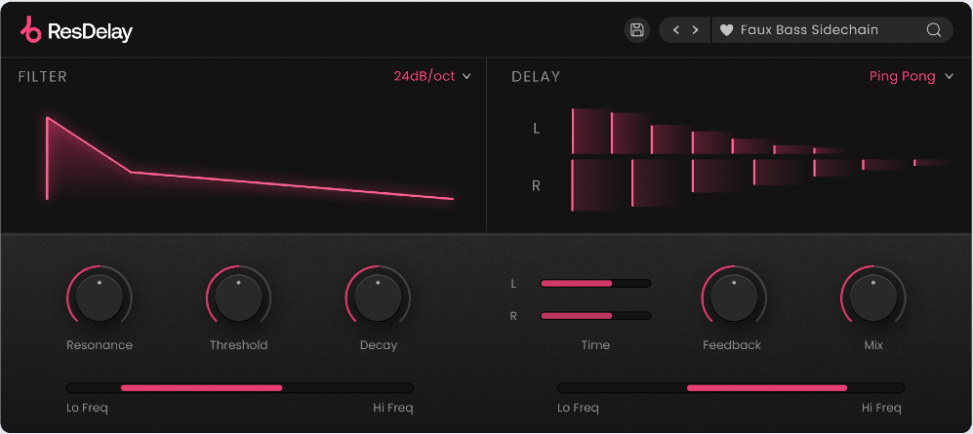
Most delay plugins give you time, feedback, and a filter. ResDelay adds a resonant filter to the delay feedback path that turns standard echo effects into melodic, singing, and harmonically tuned delays that interact with the feedback in musically interesting ways. The resonance in the feedback creates pitched overtones that sustain and evolve as the delay repeats, producing effects that range from subtle metallic coloring to dramatic, self oscillating tonal feedback.
What makes ResDelay worth investigating is the specific interaction between the resonant filter and the delay feedback. As the delay repeats, each pass through the filter reinforces certain frequencies and attenuates others, causing the echoes to develop a pitched, singing quality that gets more pronounced with higher feedback settings. I use it primarily on synths and vocals where I want the delay to add harmonic interest rather than just rhythmic repetition.
- Resonant Feedback
The resonant filter in the feedback path processes each delay repeat, with the filter’s resonance adding pitched emphasis that becomes more pronounced with each repetition. Higher feedback settings cause the resonance to build up, producing singing, metallic, and self oscillating delay tails that standard delays can’t generate.
- Filter Types
Multiple filter modes (low pass, high pass, band pass) in the feedback path produce different characters of resonant delay. Band pass produces the most dramatic pitched effect. Low pass creates warming, darkening delays. High pass produces bright, thinning repetitions.
- Tempo Sync
The delay time syncs to host tempo with standard note value divisions, keeping the rhythmic placement of the delays locked to your track. Combined with the resonant filter, tempo synced delays produce tuned rhythmic effects that can become melodic elements in their own right.
- Feedback Control
A precise feedback amount determines how many delay repetitions occur and how quickly the resonance builds up. At lower feedback settings, you get subtle coloring. At higher settings, the delay approaches self oscillation, producing sustained pitched tones that can be used as a creative instrument.
- Stereo Width
The delay includes stereo processing that distributes the resonant echoes across the stereo field, creating a sense of space and dimension. The stereo spread prevents the delay from sitting on top of the dry signal and gives the resonant tails room to develop without cluttering the center of the mix.
Available from Plugin Boutique in VST, VST3, AU, and AAX formats.
10. Plugin Boutique DualClip (Clipper)
Clipping is a dynamics technique that’s become increasingly popular in modern mixing and mastering as an alternative (or complement) to limiting. DualClip provides a dual stage soft clipper that shaves peaks with harmonic saturation rather than the dynamic gain reduction that limiters use. The result is a different character of loudness that many engineers prefer on percussive material and bus processing.
I use DualClip primarily before my limiter on the master bus and on the drum bus where the combination of clipping followed by limiting often produces louder, cleaner results than limiting alone. The soft clipping rounds the peaks with saturation rather than squashing them with gain reduction, which preserves more of the perceived transient impact while still controlling the peak level. The dual stage design lets you set two different clipping thresholds for stepped gain reduction.
- Dual Stages
Two independent clipping stages in series provide stepped peak reduction, where the first stage catches the largest peaks and the second stage refines the remaining ones. The dual approach produces smoother results than a single aggressive clipping stage, because each stage is doing less work individually.
- Soft Clipping
The soft clip algorithm rounds peaks with a gradual saturation curve rather than hard cutting them, which produces warm, musical harmonic distortion instead of the harsh digital clipping that flat amplitude limiting creates. The softness of the clipping curve determines how much harmonic content is added to the peaks.
- Input/Output Gain
Independent drive and output controls let you push harder into the clipping while maintaining an appropriate output level. The drive determines how aggressively you’re clipping, while the output compensates so you can make accurate loudness matched comparisons.
- Metering Display
A visual display shows the clipping behavior in real time, letting you see how much of the signal is being clipped and the character of the saturation being applied. The visual feedback helps you find the balance between transparent peak control and audible saturation.
Available from Plugin Boutique in VST, VST3, AU, and AAX formats.
Get the Free Plugin Starter Kit
The genuinely useful free DAWs and plugins worth installing. No filler. Straight to your inbox.

Hello, I’m Viliam, I started this audio plugin focused blog to keep you updated on the latest trends, news and everything plugin related. I’ll put the most emphasis on the topics covering best VST, AU and AAX plugins. If you find some great plugin suggestions for us to include on our site, feel free to let me know, so I can take a look!