
Ableton Live has a specific workflow that rewards controllers designed around it. The Session View clip launching, the device macro controls, the mixer architecture, and the way Live handles MIDI mapping all benefit from controllers that speak Ableton’s language natively rather than relying on manual MIDI learn for every function.
A generic MIDI keyboard works fine for note input, but a controller with proper Ableton integration lets you launch clips, control devices, navigate tracks, and manage your mixer without touching the mouse, which fundamentally changes how you interact with the software.
What I find worth considering before choosing is whether you primarily need a performance controller for live sets and clip launching, a production keyboard for writing and recording parts, or something that handles both.
Some options on this list are built entirely around Ableton’s Session View and performance workflow. Others are full-featured keyboard controllers that happen to have excellent Ableton integration alongside their general capabilities.
I’ve selected ten controllers that represent the strongest current options for Ableton users, from Ableton’s own hardware through deeply integrated third-party controllers to versatile keyboards that balance Ableton-specific features with broader production utility.
1. 37-Key MIDI Controller Keyboard — $129.99

Before the Ableton-specific controllers below, one option from the Pluginerds store for producers who need a working keyboard immediately before investing in Session View integration and Push-style features.
The 37-Key MIDI Controller Keyboard gives you 37 full-size keys, pitch and modulation wheels, and USB-MIDI plug-and-play at $129.99. Ableton Live detects it immediately and you can map it to instruments, racks, and automation parameters without any special integration. The controllers below add clip launching, macro knobs, and touch strip performance features that deepen the Ableton workflow significantly — but those features require learning how the Session View interaction works. A plain keyboard gets you recording and programming immediately while you decide which Ableton-specific interface suits the way you work.
- Immediate Recording
37 keys across three octaves let you record MIDI instrument parts, chord progressions, and melodic lines directly into Ableton Live’s Arrangement and Session Views without any configuration.
In a DAW where clip launching and live performance are central to the workflow, having a physical keyboard that responds to what you play is more fundamental than any pad or macro integration. The notes you record on keys are what fill the clips that everything else in Ableton’s workflow is built around.
- Universal Mapping
MIDI learn compatibility means every knob, button, and wheel on this controller can be mapped to any parameter in Ableton Live using the CMD+M (Mac) or CTRL+M (Windows) MIDI learn shortcut.
You can map the pitch wheel to a filter sweep, the mod wheel to reverb send, and any physical control to any software parameter. This universal mapping approach works before you invest in a controller with preset Ableton integration.
- Plug-and-Play
No driver installation on current Mac and Windows systems — Ableton Live recognises it in Preferences > MIDI immediately on connection. One cable, one minute of setup, and you are playing.
Shop at Pluginerds — 37-Key MIDI Controller Keyboard $129.99
Get the Free Plugin Starter Kit
The genuinely useful free DAWs and plugins worth installing. No filler. Straight to your inbox.
2. Ableton Push 3
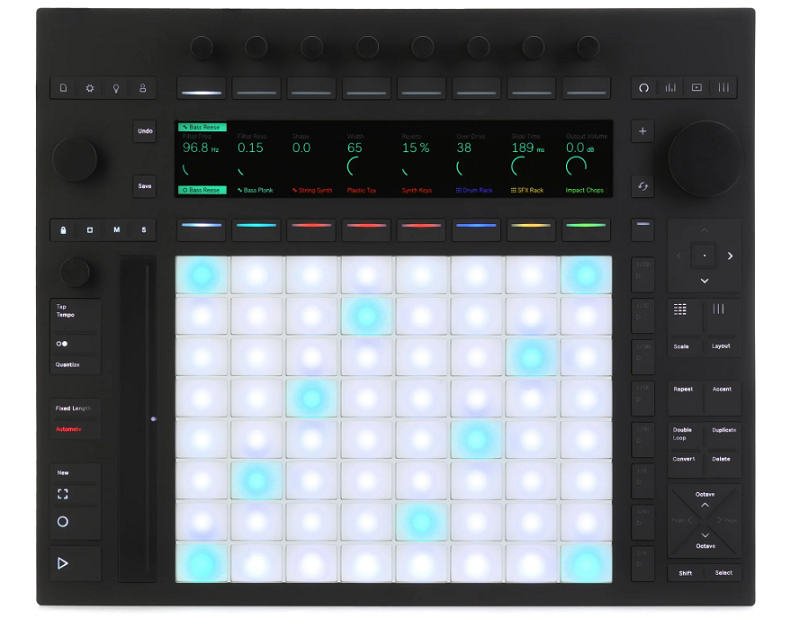
The only controller on this list made by Ableton themselves, and the deepest integration you can get with Live because Push 3 was designed alongside the software rather than mapped to it after the fact.
Ableton Push 3 functions as a standalone instrument (with the standalone version) or as a connected controller, giving you an 8×8 pad grid, high-resolution display, touch-sensitive encoders, and MPE-capable pads that provide direct, visual, tactile control over virtually every aspect of Live.
Push 3 isn’t just a controller for Ableton. In many ways it is Ableton in hardware form, with the interface designed so you can produce entire tracks without looking at a computer screen.
- Standalone Mode
The standalone version runs Ableton Live internally on dedicated hardware, meaning you can produce, perform, and mix without a connected computer. You load your Live sets onto Push 3 and work with them using only the hardware interface. For live performers, the standalone capability eliminates the laptop from your setup entirely, and for producers, it lets you work away from the studio with the full Ableton engine running on battery power.
- 64-Pad Grid
The 8×8 velocity-sensitive RGB pad grid with MPE capability provides clip launching, melodic input, drum programming, and step sequencing from a single surface. The pads display clip colors, note positions, and step sequence data through their LEDs, giving you visual feedback that connects what you see on the pads to what you hear. The MPE response adds per-pad pressure and slide expression that flat velocity pads don’t provide.
- Display Integration
A high-resolution color display shows Live’s device parameters, waveforms, clip names, and mixer state directly on the hardware. The display means you read parameter values, browse presets, and view arrangement information on Push itself rather than on your computer screen. For performance, the onboard display eliminates the need to check your laptop while playing.
- Encoder Control
Touch-sensitive encoders with automatic parameter mapping control whatever device, instrument, or mixer channel is currently active. The encoders follow your selection, so navigating to a different track automatically maps the knobs to that track’s device parameters. The touch sensitivity lets you see parameter values by touching an encoder without changing the value, which is useful for checking settings mid-performance.
3. AKAI Professional APC64
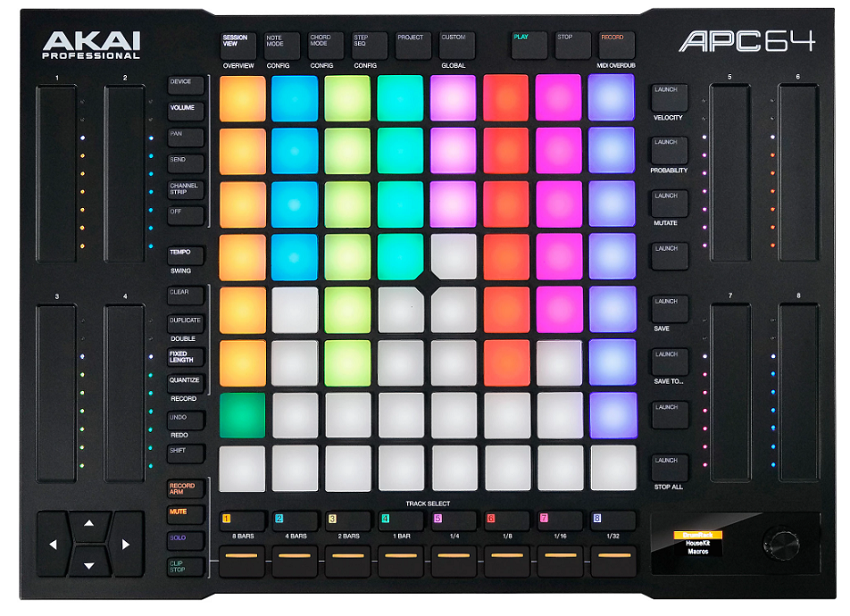
Built specifically for Ableton Live’s Session View with an 8×8 pad grid for clip launching alongside touch-sensitive faders, assignable knobs, and a step sequencer designed around Live’s workflow. AKAI APC64 carries forward the APC (Ableton Performance Controller) legacy that AKAI and Ableton co-developed years ago, updated with modern features and a more versatile layout.
The APC64 is for producers and performers who center their Ableton workflow around Session View clip launching and want a hardware surface that makes that interaction immediate and visual.
- Clip Grid
The 64-pad RGB clip launching matrix maps directly to Ableton Live’s Session View, with each pad representing a clip slot. The pad colors match your clip colors in Live, and pressing a pad launches the corresponding clip. The visual one-to-one mapping between the hardware grid and the Session View means you manage your live set from the controller with complete confidence about what each pad will trigger.
- Touch Faders
Eight capacitive touch-sensitive faders provide smooth, responsive mixer level control for your Live tracks. The touch faders detect your finger position without physical slider mechanisms, which means no physical slider caps to break or collect dust. The faders provide the volume control that pad-only controllers lack, letting you mix your Session View performance in real time.
- Step Sequencer
A dedicated step sequencer mode turns the pad grid into a drum and melodic step sequencer that programs patterns directly into Live’s clips. The step sequencer uses the pads for step entry and the display for visual feedback, providing a hardware programming experience that’s faster than mouse-based piano roll editing for rhythmic and melodic pattern creation.
- Assignable Knobs
Eight assignable rotary encoders provide hands-on control over device parameters, send levels, or any MIDI-mappable parameter in Live. The knobs supplement the faders by giving you timbral and effects control alongside the volume mixing, meaning you can adjust filter cutoff, reverb send, or any other parameter while your faders handle the mix.
- Scene Launch
Dedicated scene launch buttons trigger entire rows of clips simultaneously, which is how most Ableton live performers manage song sections. You press a scene button and every clip in that row launches, transitioning your entire arrangement from one section to the next. The dedicated scene buttons are essential for performance where timing scene changes to specific musical moments matters.
- Note Mode
A note mode transforms the pad grid from clip launching into a melodic playing surface with scale locking and chromatic layouts. The mode switching means the APC64 handles both performance clip management and melodic input from the same hardware, reducing the need for a separate keyboard for basic note entry.
4. Novation Launchkey 61 MK4
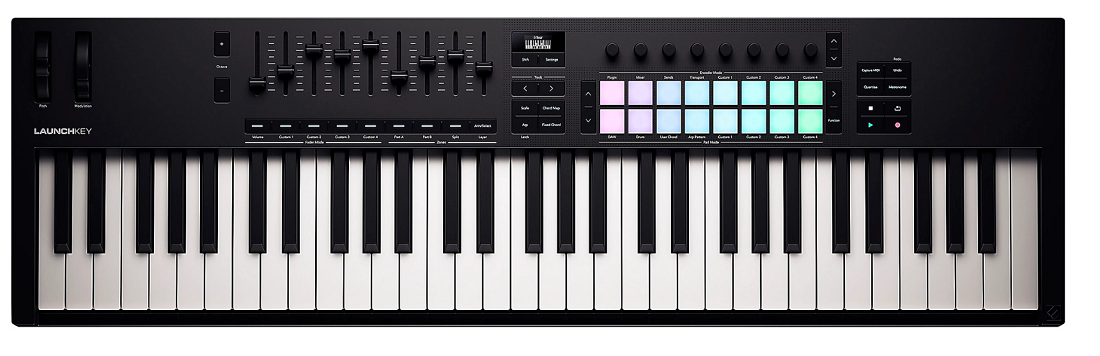
The full-size, 61-key version of Novation’s Ableton-focused controller line, giving you five octaves of velocity-sensitive keys with aftertouch alongside 16 pads, 9 faders, 8 encoders, and deep Ableton Live integration that maps controls automatically. Novation Launchkey 61 MK4 is for Ableton users who need a proper keyboard for playing parts alongside comprehensive DAW control.
Where the APC64 is purely a Session View controller, the Launchkey 61 is a complete production keyboard that happens to have excellent Ableton integration built in.
- Full Keybed
61 full-size velocity-sensitive keys with channel aftertouch provide the playing range and expressiveness that pad controllers and mini-key devices can’t match. If you play keyboard parts live, record chord progressions, or perform extended melodic passages, the 61-key format with aftertouch delivers the surface you need for expressive, two-handed playing within an Ableton-integrated controller.
- Fader Control
Nine faders provide dedicated mixer level control for your Live tracks, which is unusually comprehensive for a keyboard controller. The faders give you physical volume control that feels natural and immediate, and the ninth fader can be assigned to master volume or any other parameter you need accessible.
- Live Integration
Automatic Ableton Live mapping configures the Launchkey’s pads, knobs, faders, and buttons to control Session View clips, device parameters, mixer channels, and transport without manual MIDI learn setup. The integration is developed in collaboration with Ableton, providing a custom protocol that goes deeper than generic MIDI CC assignment.
5. Arturia KeyLab 61 Mk3
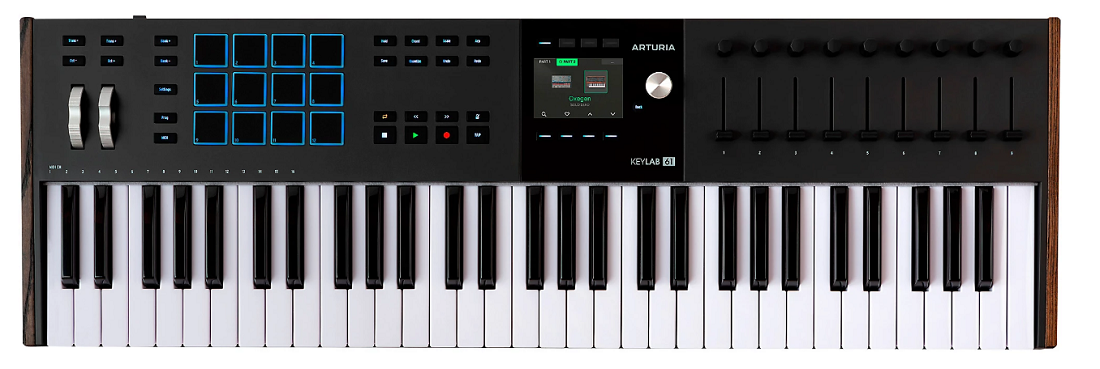
A premium 61-key controller with motorized faders, a large color display, and integration with both Arturia’s Analog Lab ecosystem and Ableton Live. Arturia KeyLab 61 Mk3 gives you a semi-weighted keybed with polyphonic aftertouch, 16 RGB pads, nine motorized faders, and nine encoders in a controller that feels like a proper studio centerpiece.
The KeyLab 61 Mk3 sits at the premium end of the controller market, and for Ableton users who want the best keybed, the most comprehensive physical controls, and deep software integration, it delivers a level of quality that more affordable controllers don’t match.
- Motorized Faders
Nine motorized faders move automatically to reflect your DAW’s current parameter positions when you switch tracks or recall presets. The motorized feedback means you always know the actual value of each fader by its physical position, which eliminates the parameter jumps that non-motorized faders produce when values don’t match positions. For mixing in Ableton, the motorized faders provide a genuinely tactile mixing experience.
- Poly Aftertouch
Polyphonic aftertouch detects pressure independently on each key, enabling per-note expression that channel aftertouch can’t provide. In Ableton, poly aftertouch works with instruments that support it, allowing you to apply different vibrato, filter, or modulation amounts to individual notes within a chord by varying your finger pressure on each key.
- Color Display
A large color screen shows preset names, parameter values, DAW state information, and visual feedback that keeps your eyes on the controller rather than the computer. The display quality is a step above what most controllers offer, with enough resolution and color depth to show meaningful visual context during production.
- Analog Lab
Built-in integration with Arturia Analog Lab gives you instant access to thousands of virtual instrument presets with the KeyLab’s knobs and faders automatically mapped to each preset’s most useful parameters. The Analog Lab integration provides an enormous sound library that’s immediately playable without any setup, and all of it works within Ableton as a plugin.
6. M-Audio Oxygen Pro 61
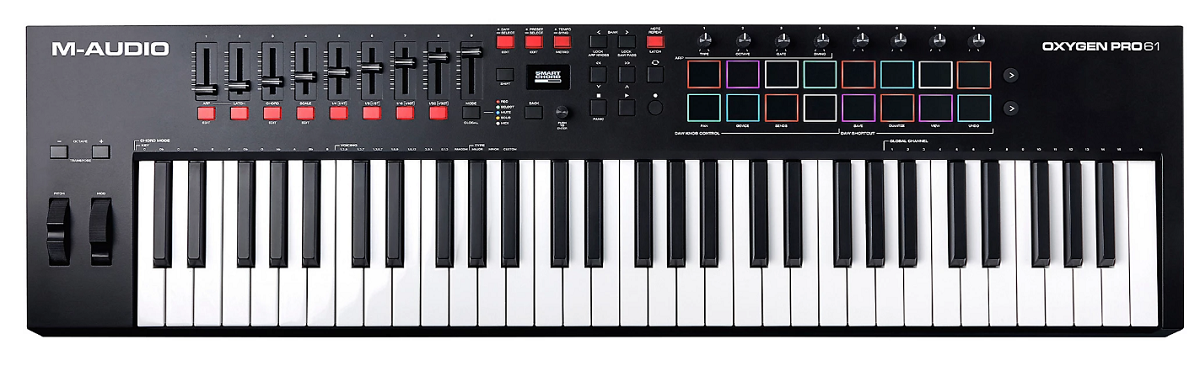
A practical, well-featured 61-key controller at a mid-range price that provides Ableton Live integration alongside general DAW compatibility. M-Audio Oxygen Pro 61 gives you 61 semi-weighted velocity-sensitive keys, 16 velocity-sensitive pads, 8 encoders, 9 faders, and auto-mapping for Ableton and other major DAWs in a controller that balances features with affordability.
For Ableton users who want a full 61-key controller with production controls but don’t need the premium price tag of flagship options, the Oxygen Pro fills that gap capably.
- Auto-Map
Pre-configured Ableton Live mapping assigns the Oxygen Pro’s faders, knobs, pads, and buttons to Live’s mixer, devices, and transport automatically. The auto-mapping eliminates the setup time that generic controllers require, getting you from unboxing to productive Ableton work quickly.
- 16 Pads
16 velocity-sensitive RGB pads with four pad banks provide drum input, clip launching, and note triggering alongside the keyboard. The pads are large enough for comfortable finger drumming and responsive enough for programmed velocity variation.
- Semi-Weighted
Semi-weighted keys provide more resistance than synth-action keybeds, offering a feel that’s closer to a piano for players who want more substance under their fingers. The semi-weighted action suits producers who play keyboard parts expressively rather than just step-entering notes.
7. Ableton Move
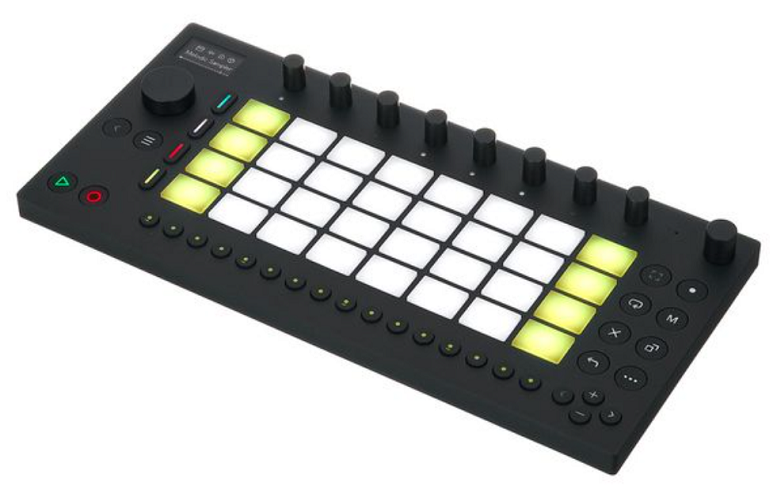
Ableton’s portable music-making device that brings Live’s clip-based workflow to a battery-powered, pocketable format. Ableton Move is designed for capturing musical ideas away from your studio, with pads, knobs, a built-in microphone, and onboard sounds that let you build clips, loops, and arrangements that transfer directly to Live on your computer.
Move isn’t a traditional MIDI controller. It’s a standalone creative tool that integrates with Ableton’s ecosystem, designed for the moments when inspiration hits and your studio isn’t nearby.
- Standalone Creation
Battery-powered standalone operation with onboard sounds, sampling, and sequencing lets you create music anywhere without a computer. You build clips, record samples from the built-in microphone, and arrange musical ideas using Move’s pads and controls, then transfer everything to Live for further development. The standalone capability makes Move a sketch pad for Ableton ideas.
- Live Transfer
Created content transfers seamlessly to Ableton Live as clips, audio, and MIDI data that you continue working on in your full production environment. The transfer integration means ideas captured on Move don’t require reimporting or rebuilding. They arrive in Live ready to be arranged, mixed, and finished.
- Built-in Mic
A built-in microphone captures audio samples, voice recordings, and environmental sounds directly into Move’s sampler. The microphone turns Move into a portable sampling device where you record sounds from the world around you and immediately incorporate them into musical ideas.
- Portability
The compact, battery-powered form factor with Bluetooth connectivity makes Move genuinely pocketable. You take it on a commute, to a park, or anywhere inspiration might strike, and you have a complete Ableton-compatible music creation tool that weighs almost nothing and requires no cables.
- Onboard Sounds
A library of instruments, drums, and samples provides immediate musical material without connecting to a computer. The sound library covers enough ground that you can build complete musical sketches using only Move’s onboard content, which makes it useful from the moment you turn it on.
8. Native Instruments Kontrol S61 MK3
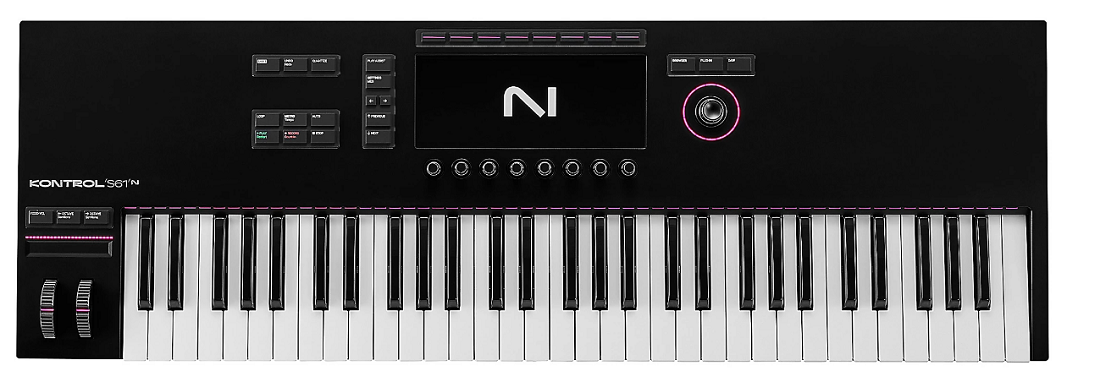
A 61-key controller built around NI’s Komplete ecosystem that also works well with Ableton Live through its general MIDI and template functionality. Native Instruments Kontrol S61 MK3 gives you a semi-weighted Fatar keybed, a high-resolution color display, 8 touch-sensitive encoders, and deep integration with Komplete instruments that are commonly used within Ableton.
For Ableton producers who rely heavily on Kontakt, Massive, and other NI instruments as plugins within Live, the Kontrol S61 provides a hardware interface optimized for those specific tools.
- Komplete Map
Automatic parameter mapping for every NI Komplete instrument and any third-party plugin supporting the NKS standard provides instant hardware control over your most-used Ableton plugins. Loading a Kontakt library in Ableton automatically maps the Kontrol’s encoders to that library’s most relevant parameters. The integration means you adjust virtual instrument settings from the hardware without manual MIDI learn.
- Fatar Keybed
A semi-weighted Fatar keybed provides a playing feel that’s notably better than most controllers at any price. The Fatar mechanism offers consistent velocity response, comfortable key spacing, and a substantial feel that makes extended playing sessions comfortable. For Ableton users who play parts live, the keybed quality matters more than any other specification.
- Light Guide
Per-key RGB LEDs (Light Guide) illuminate keys to show scales, chord shapes, and melodic patterns, which is useful for composition and learning within Ableton. The Light Guide can display the notes in a selected scale, show you which keys trigger specific drum sounds, or indicate the root notes of chords across the keyboard range.
9. Novation 61SL MKIII
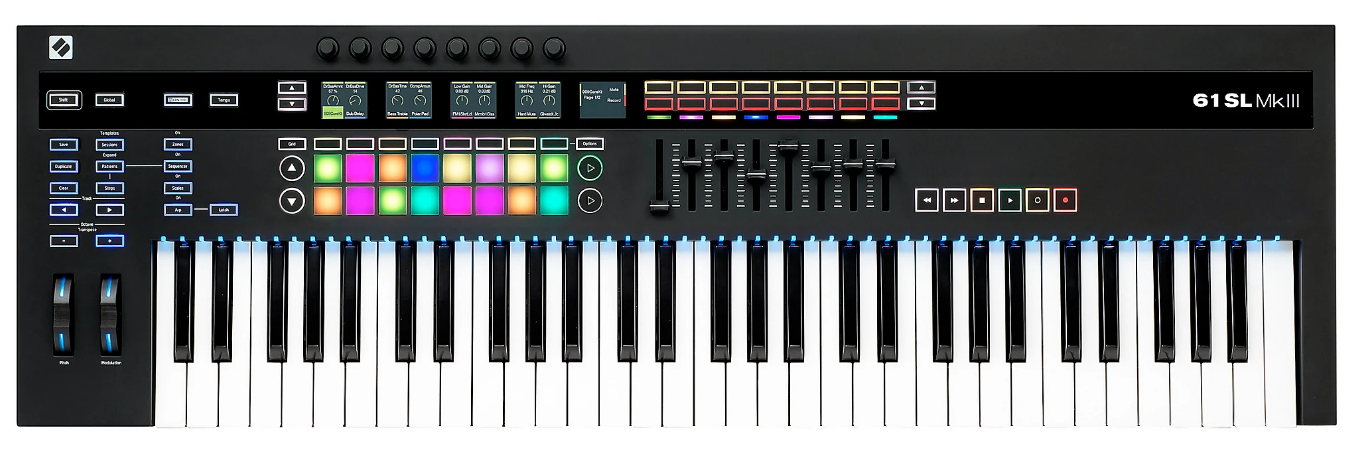
The most hardware-focused controller on this list, designed for producers who bridge Ableton Live with external synthesizers, modular systems, and other MIDI hardware. Novation 61SL MKIII includes an 8-track internal sequencer, CV/Gate outputs, and 5-pin MIDI alongside comprehensive Ableton integration, making it the controller for hybrid setups where Live coordinates with external gear.
If your Ableton workflow involves external analog synths, drum machines, or modular equipment alongside software instruments, the SL MKIII handles all of those connections from a single keyboard.
- CV/Gate Outs
Dedicated CV/Gate/Mod outputs connect the SL MKIII directly to analog synthesizers, semi-modular instruments, and Eurorack modules. The CV connectivity means you control your analog hardware from the same controller that manages your Ableton session, with the internal sequencer or Ableton’s own MIDI sending pitch and gate data to your synths.
- Internal Sequencer
An 8-track onboard sequencer programs and plays back patterns independently of Ableton, which is useful for driving external hardware with tight timing while Live handles the software side. The internal sequencer can also sync to Live’s clock, meaning your hardware sequences stay locked to your Ableton arrangement.
- Hardware Templates
Pre-built templates for hardware from Elektron, Korg, Roland, Moog, and Novation configure the SL MKIII’s controls to match specific external synths. The templates eliminate the manual setup that hybrid workflows normally require, letting you control your hardware synths from the same keyboard that manages your Ableton session.
- Semi-Weighted
A 61-key semi-weighted keybed with aftertouch provides an expressive playing surface for both software instruments in Ableton and external hardware. The keybed quality suits the SL MKIII’s role as the central controller in a mixed software/hardware studio where you play parts on whatever instrument is currently routed.
10. Arturia KeyLab Essential 61 Mk3
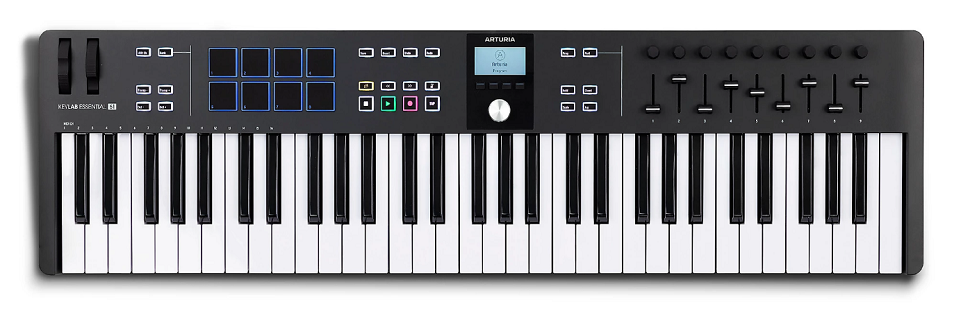
A more affordable entry into Arturia’s controller lineup that maintains Ableton integration, Analog Lab access, and a comprehensive control surface at a significantly lower cost than the flagship KeyLab. Arturia KeyLab Essential 61 Mk3 gives you 61 velocity-sensitive keys, 16 pads, 9 faders, 9 encoders, and a display with both Ableton and Analog Lab integration.
For Ableton users who want the Arturia ecosystem at a budget that doesn’t stretch to the Mk3 flagship, the Essential delivers the core functionality without the premium extras like motorized faders and polyphonic aftertouch.
- DAW Control
Pre-configured Ableton Live mapping provides automatic assignment of the Essential’s faders, knobs, pads, and buttons to Live’s transport, mixer, device parameters, and navigation. The integration works out of the box, meaning you connect the Essential to your computer, open Ableton, and the controls are already functional.
- Analog Lab
Full Analog Lab integration with automatic parameter mapping gives you access to thousands of Arturia virtual instrument presets with the hardware controls pre-assigned to each preset’s most useful parameters. The Analog Lab library runs as a plugin within Ableton, providing an enormous sound palette that’s immediately playable.
- Control Density
Nine faders plus nine encoders provide enough physical controls for simultaneous mixer and device parameter management. The control count matches more expensive controllers, giving you the hardware surface needed for hands-on Ableton work without the flagship price tag.
- Chord Features
Built-in chord mode and scale quantization constrain your playing to musically useful notes and generate chords from single keys. Within Ableton, the chord and scale features speed up composition by eliminating wrong notes and letting you explore harmonic ideas quickly.
- Pad Section
16 velocity-sensitive RGB pads handle drum programming, clip launching, and chord triggering alongside the keyboard. The pad section adds the rhythmic input and clip management capability that a keyboard alone doesn’t provide, making the Essential a more complete Ableton production surface.
11. Nektar Impact GXP61
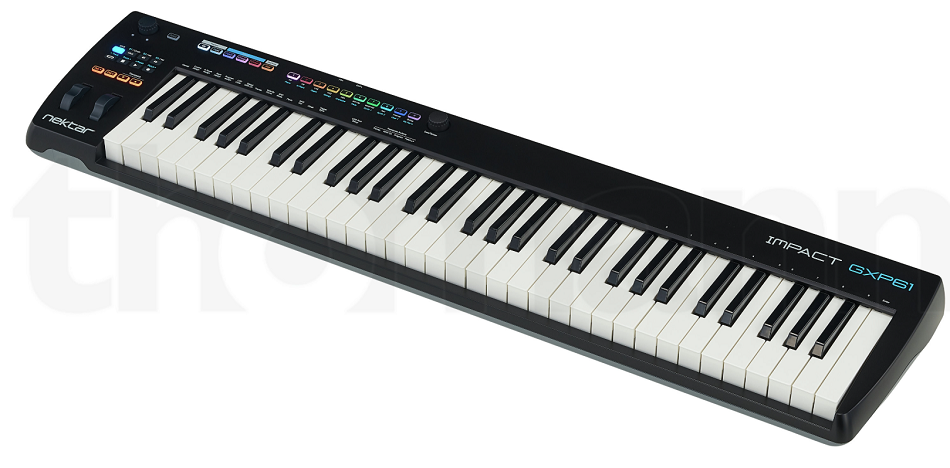
Closing the list with a straightforward, no-nonsense 61-key controller that provides solid Ableton integration at the most accessible price point for a full-size 61-key device. Nektar Impact GXP61 gives you 61 semi-weighted velocity-sensitive keys, a pitch/mod wheel, and Nektar’s DAW integration technology that auto-configures for Ableton Live alongside other major DAWs.
For Ableton users who primarily need a quality 61-key playing surface with functional DAW control and don’t require pads, faders, or extensive additional features, the GXP61 delivers the keyboard fundamentals at a reasonable cost.
- Semi-Weighted
The semi-weighted keybed provides more playing substance than synth-action controllers, with a response that suits both melodic performance and sustained chord work. The semi-weighted feel gives you enough resistance to play expressively without the heaviness of fully weighted hammer-action keys.
- DAW Integration
Nektar’s auto-configuration for Ableton Live maps transport controls, mixer functions, and basic navigation to the GXP61’s buttons without manual setup. The integration uses Nektar’s DAW communication protocol, which configures automatically when you install the included software and select Ableton as your DAW.
- Pitch/Mod
Dedicated pitch bend and modulation wheels provide the essential performance controls that some budget controllers omit. The wheels give you real-time pitch manipulation and modulation access during playing, which matters for expressive lead lines and pad performances within Ableton.
- Sustain Input
A sustain pedal input lets you hold notes and chords with foot control, which is essential for piano-style playing and sustained pad performances. The sustain input is a practical feature that some competing budget 61-key controllers skip, and its inclusion makes the GXP61 more versatile for keyboard-centric workflows in Ableton.
Get the Free Plugin Starter Kit
The genuinely useful free DAWs and plugins worth installing. No filler. Straight to your inbox.

Hello, I’m Viliam, I started this audio plugin focused blog to keep you updated on the latest trends, news and everything plugin related. I’ll put the most emphasis on the topics covering best VST, AU and AAX plugins. If you find some great plugin suggestions for us to include on our site, feel free to let me know, so I can take a look!