
Phase problems have a way of hiding in plain sight. You might not immediately recognize a phase issue as the culprit when your snare sounds thin, your DI bass feels lifeless when mixed with the miked amp, or your guitar recorded through both a direct signal and a cabinet suddenly loses its weight and body.
The instinct is usually to reach for EQ or compression to compensate, but no amount of boosting low end on a track that’s partially canceling itself is going to fix the underlying problem. Waves Audio built this plugin specifically for those situations, and what sets it apart from simpler phase tools is the visual system it puts in front of you so you can actually see what you’re addressing rather than guessing by ear alone.
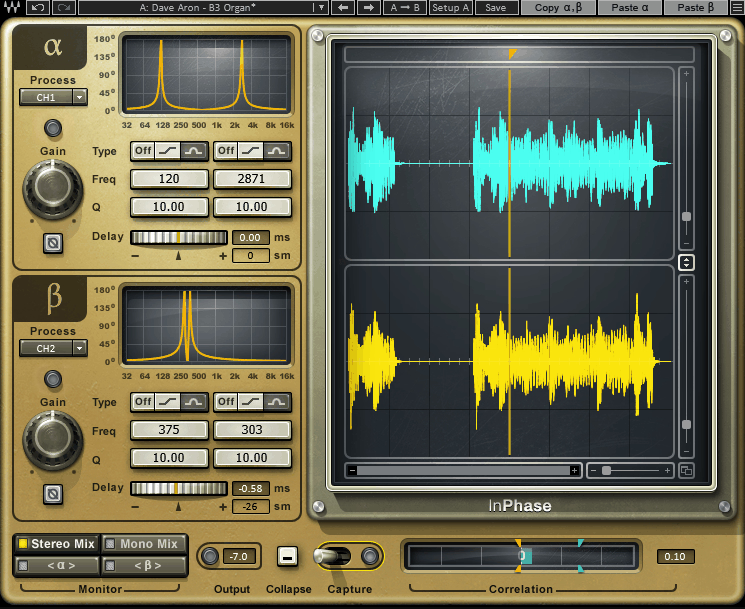
This is a phase correction and time alignment plugin built around dual waveform displays that capture your signals and show you their relationship in real time, alongside a correlation meter that gives you a clear visual readout of how well the signals are agreeing with each other at any given moment.
You also get two allpass phase shift filters per channel, each switchable between shelf and bell modes with adjustable frequency and Q, and a pure delay control that moves signals up to 20 milliseconds in either direction for straightforward time alignment before the phase filtering begins.
The plugin comes bundled with InPhase LT, a simplified version with fewer controls that’s useful for quick creative phase manipulation without the full visual analysis workflow.
For me, Waves InPhase is worth it specifically because of the visualization. If you’re someone who already understands phase well and works primarily by ear, simpler tools might serve you just as effectively.
But if you want to actually see what’s happening between two signals and develop a clearer mental model of phase relationships in your sessions, the dual display and correlation meter here make that learning process significantly more concrete.
The Visual System
I want to spend real time on this because it’s genuinely the most useful thing about the plugin and why it stands out from tools that are purely parameter-based. The Capture function records up to two seconds of signal from both channels, displaying Alpha and Beta waveforms in the dual windows so you can see how they line up with each other across the timeline. You can zoom in to sample-level resolution on the x-axis, which means you can actually see the waveforms sitting on top of each other and identify where the offset is happening and in what direction it needs to move.
The Phase Shift Curve window is equally useful for a different reason. While the waveform display helps with time alignment, the phase curve shows you what’s happening across the frequency spectrum, letting you see how the allpass filters are affecting the phase response at different frequencies as you adjust them.
This makes the filter adjustments far more deliberate and less like guesswork, because you can see the correction curve shifting in real time and correlate what you’re hearing with what you’re seeing in the display.
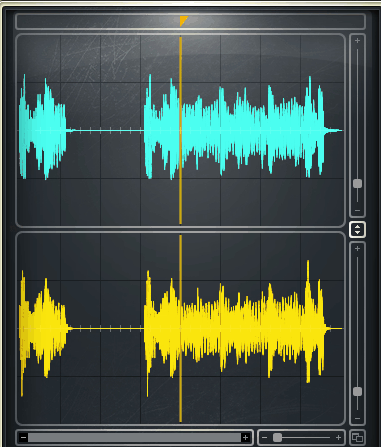
At the bottom of the interface, the correlation meter gives you an at-a-glance readout in blue or orange, reflecting how in-phase or out-of-phase your signals are, along with correlation markers that show the peak values and a numerical correlation value. I found that toggling the phase correction on and off while watching this meter is one of the fastest ways to confirm that what you’re doing is actually helping rather than introducing new problems in a different frequency range.
Get the Free Plugin Starter Kit
The genuinely useful free DAWs and plugins worth installing. No filler. Straight to your inbox.
Controls and Signal Flow
The plugin operates with two channels, Alpha and Beta, which default to left and right on a stereo input but can each be independently assigned to a separate sidechain source. This sidechain routing is what makes the plugin genuinely flexible for multi-mic situations, because it lets you set your reference signal, the boom mic, the close mic, the DI, whatever your anchor track is, as the input to one channel, while the track you’re correcting feeds the other. You then make adjustments to the target track until the correlation meter and waveform display show the two signals moving toward coherence.
Each channel has:
- Gain control for the signal going into processing
- Phase Invert to flip polarity 180 degrees
- Two allpass phase shift filters switchable between Shelf and Bell response
- Frequency control setting where the filter applies its 90-degree or 180-degree phase shift
- Q control in Bell mode to set the width of the correction curve
- Delay control moving the signal up to 20 milliseconds in either direction
- Output level metering to catch any gain changes introduced by processing
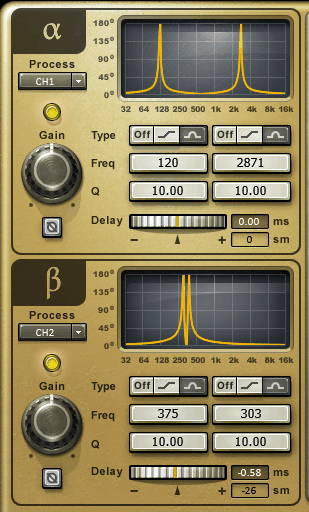
The workflow for a typical multi-mic scenario starts with the delay control rather than the phase filters, since time offset between mics is often the primary problem and correcting that first makes the remaining phase differences easier to address with the filters. I’d suggest using the waveform display to visually nudge the waveforms into rough alignment using the delay control, then switching your monitoring to mono and using the filters to clean up whatever phase relationship remains that the time alignment didn’t fully resolve.

Studio and Live Versions
One genuinely practical thing about this plugin is that it ships with dedicated live sound components alongside the standard studio version, and the live component specifically allows signals to be moved only forward in time rather than both directions, which is a necessary constraint for live applications where you can’t introduce negative latency on a channel you’re processing in real time.
For FOH engineers dealing with phase issues between a DI bass and a bass cabinet mic, or between a kick drum close mic and the sub kick, this live version provides the same visual analysis tools in a format that works within the constraints of a live mixing environment.
The InPhase LT version included with purchase takes a simplified approach with fewer parameters and a more streamlined interface, dropping the full waveform display and some of the advanced filter controls in favor of quick access to the most common phase manipulation adjustments. For situations where you need a fast phase correction on a single track without the full analysis workflow, LT is genuinely convenient to have available as a second option within the same purchase.
There are no traditional presets in the plugin in the sense of stored parameter configurations, since phase correction is entirely specific to the recording you’re working on rather than something that benefits from preset management. The intelligence is in the visual system and your ability to interpret it, not in pre-stored settings.
Formats: VST, VST3, AU, AAX
Works with: macOS, Windows
Price: $149 (frequently on sale significantly lower)
Check here: Waves InPhase
Get the Free Plugin Starter Kit
The genuinely useful free DAWs and plugins worth installing. No filler. Straight to your inbox.

Hello, I’m Viliam, I started this audio plugin focused blog to keep you updated on the latest trends, news and everything plugin related. I’ll put the most emphasis on the topics covering best VST, AU and AAX plugins. If you find some great plugin suggestions for us to include on our site, feel free to let me know, so I can take a look!