
Music theory knowledge is genuinely useful, but the reality of most production and DJ workflows is that there’s rarely time to sit down and carefully work out the key of every sample, loop, or track you want to work with. Matching keys by ear takes experience, and even experienced producers sometimes spend frustrating minutes trying to figure out whether a vocal sample is in B minor or F# minor before they can figure out if it’s going to work with what they’re building.
Mixed In Key Live was designed to eliminate that problem entirely, and it does so in the most low-friction way imaginable.
Developed by Mixed In Key in collaboration with the artist KSHMR, this is a system audio analyzer that lives in your menu bar or taskbar and identifies the BPM, key, and individual notes of literally any audio playing through your computer in real time. That means it works on Spotify streams, YouTube videos, Splice previews, files playing in your DAW, samples in a browser, anything at all. There’s no plugin to insert, no file to drag into an analysis queue, no learning mode to set up.
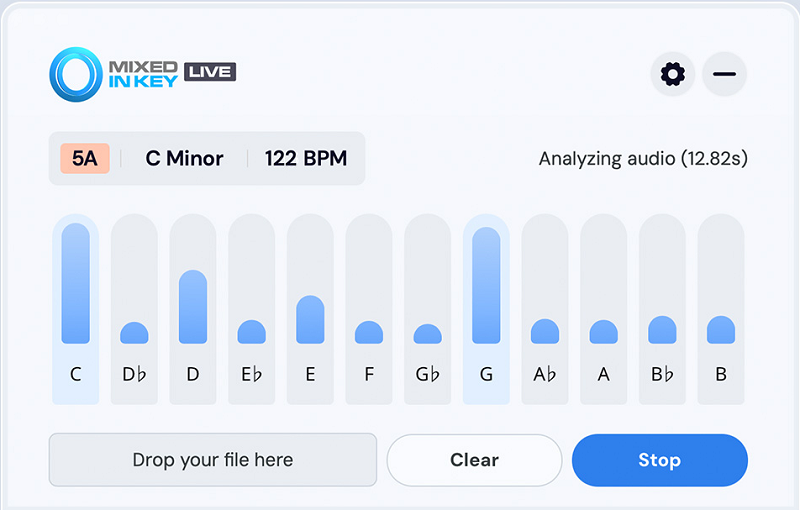
You play the audio and within seconds you have your key, scale, and tempo information alongside a graphic note visualizer showing which specific notes are present and their relative strength within the audio.
For me, Mixed In Key Live is genuinely worth its price for anyone who regularly hunts for samples, works on remixes, or prepares DJ sets and wants that key information instantly without breaking their creative flow. The time it saves across a session adds up quickly, and the zero-friction design means you’ll actually use it constantly rather than pulling it up only when you’re stuck.
How it works
The core workflow is about as simple as software gets, which I think is the point and a deliberate design choice rather than a limitation. You install the application, and it sits persistently in your Mac menu bar or Windows taskbar, floating above whatever you’re working in without demanding any screen real estate or attention. When you need it, it’s there. When you don’t, it’s invisible.
There are two main ways to use it. The first is drag and drop: you grab an audio file from Finder, Splice, your sample browser, or anywhere else and drop it directly onto the application window. Within a few seconds, it analyzes the file and returns the key, scale, and BPM. This works on individual samples, one-shot hits, loops, and full songs alike.
The second method is system audio listening: you hit the Listen button and it captures whatever audio is currently playing through your computer, whether that’s a track previewing in a streaming service, a clip playing in your DAW, or a sample you’re auditioning in a browser. It listens, processes, and gives you the result.
The graphic note visualizer is the feature that elevates this beyond a simple readout, and I found it more useful than I initially expected. Rather than just telling you the key, it shows you each note that’s present in the audio and indicates how dominant each one is relative to the others, giving you a visual breakdown of the harmonic content of what you’re hearing.
For melody transcription work this is particularly helpful because you can see which specific notes a melody is using without having to play it back against a piano and work them out by ear.
Get the Free Plugin Starter Kit
The genuinely useful free DAWs and plugins worth installing. No filler. Straight to your inbox.
Accuracy and performance
I want to be honest about this because it affects how you should incorporate the tool into your workflow. The accuracy is genuinely impressive across the vast majority of material, particularly on contemporary music with clear tonal centers, electronic production, pop vocals, and most sample library content. In testing across dozens of tracks, genres, and tempos, the overwhelming majority of key detections were correct and the BPM readouts were reliable on music with clear rhythmic pulse.
Where it can stumble is on:
- Harmonically ambiguous material: atonal or highly chromatic content, experimental electronic music, or anything where the key center is deliberately obscured
- Very slow or downtempo material: the tool sometimes reads the BPM at double or half the intended tempo on tracks with sparse rhythmic information
- Relative key confusion: detecting B minor as F# major or vice versa, since these keys share the same notes, is a known limitation of any key detection algorithm and happens occasionally
- Complex polyphonic textures: dense orchestral or heavily layered audio can be harder to pin down than a clean solo instrument or straightforward production
The practical takeaway is that you should treat the result as a strong starting point that’s almost always correct, while keeping your ears engaged as the final check. For routine work, hunting samples and checking compatibility, the accuracy is more than good enough to be genuinely useful in real time. I noticed it detected keys correctly on material where I might have taken considerably longer to work it out by ear, which is the entire point.
Who it’s for
The honest answer is that the value of Mixed In Key Live scales with how much time you spend dealing with unknown audio in your workflow. The people who get the most out of it are:
DJs who need to quickly verify the key of a track before working it into a set or a mashup, producers who regularly audition samples from Splice or other platforms and want immediate key information without leaving the browsing experience, remix engineers who need to identify the key of reference material quickly before deciding what to build around it, and music educators or learners who want a visual confirmation of the theory they’re hearing and developing their ear.
It’s significantly less essential if you work primarily with MIDI instruments where the key is always clear, if you record live instruments and are setting the key yourself, or if you’re working in a context where harmonic matching between audio sources isn’t a regular part of your workflow.
One thing I want to note clearly is that Mixed In Key Live does not write key and BPM information to your files the way the full Mixed In Key software does. So if your goal is to analyze and tag your entire music library for DJ use, you still need the main application for that. Live is specifically for instant in-session identification rather than library management, and understanding that distinction helps you know whether it’s the right purchase for your specific needs.
Works with: Any audio playing on your system, from any application
Platform: Mac OS 10.14.6 or higher (native M1 and M2), Windows 10 or higher
Price: $58
Check here: Mixed In Key Live
Get the Free Plugin Starter Kit
The genuinely useful free DAWs and plugins worth installing. No filler. Straight to your inbox.

Hello, I’m Viliam, I started this audio plugin focused blog to keep you updated on the latest trends, news and everything plugin related. I’ll put the most emphasis on the topics covering best VST, AU and AAX plugins. If you find some great plugin suggestions for us to include on our site, feel free to let me know, so I can take a look!