
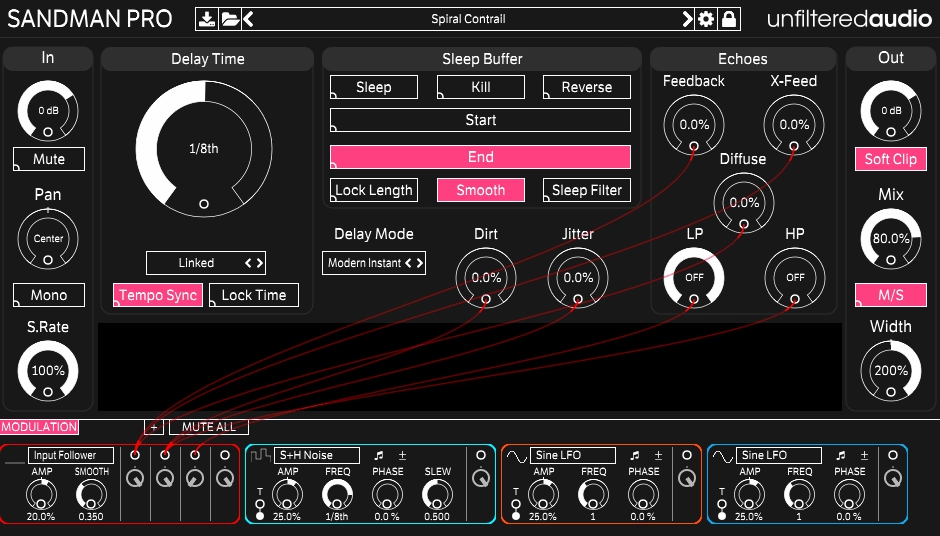
Most delay plugins do exactly what you’d expect: you dial in a time, set the feedback, maybe tweak a filter, and you’re done. Sandman Pro is not that plugin, and calling it a delay almost undersells what it actually is. Yes, it handles conventional echo effects beautifully, but the deeper you go with it, the more it starts to feel like a completely different kind of creative tool.
Built by Unfiltered Audio and distributed through
Most delay plugins do exactly what you’d expect: you dial in a time, set the feedback, maybe tweak a filter, and you’re done. Sandman Pro is not that plugin, and calling it a delay almost undersells what it actually is. Yes, it handles conventional echo effects beautifully, but the deeper you go with it, the more it starts to feel like a completely different kind of creative tool.
Built by Unfiltered Audio and distributed through Plugin Alliance, this thing has earned a cult following among sound designers, mix engineers, and DJs for good reason. At its core sits a Sleep button that freezes the delay buffer into a loop, and from that single feature branches out an entire world of granular synthesis, wavetable-style manipulation, stutter effects, reverse grains, pitch shifting, and glitch textures that most dedicated glitch plugins would struggle to match. That’s before you even look at the seven delay modes, each with its own character and control set.
I believe Sandman Pro is absolutely worth the $99 asking price, especially if you’re someone who enjoys creative sound design and wants a single tool that can serve as a clean delay one minute and a completely unhinged glitch machine the next.
In fact, it earned a well-deserved spot on our list of the best glitch and stutter plugins available right now, precisely because of how much creative territory it covers beyond what you’d typically expect from a delay.
The Sleep Buffer and why it changes everything
The Sleep button is the heart and soul of this plugin, and I want to spend real time on it because understanding what it does changes how you think about the whole thing. When you hit Sleep, the plugin freezes whatever audio is currently in the delay buffer and locks it into a loop.
From there, you can adjust the Start and End points of that loop using horizontal faders, stretch or compress the loop by modulating delay time, reverse the buffer for backward grain effects, drop the sample rate to pitch it down into granular territory, or trash it with noise for something genuinely abrasive.
What makes this special for glitch and stutter work specifically is how short you can make that loop. Pull the Start and End points close together and you’re essentially creating a micro-stutter that can be as clean or as destroyed as you want. Use the No Echo mode to bypass the delay entirely and feed audio directly into the Sleep buffer, then modulate the Sleep button itself rhythmically, and what you get is a stutter and buffer effect that rivals dedicated glitch tools like iZotope Stutter Edit.
I found this to be one of the most flexible stutter approaches in any plugin I’ve used because you’re building the effect yourself from scratch rather than triggering a preset pattern, which means the results feel genuinely musical rather than generic.
The buffer can be:
- Reversed for backward envelopes and haunting grain textures
- Re-pitched by adjusting the loop length while locked
- Down-sampled using the Sample Rate control for lo-fi and granular character
- Filtered through built-in lowpass and highpass filters within the Sleep section
- Noised up by injecting dirt directly into the buffer content
- Modulated via the full modulation system for constantly evolving results
I love how the waveform display in the interface actually shows you the buffer content in real time as you manipulate it, so when you’re modulating delay times or adjusting Start and End points you can literally see the waveforms stretching and compressing. It’s one of those interface details that makes the plugin significantly easier to work with intuitively.
Seven Delay Modes
Beyond the Sleep buffer, the seven delay modes each bring a genuinely different character to the table and are worth exploring individually rather than just sticking with the default. The modes are:
- Classic Tape, which adds tape saturation, wow, and flutter for that warm, vintage echo character
- Modern Instant, which lets you modulate delay time without producing pitch artifacts, making it great for clean vocal doubling to trail transitions
- Pitch Shifter, a dual-mono mode that creates harmonies, shimmer effects, and metallic textures
- Glitch Shifter, which does pitch shifting in a deliberately wrong and unpredictable way that’s surprisingly musical
- Multi-Tap, giving you 16 simultaneous delay lines for massive doubling and stadium-scale echo effects
- Reverse, which produces click-free reverse echoes that sound haunting and clean
- No Echo, which bypasses echo entirely and feeds directly to the Sleep buffer for pure stutter and glitch work
I think the Glitch Shifter mode deserves a special mention because it’s one of those modes that takes a few minutes to understand and then becomes one of your most-reached-for options. Combined with the Sleep buffer and some modulation, it produces pitch-mangled loop textures that feel genuinely unusual and hard to place, which is exactly what you want when you’re trying to make something stand out.
I must say the delay time range here is also worth noting: from 5ms at the short end all the way to 1,000 seconds when you factor in Sample Rate reduction, which opens up possibilities that go well beyond what standard delay plugins offer.
Modulation System
For me, the modulation section is what separates Sandman Pro from most of the competition in this category. Rather than a basic LFO or two mapped to a handful of parameters, you get eight fully assignable and automatable modulators using drag-and-drop patching to connect any modulator to any control in the plugin. The modulator types available include:
- Sine, Sawtooth/Triangle, and Square LFOs for standard rhythmic modulation
- Input Follower so the effect intensity reacts directly to the dynamics of your incoming audio
- Sample and Hold Noise for stepped, random modulation that creates unpredictable movement
- Macro Knobs for grouping multiple parameter changes under a single control
- Step Sequencer for rhythmic modulation that locks to your project tempo
- ROLI Lightpad integration for real-time expressive control if you have that hardware
I realized that once you start connecting the Input Follower to the Sleep buffer start point and the Step Sequencer to the delay feedback while running audio through, the results start feeling genuinely alive in a way that’s hard to describe and almost impossible to recreate through conventional automation. This is where the plugin stops being a delay with interesting features and starts feeling like a creative instrument you perform with.
I’d suggest also taking time with the professionally designed presets from Richard Devine, Julius Dobos, Simon Stockhausen, and Toby Pitman of Air Studios, which do an excellent job of showing you what the modulation system is capable of when used with intention. They’re not just starting points for sound design, they’re genuinely instructive examples of how far the plugin can go.
A Few Honest Things to Know
I want to note that the diffusion control, which adds reverb-like spreading to the echo tails, has a somewhat synthetic quality that might not suit everyone’s taste for every application. It works well in the context of experimental sound design but can sound a bit echoey and artificial when you’re going for something more natural and transparent.
The plugin also requires Plugin Alliance’s launcher for activation, which is worth knowing upfront if you prefer simpler licensing setups. It’s not a dealbreaker in any way, but it’s a layer of software you’ll need to have installed.
Beyond those minor caveats, this is one of the most creatively rewarding delay and glitch tools I’ve spent time with. I’d recommend recording your Sandman Pro output in real time whenever you’re experimenting, because you will stumble across sounds that are nearly impossible to recreate exactly, and the best ones will surprise you.
Formats: VST2, VST3, AU, AAX Native
Works with: macOS, Windows
Price: $99
Check here: Unfiltered Audio Sandman Pro
, this thing has earned a cult following among sound designers, mix engineers, and DJs for good reason. At its core sits a Sleep button that freezes the delay buffer into a loop, and from that single feature branches out an entire world of granular synthesis, wavetable-style manipulation, stutter effects, reverse grains, pitch shifting, and glitch textures that most dedicated glitch plugins would struggle to match. That’s before you even look at the seven delay modes, each with its own character and control set.
I believe Sandman Pro is absolutely worth the $99 asking price, especially if you’re someone who enjoys creative sound design and wants a single tool that can serve as a clean delay one minute and a completely unhinged glitch machine the next.
In fact, it earned a well-deserved spot on our list of the best glitch and stutter plugins available right now, precisely because of how much creative territory it covers beyond what you’d typically expect from a delay.
The Sleep Buffer and why it changes everything
The Sleep button is the heart and soul of this plugin, and I want to spend real time on it because understanding what it does changes how you think about the whole thing. When you hit Sleep, the plugin freezes whatever audio is currently in the delay buffer and locks it into a loop.
From there, you can adjust the Start and End points of that loop using horizontal faders, stretch or compress the loop by modulating delay time, reverse the buffer for backward grain effects, drop the sample rate to pitch it down into granular territory, or trash it with noise for something genuinely abrasive.
What makes this special for glitch and stutter work specifically is how short you can make that loop. Pull the Start and End points close together and you’re essentially creating a micro-stutter that can be as clean or as destroyed as you want. Use the No Echo mode to bypass the delay entirely and feed audio directly into the Sleep buffer, then modulate the Sleep button itself rhythmically, and what you get is a stutter and buffer effect that rivals dedicated glitch tools like iZotope Stutter Edit.
I found this to be one of the most flexible stutter approaches in any plugin I’ve used because you’re building the effect yourself from scratch rather than triggering a preset pattern, which means the results feel genuinely musical rather than generic.
The buffer can be:
- Reversed for backward envelopes and haunting grain textures
- Re-pitched by adjusting the loop length while locked
- Down-sampled using the Sample Rate control for lo-fi and granular character
- Filtered through built-in lowpass and highpass filters within the Sleep section
- Noised up by injecting dirt directly into the buffer content
- Modulated via the full modulation system for constantly evolving results
I love how the waveform display in the interface actually shows you the buffer content in real time as you manipulate it, so when you’re modulating delay times or adjusting Start and End points you can literally see the waveforms stretching and compressing. It’s one of those interface details that makes the plugin significantly easier to work with intuitively.
Seven Delay Modes
Beyond the Sleep buffer, the seven delay modes each bring a genuinely different character to the table and are worth exploring individually rather than just sticking with the default. The modes are:
- Classic Tape, which adds tape saturation, wow, and flutter for that warm, vintage echo character
- Modern Instant, which lets you modulate delay time without producing pitch artifacts, making it great for clean vocal doubling to trail transitions
- Pitch Shifter, a dual-mono mode that creates harmonies, shimmer effects, and metallic textures
- Glitch Shifter, which does pitch shifting in a deliberately wrong and unpredictable way that’s surprisingly musical
- Multi-Tap, giving you 16 simultaneous delay lines for massive doubling and stadium-scale echo effects
- Reverse, which produces click-free reverse echoes that sound haunting and clean
- No Echo, which bypasses echo entirely and feeds directly to the Sleep buffer for pure stutter and glitch work
I think the Glitch Shifter mode deserves a special mention because it’s one of those modes that takes a few minutes to understand and then becomes one of your most-reached-for options. Combined with the Sleep buffer and some modulation, it produces pitch-mangled loop textures that feel genuinely unusual and hard to place, which is exactly what you want when you’re trying to make something stand out.
I must say the delay time range here is also worth noting: from 5ms at the short end all the way to 1,000 seconds when you factor in Sample Rate reduction, which opens up possibilities that go well beyond what standard delay plugins offer.
Modulation System
For me, the modulation section is what separates Sandman Pro from most of the competition in this category. Rather than a basic LFO or two mapped to a handful of parameters, you get eight fully assignable and automatable modulators using drag-and-drop patching to connect any modulator to any control in the plugin. The modulator types available include:
- Sine, Sawtooth/Triangle, and Square LFOs for standard rhythmic modulation
- Input Follower so the effect intensity reacts directly to the dynamics of your incoming audio
- Sample and Hold Noise for stepped, random modulation that creates unpredictable movement
- Macro Knobs for grouping multiple parameter changes under a single control
- Step Sequencer for rhythmic modulation that locks to your project tempo
- ROLI Lightpad integration for real-time expressive control if you have that hardware
I realized that once you start connecting the Input Follower to the Sleep buffer start point and the Step Sequencer to the delay feedback while running audio through, the results start feeling genuinely alive in a way that’s hard to describe and almost impossible to recreate through conventional automation. This is where the plugin stops being a delay with interesting features and starts feeling like a creative instrument you perform with.
I’d suggest also taking time with the professionally designed presets from Richard Devine, Julius Dobos, Simon Stockhausen, and Toby Pitman of Air Studios, which do an excellent job of showing you what the modulation system is capable of when used with intention. They’re not just starting points for sound design, they’re genuinely instructive examples of how far the plugin can go.
A Few Honest Things to Know
I want to note that the diffusion control, which adds reverb-like spreading to the echo tails, has a somewhat synthetic quality that might not suit everyone’s taste for every application. It works well in the context of experimental sound design but can sound a bit echoey and artificial when you’re going for something more natural and transparent.
The plugin also requires Plugin Alliance’s launcher for activation, which is worth knowing upfront if you prefer simpler licensing setups. It’s not a dealbreaker in any way, but it’s a layer of software you’ll need to have installed.
Beyond those minor caveats, this is one of the most creatively rewarding delay and glitch tools I’ve spent time with. I’d recommend recording your Sandman Pro output in real time whenever you’re experimenting, because you will stumble across sounds that are nearly impossible to recreate exactly, and the best ones will surprise you.
Formats: VST2, VST3, AU, AAX Native
Works with: macOS, Windows
Price: $99
Check here: Unfiltered Audio Sandman Pro

Hello, I’m Viliam, I started this audio plugin focused blog to keep you updated on the latest trends, news and everything plugin related. I’ll put the most emphasis on the topics covering best VST, AU and AAX plugins. If you find some great plugin suggestions for us to include on our site, feel free to let me know, so I can take a look!