
Cleaning up dialogue and vocals has always been one of those tasks where the tool either gets out of your way and lets you focus on the creative work, or it sends you down a rabbit hole of parameter adjustments that takes longer than just re-recording the track would have. Supertone Clear sits firmly in the first category, and that’s not a small thing to say about a plugin this effective.
Developed by Supertone, a South Korea-based AI audio company, this is a de-noise and de-reverb voice separator plugin built entirely around a proprietary neural network that processes audio into three distinct components: voice, ambience, and voice reverb.
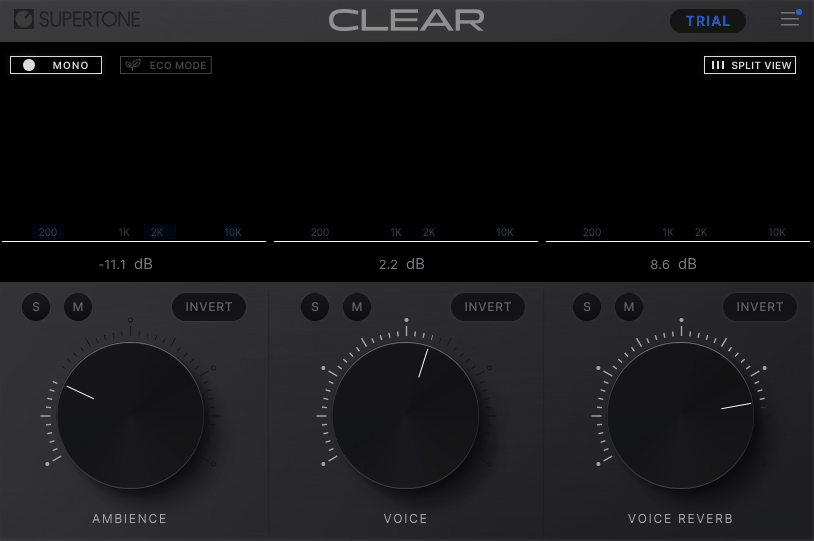
The interface reflects this division exactly: three knobs, one for each component, letting you adjust the balance between them in real time. There’s no noise profile to capture, no lengthy analysis step, no frequency band management unless you specifically want to fine-tune. You drop it on a track, adjust the knobs by ear, and more often than not you’re done in about thirty seconds.
I believe Supertone Clear is absolutely worth the $99 for anyone who regularly works with voice, whether that’s podcast production, YouTube content, film dialogue, or vocal cleanup in a music context. It won a Production Expert shootout for its performance on transient and complex noise sources, and in my experience the quality of the neural network separation genuinely stands out as one of the cleaner implementations available at any price point.
The Three-Channel Approach
I want to spend real time on this because the three-channel concept is what makes the plugin feel fundamentally different from most noise reduction tools you’ve probably used before. Rather than asking you to identify and subtract specific noise frequencies, Clear’s neural network simply listens to your audio and separates what it hears into three things: the voice itself, the ambient noise surrounding it, and the reverb component of the voice.
From there, you use:
- Voice to control the level of the isolated vocal component, essentially bringing the voice forward and making it more present
- Ambience to dial down the background noise, whether that’s HVAC rumble, traffic, fan hum, outdoor chatter, or anything else that isn’t the voice
- Reverb to reduce the room reflections that are baked into the recording, separately from the noise reduction
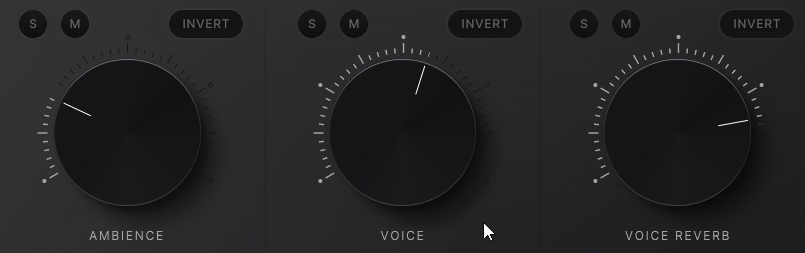
What I love about this approach is that the Reverb control operates independently from the Ambience control, which means you can choose exactly how much of each problem to address without one decision affecting the other. This is genuinely unusual in the noise reduction space.
Most tools that handle both noise and reverb do so through a single processing chain where adjusting the noise threshold also changes how the reverb is handled, which forces compromises. Here, you have precise, independent control over two completely different acoustic problems at the same time.
I found this separation particularly valuable on podcast recordings where a guest had recorded in a reverberant kitchen or bathroom while also having some broadband noise from a laptop fan.
Bringing the Reverb knob down first while leaving Ambience at zero let me hear exactly how much of the problem was reverb versus noise, which then made it much easier to dial in the Ambience reduction without over-processing.
How It Actually Sounds
For me, the honest answer to how a noise reduction tool sounds is almost always best expressed by what it doesn’t do, meaning what artifacts it avoids, which is where Clear genuinely stands out. I noticed that even at fairly aggressive settings, the voice retained its natural character in a way that tools using different approaches often don’t manage. The high frequencies stayed intact without the dulled, muffled quality that aggressive broadband noise reduction typically introduces. The transients in speech, the consonants and the breath sounds, remained clear and present without that smeared, watercolory quality that you sometimes hear from FFT-based processing.
In Production Expert’s 2025 dialogue noise reduction shootout, Clear led for specifically the kinds of complex noise scenarios where the neural network’s spectral separation capabilities shine brightest, including traffic and transient noise sources that sit in frequency ranges close to speech. It consistently placed at or near the top across different types of noise, which speaks to the versatility of the underlying algorithm rather than it being tuned for only one specific use case.
On vocals in a music context, the results are also worth mentioning since Clear isn’t just a post-production tool. Running a vocal take with moderate noise and a bit of room reflection through it and carefully reducing the Ambience and Reverb while keeping Voice at full level gave me a result that still felt like a real performance rather than a processed one, which is the most important thing you can say about any restoration tool used on music.
CPU and Workflow
I have to say that CPU efficiency is something Supertone has specifically addressed in recent versions, and it shows. The plugin dropped from over 100% CPU usage in earlier releases to around 30% in the current version, which is a meaningful improvement that makes running multiple instances across a dialogue-heavy session practical rather than painful.
There’s also a dedicated Low CPU mode available for situations where you need to run the plugin across many channels without straining your system, which is a thoughtful inclusion.
The combined and split three-channel audio visualization gives you a clear visual picture of what the plugin is separating, so you’re not flying blind as you adjust the controls. The real-time processing capability also makes it suitable for streaming applications, not just offline production work, since there’s no analysis step that requires the plugin to process audio before playback begins.
I’d suggest setting the plugin to show the split view rather than the combined view when you’re first dialing in settings, because seeing the three channels separated visually helps you understand what the algorithm is actually doing to your audio and makes it easier to decide how far to push each control.
There are a few stability notes worth being aware of. Some users have reported occasional crashes in certain DAWs and registration issues after updates that require re-entering the activation key. These are the kinds of things that seem to vary significantly by system and DAW combination, and Supertone maintains an active Discord for support, but it’s worth knowing they exist before you commit the plugin to a critical session for the first time.
There are no traditional presets in this plugin, which makes sense given the nature of how it works. The three-knob approach is already so fast and intuitive that preset management would add complexity without adding much value since every recording has a different noise and reverb character that requires its own specific balance of the three controls.
Formats: AU, VST3, VST, AAX
Works with: macOS 10.13 and above (optimized for Apple Silicon), Windows 10 and above (64-bit)
Supported sample rates: 44100Hz, 48000Hz, 96000Hz
Price: $99
Check here: Supertone Clear

Hello, I’m Viliam, I started this audio plugin focused blog to keep you updated on the latest trends, news and everything plugin related. I’ll put the most emphasis on the topics covering best VST, AU and AAX plugins. If you find some great plugin suggestions for us to include on our site, feel free to let me know, so I can take a look!