
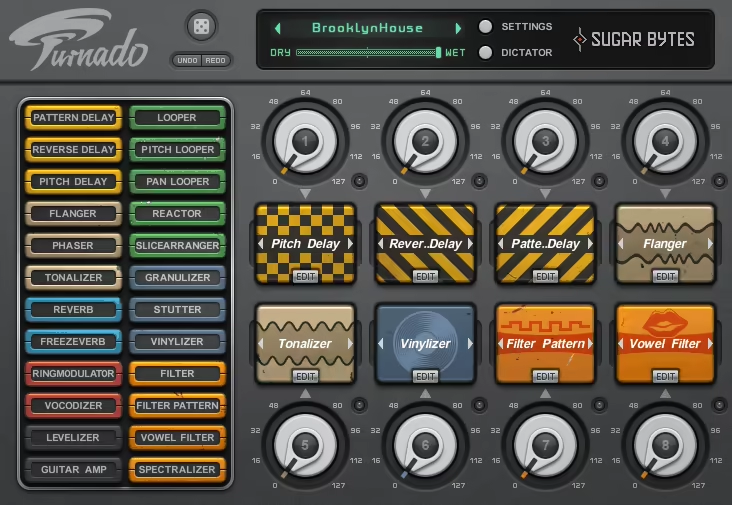
There are plugins you use carefully and deliberately, and then there are plugins you just grab and start twisting knobs on because the results are immediately interesting. Turnado very firmly belongs in that second category, and I think that’s intentional. Sugar Bytes built this thing around the idea that effects should be playable and performative rather than static and surgical, and every design decision in the interface reflects that philosophy.
The concept is built around eight effect slots, each controlled by a single physical or on-screen knob, and a library of 24 effects you can drag and drop into those slots in any combination you want.
Turning a knob up activates the effect, and turning it further adjusts the key parameters and modulation simultaneously, all in one gesture. It’s a remarkably elegant approach to multi-effect control, and it makes even complex effect chains feel immediate and tactile in a way that most multi-effect plugins simply don’t manage.
Artists like Beardyman and producers associated with Modeselektor have made this a core part of their live rigs for good reason.
For me, Turnado is absolutely worth the asking price, especially if you perform live or want a fast, hands-on approach to creative sound mangling in the studio. The combination of depth, immediacy, and sheer fun factor is genuinely hard to find in any other plugin at this price point.
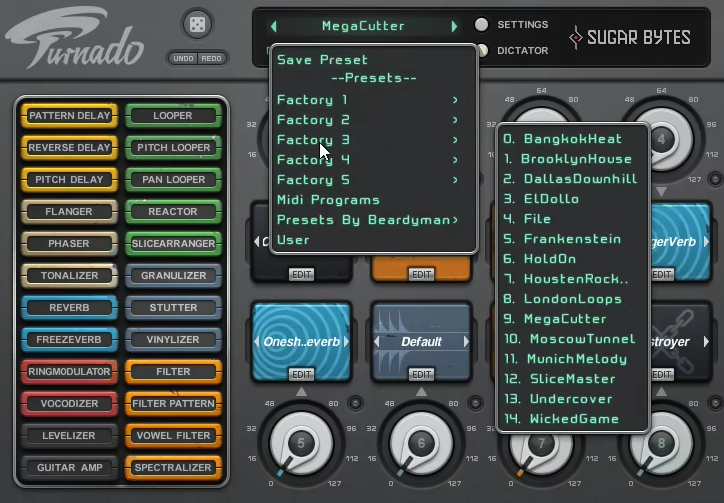
The Eight Knob System
The whole experience starts with those eight knobs, and I want to spend time here because understanding how they work changes how you think about the plugin entirely. Each knob is mapped to a single effect slot, and the relationship between knob position and what the effect does is something you define yourself through the per-effect edit page. Turn a knob to around 30% and the effect kicks in at a moderate amount. Push it to 70% and you’re in full modulation territory. Pull it back to zero and the effect disappears completely.
What makes this genuinely powerful is the per-effect edit page, where each effect has five adjustable parameters and you decide which of those parameters are tied to the main knob and to what degree. So the same physical gesture that turns up your reverb amount can simultaneously be sweeping the feedback, pushing a filter cutoff, and modulating the wet signal width, all at once, all from a single knob turn. I love how this collapses what would normally be a complex, multi-fader automation move into something you can do in real time with one hand while performing.
The Dynamic Signal Flow mode is worth calling out specifically because it changes the routing of effects based on the order in which you activate them rather than their fixed position in the chain. So if you turn up a filter before you turn up a reverb, the signal runs through filter first then reverb. Reverse the order of activation and the character of the combination changes completely.
I believe this is one of the most creative routing ideas in any effects plugin I’ve used because it means the physical performance gesture determines the signal path, which feels genuinely musical rather than just technical.
Lots of effects
The effect library is organized into eight color-coded categories covering delays, modulation, reverb, transformation, amplifier, loop effects, DJ tools, and filters, and the color coding in the interface makes it immediately clear what type of effect is sitting in each slot at a glance. The full list of 24 effects includes both the familiar and the genuinely unusual:
- Reactor: samples and freezes incoming audio with three modes including freeze, ghostly reverb loop, and a buffer looper for robotic stutters, triggerable by audio threshold or manually
- Tonalizer: a comb filter that tracks incoming pitch in Auto mode, producing surprisingly musical harmonic effects
- Granulizer: granular synthesis applied in real time to whatever audio is passing through
- Spectralizer: spectral processing that does things to frequency content that are hard to describe but immediately recognizable
- Vocodizer: vocoder-style processing that works on any audio source, not just vocals
- Pattern Delay: rhythmically patterned delay that locks to tempo in ways standard delays don’t
- Transient Looper: captures and loops transient hits for glitchy, rhythmic effects
- Vowel Filter: formant filtering that gives audio an almost vocal, talking quality
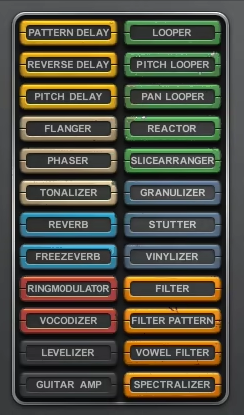
Beyond these highlights, you’ve also got flangers, phasers, ring modulators, distortion, tape stops, standard delays and reverbs, and more conventional tools for when you need something more restrained. I found that the less conventional effects are where Turnado really earns its reputation, particularly Reactor and Tonalizer, which I noticed produce results on drum loops and synth lines that feel genuinely original every time.
The Dictator
I have to say the Dictator is the single most interesting feature in the whole plugin and deserves its own section. It’s a single vertical fader that controls all eight effect knobs simultaneously, but not in a boring uniform way. For each of the eight knobs, you define when the Dictator fader reaches that knob’s position and how much it moves it, essentially programming a vertical automation sequence across all eight effects that you can then sweep through with one gesture.
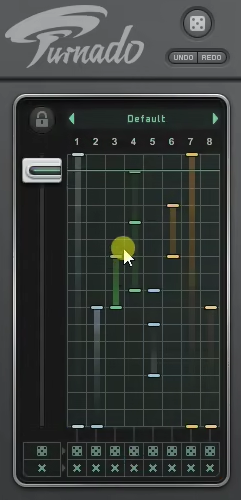
I mean, think about what that means in practice. Moving the Dictator from bottom to top can take your audio on a predetermined journey through your entire effect chain in a single fluid motion. Pull it halfway up and everything is sitting at a specific programmed intensity. Push it to the top and all eight effects are running at their maximum configured amounts simultaneously. Pull it back and everything unwinds in reverse. It’s genuinely one of the most interesting performance tools I’ve found in any plugin, and once you understand it, you’ll find yourself setting it up differently for every track and every context.
I’d suggest spending a dedicated session just building Dictator configurations rather than diving straight into effect selection, because a well-programmed Dictator can turn a single fader sweep into a complete arrangement transition.
Modulation and Control
Each of the eight effect slots has two LFOs and an envelope follower available for hands-off modulation, and these can be assigned to any of the five per-effect parameters using the color-coded modulation system in the edit page. The envelope follower is particularly useful for effects like the filter and Reactor, where having the effect intensity rise and fall with the dynamics of your incoming audio creates something that feels reactive and organic rather than mechanically looped.
Every single control in the plugin is fully automatable, and the MIDI Learn feature lets you map hardware rotary knobs directly to Turnado’s virtual knobs for real-time physical control. The plugin also supports NKS for seamless integration with Native Instruments hardware controllers, which is genuinely useful if you’re running a Komplete Kontrol setup and want the eight knobs to map automatically.
The signal routing gives you a choice between series routing through effects in fixed slot order, or the Dynamic Signal Flow mode I mentioned earlier. Both have their place, and I found myself switching between them depending on whether I wanted predictable, buildable complexity or more spontaneous, activation-order-dependent results.
One fair criticism worth noting is that the interface runs a bit on the small side, which can make reading parameter values and labels somewhat difficult on larger screens at normal viewing distance. It’s not a dealbreaker by any stretch, but it’s something you’ll notice if you’re working on a big monitor. The interface is also less detailed than newer plugins in the same space, and for strictly rhythmic or step-sequenced effect work, something like Effectrix 2 gives you more granular control over timing.
That said, for pure real-time performability and that instant, tactile feeling of actually playing your effects rather than programming them, very few plugins in this category come close.
Formats: VST2, VST3, AU, AAX, Standalone
Works with: macOS 10.13 or higher (Intel and Apple Silicon), Windows
Price: $79
Check here: Sugar Bytes Turnado

Hello, I’m Viliam, I started this audio plugin focused blog to keep you updated on the latest trends, news and everything plugin related. I’ll put the most emphasis on the topics covering best VST, AU and AAX plugins. If you find some great plugin suggestions for us to include on our site, feel free to let me know, so I can take a look!