Woth Stutter Master 2, you can get usable results in less than a minute, but there’s still enough depth to keep you experimenting for weeks.
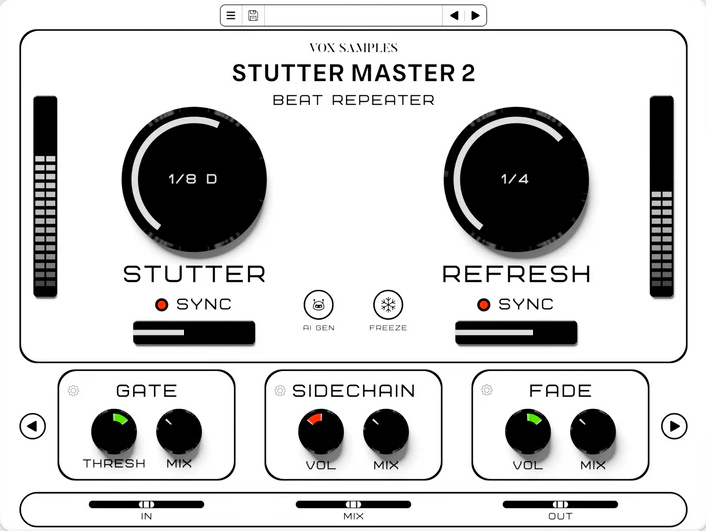
At its core, Stutter Master 2 by Vox Samples is built around two main knobs that control the stutter rate and intensity. The whole plugin stays BPM-synced with your DAW, so you don’t have to fight timing issues or manually calculate subdivisions. I throw a drum loop in, twist the main knob, and I’m instantly getting rhythmic stutters that lock perfectly to my project tempo. No clicks, no drift, just clean stuttered repeats that feel musical right away.
I really like how fast the workflow is as there’s no need to open lots of menus or set up complicated routing. Just load it on a track, adjust the main settings, and you’re making stutter effects. This speed is especially helpful for quick transitions, build-ups, or adding movement to loops.
The AI Text-to-FX Thing
This is where things get interesting because Stutter Master 2 has an AI Text-to-FX feature where you type what you want, and it creates a glitch effect based on your description. At first, I thought it was a gimmick, but it’s actually helpful when you’re stuck for ideas.
I typed in “aggressive rising glitch” and got a stuttered effect that built up in intensity with some filtered chaos. When I tried “subtle vocal chop,” it gave me a softer stutter pattern with rhythmic cuts that kept the original sound intact. It’s not perfect every time, but when it works, it saves you from scrolling through tons of presets hoping to find the right one.
Freeze Function and Playback Control
The Freeze function lets you lock playback at a specific point in your audio. For example, on vocal loops, you can freeze a syllable or word and then control how that section repeats. This gives you precise control over which part of the loop is stuttered, so you’re not just repeating random bits of audio.
When I’m working on a vocal hook, I’ll freeze the last word of a phrase to create a stuttered tail that leads into the next section. Or I’ll freeze a snare hit in a drum loop and layer stuttered repeats under the main groove. This level of control makes the plugin practical, not just a random glitch tool.
You can also change playback speed and direction while frozen, so you get reverse stutters, half-speed repeats, or faster fragments without having to bounce anything to audio. It all happens in real time, so you can automate these settings and create stutter patterns that evolve throughout your track.
The 24 Effect Modules
Stutter Master 2 comes with 24 high-quality effects, all synced to your project’s tempo and these include filters, reverbs, delays, distortion, modulation, compression, and more. Each effect is designed to work smoothly without overloading your CPU or adding unwanted noise.
The filters have enough resonance to get aggressive if needed, but they still sound musical. The reverb doesn’t make everything muddy, and the delay stays tight and rhythmic. I’ve used the distortion to add grit to stuttered hi-hats, and it actually sounds good, not just noisy.
Since everything is tempo-synced, you don’t have to calculate delay times or match effect speeds to your project. A quarter-note delay is just that, and a half-bar reverb tail is exactly what it says. This takes out the guesswork, so you can focus on creating instead of doing math.
I also appreciate that you can stack multiple effects without the plugin choking. I’ll run a stutter through a filter, add some reverb, throw in a bit crusher for texture, and maybe layer a delay on top. The CPU usage stays reasonable, and the effects interact in ways that feel intentional rather than chaotic.
Preset Library and Workflow
Stutter Master 2 comes with over 250 handcrafted presets, and I have to say, most of them are actually usable. I’m not scrolling through 200 variations of the same basic stutter. There are presets for specific use cases, such as vocal chops, drum transitions, riser effects, and textured glitches.
What stands out to me is that the presets feel like starting points rather than final destinations. I’ll load a preset that gets me 70% of the way there, then tweak a couple of parameters to fit my specific track. The fact that the main controls are simple means I’m not hunting through layers of menus to adjust one thing.
CPU Efficiency and Performance
The CPU usage stays low, even when I’m using several instances with effects stacked. On my system, I’m seeing around 1-2% CPU per instance, which is negligible compared to some of the heavier glitch plugins I’ve used. This efficiency means I can be more liberal with how I use it. I usually throw it on a drum bus, a vocal track, a synth pad, and maybe a percussion loop all in the same session. I’m not rationing plugin instances or bouncing things to audio just to free up processing power.
Where It Actually Fits in Your Workflow
I recommend using Stutter Master 2 when you want quick, musical stutters without any hassle. If you’re building a transition between song sections, you can automate the stutter rate to build intensity as the drop comes in. If a vocal phrase feels too flat, just add subtle stutter hits on certain syllables to create movement.
For drum programming, I use it to add variety to repetitive loops so instead of slicing and rearranging MIDI by hand, you can process the audio with Stutter Master 2 and automate the effect on and off as the track plays. It’s faster and often sounds more natural than editing on a grid.
I also recommend it for creative sound design.For example. I’ll take a simple synth pad, run it through Stutter Master 2 with heavy effects, and create glitched textures that I can layer under the main elements. Or I’ll process field recordings and found sounds into rhythmic stutter patterns that add percussive movement to a mix.
What It Doesn’t Do
Stutter Master 2 isn’t a granular processor, so if you want thick, overlapping grain textures, this isn’t the right tool. It’s designed for rhythmic stuttering and beat manipulation, not for creating atmospheric granular sounds.
It also doesn’t have advanced modulation routing like some complex multi-effect sequencers. You’re not drawing automation curves for every setting or building detailed modulation setups. If you need that, you might prefer something like Infiltrator 2 or Effectrix 2. But honestly, I think the simplicity is a plus. Not every plugin has to do everything.
The Practical Reality
Overall, Stutter Master 2 gives you fast, musical stutters with enough creative control to keep things interesting, but without too many options to slow you down. The AI feature is genuinely helpful when you need inspiration. The effects sound good and don’t use much CPU. The presets are great starting points.
I think this is one of those plugins that earns its place in your toolkit by being reliable and fast, not flashy or complicated. When I need stutters, I load this first because I know I’ll get results quickly. That consistency is more valuable to me than having hundreds of features I’ll never use.
To sum up, if you want a stutter plugin that balances speed, sound quality, and creative flexibility, Stutter Master 2 is worth a look. It doesn’t try to do everything, and that focus makes it better at what it does.
You can also check out our roundup of the best glitch plugins, where Stutter Master 2 is included, and see how it compares to other options.

Hello, I’m Viliam, I started this audio plugin focused blog to keep you updated on the latest trends, news and everything plugin related. I’ll put the most emphasis on the topics covering best VST, AU and AAX plugins. If you find some great plugin suggestions for us to include on our site, feel free to let me know, so I can take a look!