
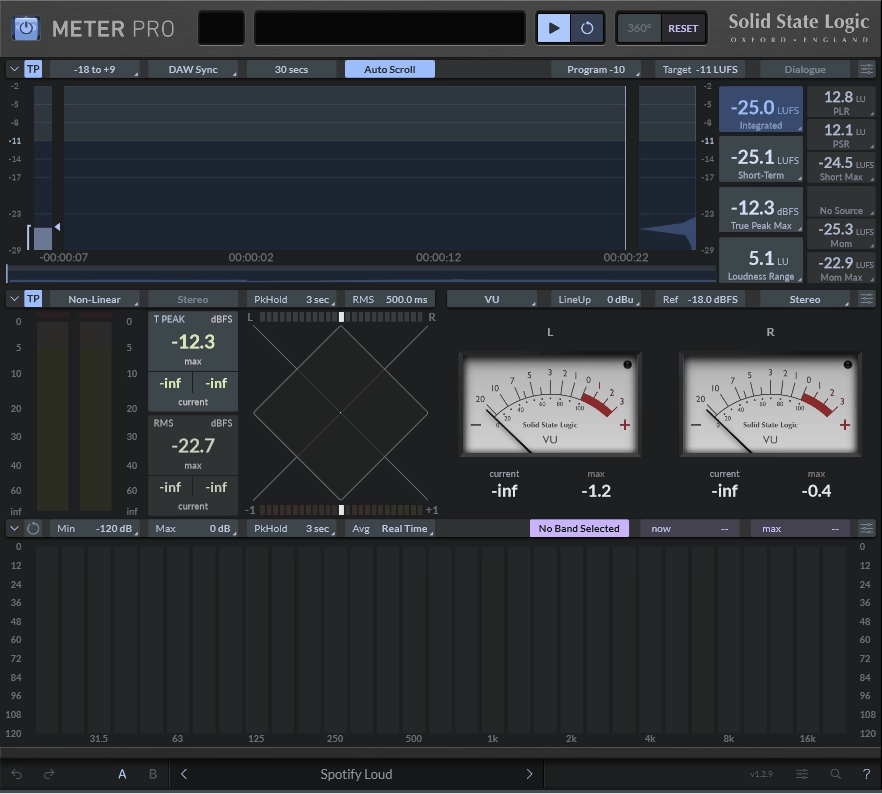
There’s a certain kind of plugin that you open, look at for about thirty seconds, and immediately understand. SSL Meter Pro is that kind of plugin, and I think that clarity is actually harder to achieve than most developers make it look.
SSL has been building studio hardware for decades, and you can feel that pedigree in how this thing is laid out. Nothing is buried, nothing requires you to dig through a manual, and every reading you need is right there in front of you the moment you hit play.
What you’re getting here is a comprehensive metering suite covering loudness, true peak, dynamic range, stereo correlation, and spectrum analysis all within a single plugin window. I found the LUFS display to be the most immediately useful part of the whole thing, showing you integrated, short-term, and momentary loudness readings simultaneously so you can monitor how your mix is behaving over time without having to flip between views.
If you’re delivering for streaming and you need to land at -14 LUFS for Spotify or -16 LUFS for broadcast, you have everything you need to monitor that in real time without any guesswork involved. I must say, the true peak meter is handled really well here, reading accurately and updating fast enough that you’re not going to miss intersample peaks sneaking through before your limiter catches them.
That’s exactly the kind of thing that causes problems when a streaming platform normalizes your track down and suddenly those peaks become audible distortion. I appreciate that SSL didn’t treat this as an afterthought the way some metering plugins do, because it’s genuinely one of the most practically important readings for anyone delivering music today.
More than just numbers on a screen
The spectrum analyzer is clean and highly readable, and I love how it overlays information without making the display feel cluttered. You can use it during the mix to keep an eye on your tonal balance, and the K-System metering modes are included for anyone working in post or doing more dynamics-conscious mixing work.
I noticed the phase correlation meter is always visible rather than tucked into a secondary view, which matters when you’re checking mono compatibility on a mix that has a lot of wide stereo processing happening. For me, that kind of thoughtful layout decision is what separates a plugin built by people who actually mix from one that was just designed to look impressive in a screenshot.
The spectrum analyzer lets you monitor tonal balance in real time without needing to jump to a separate analysis tool, and I think having that sitting right alongside your loudness readings in the same window keeps you in the flow of a session rather than constantly managing your screen real estate. I love how nothing here feels like it was bolted on as an afterthought.
Everything in one place
I think what separates SSL Meter Pro from a lot of the competition is how cohesive the whole experience feels. A lot of metering plugins give you all the right numbers but arrange them in a way that feels almost accidental, like the developer just stacked features on top of each other without thinking about how you’d actually read them in a real session.
SSL clearly thought hard about the layout here, and the result is that your eye naturally moves across the display in a logical order rather than hunting around for the reading you need. I’d say the loudness history graph is one of those features you don’t realize you need until you have it.
Being able to see how your integrated LUFS has developed over the course of a full playthrough is genuinely useful, especially on longer pieces or anything with a dynamic structure where the overall loudness is building or shifting over time. I realized that without that visual history, you’re essentially just watching a single number and hoping it settles where you want it by the end, which is a much less informed way to work.
The loudness range reading, or LRA, is also surfaced clearly rather than buried, and for anyone doing mastering work that’s actually a critical piece of information because it tells you how dynamically consistent your master is across its full duration. In my opinion, a lot of engineers focus entirely on integrated LUFS and ignore LRA, and then wonder why their master sounds squashed or inconsistent compared to references.
Having it right there in the same view as everything else makes it harder to overlook. I want to note that SSL Meter Pro runs as a VST3, AU, and AAX plugin and the CPU footprint is minimal, which is exactly what you want from something you’re keeping on your master bus for an entire session.
I believe the pricing sits at a level that positions it as a professional tool rather than a casual purchase, and honestly that feels appropriate given what it delivers. I would recommend it without hesitation to anyone doing serious mixing or mastering work who wants a metering solution that feels as considered and reliable as the hardware SSL has been making for years.
If you’ve been getting by with a basic loudness meter and wondering whether a proper suite would actually change anything about how you work, the answer here is yes, it genuinely will.

Hello, I’m Viliam, I started this audio plugin focused blog to keep you updated on the latest trends, news and everything plugin related. I’ll put the most emphasis on the topics covering best VST, AU and AAX plugins. If you find some great plugin suggestions for us to include on our site, feel free to let me know, so I can take a look!