
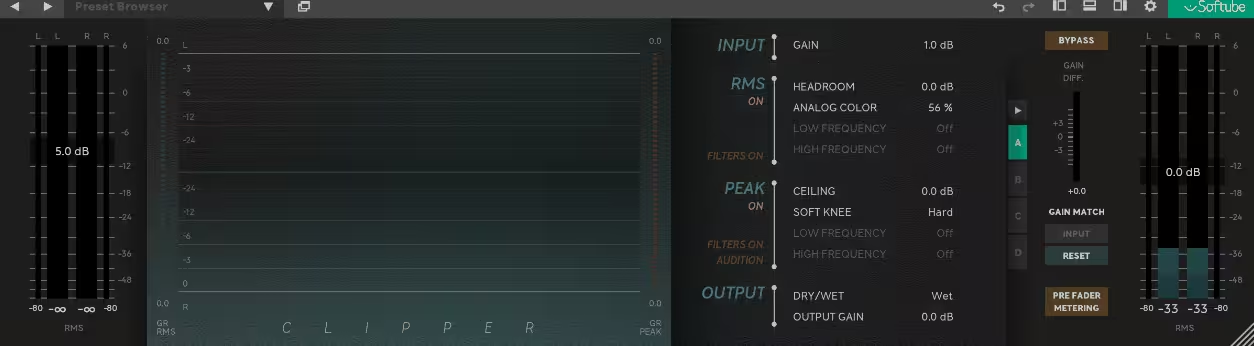
Most clipper plugins approach the problem from a purely mechanical angle: push the signal to the threshold, flatten the peaks, done. The result is often cleaner than a limiter at equivalent gain reduction, but still carries that slightly cold, analytical quality that comes from treating the waveform like a math problem rather than like music.
Softube, the Swedish company known for meticulous hardware emulations in partnership with brands like Tube-Tech, SSL, Chandler Limited, and Weiss Engineering, built their Clipper plugin around a fundamentally different question, which is what would happen if you prepared the signal musically before applying the clipping rather than just hitting it cold?
The answer to that question is the dual-stage RMS and Peak architecture at the core of the plugin, released in February 2024 as a companion to their Widener plugin. The RMS stage comes first in the signal chain, acting as a gentle dynamic shaper that adds perceived loudness and warmth to the material before it reaches the Peak stage, which then handles the actual transient clipping with an infinitely fast attack and release.
An Analog Color control in the RMS stage introduces even-order harmonics, and a 4x oversampling system handles aliasing control throughout. The plugin also integrates with Console 1, Softube’s hardware mixing system, for engineers who run that setup.
I’d say Softube Clipper is worth it for producers and engineers who want clipping to feel like a tone-shaping tool rather than a purely technical process, and who value the musical quality that comes from the RMS pre-shaping stage specifically. It frequently goes on sale well below its list price, which makes it an even easier recommendation at that point.
The RMS Stage
I want to spend real time here because this is genuinely the most interesting and distinctive thing about how this plugin works, and understanding it changes how you’ll use it.
Most clipper plugins in the category, whether you’re looking at tools like Kazrog KClip, Yum Audio Crispy Clip, or PluginBoutique DualClip, present the clipping stage as the primary processing and leave you adjusting soft or hard modes around that core. Here, the RMS stage is the primary creative tool and the Peak stage is almost the cleanup operation that follows from it.
The RMS stage compresses the audio in a way that doesn’t behave like a conventional compressor with attack and release artifacts or the pumping and breathing that comes with traditional compression. Instead, it’s described as instantaneous compression, more akin to the effect of tape magnetization, but without the spectral balance changes that tape introduces.
At lower drive settings it adds density and warmth without the listener necessarily perceiving it as processing at all. At higher settings it breaks into a thick, character-laden distortion that can be deliberately musical rather than incidentally harsh.
I love how the RMS stage gives you a way to increase perceived loudness before you’ve introduced any peak clipping at all, which means you can often arrive at the loudness target you’re after with less aggressive Peak stage clipping than you’d need without it. The result tends to feel bigger and more cohesive rather than simply louder, which is the distinction that matters in a modern loudness context.
Get the Free Plugin Starter Kit
The genuinely useful free DAWs and plugins worth installing. No filler. Straight to your inbox.
Analog Color
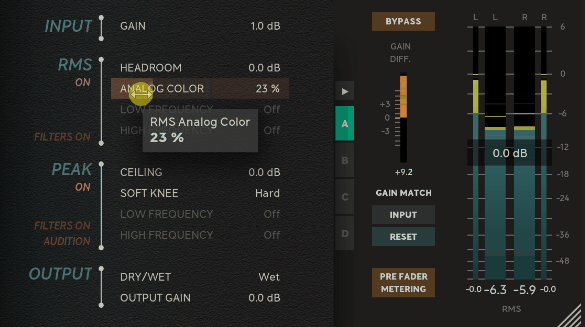
The Analog Color control sits within the RMS stage and adds even-order harmonics to the processed signal, which are the harmonics associated with pleasant analog saturation rather than the odd-order harmonics that tend to sound harsh and grating.
Softube was notably candid about the naming process for this control, having gone through several options including “asymmetry” before landing on Analog Color as the descriptor that best communicates the sound even though the processing itself is entirely digital.
The practical effect of dialing in Analog Color is a warmer, richer character to the saturation that the RMS stage introduces, and it responds differently at different drive levels. At light settings with subtle Analog Color the result is barely perceptible but contributes to that intangible sense of a mix feeling more alive and three-dimensional.
At higher settings the coloration becomes more obvious and forward, which can be useful creatively on specific sources like drums or guitars where a bit of analog-style grit is the goal rather than a side effect to be minimized.
The Peak stage is where the actual waveform clipping happens, operating as a limiter with an infinitely fast attack and release that shaves the tops off transients at whatever ceiling you’ve set. The soft knee function gives you control over how the transition into clipping behaves, making the onset of clipping more gradual and musical rather than hard and abrupt.
Combined with the pre-shaped material coming out of the RMS stage, the Peak clipping tends to produce results that feel more natural than applying the same amount of gain reduction with a hard clipper on unprepared material.
Here are the main scenarios where this plugin tends to shine most consistently:
- Mix bus and mastering: the combination of RMS warmth and Peak clipping works naturally as a final processing stage before a limiter, often allowing the limiter to work less aggressively because some of the peak control is handled upstream
- Drum buses: the RMS stage adds glue and density to the drums while the Peak stage tames the sharpest hits for a punchy, controlled result
- Bus processing: on instrument groups like guitars, synths, or bass, the Analog Color adds harmonic richness that complements the loudness
- Production use: the more aggressive RMS settings can be deliberately used as a saturation effect rather than a transparent dynamics tool
Console 1 integration and practical notes
For engineers running Softube’s Console 1 hardware mixing system, the plugin integrates directly into that workflow, which is a practical benefit for anyone already in that ecosystem. The integration lets you access the plugin’s controls through the hardware interface rather than reaching for the mouse, which is particularly useful during mix sessions where you’re moving quickly.
The 4x oversampling is fixed rather than user-selectable, which is a fair criticism from engineers who prefer to adjust oversampling to balance CPU load against aliasing control, or who specifically want higher oversampling rates for mastering work. Softube’s position is that 4x represents the optimal balance they found between quality and performance, and while the output is genuinely clean, the lack of user control over this is a real limitation compared to tools like Yum Audio Crispy Clip which offers up to 16x oversampling on demand.
The plugin also doesn’t offer multiband or M/S processing natively, keeping the approach straightforward and focused rather than comprehensive. If you need that level of frequency-specific control, tools like Venn Audio V-Clip 2 or Kazrog KClip 3 would serve you better. What Softube Clipper does, it does with a distinct musical quality that’s harder to achieve by combining separate tools.
Formats: AU, VST, VST3, AAX
Works with: macOS (Monterey 12, Ventura 13, Sonoma 14), Windows 10 and 11 (64-bit)
Price: $79 (frequently on sale significantly lower, often around $29-35)
Check here: Softube Clipper
Get the Free Plugin Starter Kit
The genuinely useful free DAWs and plugins worth installing. No filler. Straight to your inbox.

Hello, I’m Viliam, I started this audio plugin focused blog to keep you updated on the latest trends, news and everything plugin related. I’ll put the most emphasis on the topics covering best VST, AU and AAX plugins. If you find some great plugin suggestions for us to include on our site, feel free to let me know, so I can take a look!