When I load Native Instruments Symphony Series Brass, the first thing I register is the space it puts you in. You’re not starting from silence and adding reverb later. You are already standing inside a hall, and every note you play carries that environment with it.
I think that’s the most important mindset shift you have to make with this library. If you come in expecting dry, modular brass that you sculpt into shape later, you might feel boxed in. If you’re comfortable writing inside an existing acoustic space, this library immediately makes sense.
From my experience, Symphony Series Brass isn’t trying to impress you with instant punch or cinematic hype. It’s trying to behave like a real brass section recorded properly, and once you accept that, your writing approach naturally adjusts.
Features & what you get
Symphony Series Brass ships with a comprehensive set of instruments organized into ensemble and solo configurations. You get 4 French horns, 4 trumpets, 3 trombones, and 1 tuba, all recorded in the same hall with consistent mic positioning.
The library includes 6 microphone positions: Close, Mid, Room, Surround, Main, and High. This gives you detailed control over perspective, the room character remains present regardless of which combination you use.
Articulation-wise, you’re looking at sustains, staccatos, legatos with true intervallic transitions, marcatos, sforzandos, crescendos, diminuendos, and various muted techniques. The exact count varies by instrument, but the core performance techniques you need for orchestral writing are all covered.
Round robins are implemented across short articulations, typically 3 to 5 variations per note depending on the articulation type. This helps avoid the machine-gun effect when writing repeated figures.
The library requires the full version of Kontakt 6.7.1 or later, and the installation size sits around 55GB when fully installed. That’s not unusual for a contemporary orchestral brass library, but it does mean you need to plan storage accordingly.
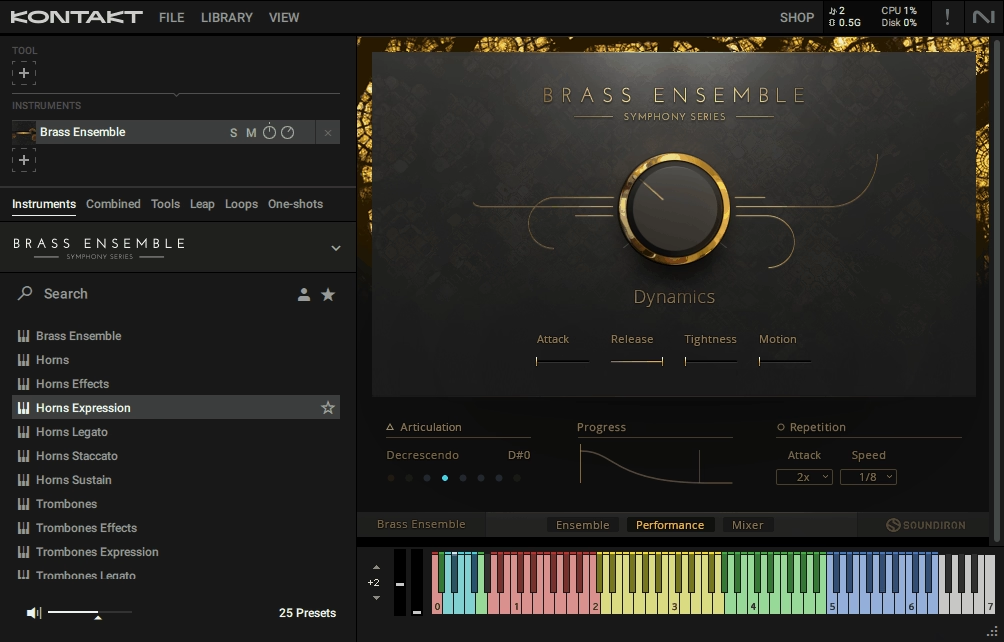
Performance controls include dynamic range adjustment, attack shaping, release control, tightness for ensemble cohesion, and motion parameters for vibrato intensity. These aren’t just preset toggles- they actively shape how the instrument responds during performance.
There’s a lot of talk about the perceived wetness of this library. In my experience, that comes down to how you write as much as how you mix. Dense voicings combined with wide mic mixes will blur quickly. Clear orchestration and restrained mic usage keep things defined. If you treat mic balance as part of your composition instead of a corrective tool, you’ll get more predictable results.
Writing with the room instead of against it
I’ve found that the room sound influences how I write from the first chord. When you voice brass parts tightly, you hear the room fill up quickly. That encourages you to leave space, spread voicings, and I would say more orchestrally rather than stacking notes just because you can.
For you, this can be a good thing or a frustrating one, depending on the project. If you are writing traditional orchestral cues, the depth and cohesion come together fast. Long notes bloom naturally, chords feel glued, and you don’t need to pile on processing just to make things sound believable.
That saves you time, especially if you are working under deadlines. That said, you are not constantly correcting harshness or artificial brightness as the brass already feels like it belongs in an orchestra.
On the other hand, if you need extremely tight, forward brass for aggressive modern writing, you’ll feel that resistance. Even when I lean on closer mic choices, the sound never becomes truly clinical. There’s always a sense of distance, and you either work with that or you fight it.
The multiple microphone positions help you shape perspective, but they don’t change the core character. I would treat mic balance as part of the composition, not as a fix. Wider mixes support big harmonic writing, while closer setups help articulation clarity, but neither completely removes the room.
An ensemble-first design that affects how you think
One thing I noticed early on is how clearly this library is built around ensemble writing. When you load ensemble patches, everything feels balanced right away. That pushes you toward writing in sections instead of obsessing over individual players.
If you like starting with broad strokes and refining later, you’ll probably appreciate this. You can sketch harmonic movement quickly and trust that the section will hold together without constant tweaking.
Also, when you need more focus, the solo instruments integrate cleanly with the ensembles and you can double a line or bring a melody forward without it suddenly sounding like it came from a different room or session. You don’t have to rethink your entire setup just to highlight a phrase.
Tonally, the balance leans classical and controlled. The trumpets stay clear without becoming piercing, the trombones have weight without turning aggressive, and the horns sit comfortably in the midrange. For you, that means dense arrangements are easier to manage, especially when brass is meant to support rather than dominate.
I wouldn’t call this a flashy library, and that’s intentional. It doesn’t exaggerate attacks or push brightness for instant impact. Instead, it rewards careful voicing and dynamic control. When I stack chords thoughtfully and let dynamics do the work, the result feels composed rather than assembled.
Dynamics that feel musical, not mechanical
A lot of realism here comes down to how dynamics are handled, and this is one of the areas where I think Symphony Series Brass really shines. Dynamics blend volume, timbre, and intensity together, so when you push the mod wheel, you’re shaping performance, not just loudness.
For you, that makes real-time playing practical. I can record a pass while riding the mod wheel and trust that the musical shape will come through. I still edit afterward, but I’m refining expression instead of fixing obvious problems.
The performance controls like attack shaping, tightness, and motion actually matter in daily use. Tightening short notes helps them lock into rhythmic passages without rewriting MIDI, and softening attacks lets you ease brass into a texture without switching articulations.
These controls aren’t there for show. They directly affect how your parts sit in the mix, which is what you care about when you’re working fast.
Legato is handled with restraint. True legato transitions are available, but they expect you to play cleanly. If overlaps are sloppy, I could hear it immediately. I like that, because it keeps me honest and prevents that overly smoothed, synthetic feel some libraries lean into.
Articulations designed for real workflows
There’s a lot of articulation depth here, but what I appreciate is how manageable it feels. The articulation system allows flexible switching using keyswitches, MIDI CCs, or value ranges, which means you can build a setup that matches how you work. I usually start with a small working set of longs, shorts, and legato and when a cue calls for something specific, swells, muted brass, or special techniques, they’re there without forcing me to rebuild my template.
Repeated notes and fast passages benefit from multiple round robins, which helps avoid that mechanical feel. You might not consciously notice it when it’s working, but you definitely notice when it’s missing elsewhere.
Consistency across instruments also matters more than people realize. When you switch from horns to trombones or trumpets, articulation behavior stays familiar. That keeps you moving instead of stopping to relearn how each patch behaves.
Knowing when this library fits your work
I think Symphony Series Brass by Native Instruments & Soundiron works best when you treat it like what it is: a recorded orchestral brass section with strong cohesion and a clear sense of space. It excels in film scoring, concert-style orchestral writing, and any context where realism and blend matter more than raw impact.
If your work leans heavily toward trailer music or ultra-aggressive hybrid cues, you may want to pair it with other tools or processing to get the bite you want. That doesn’t make this library weak, it just defines where it sits best.
What I value most is its reliability. Once you understand how it wants to be played and arranged, it delivers consistent results. You will spend less time fighting the sound and more time thinking about harmony, dynamics, and pacing.
If you enjoy shaping performances, thinking orchestrally, and writing brass as part of a larger ensemble rather than a spotlight effect, I think you’ll feel comfortable here. It doesn’t try to impress you with spectacle. It focuses on doing one thing well, and in a professional scoring workflow, that focus really matters.

Hello, I’m Viliam, I started this audio plugin focused blog to keep you updated on the latest trends, news and everything plugin related. I’ll put the most emphasis on the topics covering best VST, AU and AAX plugins. If you find some great plugin suggestions for us to include on our site, feel free to let me know, so I can take a look!