
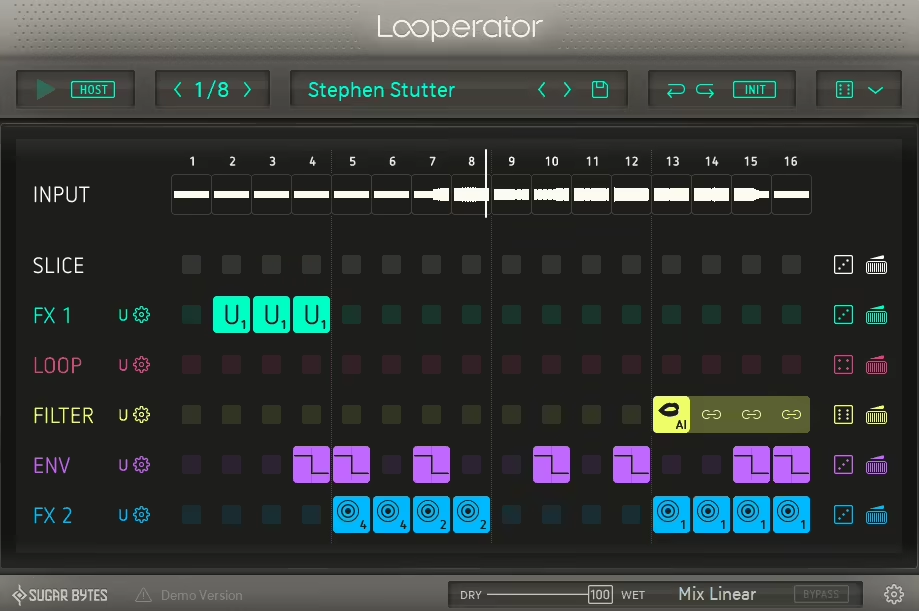
If you’ve ever dropped a drum loop into your session and thought it sounded flat, predictable, or just kind of lifeless, Looperator is the kind of plugin that solves that problem within about thirty seconds of opening it. The concept is straightforward enough on paper: it takes your incoming audio, chops it into 16 steps, and lets you assign different effects to each step using a multi-lane sequencer. But the results it produces are anything but simple, and I think the speed at which you can go from a boring loop to something genuinely interesting is one of the most impressive things about it.
Sugar Bytes has been building plugins in this creative effects sequencer space for a long time, with Effectrix and Turnado being well-known names in that catalog, and this one essentially combines the best ideas from both while adding a slicer component that takes the whole thing to a different level.
The interface is clean, the color coding makes the layout immediately readable, and the workflow is set up in a way that rewards experimentation without punishing you for not reading the manual cover to cover before you start.
At around $79, I’d say this is very much worth it for producers who work with loops regularly and want a fast, performative way to add movement, variation, and energy without spending an afternoon drawing in automation. It earns a spot on any shortlist of creative loop manipulation tools available right now, particularly for electronic, hip-hop, and experimental music where rhythmic texture matters a lot.
The Slicer and Sequencer
The foundation here is a 16-step effects sequencer with 6 lanes, each lane dedicated to a different type of processing. What makes it distinctly different from a standard multi-effect plugin is the slicer running underneath everything: incoming audio gets recorded into a buffer and divided into chunks, with each chunk representing one step in the sequence.
You can set the step resolution to 1/2, 1/4, or 1/8 note, which gives you a surprising amount of flexibility in terms of how tightly the effects follow the rhythm of your material.
The signal flow through the six lanes is fully reorderable, so if you want your filter to hit before the distortion rather than after, you just drag the lanes into a different order and the character of the processing changes immediately.
Each step in each lane can hold one of 20 preset effect settings or one of four fully user-configurable options, and you can tie steps together by shift-dragging to hold an effect across multiple steps for longer, sustained transformations rather than just single-hit processing.
The Slice lane at the top is what gives this plugin its live looping character. I mean, with a simple drum beat you can rearrange which slice plays on which step, essentially remixing the rhythm of your loop in real time without touching a sample editor. On something more melodic, like a synth riff or a bass line, this gets genuinely creative fast, since rearranging which fragment plays on which step creates patterns and phrases that you’d never have come up with manually.
The Effects
The effects across the six lanes cover a solid range of processing types, and I found that combinations across multiple lanes produce the most interesting results:
- Filter with various modes for classic wobble and cutoff movement
- Distortion for adding grit and saturation per step
- Stutter and tape stop for rhythmic interruptions and pitch-drop effects
- Delay and reverb for space and echo
- Volume modulation for gating and tremolo-style pulsing
- Loop and slice manipulation for rearranging and repeating buffer content
I have to say that some of the individual effects are modest when used in isolation, and a dedicated delay or reverb plugin will clearly outperform what you get here in that specific department. But that’s honestly the wrong way to think about it, because Looperator’s strength is in the combination and sequencing of effects rather than the depth of any single one. When the filter sweeps on a step, then the stutter kicks in on the next two, then the delay trails into a tape stop on the downbeat, the result is something that feels genuinely composed rather than randomly processed.
Randomization
For me, the randomization system is one of the most practically useful features in the whole plugin, and Sugar Bytes put real thought into how it works rather than just bolting on a random button that fills the grid with nonsense. There are six distinct randomization modes to choose from:
- Smart, which is algorithmically designed to produce balanced, musically usable results
- Space, which limits randomization to reverb and delay effects for ambient results
- Single, which puts one effect per lane rather than stacking multiple effects simultaneously
- Randolf, which fills everything with random effects that continue changing through playback
- Tieland, which adds tied steps for longer sustained effects
- Track Random, which uses the individual randomization settings you’ve configured per lane
The fact that each randomization mode has been individually crafted to that specific effect type is something I appreciate a lot, because it means that hitting the random button in Smart mode actually produces something you’d want to listen to rather than something you immediately want to undo. I noticed that using Smart mode on a boring drum loop and then just tweaking one or two of the generated steps is one of the fastest ways to get a genuinely interesting pattern out of the plugin with almost zero effort.
Live Performance
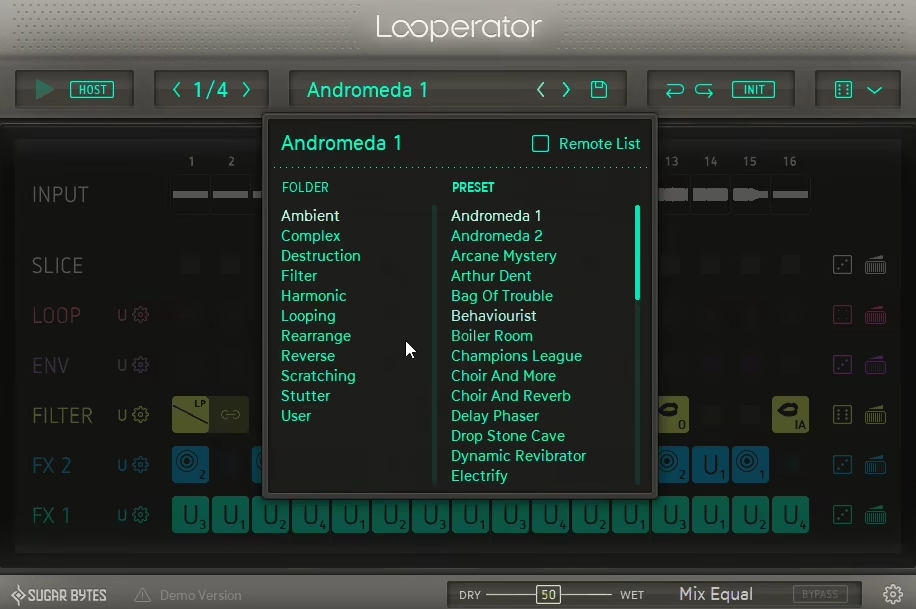
I love how Looperator handles live use, and this is where it really separates itself from plugins that are purely studio tools. You can assign complete effect sequences to MIDI notes using the Remote List, which lets you store multiple patterns and switch between them in real time by hitting different keys on a controller. The sync is extremely tight, and switching between patterns happens cleanly without clicks or timing issues.
I believe this is a significant part of what makes the plugin valuable beyond just studio production. If you’re performing live with loops or doing live electronic sets, having a collection of different effect sequences ready to trigger instantly on any loop or instrument in your mix gives you the kind of real-time control that used to require a lot more setup to pull off. I’d suggest spending time building a personal library of Remote List patches tailored to the sounds you use most often, because that preparation pays off enormously when you’re performing.
The unlimited undo is also worth calling out specifically because it completely removes the risk from experimentation. You can try anything, hear what it sounds like, and step back if it doesn’t work, which Sugar Bytes explicitly built into the plugin to encourage that kind of fearless exploring approach to sound design.
Formats: VST2, VST3, AU, AAX, Standalone
Works with: macOS, Windows
Price: $79
Check here: Sugar Bytes Looperator

Hello, I’m Viliam, I started this audio plugin focused blog to keep you updated on the latest trends, news and everything plugin related. I’ll put the most emphasis on the topics covering best VST, AU and AAX plugins. If you find some great plugin suggestions for us to include on our site, feel free to let me know, so I can take a look!