

There are plugins you use occasionally when the moment calls for it, and then there are plugins that end up on almost every single track you open. Infiltrator 2 very quickly falls into that second category, and I think once you understand what it actually does, it’s pretty easy to see why producers across genres keep reaching for it.
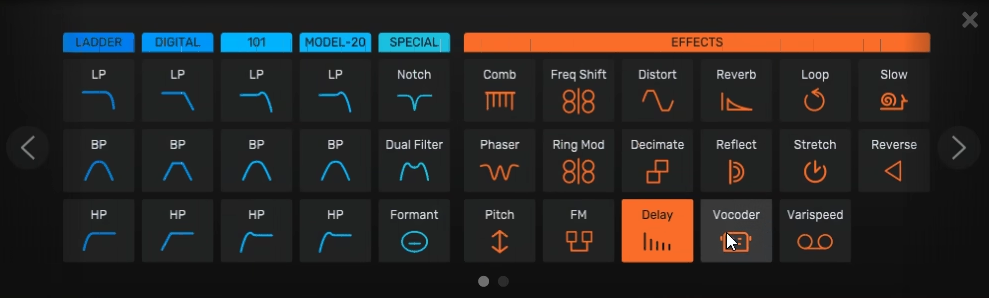
At its core, this is a multi-effect processor that lets you stack, sequence, and modulate up to ten different effects simultaneously, pulling from a library of 54 effect modules covering everything from analog-style filters to spectral manipulation, granular processing, pitch shifting, distortion, reverb, delay, and a whole lot more.
What separates it from a simple effects chain though is the modulation and sequencing system underneath all of it, which is what gives the plugin its real character and makes it feel closer to a performance instrument than a traditional effects unit.
I believe Infiltrator 2 is genuinely worth the money for any producer who works across multiple genres or regularly needs to add movement, texture, and rhythmic energy to their sounds, and at its price point it’s one of the better value propositions in the multi-effects space. The combination of depth and workflow is rare, and the fact that it was a free upgrade for existing users says a lot about how Devious Machines handles its community.
54 effects and usable workflow
One of the things I found genuinely impressive about this plugin is that despite the almost overwhelming number of effects on offer, the interface manages to stay navigable in a way that a lot of dense multi-effect plugins completely fail at.
The 10 effect module slots sit at the center of the layout, and you can fill each one with any effect from the full library using a scrollable selector that makes swapping things in and out fast and intuitive. I love how the modulation stays in place even when you swap one effect out for another, which is the kind of small design decision that makes the difference between a plugin you explore freely and one you carefully avoid touching.
The effect categories you’re working with include:
- 15 multimode filter types ranging from Moog-style ladder filters to formant and comb filtering models
- 12 overdrive and distortion models including a new Degrade mode that gets increasingly destructive past about 30%
- 14 spectral effects using FFT filtering for genuinely unique frequency manipulation
- Pitch shifting, FM, chorus, flanger, phaser, delay, and reverb all available as individual modules
- Granular and LoFi processing for textural and degraded sounds
- A Void reverb mode that produces an almost infinite, highly colored spatial effect at higher settings
I must say the spectral effects section deserves its own paragraph because this is where the plugin does things that are genuinely hard to find elsewhere.
Effects like Spectral Smear, Spectral Spread, Spectral Reverb, and a spectral compressor create sounds that feel like the frequency content of your audio is physically being rearranged in space, and combining two or three of them with a filter underneath produces textures that are incredibly difficult to replicate with any conventional approach.
For sound designers and composers working in experimental or cinematic territory, this section alone justifies serious attention.
The Modulation System
Each of the ten effect modules gets two tempo-synced multi-segment envelopes for modulating key parameters, and this is honestly the engine that makes everything feel alive rather than static. You can draw your own patterns into the envelope editor, use one of the eight preset curve shapes, generate Euclidean rhythms, apply swing directly in the LFO without any manual calculation, or hit the random button to generate something unexpected and then dial it back to where you want it.
I think the swing implementation is worth calling out specifically because it’s the kind of thing that sounds small until you actually use it. Being able to set a grid size and swing amount and have all your envelope points move automatically to match means you can humanize rhythmic effects with almost no effort, which is something that would normally require a lot of careful manual nudging in other plugins.
Beyond the per-module envelopes, there are 8 macro controls that can be assigned to any combination of parameters across any number of effects simultaneously.
I realized pretty quickly that this is where a lot of the magic happens in the presets that come with the plugin, because rather than giving you one knob that controls one thing, a single macro can be sweeping the filter cutoff, adjusting the reverb mix, shifting the pitch envelope depth, and changing the distortion character all at once in a way that feels intentional and musical rather than chaotic.
The 32-step sequencer adds another dimension on top of all of this, letting you switch individual effect modules on and off in rhythmic patterns so that effects appear and disappear in sync with your track.
I noticed that combining the on/off sequencer with the envelope modulation system produces rhythmic effects that would take genuinely significant effort to recreate through DAW automation, and the fact that you can do it all within one plugin window is a huge workflow advantage.
Tons of presets
I want to note something about the preset library here because it’s genuinely one of the stronger ones I’ve come across in a plugin of this type. There are over 1500 presets covering a wide range of genres and use cases, and they’re organized into categories and subcategories that make browsing practical rather than overwhelming.
Every preset has its macro controls carefully assigned so that the eight knobs are already mapped to the most useful parameters for that specific sound, meaning you can grab any preset and immediately start shaping it without needing to dig into the modulation routing first.
The guest banks from artists like Black Sun Empire, Reso, Venus Theory, and others add a lot of variety and show you the kinds of results that experienced producers actually pull out of this thing, which is useful both as instant inspiration and as a way to study how different effects combinations get built.
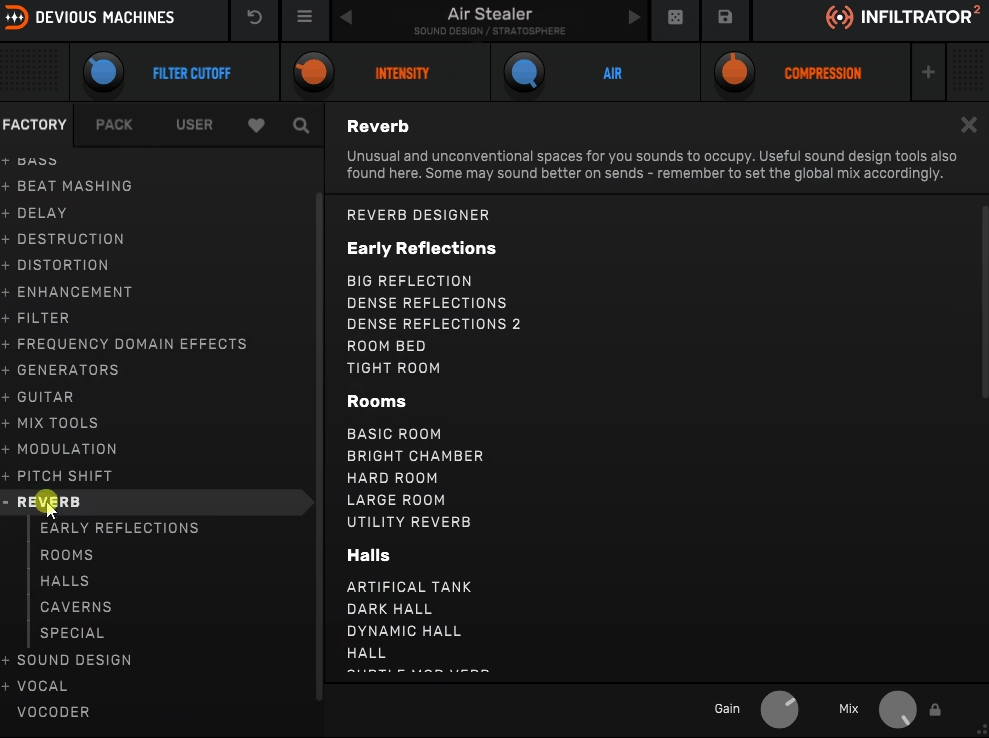
I suggest spending a session just browsing these before you start building your own patches, because they do a great job of showing you what the plugin is capable of in ways that the dry feature list doesn’t fully communicate.
There’s also a random preset button that genuinely works well here, partly because of how well the macros are pre-assigned across the library, and partly because even random combinations of these effects tend to produce something interesting rather than something broken.
Things to know..
For me, the learning curve sits at a level that’s honest but not punishing. The interface looks dense when you first open it, and I’d say spending twenty minutes with the getting started video that Devious Machines provides is genuinely worth doing before you dive in, because once the layout clicks everything moves very fast. After that initial investment of time, the workflow is actually one of the faster ones you’ll find in a plugin this deep.
One thing I appreciate about Infiltrator 2 is the master section that sits outside the main effects chain.
It includes a dedicated drive section with 12 models that can be positioned either before or after the main chain, a compressor with four different models ranging from clean and transparent to the deliberately aggressive Overkill mode, and a very useful bass bypass option that lets you remove frequencies below a set point from the processing chain entirely, which is a practical lifesaver when you’re running heavy modulation effects on full mixes and don’t want the low end getting mangled.
There’s also MIDI note triggering for switching effects on and off, which opens up interesting live performance possibilities if you’re set up to route MIDI to effect plugins in your DAW.
Formats: VST2, VST3, AU, AAX (64-bit)
Works with: macOS 10.13 or later, Windows 10 or later, Native Apple Silicon support
Price: $99

Hello, I’m Viliam, I started this audio plugin focused blog to keep you updated on the latest trends, news and everything plugin related. I’ll put the most emphasis on the topics covering best VST, AU and AAX plugins. If you find some great plugin suggestions for us to include on our site, feel free to let me know, so I can take a look!