
If you’ve ever tried to get a great bass tone in your DAW and ended up frustrated after hours of tweaking, you’ll know exactly how rare it is to find a plugin that just works. I mean, the bass plugin space has always been the awkward younger sibling of guitar amp sims, where you’ve got dozens of solid options for six-string but comparatively slim pickings for the low end. That’s part of what makes Mark Studio 2 stand out so clearly in that crowd.
Developed in collaboration with Markbass, one of the most respected names in professional bass amplification, this plugin brings the real deal into your session. You’re getting six Markbass amp heads, nine cabinets, a full pedalboard, and six microphone options, all captured in a high-end Italian studio by engineers who clearly knew what they were doing. I think the collaboration angle matters here because the modeling has that kind of specificity you can only get when the people building the hardware are actually in the room.
For me, this is genuinely worth picking up, especially if bass is a regular part of your workflow. The combination of amp variety, cab choices, and the built-in effects chain means you’re not stitching together three different plugins to get one usable bass sound. You get it all in one place, and it sounds convincingly real.
The Amp and Cabinet Selection
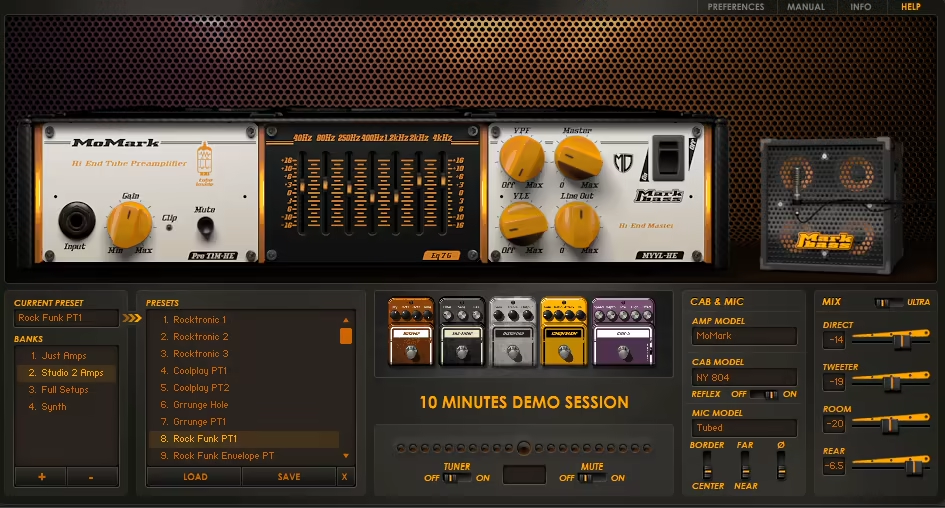
The six amp heads are where you’ll spend most of your time, and I have to say the variety here covers a lot of ground. You’ve got the TA501, the R500, the all-tube Classic 300, the TTE500, the Little Mark Tube, and the MoMark, which is Markbass’ modular hybrid system. Each one has its own character and its own control set, and I appreciated that Overloud didn’t just copy-paste the same EQ section across all six. The MoMark in particular is great for a tight, punchy studio sound with a scooped middle, while the Little Mark Tube leans cleaner and more articulate.
On the cabinet side, you’ve got nine options ranging from a rear-ported 1×15″ all the way up to a sealed 8×10″, plus a couple of New York-series front-ported cabs. I found that the cabinet choice has more of a subtle influence on the character rather than a dramatic one, which actually feels true to how real Markbass cabs behave. They add depth and weight to the signal without coloring it so aggressively that you lose the amp’s personality.
Get the Free Plugin Starter Kit
The genuinely useful free DAWs and plugins worth installing. No filler. Straight to your inbox.
Microphone Placement and Signal Path
I noticed that this is where Mark Studio 2 separates itself from more basic bass amp sims. Rather than just handing you a mic’d signal and calling it a day, you can use multiple microphones simultaneously, blending the main woofer mic, a tweeter mic, and in some cases a rear bass reflex mic as well. You have six individual microphone models to work with, including a Condenser 47 that’s rounded and smooth, a Ribbon 122 that runs on the darker side, and a Dynamic 57 that delivers a much more forward, pointed sound when you need it to cut.
Beyond that, the signal path itself is genuinely flexible. You can blend your direct input, the amp’s line out, and the mic output independently, which gives you a lot of creative control over how polished or raw the final sound ends up. I believe this is one of the features that gets overlooked in most reviews, but it’s actually pretty central to how usable this plugin is in a real mix.
Pedalboard
The built-in pedalboard includes an octave, envelope filter, bass chorus, distortion, and a compressor, and while none of these are trying to be standalone pedal plugins, they get the job done in a way that keeps your signal chain clean and your workflow fast. I’d say the compressor in particular is useful for evening out your dynamics before the amp stage without having to reach for a separate plugin.
The preset library is genuinely one of the strongest parts of the experience, and I want to note that this isn’t just filler content. You get over 100 factory presets designed by top engineers and Markbass artists, covering:
- Basic amp-only configurations for clean, natural tones
- Full pedalboard rigs for more processed, genre-specific sounds
- Synth bass presets that push the plugin beyond traditional bass territory
- Punchy studio tones, deep sub-heavy settings, and everything in between
- The ability to save and organize your own banks alongside the factory content
I realized that starting from a preset and dialing it in from there is actually the fastest way to work with this plugin, especially if you’re under session time pressure. You can be at a usable tone in under a minute.
A Few Things to keep in mind
In my opinion, the one area where you might need a little patience is balancing the different signal paths. Blending the direct input, line out, and mic levels isn’t the most self-explanatory process at first, and I feel like a cleaner global output level control would’ve made the whole experience a little smoother. It’s not a dealbreaker, but it’s worth knowing ahead of time so you’re not hunting around for why your levels feel inconsistent.
I also want to mention that full MIDI support is included, so you can assign controllers to the five pedals and the master output level, which is a nice touch for live use or more performance-oriented setups. CPU load is kept very low, and every parameter in the plugin version can be automated, which makes it practical for detailed mix work where you need things to move and evolve across a track.
I suggest giving the MoMark head a serious look if you’re going for modern, studio-clean bass, and don’t skip the mic blending section because that’s where you can really push the sound from good to polished.
Check here: Overloud Mark Studio 2
Get the Free Plugin Starter Kit
The genuinely useful free DAWs and plugins worth installing. No filler. Straight to your inbox.

Hello, I’m Viliam, I started this audio plugin focused blog to keep you updated on the latest trends, news and everything plugin related. I’ll put the most emphasis on the topics covering best VST, AU and AAX plugins. If you find some great plugin suggestions for us to include on our site, feel free to let me know, so I can take a look!