
If you’ve ever downloaded a sample library and then hit a wall trying to figure out why it won’t load properly, or why it keeps cutting out after fifteen minutes, there’s a good chance the answer comes down to one fundamental distinction: whether you have Kontakt Player or the full version of Kontakt.
It’s one of the more confusing splits in the plugin world, partly because both versions share the same name, look nearly identical when you open them, and can load a substantial number of the same libraries without any issue. The confusion is real and completely understandable, especially if you’re newer to working with sample-based instruments.
This article is going to spell out the difference in practical terms, so you can figure out exactly where you stand, what you can and can’t do with what you have, and whether the upgrade to the full version is actually worth making for your specific situation.
In a nutshell: Kontakt Player and full Kontakt are not really two competing products: they’re more like two tiers of access to the same platform, with the free tier covering a genuinely useful range of ground and the paid tier unlocking the parts that matter most to intermediate and advanced users, instrument builders, and professionals working in fields where the independent library market is essential.
Quick Comparison
| Feature | Kontakt Player | Kontakt 8 (Full) |
|---|---|---|
| Price | Free (via Komplete Start) | ~$399 standalone; included in Komplete Standard and above |
| Player-Compatible Libraries | Yes (full, unlimited) | Yes (full, unlimited) |
| Non-Player (Full Kontakt) Libraries | 15-minute demo only, then cuts out | Yes (full, unlimited via Files browser) |
| Kontakt Factory Library | Factory Selection only (subset) | Full Factory Library |
| Build Your Own Instruments | No | Yes (full sample mapping, multi-sample editing) |
| KSP Scripting | No | Yes (full Kontakt Script Processor access) |
| Creator Tools | No | Yes (build complete instrument GUIs) |
| Kontakt 8 New Features (Leap, Conflux, Chords, Phrases) | No | Yes |
| Synthesis Engines (Wavetable, FM, Ring Mod) | No | Yes |
| Files Browser (for unregistered libraries) | No | Yes |
| Access to Independent Developer Market | Player-compatible only | Full market access (thousands of additional libraries) |
| Upgrade from Kontakt 7 | N/A | ~$99 upgrade |
Get the Free Plugin Starter Kit
The genuinely useful free DAWs and plugins worth installing. No filler. Straight to your inbox.
About Company
Native Instruments was founded in Berlin in 1996, and Kontakt, which first appeared in 2002, has grown into what is widely considered the industry-standard software sampler for professional music production.
Over more than two decades, the platform has accumulated a library ecosystem that no other sampler can match for sheer depth and breadth: everything from Hollywood-level orchestral libraries used on major film scores, to boutique experimental instruments built from unusual acoustic recordings, to the kind of meticulously detailed ethnic and world music instruments that would be nearly impossible to record yourself.
If you’re working in film scoring, game audio, hip-hop beat production, or any genre where you’re regularly reaching for realistic instruments or expressive sampled textures, you’ve almost certainly run into Kontakt in some form.
The distinction between Kontakt Player and the full version of Kontakt is something Native Instruments has maintained since the early versions of the software, and understanding it is genuinely important for anyone building out a sample library collection.
Long story short, Kontakt Player is the free hosting shell, and the full version of Kontakt is the complete platform with all its creative and technical tools unlocked. They share an engine, they share an interface, and for a large number of libraries they behave identically. Where they diverge is in library compatibility and in what you can actually do beyond just playing back presets.
What Is Kontakt (Full)?
Kontakt 8 is the current version of the full platform, and it represents NI’s most significant update to the sampler in years. At its core, Kontakt is a software sampler: it reads audio samples from your hard drive and plays them back with pitch shifting, time stretching, looping, and envelope shaping so that what sounds like a single note played on a real instrument can actually be a composite of multiple recorded notes, velocities, articulations, and round robins that Kontakt assembles in real time to create a convincing playable instrument.
On top of that sample playback foundation, Kontakt 8 adds several layers that push it well beyond a simple sample host. The Chords tool lets you trigger full harmonized chords with a single key press, with scale locking and humanization controls so the results don’t sound mechanical.
The Phrases tool gives you over 100 melodic phrase patterns that you can trigger from a single key and customize in terms of rhythm, swing, and starting point, which is genuinely useful for sketching arrangements quickly.
Conflux is an instrument layering system that lets you combine multiple Kontakt instruments and blend between them with smooth transitions. Leap is a curated system of loop and sample expansions organized into playable kits, designed to let you get into creative territory fast rather than starting from a blank patch. These features are all exclusive to the full version and are not available in Kontakt Player at all.
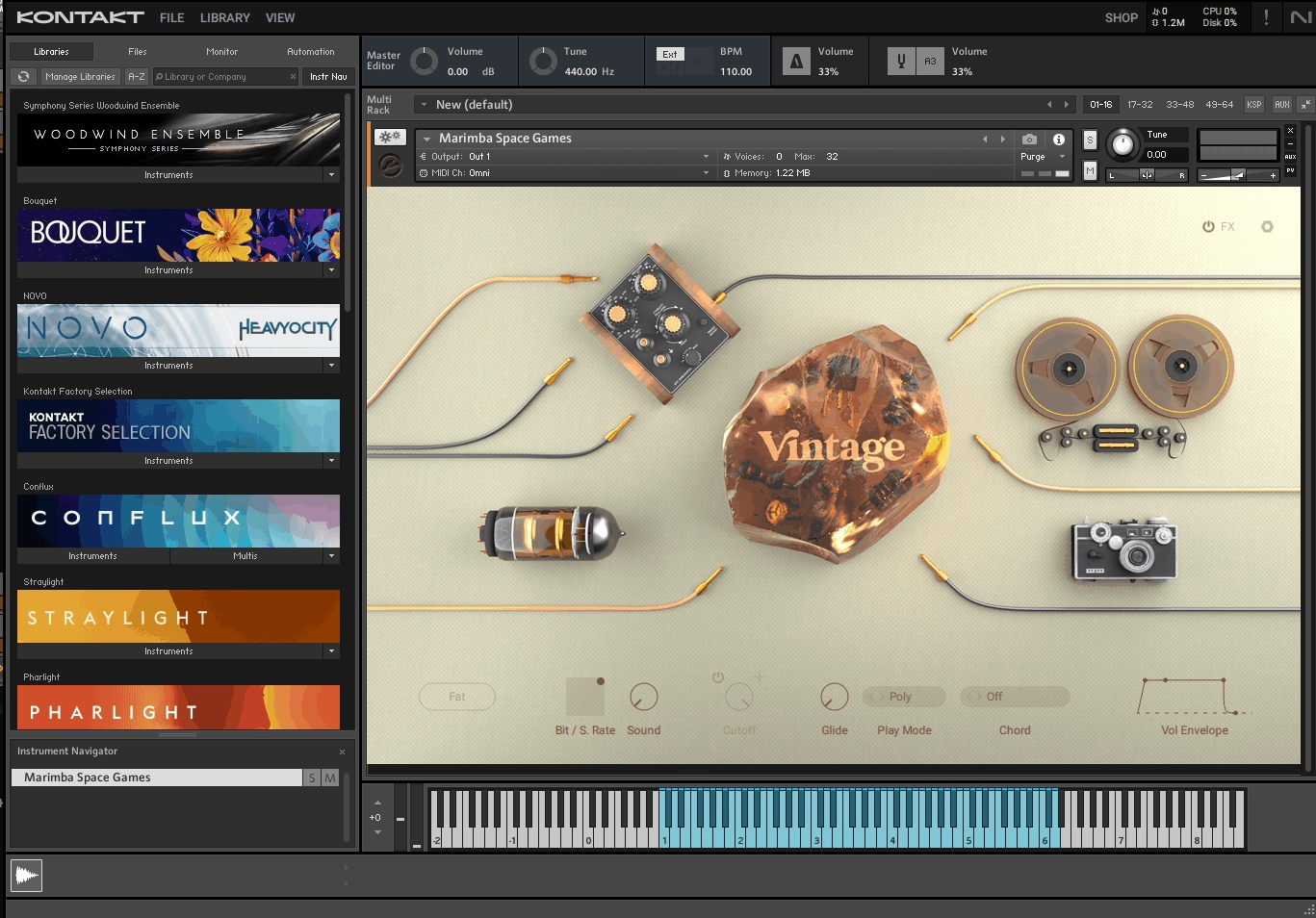
Kontakt 8 also introduced synthesis engines that let you go beyond pure sample playback: wavetable synthesis, FM synthesis, and ring modulation can all be used alongside sampled content, which means you can layer synthesized tones with real recordings in a single instrument.
The sample editing environment lets you dig into individual recordings, set loop points, apply processing, and map samples across the keyboard with granular control over velocity layers and round robins.
The full Kontakt Script Processor (KSP) gives you access to a complete programming environment for building complex instrument behaviors, performance logic, and custom interfaces. And the full Files browser lets you load any Kontakt instrument from anywhere on your hard drive without requiring it to be registered in Native Access.
Kontakt 8 is priced at around $399 standalone, though it’s more commonly purchased as part of Komplete Standard (around $599 at full price), which bundles it with a substantial collection of NI’s own instruments and effects. Upgrading from Kontakt 7 to Kontakt 8 costs around $99.
What Is Kontakt Player?
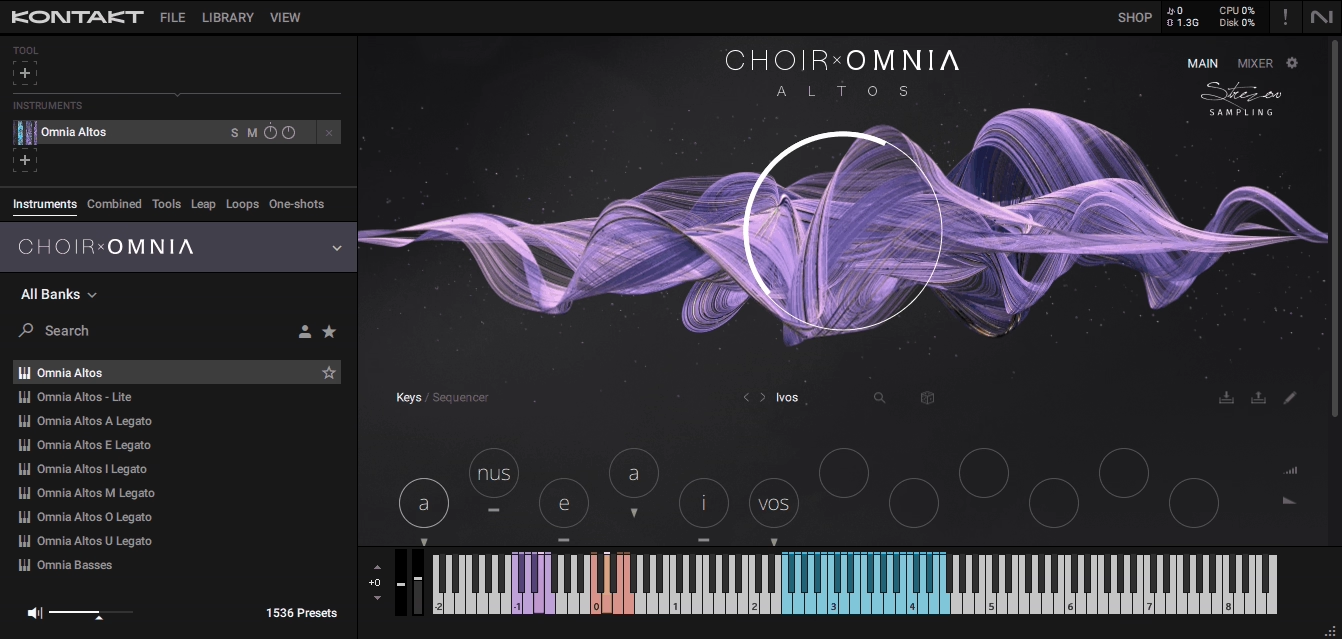
Kontakt Player is a free version of the same engine that you can download through the Komplete Start bundle, which is NI’s free entry-level package available through Native Access. When you install Komplete Start, you get Kontakt Player alongside a curated selection of instruments including the Kontakt Factory Selection, Play Series Selection, and several other NI instruments designed to give you a usable starting toolkit at no cost.
From the outside, Kontakt Player looks almost identical to the full version. It has the same interface, the same browser layout, and loads instruments in exactly the same way. If you have a library that works in Kontakt Player and you open it in both versions side by side, you will not notice any sonic difference, because the underlying playback engine is the same. The limitations of Kontakt Player are about access and capability, not about audio quality.
The catch is that Kontakt Player can only fully load what are called Player-compatible libraries, sometimes labeled as “Powered by Kontakt.” These are instruments that developers have officially licensed through NI’s Kontakt Player developer program, which requires them to pay NI a licensing fee in exchange for the ability to have their instruments work in the free Player.
When you load a library that hasn’t gone through that licensing process, Kontakt Player will run it in demo mode, which gives you full access for 15 minutes before the audio cuts out. To get sound back, you have to reload the instrument. For browsing or auditioning, this is workable. For actually producing music, it becomes frustrating very quickly.
Kontakt Player – What you can and can’t do
It’s worth being specific here, because the list of things Kontakt Player handles well is genuinely substantial, and the list of things it can’t do is also meaningful enough to matter depending on how deep into the Kontakt ecosystem you want to go.
What you can do in Kontakt Player without any restrictions: load and play any library that’s been officially licensed as Player-compatible, which includes NI’s entire own catalog and a large selection of third-party instruments from major developers. You can use the pre-built instrument interfaces with all their controls, expression options, articulation switches, and effects.
You can browse, audition, and switch between Player-compatible libraries as much as you like. You can load multiple instances across different tracks in your DAW. You can record MIDI performances, automate controls, and do everything you’d expect from a fully functional instrument plugin within the compatible library ecosystem.
What you can’t do: load non-Player libraries from the Files browser without hitting the 15-minute timer. You can’t build your own instruments, map your own samples, or edit the internal structure of existing instruments. You don’t have access to the KSP scripting environment, so you can’t write your own scripts or modify how existing scripts behave. You can’t use the synthesis engines (wavetable, FM, ring mod) that were added in Kontakt 8.
The Chords, Phrases, Conflux, and Leap tools from Kontakt 8 are all unavailable. And you don’t have access to Creator Tools, which is the companion software NI provides for building complete instrument GUIs with custom graphics and layouts.
The 15-minute timer is the thing that will bite you most often in practice, because many of the most interesting and widely recommended Kontakt instruments in the independent developer world are built for the full version specifically.
If you download something like a free Wrongtools library or a boutique orchestral instrument from a smaller developer, and it loads in demo mode, that’s Kontakt Player telling you that this particular instrument is not Player-compatible and you’d need full Kontakt to use it without the timeout.
Library Compatibility Differences
This is the core practical difference between the two versions, and it’s worth understanding exactly how the system works because it’s not immediately obvious from the outside.
Every Kontakt instrument falls into one of two categories. Player-compatible libraries (also called “Powered by Kontakt”) are instruments where the developer paid NI’s licensing fee to get their instrument certified for use in the free Player. When you buy one of these instruments and register it in Native Access, it appears in the Kontakt Player sidebar under your Libraries tab and works with no time limit. The developer’s choice to pursue Player certification means you as the end user benefit from being able to run it without owning the full version of Kontakt.
Major companies like Spitfire Audio (for their Kontakt-based releases), Heavyocity, ProjectSAM, Impact Soundworks, and many others have Player-compatible titles in their catalogs alongside others that require full Kontakt.
Non-Player libraries (sometimes called “full Kontakt only” instruments) are instruments where the developer did not go through the NI licensing process. This is often a financial decision: the NI licensing fee can be significant, particularly for smaller independent developers who are releasing boutique instruments at modest price points and for whom the fee would represent a meaningful portion of revenue.
Many of the most creative and distinctive Kontakt instruments on the market are full-Kontakt-only for exactly this reason. Developers like Wrongtools, AudioOllie, Silence + Other Sounds, some of the Sonuscore Origins series, and a significant portion of the Strezov Sampling catalog fall into this category.
Non-Player libraries don’t appear in the Kontakt Player sidebar. You load them through the Files browser in the full version of Kontakt, navigating to the folder on your drive where the library is installed, and opening the .nki instrument file directly.

There’s no registration in Native Access required, no serial number, and no activation step: you just browse to the file and open it. In Kontakt Player, the Files browser is either absent or functionally limited to the 15-minute demo behavior, which is why these libraries simply don’t work properly in the free version.
The scope of what falls into each category is worth understanding before you start building your library collection. NI’s own entire catalog, Play Series instruments, and the Komplete Start content are all Player-compatible. Most big commercial orchestral libraries from established studios are Player-compatible because those companies have the resources to pay the licensing fee. A large portion of the independent developer market, particularly at the boutique and experimental end, is full-Kontakt-only.
Building and Editing Your Own Instruments
If you ever want to do more than just play back libraries other people made, the full version of Kontakt is where that work happens, and Kontakt Player has no capacity for it at all.
Building an instrument in full Kontakt starts with importing your own audio recordings, which you can do by dragging WAV or AIFF files directly into the Kontakt interface.
From there, you’re working in the sample mapping editor, where you assign samples to keyboard zones and velocity layers, set up the note ranges each sample covers, define how the sampler handles pitch shifting as you play away from the root note, and configure round robins so that the same key doesn’t trigger the exact same sample every time it’s played. This is the essential foundation of building any realistic sampled instrument, and all of it is exclusive to the full version.
Above the sample map, you have access to Kontakt’s modular instrument architecture: amplifier, filter, and modulation sections that can be configured in complex signal routing arrangements, multiple group structures for organizing articulations, MIDI scripts for performance behaviors, and the effects rack for adding reverb, delay, saturation, and other processing to the instrument output.
You can take recordings you’ve made yourself, whether it’s a guitar in your bedroom, a friend playing piano, an unusual object you found in your garage, or a synthesizer you own, and turn them into a fully featured, playable instrument with all the expressivity and control you’d expect from a commercial library. This creative path is completely closed off in Kontakt Player.
For producers who make beats or work in experimental genres, this opens up the possibility of building genuinely unique instruments that no one else has: custom drum kits from recordings that are specifically yours, granular-style texture instruments built from unusual source material, or playable melodic instruments from any acoustic sound you can capture with a microphone.
For composers and sound designers, it means being able to record live musicians and package those recordings into reusable, playable instruments within the Kontakt framework.
Scripting and Deep Customization
The Kontakt Script Processor is Kontakt’s built-in programming environment, and it’s the reason why high-end Kontakt instruments can do things that would be impossible in a simpler sampler.
KSP is a purpose-built scripting language that lets developers define how an instrument responds to MIDI input, automate internal parameters in complex ways, create custom UI elements with interactive controls, build performance modes that go well beyond simple key-to-sample mapping, and handle articulation switching logic that can respond intelligently to playing context.
When you look at a sophisticated orchestral library with legato transitions, phrase detection, and intelligent auto-articulation, or a guitar instrument that handles strumming patterns and chord voicing automatically, or a cinematic percussion library with complex round-robin and humanization systems, that behavior is almost always implemented through KSP scripts running inside Kontakt. As a full Kontakt user, you can inspect those scripts, modify them, learn from them, and write your own from scratch.
Kontakt Player presents the end result of scripts without giving you any access to the underlying code.
For most players and producers, this matters not at all: you’re loading the library, playing it, and the script is doing its job invisibly in the background. But for instrument developers, advanced sound designers, or anyone who wants to push Kontakt beyond what pre-built instruments offer, KSP access is one of the most compelling reasons to own the full version.
The ability to write a script that, say, automatically selects the correct articulation based on note length, or maps incoming MIDI controllers to evolving parameter combinations across the instrument, or generates musical patterns and harmonies from simple input, is the kind of power that puts Kontakt in a different category from basic sample playback tools.
Alongside KSP, full Kontakt users also get access to Creator Tools, which is a separate NI application for building complete visual instrument interfaces with custom graphics, button layouts, and interactive elements that end users see when they load the instrument. If you want to distribute your own instruments, Creator Tools is what lets you give them a professional, finished appearance.
Free vs Paid Libraries
One of the most practical questions you might have when starting out with Kontakt Player is whether there’s enough free content to make the platform worthwhile before you spend any money at all, and the answer is genuinely yes, though with some important nuances.
The Komplete Start bundle gives you Kontakt Player plus a starter library collection at no cost. Within Komplete Start, the Kontakt Factory Selection is a solid overview of sampled instrument types covering acoustic pianos, electric pianos, organs, guitars, bass, drums, orchestral instruments, and synthesizer samples. It’s not a deep library in any category, but it gives you real instruments to work with from day one.
The Play Series Selection adds a curated set of sounds from NI’s Play Series instruments including Analog Dreams for electronic sounds, Kinetic Treats for unusual textural material, and additional content that skews toward contemporary production contexts. NI’s Twenty-Five anniversary library, which came out as a free release, covers synthesized and cinematic sounds across 150 presets from historical NI instruments.
Beyond what comes directly from NI, the ecosystem of free Player-compatible third-party libraries is larger than many people realize. Fracture Sounds’ Blueprint Series is an ongoing collection of free Player-compatible libraries covering strings, piano textures, and other instruments that are built to a high production standard. ProjectSAM’s The Free Orchestra and The Free Orchestra 2 are Player-compatible orchestral libraries with recording quality that reflects ProjectSAM’s commercial work, covering a range of ensemble instruments and multi-layered patches.
Heavyocity’s Foundations Piano is a free Player-compatible library from one of the more respected cinematic sound design companies, with a felt-piano character useful for subtle, understated tracks. Embertone’s Arcane is a free Player-compatible instrument with genuine character and creative scripting that reflects Embertone’s commercial instrument design philosophy.

Where the free library story gets more complicated is on the full-Kontakt side. Some of the most celebrated free Kontakt instruments in the community, including Shreddage 3 Stratus (a highly-regarded free electric guitar library) and The Alpine Project (a comprehensive free orchestral library built from public domain samples), require the full version of Kontakt. This is a recurring pattern you’ll encounter: a free library that looks genuinely excellent turns out to require full Kontakt, and suddenly the value proposition of upgrading becomes more concrete.
For paid libraries, the picture is straightforward: the biggest commercial orchestral libraries from companies like Spitfire Audio, Cinematic Studio Series, 8Dio, and Orchestral Tools generally fall into one of two camps. Either they’re Player-compatible Kontakt instruments, or they’ve migrated to their own proprietary sample players (like Spitfire’s LABS and BBC Symphony Orchestra running in the Spitfire Audio player rather than Kontakt).
The independent boutique market, however, remains substantially oriented around full Kontakt, and if you’re the kind of producer who finds yourself drawn to unusual, creative, or experimental instruments from smaller developers, that market is functionally inaccessible without the full version.
Is Kontakt Player Enough for Most Users?
For a meaningful slice of the music production world, Kontakt Player is a completely practical starting point that covers genuine creative territory without requiring you to spend anything. If your needs align with what Player-compatible libraries offer, and if you have no interest in building your own instruments, there’s a real case for staying free for as long as it works for you.
The producers most likely to find Kontakt Player sufficient are those who primarily work with NI’s own ecosystem of instruments and whose library purchases tend to stay with major commercial developers whose catalogs are Player-compatible. If you’re buying libraries from Spitfire Audio, Heavyocity, ProjectSAM, or Impact Soundworks, many of their titles work in the Player and you can build a solid collection without ever needing the full version.
Hip-hop producers who primarily use sampler-based tools within Kontakt for drums and melodic one-shots, or electronic producers who mainly use the Play Series instruments, can accomplish a lot within the free Player framework.
Where the Player starts to feel limiting is when you start browsing forums, reading library recommendations, and encountering instruments that keep showing up as full-Kontakt-only. It tends to happen gradually: you see a boutique string library that everyone is talking about, you download the demo, it cuts out after 15 minutes, and you realize you’d need to upgrade to use it properly. That experience, repeated a few times with instruments you genuinely want, is usually what tips people toward the upgrade.
The 15-minute demo behavior can also be a source of frustration if you’re exploring the broader free library ecosystem and encountering instruments that happen to be full-Kontakt-only. Some of the most interesting free libraries in the community require the full version, and running them in perpetual 15-minute demo sessions in order to audition them is not a pleasant workflow.
One important thing to understand is that Kontakt Player also lacks the Kontakt 8 creative tools entirely, not just the library compatibility. If the Chords tool for one-finger harmony triggering, the Phrases tool for pre-built melodic patterns, or the Conflux layering system sound useful to your workflow, none of those are available in the Player regardless of which libraries you’re using.
Who Should Upgrade to Full Kontakt?
The clearest cases for upgrading are situations where the limitations of Kontakt Player are actively preventing you from accessing sounds or doing things that matter to your productions.
If you are a film, TV, or game composer, the upgrade is essentially non-negotiable. The most respected orchestral and cinematic libraries in the professional scoring world require the full version of Kontakt, and the boutique independent developer market, which produces some of the most distinctive and character-rich instruments used in professional scoring, is built almost entirely around full Kontakt. Libraries like those from Silence + Other Sounds, Wrongtools, AudioOllie, Strezov Sampling’s full-Kontakt catalog, and the Sonuscore Origins series are all things you’d be missing.
If you are a producer who records your own samples from any source, whether that’s a hardware synthesizer you own, acoustic instruments you play, or unusual objects you want to turn into playable instruments, full Kontakt gives you the complete environment for building those recordings into proper instruments with velocity layers, round robins, scripted behavior, and a finished interface.
If you build or plan to build Kontakt instruments that you want to distribute or sell, the KSP scripting environment and Creator Tools are both necessary, and both require the full version.
If you have already found yourself wanting a specific library that keeps appearing as full-Kontakt-only and you keep running into the 15-minute timeout while trying to use it, that’s a direct signal that the upgrade addresses a concrete problem rather than a hypothetical future need.
If you bought Komplete Standard, the decision has already been made for you since Kontakt 8 full is included in that bundle, meaning you already have the complete platform alongside a substantial library collection at no additional cost beyond the bundle price.
The upgrade makes less sense if you genuinely only use NI’s own instruments and a small selection of major Player-compatible libraries, if you have no interest in sound design or instrument building, and if the library ecosystem you’re drawing from doesn’t require full Kontakt. In that case, staying with the Player is a completely rational decision.
The Bottom Line
Kontakt Player is the right starting point for anyone new to the Kontakt ecosystem, and it remains a practical tool for as long as your library needs are covered by the Player-compatible catalog. The free instruments available through Komplete Start are a solid foundation, the range of free and paid Player-compatible third-party libraries is broader than it might initially seem, and for many casual to intermediate producers the Player does exactly what they need it to do without ever requiring an upgrade.
Full Kontakt is what you need the moment you find yourself wanting access to instruments that require it, wanting to build your own sampled instruments from personal recordings, wanting to dig into KSP scripting and understand how sophisticated library behavior is actually implemented, or wanting the Kontakt 8 creative tools like Chords, Phrases, Conflux, and Leap that push the platform beyond basic sample playback.
The upgrade from Kontakt 7 to 8 at around $99 is reasonable if you already own the full version, and the standalone price of around $399 is significant but reflects the scope of what full Kontakt enables over the long term.
The honest way to frame the choice is this: if you’ve been using Kontakt Player and you’ve never felt limited by it, you probably don’t need to upgrade yet. But if you’ve encountered instruments you wanted and couldn’t properly use, or if you have recordings you’d love to turn into playable instruments, the full version is one of those purchases that tends to pay for itself over time through what it opens up, rather than through any single immediate use case.
More Info: Full Kontakt 8
More Info: Kontakt 8 Player
Get the Free Plugin Starter Kit
The genuinely useful free DAWs and plugins worth installing. No filler. Straight to your inbox.

Hello, I’m Viliam, I started this audio plugin focused blog to keep you updated on the latest trends, news and everything plugin related. I’ll put the most emphasis on the topics covering best VST, AU and AAX plugins. If you find some great plugin suggestions for us to include on our site, feel free to let me know, so I can take a look!