
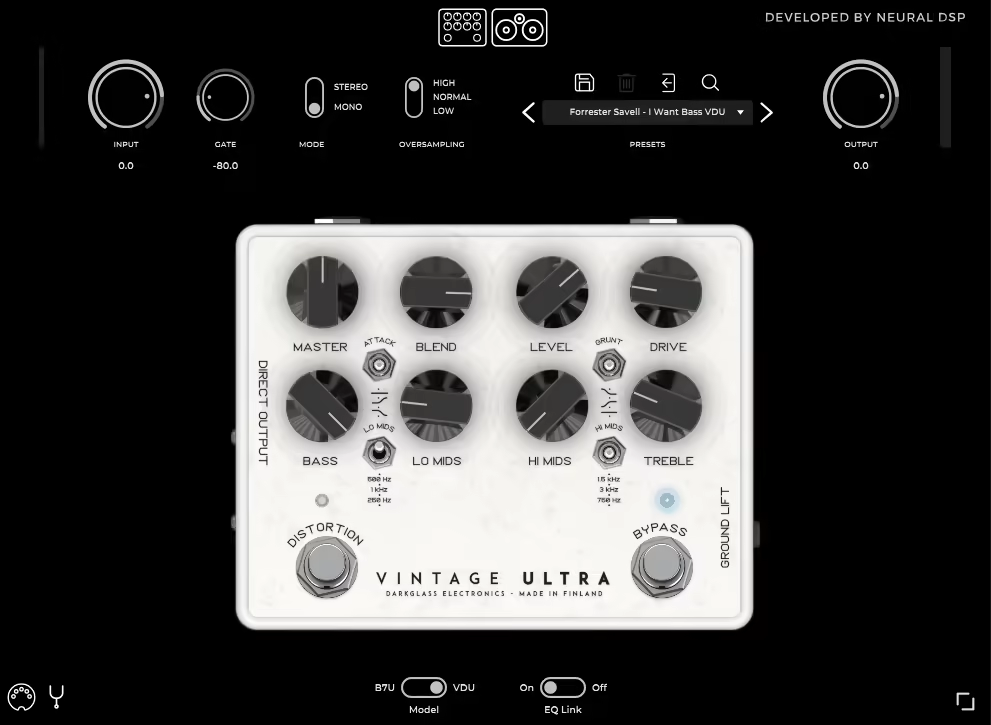
If you’ve ever worked with a real Darkglass pedal on a session, you already know why this plugin exists. The B7K Ultra and Vintage Ultra have been staples in metal and hard rock bass rigs for years, and Neural DSP, in collaboration with Darkglass Electronics themselves, set out to bring both of those into your DAW as faithfully as possible. I think they pulled it off, and then some.
The plugin essentially gives you two complete preamp emulations in a single package: the Microtubes B7K Ultra, which leans toward aggressive, high-gain modern tones, and the Vintage Ultra, which covers warmer, more organic territory. Switching between them flips the entire GUI from dark to white, which is a small but satisfying touch. For bassists who primarily work in heavier genres, metal, hard rock, post-hardcore, this is genuinely hard to beat at the price point. It’s worth the investment simply because it replaces a substantial amount of outboard gear while sounding incredibly close to the real thing, and the cab sim section alone justifies a serious look even if you already own the hardware.
I want to note upfront that this isn’t just a tool for metal players. I found myself reaching for it on funk sessions when I needed a bit more grind in the mids, and it even does interesting things to drums and synths when you want to add some character and edge to a track.
The Two Pedals, One Plugin
What I appreciate most about how Neural DSP structured this is that both models feel genuinely distinct from each other. The B7K Ultra gives you that sharp, clanky, modern metal tone that you hear on countless records, while the Vintage Ultra smooths things out and adds a kind of vintage warmth that works really well for more melodic rock or even cleaner funk bass lines.
Both models share the same fundamental control layout: Blend, Drive, Level, and Master volume, along with a 4-band semi-parametric EQ and the two signature toggle switches that Darkglass pedals are known for. The Grunt switch controls how much low-frequency content gets pushed into the clipping stage before saturation, giving you three different levels of bass boost, and the Attack switch does the same thing for the treble content with Boost, Flat, and Cut options. These two switches together are honestly where a lot of the character lives, and spending time with just those two controls will get you most of the way to a finished bass tone faster than you’d expect.
The Cabinet Simulation
Version 2.0 added a cab sim section that, I have to say, made the plugin feel complete in a way the earlier versions didn’t quite manage. The cabinet modeled here is the DG210C from Darkglass Electronics, and the IR captures were done by Mikko Logrén of ML Sound Lab, which is a name you can trust if you spend any time in the plugin world.
What makes this cab sim section particularly useful is the level of control you actually get over it:
- Seven virtual microphone positions, each placeable anywhere on the cone
- The ability to pair two mics simultaneously and blend their characteristics
- A Tweeter knob for adding edge and attack, just like the physical cab
- A sub-kick option that adds significant low-end weight without muddying the overall sound
- The option to bypass the cab sim entirely if you’re running your own IRs
I realized that for producers who already have a favorite IR loader in their chain, bypassing the built-in cab sim and just using the preamp section is a totally valid workflow, and the plugin handles that cleanly. But if you want a one-stop solution, the built-in cab sim is genuinely good enough to ship with.
Tone Range
I’d say the tonal range here is wider than you might expect if you’ve only heard Darkglass pedals used in the context of djent or modern metal. Yes, it absolutely crushes on those applications, and the aggressive, clanky mid presence that made the hardware famous translates directly into the plugin. But with the Drive pulled back and the Blend knob keeping a solid amount of clean signal in the mix, you can get surprisingly usable tones for funk, indie rock, and even lighter jazz-fusion contexts where you just want a little warmth and definition rather than full distortion.
For presets, Neural DSP provides a factory library that covers a reasonable range of starting points, and there’s also an active community sharing patches on their forums, so you’re not starting from scratch if you just want to load something up and audition the plugin quickly. I found the factory presets lean a bit heavy on the distortion side by default, so if you’re after cleaner tones, I’d suggest turning the Drive back first before assuming the plugin can’t do subtlety, because it can.
The plugin also includes a low, mid, and high quality switch that controls the level of oversampling, which is useful if you’re running a lot of instances or working on an older machine. And the stereo switch is something the hardware never had, which is one of those small digital bonuses that makes the plugin version genuinely more versatile than the original hardware in certain situations.
Standalone Mode and Workflow
For live use or practice, the standalone mode is a straightforward win. You install it, open it, plug your bass into your interface, and you’re running. There’s no DAW required, and with MIDI support added in later versions, you can assign MIDI commands to parameters, which opens things up for live performance in a real way. I believe this makes it a legitimate option for players who want to replace a hardware pedal board rather than just use it in the studio.
The drag-and-drop preset system is clean and easy to navigate, and the overall interface is hardware-inspired without feeling cramped or over-complicated. For a plugin that’s essentially a preamp emulation, the workflow is about as smooth as it gets.
At $99, the Darkglass Ultra sits in a very competitive position. It’s not the most feature-rich bass plugin on the market, and if you want parallel processing, a full amp sim with multiple cab options, or a built-in tuner and metronome, something like Neural DSP’s own Parallax might serve you better. But for what it sets out to do, which is deliver the specific sound and character of two iconic Darkglass preamps with a good cab sim on top, it’s very hard to argue with.
Check here: Neural DSP Darkglass Ultra

Hello, I’m Viliam, I started this audio plugin focused blog to keep you updated on the latest trends, news and everything plugin related. I’ll put the most emphasis on the topics covering best VST, AU and AAX plugins. If you find some great plugin suggestions for us to include on our site, feel free to let me know, so I can take a look!