
Background noise is one of those problems that sneaks into recordings at every level, from bedroom producers dealing with laptop fan hum and HVAC rumble, to seasoned engineers cleaning up location dialogue on a documentary or taming mic bleed on a live drum session.
Most noise reduction tools handle the problem but come with a cost: phase artifacts, that dreaded chirpy, watery quality that makes treated audio sound worse than the original noise did. Brusfri takes a different approach entirely, and I think that difference is what makes it genuinely worth talking about.
Klevgrand is a Swedish plugin developer known for making tools that are clean, beautiful, and refreshingly focused on doing one thing well rather than trying to be everything at once. Their name actually translates loosely to “meadow ridge,” and Brusfri itself means “noise free” in Swedish, which pretty much tells you exactly what you’re getting.
Rather than using phase cancellation to suppress unwanted sound, the plugin runs your audio through multiple frequency-trimmed expanders that work together to profile and suppress noise without touching the phase of your signal at all, which means none of those squishy, unnatural artifacts that make so many noise reduction tools painful to work with at moderate to heavy settings.
I’d say Brusfri is worth every dollar for home studio producers, podcasters, and post-production engineers who need a fast, reliable noise reduction solution that doesn’t require a deep dive into complex controls to get results.
It won’t replace a full-featured restoration suite for the most extreme cases, but for the vast majority of everyday noise problems, it handles the job with very little fuss and very little collateral damage to your audio.
How the Learn Button changes everything
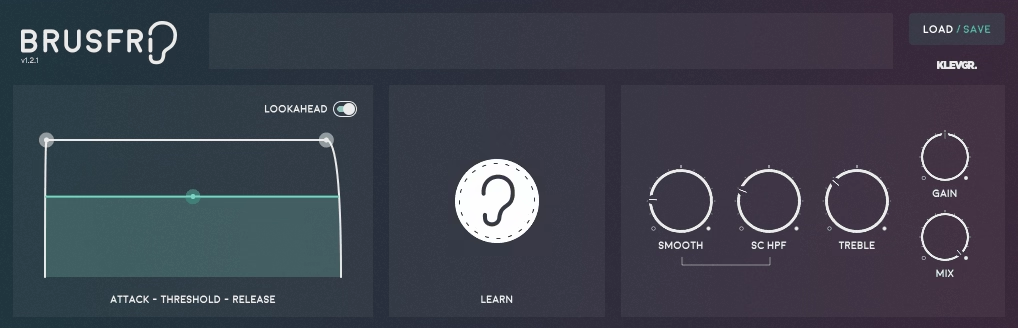
The whole workflow here revolves around the Learn button, and I love how simple it is to use once you understand what it’s doing. You hold the button down while a section of noise-only audio plays through the plugin, ideally a second or two of clean noise without any signal on top of it, and the algorithm automatically builds a profile of what the noise sounds like across the frequency spectrum.
From that profile, it sets the thresholds for each of the individual expanders automatically, and in most cases that single step gets you most of the way to where you need to be.
I found this to be genuinely impressive on a range of sources. Fan noise from a laptop recording, electrical hum from a vintage keyboard track, microphone hiss from a budget condenser, room ambience on a vocal recorded in an untreated space and the plugin handled all of them cleanly without needing much manual adjustment beyond the initial Learn step.
For heavier noise situations you’ll want to spend a few minutes with the fine-tuning controls, but the starting point from Learn alone is consistently better than I expected.

I want to note that Brusfri introduces 20ms of latency when the Lookahead feature is enabled, which is worth being aware of for any real-time monitoring situations. In a standard mixing context your DAW compensates for this automatically, but it’s worth knowing upfront if you’re thinking about live applications.
The Controls
The interface is genuinely one of the most elegant I’ve seen on a utility plugin, and it’s a nice reminder that functional tools don’t have to look sterile and clinical. The main controls you’ll actually use are:
- Threshold: sets the offset for the noise reduction threshold curve, with lower values producing more aggressive reduction
- Attack: controls how quickly the noise reducer engages when it detects noise
- Release: determines how long it takes for the processing to disengage after the signal rises above the threshold
- Lookahead: when enabled, allows the plugin to anticipate noise levels slightly ahead of real-time for cleaner gating behavior
- Smooth: adjusts the ratio of the internal expanders, giving you smoother results at the cost of being less assertive against heavier noise
- SC HPF (Sidechain High-Pass Filter): sets a low-cut frequency in the internal detection sidechain, which is useful for preventing low-frequency rumble like microphone stand vibration from dictating the overall reduction behavior
- Treble: adds a compensatory high-frequency boost for situations where the processing affects the top-end harmonics of decaying notes or bright sounds
- Mix: blends the processed and unprocessed signal, which is actually one of the more useful controls because bringing the Mix down to where the noise just becomes acceptable often produces more transparent results than pushing for complete elimination
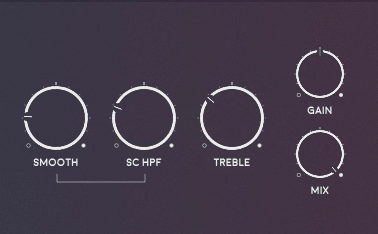
I appreciate that the Mix control exists here, because I realized that using it as your primary level of control rather than pushing Threshold all the way gives you much more natural results in situations where the noise isn’t severe. Just enough reduction to take the edge off, blended with the dry signal, is often the difference between audio that sounds treated and audio that simply sounds clean.
What It Handles Well
I believe it’s important to be honest about where the plugin excels and where it hits its limits, because this shapes whether it’s the right tool for your situation. Brusfri is very well suited for steady-state noise, meaning noise that has a consistent character over time:
- HVAC and fan hum in home and bedroom recordings
- Microphone hiss from budget or vintage mics
- Electrical hum at 50Hz or 60Hz from studio equipment
- Room tone and ambient noise on dialogue recordings
- Headphone bleed from click tracks or rough mixes
- Film and field recording ambience
What it won’t fix is transient noise: clicks, pops, crackle from vinyl, or anything that changes dramatically in character over time. For those problems you need a dedicated restoration tool like iZotope RX. Brusfri is not trying to compete with that category, and it doesn’t pretend to. It’s focused on the steady-state problem and handles it better at its price point than almost anything else available.
I have to say the comparison to iZotope RX is worth addressing directly because it comes up frequently. RX is more powerful at extreme settings and handles a wider range of noise types, but it also introduces more phase artifacts at moderate settings and costs significantly more. Brusfri sits comfortably as either an alternative for straightforward jobs or a first-pass processing stage before RX for more challenging material, and the phase-free approach actually makes it a useful complement rather than just a cheaper substitute.
There are no traditional presets in the conventional sense here since the plugin builds its noise profile dynamically through the Learn process, which means each session essentially creates its own custom profile tailored to the specific noise in your recording. That’s actually a smarter approach for noise reduction than fixed presets would be, since every noise problem is slightly different and a preset couldn’t account for the specific frequency character of your particular HVAC system or microphone.
Formats: VST, AU, AAX
Works with: macOS 10.10 or later (optimized for M1), Windows 7 SP1 or later, AUv3 for iOS
Price: $53
Check here: Klevgrand Brusfri

Hello, I’m Viliam, I started this audio plugin focused blog to keep you updated on the latest trends, news and everything plugin related. I’ll put the most emphasis on the topics covering best VST, AU and AAX plugins. If you find some great plugin suggestions for us to include on our site, feel free to let me know, so I can take a look!