
If you’ve spent any time trying to get your mixes louder without making them sound like a squashed mess, you’ve probably run into the clipper vs. limiter debate at some point.
Clipper plugins have become increasingly essential in modern mixing and mastering workflows, and Kazrog has been one of the names people keep coming back to in that space. KClip 3 is the company’s most fully realized version yet, and I think it makes a genuinely strong case for itself whether you’re working on the master bus, individual tracks, or somewhere in between.
Kazrog was founded by Shane McFee with a pretty straightforward goal: give home studio producers access to tools that can compete with large-scale professional studios, without the price tags that come with that territory. I’d say they’ve largely delivered on that promise here.
KClip 3 runs as a VST2, VST3, AU, and AAX plugin on both Mac and Windows, with native Apple Silicon support, and it also works on Linux, which is genuinely rare and appreciated. No iLok, no dongle, no subscription. You just buy it and use it, which I appreciate more than people might think.
In terms of whether it’s worth it, I believe the answer is yes for most producers and engineers, and the main reason is how much you’re actually getting for the price. At around $69 MSRP, you’re picking up eight distinct clipping modes, full multiband processing across four adjustable bands, M/S control, LUFS metering, and oversampling up to 32x, all in a plugin that’s been consistently updated and refined over several years. That’s a lot of firepower for the money, and it performs at a level that doesn’t feel like a compromise.
Eight Clipping Modes
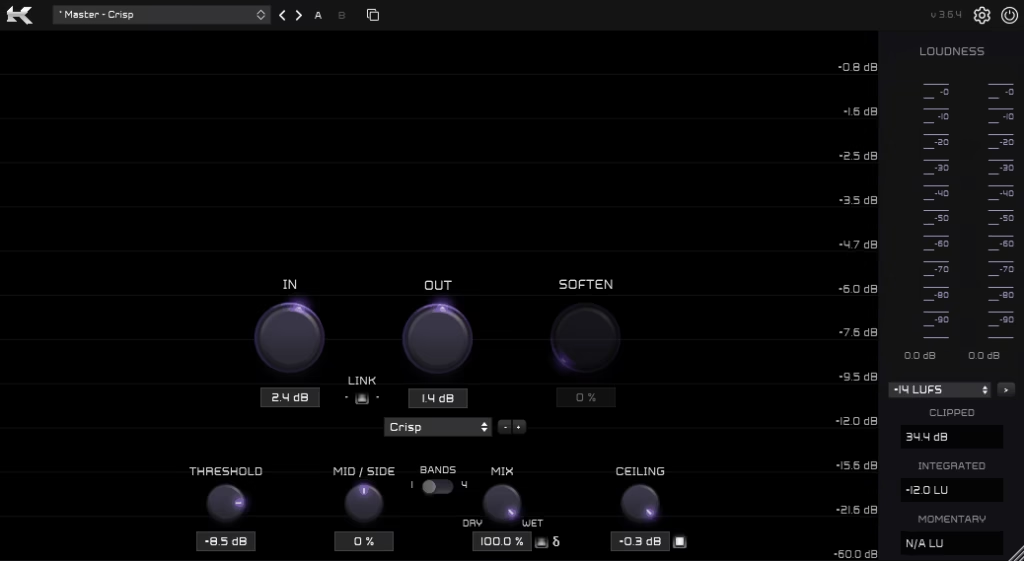
This is where KClip 3 really separates itself from a lot of other clippers on the market. Most clippers give you a single algorithm and maybe a soft/hard toggle. Here you get eight genuinely distinct modes: Smooth, Crisp, Tube, Tape, Germanium, Silicon, Broken Speaker, and Guitar Amp, each modeled after specific analog characteristics. I found myself reaching for different modes depending on the material in front of me, which is not something I expected going in.
The Crisp mode, for example, is modeled after the digital saturation behavior of a well-known hardware ADC/DAC unit, and it adds a punchy brightness that works really well on drums and percussive elements. Germanium is warmer and does a great job gluing together mid-range content like guitars and cymbals.
I noticed that even the more extreme modes like Broken Speaker and Guitar Amp have a lot of practical use beyond novelty, especially for sound design and more distorted genres. The Soften control lets you dial in how hard or smooth the clipping curve behaves, so you’re not locked into one character per mode.
Get the Free Plugin Starter Kit
The genuinely useful free DAWs and plugins worth installing. No filler. Straight to your inbox.
Multiband and M/S Processing
I mean, this is the feature that really takes KClip 3 to another level compared to simpler clippers. The four-band mode lets you assign a completely different clipping mode to each frequency band, with fully adjustable crossover points, which means you can be surgical about where and how clipping is applied across the spectrum. Want heavy Tube saturation on the low mids but transparent Smooth clipping on the highs? You can do exactly that.
The M/S processing adds another layer of control by letting you adjust the ratio of mid and side signal going into the clipper, which is a surprisingly effective tool for shaping the stereo width of your master. I’d recommend spending some time with the four-band mode in particular because it really is where the plugin earns its reputation as a mastering tool. In multiband mode, the M/S adjustment is post-clipping, which is worth knowing as you’re dialing things in.
A couple of things to keep in mind practically: if you’re working in Logic Pro X or Pro Tools on macOS, Kazrog recommends setting your host buffer to 1024 samples when using multiband mode. It’s a limitation they’ve acknowledged and are working on, and it’s not a dealbreaker, but it’s worth noting before you set up your session.
Interface & workflow
Here’s where I think a lot of people will be pleasantly surprised. The GUI is clear, well-organized, and genuinely easy to read at a glance, especially after the version 3.6 update which brought a redesigned visualizer with color customization and a resizable window.
The real-time color-coded visualizer shows you exactly where and how much clipping is happening, which makes it a lot easier to trust your ears and your eyes together rather than just guessing.
The workflow features are well thought out:
- A/B preset comparison slots for quick before/after checks
- Inverse gain link that ties input and output gain inversely, so you can push the processing without tricking yourself with apparent volume jumps
- Delta function that isolates only the changed part of the signal, which is invaluable for hearing what the clipper is actually doing
- Mix/dry-wet control on the front panel for parallel processing workflows
- LUFS/EBU metering with a target loudness feature for streaming preparation
- Preset subfolder support up to three levels deep, which keeps your saved settings organized as your preset library grows
The factory presets are a solid starting point and cover a range of use cases from gentle mastering glue to more aggressive track saturation. I found them useful for quickly understanding what each mode is capable of before diving into my own settings.
On the Master Bus and Beyond
I want to note that KClip 3 is genuinely versatile across the signal chain, not just a mastering-only tool. It performs exceptionally well on drum buses, bass, guitars, synths, and vocals, and its ability to tame transient peaks before a limiter is one of the main reasons it’s become a go-to in so many engineers’ chains. The idea is that you clip the peaks cleanly and let your limiter do less work, which generally results in a louder, more open-sounding master.
For 808 bass and sub-heavy material, I’d suggest being a bit more careful. Aggressive clipping on low end can introduce distortion quickly, but the Smooth mode with the Soften control dialed up gives you a gentler entry point that works well as long as you’re not pushing too hard. The zero-latency mode when oversampling is disabled is also a nice touch for composition and tracking sessions where you want real-time feedback without introducing delay.
One thing I realized fairly quickly is that this plugin rewards a little time spent learning it. There is a short learning curve, particularly around understanding how the eight modes interact with different source material, but once you have a feel for it, the workflow is fast and intuitive. For people coming from a simpler clipper or using limiters exclusively, the jump in capability is noticeable.
Overall, KClip 3 is one of the more fully featured and consistently well-regarded clippers available at this price point. It’s been used on major releases, it runs clean and efficient on modern systems, and it gives you a level of control that scales from simple peak management all the way up to detailed multiband mastering work. I would recommend downloading the free demo first to get a feel for the modes before committing, but for most producers and engineers, the full version is going to be hard to pass up.
Check here: Kazrog KClip 3
Get the Free Plugin Starter Kit
The genuinely useful free DAWs and plugins worth installing. No filler. Straight to your inbox.

Hello, I’m Viliam, I started this audio plugin focused blog to keep you updated on the latest trends, news and everything plugin related. I’ll put the most emphasis on the topics covering best VST, AU and AAX plugins. If you find some great plugin suggestions for us to include on our site, feel free to let me know, so I can take a look!