
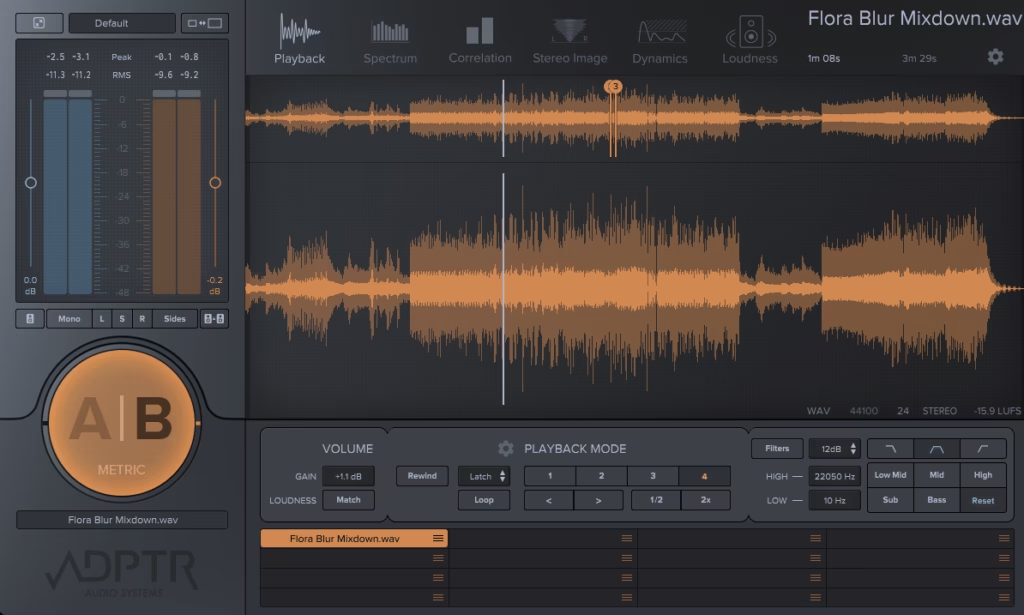
If you’ve ever finished a mix, felt genuinely good about it, and then pulled up a reference track only to realize your low end is completely out of control or your overall level is sitting way too hot, then you already understand exactly why Metric AB exists.
I mean, that moment of comparison is something every producer and mixing engineer goes through, and for a long time the workflow around it was kind of awkward. You’d be bouncing between windows, adjusting gain by ear, trying to remember what the reference sounded like three seconds ago.
Metric AB just solves all of that in one place, and once you start using it the way it’s designed to be used, it’s genuinely hard to go back to doing it the old way.
What you’re getting
The first thing I noticed when I loaded Metric AB up on my master bus was how much information it puts in front of you without feeling overwhelming. You get simultaneous A/B comparison between your mix and up to eight reference tracks, all gain-matched so you’re actually comparing things fairly rather than just hearing whichever one happens to be louder.
I think that gain-matching piece is probably the single most important thing it does, because our ears are incredibly easy to fool when volume is involved, and a difference of even 1-2 dB can make one source sound noticeably better even when the actual tonal balance is identical.
The visual analysis side covers loudness, spectrum, stereo field, dynamics, and transients all at once, and I appreciate that each of these views is genuinely readable rather than just decorative.
The spectrum analyzer lets you overlay your mix and your reference simultaneously, so you can see at a glance whether your high mids are sitting where a commercially released track’s high mids are, or whether your low end is carrying more energy than it should relative to the kick.
I found this especially useful when working on genres where the tonal balance expectations are pretty specific, like modern hip-hop or pop, where the relationship between the sub and the kick is really tightly defined..
I want to note that the loudness matching is based on EBU R128, which means it’s doing proper integrated LUFS matching rather than just peak matching, and that distinction matters a lot in practice. Peak matching is easy to fool because a transient-heavy track can read high on peak while actually sitting much quieter in terms of perceived loudness. The way Metric AB handles this means when you flip between your mix and a reference, you’re hearing an honest comparison every single time.
It speeds up your workflow
I’d say the biggest practical benefit here, beyond the analysis itself, is how fast the whole thing is to use once it’s set up. You drag your reference files directly into the plugin, and from that point on switching between your mix and any of your references is a single keystroke.
I realized pretty early on that this speed is what separates Metric AB from just having a second track in your session loaded with a reference. When the comparison is instant, you start making faster, more confident decisions because you’re not giving your ears time to adjust or your brain time to rationalize.
The Delta mode is something I love using during the EQ stage of a mix, because it lets you hear only the difference between your mix and the reference rather than both simultaneously.
In practice that means you can identify exactly what frequency content your mix has that the reference doesn’t, and vice versa, which makes surgical EQ decisions a lot more grounded in reality than just sweeping around by ear hoping to land on something.
I believe this is one of those features that sounds almost too technical when you read about it but makes complete intuitive sense the moment you actually hear it in action.
I also noticed that Metric AB includes a correlation meter and a stereo vectorscope, and while those aren’t unique features in the plugin world, having them right there in the same window as your reference comparison means you’re checking mono compatibility and stereo width in the same glance rather than jumping to a separate metering plugin.
For me, that kind of consolidated view just keeps you in the creative zone rather than constantly managing your plugin windows.
Where it fits
I think it’s worth being honest about who gets the most out of this and in what context, because Metric AB is priced as a professional tool and it deserves a straight answer on that front.
If you’re doing full mixing and mastering work on a regular basis and you’re delivering to clients or releasing music that needs to compete on streaming platforms, I would recommend this without much hesitation. The workflow improvement is real and the analysis is genuinely deep enough to justify it.
For someone who is mostly producing their own music at a hobbyist level, I’d say the value proposition is a little more conditional. You can absolutely use it and benefit from it, but at its full price point of $149, it’s a meaningful investment and you’d want to make sure you’re at a stage in your work where referencing is already a regular part of your process rather than something you do occasionally.
suggest taking advantage of the trial before committing, because the plugin is one of those tools where the value becomes immediately obvious the first time you use it in a real session.
I must say, one thing I appreciate about how ADPTR designed this is that it works equally well as a mixing tool and a mastering tool.
On the mix bus it helps you keep your tonal balance and dynamics in check relative to a target. In mastering it becomes almost indispensable for making sure your limiting and saturation decisions aren’t pulling your mix away from where it needs to land. The fact that it handles both contexts without feeling like it’s compromising either one is genuinely well thought out.
Bottom line
I have to say, Metric AB is one of those plugins that I think a lot of people sleep on because referencing feels like something you can do manually without dedicated tools, and technically you can. But there’s a real difference between a workflow that makes referencing slightly inconvenient and one that makes it completely seamless, and that difference shows up in the quality of your decisions over the course of a long session.
I love how it keeps everything in one place, handles the gain matching automatically so you’re never second-guessing the comparison, and gives you enough visual information to back up what your ears are telling you.
It runs as a VST3, AU, and AAX plugin and is compatible with all major DAWs on both Mac and Windows. I found the CPU footprint to be minimal even with multiple references loaded, which is exactly what you want from something sitting on your master bus for an entire session. If referencing is already part of how you work, Metric AB makes it better. If it isn’t yet, this might be the tool that finally makes it a habit.

Hello, I’m Viliam, I started this audio plugin focused blog to keep you updated on the latest trends, news and everything plugin related. I’ll put the most emphasis on the topics covering best VST, AU and AAX plugins. If you find some great plugin suggestions for us to include on our site, feel free to let me know, so I can take a look!