
If you’re into experimental production, sound design, or just love adding grit and character to your tracks, Digitalis is one of the most creative tools you’ll find at any price point, let alone $36. If you prefer clean and polished sounds only, this one probably isn’t for you.
There’s a specific kind of producer who gets genuinely excited about destroying audio in creative ways, and if that sounds like you, then Aberrant DSP Digitalis is about to become one of your favorite plugins.
The whole concept behind it is built around digital decay, the kind of sounds you get from bad converters, corrupted CDs, weak internet connections, and catastrophic data errors, all captured and weaponized into a multi-effect plugin that’s as fun to use as it is unpredictable.
Aberrant DSP already had a solid reputation from SketchCassette II, their well-loved tape emulation plugin, and I think Digitalis is actually the more interesting and ambitious release from them.
At $36, this is honestly a no-brainer buy if you’re even remotely curious about it. The depth of what you get for that price is genuinely hard to justify from Aberrant’s side, which is probably why so many people who demo it end up buying it within the first session. I would recommend grabbing the free trial first though, because this is a very specific flavor of plugin and you’ll know within five minutes whether it speaks to you.
The Interface
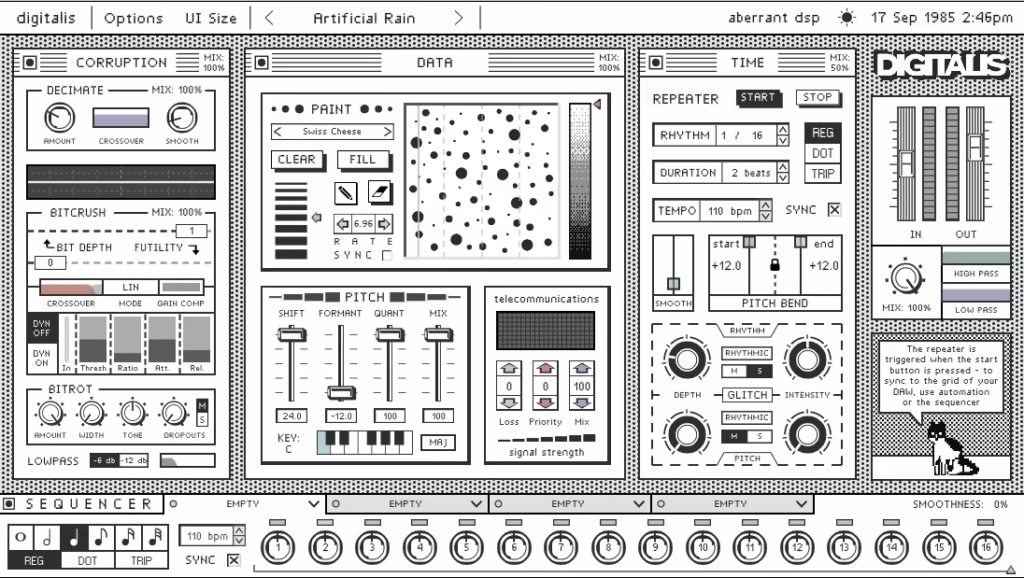
Before you even make a sound with Digitalis, I have to say the interface is one of the most memorable things about it. The whole plugin is designed to look exactly like a desktop from an old Mac Classic, complete with authentic retro fonts, vintage-style widgets, draggable application windows, and a menu bar across the top that includes a working clock and calendar.
The calendar keeps the year locked to “198X” so that 2022 shows as 1982, 2026 shows as 1986, and so on, which is a small detail but one that tells you exactly what kind of care went into building this thing.
The three main processing modules, Data, Corruption, and Time, are presented as individual windows sitting on that faux desktop, and you can actually drag them around and rearrange their order to change the signal flow through the plugin.
That’s not just a visual quirk either, it’s a genuinely functional feature since the order in which those modules process your audio makes a real difference to the results you get. There are six possible arrangements and each one pushes the sound somewhere different.
I love how the whole thing feels like a creative statement rather than just a functional tool. And for anyone who gets confused, there’s also Jon the cat sitting in the bottom right corner of the interface, a built-in AI assistant who gives you contextual guidance on whatever control you’re hovering over, which is genuinely useful when you’re first getting oriented.
Three Modules, Endless ways to wreck your audio
The Data module is where a lot of the more surgical damage happens, and the centerpiece of it is something Aberrant calls the PaintBox, which is easily one of the most original features I’ve found in any plugin. It looks exactly like an old-school drawing application, complete with a canvas, pen tools, and an eraser, but what you’re actually doing is drawing a spectral filter.
A scan line moves continuously across the canvas from left to right, and wherever it crosses a mark you’ve drawn, the vertical position determines which frequency gets attenuated and the brightness of the mark determines how much. You can draw freehand, load one of the included images or patterns, and even control how fast the scan line moves or sync it to your DAW tempo.
I mean, the concept alone is remarkable. You’re literally painting frequency content onto your audio in real time. Beyond PaintBox, the Data module also handles pitch shifting, formant shifting, and pitch quantization, so you can do things like force incoming audio to snap to a musical scale while simultaneously filtering it through whatever chaotic spectral pattern you’ve drawn on the canvas.
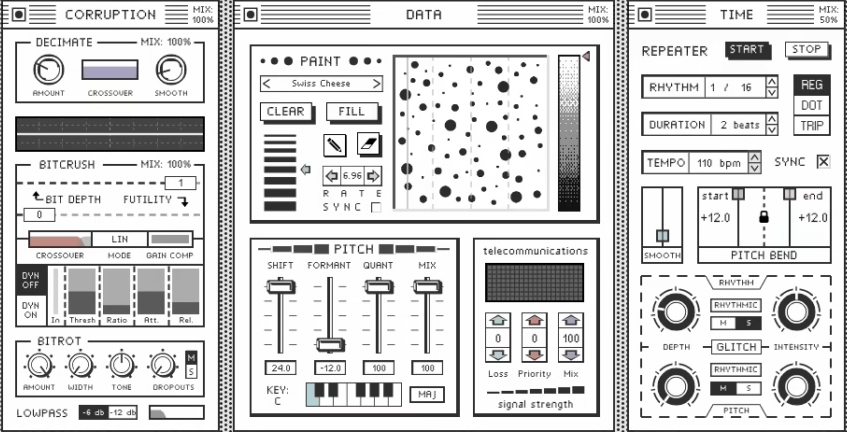
The Corruption module is where things get more traditionally destructive in the best possible way. This is your digital degradation toolkit, covering:
- Bitcrusher with dynamic control so the crushing can move and breathe rather than sitting static
- Downsampler for that classic lo-fi aliasing sound
- Telecoms filter that simulates low-bandwidth phone and internet connections, which is surprisingly musical
- Compressor for taming things when the chaos gets too loud
The Time module is built around the Repeater, which samples short chunks of incoming audio and loops them a set number of times before grabbing the next chunk, with pitch shifting and pitch bend controls that let you detune and warp those repeated fragments.
On top of that, the Glitch section inside the Time module adds a layer of rhythmic and pitch randomness on top of the repeater, either in sync with the repeater’s timing or running completely free for unpredictable chaos. I noticed this is where you can get sounds that genuinely feel like corrupted playback, the kind of thing that makes a listener stop and ask what just happened.
The Sequencer
I believe the 16-step sequencer running along the bottom of the interface is the single most powerful part of Digitalis, and it’s probably the feature that separates it from every other glitch or degradation plugin out there. You get four independent sequencer channels, each of which can be routed to a different effect parameter anywhere in the plugin, and each channel has its own step length, step resolution, and smoothing control.
What that actually means in practice is that you can have one channel sequencing the bitcrush amount on a 7-step pattern, another sequencing the PaintBox scan speed on a 5-step pattern, another modulating the repeater pitch on a 12-step pattern, and a fourth doing something entirely different, all running simultaneously and creating these constantly shifting polyrhythmic textures that would be essentially impossible to program manually. The 22 available effects that can be assigned across those four slots give you a huge range of modulation targets to work with.

For me this is where you can easily lose a couple of hours just exploring what happens when different combinations of sequencer assignments interact with each other. It’s a hands-on, trial and error kind of experience, and I appreciate that Aberrant built the plugin to reward that kind of experimentation rather than pushing you toward safe, predictable results.
Worth it or not?
I’d say Digitalis sits in a pretty specific creative lane, but within that lane it’s genuinely exceptional. If you’re making electronic music, experimental hip-hop, sound design for film or games, ambient music, or really anything where texture and sonic weirdness are part of the vocabulary, this plugin is going to get heavy use. I found myself reaching for it on drums, synths, vocals, and even full mix buses just to see what it would do, and it consistently surprised me in ways I didn’t expect.
The 98 factory presets give you a solid starting point across a wide range of effects from subtle digital enhancement all the way to full signal destruction, and they do a good job of showing you the range of what the plugin can do before you start building your own. I suggest spending time with the presets first, then start tweaking individual parameters to understand how each module contributes to the overall sound.
A fair heads up is that the learning curve is real. The PaintBox especially takes some time to understand intuitively, and the sequencer requires a bit of patience before you’re getting the most out of it. Neither of these is a dealbreaker by any stretch, but you should go in knowing this isn’t a plugin where you dial in a single knob and walk away.
At $36 it’s one of the best value creative tools available right now, full stop. The free trial is fully featured aside from periodic audio dropouts and no preset saving, which is more than enough to know whether it belongs in your plugin folder.
Formats: VST3, AU, AAX (64-bit only)
Works with: macOS (Apple Silicon and Intel), Windows
Price: $36

Hello, I’m Viliam, I started this audio plugin focused blog to keep you updated on the latest trends, news and everything plugin related. I’ll put the most emphasis on the topics covering best VST, AU and AAX plugins. If you find some great plugin suggestions for us to include on our site, feel free to let me know, so I can take a look!