
Let’s talk about some of the best ethnic Kontakt libraries I recommend you can get today for cinematic scoring, music production and other applications!
Sometimes a track needs authentic cultural character that synthesizers and standard orchestral samples just can’t deliver. That’s when I reach for libraries that don’t just throw loops at you, they give you playable instruments with built-in performance logic, traditional scales, and rhythmic patterns that respect the musical traditions they’re capturing.
There are many solid picks in this list, just to name a few – Native Instruments Spotlight Collection series (India, West Africa, East Asia, Middle East, Cuba, Ireland, Balinese Gamelan) and few more.
Whether you want to build polyrhythmic West African percussion foundations, layer authentic Indian sitar melodies with proper raga scales, add microtonal Middle Eastern oud phrases, or create shimmering Balinese gamelan textures, there’s a library here that gives you that cultural authenticity without requiring years of ethnomusicology study.
From pattern-driven percussion ensembles to scale-mapped melodic instruments, phrase-based performance patches, and deeply sampled traditional sounds, these libraries let you create convincing world music content quickly, shaping every melodic gesture, rhythmic pattern, and tonal color with respect for the traditions behind them.
Whether you’re scoring films, building world fusion tracks, or adding ethnic textures to ambient and electronic productions, you can turn static ideas into culturally rich compositions, transform generic arrangements into geographically specific soundscapes, and explore musical traditions without leaving your DAW.
If you want your tracks to carry authentic global character, traditional musical depth, and genuine cultural resonance, the following world music libraries are solid picks for cinematic scoring and modern music production.
1. Native Instruments Spotlight Collection: India
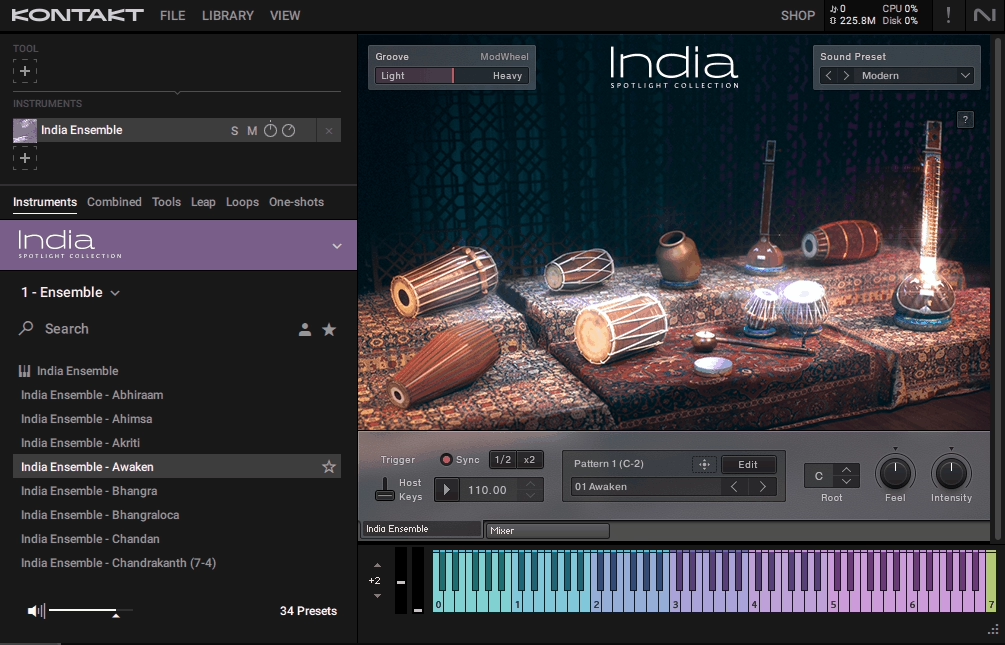
For producers working on cinematic scores, world fusion tracks, or ambient pieces that need authentic Indian color, this library bridges the gap between traditional instrumentation and modern DAW workflows. You can drag MIDI patterns directly into your timeline, edit them freely, then layer live performances on top using the scale mapped instruments.
Native Instruments designed Spotlight Collection India to be more than just another “world music” sample pack. You’re getting 16 individual Kontakt patches that split between 9 percussion instruments, 6 melodic options, and one ensemble patch that brings everything together.
The 3 GB compressed size (roughly 7 GB uncompressed) keeps things manageable while still delivering the sampling depth needed for realistic performances.
I really like how this ethnic Kontakt library handles Indian musical frameworks without forcing you to become a raga theory expert overnight. The library includes 96 historical scales that you can map directly to your keyboard, so when you play melodic instruments like the Sitar or Bansuri, you’re already working within authentic modal structures.
Main points:
- Groove Player with Real Tala Patterns
The 954 MIDI grooves aren’t just thrown in as afterthoughts. They’re organized into pattern sets that reflect actual tala structures, and you can tweak them with Groove, Feel, and Intensity controls before exporting as MIDI.
This means you can start with an authentic rhythmic foundation, then modify it to fit your track’s specific timing or swing without breaking the pattern’s internal logic. Each of the 159 pattern sets includes 6 variations, giving you flexibility without overwhelming choice.
- 177 Snapshots for Quick Setup Changes
Instead of manually tweaking parameters every time you want a different timbre or articulation setup, you can jump between pre configured snapshots. This becomes essential when you’re working fast and need to switch from a bright, aggressive tabla sound to something more subdued for a different section.
The snapshots cover articulation switches, mixed instrument setups, and tonal variations that would otherwise take several clicks to dial in manually.
- Built In Scale Mapping with 96 Ragas
The raga system is where this library really helps non specialists. You select a scale, and Kontakt automatically maps the correct notes across your keyboard so you’re not accidentally hitting pitches that sound wrong within traditional Indian frameworks.
I’ve found this particularly useful when sketching melodic ideas quickly because you can explore without second guessing every interval. The scales aren’t just presets either. You can edit them to adjust the mood or create hybrid frameworks if your composition calls for something less orthodox.
- Internal Mixer and Effects Chain
Each instrument has balance controls for different mic layers (close vs. room), built in reverb, and basic FX processing. You’re not forced to immediately reach for external plugins to make things sit right in your mix.
The low/high mic blending is subtle but effective. It lets you add air and space or tighten things up depending on whether you’re working on an intimate cue or a larger cinematic passage.
- NKS Ready Integration
If you’re using a Komplete Kontrol keyboard, the experience gets noticeably smoother. Light guides show you exactly which keys correspond to your selected scale, ornamentation becomes more visible, and hardware controls are pre mapped to key parameters.
This isn’t just about convenience. It genuinely speeds up the creative process when you’re in the flow and don’t want to break momentum by clicking around the interface.
- Ensemble Patch for Layered Performances
Rather than loading multiple patches separately and managing MIDI channels, the ensemble mode combines all instruments into split zones and layers you can trigger simultaneously. This becomes particularly valuable when you’re auditioning combinations or performing live parts where you want percussion and melodic elements responding together.
It’s not perfect for every situation, but for initial sketching and arrangement building, it saves substantial time.
2. Ethno World 7 Complete
Let’s start with keys things. Best Service spent 25 years developing Ethno World 7 Complete library with 94 musicians and vocalists worldwide, resulting in 382 instruments and voices across more than 1,000 Kontakt patches.
The 53 GB uncompressed collection spans every inhabited continent, treating each cultural tradition as a complete musical system rather than surface level ethnic flavoring. This works directly in Kontakt (version 7.10.7 or later) or the free Kontakt Player , making it accessible without purchasing the full sampler.
The scope covers stringed instruments from India, Turkey, Afghanistan, China, Japan, and West Africa; percussion spanning traditional drums, metallic instruments, and hand percussion from multiple regions; wind instruments including flutes, reeds, and ceremonial options; plus vocal content from various traditions.
Beyond raw samples, the library provides educational context and performance logic that helps you use these instruments authentically within modern production workflows.
- 382 Instruments Covering Global Musical Traditions
The sheer variety here is what separates Ethno World 7 from smaller collections. You’re not getting three sitars and calling it “Asian instruments.” You’re working with Turkish saz, Afghan rubab, Chinese pipa, Japanese koto, monochords, zithers, and instrument types most producers never encounter in standard libraries.
The percussion alone spans continents: ghatams and kanjiras from India, karkabas from Morocco, West African djembes, and Latin American percussion families. This breadth means you can build hybrid ensembles that combine Middle Eastern strings with West African rhythms or layer Japanese woodwinds over Andean percussion without needing three separate libraries to pull it off.
- Cultural Context Through INFO Pages
I’ve found this feature more useful than expected. When you load certain patches, you get descriptive text explaining the instrument’s role in its native tradition, common playing techniques, and sometimes even tuning information.
If you’re working with a Moroccan ribab or trying to program convincing maqam phrases on a Middle Eastern violin, these contextual notes save you from guessing or spending hours researching online. It’s the kind of detail that elevates this from a sample pack into an educational tool that respects the traditions it’s sampling.
- Performance Patches with Embedded Phrases
Rather than just chromatic instruments where you program every note, some patches come with playable licks and rhythmic patterns already recorded and mapped. The Indian sitar patches include phrases recorded in multiple scales and tempos, so you can trigger authentic melodic runs without needing deep knowledge of raga ornamentation.
Moroccan and Klezmer violins include expressive phrase content that captures the microtonal bends and vibrato styles specific to those traditions. This approach works particularly well when you’re sketching ideas quickly or need realistic performances that would be difficult to fake with MIDI programming alone.
- 53 GB of Uncompressed Sample Detail
The file size reflects serious recording depth. Multiple velocity layers, round robin samples, and mic positions give you dynamic range and timbral variety. When you play harder on a tabla or darbuka, the sound responds naturally rather than just getting louder.
Sustaining instruments like bowed strings and winds have the kind of sample length and detail that lets phrases breathe without obvious loop points or artificial cutoffs. This level of capture means you’re not immediately reaching for EQ and compression to make things sit right. The sounds already have the tonal character and presence needed for production work.
- Over 1,000 Kontakt Patches for Workflow Flexibility
The 382 instruments expand into more than 1,000 patches because Best Service provides multiple configurations for many instruments: different articulations, tuning systems, phrase banks, and playing modes each get their own patch.
It means you’re not stuck with one size fits all presets. You can load a sitar patch optimized for melodic playing or switch to one focused on rhythmic strumming patterns.
When it comes to percussion instruments, they often have separate patches for loops versus single hits, giving you options depending on whether you’re programming or performing live parts.
- NKS Integration for Hardware Control
If you’re working with Komplete Kontrol keyboards, the experience becomes noticeably smoother. Key lights show you which notes fall within selected scales, parameter controls map automatically to hardware knobs, and you can browse instruments without leaving your keyboard.
This isn’t essential for basic use, but when you’re deep in a session and want to audition different instruments or adjust tuning systems on the fly, having everything at your fingertips rather than buried in menus keeps the creative momentum going. The scale visualization is particularly helpful with non Western tuning systems where you’re not working with standard equal temperament.
3. Native Instruments Spotlight Collection: West Africa
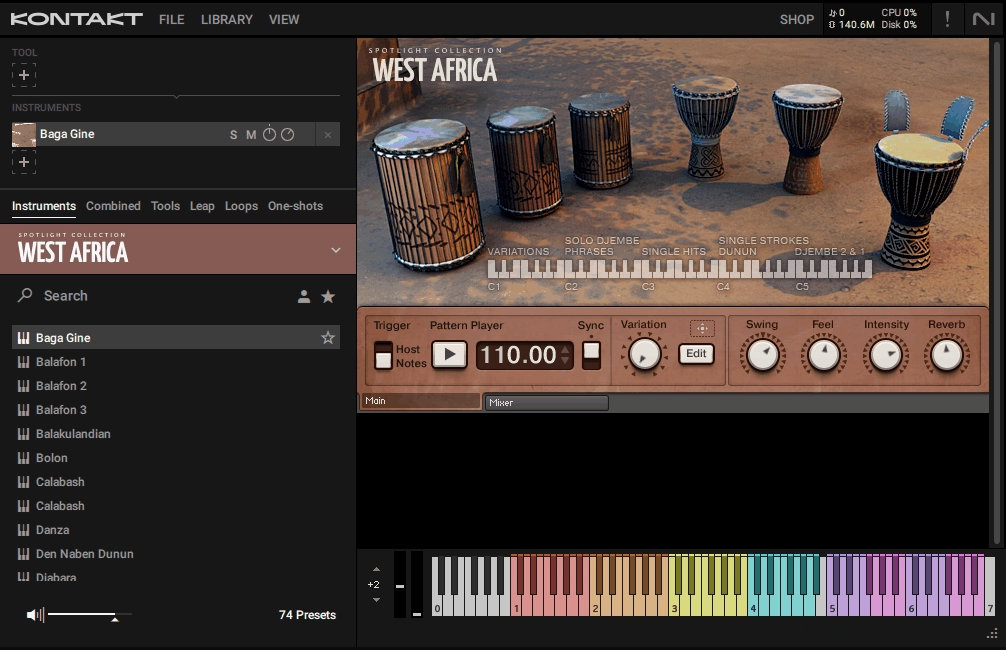
What makes these instruments particularly useful is the ability to switch between traditional scales and chromatic tuning depending on whether you’re aiming for authentic modal content or need to blend with Western harmonic frameworks.
You’re working with 26 percussion instruments and 8 melodic/tonal instruments spread across 74 Kontakt patches, all contained in a manageable 3 GB of uncompressed samples (about 1.3 GB compressed download).
Where this library separates itself from static loop collections is in its built-in pattern sequencer. You get 38 ensemble rhythms (each with 12 variations), 28 standalone percussion rhythms (with 12 accompaniment patterns each), and 8 melodic patterns (with 12 accompaniment variations).
This is what you get with the NI West Africa library:
- Polyrhythmic Ensemble Engine with 38 Core Patterns
The standout feature is how the ensemble patterns work. Each of the 38 rhythms comes with 12 variations, and you can trigger entire polyrhythmic textures that layer multiple percussion instruments simultaneously.
The patterns capture the interlocking relationships between drums that define West African ensemble playing, so instead of programming djembe, dunun, and bell parts separately and hoping they mesh convincingly, you’re working with arrangements that already reflect traditional rhythmic structures.
The fills and variations keep things dynamic, preventing the repetitive feel that plagues simpler loop libraries. I’ve found this particularly valuable when building foundation grooves that need to sound lived-in rather than programmed.
- Built-In Pattern Sequencer with Graphical Editing
Beyond just triggering pre-made patterns, you get a sequencer interface where you can edit rhythmic behavior visually. This means you can adjust hit placement, velocity, and timing within patterns without leaving Kontakt or bouncing to MIDI in your DAW.
The sequencer syncs to your project tempo and timeline position automatically, so when you start playback mid-arrangement, the patterns lock in at the correct rhythmic point rather than starting from the beginning. This sync capability makes the library work seamlessly in film scoring contexts where you’re often jumping around the timeline to refine specific cues.
- Traditional Scale Switching for Melodic Instruments
The kora, balafon, ngoni, and other pitched instruments let you toggle between traditional West African scales and chromatic tuning. When you’re working in traditional mode, the instrument maps notes across your keyboard to reflect authentic modal frameworks, helping you avoid pitches that sound wrong within West African musical contexts.
Switch to chromatic mode when you need to blend these timbres with Western chord progressions or contemporary harmonic structures. This dual approach gives you cultural authenticity when you want it and harmonic flexibility when your production demands it, all without loading separate patches or manually retuning samples.
- 74 Kontakt Patches for Instrument and Performance Variety
The 34 total instruments expand into 74 patches because Native Instruments provides multiple configurations for different playing contexts. You get separate patches for ensemble triggers, individual percussion instruments, melodic instrument variations, and different articulation sets.
This granularity means you can load just the percussion layer you need or access the full ensemble engine depending on whether you’re building parts from individual elements or working with complete rhythmic arrangements. The patch organization keeps your workflow efficient when you’re auditioning sounds or layering multiple instruments in complex arrangements.
- Tempo-Synced Integration for Modern Production
Everything in the pattern engine locks to your DAW’s tempo automatically, which matters more than it might seem at first. When you’re working on hybrid electronic tracks or building layered percussion arrangements, having West African polyrhythms sync perfectly with your grid eliminates the tedious process of time-stretching loops or manually adjusting MIDI timing.
The patterns respond to tempo changes in real time, so you can experiment with different BPMs without re-rendering or losing groove feel. This makes the library work particularly well for tech house, global bass, or downtempo productions where West African percussion adds rhythmic complexity under modern electronic elements.
4. Native Instruments Spotlight Collection: East Asia
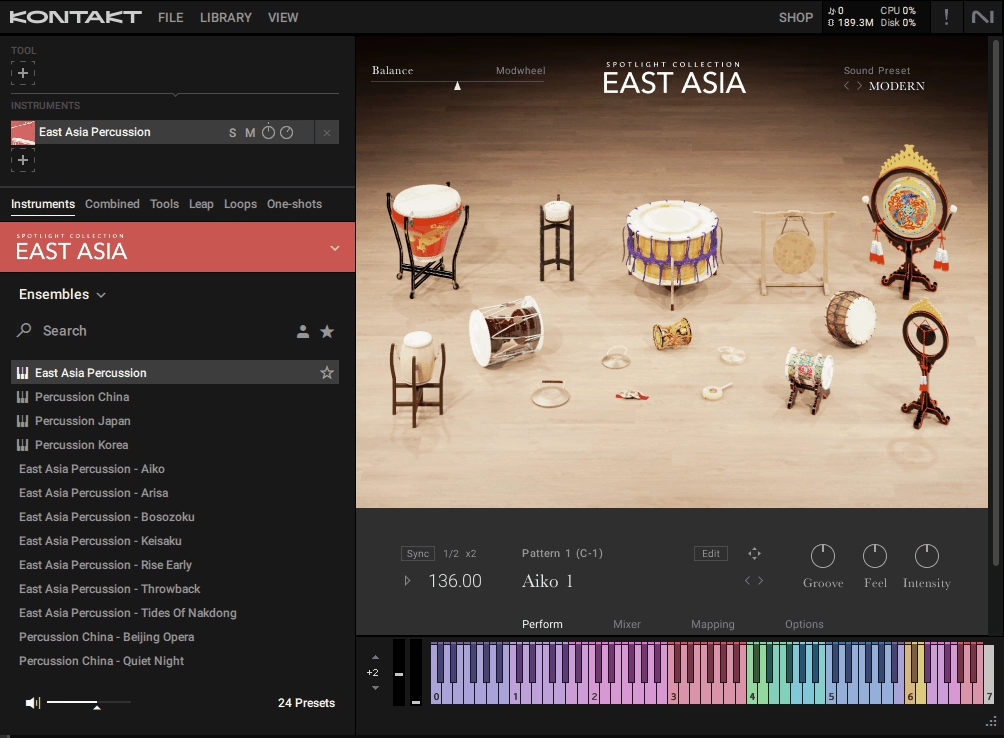
Spotlight Collection: East Asia captures 38 instruments from Chinese, Japanese, and Korean musical traditions, divided into 24 percussion instruments and 14 melodic instruments. Native Instruments recorded these with expert players from each region, focusing on performance nuance rather than generic sampling.
The result is a collection that respects traditional playing techniques while staying accessible to producers who don’t have deep ethnomusicology backgrounds. Everything runs in Kontakt Player (the free version) or full Kontakt, so you’re not locked behind an additional purchase just to access the content.
Percussion covers a wide range: bangu, naobo, kakko, tsuri daiko, jing, samul buk, sori buk, janggu, kkwaenggwari, and more traditional drums, gongs, and handheld rhythm instruments. Each comes with multiple hits, dynamic layers, and internally sequenced rhythmic behavior that lets you trigger traditional patterns or build your own variations.
The melodic side includes Chinese instruments like dizi, erhu, guzheng, guqin, pipa, and yangqin; Japanese options like hichiriki, koto, shakuhachi, shamisen, and shō; plus Korean instruments including ajaeng, daegeum, and gayageum.
These aren’t just chromatic sample maps. Many include assignable scales and tunings that switch between traditional modal systems and Western friendly layouts, plus expressive articulations that respond to how you play them.
What makes this collection practical is how it handles performance logic. Melodic instruments come with preset rhythmic phrases and fills for percussion, along with macro controls mapped to expression, tremolo, dynamics, and feel.
- 38 Instruments Covering Three Regional Traditions
The instrument roster spans China, Japan, and Korea with dedicated attention to each tradition’s characteristic sounds. Chinese instruments include the erhu (bowed string), guzheng and guqin (plucked zithers), pipa (lute), yangqin (hammered dulcimer), and dizi (bamboo flute). Japan contributes shakuhachi and hichiriki (wind instruments), koto and shamisen (plucked strings), plus the shō (mouth organ).
Korea adds ajaeng (bowed zither), gayageum (plucked zither), and daegeum (flute). Having all three regions represented in one library means you can create geographically specific textures or blend elements from different traditions without needing separate purchases for each cultural area.
- Assignable Scale Systems for Melodic Instruments
Rather than forcing you to manually retune samples or guess at traditional interval structures, melodic instruments let you switch between authentic scale systems and chromatic layouts. When you select a traditional mode, the keyboard mapping reflects the actual pitches used in that regional style, helping you avoid notes that sound wrong within the cultural context.
- Macro Controls for Real Time Performance Shaping
Instead of burying expressive parameters in menus, the library maps key performance dimensions to macro controls you can adjust on the fly. Expression, tremolo, dynamics, and feel are accessible without scripting knowledge, which speeds up the process of shaping musical phrases during recording or live performance.
When you’re working on a shakuhachi line that needs dynamic swells or an erhu passage requiring vibrato variation, having these controls immediately available keeps the creative momentum going rather than interrupting your flow to hunt through parameter lists.
The macro system becomes particularly useful during film scoring sessions where you’re iterating quickly and need to adjust performances without stopping to program detailed automation curves.
- 4 Ensemble Patches for Complete Textural Arrangements
Beyond individual instruments, this ethnic Kontakt library gives you ensemble patches that combine multiple percussion sources into ready to play configurations. There’s a full East Asia ensemble plus country specific ensembles for China, Japan, and Korea.
These patches give you complete rhythmic textures in one load, with different drums, gongs, and handheld percussion already balanced and mapped across your keyboard. When you’re sketching ideas or need to audition how different percussion combinations work together, pulling up an ensemble patch is faster than loading six individual instruments and routing them through separate MIDI channels.
The ensemble approach works well for initial composition stages where you’re exploring rhythmic foundations before committing to detailed arrangements
- Preset Rhythmic Phrases and Fills for Traditional Patterns
Percussion instruments include internally sequenced rhythms and fills that reflect traditional playing patterns from each region. You can trigger these preset phrases directly or use them as starting points for your own variations.
The patterns capture the idiomatic rhythmic behavior specific to East Asian music, which matters when you’re trying to create convincing grooves without deep knowledge of regional drumming traditions. I’ve found this particularly valuable when building foundations for hybrid tracks where authentic percussion needs to lock with electronic elements.
The ability to drag these patterns as MIDI into your DAW means you can edit timing, velocity, and orchestration after the fact while keeping the core rhythmic logic intact.
- Builtin Mixer and Effects for Self Contained Processing
Each instrument patch includes a mixer panel and basic effects chain covering reverb, delay, and spatial processing. This keeps initial sound shaping contained within Kontakt rather than requiring you to immediately route through external plugins for basic polish.
The mixer lets you balance close and room mic perspectives where applicable, giving you control over how intimate or spacious the instruments sound. While you’ll likely add more detailed processing later in your mix, having these tools built in means you can get convincing results during composition and sketching phases without setting up complex signal chains.
The effects are simple but effective enough for most production contexts where East Asian instruments need to sit naturally in contemporary mixes.
5. Native Instruments Spotlight Collection: Middle East
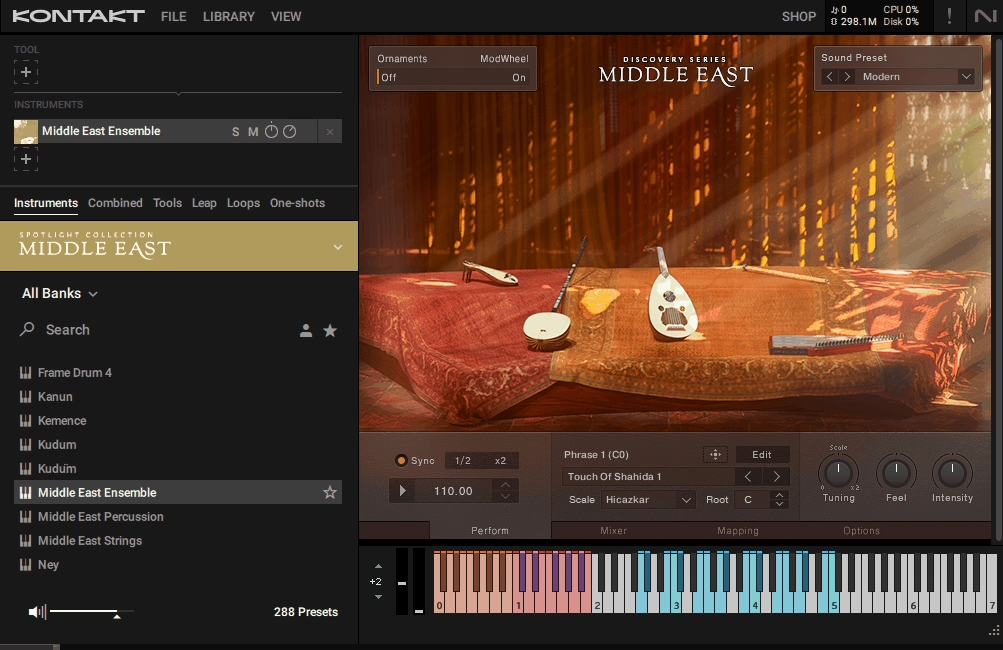
Native Instruments focused Middle East Kontakt library on Arabic, Turkish, and Persian musical traditions, giving you 27 Kontakt patches that split between percussion, melodic instruments, and string ensembles. The 23 GB uncompressed content (roughly 10 GB compressed) includes 15 percussion instruments, 9 melodic instruments, and a string ensemble recorded with seasoned Istanbul players featuring two violins, viola, and cello.
Rather than treating Middle Eastern music as a monolithic category, the library respects regional distinctions while keeping everything accessible to producers who don’t have deep ethnomusicology training.
The percussion roster covers traditional drums and handheld rhythm instruments: darabukka/doumbek (goblet drums), dohola (bass goblet drum), tombak (Persian drum), bendir, daire, daf (frame drums with jingles), davul (large double head drum), duff, kudüm (paired kettle drums), riq (small tambourine), and zil (finger cymbals).
Each comes sampled with dynamic hits, accents, and fills that capture how these instruments actually behave in performance. Melodic options include oud (fretless lute), saz variants, tanbur (long neck lute), kanun (plucked zither), kemençe (small violin), ney (reed flute), and zurna (loud folk wind instrument).meters.
- 1,488 MIDI Patterns Organized into 248 Pattern Sets
The pattern library gives you rhythmic foundations that reflect actual Middle Eastern drumming traditions. Each of the 248 pattern sets includes 6 variations, and you can adjust Groove, Feel, and Intensity before dragging them into your DAW as MIDI.
This means you start with authentic rhythmic structures but retain full control over timing, swing, and dynamics once the pattern hits your timeline. The patterns capture the interlocking relationships between different percussion instruments that define Middle Eastern ensemble playing, which would take considerable time to program manually if you’re not deeply familiar with regional rhythmic conventions.
When you’re building foundations for film cues or world fusion tracks, having these patterns ready to customize speeds up the compositional process considerably while keeping the cultural character intact.
- 36 Scales Including Quarter Tone Options
Middle Eastern music relies on microtonal intervals that standard Western equal temperament can’t accommodate. The library addresses this with 36 scales that include quarter tone mappings, automatically configuring your keyboard so you’re playing the correct pitches for authentic melodic work.
When you select a scale, Kontakt maps the appropriate notes across your keyboard range, eliminating the need to manually retune samples or guess at which intervals sound right within traditional frameworks.
This feature becomes critical when working with instruments like the oud, ney, or kanun where subtle pitch variations define the melodic character.
- String Ensemble Recorded in Istanbul
Rather than assembling string textures from individual solo patches, you get a small ensemble (two violins, viola, cello) recorded by experienced Istanbul players. This gives you orchestral string colors that already carry the performance style and timbral characteristics associated with Middle Eastern music.
The ensemble patches work well for film scoring contexts where you need fuller arrangements without layering multiple solo instruments and managing their balance manually. The recordings capture the collective intonation and phrasing tendencies that emerge when players perform together, which creates a more cohesive sound than combining separately recorded solo instruments after the fact.
- Key Switching for Ornaments and Performance Articulations
Melodic instruments include key switches that trigger slides, trills, ornamental figures, and dynamic variations during performance. Instead of programming these details in MIDI afterward, you can perform them live as part of your initial recording pass.
The Kontakt interface shows playable zones and key switch positions clearly, so you’re not hunting for articulation triggers while trying to maintain musical momentum. This approach works particularly well for instruments like the oud and saz where ornamental techniques are integral to authentic phrasing.
The ornament key switches capture performance gestures that would be difficult to fake with pitch bend or modulation alone, adding expressiveness that makes programmed parts sound more like actual performances.
- Three Ensemble Patches for Rapid Arrangement Building
Beyond individual instruments, the library provides three ensemble configurations: a percussion group, a melodic group, and a mixed ensemble combining both. These patches let you trigger complete textural arrangements from a single Kontakt instance rather than loading multiple patches and routing them through separate MIDI channels.
When you’re sketching ideas or need to audition different instrument combinations during early compositional stages, pulling up an ensemble patch is substantially faster than building layers manually.
The ensembles are pre balanced and mapped across your keyboard in ways that make musical sense, so you can perform complete arrangements immediately rather than spending time on technical setup before hearing how things sound together.
- NKS Integration with Komplete Kontrol Hardware
If you’re working with a Komplete Kontrol keyboard, the hardware light guides visually display which keys correspond to your selected scale, where ornament switches are located, and which zones trigger different instruments in ensemble patches.
Parameter controls map automatically to hardware knobs, giving you hands on access to Groove, Feel, Intensity, and other performance dimensions without reaching for your mouse.
This integration becomes particularly valuable when exploring unfamiliar scales or performing live parts where you need immediate visual feedback about note positions and articulation zones. The light guides help you navigate the library’s microtonal content more confidently, especially when working with quarter tone scales where traditional keyboard muscle memory doesn’t apply.
6. Native Instruments Spotlight Collection: Cuba
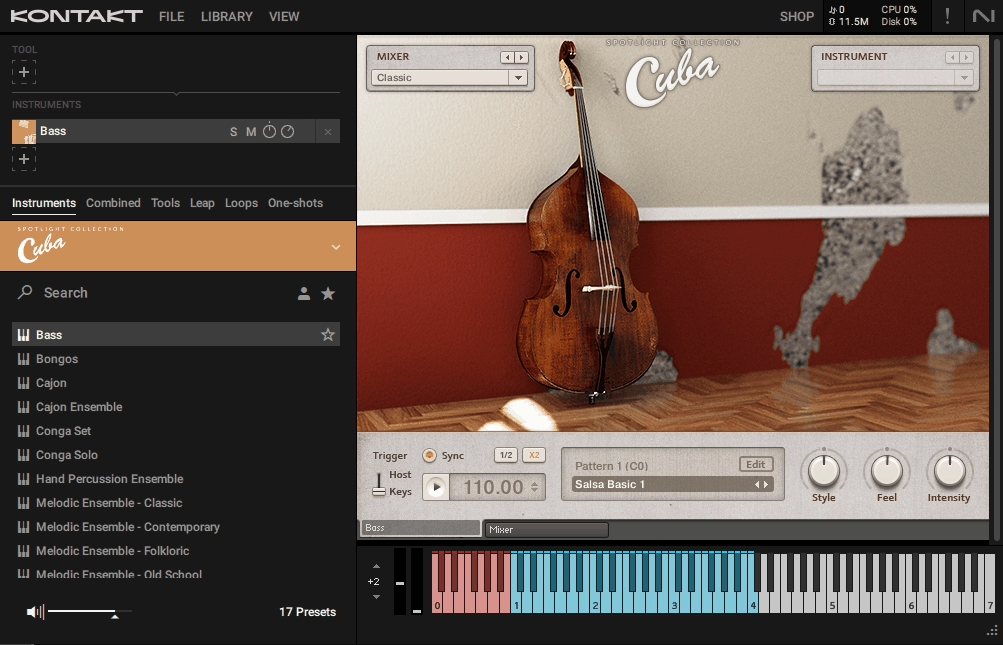
Afro Cuban music runs on rhythmic complexity and ensemble interplay, which is exactly what Native Instruments captured with this library. Native Instruments Cuba gives you 17 Kontakt patches divided into 11 percussion based ensembles and 4 melodic ensemble types, all built from roughly 12,000 samples compressed into 2.88 GB.
The approach here isn’t about throwing loops at you; it’s about giving you a pattern driven ensemble instrument where you can compose Cuban parts using performance style sequencing and integrated groove controls. Everything works in both the full Kontakt sampler and the free Kontakt Player, so you’re not locked behind additional purchases.
Percussion coverage is extensive: congas with 8 variations, timbales with 6 variations, bongos with 5 variations, plus cajón variants and hand percussion like guiro, maracas, and shekere. Each percussion group captures different tunings and timbres that let you layer parts and build dynamic pattern play rather than relying on a single static sound per instrument type.
The melodic side includes bass, piano (both grand and upright variations), tres, and trumpet with multiple articulations like staccato and tenuto. These aren’t deeply scripted solo performance instruments, but they provide harmonically appropriate accompaniment and rhythmic comping typical of son, salsa, and rumba styles.
What makes this library functional is the built in sequencer and pattern editor. You can pick, edit, and switch up to 12 patterns per instrument using keyswitches, with Groove, Feel, and Intensity controls that adjust micro timing, humanization, and overall energy.
- Pattern Driven Sequencer with 12 Patterns Per Instrument
The sequencer interface gives you visual access to rhythmic patterns that you can switch via keyswitches during performance. Each instrument supports up to 12 different patterns, and you can edit them graphically within the Kontakt interface rather than programming MIDI note by note.
This approach works particularly well for Cuban music where rhythmic complexity comes from layering multiple percussion instruments with interlocking patterns. When you’re building a salsa groove or rumba foundation, having these patterns ready to trigger and customize saves substantial time compared to manually programming every conga hit, timbale accent, and bell pattern from scratch.
The visual editor shows you exactly what’s happening rhythmically, making it easier to understand and modify patterns even if you’re not deeply familiar with Cuban drumming conventions.
- Groove, Feel, and Intensity Controls for Performance Humanization
These three parameters let you shape how patterns actually feel in performance without manually adjusting MIDI velocities and timing across hundreds of notes. Groove affects the micro timing and swing characteristics, Feel controls humanization and looseness, while Intensity adjusts the overall energy and dynamic range.
I’ve found these controls essential when matching Cuban percussion to different production contexts because the same pattern can sound too mechanical for organic world music or too loose for electronic dance tracks.
By adjusting these parameters, you can make ensemble grooves sit naturally alongside modern electronic production or lean into a more traditional acoustic aesthetic depending on your compositional goals.
The controls respond in real time, so you can tweak them during playback and hear results immediately rather than bouncing and re importing to test changes.
- Extensive Percussion Variation Coverage
Rather than providing one conga sound and calling it done, the library includes 8 conga variations, 6 timbale variations, and 5 bongo variations along with multiple options for other percussion instruments.
This variation depth means you can build layered percussion arrangements where different instruments occupy distinct timbral spaces, creating the rich textural complexity that defines Cuban ensemble playing.
Each variation captures different tunings, playing positions, and tonal characteristics, giving you options for both lead and supporting percussion roles within your arrangements. The multiple variations also help avoid the repetitive sameness that plagues libraries with single samples per instrument, keeping grooves sounding fresh across longer compositions.
- MIDI Export Capability for Pattern Flexibility
Beyond the internal sequencer, pattern data exists as accessible MIDI files within the library folders. This means you can drag patterns into your DAW, modify them freely, and even reassign them to completely different instruments if you want Cuban rhythmic structures playing back through non Cuban sounds.
The ability to export and edit MIDI becomes valuable when you need to create hybrid grooves that combine Cuba’s percussion with other elements, or when you want to use the rhythmic frameworks as starting points for your own variations. You’re not locked into only using patterns within the Cuba instrument itself, which extends the library’s usefulness beyond its original design parameters.
- Integrated Mixer and Effects Chain
Each instrument patch includes a mixer panel with Solid EQ, convolution reverb, tape saturation, and compression built directly into the Kontakt interface. This self contained processing means you can shape tone, add spatial depth, and apply character enhancement without immediately routing through external plugins.
The tape saturation adds warmth and cohesion to ensemble patches, the convolution reverb provides spatial context ranging from tight rooms to larger halls, and the EQ lets you carve frequency space for individual instruments within complex arrangements.
While you’ll likely add more detailed processing later in your mix chain, having these tools available during composition and sketching stages means you get convincing results faster without breaking creative momentum to set up elaborate signal routing.
- Tempo Sync with DAW Integration
All groove patterns automatically latch to your DAW’s tempo when synced, adapting to tempo changes without manual time stretching or pitch artifacts. This sync capability makes the library work seamlessly across projects at different BPMs, from slower son montuno grooves around 90 BPM to faster salsa tempos pushing 180 BPM or higher.
The patterns maintain their rhythmic character across tempo ranges because they’re MIDI based rather than audio loops, so you’re not fighting timing drift or degraded audio quality when working outside the library’s original recording tempo.
This flexibility becomes particularly useful when building Latin influenced electronic tracks where you need authentic Cuban percussion locked perfectly to grid based electronic elements.
7. Native Instruments Spotlight Collection: Ireland
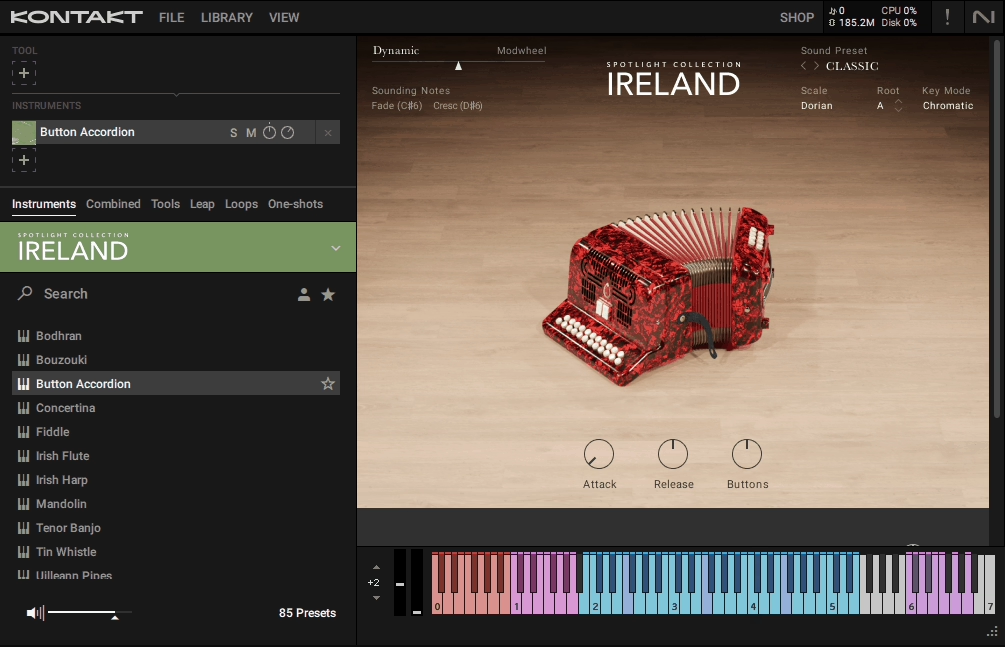
Irish traditional music operates on modal frameworks, ornamental techniques, and performance nuances that don’t translate naturally to standard MIDI programming. Native Instruments built this library around capturing those specific performance behaviors rather than just sampling Irish instruments statically.
The focus is on embedding traditional playing logic directly into the patches so melodic instruments respond with appropriate ornamentation, scales stay within modal boundaries automatically, and rhythmic elements reflect authentic Celtic structures.
Spotlight Collection: Ireland covers essential Irish instrumentation across melodic and percussive categories, from wind instruments and strings to traditional frame drums and rhythmic support elements. What separates this from generic folk sample packs is how deeply the performance traditions get integrated into playability.
When you’re working with these instruments, you’re not fighting against their cultural context or manually programming ornamental details that define Celtic musical character.
Everything works in both full Kontakt and the free Kontakt Player, making the library accessible without additional sampler purchases. The design philosophy centers on letting producers create convincing Irish musical content quickly, whether you’re scoring film cues, building Celtic inspired ambient tracks, or adding traditional textures to contemporary productions.
- Modal Scale Mapping for Authentic Irish Tonality
Traditional Irish music operates within modal frameworks like Mixolydian and Dorian variants that don’t align perfectly with standard Western equal temperament. The library addresses this by mapping appropriate modal scales directly to your keyboard across all 24 Kontakt instruments, so when you’re playing melodic instruments the available notes automatically reflect what works within Irish musical conventions.
This eliminates the need to manually retune samples or constantly check whether specific pitches sound right within traditional contexts. You can explore melodic content confidently without breaking flow to verify scale degrees or worry about hitting notes that sound immediately wrong to anyone familiar with Celtic music.
The scale awareness extends to how ornaments and grace notes function, ensuring these embellishments land on musically appropriate pitches rather than clashing with the underlying modal structure.
- Key Switch Ornament Controls Across 7 Melodic Instruments
Irish traditional performance relies heavily on ornamental techniques like cuts, rolls, grace notes, and slides that define the melodic character. Rather than forcing you to program these details manually in MIDI, the library maps ornaments to key switches and mod wheel controls across the Irish flute, tin whistle, low whistle, uilleann pipes, fiddle, bouzouki, and harp.
When you’re recording a tin whistle melody or uilleann pipe phrase, you can perform ornaments in real time as part of your initial pass rather than adding them afterward through tedious note editing.
The ornament mappings capture performance gestures that would be difficult to fake with standard MIDI programming, giving recorded parts the inflected quality that separates convincing Celtic melodies from generic flute sounds playing Irish tunes.
- Pre Programmed Ensemble Patches for Rapid Sketching
Beyond individual instruments, this ethnic Kontakt library offers ensemble patches that layer melodic lines with rhythmic backing and harmonic drones in ready to use configurations. These patches let you trigger complete Irish musical textures from a single Kontakt instance rather than loading multiple instruments and managing their balance across separate MIDI channels.
When you’re composing film cues or building Celtic inspired ambient tracks, pulling up an ensemble gives you full arrangements immediately rather than spending initial creative time on technical setup.
The ensembles are pre balanced with appropriate instrument combinations, so you hear how bagpipes work with bodhrán percussion or how fiddle layers with harp accompaniment without manual mixing.
This approach works particularly well during early compositional stages when you’re exploring ideas and need to hear complete textures rather than isolated instrument parts.
- Bodhrán Patterns with Drag and Drop MIDI
The bodhrán, the traditional Irish frame drum, gets sampled with multiple stroke types including tip variations and cut techniques that capture real playing feel. Beyond static samples, you get rhythmic patterns you can trigger directly or drag as MIDI into your DAW for further editing.
These patterns reflect traditional Irish rhythmic structures, giving you authentic groove foundations without needing deep knowledge of Celtic percussion conventions. The patterns work as starting points you can modify freely once they’re in your timeline, adjusting timing, velocity, and orchestration while keeping the core rhythmic logic intact.
The bodhrán patches include foot taps, brushes, and hand percussion elements that provide rhythmic context without overpowering melodic lines, which matters when building arrangements where percussion supports rather than dominates the musical texture.
- Expressive Articulation Response Across Melodic Instruments
Rather than treating instruments as static sample playback engines, the library implements responsive articulation that reacts to how you play across all melodic sources. The Irish flute responds to velocity and mod wheel with breath control variations and expression layers, the fiddle includes bow noise and slide behaviors triggered by playing dynamics, and the uilleann pipes adjust drone balance and regulator engagement based on performance input.
This responsive behavior means recorded parts carry more natural variation and expressive nuance than you’d get from velocity mapped samples alone. When you play harder or softer, pull back on the mod wheel, or hit specific velocity ranges, the instruments respond with timbral and dynamic changes that mirror how these instruments behave acoustically.
The articulation response becomes especially important when building solo melodic lines where every phrase needs to feel performed rather than programmed.
8. Native Instruments Spotlight Collection: Balinese Gamelan
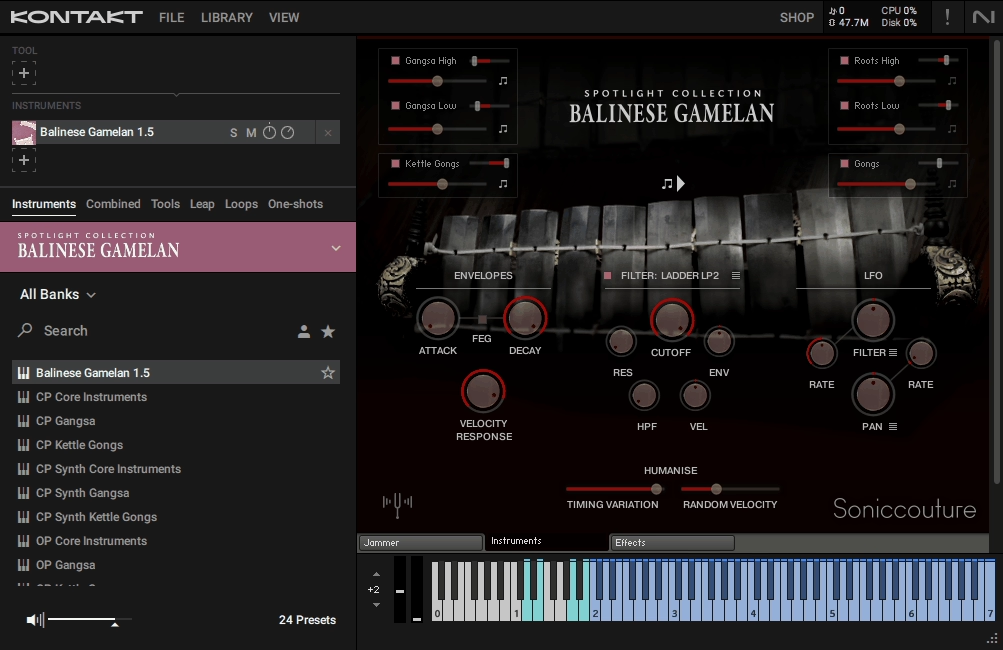
Balinese Gamelan from Native Instruments operates on musical principles entirely separate from Western traditions, built around paired detuned instruments creating interference patterns, interlocking rhythmic cycles, and layered metallic timbres.
Native Instruments captured this specific ensemble sonority with tools designed to make gamelan textures playable in modern production without requiring deep knowledge of traditional notation systems or performance practices.
The library works in both full Kontakt and the free Kontakt Player, making it accessible without additional sampler purchases.
- Detuned Instrument Pairs for Authentic Ombak Effect
The defining characteristic of Balinese gamelan is how paired instruments are intentionally tuned slightly apart, creating a beating interference pattern called ombak that gives the ensemble its shimmering, alive quality. All 13 Kontakt patches capture this by recording each instrument in detuned pairs and providing controls to adjust their relative balance and panning.
When you play a gangsa metallophone or strike a kettle gong, you’re actually triggering two slightly detuned versions that interact acoustically to produce the characteristic chorus effect. This paired behavior is what separates authentic gamelan sonority from generic metallic percussion samples.
You can adjust how pronounced the beating effect is by controlling the balance between paired instruments, letting you dial in subtle shimmer for background textures or more pronounced detuning for prominent melodic lines. The ombak effect is so fundamental to gamelan that without it, the instruments would sound hollow and unconvincing regardless of sample quality.
- The Jammer Generative Arpeggiator for Interlocking Patterns
Traditional gamelan performance involves multiple players executing interlocking rhythmic patterns where individual parts create cohesive textures through their interaction. Programming these patterns manually in a DAW requires understanding traditional notation and spending considerable time on MIDI editing.
The Jammer addresses this by generating gamelan style interlocking figures automatically based on parameters you adjust in real time. You can control pattern density, rhythmic complexity, and how different instrument layers interact, then let the engine create cyclical figures that evolve organically.
This becomes particularly valuable when building ambient textures or cinematic passages where you want authentic gamelan movement without tedious programming. The patterns respond to your playing and adjust dynamically, so you’re not locked into static loops.
It’s useful for sketching ideas fast as you can audition different pattern behaviors and capture the ones that work without committing hours to manual MIDI construction.
- Dual Tuning Systems for Traditional and Hybrid Contexts
Gamelan instruments use tuning systems that don’t align with Western equal temperament, which creates problems when you want to layer them with conventional instruments or work within standard harmonic frameworks.
The library solves this by providing two complete tuning sets across all patches: original gamelan tuning that preserves the ensemble’s native intervals, and western concert tuning that maps gamelan timbres to standard Western pitches.
You can switch between these systems depending on whether you’re creating culturally authentic gamelan music or building hybrid productions where gamelan textures need to coexist with synthesizers, orchestral instruments, or contemporary harmonic progressions.
The western tuning maintains the characteristic timbre and paired detuning behavior while adjusting pitch relationships to work within conventional scales, giving you authentic gamelan color without the tuning conflicts that would otherwise require extensive pitch correction or compromise on either the gamelan or Western elements.
- Six Core Instrument Groups Covering Essential Gamelan Roles
Rather than attempting comprehensive coverage, the 2 GB library focuses on six primary gamelan instrument types recorded from the Semara Dana Gamelan Ensemble that represent the ensemble’s essential sonic roles. Root instruments include jegog, calung, and penyacah providing structural foundation with large resonant gongs. Gangsa metallophones like ugal, pemadé, and kantilan generate rapid interlocking melodic figures.
Kettle gongs such as trompong and reyong occupy middle territory for punctuation and melodic motifs. Each instrument group includes multiple variations and the paired detuned versions that create ombak beating effects.
This focused approach means you get depth in the instruments included rather than superficial coverage across dozens of sources. The selection reflects what you actually need to create convincing gamelan textures in production contexts, covering low foundation tones through bright metallic highs with enough variation to build layered arrangements that maintain interest across extended passages.
- Integrated Effects Chain for Sound Shaping Within Kontakt
Each of the 13 patches includes built in reverb, filtering, and modulation tools that let you shape gamelan tones without routing through external plugins. The effects chain is designed specifically for metallic percussion timbres, with reverb algorithms that enhance shimmer without turning sustained tones muddy and filters that can tame brightness without losing the characteristic edge that defines gamelan sonority.
You also get envelope shaping and LFO modulation that can add movement to sustained tones or create rhythmic variations in pattern based passages. Having these tools available within the Kontakt interface means you can dial in production ready sounds during composition rather than treating gamelan as raw material that requires extensive external processing before fitting into mixes. The effects respond to the paired detuning behavior intelligently, maintaining ombak characteristics rather than fighting against them.
- Free Kontakt Player Compatibility
This ethnic Kontakt library works with the free Kontakt Player, eliminating the barrier of needing to purchase the full Kontakt sampler.
The Kontakt Player compatibility means you can load any of the six instrument groups, access The Jammer pattern engine, and switch between tuning systems without additional software investments beyond the library itself.
9. Strezov Sampling Kambanite Church Bells
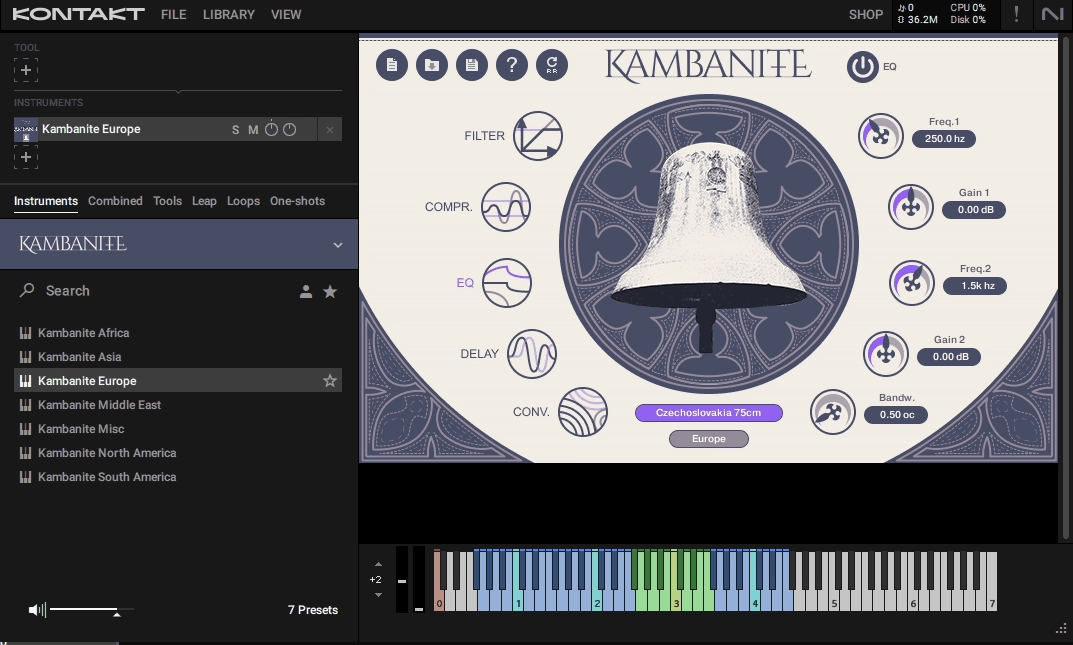
Most bell libraries treat bells as a single sonic category with minimal variation. Strezov Sampling recorded bells from the Kambanite Monument park near Sofia, Bulgaria, where instruments gifted from countries worldwide have been preserved, resulting in a library that captures diverse bell traditions and timbral characters rather than uniform church sonority.
Kambanite Church Bells works with both full Kontakt and the free Kontakt Player, making it accessible without additional sampler purchases.
Over 100 Individually Sampled Bells with Distinct Tonal Characters
The sheer variety here separates this 2.09 GB library from typical bell collections. You’re not getting one cathedral bell transposed across a keyboard; you’re working with over 100 physically different instruments, each with unique overtone structures, decay characteristics, and timbral qualities.
Some bells carry bright, cutting tones suitable for melodic lines that need to pierce through dense arrangements. Others provide dark, resonant foundations that work better for atmospheric pads or low end accents.
The collection includes bells from various cultural traditions because the source instruments were gifted from countries worldwide, so you can find European style cathedral bells alongside Asian temple bells and folk instrument characters.
This diversity means you can select specific bell timbres that match your compositional intent rather than forcing one sound to work across all contexts. When building layered bell arrangements or searching for bells with particular symbolic associations, having 100+ options gives you genuine choice rather than superficial variation.
- 4 Octave Playable Range for Melodic Composition
Traditional bell libraries often limit you to the bell’s natural pitch range, which restricts musical use to occasional accents or single note punctuation. Strezov extended each bell’s range by transposing the original pitch up one octave and down one to two octaves, creating 4 usable octaves per instrument.
This expansion transforms bells from percussion elements into melodic tools you can use for arpeggiated patterns, pad textures, or complete melodic lines. The transposition is done intelligently to maintain timbral character across the extended range rather than sounding artificially stretched.
You can compose bell melodies that span multiple octaves, layer bells at different pitch ranges for harmonic richness, or use low transpositions for drone like foundations under other instruments. It can work in ambient and cinematic contexts where bells need to carry sustained musical ideas rather than just providing momentary accents.
- 2 Dynamic Layers and 2 Round Robins Per Bell
Each of the 100+ bells includes 2 dynamic layers that respond to velocity, plus 2 round robin variations that alternate with repeated strikes. The dynamic layers mean softer playing produces gentler, more delicate tones while harder strikes trigger fuller, more resonant samples.
This velocity response adds musical expressiveness that static single layer samples can’t provide, letting you shape phrases dynamically through your playing rather than just adjusting MIDI velocities after recording. The round robin alternations prevent the machine gun effect where repeated notes sound identical, which becomes particularly noticeable with bells since their long decay tails make repetition more obvious than with shorter percussion sounds.
Together, these features give recorded bell parts natural variation and responsiveness that holds up across extended passages without sounding mechanically sampled.
- Integrated Effects Chain for In Context Sound Shaping
Rather than forcing you to route through external plugins before hearing how bells work in your mix, the library includes built in filter, EQ, compression, reverb, and delay.
The filter lets you tame bright overtones or remove low end rumble depending on the specific bell and musical context. EQ provides more detailed tonal shaping for fitting bells into frequency slots alongside other instruments. Compression can even out dynamic inconsistencies or add punch to strikes.
The reverb and delay are designed specifically for bells, with algorithms that enhance natural decay tails without turning sustained tones muddy. Having these tools within the Kontakt interface means you can dial in production ready bell sounds during composition rather than treating them as raw material requiring extensive external processing.
The effects parameters are accessible enough for quick adjustments but detailed enough for precise sound design when you need specific timbral characteristics.
- NKS Integration for Native Instruments Hardware Workflows
If you’re working with Komplete Kontrol keyboards or Maschine controllers, the library integrates directly into that ecosystem with pre mapped parameters and streamlined browsing. You can navigate through the 100+ bell options using hardware controls, adjust effects parameters without reaching for your mouse, and see visual feedback on the keyboard’s screens or light guides.
The NKS support becomes particularly valuable when auditioning different bells quickly during composition because you can browse and switch sounds using hardware rather than clicking through Kontakt’s interface. Parameter mappings put key controls like filter cutoff, reverb amount, and dynamic response directly on your controller’s knobs and faders, letting you shape bell tones while playing rather than stopping to program automation.
- Free Kontakt Player Compatibility (Version 5.7.1+)
The entire library works with the free Kontakt Player (version 5.7.1 or later) and full Kontakt, eliminating the barrier of needing to purchase the full sampler.

Hello, I’m Viliam, I started this audio plugin focused blog to keep you updated on the latest trends, news and everything plugin related. I’ll put the most emphasis on the topics covering best VST, AU and AAX plugins. If you find some great plugin suggestions for us to include on our site, feel free to let me know, so I can take a look!