
Let’s talk about some of the best graphic EQ plugins you can get today for mixing and music production.
If you’re like me, sometimes you need broad tonal control that feels musical rather than surgical. That’s when I reach for graphic equalizers that don’t just carve out frequencies, they shape entire spectral zones, adding cohesion and balance that makes your mixes feel polished and professional without endless parametric tweaking.
There are many solid picks in this list, just to name a few – Kuassa Efektor PAten, Newfangled Audio EQuivocate, Waves GEQ, TBTech Modern G-31, and more!
Whether you want to smooth out harsh midrange on a vocal bus, add air and presence to a full mix, tighten low-end rumble on drums, or match the tonal balance of a reference track, there’s a graphic EQ here that gives you that instant control.
From 10-band proportional Q designs to 31-band linear-phase processors, perceptual filtering systems, and vintage analog emulations, these plugins let you shape tone with intuitive sliders that work the way your ears actually hear, not just mathematical precision.
Whether you’re mixing in a bedroom studio or refining masters on headphones, you can turn muddy mixes into balanced productions, transform dull recordings into vibrant tracks, and sculpt frequency balance with confidence.
With that being said, if you want your tracks to sound clear, balanced, and professionally EQed, the following graphic equalizer plugins are solid picks for modern music production and mixing.
1. Kuassa Efektor PAten
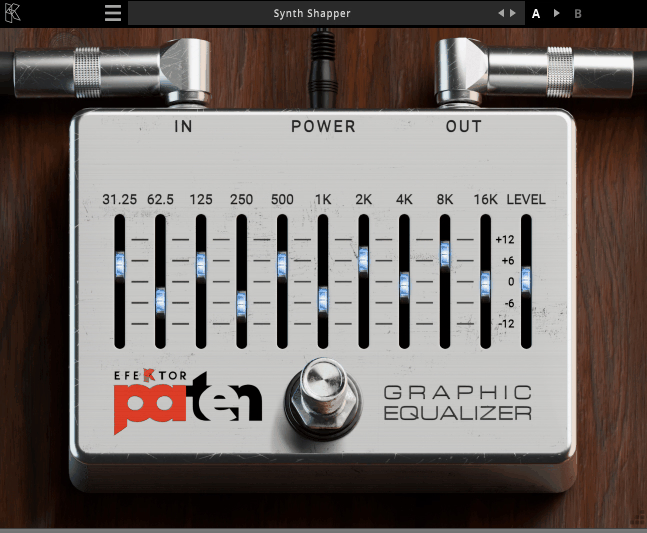
I’ve always been skeptical of graphic EQs because most of them introduce weird phase issues or harsh resonances when you start boosting multiple bands. Kuassa Efektor PAten changed that for me with its Protean Algorithm that dynamically adjusts Q curves based on how much you boost or cut.
This isn’t just marketing talk, you actually hear the difference when you’re making adjacent boosts without getting those comb filtering artifacts that plague cheaper graphic EQs.
The plugin features 10 bands with one per octave covering the entire audible spectrum, and I’ve noticed it uses parallel architecture instead of serial-chaining bands which keeps each frequency adjustment more isolated and predictable.
What you get:
- Great presets
Presets covers bass, synths, guitars, vocals and even some more, there is nice amount of presets for each section.
- 10-Band One-Per-Octave Layout for Musical Frequency Control
Each slider maps to a defined frequency with roughly one octave spacing from low to high giving you 10 distinct control points spanning the audible range. I’d argue this layout is more musical and intuitive for broad tonal shaping than a scatter of arbitrary parametric bands especially when you’re adjusting whole areas like low-mids or air. You’re not hunting for specific frequencies but working with zones that make sense musically.
- Protean Algorithm with Variable Q Curves
The Protean aspect means the plugin actively adjusts Q curves based on how much you boost or cut. As you move a slider up or down the algorithm subtly reshapes the curve to avoid unnatural peaks or dips which reduces unwanted phase shift and combing artifacts.
This is a real plus for dense mixes or layered stems where multiple bands are active simultaneously because you’re not getting that harsh resonant buildup.
- Parallel Architecture Prevents Band Interaction Issues
I think this matters when you’re making multiple adjacent boosts and cuts because you don’t want one adjustment clouding another’s effect. I can see how this architectural choice is what makes PAten feel more cohesive than stock options.
- Low CPU Overhead for Multiple Instances
You can drop it on drum buses, bass, guitars, and vocals without worrying about snarling your system.
2. Newfangled Audio EQuivocate
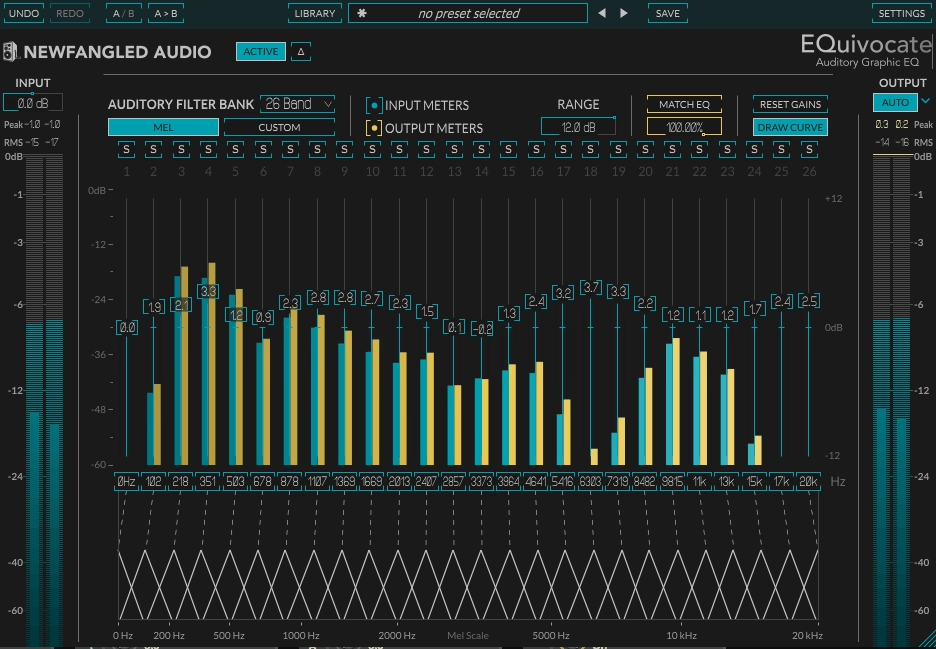
Most graphic EQs divide the frequency spectrum into arbitrary chunks based on math rather than how your ears actually perceive sound. Newfangled Audio EQuivocate takes a different approach as a 26-band auditory graphic EQ built around filters modeled on the critical bands of human hearing using the Mel scale.
I think what makes this practical is how the frequency spacing aligns with what your ear perceives as roughly equal rather than just fixed numbers on a grid. The plugin features linear-phase FIR filters with triangular shapes designed to match auditory perception, and I believe it includes a Match EQ system that analyzes reference tracks through the same 26 auditory filters.
You get 67 factory presets covering mixing and mastering scenarios, Draw Curve Mode for visual EQ shaping, Band Solo for isolating specific frequencies, and Auto Output Level compensation. The plugin works in VST, VST3, AU, and AAX formats but requires iLok authorization.
- Linear-Phase Filters
EQuivocate’s core uses 26 linear-phase auditory filters based on the Mel scale where frequency spacing matches how your ear perceives sound as roughly equal. I’d argue each band targets a chunk of the spectrum that’s meaningfully distinct to human hearing not just arbitrarily spaced numbers.
The triangularly shaped FIR filters aim to match auditory perception which means you’re shaping perceptually relevant zones of the spectrum, and I’ve noticed flat sliders really do sum to a natural flat response rather than introducing subtle bumps you didn’t intend.
- Match EQ with Sidechain Reference Analysis
One standout tool is the Match EQ feature where you feed a reference track into EQuivocate’s sidechain and the plugin analyzes its spectrum through the same 26 auditory filters crafting a matching EQ shape.
You then apply that shape to your target track helping you match the tone of a reference master or ensure two different sounds inhabit the same spectral space. I feel like this is more than copying a curve because EQuivocate tries to preserve natural tonal balance rather than mimicking every tiny bump which can sound unnatural in some match EQs.
- Draw Curve Mode for Visual EQ Shaping
You can literally draw a desired EQ shape with your cursor across all bands then refine it manually. This feels more intuitive than dragging individual sliders one at a time especially when you want broad tonal adjustments across multiple bands. Basically, this matters most when you’re trying to create smooth curves quickly without clicking through each band separately.
- Auto Output Level and Flexible Filter Count
A single button compensates for gain changes introduced by EQ moves so you’re comparing tonality not just louder versus quieter. You don’t have to use all 26 filters if you don’t want to where you can shape the number and placement to suit your source material.
This flexibility matters when you’re working on sources that don’t need full-spectrum adjustments.
3. Waves GEQ
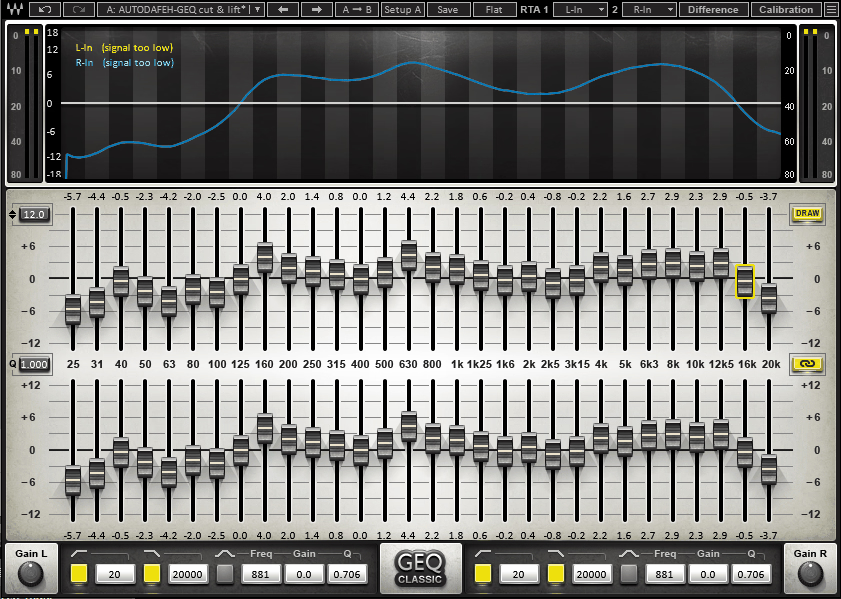
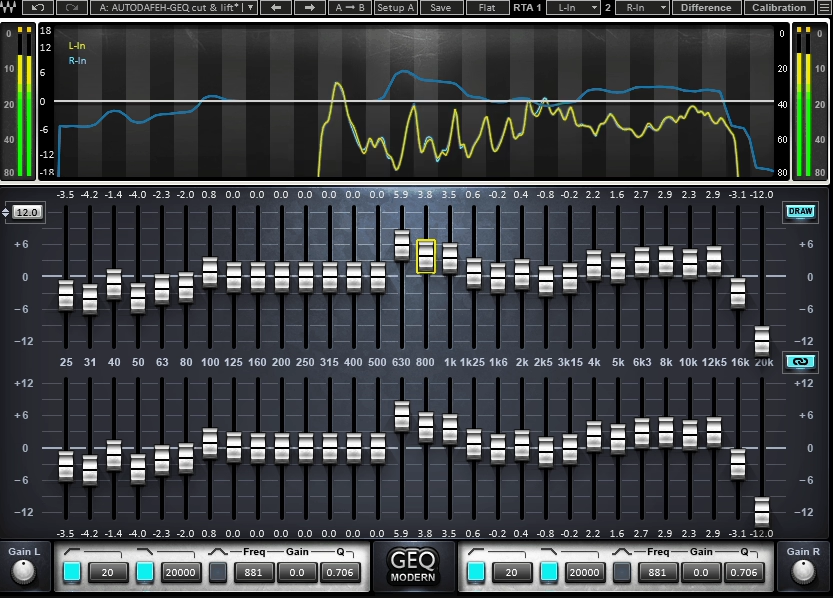
When you need precise spectral control across the entire frequency range, having more bands than the typical 15-band graphic EQ makes a tangible difference in how accurately you can shape tone.
Waves GEQ is a classic-styled graphic equalizer with 30 ISO bands giving you significantly more resolution for broad spectral adjustments.
The plugin features adjustable gain range per band where you can swing between ±6 dB, ±12 dB, or ±18 dB depending on how aggressive your tonal shaping needs to be.
I think what makes this practical is the two filter modes where Classic uses proportional Q filters that narrow as you increase gain historically matching analog graphic EQ behavior, while Modern introduces Flat-Top filters that eliminate unwanted artifacts and avoid excessive interaction between adjacent bands.
You get a built-in dual real-time analyzer for visualizing frequency content, independent high-pass and low-pass filters plus a single parametric bell per channel, and zero-latency operation making it suitable for both studio mixing and live scenarios. The plugin works in VST, AU, and AAX formats.
- 30 ISO-Standard Frequency Bands for Detailed Tonal Control
You get 30 fixed ISO-standard frequency bands covering the entire audio spectrum which is significantly more than typical 15-band stock graphic EQs. I’d argue this gives you really fine control over tonal shaping from subtle shelving to bold curve sculpting because you can target narrower frequency regions without gaps.
I can see how having this many bands lets you finesse specific problem areas that would be impossible with fewer control points.
- 2 EQ Modes
First, Classic Mode, uses proportional Q filters that narrow as you increase gain which is how analog graphic EQs behave and can feel more musical for broad corrective moves. On the flip side, Modern Mode introduces Flat-Top filters that aim to eliminate unwanted artifacts and avoid excessive interaction between adjacent bands giving cleaner more predictable results when you’re doing aggressive tonal tweaks.
Both options means you can choose vintage character or modern precision depending on the source material.
- Adjustable Gain Range Per Band
Each band can swing between ±6 dB, ±12 dB, or ±18 dB of gain giving you flexibility in how aggressive your adjustments need to be. I think the ability to switch gain ranges matters because you might want subtle ±6 dB moves on a mix bus but need ±18 dB for corrective work on problem tracks. I’ve noticed this can prevents you from accidentally over-boosting when you only need gentle adjustments.
- Independent HPF/LPF and Parametric Bell Stage
Beyond the core graphic bands, GEQ includes additional high-pass and low-pass filter controls plus a single parametric bell per channel. I tend to notice this means you still get some surgical precision when needed without loading a separate parametric EQ.
4. TBTech Modern G-31
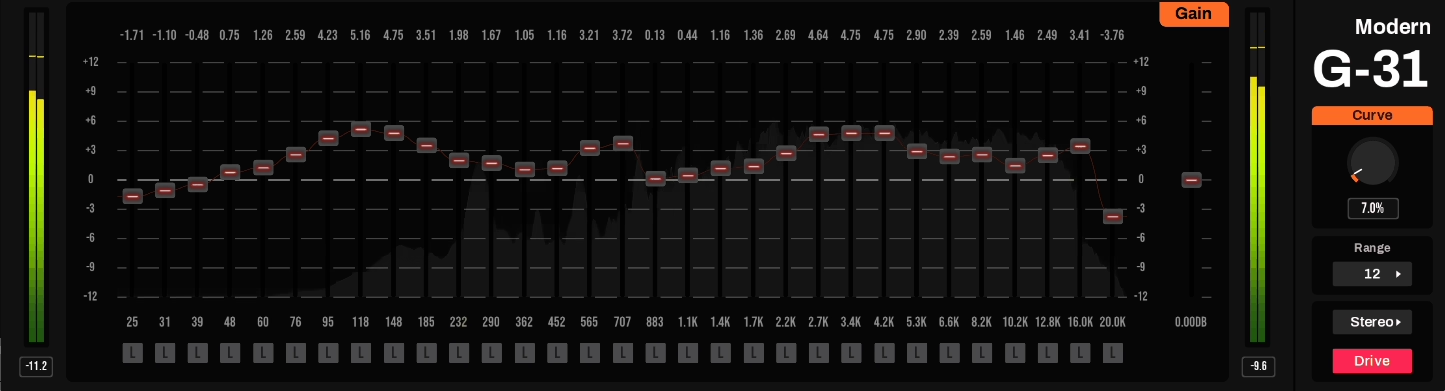
You’ve probably noticed that most graphic EQs either give you vintage IIR filter behavior with phase issues or they’re overly simplified with too few bands for detailed work. TBTech Modern G-31 positions itself as a 31-band graphic equalizer using minimal-phase and linear-phase FIR filters rather than older IIR filter designs which helps reduce unwanted interactions between adjacent bands.
The plugin features one-third-octave spacing across 31 discrete sliders giving you fine-grained spectral control, and I think what makes this practical is the ability to switch between zero-latency minimal-phase processing and linear-phase mode (about 2048 samples latency) depending on whether phase coherence or responsiveness is your priority.
You get stereo, L/R, and M/S processing modes, a real-time spectrum visualizer, an adjustable Curve knob for smoothing band edge transitions, plus a floating parametric bell filter and vintage console Drive mode.
The interface is resizable and GPU-accelerated meaning you can zoom in on bands without workflow slowdown. It works in VST formats on Windows and macOS.
- 31 Bands with One-Third-Octave Spacing
With 31 discrete sliders you get fine-grained spectral control across the audio spectrum which is far more resolution than basic 7 or 15-band graphic EQs. I’d argue this is ideal for broad tone shaping or detailed adjustments across many narrow bands because you can finely contour the midrange and tame narrow resonances without resorting to a parametric EQ.
I can see how having this many bands makes it possible to sculpt smooth curves that would require jumping between multiple frequency points in simpler EQs.
- Switchable Minimal-Phase and Linear-Phase Processing
You can flip between zero-latency minimal-phase processing and linear-phase mode depending on whether phase coherence or responsiveness is your priority. I think minimal-phase is great for tracking and near-zero delay where you need immediate response, while linear-phase is better for mastering or transparent mix bus EQ work where phase coherence matters more than latency.
This flexibility means you’re not locked into one processing approach for all scenarios.
- Stereo, Left/Right, and Mid/Side Processing Modes
Modern G-31 lets you EQ in standard stereo, work on left/right independently, or use mid/side mode to tailor center and side content separately. This is powerful for mix bus and mastering tasks where you might want to brighten the sides without affecting the center or clean up the center without dulling stereo width.
5. IK Multimedia EQ PG
Graphic EQs typically give you frequency control without any harmonic character, which means you’re shaping tone but not adding the analog warmth that makes tracks sit better in dense mixes.
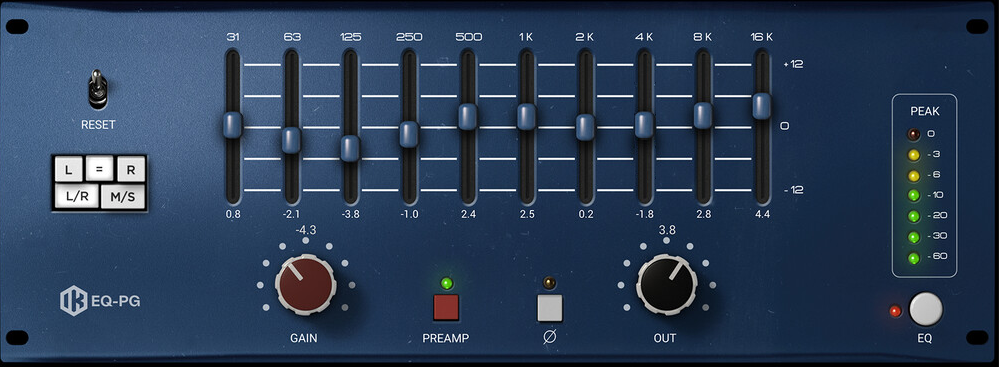
IK Multimedia EQ PG is a 10-band graphic equalizer plus preamp emulation plugin modeled after a classic American console equalizer design where it blends straightforward graphic EQ control with an analog-inspired preamp stage giving you both tonal shaping and harmonic character and saturation.
Discrete proportional Q design mimics vintage analog EQ modules where boosting or cutting several bands simultaneously can radically alter the tone and vibe of your sound.
The plugin features 10 fixed frequency bands at 30 Hz, 63 Hz, 125 Hz, 250 Hz, 500 Hz, 1 kHz, 2 kHz, 4 kHz, 8 kHz, and 16 kHz each with a ±12 dB gain range, and I’ve noticed it includes preamp circuit modeling that adds controlled harmonic content and saturation.
You get oversampling, full latency compensation, and support up to 192 kHz, plus stereo, dual-mono, and M/S compatibility for different channel modes. It works inside the T-RackS CS standalone app and as a standard plugin in AU, VST2/3, and AAX formats.
- 10-Band Proportional Q Design with Fixed Frequency Points
Each of the ten fixed frequency bands has a ±12 dB gain range and a proportional Q that narrows as you boost or cut. I’d argue this lets you feel what you’re doing rather than surgically dialing it in which is great for fast tonal decisions.
The bands are designed so that boosting and cutting across them interacts in a predictable way, and I can see how if you need to undo a previous EQ move on a processed file the fixed structure helps you approximate the original balance.
- Analog Preamp Modeling Stage for Harmonic Character
On top of the EQ there’s an onboard preamp circuit based on the same analog lineage adding controlled harmonic content and saturation.
I’ve experienced how at lower gain settings this adds warmth and presence while at higher settings the character moves toward hard clipping which can push bass or drums into focus and add edge to vocals. This is what separates EQ PG from basic digital graphic EQs because you’re not just fixing frequencies but coloring them in a way that makes tracks sit better in mixes.
- T-RackS Engine with Advanced Processing Options
It works both inside the T-RackS CS standalone app and as a standard plugin with oversampling, full latency compensation, and support up to 192 kHz. I believe this T-RackS integration means you get high-quality processing with professional-grade sample rate handling.
I tend to notice the standalone operation can be useful if you’re bouncing between tracking sessions and mix tweaks without opening your full DAW.
6. Red Rock Sound EQ302
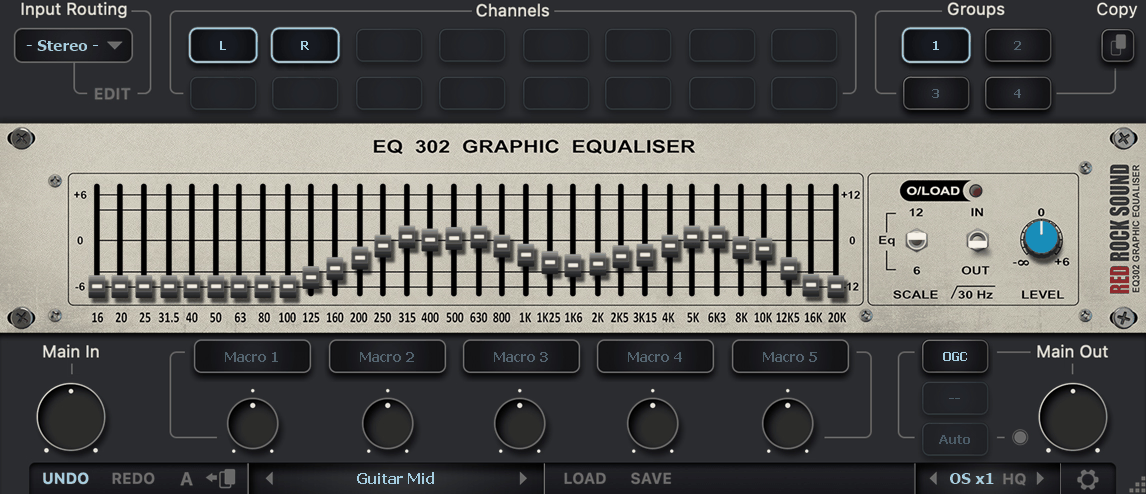
Red Rock Sound EQ302 is a 32-band graphic equalizer plugin giving you 1/3-octave control across the full audible range from 16 Hz up to 20 kHz with ±12 dB of boost/cut per band.
The plugin is inspired by traditional studio and live graphic EQ hardware with emphasis on precision filter calibration so the EQ behaves cleanly and predictably without nasty anomalies in phase or noise.
I think what makes this practical is how the EQ’s band centers are designed to match Red Rock Sound’s SA60 spectrum analyzer’s 1/3-octave display making it easy to spot a frequency visually then shape it with EQ sliders.
You get a selectable boost/cut range where you can choose between ±6 dB or ±12 dB per band, a built-in 30 Hz subsonic filter for rumble removal, input/output gain controls with overload LED, and a macro system that lets you link multiple parameters to a single control.
The plugin supports 2x/4x/8x oversampling with HQ antialiasing mode, multichannel routing up through immersive formats, and A/B comparison with undo/redo. It works in VST formats and can be obtained free or very low cost from Red Rock Sound.
- 32-Band 1/3-Octave Layout with Dense Frequency Resolution
You get a dense bank of sliders each spaced in 1/3-octave increments between 16 Hz and 20 kHz giving you better resolution than 15-band EQs for both corrective and tonal shaping. I’d argue with 32 bands you can pinpoint troublesome resonances or build creative curves that broader graphic EQs simply can’t touch.
I’ve experienced how this level of detail matters when you’re trying to shape specific problem areas without affecting adjacent frequencies.
- Macro System for Linked Parameter Control
A macro system lets you link multiple parameters to a single control speeding up broad adjustments with one knob. I feel like this is helpful if you want to make parallel changes like boosting lows while lowering highs quickly without individually adjusting every slider.
- Oversampling and HQ Antialiasing Modes
You can enable 2x/4x/8x oversampling and an HQ antialiasing mode for cleaner processing at the cost of extra CPU which is helpful on high-resolution sessions or master buses.
7. Waves API 560
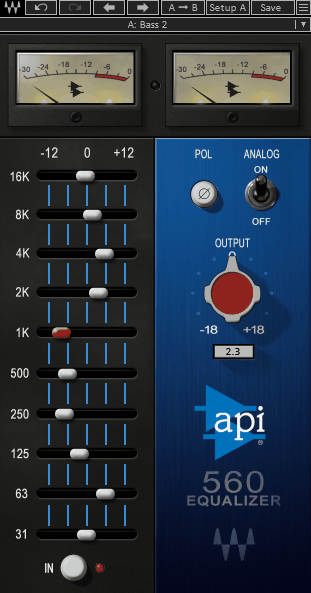
Classic graphic EQs either give you fixed Q filters that sound rigid or they’re so modernized they lose the musical character that made the originals studio staples. Waves API 560 is a 10-band graphic EQ plugin modeled after the classic API 560 hardware EQ from 1967 featuring Proportional-Q filter design that adjusts bandwidth dynamically as you boost or cut.
The plugin features 10 graphic bands from 31 Hz to 16 kHz spaced an octave apart offering ±12 dB of gain per band, and you get an analog modeling switch that introduces subtle emulation of the original circuitry’s harmonic distortion and tape-like hiss.
I think what makes this practical is how the proportional Q widens at small adjustments and narrows at big ones so gentle moves stay smooth while bigger moves remain focused and musical.
You also get a polarity (phase) switch to flip the signal’s phase by 180°, output gain control spanning −18 dB to +18 dB, and both stereo and mono plugin components. It works in VST, AU, and AAX formats.
Here is the info in more detail:
- Proportional-Q Filter Design
Unlike fixed-Q graphic EQs the 560’s proportional Q widens at small adjustments and narrows at big ones so gentle moves stay smooth while bigger moves remain focused and musical. I’d argue this is what makes broad tonal shaping feel intuitive and pleasing because you’re not fighting against static filter behavior.
The octave spacing makes the EQ easy to feel out especially when you want quick tonal corrections rather than surgical narrow cuts.
- Optional Analog Modeling for Harmonic Character
Engage the Analog mode to introduce subtle emulation of the original circuitry’s harmonic distortion and tape-like hiss which can add perceived warmth and presence. I’ve noticed if your mix feels dull or lacking punch a touch of the analog emulation can add life without sounding artificial.
The effect can be subtle so you might not always hear a pronounced change depending on the source material.
- High Headroom and Classic API Tone
The plugin was built in collaboration with API and aims to preserve high headroom and clarity helping your cuts and boosts feel natural and transparent even at extreme settings. I feel like this is particularly useful on guitars, vocals, overheads, and synths where a classic EQ dial-in feel helps sculpt character with minimal fuss.
Freebies:
1. Analog Obsession GrapHack
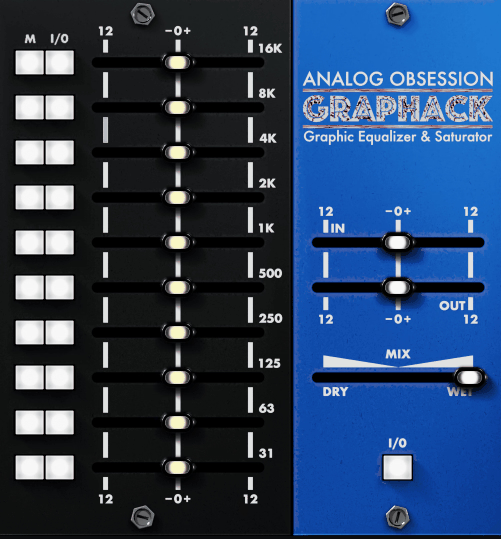
Analog Obsession GrapHack is a free 10-band graphic EQ plugin where every band has not only a traditional equalizer control but also its own saturation module you can switch in independently.
The plugin is loosely modeled after classic American graphic EQ vibe with that extra per-band saturation control letting you add harmonic coloration in a very targeted way. You get 10 fixed frequency bands where each slider has a Mode (M) button that switches between EQ and saturation controls allowing you to use both at the same time on a single band.
What makes this practical is the per-band bypass (I/O) where each band can be bypassed individually helping you isolate specific parts of the spectrum while shaping. The plugin includes gain-compensated input drive to push the overall signal, a Mix knob for parallel processing blending processed and unprocessed signals, and 4x oversampling (engaged by clicking the Analog Obsession label).
- Independent Per-Band Saturation Control
Every band has a Mode (M) button that switches between EQ and saturation controls where you can use both at the same time on a single band if you want to EQ and add harmonics simultaneously.
This gives you creative control over both tonal balance and color because you can add saturation only where you choose rather than coloring the entire signal. The ability to warm up mids, beef up lows, or add grit to highs without saturating everything else is what separates GrapHack from standard graphic EQs.
- 10-Band Graphic Layout with Fixed Frequency Points
Each slider covers a fixed frequency band of the audio spectrum letting you shape tone quickly and visually. I think the graphic layout stays fast and tactile which is great when you’re mixing on headphones or in a small room and want to make broad tonal decisions quickly without parametric complexity.
- Per-Band Bypass for Isolated Frequency Testing
Each band can be bypassed individually which helps isolate specific parts of the spectrum while shaping or auditioning changes. This makes it easier to understand what each band is contributing to the overall tone because you can toggle individual bands on and off without affecting your entire EQ curve.
- 4x Oversampling
2. Synthescience Graphic EQ
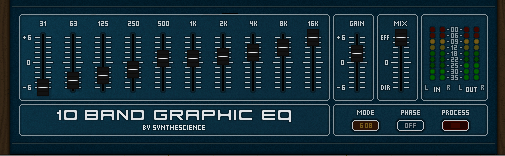
Synthescience 10-Band Graphic EQ is a simple free graphic equalizer plugin with 10 fixed frequency bands and basic controls focused on straightforward tonal shaping. The plugin is Windows VST-only offering ±6 dB or ±12 dB boost/cut ranges per band, a phase invert switch, mix control for dry/wet blending, and 64 user-save preset slots.
It’s lightweight at about 1.3 MB with no copy protection making setup straightforward where you unzip and drop into your VST plugin folder. The plugin is fully automatable giving you dynamic control over every band in your DAW.
- 10 Fixed Bands with Selectable ±6/±12 dB Range
Each of the ten sliders corresponds to a fixed frequency band letting you either lightly sculpt or more drastically shape tone depending on the range you select. This layout works well for broad tonal adjustments without parametric complexity.
- Mix Control for Parallel Processing
There’s a dry/wet mix slider so you can blend the original and processed signals letting you use the EQ more gently in parallel. This gives more flexibility than static EQ alone where you can temper aggressive adjustments.
- 64 Preset Storage Slots and Phase Invert
It has up to 64 user-save slots plus a handful of built-in presets to help you get started or recall ideas quickly. You get a selectable phase switch that flips the signal’s phase which is handy for multi-mic setups or parallel processing where phase relationships matter.
3. Voxengo Marvel GEQ
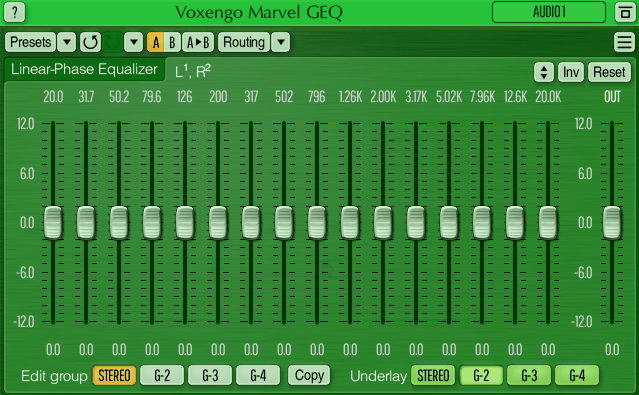
Free graphic EQs usually compromise on features or sound quality to justify the zero cost, which means you’re either getting limited bands, basic processing, or no advanced routing options. Voxengo Marvel GEQ breaks that pattern as a free linear-phase 16-band graphic equalizer plugin offering professional-level tonal shaping with transparency and precision.
The plugin features 16 fixed bands each offering ±12 dB of gain where the linear-phase design means boosting or cutting doesn’t introduce phase shift that smears transient detail. I think what makes this practical is the freehand drawing mode where you can paint a response curve quickly then fine-tune individual bands rather than adjusting each slider one at a time.
You get stereo and multi-channel support (up to 8 channels depending on your host), mid/side processing for separate center and side EQ control, and preset manager with undo/redo history and A/B comparison.
The plugin runs in 64-bit floating point precision with approximately 9 ms compensated latency and works in VST, VST3, AU, and AAX formats on both macOS and Windows. The interface is resizable with multiple color schemes and includes contextual hints.
- 16-Band Linear-Phase Processing for Transparent Mix Shaping
You get 16 fixed bands each offering ±12 dB of gain where the linear-phase design preserves transient integrity so using it on full mixes or sub-buses won’t smear punch or blur clarity. It’s good for mix refinement or gentle mastering tweaks because you’re maintaining phase coherence across the frequency spectrum.
The 64-bit floating point precision maintains clean consistent processing across different sample rates.
- Mid/Side Processing for Independent Center and Side Control
This lets you EQ the center (mid) differently from the sides which is a powerful trick for mix buses and mastering when you want more punch in the center without fattening the stereo edges. I feel like having mid/side in a free graphic EQ is rare because most free plugins don’t include advanced routing features.
You can achieve stereo width adjustments without loading a second plugin.
4. Manda Audio 7Q
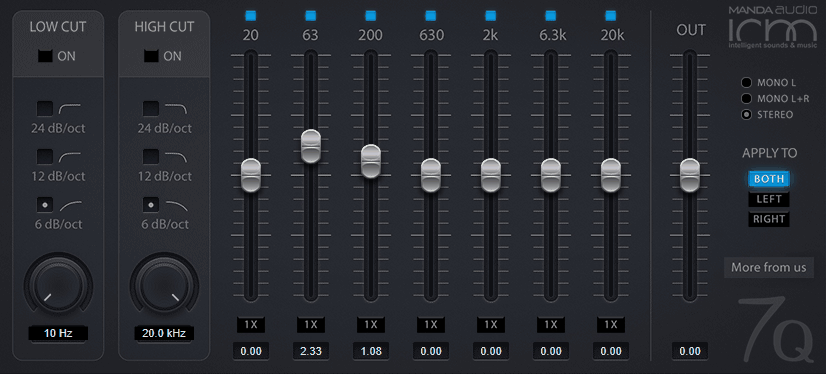
Now the last one, Manda Audio 7Q, is a free 7-band graphic EQ plugin inspired by classic freeware EQs like the discontinued Kjaerhus Classic EQ but updated for modern systems with 32/64-bit support across VST, AU, and AAX formats on Windows and macOS.
The plugin features 7 musically selected bands with predefined frequency points covering key tonal zones, ±6 dB or ±12 dB gain ranges for lighter or more pronounced shaping, and integrated high-pass and low-pass filters with selectable slopes.
It’s designed to be no-nonsense and light on CPU where you can safely load it across multiple tracks even in larger sessions. You get stereo/mono modes for individual tracks or stereo buses, and there’s no registration or license required making installation straightforward.
- 7 Musically Selected Bands with Sensible Q Values
Each slider corresponds to a predefined frequency point chosen to cover key tonal zones without crowding the interface. The bands are set up with sensible Q values so boosting and cutting feels intuitive rather than technical. I think this makes it easy to brighten vocals, tighten bass, or smooth mids without overthinking frequency math.
- Switchable ±6 dB or ±12 dB Gain Ranges
Most bands provide ±6 dB or ±12 dB range letting you switch between lighter tweaks or more pronounced tonal shaping without dramatically increasing noise or artifacts. You can work with subtle adjustments or aggressive corrections using the same plugin.
- Integrated High-Pass and Low-Pass Filters
Built-in HPF and LPF with selectable slopes (24/12/6 dB/oct) help you clean rumble and excessive highs before the graphic bands. These filters add usefulness beyond basic EQ curves making it practical for initial passes where you need to remove sub-rumble or excessive hiss before further processing.
- Stereo and Mono Operation Modes
You can toggle between mono and stereo operation so it works on individual tracks or stereo buses. This flexibility means you’re not loading separate instances for different channel configurations.
- Light CPU Footprint for Multiple Instances
Designed to be low on processing and memory you can safely load it across multiple tracks even in larger sessions.

Hello, I’m Viliam, I started this audio plugin focused blog to keep you updated on the latest trends, news and everything plugin related. I’ll put the most emphasis on the topics covering best VST, AU and AAX plugins. If you find some great plugin suggestions for us to include on our site, feel free to let me know, so I can take a look!