
I’ve spent the last few months testing free vocal plugins that actually hold up in real mixes, and I’m honestly impressed by how far the freeware scene has come.
Whether you’re tracking vocals in a bedroom with questionable acoustics or polishing a podcast, these freebies can genuinely compete with paid alternatives! After few hours of testing, I’ve identified the best free vocal plugins that deliver professional results without the price tag – from character-rich preamps to transparent dynamics control.
I’ve organized this list to cover everything from preamps and compression to reverbs and creative effects – basically the full signal chain you need to make vocals sit right in a mix.
Here is a detailed table of my results:
| Plugin Name | Best For | Engine Type | Key Strength | My Verdict | Pros | Cons |
|---|---|---|---|---|---|---|
| 1. Analog Obsession ATTRACTOR | Dynamic Processing | Compressor + Saturation | Smooth glue, harmonic warmth | Best Dynamic processor | Adaptive attack/release, ±12 dB EQ, wet/dry blend | Minimal tonal shaping |
| 2. Slate Digital Fresh Air | High-Frequency Exciter | Harmonic Boost | Presence and air | Best exciter | Zero edge, instant results, simple interface | Limited low-end control |
| 3. Chris Liepe Vocal Menace | Grit and Attitude | Drive + Mix | Multi-stage distortion | Best processor #2 | Tempo-synced delay, sidechaining, airy sparkle | Harsh if fully wet |
| 4. Techivation T-De-Esser 2 | De-Essing Sibilance | Frequency Detection | Natural high-frequency control | Best de-esser | Four quality modes, intuitive controls, CPU efficient | Limited extreme shaping |
| 5. Lux Vocal Preamp VST | Analog Preamp Modeling | Tube Emulation | Warm harmonic tone | Best vocal preamp | One-knob saturation, subtle EQ, musical glue | EQ flexibility limited |
| 6. BPB Dirty LA | Optical Compression | Limiter + Grit | Classic LA-2A style | Best LA-2A | Smooth compression, harmonic grit, intuitive workflow | Fixed compression ratio |
| 7. iZotope Vocal Doubler | Stereo Doubling | Delay + Modulation | Natural stereo width | Best doubler | Lightweight, subtle timing/pitch variations | Limited creative controls |
| 8. Integraudio & Sixth Sample Deelay | Creative Delay | Digital Multi-Mode | Slapback and modulation | Best Delay & Reverb #1 | Reverse, chaos, pitch-shift, diffusion, ducking | Complex interface for beginners |
| 9. Integraudio & Sixth Sample Cramit | Peak Limiting | Transparent Compression | Soft clipping control | Best Clipper | Built-in drive, speed/depth knobs, musical peaks | Limited extreme compression |
| 10. FeenstaubTX | Transient Shaping | Attack + Sustain | Consonant control | Best Expander | Tube/Solid-State modes, mid/side, subtle glue | Only affects transients |
| 11. Analog Obsession PREDD | All-in-One Channel Strip | Preamp + EQ + Compressor | Console warmth | Best Mic Preamp | Harmonic lift, musical EQ, gentle compression | Interface dense |
| 12. Kiive Audio XTMax | Bus Maximizer | Multiband Processing | Clarity and loudness | Best Compressor | Detail/Depth knobs, multiband, lightweight CPU | Subtle color only |
| 13. TAL-Reverb-4 | Vintage Digital Reverb | Algorithmic Plate | Lush diffuse tail | Classic Reverb | Low CPU, modulation, damping controls | Limited stereo width |
| 14. Melda MAutoPitch | Automatic Pitch Correction | Formant + Tuning | Fast subtle tuning | Best pitch shifting | Formant shifting, stereo widening, intuitive | Monophonic only |
| 15. epicPLATE mkII | Plate Reverb | Algorithmic Dense | Smooth diffuse tail | Best Plate Reverb | Refined diffusion, VST3 support, CPU friendly | Subtle modulation only |
| 16. Goyo Voice Separator | Noise Reduction | ML Isolation | Background removal | Discontinued | Minimal artifacts, simple interface | Excessive reduction creates phase issues |
| 17. Valhalla Supermassive | Creative Reverb/Delay | Hybrid Algorithm | Evolving spaces | Best Delay & Reverb #2 | 21 modes, Warp/Density control, CPU efficient | Not natural reverb |
| 18. Blue Lab Audio Denoiser | Spectral Noise Reduction | FFT Analysis | Background cleaning | Best Noise Reducer | Residual noise removal, transient boost | Not for creative effects |
| 19. Auburn Sounds Inner Pitch 2 | Subtle Pitch Correction | Real-Time Formant | Transparent tuning | Best Pitch Shifter #2 | Shift pitch/formants, stereo expansion | Limited polyphonic use |
| 20. TDR Nova | Dynamic EQ | Multi-Band Processing | Tame problem frequencies | BEst Dynamic EQ | Dynamic bands, spectrum analysis, undo/redo | Learning curve for beginners |
1. Analog Obsession ATTRACTOR – Best Dynamic processor
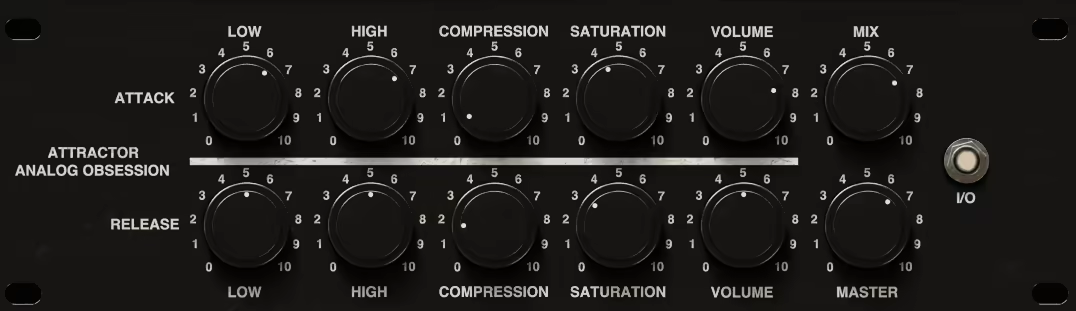
There’s something immediately satisfying about how ATTRACTOR shapes vocals without feeling like you’re wrestling with a compressor. This dynamic processor plugin gives me that smooth, glued-together sound I usually associate with hardware.
- LOW: ±12 dB adjustment centered at 120 Hz
- HIGH: ±12 dB adjustment centered at 8 kHz
- COMPRESSION: Built-in compressor featuring automatic gain compensation and adaptive attack/release times
- SATURATION: Adds harmonic saturation with automatic gain control
- VOLUME: Adjusts the output level for each section
- MIX: Blends the processed (wet) and unprocessed (dry) signals
-
MASTER: Controls the overall output level
Also check:
2. Slate Digital Fresh Air – Best free exciter
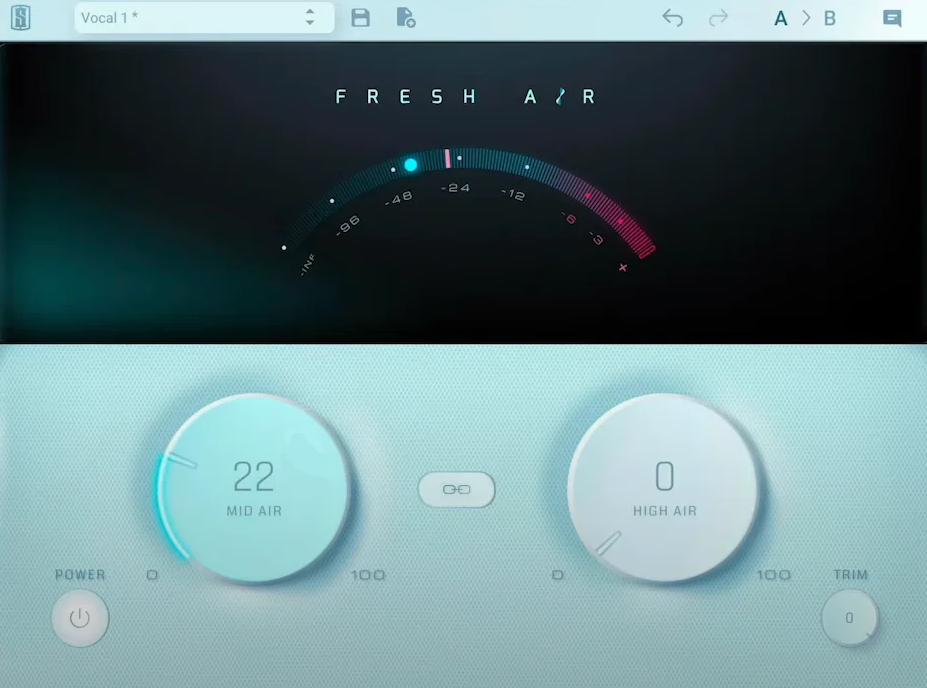
The concept of Fresh AIr by Slate straightforward – it’s an exciter that adds presence and air to vocals, drums, or entire mixes without the brittleness that usually comes with boosting high frequencies.. It’s truly premium exciter just it’s free.
- Zero learning curve
- the top end feels effortlessly smooth and natural, with zero edge or harshness creeping in
- works on individual tracks (drums, vocals, bass), buses or even mastering!
- instant results
3. Chris Liepe Vocal Menace – Best processor #2
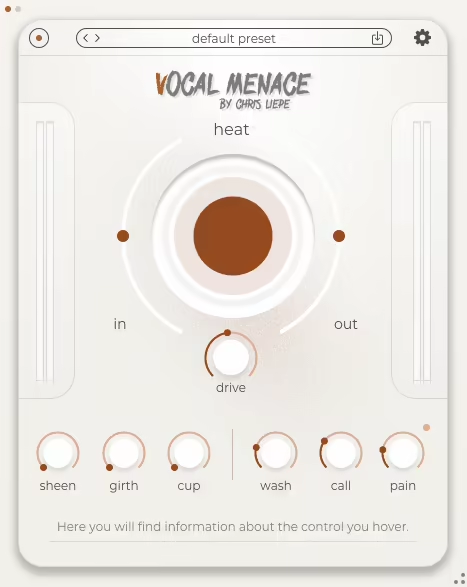
Vocal Menace free vocal VST plugin isn’t your typical vocal processor – it’s designed specifically to add attitude, grit, and aggression to voices. The Drive control is the heart of it, and I usually find the sweet spot between 40-60% depending on the source.
What really sets Vocal Menace apart is the Mix knob. I rarely run it at 100% wet but I blend it around 30-50% to add edge while keeping the core of the vocal intact. The tone stack is modeled after guitar amp EQ sections, and I tend to boost the mids slightly and roll off some lows to keep the distortion from getting muddy.
It’s not subtle vocal VST, but when you need vocals to cut through heavy guitars and pounding drums, it delivers.
- Performance-ready design featuring tempo-synced delay, flexible internal sidechaining, and hidden “eastercoldegg” effects that reveal new tonal possibilities as you explore.
- Multi-stage compression that actually feels musical, keeping your voice upfront and full without any clipping or harsh edges.
- Plenty of character on tap, from gentle saturation to gritty distortion, plus a touch of airy sparkle and a reverb that feels more like a vibe than a preset.
- Built for exploration, with tempo-synced delays, easy sidechaining, and a few hidden surprises waiting to be discovered the more you play with it.
4. Techivation T-De-Esser 2 – Best de-esser
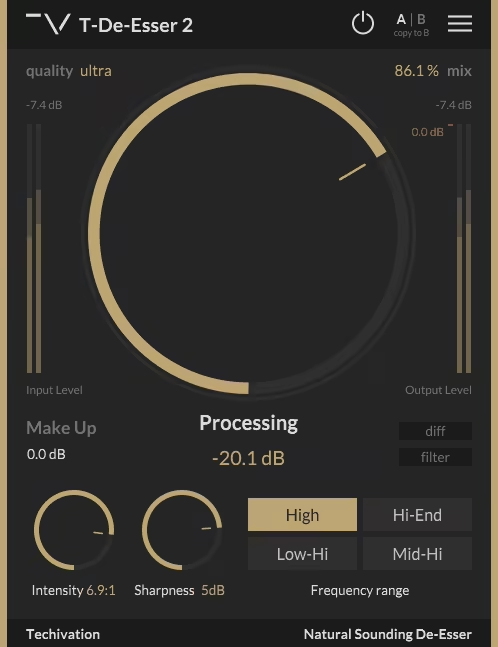
I’ve tried many de-essers, and T-De-Esser 2 is one of the few free ones that doesn’t sound like it’s just ducking the entire high end whenever a sibilant hit comes through. The frequency detection focuses on the harsh 5-8 kHz range where sibilance actually lives, rather than killing the air and presence above it.
You can also choose between four quality modes – Ultra, Great, Good and Standard. There is not much difference in CPU though, so I would just always stick with Ultra. Two knobs Intensity and Sharpness gives you the freedom to adjust the processing to your liking, making the plugin super versatile free de-esser.
- A smoother, smarter De-Esser that tames harsh highs and sibilance without dulling your mix. T-De-Esser 2 feels natural on vocals, guitars, synths, and even drum overheads, giving you that polished top end without the bite.
- Super quick to set up, with just a few intuitive controls that actually make sense – no endless tweaking, just dial in the processing, adjust intensity and sharpness, and you’re good to go.
- Clean and musical sound, free of artifacts or weird phasing. It smooths out the harshness while keeping the tone alive and airy, so you never lose the energy in your performance.
- Simple but powerful workflow, built around a minimalist interface that keeps your ears in charge instead of your eyes. With oversampling, mix control, and four frequency modes, it’s a tool that quietly does its job and always sounds right.
Also check:
5. Lux Vocal Preamp VST – Best vocal preamp
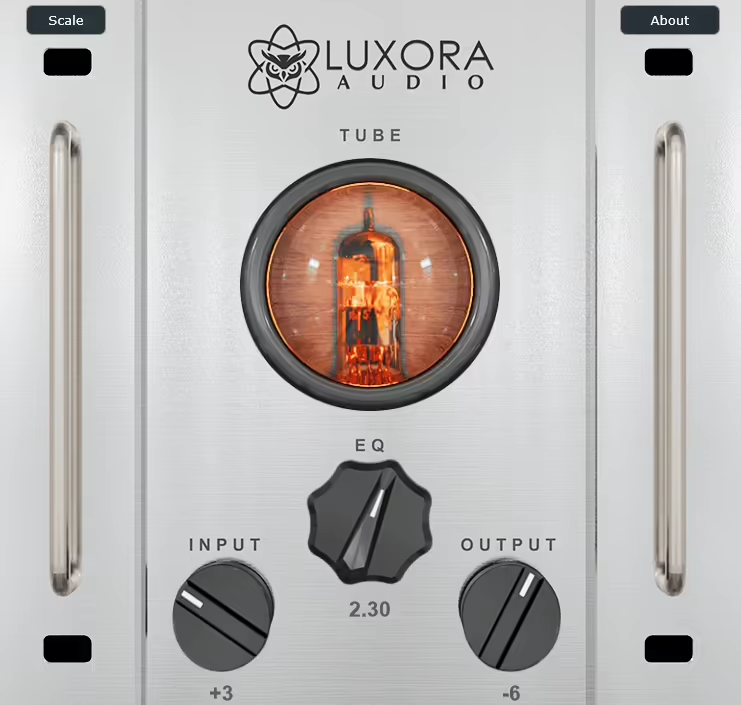
Lux Vocal Preamp surprised me because it actually sounds like a preamp, not just another saturation plugin pretending to be hardware. It models the front-end characteristics of a tube preamp circuit, and the harmonic content it adds is rich and warm without turning vocals into mush. When it comes to the best free vocal plugins for adding analog warmth, Lux Vocal Preamp stands out by actually modeling real tube circuitry rather than just applying generic saturation.
I’ve started using it as the first insert on vocal chains, right where a real preamp would sit.
The input gain staging is critical here. I drive the input until I see the LED flicker on peaks, which usually adds just enough harmonic color. The EQ section is simple but effective – a high-pass filter that I set around 80-100 Hz to clean up low-end rumble, and a presence boost that sits around 4 kHz. The output stage has a subtle transformer saturation that glues everything together nicely.
- A mix of analog soul and digital clarity, the Lux Vocal Preamp adds that warm, tube-like tone inspired by classic 12AX7 circuits while keeping your signal clean and controlled. Even before you touch the EQ, it gives vocals a fuller, more “alive” presence that sits beautifully in the mix.
- One-knob saturation that actually feels musical, delivering smooth harmonic richness without slipping into harsh distortion. It’s the kind of saturation that makes you want to keep turning it up just to hear how it breathes life into a performance.
- Optional EQ crafted with precision, designed by Berat Pala for effortless vocal shaping. When engaged, it adds just the right touch of polish and tone-sculpting flexibility without overcomplicating your workflow.
Also check:
6. BPB Dirty LA – Best LA-2A
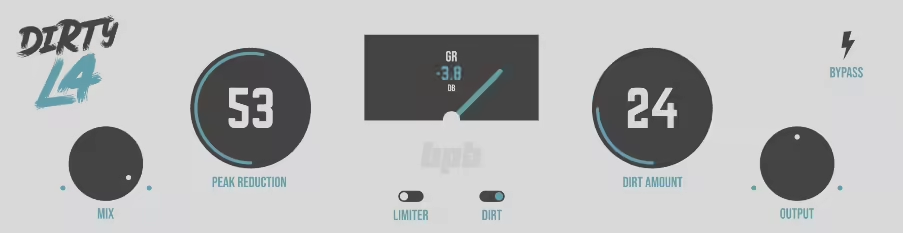
When I need that classic LA-2A style compression but with more character, Dirty LA from BPB is my go-to! It’s got the slow, smooth response of an optical compressor, but with an added grit circuit that makes vocals feel more present. The compression ratio is fixed, which actually simplifies my workflow.
I just adjust the Peak Reduction knob until I’m getting 4-7 dB of gain reduction, then balance it with the output Gain knob. The Dirty vocal VST switch adds harmonic distortion that ranges from subtle warmth to obvious grit – I usually keep it around 30-40%.
- A vintage-style limiter with attitude, BPB Dirty LA captures the tone and behavior of classic analog limiting amplifiers while keeping things quick and intuitive. It feels right at home on vocals, drums, or the mix bus, delivering that rounded, “glued” sound without extra tweaking.
- Smooth compression meets subtle grit, letting you blend clean dynamics control with optional saturation from BPB’s signature “Dirty” algorithm. You can keep it transparent or push it for extra vibe and character when a track needs a little dirt to come alive.
- Built for musical results, not endless tweaking, featuring just the essentials: compression, limiter mode, mix control, and VU metering. Whether you’re after soft leveling or full-on parallel compression, Dirty LA keeps it simple and sonically satisfying.
Also check:
7. iZotope Vocal Doubler – Best doubler – Best doubler
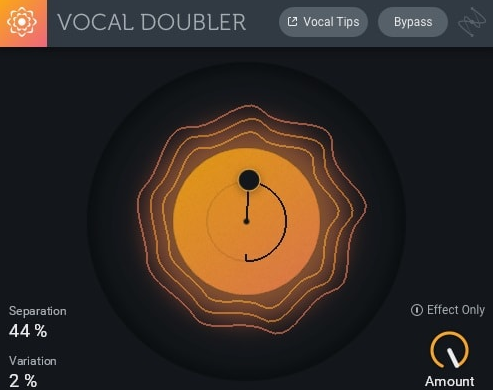
Vocal Doubler does one thing and does it well – it creates a stereo widening effect that simulates double-tracked vocals. I don’t use it on lead vocals often, but for background vocals and harmonies, it’s become essential. The processing adds subtle timing and pitch variations to create the illusion of multiple takes panned left and right.
The interface is dead simple: one knob controls the separation amount. I typically set it between 30-50% for a natural width that doesn’t sound obviously processed. Push it to 100% and things get wide but can feel a bit artificial. The plugin works best when you’re trying to fill out a chorus or make a single harmony line feel bigger.
- Instant vocal doubling without the hassle, iZotope’s Vocal Doubler gives your vocals that natural, stereo-rich feel in seconds. Just drag your mouse around the interface to control depth and variation – it’s as hands-on as it gets, and you’ll hear the results right away.
- Lightweight but effective – this little plugin barely touches your CPU, so you can throw it on every vocal layer or even experiment with instruments without slowing your session down.
8. Integraudio & Sixth Sample Deelay – Best Delay

It’s not trying to be a vintage analog delay, and that’s what caught my attention about Deelay – it’s a straightforward digital delay with some creative features that actually matter. The interface is clean, and I can dial in everything I need without menu diving. I use it primarily on vocals for slapback and quarter-note delays.
The feedback control is smooth, and I appreciate that it doesn’t self-oscillate into chaos unless you really push it. The filter section lets me roll off highs and lows on the delayed signal – I usually cut below 200 Hz and above 8 kHz to keep the repeats clear but unobtrusive.
- Beyond basic echoes, Integraudio’s Deelay (made with Sixth Sample) is one of those free plugins that actually feels like a playground for sound design. You can keep it simple with a clean, classic delay or dive into its wild side with reverse, chaos, and pitch-shift modes that twist your audio into something completely new.
- Packed with creative extras, like built-in distortion (with over ten types), tape wobble, diffusion for reverb-like smearing, and even ducking so your repeats never fight the dry signal. It’s the kind of delay that can go from subtle vibe to full-on cinematic texture without breaking your flow.
- Friendly for everyday producers, the interface is colorful, resizable, and super intuitive. Hit the Randomize button when you’re stuck and watch it throw out weird, inspiring results you’d probably never have dialed in yourself. It’s free, fun, and easily one of the most feature-rich delays you can drop in your DAW right now.
Also check:
9. Integraudio & Sixth Sample Cramit – Best Clipper / OTT Style
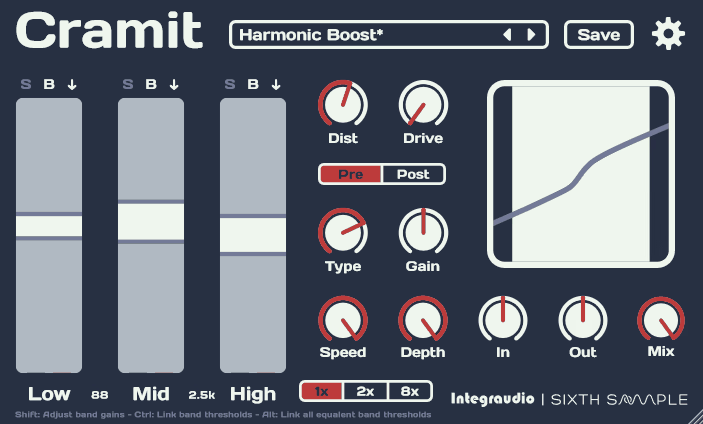
I initially grabbed Cramit for mastering, but I’ve found it works surprisingly well on vocal buses when I need to control peaks without obvious compression. It’s transparent enough that I can push vocals into it fairly hard without hearing pumping or distortion. I typically set the threshold so I’m getting 2-4 dB of limiting on the loudest sections.
The release time is automatic, which adapts based on the signal. There’s a soft clip option that I engage when I want a bit more density – it rounds off the peaks gently before the limiter hits them.
- Think of Cramit as OTT made smarter and smoother. Developed by Integraudio and Sixth Sample, it takes that classic “over-the-top” compression style and turns it into a more flexible, musical tool. You can shape lows, mids, and highs separately, so instead of just smashing your mix, you can fine-tune which parts get that hyped, in-your-face energy.
- What makes it fun is the extra flavor. Cramit includes built-in distortion and drive controls, so you can add warmth or grit right inside the compressor without reaching for another plugin. The Speed and Depth knobs make it super easy to dial in how aggressively it reacts, whether you’re gluing a drum bus or bringing a synth lead to life.
- Perfect for bedroom producers, it’s clean, fast, and doesn’t eat CPU. You can throw it on drums, bass, vocals – pretty much anything that feels too flat – and instantly get that polished, “finished” sound you hear in pro mixes. It’s simple, musical, and honestly, hard not to overuse once you hear what it does.
Also check:
10. FeenstaubTX – Best Expander
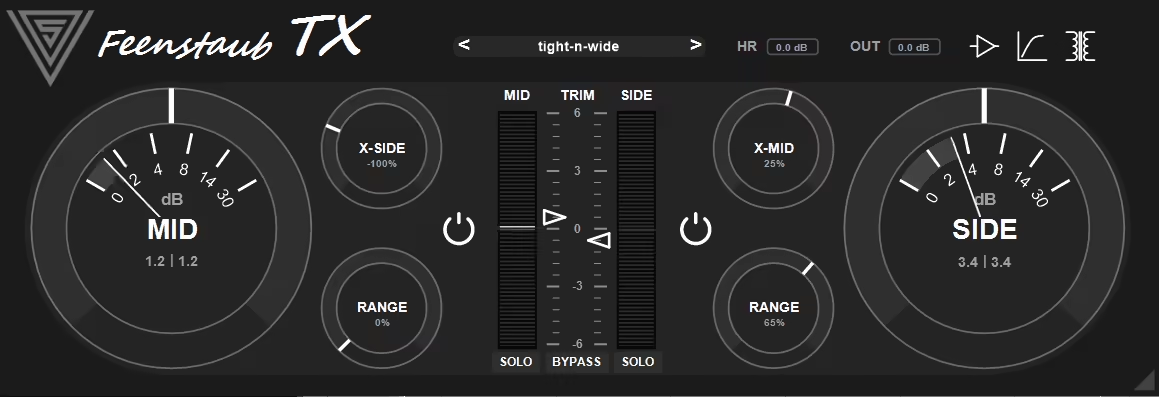
I use FeenstaubTX when I need to shape the attack and sustain of vocal consonants. It’s not something I reach for on every mix, but when I have vocals that feel too soft or too aggressive, this transient designer solves the problem quickly. Increasing the attack makes consonants punchier and more forward, which helps vocals cut through dense arrangements.
I usually boost attack by 20-30% on vocals that were recorded with a lot of proximity effect. The sustain control affects the body and tail of the sound.
- FeenstaubTX is a transient-based exciter and expander that adds depth, texture, and width to your mix without overdoing it. It’s built to work gently across a full stereo signal, adding that subtle analog-style glue that makes everything feel more connected and alive.
- What makes it stand out is how it shapes sound in three dimensions. It can smooth or accent transients, expand dynamics, and give the stereo field a more natural sense of space, all while keeping things musical and cohesive.
- You also get character options like Tube, Solid-State, and Transformer modes, each with its own flavor of saturation. Add in mid/side processing and a few smart workflow touches like a resizable interface and built-in presets, and you’ve got a free tool that’s as creative as it is practical.
Also check:
11. Analog Obsession PREDD – Best Mic Preamp

Modeled after a classic British channel strip, PREDD by Analog Obsession brings that console warmth and punch that I associate with professional recordings. I use this vocal VST as an all-in-one processor when I want to add character without loading multiple plugins. The EQ section is musical and forgiving, with broad curves that shape tone without sounding surgical.
The preamp section adds harmonic saturation that thickens vocals, and I usually drive it just enough to see the input meter react. The compressor is gentle and program-dependent, working well on dynamic performances where I want to maintain natural movement.
- PREDD is Analog Obsession’s free take on the legendary EMI REDD.51 console preamp, the same circuitry that gave so many Abbey Road recordings their unmistakable tone. It captures that classic tube warmth and gentle harmonic lift that instantly makes a vocal, guitar, or drum track feel more “alive.”
- The controls feel like vintage hardware, with everything you’d expect from a real REDD-style preamp: mic/DI switch, voltage gain, -20dB pad, rumble filter, phase invert, and a tasty 10dB high boost that adds air without turning harsh. It even includes fine gain trim for detailed level matching, so you can drive the saturation just right. For producers chasing that Abbey Road console sound, PREDD ranks among the best free vocal plugins that bring vintage British character to modern DAWs without compromising CPU efficiency.
- Like most Analog Obsession releases, PREDD nails that analog depth and realism without bogging down your CPU. It’s one of those plugins you can toss on almost anything when you want that record-ready glow that hardware preamps are known for. And the fact that it’s free makes it an easy no-brainer for any bedroom producer chasing classic console color.
Also check:
12. Kiive Audio XTMax – Best Compressor
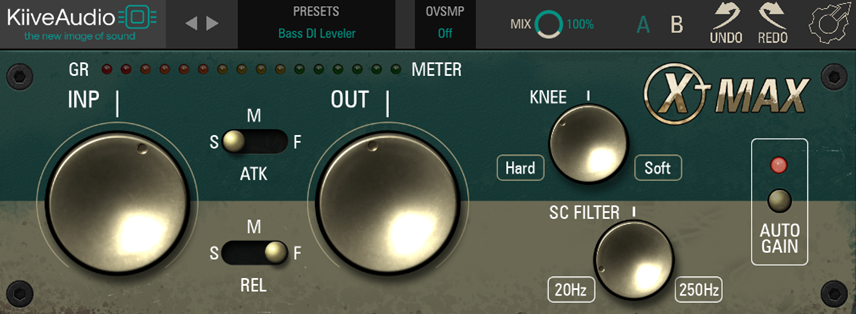
XTMax is a maximizer that enhances clarity and loudness without aggressive limiting. I would use this free vocal VST on vocal buses to bring vocals forward in the mix without changing their dynamic character too much. It uses multiband processing to add perceived volume, which works better than just cranking a limiter.
The Detail knob controls how much high-frequency enhancement is applied, and I keep it moderate – around 40-50% – to avoid harshness. The Depth control affects the low-mids and body of the vocal, and I usually set it around 30% to add fullness without muddiness. The Output Level lets me match the perceived loudness increase, so I’m not just hearing it as “louder equals better.” It’s transparent enough that I can use it subtly without obvious processing artifacts.
- Analog-style punch and grit, inspired by the classic Distressor sound, perfect for drums, vocals, and mix bus energy.
- Three distinct release modes let you shape your compression feel from tight and snappy to smooth and gluey.
- AutoGain and a redesigned GUI make dialing in punchy compression fast and intuitive, ideal for quick creative flow.
- Lightweight and reliable, XTMax delivers pro-grade compression with free lifetime updates from Kiive Audio.
Also check:
13. TAL-Reverb-4 – Classic Reverb
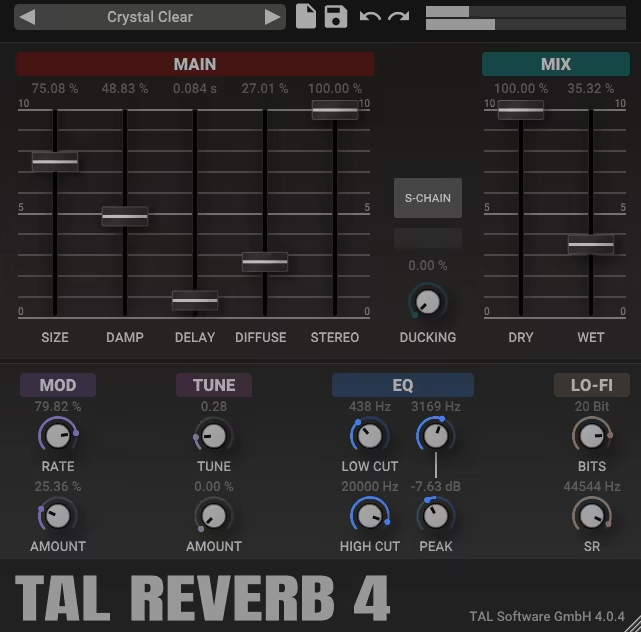
For years, TAL-Reverb-4 has been on my vocal chain because it nails that vintage digital reverb sound without the CPU hit of convolution reverbs. It’s modeled after classic hardware units from the 80s and 90s, and the algorithms have that slightly grainy, diffuse quality that sits beautifully on vocals.
I use the Plate setting most often for vocals, usually with a decay time around 1.8-2.5 seconds. The pre-delay is critical for keeping vocals clear – I set it between 30-60 ms so the dry vocal hits first, then the reverb blooms around it. The high-frequency damping helps control brightness, and I usually roll off the highs around 6-8 kHz.
- Classic 80s plate reverb vibe, TAL Reverb 4 nails that lush, modulated vintage sound that instantly gives vocals, synths, or drums a smooth retro depth.
- Straightforward controls for size, damping, diffusion, and stereo width make it easy to dial in anything from tight room reflections to wide, atmospheric tails.
- Creative extras like modulation, EQ, ducking, and a Lo-Fi section for bit reduction and sample rate shaping add a modern twist to its old-school tone.
Also check:
14. Melda MAutoPitch – Best pitch shifting
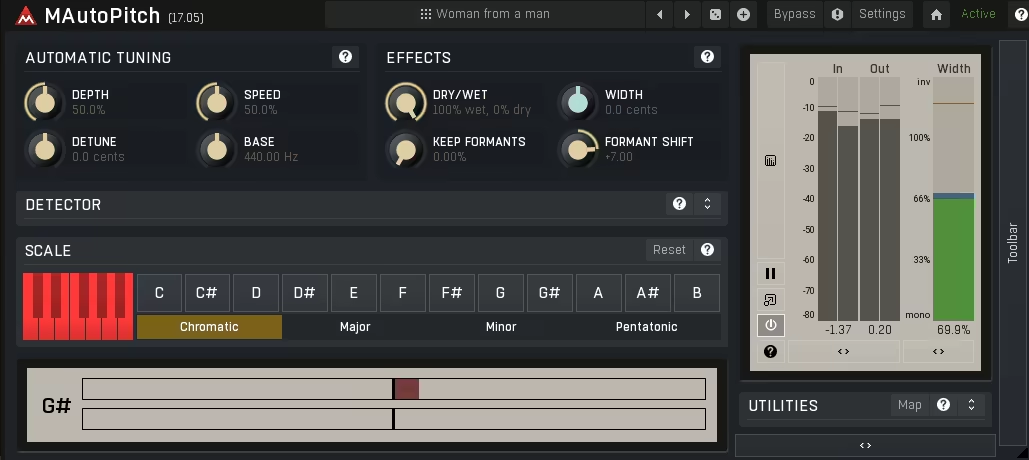
The automatic mode on MAutoPitch detects the scale and corrects pitch in real-time, which is fast for demo work or live processing. It’s a straightforward pitch correction tool that works well for subtle tuning or obvious auto-tune effects. The Speed control determines how quickly the correction happens – set it slow (100-200 ms) for natural-sounding correction, or crank it to 0 ms for that hard, robotic effect.
The Depth parameter controls how strongly the correction is applied, and I usually keep it around 70-80% for transparent tuning.
- Automatic tuning made simple, MAutoPitch keeps vocals and monophonic instruments perfectly in tune without overcomplicating things. It’s fast, musical, and ideal for both subtle correction and creative pitch manipulation.
- Creative controls built right in, including formant shifting for natural or robotic tones, plus stereo expansion to instantly widen backing vocals or layered takes.
- Lightweight and intuitive, it’s one of those plugins you can drop in any session when you want smooth, reliable pitch correction that just works.
Also check:
15. epicPLATE mkII – Best Plate Reverb
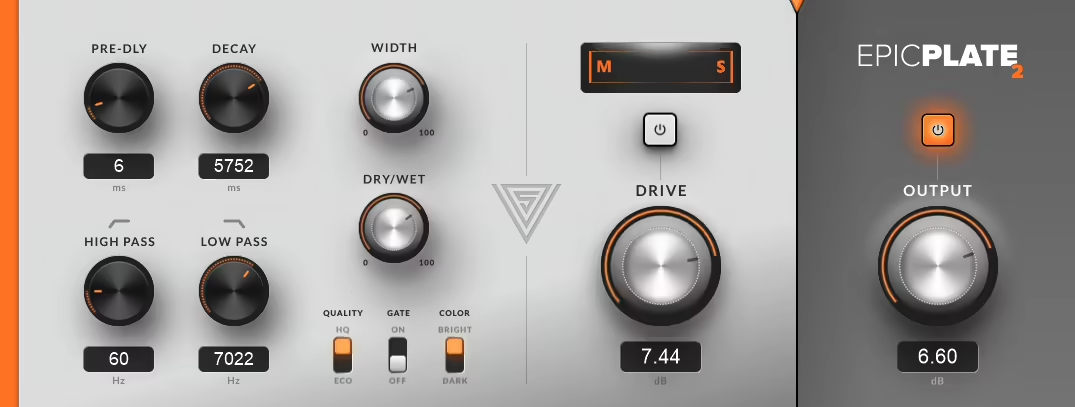
epicPLATE mkII is a plate reverb emulation that sounds noticeably different from TAL-Reverb-4 – it’s smoother, denser, and more luxurious. It’s a perfect vocal VST plugin that I would recommend to use when you want vocals to sit in a lush, expensive-sounding space.
The diffusion is thick, and the reverb tail has a silky quality that works particularly well on ballads and cinematic productions. The decay time is adjustable from short slap-style reflections to long, washy tails. I typically set it between 2-3 seconds for vocal-focused mixes.
The damping controls let me shape the tonal balance – I usually roll off lows below 300 Hz to keep the reverb from clouding the mix, and tame the highs around 8 kHz to avoid harshness. The modulation adds subtle movement that makes the reverb feel less static, and I keep it gentle to maintain realism.
- epicPLATE mkII takes classic plate reverb into modern territory with a smoother, denser sound and refined diffusion that feels luxurious on vocals, drums, and synths. The updated mkII version adds a cleaner interface, VST3 support, and improved
- The updated mkII version adds a cleaner interface, VST3 support, and improved processing quality, making it even easier to blend that vintage plate tone into today’s mixes.
- Perfect for adding space and depth, it builds reverb naturally and pairs beautifully with delays or ambient textures, all while staying CPU-friendly and completely free.
16. Goyo Voice Separator
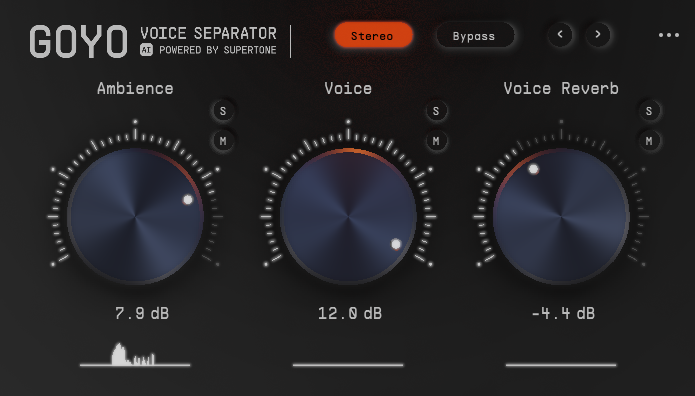
It uses machine learning to identify and remove unwanted sounds, which makes Goyo Voice Separator incredibly useful when dealing with less-than-ideal recordings. I’ve used it on vocals tracked in untreated rooms where air conditioning, computer fans, or room reflections are audible. The interface is minimal – just a reduction amount knob.
I start conservatively around 30-40% and increase if needed. Push it too hard and the vocal can start sounding processed or slightly phasey, but in the sweet spot, it removes noise without obvious artifacts.
- GOYO Beta has officially ended, making way for Supertone Clear, the upgraded version with better CPU performance, new visuals, and offline workflow support.
- The team thanks all beta users for being part of the journey and invites them to continue with Supertone’s future releases.
17. Valhalla Supermassive – Best Reverb #3
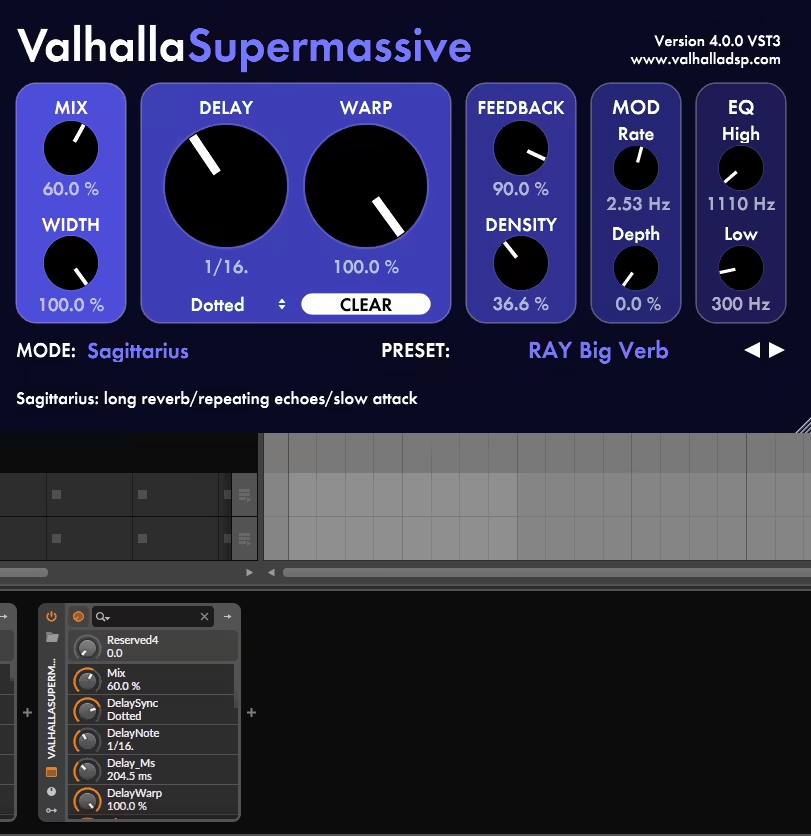
Supermassive is a reverb and delay hybrid that creates massive, otherworldly spaces. It’s not what I’d use for natural vocal reverb, but for creative effects, atmospheric builds, or experimental productions, it’s become one of my favorite tools.
The algorithms range from dense reverbs to feedback delays that spiral into infinity. I use Supermassive on vocal throws, ad-libs, or sections where I want the vocal to dissolve into the background. The Warp control morphs between different delay and reverb structures, and it’s fun to automate this for evolving effects.
The Density parameter controls how thick the reverb is – turn it up for lush, pad-like textures. The Mix knob lets me blend the effect carefully, and I usually run it on a send so I can control how much processed signal I’m adding to the dry vocal.
- Massive delays and reverbs, built from the ground up for huge, evolving spaces, lush ambience, and cosmic echoes.
- 21 unique reverb and delay modes, each with its own character, from tight and rhythmic to endlessly spacious.
- Simple, intuitive controls like Warp, Feedback, and Density that let you morph from subtle echoes to massive reverb clouds in seconds.
- Completely free, CPU-friendly, and constantly updated with new modes like Pleiades, Leo, and Libra for endless sound design possibilities.
18. Blue Lab Audio Denoiser – Best Noise Reducer
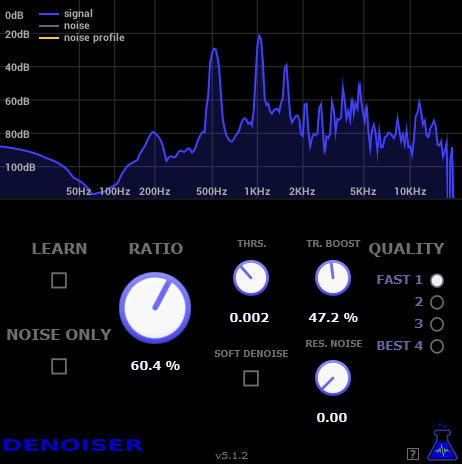
I’ve used Blue Lab Audio Denoiser on vocals recorded with noisy interfaces, in rooms with HVAC noise, or with cheaper microphones that add self-noise. It’s a spectral noise reduction tool that removes constant background noise like hiss, hum, or room tone.
The workflow is simple: I loop a section where only noise is present, hit the Learn button, and the plugin analyzes the noise profile. Then I adjust the Reduction amount until the noise is gone without the vocal sounding processed, usually keeping it between 50-70%.
- Blue Lab Denoiser intelligently learns and removes background noise by analyzing a short section of pure noise, cleaning up vocals, instruments, or full mixes with precision.
- Extra tools for control, including transient boost, residual noise removal, and a mix knob to balance between the original and denoised signal for natural, artifact-free results.
Also check:
19. Auburn Sounds Inner Pitch 2 (Free Edition) – Best Pitch Shifter #2
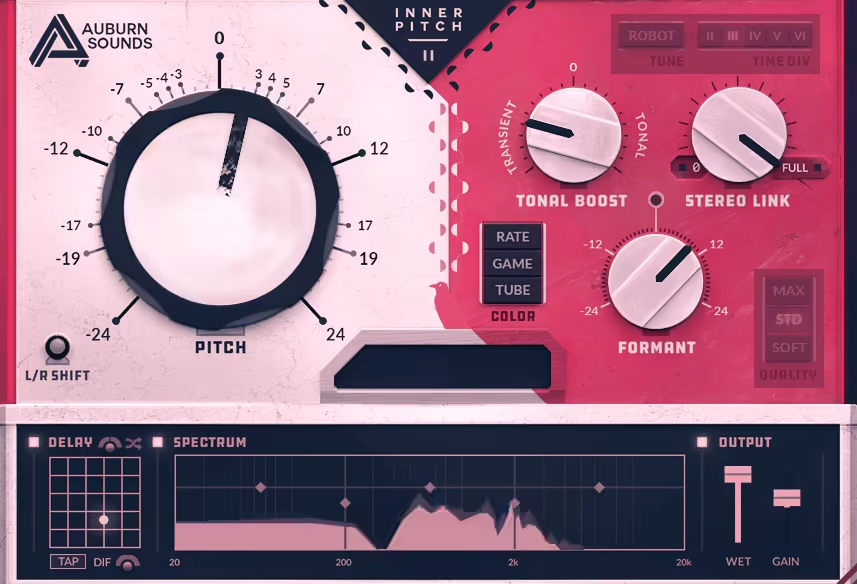
The focus on transparency is what makes Inner Pitch 2 useful for subtle, musical pitch correction. I use it when I need to fix a few off notes without committing to auto-tune or creating obvious artifacts. The interface shows the detected pitch and the corrected pitch in real-time. The correction speed is adjustable, and I keep it moderate to preserve natural expression.
The Free Edition limits how many instances I can run simultaneously, but for single lead vocals, it’s perfectly functional.
- Inner Pitch is a high-quality pitch shifter that keeps your sound natural and musical while still giving you creative control to push things into wild territory when you want.
- Do it all in one plugin – shift pitch and formants, double vocals, widen the stereo field, or create surreal, endlessly rising (or falling) tones with pristine clarity.
- Powerful but free
20. TDR Nova – Best Dynamic EQ
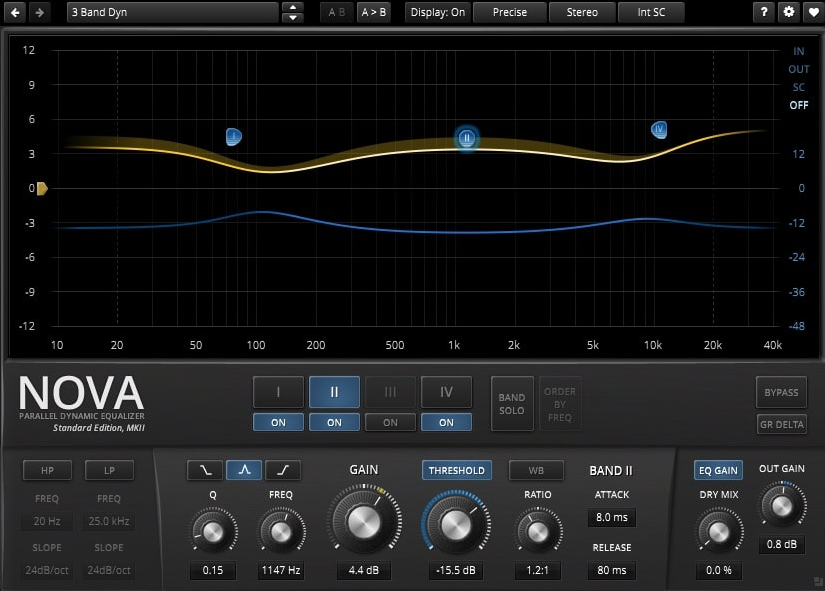
When static EQ cuts and boosts aren’t enough, TDR Nova is a dynamic EQ that I use on vocals. It lets me target specific frequency ranges that only need correction when they become problematic. For example, I’ll set a band around 200-300 Hz to reduce muddiness only when it gets too thick, leaving the low-mids intact during quieter sections.
The interface is straightforward, with up to four bands that can be set to dynamic or static mode. Each band has adjustable threshold, ratio, attack, and release. I typically use one band around 3-5 kHz to tame harshness dynamically.
- Nova blends the precision of a parametric EQ with the control of compression, letting you shape tone and dynamics at the same time.
- Each band includes its own dynamics section, making it perfect for tasks like taming sibilance, tightening a drum bus, or adding density to a master without losing clarity. As one of the best free vocal plugins for surgical frequency control, Nova’s dynamic EQ capabilities rival paid alternatives and solve problems that static EQ simply can’t address.
- Built-in spectrum analysis and equal-loudness features make dialing in changes intuitive, helping you focus on tone rather than volume shifts.
- Smooth workflow and pro features, including undo/redo, A/B comparison, and a polished interface, make Nova just as friendly for beginners as it is powerful for advanced users.
Also check:
Bonus: Caelum Audio TapeCassette2 – Best Tape Emulation
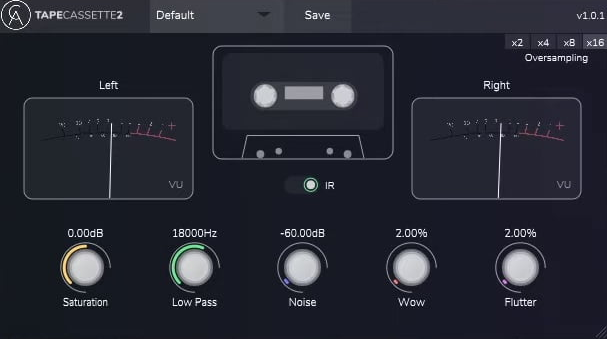
It emulates the sound of recording to cassette tape, and TapeCassette2 is a creative effect that I use when I want vocals to feel lo-fi, nostalgic, or intentionally degraded. The tape age control adjusts how worn the tape sounds, adding more noise and instability. The wow and flutter controls add pitch variation that mimics tape transport issues – I keep these subtle, around 10-20% for a gentle warble. The saturation adds warmth and compression, and I can adjust how hard I’m hitting the tape.
It’s not a plugin I use on every mix, but for specific aesthetic choices, it nails the vibe.
- Tape Cassette 2 brings the warmth, noise, and wobble of vintage cassette decks straight into your DAW, perfect for adding lo-fi texture or nostalgic character to any mix.
- Real Type 1 cassette impulse response and sampled tape noise recreate the authentic high-end roll-off and gentle grit of old-school tape.
- Enhanced wow & flutter modulation adds movement and imperfection, while the improved saturation engine gives you rich harmonic color that feels alive and analog.
- Use it subtly or creatively, from gentle warmth on vocals and synths to fully warped, pitch-drifting experimental sound design.

Hello, I’m Viliam, I started this audio plugin focused blog to keep you updated on the latest trends, news and everything plugin related. I’ll put the most emphasis on the topics covering best VST, AU and AAX plugins. If you find some great plugin suggestions for us to include on our site, feel free to let me know, so I can take a look!