
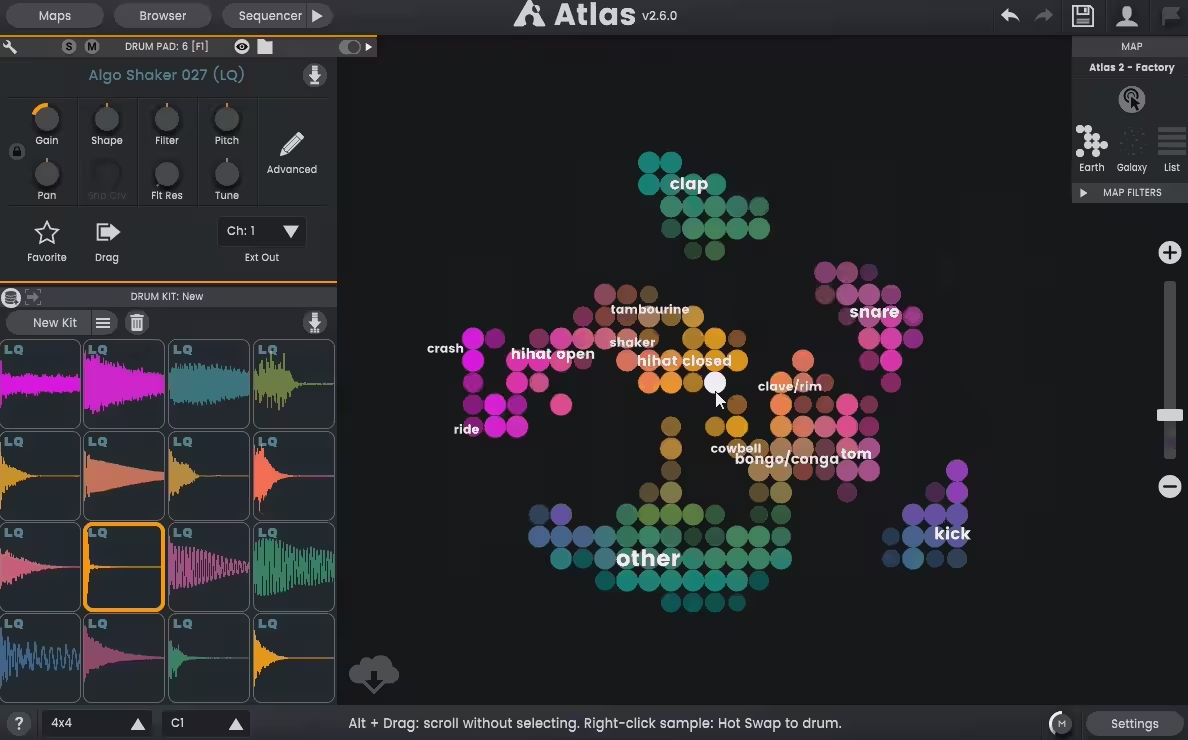
Algonaut Atlas 2 is honestly one of those plugins that solves a real problem most producers genuinely have, which is that massive drum sample library sitting on your hard drive full of forgotten sounds you paid money for but never actually use.
Rather than being just another drum sampler, this tool combines AI-powered sample organization, intelligent kit building, a flexible step sequencer, and full sample editing into one unified workflow.
Developed by Algonaut, this is the second major version of their sample management tool, built from the ground up after two years of feedback and iteration on the original. The plugin uses AI to scan your entire drum sample collection, automatically categorizing and visualizing sounds as colorful, interactive maps where sonically similar samples cluster together into continents on a 2D world view.
From the Pluginerds Store
Before you go — if you're putting together or upgrading a home studio setup, we run our own store alongside the blog at Pluginerds Shop. Everything on it is picked by people who actually make music, not sorted by whoever paid for placement on a marketplace. Worth a look if you're filling in the gaps in your setup.
Visit Pluginerds ShopThe Sample Map
The visual map is honestly where this plugin earns its keep for most producers.
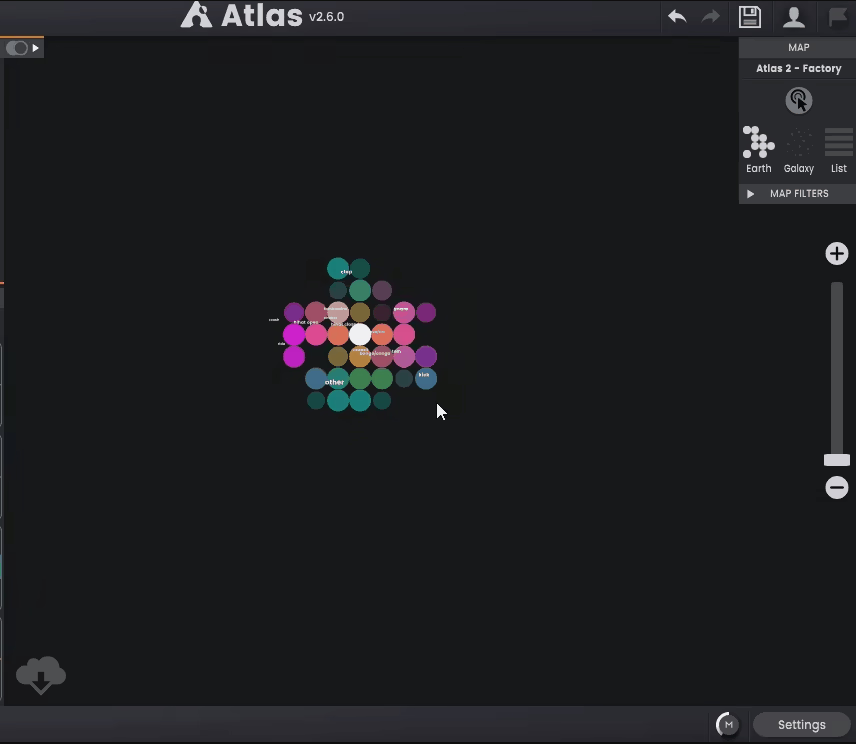
When you first launch the software, you point it at your sample folders (or individual sample packs), and the AI scans everything while automatically categorizing sounds by type (kick, snare, clap, closed hi-hat, open hi-hat, tom, bongo, percussion, cymbal) and plotting them onto a 2D visual map. Sonically similar samples cluster together into colorful continents, so you can see your entire library at a glance rather than scrolling through endless folders.
The analysis is genuinely fast. I found that small sample packs take a few seconds, while larger libraries (like throwing in an entire factory drum collection) take a couple of minutes. Once done, you have a permanent visual reference that you can navigate in multiple ways.
You can click individual nodes to audition sounds, use WASD keys for keyboard navigation, or switch on hover mode to rapidly review sounds by moving your mouse. For producers used to slowly clicking through file lists, this feels dramatically faster.
What I love is how you can build as many separate maps as you want and switch between them instantly. Keep one map for your kick and snare collection, another for percussion, another for specific genre packs, whatever makes sense for your workflow. Supported formats cover WAV, AIFF, FLAC, OGG, MP3, WMA and more, so pretty much anything in your collection gets analyzed.
Get the Free Plugin Starter Kit
The genuinely useful free DAWs and plugins worth installing. No filler. Straight to your inbox.
Instant Drum Kit Creation
This is where the plugin stops being just a sample organizer and becomes a genuine creative tool.
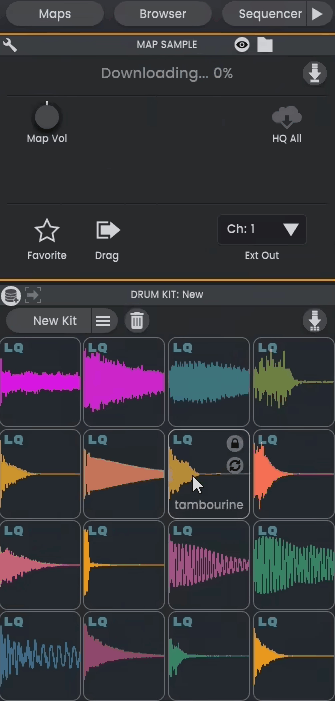
The New Kit button automatically populates the customizable grid with a selection of appropriate samples from across your library, creating a complete drum kit in a single click. The AI pulls samples from multiple packs using your selected map, giving you combinations you probably wouldn’t have put together manually.
What’s genuinely clever is how the pads are categorized by sample type in templated positions, so you get kick drums in the kick slot, snares in the snare slot, and so on. You can lock pads with sounds you like and hit the randomizer again to let the plugin fill in the rest around your chosen anchors.
For me, this workflow is honestly addictive. Lock in the kick and snare you love, roll the dice for everything else, swap individual pads you don’t like, and you’ve built a unique kit in minutes rather than hours.
The grid is customizable too, supporting 8, 16, or even 64 channels to match whatever workflow you prefer. The UI layout can also match popular hardware controllers like Launchpad and Maschine, which makes live performance and hardware integration genuinely seamless.
Sample Editor
Each sample on the grid gets its own editor for shaping the sound exactly how you want.
You get controls for gain, shape, filter with resonance, pitch adjustment, panning, tuning, volume envelope, phase flip, and reverse playback, covering all the essential sample manipulation tools. The editor also includes a variation engine that randomizes parameters to a set degree, adding natural humanization that keeps loops from feeling robotic and repetitive.
Beyond basic editing, you can switch between variable and fixed velocity, and trigger samples as one-shots or gated, giving you flexibility for different rhythmic contexts. Variations can be applied individually to volume, pan, pitch, filter, and timing, so you can dial in exactly how much randomness feels musical for your track.
I want to note that these editing parameters only apply when you’re using sounds directly inside the plugin. If you drag samples out to another DAW or sampler, the original files are transferred without the parameter changes rendered.
The Sequencer
The built-in sequencer is genuinely one of the strongest parts of the whole plugin.
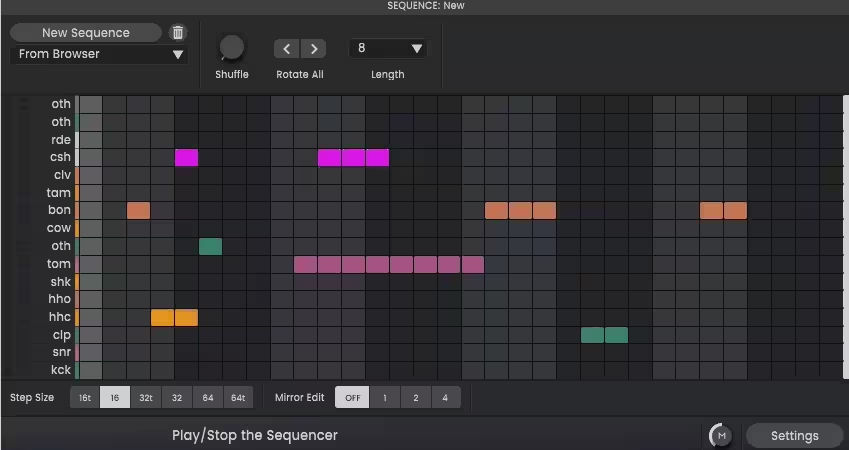
Algonaut clearly wanted to combine the speed of traditional step sequencers with the flexibility of piano-roll editors, and the result is honestly one of the most intuitive drum sequencers I’ve used. You get up to 32 steps per sequence with support for triplet subdivisions, plus individual channel lengths so different lanes can have different step counts for polyrhythmic patterns.
Several features stand out:
- Mirror Edit:
Saves repetitive mouse clicks by automatically mirroring beats across the sequence. Change one beat and it updates the mirrored copies, which is genuinely useful for quickly building symmetric patterns.
- Rotate and Nudge:
Shift patterns around in time without rebuilding them from scratch. Nudge hits slightly for groove adjustments, rotate entire patterns for creative variations.
- Polyrhythm Support:
Mix and match step timings so you can drop a hi-hat triplet fill at the end of a regular 4/4 pattern, for example. This opens up serious rhythmic complexity without making programming harder.
- Variation Generation:
Create automatic variations of your beats with a button press, which is honestly a goldmine for building song sections that evolve rather than just repeat.
- MIDI Import:
Drag and drop MIDI files in with original timing preserved, so you can bring in patterns from other sources and build on them.
- Live Recording:
Record performances live with a controller, capturing the human feel that programmed patterns sometimes lack.
You can save sequences and mix and match them with different drum kits, which effectively gives you an endless library of pattern combinations to work with.
Export and DAW Integration
This is where the plugin genuinely earns its place in real production workflows.
- Drag and drop export lets you move audio loops, individual stems, or MIDI directly into your DAW without routing through complex bus setups. You can export perfectly looping audio with seamless start and end points, or include start and end sections to capture that first hit and final cymbal properly.
- Multi-channel output routes individual pads to separate channels in your DAW, which is essential when you want to apply different processing chains to each drum. Run your kick through a compressor bus, your hats through an EQ, your snare through a transient shaper, all from within your standard mixing workflow.
- MIDI out can drive external plugins or hardware drum machines like Ableton Drum Rack, so you can use the sequencer to trigger other tools while keeping the visual workflow and randomization features. For producers who already have favorite drum plugins, this integration means you don’t have to abandon them to benefit from the sample management and sequencing tools.
Samples can also be embedded directly into your DAW project, which prevents missing file errors when you move projects between computers or collaborate with other producers.
Content and Expansions
The plugin ships with 1,500 drum samples as an optional download, complete with maps, sequences, and loops to get you started immediately.
Algonaut also offers additional Cloud Packs accessible remotely, with low-quality previews for instant auditioning and full-quality downloads available when you find something you want to use. Content includes both Algonaut’s own packs and user-submitted packs, which keeps the library growing organically.
Premium Expansions covering genres like cinematic, ambient, and dark pop each include at least 100 drum kits, sequences, maps, and bonus samples, giving you genre-specific starting points for different productions.
Pros and Cons
The AI-powered sample map genuinely changes how you interact with drum collections, turning thousands of forgotten samples into a searchable visual resource. Instant kit generation with locking keeps inspiration flowing while giving you creative control over the process.
The sequencer combines step-sequencer speed with piano-roll flexibility, including polyrhythm support, mirror edit, rotate, nudge, and automatic variation generation. Full sample editing with filter, envelope, pitch, pan, reverse, and variation engine covers everything you need for shaping individual sounds.
Multi-channel output, MIDI out, and drag-and-drop export integrate seamlessly with any DAW workflow, and 1,500 included samples plus expanding cloud content means you can start producing immediately even without a big existing library. Support for VST, VST3, AU, AAX, and standalone modes across Mac, Windows, and Linux covers pretty much every production environment.
Then, on the flip side, sample layering isn’t currently supported, so you can’t stack multiple samples on a single pad for combined textures, which is a real limitation for producers who like layered drum sounds.
The plugin is specifically designed for one-shots and drum samples, so longer melodic loops or pitched instrumental content gets less effective treatment from the AI analysis. The interface can feel busy on smaller screens with all panels visible, though you can hide sections to focus on specific tasks.
Some producers may find the design less polished than competitors like XO from XLN Audio, though the tradeoff is that this tool packs significantly more sequencing and management features into one plugin.
Final Thoughts
I would say Algonaut Atlas 2 is genuinely one of those plugins that solves a real problem most producers don’t even realize they have until they start using it. Together, the combination of AI sample mapping, instant drum kit generation, full sample editing with variations, a flexible 32-step sequencer, multi-channel output, MIDI integration, and 1,500 included samples creates a tool that doesn’t just play drum samples but fundamentally improves how you work with them.
For beat makers, electronic producers, and anyone working with extensive drum sample libraries, this plugin fills a genuinely useful space in your template. The organization alone saves real time, the creative tools keep inspiration flowing, and the workflow integration means you spend less time managing files and more time actually making music.
I love how the plugin treats sample management as a creative tool rather than a chore. Turning your drum library into an accessible, visual resource changes how you approach beat-making, and that shift in perspective alone makes this tool valuable.
You can checkit here: Algonaut Atlas 2
Get the Free Plugin Starter Kit
The genuinely useful free DAWs and plugins worth installing. No filler. Straight to your inbox.

Hello, I’m Viliam, I started this audio plugin focused blog to keep you updated on the latest trends, news and everything plugin related. I’ll put the most emphasis on the topics covering best VST, AU and AAX plugins. If you find some great plugin suggestions for us to include on our site, feel free to let me know, so I can take a look!