
Native Instruments Action Woodwinds takes a category most composers overlook (orchestral woodwinds) and turns it into something genuinely exciting for cinematic writing. Rather than being just another multi-sampled woodwind collection, this release uses the same phrase-based Live Modules engine that made Action Strings 2 such a capable tool and applies it to a full woodwind ensemble.
Developed in collaboration with Sonuscore, the team behind Action Strings, Action Strings 2, Action Strikes, Emotive Strings, Mallet Flux, and The Orchestra, this library rounds out the Action Series with a woodwind-focused tool that frankly surprised me with how useful it turned out to be.
You get flutes, clarinets, oboes, English horns, bassoons, contrabass clarinets, and more, all wrapped into an ensemble that plays together rather than as isolated solo instruments. For me, what makes this library so compelling is how it turns woodwinds (usually a background element in cinematic music) into a genuinely foreground compositional tool.
You can build rhythmic phrases, driving ostinatos, and melodic passages that bring woodwind character to moments where you’d normally reach for strings or brass, and the results sound surprisingly fresh.
From the Pluginerds Store
If this article has you thinking about what's missing from your setup, our own shop is worth a browse. We stock the practical side of a home studio — the accessories, stands, and interfaces that reviews rarely cover but every setup eventually needs.
Visit Pluginerds ShopThe Interface
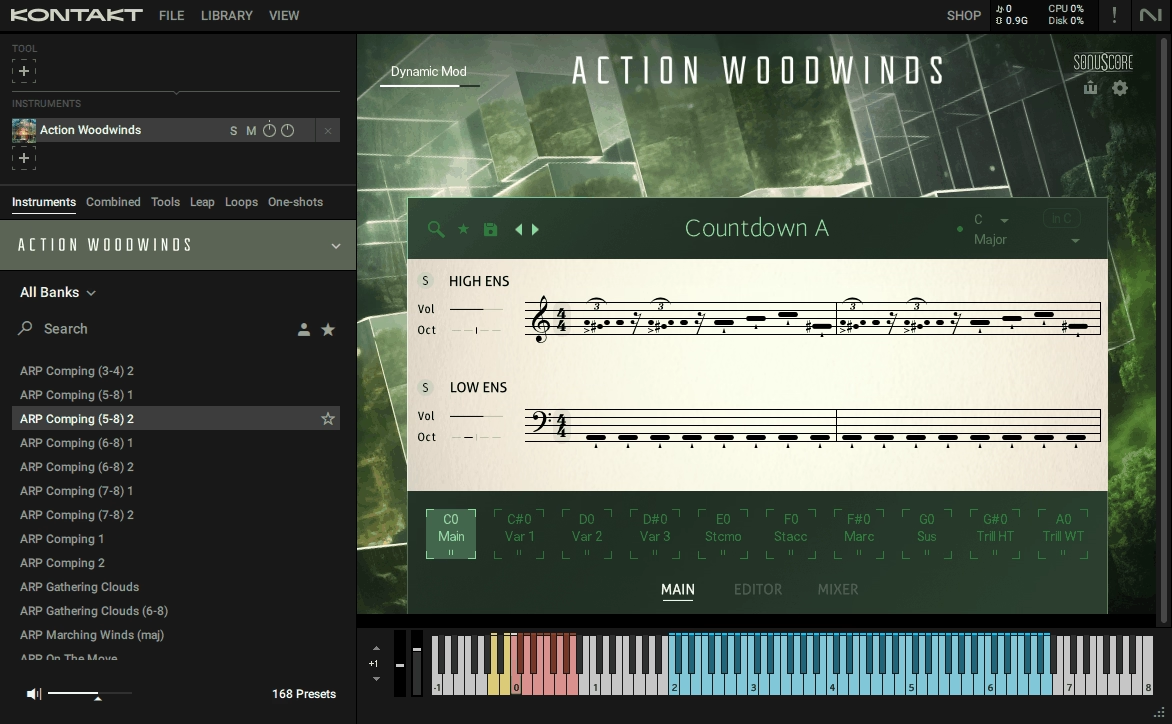
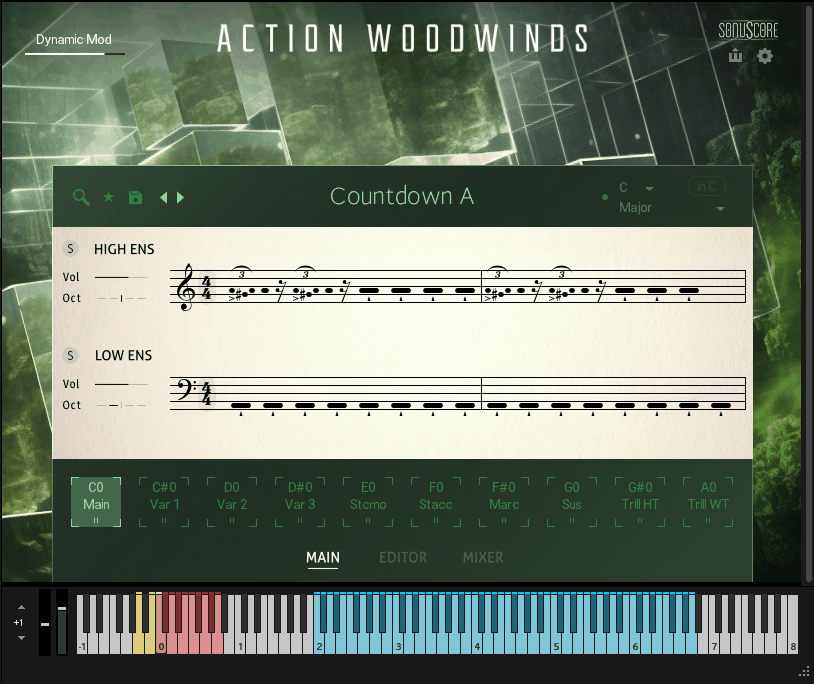
The Action Woodwinds interface keeps things genuinely organized without feeling cluttered, which matters a lot when you’re deep in a scoring session.
Everything lives across three main pages accessed through clean tabs at the top. The Main page handles theme and phrase selection, the Editor page is where you customize phrases and modules, and the Mixer page covers microphone blending and global effects.
Essential controls like the Settings gear, MIDI Export button, and Dynamic Mod slider sit at the top-right corner where you can reach them at a glance. Having these visible rather than buried in submenus is a small thing that makes a big difference during real work.
One thing I love is how the Light Guide integration with Kontrol keyboards extends visual clarity directly to your hardware, showing active keyswitches in red, trigger keys in blue, and solo keyswitches in yellow both on-screen and on your keyboard itself.
For producers used to older, more cluttered Kontakt instruments, this interface feels refreshingly modern. Everything has a purpose, nothing feels buried, and the workflow stays intuitive.
Get the Free Plugin Starter Kit
The genuinely useful free DAWs and plugins worth installing. No filler. Straight to your inbox.
What You’re Getting
Action Woodwinds is built around the same core concept as its siblings in the Action Series, but with its own personality. The ensemble covers both ends of the woodwind spectrum, with clarinets, English horns, oboes, and flutes on the higher side, and bassoons, contrabass clarinets, and beyond bringing that dark, reedy weight.
Everything splits into two configurable ensembles called High Ens and Low Ens, mirroring the same structure used in Action Strings 2. Each one can be mixed and manipulated independently, which gives you real compositional flexibility.
Here’s the core content:
- Over 1,000 Interchangeable Phrases:
This is where the real creative depth lives. Each phrase is built from modular building blocks that you can swap, edit, and customize, so you’re never locked into preset performances.
- Over 160 Themes:
Each theme contains 10 pairs of Phrases and Articulations for both ensembles, assigned to different keyswitches so you can quickly switch between them during playback.
- Modules System:
The flexible system that lets you chop, duplicate, and refine mini-phrases to create custom performances. Trills, crescendos, falls, and runs can all be shaped to fit your specific arrangement.
One thing worth noting is that patterns are split into high and low winds, so you can solo and mute either layer independently. However, you can’t isolate specific individual instruments (like just the flutes or just the clarinets), which might be a limitation for some composers.
The Sound
The woodwinds have a bright, lively, authentically orchestral character that cuts through cinematic mixes without needing heavy processing. Compared to solo woodwind libraries that can feel dry or isolated, playing this collection feels like conducting a real section of players actually listening to each other.
The group was recorded playing together as an actual ensemble, which delivers something you genuinely can’t fake with solo instruments layered in post. There’s natural breathing room, subtle timing variations between players, and the way the reeds blend into a cohesive whole.
Flutes shine, clarinets sing, oboes cut through, and bassoons add warmth without muddying the mix. Runs, falls, trills, crescendos, diatonic figures, and chromatic figures were all recorded by real players, which is huge because you’re hearing actual humans performing rather than samples stitched together algorithmically.
I want to note that the character leans toward the brighter, more action-oriented side of woodwind writing. This fits the library’s cinematic and trailer focus, but it also means delicate chamber music probably isn’t where this tool is meant to shine.
The Editor Page
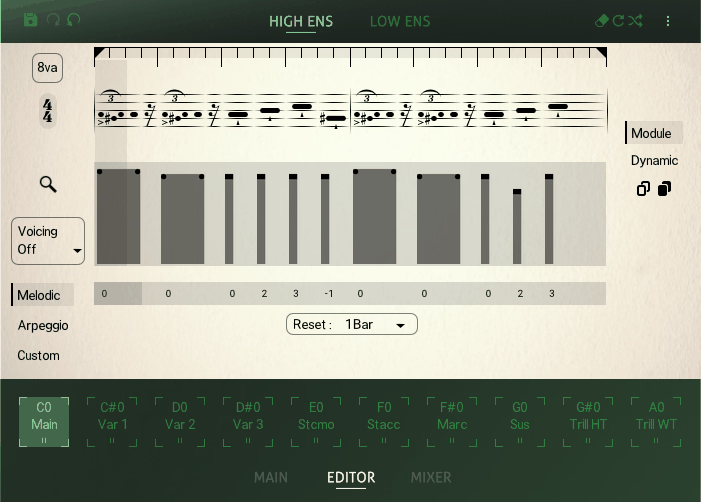
The Editor page is where this library stops being a phrase collection and becomes a genuinely creative compositional tool. You see your phrase broken down into individual Modules using a hybrid notation approach that combines a traditional staff with MIDI-editor-style horizontal length display.
The Module Browser organizes everything into categories including Singles, Basic Rhythms, Diatonic Figures, Chromatic Figures, Falls, Trill Figures, Crescendos, and Runs (the last one being exclusive to the High Ensemble). Click any module to select it, then swap it from the browser or adjust its dynamics and pitch independently.
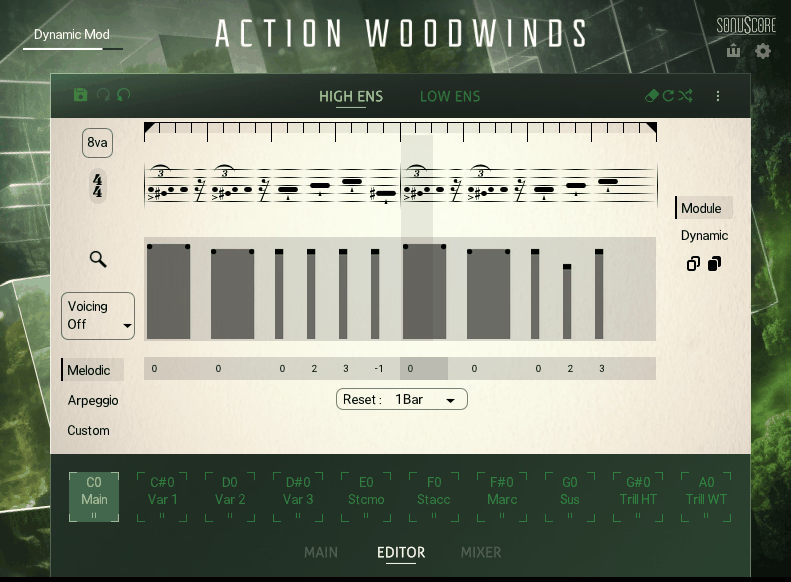
The Loop Range lets you define exactly how much of your phrase loops during playback by dragging two handles. Below the notation view, the Envelope shapes the dynamic curve across the phrase, which matters enormously for cinematic writing where intensity changes drive emotional impact.
You also get three distinct Play Modes that approach composition from different angles:
- Melodic:
Optimized for playing melodies with single keys. You can adjust the pitch of every module chromatically by clicking and dragging pitch boxes up and down.
- Arpeggio:
Behaves like a step arpeggiator with multiple notes played at a time. Controls for Pattern, Reset, Skip, and Repeat give you serious flexibility over how chords translate into flowing passages.
- Custom:
Lets you decide exactly which depressed keys play on each module, using a grid-based note selection system for unmatched precision.
Beyond the modes, Step Edit and Step Copy tools let you delete, repeat, variate, or paste modules across keyswitches. Undo and redo functionality is built in directly, which makes experimenting way less stressful.
The Mixer Page
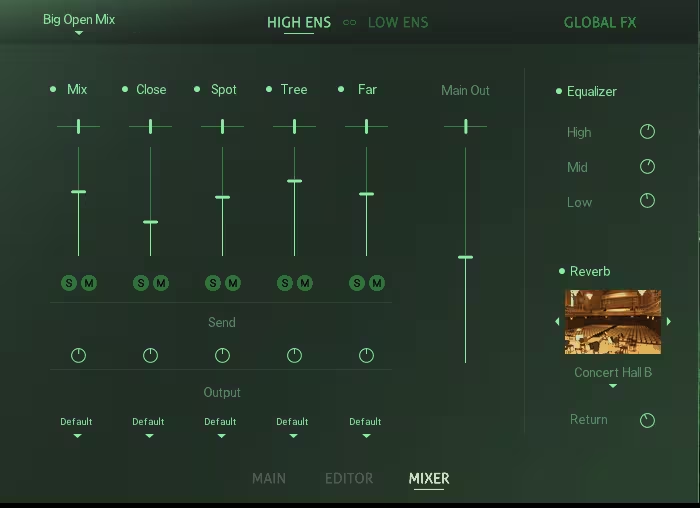
The Mixer page gives you independent controls for both the High and Low Ensembles, with a handy Link function that applies edits to both simultaneously when needed. Several Mixer presets provide quick starting points from close and intimate to wide and open sounds.
Each microphone channel has its own pan, level, solo, mute, send, and output routing controls. Deactivating channels purges their samples from memory, which genuinely helps with RAM management on larger templates.
The Global Effects section includes two main processors that apply to both ensembles. A three-band EQ with independent High, Mid, and Low controls handles tonal shaping, while a convolution reverb based on impulse responses of real spaces (rooms, chambers, concert halls, cathedrals) delivers genuine cinematic depth.
One useful detail is that each microphone channel can route to a specific Kontakt output, letting you send individual mics to separate processing chains in your DAW for detailed mixing work.
Playing and Workflow
You can press any key between C2 and A6 to trigger phrases at the corresponding pitch. Phrases automatically sync to your DAW tempo, so everything stays locked without manual configuration.
Keyswitches from C0 to A0 let you switch between phrases and articulations within your loaded theme. C0 typically hosts the main version, while the remaining keyswitches cover variations and Single Articulations like staccato, staccatissimo, marcato, sustain, half-tone trills, and whole-tone trills.

Two solo keyswitches at A-1 and B-1 let you isolate either the Low or High Ensemble temporarily. Dynamics are controlled by Dynamic Mod mapped to the modulation wheel by default, blending between velocity layers for expressive performance shaping.
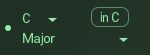
The Scaler feature deactivates any keys not in your chosen scale and swaps modules for equivalent ones that fit. Pick a Root Note, choose from 20 Scale Types, and optionally use the in C button to map the scale onto white keys.
The MIDI Export function is honestly one of the most valuable features here. Once you’ve built a performance, drag it into your DAW as editable MIDI with separate regions for the High and Low Ensembles.
This opens real possibilities like driving other woodwind libraries for realism, layering patterns onto strings, or triggering synths with the same rhythmic patterns for hybrid textures.
Pros and Cons
Pros
The full woodwind ensemble recorded as a real group delivers cohesive, breathing quality that solo sample layering can’t replicate. Over 1,000 phrases and 160+ themes give you serious creative depth without feeling overwhelming thanks to good organization.
The Live Modules system is excellent for editing phrases to fit your specific needs, turning generic library content into custom-sounding performances. Recorded runs, falls, trills, crescendos, and ornaments performed by real players add authenticity that programmed articulations rarely match.
MIDI Export turns the library into a compositional engine with separate High and Low Ensemble regions for driving other instruments. Features like the Scaler with 20 scale types, Custom Mode for precise sequence design, and the 8va button for octave doubling make the library accessible while adding useful tools for experienced composers.
Cons
You can’t isolate individual instruments like just the flutes or just the oboes, since patterns work with high and low winds as grouped ensembles. The phrase-based approach won’t suit every composer, especially those who prefer building woodwind parts note-by-note from single-articulation libraries.
The brighter, action-oriented character limits usefulness for delicate or classical concert-style writing. Like other Kontakt libraries, loading times can be lengthy, and the library is somewhat demanding on system resources, so running multiple instances alongside heavy orchestral templates requires a reasonably capable machine.
The Runs category is exclusive to the High Ensemble, which might be a limitation if you want those fast cascading passages in the lower woodwinds too.
Final Thoughts
Native Instruments Action Woodwinds is genuinely one of those libraries that expands what you can do creatively rather than just duplicating capabilities you already have.
Together, the combination of the full woodwind ensemble, 1,000+ interchangeable phrases, 160+ themes, Live Modules editing system, three Play Modes, dedicated mixer controls, and MIDI Export creates a tool that delivers cinematic results fast while still giving you real compositional depth when you want to dig in.
For composers working on cinematic content (trailers, film scores, game music, fantasy soundtracks, hybrid orchestral production), this library fills a genuinely useful space in your template. The phrase-based workflow saves real time, the ensemble character brings something fresh to arrangements, and the editing depth rewards exploration without requiring it.
I love how the library treats woodwinds as a legitimate foreground element in cinematic writing rather than relegating them to background coloration. That shift in perspective alone makes this tool valuable, and the quality of the recordings backs up that ambition with substance.
Check here: Native Instruments Action Woodwinds
Get the Free Plugin Starter Kit
The genuinely useful free DAWs and plugins worth installing. No filler. Straight to your inbox.

Hello, I’m Viliam, I started this audio plugin focused blog to keep you updated on the latest trends, news and everything plugin related. I’ll put the most emphasis on the topics covering best VST, AU and AAX plugins. If you find some great plugin suggestions for us to include on our site, feel free to let me know, so I can take a look!