

Baby Audio ATOMS is one of those plugins that doesn’t really fit into any category you’ve seen before. Instead of using oscillators, wavetables, or samples, this synth generates sound through physical modeling, simulating a network of interconnected masses and springs that get excited by a virtual bow.
The result is a genuinely unusual instrument that produces sounds somewhere between a bowed cello, an evolving pad synth, and something completely otherworldly.
Over the last few years, Baby Audio has built a reputation for plugins with real personality, like Transit, Spaced Out, and the retro BA-1 soft synth. This new one takes that identity into an entirely new direction by entering the niche world of physical modeling synthesis.
So, is this plugin worth it? It looks simple but it’s good choice if you work on cinematic scoring, ambient music, experimental electronic production, or just want a synth that genuinely doesn’t sound like anything else in your template. The combination of physical modeling depth with this brand’s signature easy-to-use interface makes ATOMS one of the most approachable physical modeling synths I’ve come across.
From the Pluginerds Store
A quick mention: alongside the blog, we run Pluginerds Shop, our own store for studio hardware and accessories. Everything on it is there because someone on this team actually uses gear like it, not because it was the cheapest thing to list.
Visit Pluginerds ShopInside the Physical Modeling Engine
Rather than emulating specific instruments, Atoms simulates a mass-spring network that gets excited by a virtual bowing action, creating sounds that are inspired by bowed instruments but aren’t trying to replicate any particular one.
Here’s what’s actually inside:
- Mass-Spring Physical Modeling:
The core engine simulates interconnected masses and springs that vibrate when triggered by a virtual bow. Imagine a string of 100 balls connected by 100 elastic springs, then picture a violin bow scraping across them at different positions, with all the physical properties dialed in by knobs.
- Six Main Sound Parameters:
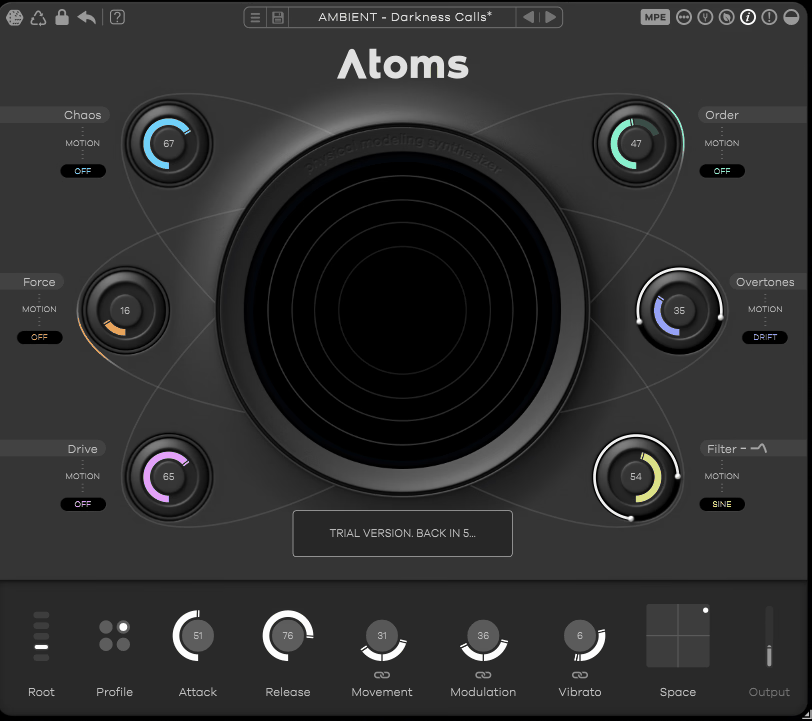
Chaos, Force, Drive, Order, Overtones, and Filter surround the central visualizer. Each knob directly affects the physics of the simulation, producing meaningful sonic changes that feel connected to the instrument’s behavior rather than arbitrary synth controls.
- Four Spring Network Profiles:
Four different underlying network configurations give you distinct starting points for the model’s behavior. These profiles subtly change the character of the sound from bright and metallic to darker and more organic.
- Built-In Effects as Part of the Model:
Modulation (chorus) and Vibrato are generated inside the physical model itself rather than as post-processing, which means they feel integrated with the sound rather than tacked on. The Space reverb sits as the one traditional post-FX effect, controlled via an X/Y pad for size and mix.

- Deep Motion System:
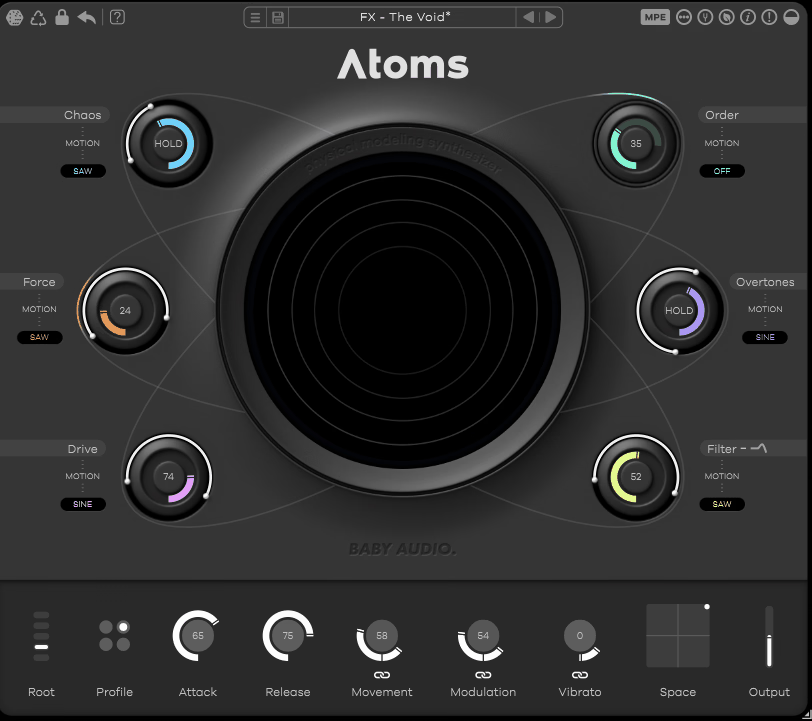
Every one of the six main parameters can be animated with LFO-style motion using sine, sawtooth, or drift shapes. You get retrigger, hold, and free LFO modes, host sync, direction controls, and copy/paste between parameters, which makes building evolving textures remarkably fast.
- MPE Support and 250 Factory Presets:
MPE polyphonic aftertouch can modulate any of the six parameters per note, and the factory library ships with 250 presets designed by professional sound designers covering ambient, cinematic, bass, lead, and experimental territory.
What I love most about the interface is how six simple knobs hide a genuinely complex synthesis engine underneath. You don’t need to understand mass-spring physics to create great sounds, but the depth is there if you want to explore it.
“Atoms is a gem of a new physical modeling soft synth, with intuitive and expressive control of bowed, organic, and alien sounds alike.”
Get the Free Plugin Starter Kit
The genuinely useful free DAWs and plugins worth installing. No filler. Straight to your inbox.
The Sound
The sound of this plugin is where everything comes together, and honestly, it’s unlike what you’ll get from any traditional synth in your toolkit.
What you end up with sits in a sweet spot that moves fluidly between synthetic and organic. At gentler settings, sounds feel like bowed strings, except a little wrong in the best way, with harmonics that shift and move as notes sustain.
Push the Chaos knob up, and things get unpredictable in a musical way, introducing random pitch modulation and instability that mimics the natural imperfection of real bowed instruments. Real-world instruments never sound identical twice, and ATOMS captures that quality better than most synths I’ve worked with.
A few sonic characters stand out in particular:
- Cinematic Pads and Drones:
This plugin absolutely excels at producing rich, evolving pad sounds that breathe and shift over time. Hold a chord and let the motion system animate the parameters, and you get drones that feel like they’re generating themselves rather than being played.
- Hard-Hitting Bass:
Despite the organic reputation, the synth can produce genuinely punchy bass sounds. Drive and Force together create a raw, physical bass character that works beautifully in modern electronic and hybrid productions.
- Bowed String Emulations:
Anyone chasing cello-like or violin-like sounds will find real use here. ATOMS won’t replace a proper orchestral library, but for stylized, slightly surreal bowed tones that sit between real and synthetic, it’s pretty much unmatched.
Running a simple chord through the plugin with a bit of Chaos and some parameter motion turns static harmony into something that feels performed rather than programmed. Harmonics shift, pitch drifts slightly, and the whole sound feels alive in a way that most synth pads can’t quite reach.
One thing worth noting is that some presets lean heavily into ambient and cinematic territory, which means they can take up a lot of mix space and work best in contexts that give them room to breathe. For tight, busy productions, you’ll want to dial things back or use the motion system more sparingly.
The Parameter Controls
The six main parameters are what make the synth feel so direct and playable once you understand what each one does.
Think of Force as the knob controlling how aggressively the virtual bow plays the model, working a bit like a velocity control except with physical consequences. Push it hard and the bow introduces friction and harmonic content that wouldn’t exist at gentler settings, giving you that raspy, screechy character you can get from real bowed strings when they’re handled aggressively.
Next up, Order affects the spring damping and functions a bit like a low-pass filter, warming up the sound and smoothing the harmonics when you dial it up. Meanwhile, Overtones changes where along the model the virtual bow makes contact, similar to how moving a real bow closer to the bridge of a violin produces brighter, more cutting tones.
When it comes to Chaos, it’s where the magic happens for motion and instability. Turn it up, and you get trendy random pitch modulation that adds life and unpredictability, pulling the sound into more experimental territory.
As for the final two, Drive adds harmonic clipping and saturation for warmth or outright distortion, while Filter is a straightforward low-pass filter for final tonal shaping.
Below the main controls, you’ve got global options including the four spring network profiles, Root (octave), Attack and Release, Movement (depth and speed of bowing), Modulation (chorus), Vibrato, and the reverb X/Y pad. These give you broader shaping tools without overwhelming the core six-knob workflow.
“The tactile nature of its interface encourages a hands-on approach to crafting sound, making each twist and turn of a knob an exploration of acoustic alchemy.”
The Motion System
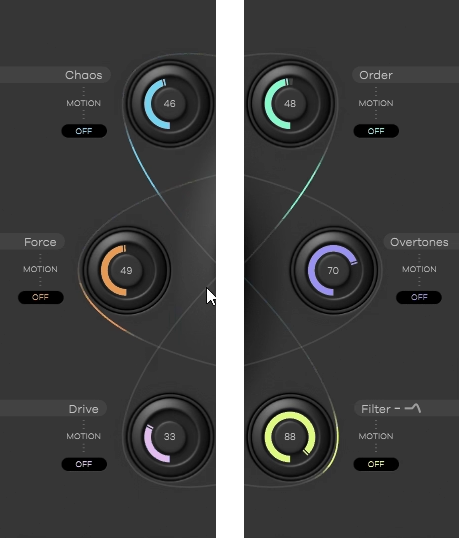
Beyond the basic parameter controls, the motion system is what transforms this plugin from a static sound generator into a living, breathing instrument that produces evolving textures without any manual automation.
Each of the six main parameters can be modulated independently with its own motion settings. You pick a shape (sine, sawtooth, or drift), set the amount, choose the LFO mode (free, retrigger, or hold), and optionally sync to your DAW’s tempo.
Worth calling out in particular is the drift shape, which adds semi-random motion that feels quite natural. Combined with small amounts on multiple parameters at once, drift creates sounds that genuinely never repeat the same way twice.
What I appreciate most is how copy/paste between parameters makes it fast to build coherent motion across the whole sound. Set up motion on one knob, copy those settings to another, adjust the rate and amount, and you’ve got a coordinated system of motion that takes static presets into cinematic territory.
Pros and Cons
Pros
- Unique Sonic Identity:
The physical modeling approach produces sounds that don’t exist in traditional synths, giving you something genuinely fresh in a crowded plugin market.
- Simple Interface:
Baby Audio’s signature design philosophy keeps the six-knob layout simple despite the complex engine underneath, making physical modeling accessible for producers who don’t want to read a manual.
- Exceptional Motion System:
Per-parameter modulation with multiple LFO shapes, drift motion, and copy/paste functionality makes building evolving textures remarkably fast.
- Organic Playability:
The mass-spring model responds to input in a way that feels alive, giving you that natural variation you get from real instruments but almost never get from synths.
- Great for Bass and Pads:
The plugin genuinely shines in two very different contexts, producing both otherworldly evolving pads and hard-hitting modern bass with equal ease.
Cons
- Niche Use Cases:
This isn’t a general-purpose synth, so you’ll need to know what you’re looking for when you load it up. Producers who need classic synth tones for everyday workflow will find it sits unused more often than dedicated workhorse synths.
- Limited Traditional FX:
Outside of the onboard reverb, modulation, and vibrato, there isn’t much in the way of built-in effects. You’ll want external delays, modulation plugins, and processors to fully flesh out the sound in many production contexts.
- Preset-Heavy Reverb:
Many factory presets lean pretty hard on the internal reverb, which can make the sounds feel mix-heavy right out of the box. I’d recommend dialing down the onboard reverb and using a dedicated plugin for better integration.
- Subtle Network Profile Differences:
The four spring network profiles give you different starting points, but the sonic variation between them is more subtle than you might expect. Don’t expect dramatic tonal shifts when switching between profiles.
Final Thoughts
Baby Audio ATOMS is one of those plugins that rewards curiosity, and I’d say it’s among the more genuinely creative soft synths to come out recently.
Put together, the mass-spring physical modeling engine, the six-knob interface, the motion system, and the 250 preset library create a plugin that opens up sonic territory most other synths can’t reach. For composers, sound designers, and experimental producers, this tool earns a spot in your template by doing something nothing else does.
One thing worth flagging is that the plugin isn’t designed to replace your main synthesizers. If you need classic analog emulations, supersaw leads, retro digital sounds, or general-purpose pop synth tones, dedicated tools for those jobs still make more sense.
That said, for producers who want a genuinely unique sound source that brings organic, bowed, evolving character to their productions, this plugin is one of the more inspiring investments you can make. Sound quality holds up across the entire parameter range, the interface keeps deep synthesis accessible, and the motion system turns static sounds into cinematic performances.
For film composers, ambient producers, sound designers, and anyone tired of synths that all sound like they came from the same mold, I’d recommend ATOMS as a plugin that expands what’s actually possible in your sessions rather than just duplicating what you’ve already got.
Check here: Baby Audio ATOMS (Trial Available)
Get the Free Plugin Starter Kit
The genuinely useful free DAWs and plugins worth installing. No filler. Straight to your inbox.

Hello, I’m Viliam, I started this audio plugin focused blog to keep you updated on the latest trends, news and everything plugin related. I’ll put the most emphasis on the topics covering best VST, AU and AAX plugins. If you find some great plugin suggestions for us to include on our site, feel free to let me know, so I can take a look!