
The free plugin space gets underestimated constantly. People download a handful of freebies, move on, and spend hundreds chasing something they could have had for nothing if they’d looked in the right places. Compressors in particular have benefited enormously from the donationware and open model that developers like Analog Obsession, Variety of Sound, and Bedroom Producers Blog have embraced.
What you’ll find across these 13 plugins covers every compression style worth knowing: SSL bus glue, Distressor-style punch, LA-2A optical warmth, transparent mastering control, upward/downward multiband mayhem, and program-dependent drum smashing.
There is no gap in your toolkit that at least one of these doesn’t fill, and not a single cent required.
1. Analog Obsession BUSTERse

If you need a free SSL-style bus compressor that actually sounds like the real thing, BUSTERse is probably the first plugin you should download. It’s the upgraded version of Analog Obsession’s earlier Buster, and it does what it claims to do: it glues.
The filter sidechain and transient section set it apart from everything else in this price category. I’d go further and say it’s more flexible than a lot of paid options, and the added transformer coloring option is something you won’t find on the hardware.
- HPF and Transient Sidechain:
The sidechain section gives you an HPF adjustable from 20 to 500Hz, a Mid control centered around 1.5kHz, and an HF cut at 10kHz that mimics the behavior of certain optical-tube hardware by letting the compressor respond more sensitively to specific frequency ranges.
The Transient section adds a Boost knob that increases sidechain sensitivity to peaks while simultaneously reducing decay, with a Tilt control to target a specific frequency range for that transient sensitivity.
I found using a slight HPF with the transient boost on drums turned BUSERse from a standard glue comp into something much more surgical and musical.
- Turbo Mode:
In its default state, BUSTERse focuses compression on mid frequencies to keep the classic SSL behavior intact. Engaging Turbo mode opens the compressor up to affect the full signal range, which changes the character significantly and pushes it closer to the behavior of some hardware compressors that were modified from the original SSL circuit. The difference between normal and Turbo on a drum bus is not subtle.
- XFORMER Transformer Coloring:
Switching on XFORMER replaces the internal ICs with transformer-based input and output stages, affecting impedance, character, and overall sound in a way that adds warmth and very slight harmonic rounding without darkening the signal. It’s a one-click option that makes BUSERse sound appreciably different and more alive, particularly when paired with lower ratios and longer attack times.
- 4x Oversampling:
Clicking the Analog Obsession logo engages 4x oversampling for better aliasing performance at higher compression amounts. It adds a small CPU overhead but is worth it when you’re pushing the ratio or resonance hard enough that digital artifacts could become audible. The interface is also fully resizable from 50 to 200%, which Analog Obsession implements across its whole catalog.
Get the Free Plugin Starter Kit
The genuinely useful free DAWs and plugins worth installing. No filler. Straight to your inbox.
2. Outobugi Dynastor
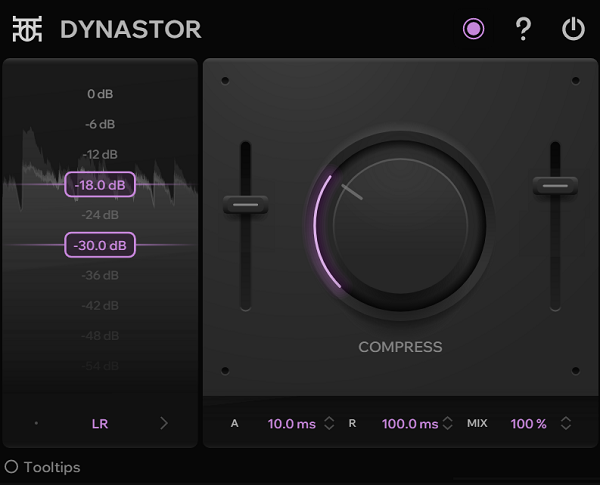
Finnish developer Outobugi built Dynastor as the compact single-band companion to Dynastia, their three-band OTT-style multiband compressor.
Both upward and downward compression are available in a single-band format, which makes Dynastor considerably easier to drop on individual sources than its bigger sibling while retaining all the same stereo processing modes.
It’s Windows VST3 only, which is a real limitation for Mac users, but for anyone on PC this is genuinely one of the more interesting creative compressors available for free. The spectrum analyzer UI alone is notable: one user called it the best compressor UI they’d seen, and I’m inclined to agree.
- Upward and Downward Compression Combined:
The core processing applies both upward compression (bringing quiet signals up) and downward compression (pulling loud signals down) simultaneously in a single band, which produces the characteristic OTT density and energy. The balance between upward and downward amounts can be adjusted, and the interaction between the two creates a density that simply stacking two separate compressors can’t replicate.
- LR, MS, Mid-Only, and Side-Only Modes:
Four processing modes give you Left/Right processing independently, full Mid/Side, Mid channel only, or Side channel only compression. The ability to compress just the side signal is particularly powerful for electronic production, letting you crush the stereo information separately from the mono center without affecting the fundamental balance of the mix.
- Spectrum Analyzer UI:
The interface includes a real-time spectrum analyzer built directly into the compression display, making the gain reduction visible across the frequency content in a way that most compressor GUIs don’t approach. It’s intuitive enough that one reviewer described it as deserving an award for the best compressor UI design, which for a free plugin from a small Finnish developer is quite a claim that the interface actually backs up.
- Compact Version of Dynastia:
For anyone who finds the three-band Dynastia too complex for quick use, Dynastor delivers the same compression character in a far more streamlined format without the crossover management and per-band controls that can slow down workflow. I found it significantly faster to dial in on individual tracks and synth busses where the three-band approach was overkill.
- Resizable and Colorizable GUI:
The interface supports color scheme customization and scaling, which is a nice touch for a free plugin that otherwise gets straight to the point. Some preset color saving behavior has been reported as buggy in certain DAWs, so it’s worth saving your visual settings separately.
- Windows VST3 Only:
This is the significant caveat worth knowing upfront: Dynastor is available exclusively as a VST3 plugin for Windows. Mac users are out of luck for now, though Outobugi has not officially ruled out expanding compatibility in the future. For Windows producers on Ableton, Reaper, FL Studio, or Cubase, this is a non-issue.
3. Kiive Audio XTRESSOR NUKE
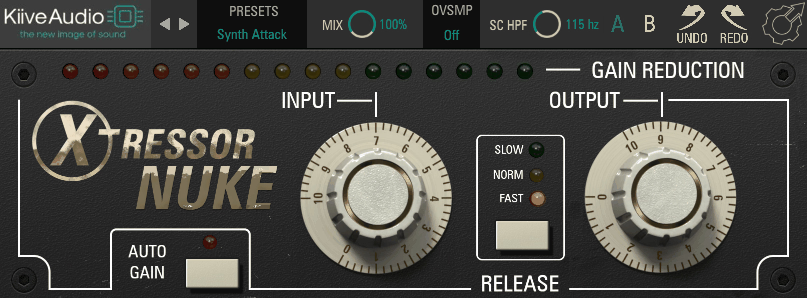
XTRESSOR NUKE is the free companion to Kiive’s Xtressor, which is itself a Distressor-inspired compressor now available through Plugin Alliance. What NUKE specifically gives you is the Nuke mode of the Distressor — the hardest, most aggressive compression setting of the hardware — in a minimal two-knob format. It uses the same internal algorithms as the full plugin, so the character is completely authentic.
- Three Release Modes:
Fast, Normal, and Slow release times cover the essential range of drum processing behavior. Fast is where the most extreme pumping lives, giving you that snappy, exaggerated compression character that works spectacularly on drum rooms and parallel drum buses. Normal is the most versatile for general use, and Slow works well when you want the compressor to hold on longer without letting transients snap back too quickly.
- Adjustable Sidechain HPF:
An adjustable high-pass filter in the sidechain prevents low-frequency content from dominating the gain reduction, which is the critical control that makes NUKE usable on full drum mixes rather than just tightly mic’d snares and kicks. With the HPF set correctly, you can apply heavy compression without the kick drum triggering massive gain reduction across the entire mix.
4. Analog Obsession Comper
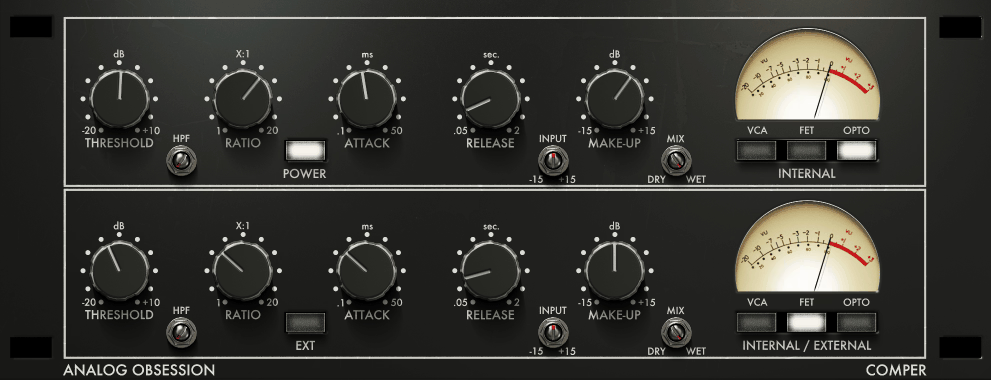
Comper is one of the more uniquely designed compressors Analog Obsession has released, and the concept behind it is genuinely clever.
Two compressors are stacked in series inside a single plugin, each with its own circuit type selection. What that means in practice is that you can do two completely different things to a signal in one pass: color it with a FET character in the first stage while tightening it with a VCA in the second, or run both stages in OPTO for a particularly smooth double-optical result. It’s not a complicated plugin to operate, but the range of sounds it can produce is wider than its clean interface suggests.
- Dual Serial Compressor:
The two compressors are arranged so that the first (INTERNAL) feeds directly into the second (INTERNAL/EXTERNAL), and both have independent threshold, ratio, attack, release, and makeup controls.
Running two compressors in series means the first stage catches the initial peak while the second stage handles the residual dynamic content, producing a more thorough and musical result than any single-stage compressor at the same settings.
- VCA, FET, and OPTO Modes Per Stage (Blendable):
Each compressor stage has three circuit options: VCA, FET, and OPTO, and unlike typical multi-mode compressors, the buttons here are not mutually exclusive radio buttons. You can blend two modes simultaneously in each stage, combining the fast attack of FET with the smooth tail of OPTO, for example, in a way no hardware unit could offer. The 1:1 ratio setting specifically adds additional transformer coloring without compression, useful for pure harmonic saturation.
- External Sidechain for Second Compressor:
The second compressor supports an external sidechain input, which means you can drive the first stage on the signal’s own dynamics and trigger the second with a kick drum, a different instrument, or any external source you want for rhythmic or reactive compression behavior. This makes Comper a creative tool for sidechain-driven effects beyond standard glue compression.
- 4x Oversampling and Resizable Interface:
The Analog Obsession logo toggles 4x oversampling, consistent with the developer’s other plugins, and the interface scales from 50 to 200%. AAX format is supported alongside VST3 and AU, making this one of the more DAW-compatible free compressors available including Pro Tools use.
5. Audio Damage Rough Rider 3
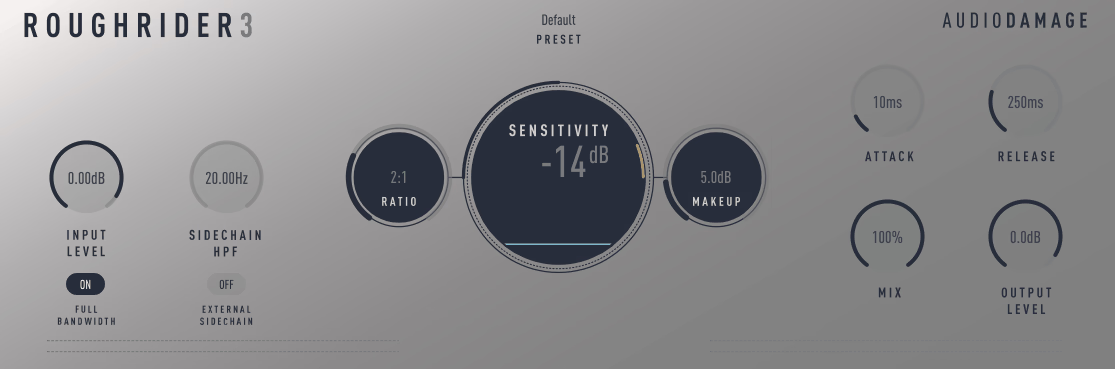
Rough Rider 3 is one of those plugins that has been downloaded over half a million times and hasn’t stopped being useful because it has never tried to be anything other than exactly what it is: an aggressive, character-heavy compressor with vintage-style bite that sounds great on drums and interesting on almost everything else. Version 3 brought a sidechain input, Full Bandwidth mode, and improved metering without changing the internal character at all.
It’s available on Linux, Mac, Windows, and iOS, which gives it a cross-platform accessibility that almost nothing else in the free space matches.
- Logarithmic Ratio to 1:1000:
The ratio knob is logarithmic, covering a range from 1:1 all the way to 1:1000, with the 12 o’clock position representing around 10:1. Everything to the left of center is standard compression territory, and everything to the right is what Audio Damage describes as “atom bomb squish.” The extreme high end of the ratio range turns Rough Rider into a slamming limiter that adds serious density to anything it touches.
- Full Bandwidth Toggle:
Rough Rider has always had a built-in warming filter that cuts some high-frequency content as part of its character. Version 3 added a Full Bandwidth button that disables this filter for a cleaner, more neutral compression character when you don’t want the vintage warmth. I found Full Bandwidth mode particularly useful when running Rough Rider on a bus where the inherent high-end softening was causing the mix to lose presence.
- External Sidechain:
Version 3 added an external sidechain input that was absent from earlier versions, making Rough Rider viable for sidechain ducking, pumping effects, and frequency-selective compression via external routing. This single addition turned Rough Rider from a pure drum smashing tool into a much more flexible creative compressor.
- Cross-Platform Including Linux and iOS:
Available as VST, VST3, AU, and AAX for Windows, macOS, and Linux, plus AUv3 and standalone on iOS, Rough Rider 3 covers every platform including Linux, which almost no other free compressor supports. For producers who work across operating systems or on iPad, this is worth calling out specifically.
- Metering and Visual Feedback:
Version 3 significantly upgraded the metering with input and output gain controls, gain reduction metering, input and output volume metering, and volume graphs that display the compression behavior over time. The earlier versions were largely flying blind by comparison, and the visual feedback in v3 makes it considerably more practical for careful mix work.
6. Dirty LA by BPB
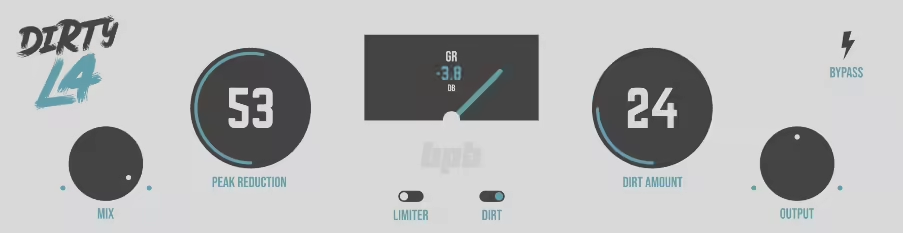
Bedroom Producers Blog built Dirty LA as a vintage limiting amplifier-inspired compressor designed to be musical, smooth, and impossible to use wrongly. Beat Magazine called it “an easy-to-use compressor/limiter that always sounds musical,” which captures it well.
The Dirt saturation algorithm is the feature that distinguishes it from a simple utility compressor, and the decision to run 4x oversampling only when Dirt is active shows smart engineering: you get better quality when you need it and lower CPU overhead when you don’t.
- Vintage Limiting Amplifier Character:
The compression algorithm is inspired by tube-driven optical leveling amplifiers and tuned for musical-sounding gain reduction that works on vocals, synths, drums, and bass with minimal fuss. The default mode uses a relatively fast attack and moderate ratio that Bedroom Producers Blog describe as fine-tuned to deliver musical results on most audio signals without requiring careful setup.
- Limiter Mode:
Switching to Limiter mode engages faster attack times and a higher compression ratio, transforming the plugin from a track compressor into a mix bus glue tool and light limiter in one click. BPB specifically recommend Limiter mode on the master bus and drum bus, where the faster attack catches peaks before they escape while the higher ratio holds the level down more consistently.
- Dirt Saturation Algorithm:
The Dirt section adds harmonic saturation derived from BPB’s in-house algorithm, fine-tuned to warm up and boost the signal while gently taming transients. When active, the plugin automatically switches to 4x oversampling internally to avoid aliasing artifacts from the saturation. Disabling Dirt drops the oversampling for lower CPU usage. For bass and drums in particular, the Dirt mode adds body in a way that sounds like the material was recorded through something warm and slightly pushed.
- Mix Knob for Parallel Compression:
A simple Mix knob makes parallel New York-style compression immediately available without any additional routing, letting you blend the heavily limited signal with the dry source to taste. For drums especially, blending around 30 to 50% wet on the drum bus gives you thickness and punch without flattening the transients.
7. Analog Obsession SPECOMP
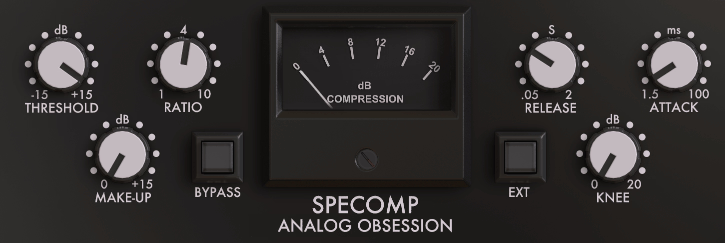
SPECOMP occupies a unique position in Analog Obsession’s catalog because it doesn’t follow the same logic as a traditional compressor plugin. It’s described as a spectral analog compressor that compresses both the overall signal and “naive frequencies” via an internal spectral processing circuit that is based on an S-Type SSL console compressor but so heavily modified that calling it an SSL clone would be inaccurate.
Bedroom Producers Blog said it sounds better than some popular paid offerings, and I found myself reaching for it as a default bus compressor more than anything else in this list because of how instantly it glues without darkening.
- Spectral Compression Circuit:
SPECOMP doesn’t just compress the amplitude of the overall signal. It also applies spectral processing to what the developer calls “naive frequencies” — frequency content that would otherwise escape standard amplitude-based compression. The result is a more complete taming of the signal’s dynamic range that captures transient detail in the mid and upper frequencies that a standard VCA or FET compressor misses. The magic is genuinely inside the algorithm in a way that’s difficult to reverse-engineer by ear.
- GR Meter Showing Spectral Frequency Compression:
The gain reduction meter shows both overall GR and the frequency-specific compression activity happening within the spectral circuit simultaneously, giving you visual feedback on two different aspects of the processing at once. It’s a simple meter but the information it displays is more complete than what any standard GR meter would show you.
- Instant Glue Character:
SPECOMP is particularly fast-acting in its glue effect. I noticed that it coheres a mix without robbing it of brightness, which is the hardest balance any bus compressor has to strike.
- Simple Controls with Complex Internal Processing:
The interface is intentionally minimalist, carrying standard compressor controls while keeping the spectral magic hidden inside the algorithm. The simplicity of setup belies the complexity of what’s happening internally, and this is a deliberate design decision. Users on KVR noted that running SPECOMP on the master bus makes individual tracks “pop” without increasing peak levels.
- 4x Oversampling:
The Analog Obsession logo toggles 4x oversampling as with the developer’s other plugins. Unlike BUSERse where oversampling is most useful under heavy compression, I found SPECOMP benefits from it even at moderate settings because the spectral processing interacts with high-frequency content in ways that benefit from the additional resolution.
- Resizable and AAX-Compatible:
The interface is fully resizable from 50 to 200% and available in VST3, AU, and AAX formats, meaning Pro Tools users have access to what I consider to be one of the most useful free bus compressors currently available anywhere.
8. Integraudio & Sixth Sample CRAMIT
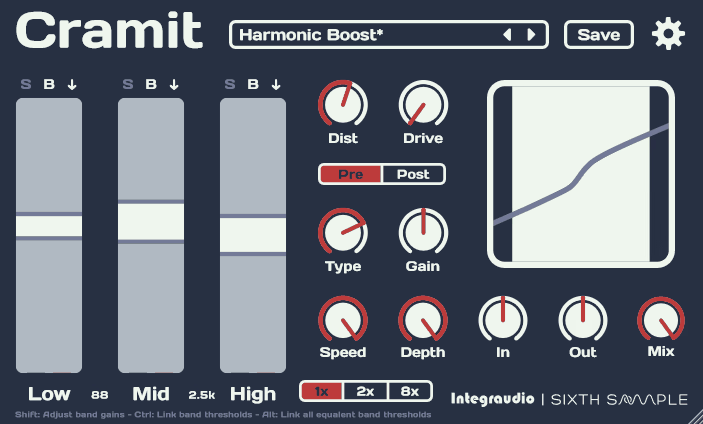
CRAMIT was built in collaboration between Integraudio and Sixth Sample, and it positions itself as an OTT-style multiband compressor with a built-in distortion section that can run pre or post the compression. The three-band upward/downward compression format will be familiar to anyone who uses OTT, but the addition of per-band solo and bypass, variable crossover frequencies from version 1.1, and 2x/8x oversampling modes makes CRAMIT considerably more precise than Xfer’s version in terms of what you can actually control. The spectrum visualization inside each band helps too.
- Three-Band Upward and Downward Compression:
The three bands (Low, Mid, High) each have independent upward and downward compression thresholds that you drag directly on the visual display. Upward compression lifts quiet content within each band, downward compression tames the peaks, and using both simultaneously creates the characteristic OTT density. Per-band solo and bypass let you hear exactly what each band is contributing before committing.
- Pre/Post Switchable Distortion Section:
The distortion section can be placed before or after the compression with a single switch. Pre-compression distortion generates harmonics that the compressor then acts on, which creates a particular density and glue. Post-compression distortion adds edge and presence to already-compressed material. The two positions sound significantly different and both are genuinely useful.
- Spectrum Visualization Per Band:
Each of the three bands shows a real-time spectrum inside the display, so you can see exactly what frequency content exists within the Low, Mid, and High bands and adjust your upward/downward thresholds relative to the actual material rather than working blind. For new users to OTT-style compression especially, this visualization makes learning what the plugin is doing dramatically faster.
- Variable Crossover Frequencies:
Added in version 1.1, adjustable crossover frequencies let you define where each band begins and ends rather than working with fixed splits. Being able to push the low/mid crossover down to where the bass content actually lives, or pull the mid/high crossover to protect the presence range of vocals, makes CRAMIT significantly more precise as a multiband processor.
- 2x and 8x Oversampling:
Version 1.1 added selectable 2x and 8x oversampling modes to reduce aliasing at higher compression amounts, particularly relevant when the distortion section is engaged. 8x oversampling on complex material may require more CPU headroom, but for bounce or export scenarios where real-time performance is less critical, the quality improvement at high settings is audible.
9. Variety Of Sound Density mkII
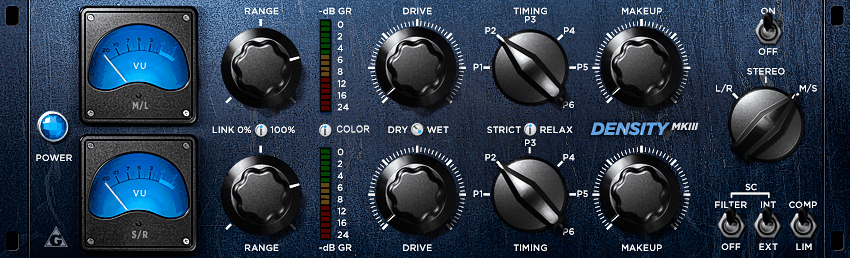
There are compressors on this list that are character plugins. Density mkII is not one of those. The developer, known as Bootsy, designed it as a stereo bus compressor not modeled on any specific hardware, which is actually rare in freeware where vintage emulation is the default approach.
It uses what he calls “proven dynamic shaping approaches from the past combined with modern concepts,” and the result is a compressor with its own distinctive sonic identity. Windows VST only, which is the persistent caveat, but for Windows producers it’s been a go-to 2-bus and drum bus tool for well over a decade for a reason.
- Dual Channel M/S Mode with Independent Range Controls:
The compressor operates in three modes: L/R with linked controls, L/R with unlinked stereo operation, and true dual-channel M/S mode. The M/S mode is a genuine two-channel setup where mid and side are compressed independently with separate Range controls per channel, making it easier to balance mid/side compression precisely. The Range controls are specifically highlighted in the developer’s own writing as the feature that makes M/S work practically rather than theoretically.
- Program-Dependent Timing via Six Fixed Presets:
Density mkII abandoned a standard ratio knob entirely and replaced it with six fixed timing presets (P1 through P6) based loosely on the program-dependent approach of the Fairchild 670. Each preset defines a specific combination of attack and release behavior, and some later presets introduce genuinely program-dependent release times rather than fixed values. The RELAX control further adjusts the timing behavior within the selected preset.
- Stateful Saturation and VCA Color:
The mkIII version of this plugin introduced a dedicated Color control built on Bootsy’s stateful saturation research, adding 2nd and 3rd order harmonics with frequency and load-dependent behavior that changes how the saturation interacts under different dynamics.
The mkII precedes this, but its own internal saturation circuit provides a subtle analog character that users have consistently compared favorably to UAD and Waves SSL offerings.
- Limiter Mode:
A Limiter mode engages a more strict handling of dynamics without operating as a brickwall in the traditional sense. Density describes it as offering “a more strict handling of dynamics” while still preserving some of the musical behavior of the standard compression mode. I found it particularly useful as a safety on the master bus during mixing where occasional peaks needed catching without the full glue effect of the compressor mode.
- External Sidechain and SC Filter:
An external sidechain input and a dedicated sidechain filter are both available, with the SC filter specifically optimized to decouple subsonic frequencies below 90Hz from driving the gain reduction. The external sidechain enables sidechain ducking, frequency-selective compression, and any other triggering workflow that requires a separate source to drive the dynamics processing.
- Windows VST Only:
This remains the limitation: Density is a Windows-only VST plugin. An x64 version was released in July 2021, and the current build supports both 32-bit and 64-bit hosts on Windows. Mac users will need to look elsewhere, but for Windows producers this remains one of the finest free bus compressors available.
10. Analog Obsession dbCOMP
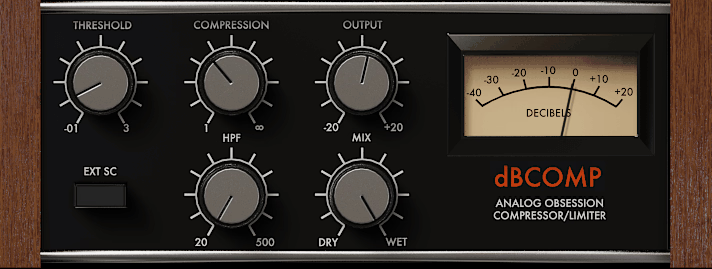
Sometimes a compressor is great because of what it does technically, and sometimes it’s great because it just works perfectly in a specific situation. dbCOMP falls into the second category.
It’s Analog Obsession’s take on the dbx 160-style VCA compressor, the classic drum and bass workhorse with program-dependent attack and release times that respond to the actual dynamics of the signal rather than fixed settings you dial in. I load this on drum buses almost reflexively now because it reliably adds snap and glue without requiring much thought.
- Program-Dependent Attack and Release:
The timing behavior is automatically determined by how much gain reduction is occurring: attack runs at 15ms for 10dB of GR, 5ms for 20dB, and 3ms for 30dB, while release moves at 8ms for 1dB, 80ms for 10dB, and 400ms for 50dB. This program-dependent behavior means the compressor naturally tightens up as you push it harder, without you needing to manually dial in faster times as the source gets more aggressive.
- HPF Sidechain from 20 to 500Hz:
A high-pass filter in the sidechain ranging from 20 to 500Hz prevents low-frequency content from dominating the gain reduction. On full drum mixes where kick drum energy would otherwise drive the compressor into pumping on every beat, this is the essential control that makes the plugin work practically. I typically set it around 100 to 150Hz on a drum bus and let the rest of the kit drive the response.
- Mix Knob for Parallel Processing:
The Mix control blends dry and wet signal for immediate parallel compression without extra routing. dbCOMP on drums at around 40% wet gives you the snap and density of the 160-style compression while the 60% dry signal preserves the natural transient dynamics of the kit. It’s a fast way to add excitement without the flatness that full wet compression can introduce.
- 4x Oversampling:
Clicking the Analog Obsession logo enables 4x oversampling for cleaner processing especially relevant when driving the compression hard enough that harmonic artifacts might otherwise appear. The developer also notes that dbCOMP “produces more harmonic material in the low and low mid frequencies,” which is exactly the character of the original hardware and useful to know when placing it in a signal chain.
11. TDR Kotelnikov
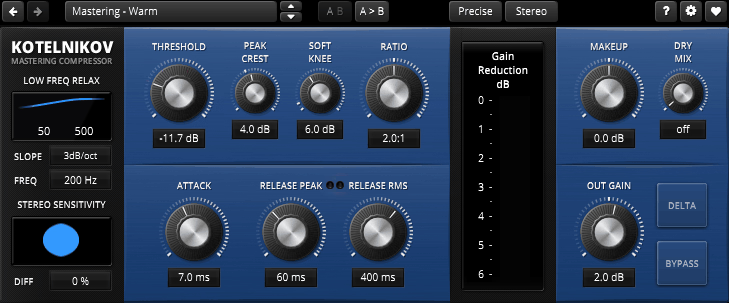
This is not an emulation. It’s not chasing the sound of hardware. It’s a wideband dynamics processor that prioritizes transparency, precision, and the preservation of tone and timbre above all else.
Kotelnikov free version is completely functional with no artificial limitations, and the paid Gentleman’s Edition simply adds more features rather than unlocking a restricted version. Bedroom Producers Blog called it “the most transparent mastering compressor on the freeware market (and beyond),” and for clean bus and mastering work, I haven’t found anything that challenges it at any price.
- Dual Release for Peak and RMS:
The standout technical feature is independent release controls for peak content and RMS content via the Crest Factor knob, which determines the threshold at which the faster peak release gives way to the longer RMS release. For transient material, the faster peak release of 50 to 100ms preserves punch while the longer RMS release of 500ms or more handles sustained content. This dual-release behavior is one of the most musically sophisticated features in any compressor at any price.
- Sidechain HPF with Adjustable Steepness:
The sidechain high-pass filter includes slope control as well as frequency selection, letting you define not just where low frequencies stop influencing the gain reduction but how aggressively they roll off. This level of sidechain precision is unusual even in commercial mastering compressors and directly affects how much the compressor pumps on bass-heavy material.
- Stereo Sensitivity Control:
A Stereo Sensitivity control adjusts how much the compression is linked between left and right channels, from fully stereo-linked (both sides compress equally) to independent (each side responds to its own content). For material where stereo width is critical, reducing the sensitivity allows the compressor to respond differently to L and R without destroying the stereo image.
12. Xfer OTT
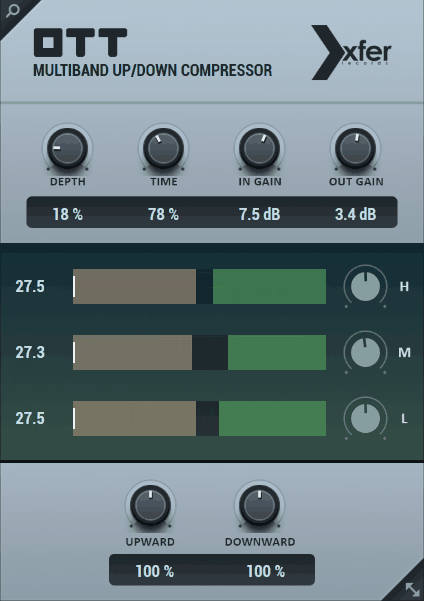
OTT started as a preset for Ableton’s Multiband Dynamics device, and when Steve Duda at Xfer Records packaged it as a standalone plugin available for free across all DAWs, it became one of the most downloaded plugins in the history of production software.
The three-band upward and downward compression is simple, the interface is minimal, and the sound it makes is the most recognizable compression effect in electronic music. If you’ve heard any EDM, dubstep, bass music, trance, or future bass in the last decade, you’ve heard OTT.
- Three-Band Upward and Downward Compression:
High, Mid, and Low bands each have independent level controls on the left side of the display that adjust their contribution to the overall processing. The Depth knob acts as a master dry/wet blend across all bands, and the Time knob adjusts attack and release globally. The upward compression (expanding quieter material) and downward compression (limiting louder material) amounts can be set independently with the bottom two knobs, giving you control over how aggressively each direction is applied.
- Visual Spectrum Analyzer Per Band:
Each band has a spectrum display showing the white original signal and yellow compressed signal in real time, with green zones indicating downward compression territory and yellow zones indicating upward compression territory. This visual feedback is what makes OTT approachable for producers who aren’t immediately sure where the threshold should be.
- In Gain and Out Gain:
Separate input and output gain knobs let you drive the compressor harder with a hotter input or compensate for level changes introduced by the processing at the output. Subtle OTT application with the Depth at 10 to 20% and careful gain staging can add shimmer and density to synths and pads without the effect being identifiable as OTT.
- Resizable GUI:
Version 1.33 brought a redesigned, fully resizable graphical interface that replaced the original cramped layout with a cleaner display that scales properly on high-resolution monitors. The update changed nothing about the processing or sound, which is exactly the right approach to updating a plugin with this many active users.
- Cross-Platform VST, VST3, AU:
OTT is available as AU, VST, and VST3 for macOS and Windows with no registration, no activation, and no email required. Download and use. For a plugin that has had this much impact on the production landscape, the accessibility is appropriate.
13. Analog Obsession LALA Leveling Amplifier
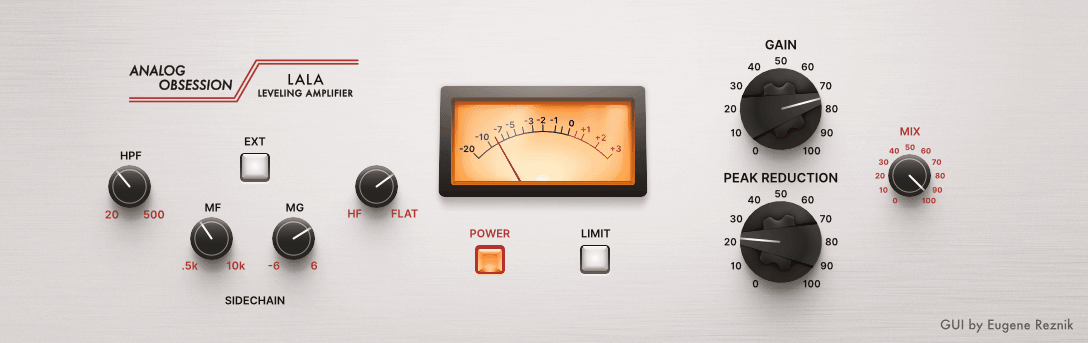
LALA wraps up the list as Analog Obsession’s free take on the LA-2A optical leveling amplifier, one of the most universally beloved compressors in audio history.
The original hardware is a tube-driven electro-optical circuit famous for its silky vocal compression, and LALA captures that character while adding a three-band sidechain filter, external sidechain input, and a mix knob that the hardware never had. It’s not a component-level circuit simulation, but the feel and musical behavior translate convincingly enough that it sits comfortably next to paid LA-2A emulations in practical use.
- LA-2A-Inspired Optical Compression:
The compression character is based on the slow, program-dependent response of the original electro-optical attenuator, where compression builds up gradually as sustained signals hit the element and releases more slowly than FET or VCA designs. This behavior is what makes the LA-2A so natural on vocals and melodic bass: it doesn’t snap on transients aggressively but smoothly pulls sustained notes into place.
- Three-Band Sidechain Filter:
LALA includes HPF for low-end removal, an MF/MG mid-frequency sensitivity control, and an HF control that adjusts compressor sensitivity to high frequencies in a way the developer describes as an enhanced version of the original hardware’s R37 trimmer setting. The ability to make the compressor more or less sensitive to different frequency ranges via the sidechain changes its behavior on different sources considerably.
- Limiter and Compressor Modes:
The LIMIT switch toggles between compressor behavior and limiting behavior, equivalent to the hardware’s Limiter/Compressor switch. In Limiter mode the unit reacts more aggressively to peaks with a higher effective ratio, while Compressor mode gives the smoother, more gradual optical response that makes the LA-2A particularly suited to sustained material.
Get the Free Plugin Starter Kit
The genuinely useful free DAWs and plugins worth installing. No filler. Straight to your inbox.

Hello, I’m Viliam, I started this audio plugin focused blog to keep you updated on the latest trends, news and everything plugin related. I’ll put the most emphasis on the topics covering best VST, AU and AAX plugins. If you find some great plugin suggestions for us to include on our site, feel free to let me know, so I can take a look!