
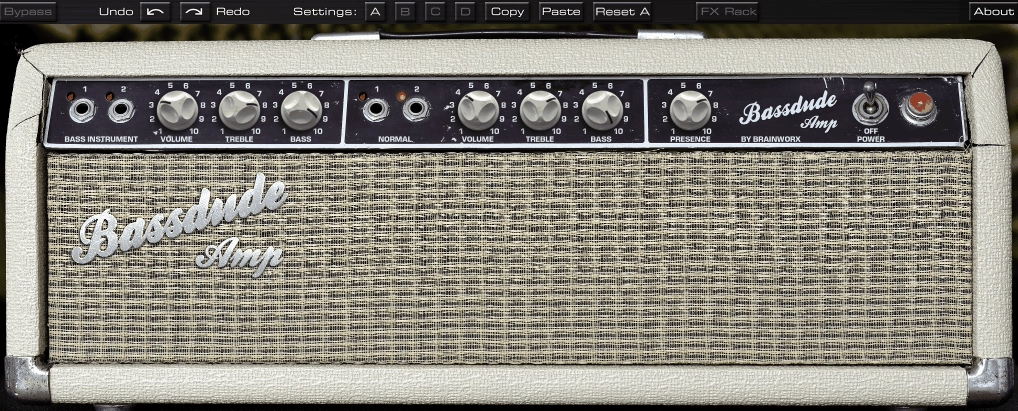
If you’ve ever chased that warm, slightly gritty vintage amp tone in your DAW and ended up frustrated with plugins that sound processed and lifeless, I think you’ll find bx_bassdude to be a genuinely different experience.
This is Brainworx’s faithful digital recreation of an early 1960s Fender Blonde Bassman amp, specifically the #6G6-B model, and the level of detail they put into the emulation is hard to ignore. There’s a reason the original Bassman is considered the mother of rock and roll amp design, and Brainworx clearly understood that legacy when building this thing.
What I appreciate most is how naturally it responds to what you feed it. Run a DI guitar recording through it and it reacts the way real tube hardware does, dynamically and with a kind of touch sensitivity that most amp sims just don’t nail.
I mean, that’s the thing that separates the good ones from the great ones, and this one sits firmly in the great column. The gain stays clean and warm up until you push the volume past 4, at which point you get a smooth, harmonically rich tube overdrive that genuinely sounds like someone cranked a real amp in a room.
For me, this plugin is absolutely worth picking up if vintage-flavored amp tones are part of your workflow. It handles both guitar and bass with equal confidence, which is actually unusual, and the built-in studio tools it packs make it a full production tool rather than just an amp emulator sitting in your plugin folder.
Dual Instrument Modes
I believe one of the most underrated things about this plugin is how seriously it takes the bass side of things. Most amp sims feel like guitar tools first, with bass as an afterthought.
That’s not the case here. You get two independent channels, a Normal channel for guitar and a Bass Instrument channel, each with their own Volume, Treble, and Bass controls. Switching between them is seamless, and I found that the Bass Instrument mode delivers a round, defined retro low end that sits beautifully in a mix without needing much additional EQ.
For guitar players, the Normal channel covers a ton of ground. Pop, rock, blues, and jazz all work naturally in this context, and the Presence knob gives you that extra bit of versatility when you want to push the highs forward or pull them back depending on the part you’re working on.
I’d say if you’re regularly tracking both guitar and bass in your sessions, having a single plugin that handles both this convincingly is a real workflow win.
Get the Free Plugin Starter Kit
The genuinely useful free DAWs and plugins worth installing. No filler. Straight to your inbox.
The IRs and Recording Chains
Here’s where things get genuinely impressive. Brainworx included 35 impulse response-based Recording Chains, and the story behind how they were captured matters.
Dirk Ulrich, the CEO of Brainworx and a former rock producer who worked with acts like Dream Theater and Toto, built these IRs using multiple speaker cabinets and nine high-end vintage and modern microphones running through a Neve VXS72 console (one of only nine in existence) with outboard EQ from Millennia, SPL, and elysia. That’s serious studio infrastructure, and you can hear it in every preset.
Cycling through the presets gives you a feel for the range on offer. I noticed the factory presets are optimized for specific guitars like Strat, Tele, and Les Paul, which is a nice practical touch that helps you land on a starting point faster.
One thing I want to note though: some users in the production community have mentioned that swapping the included IRs for your own third-party impulse responses, say from Celestion, can push things to another level entirely. The plugin supports that kind of flexibility, so it’s worth experimenting once you’re comfortable with the basics.
The FX Rack
The built-in FX rack is where you realize this isn’t a bare-bones amp emulator. Brainworx added tools that weren’t on the original hardware, and I think they made smart choices about what to include:
- Noise Gate to clean up unwanted hum and noise from your input signal
- High and Low Pass Filters (labeled Tight and Smooth) for shaping the frequency edges of your tone
- Lo-fi Delay with tap tempo, host sync, mix, feedback, and lo-fi character controls
- Power Soak, which simulates power amp clipping at reduced volume levels, letting you get that pushed, saturated tone without actually cranking anything
The delay in particular is a nice addition. I love how it has that slightly degraded, vintage character that works perfectly with the rest of the amp’s sound. You’re not going to use it for pristine, transparent delay work, but for classic rock and blues textures it fits right in without calling attention to itself.
The Power Soak is worth spending time on too since it gives you tonal color that you’d normally only get from cranking a real amp loud, which most of us simply can’t do in a home or project studio setup.
Workflow
I realized that one of the things I kept coming back to with this plugin is just how little adjustment it needs to sound good. You can drop it on a DI guitar or bass track, pick a Recording Chain from the menu, dial in your gain and tone, and you’re already in a usable place.
That’s genuinely not always true with amp sims, and it makes a real difference when you’re in the middle of a session and just need something to work. I would recommend using it on bass tracks where you want warmth and character rather than a modern, clinical DI sound. It handles jazz bass beautifully but also works in heavier contexts.
On guitar, it’s a natural go-to for anything needing Stevie Ray Vaughan, Tom Petty, or Brian Setzer-type tone. The plugin supports AAX, AU, VST2, and VST3 formats, so it plays nicely with pretty much every major DAW on both Mac and Windows, and as of the latest update in early 2026, the UI is now scalable and Apple Silicon compatibility is solid across all formats.
One honest observation: if you’re chasing aggressive modern high-gain tones, this isn’t your plugin. It’s a vintage Fender-style amp at its core, and it sounds best when you work with that character rather than against it.
But for everything in that warm, clean-to-crunch spectrum, it’s one of the better options I’ve come across in this category.
Check here: Brainworx bx_bassdude
Get the Free Plugin Starter Kit
The genuinely useful free DAWs and plugins worth installing. No filler. Straight to your inbox.

Hello, I’m Viliam, I started this audio plugin focused blog to keep you updated on the latest trends, news and everything plugin related. I’ll put the most emphasis on the topics covering best VST, AU and AAX plugins. If you find some great plugin suggestions for us to include on our site, feel free to let me know, so I can take a look!