
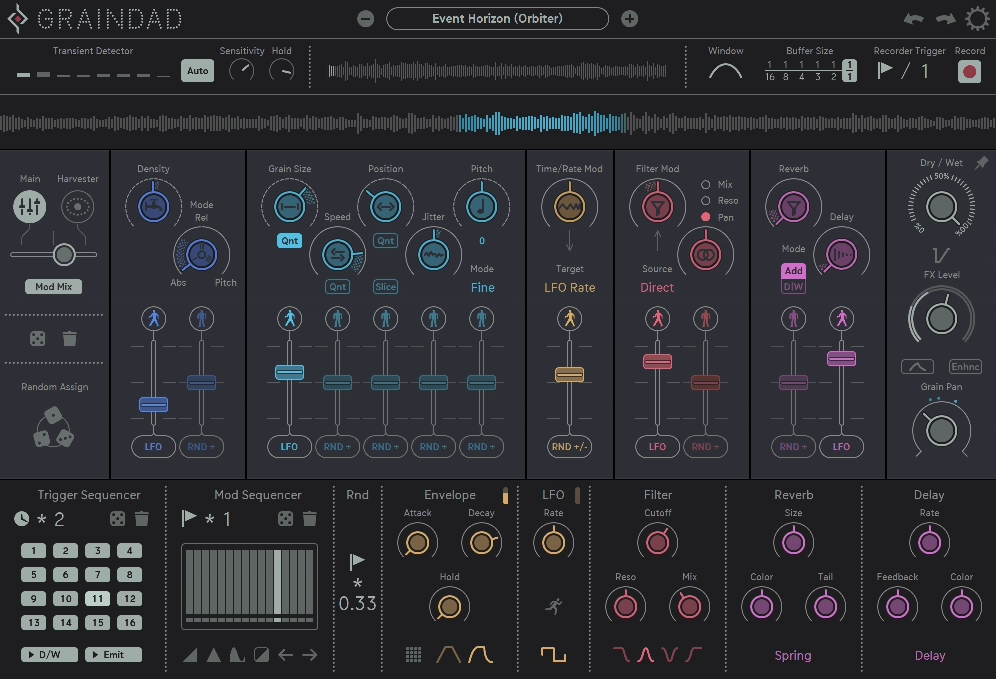
Most granular plugins do one thing: they smear your audio into a washy, ambient texture and call it a day. If you’ve tried a few of them and walked away feeling like they all sound basically the same, Graindad is going to feel like a completely different conversation.
Sugar Bytes has built a reputation for releasing plugins that push way past what you’d typically expect from a given category, and this is probably their most ambitious take on that philosophy yet.
The whole concept here goes well beyond standard granular processing, combining a real-time grain engine capable of playing back up to 64 simultaneous grains, a dual modulation system unlike anything else in this space, a full multi-effects section, and a randomization engine that can be triggered by transients, clocks, or MIDI, all packed into one interface that looks almost playfully chaotic the first time you open it.
At $99, I think this is genuinely worth it for producers and sound designers who want to go somewhere new with their audio, and not just add a shimmer pad on top of everything. The depth here is real, the learning curve is real too, but the results you can get out of it are the kind that make you stop mid-session and just listen.
Grain Engine
The heart of everything is the grain engine, and I have to say it’s one of the more flexible implementations of granular processing I’ve come across in a plugin at this price. With 12 main parameters controlling how grains behave, you’ve got a lot of room to explore before you even touch the modulation system. The core processing styles you can dial in include:
- Freezing audio into sustained, evolving textures
- Time stretching without pitch artifacts
- Pitch shifting and harmonizing across multiple grain voices
- Stuttering and looping for rhythmic, glitchy effects
- Reversing grain playback for that characteristic backwards shimmer
- Texturizing incoming audio into something almost unrecognizable
What I appreciate most about the grain engine is how it handles recording and playback simultaneously. The plugin records your incoming audio into a buffer in real time, and then plays back grains from that buffer, which means you can process live audio just as easily as you can process a sample sitting in your session.
You can set it to record in sync with your host clock, trigger recording via MIDI, or let it respond dynamically to transients in your incoming audio, which is a genuinely smart way to make the processing feel reactive rather than static.
I found the transient triggering especially useful on drums and rhythmic material, where having the grain behavior change automatically on every hit creates this kind of living, evolving texture that’s incredibly hard to replicate manually. I’d say this alone is worth spending time with before you dig into anything else the plugin offers.
Get the Free Plugin Starter Kit
The genuinely useful free DAWs and plugins worth installing. No filler. Straight to your inbox.
The Harvester is unlike anything you’ve seen in a granular plugin
Here’s where things get genuinely different. Alongside the classic modulation system, which gives you your familiar LFOs, envelopes, step sequencers with step repeat, and various randomizers, Sugar Bytes built something called the Harvester Modulation system, and I believe this is the single most original feature in the entire plugin.
The Harvester is a visual modulation system that lets you control multiple parameters simultaneously through what looks like an orbital path system, with orbits, paths, and what the interface refers to as moons. I mean, it sounds abstract when you describe it in words, but when you actually see it moving and hear what it’s doing to your sound, it makes an immediate kind of intuitive sense.
You’re essentially drawing paths through parameter space rather than setting individual modulation targets one by one, and the result is that complex, interconnected parameter movement feels almost effortless to set up.
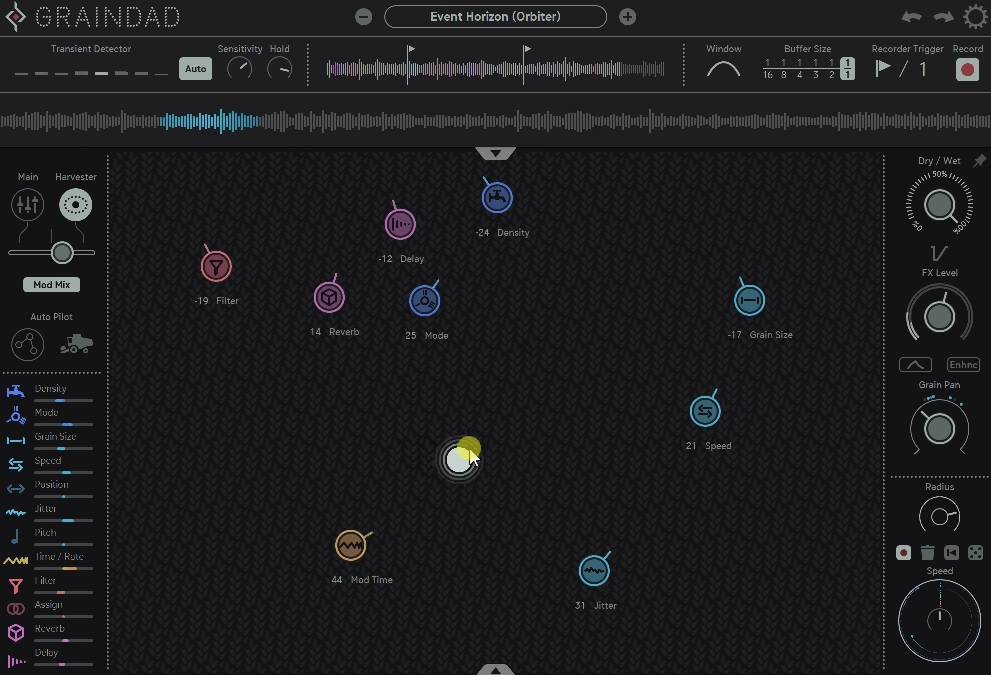
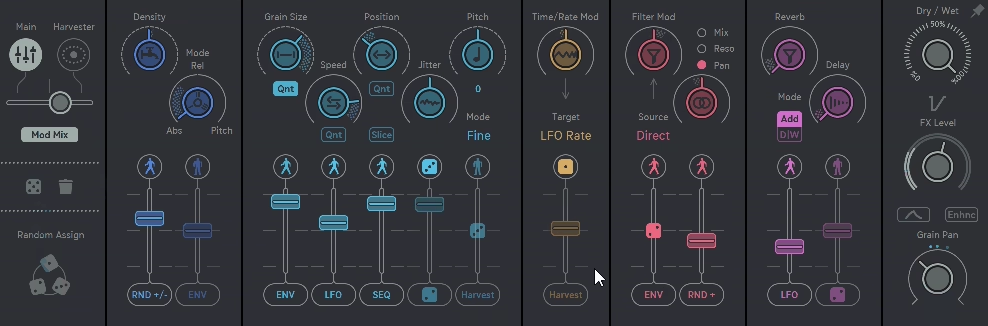
What really gives the modulation system its depth is the Modmix Control, which lets you crossfade between the Harvester and the main modulation page, blending both systems simultaneously for results that would be practically impossible to program from scratch. On top of that, randomization is built into nearly every parameter in the plugin, and you can control not just the amount of randomization but also when and how often it triggers, whether that’s on a clock, on a transient, or via MIDI.
I noticed that spending time with the randomization settings is where a lot of the happy accidents happen. Setting the randomizer to trigger on transients while the Harvester is running its orbit pattern and blending that with a step sequencer on the grain position is the kind of thing you can lose an hour to without realizing it, which is honestly a sign of a great plugin.
Effects Section
I want to note something that gets a bit undersold in how this plugin is usually discussed, which is how good the built-in effects section is. A lot of granular plugins treat effects as an afterthought, but Sugar Bytes put together a genuinely useful multi-effects engine here that covers:
- Multimode filters with lowpass, bandpass, band reject, and highpass options, all with dry/wet control
- Room and spring reverbs with a shimmer mode for that ethereal, pitch-shifted reverb sound
- Delay with standard controls for adding space and rhythm
- Flanger and chorus for movement and width
The dry/wet controls on the filters deserve a specific mention because they let you use the bandpass almost like a peaking EQ, emphasizing specific frequencies within the granular material rather than just cutting everything outside a band.
For me, this is where you can take something that already sounds interesting out of the grain engine and push it into genuinely finished territory without ever leaving the plugin.
I love how the effects interact with the modulation system too, meaning you can route Harvester orbits or step sequencer values into filter cutoff, reverb size, or delay time, which turns what would otherwise be static effects into living, moving components of the overall sound design.
—
I’d say the honest thing to tell you is that Sugar Bytes Graindad isn’t a plugin you open and immediately understand. The interface greets you with colors, moving elements, randomization dice, and a modulation system that takes a real look to fully grasp. Sugar Bytes provides a solid set of video explainers on their site that I would recommend watching before you dig in too deep, because the payoff once you understand what everything does is significant.
The preset library is a great starting point and does an impressive job of showing you the range of what’s possible, from subtle, evolving textures that add just a hint of movement to a pad, all the way to complete audio destruction that leaves almost nothing of the original signal recognizable.
I suggest using the presets not just as starting sounds but as a study tool, loading them up and tracing back which parameters and modulation settings created each result.
For producers working in ambient, experimental, electronic, film scoring, or really any context where creative sound design is part of the workflow, this plugin sits in a category of its own. It genuinely blurs the line between effect and instrument in a way that very few plugins manage to pull off.
Formats: VST2, VST3, AU, AAX, Standalone
Works with: macOS 10.13 or higher (Intel and Apple Silicon), Windows 7 or higher
Price: $99
Get the Free Plugin Starter Kit
The genuinely useful free DAWs and plugins worth installing. No filler. Straight to your inbox.

Hello, I’m Viliam, I started this audio plugin focused blog to keep you updated on the latest trends, news and everything plugin related. I’ll put the most emphasis on the topics covering best VST, AU and AAX plugins. If you find some great plugin suggestions for us to include on our site, feel free to let me know, so I can take a look!