
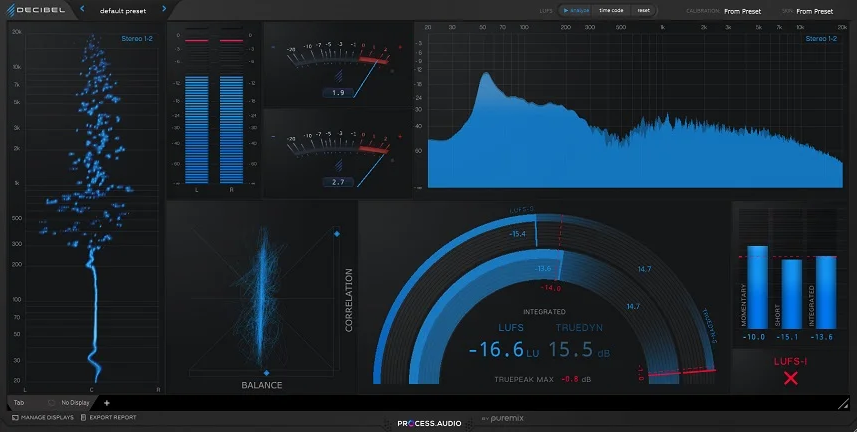
There’s a version of metering that tries to do everything at once, and then there’s Decibel. PROCESS.AUDIO made a very deliberate choice here to build something focused and opinionated rather than comprehensive, and I think that restraint is actually what makes it interesting.
Not every session needs a full analysis suite sitting on the master bus. Sometimes you just need clean, honest loudness information delivered in a way that doesn’t pull your attention away from the music itself.
I must say, the first thing you notice when you open Decibel is how considered the visual design is. It doesn’t look like most metering plugins, and I mean that in the best possible way. The typography is large, the readings are immediately legible, and the overall aesthetic feels closer to a well-designed piece of hardware than a typical plugin UI.
For me, that matters more than it might sound, because a meter you actually enjoy looking at is one you’ll actually use consistently rather than bypassing halfway through a session.
Clean by design..
What PROCESS.AUDIO Decibel gives you at its core is integrated LUFS, short-term LUFS, momentary LUFS, and true peak metering, all displayed with a clarity that makes it genuinely fast to read at a glance. I love how the integrated reading takes center stage visually, because that’s the number that matters most when you’re delivering for streaming and you need to hit a specific loudness target reliably.
I found myself checking it far more naturally than I would with a plugin that buries that reading among five other displays competing for the same visual space.
The true peak display is accurate and fast, and I appreciate that it doesn’t require you to dig into a settings menu to find it. If your mix is generating intersample peaks that are going to cause distortion after lossy encoding on streaming platforms, Decibel will show you that clearly and immediately.
I noticed the peak hold behavior is well implemented too, giving you a stable high-water mark to reference without the reading jumping around so aggressively that it becomes hard to track.
I want to note that Decibel includes selectable loudness targets for major streaming platforms including Spotify, Apple Music, YouTube, and Tidal, so you’re not having to remember delivery specs or cross-reference them elsewhere mid-session. That’s the kind of practical detail that feels small until you realize how often you actually need it, and then it becomes one of those things you wonder how you worked without.
Get the Free Plugin Starter Kit
The genuinely useful free DAWs and plugins worth installing. No filler. Straight to your inbox.
Where the workflow actually speeds up
I think the thing I appreciate most about how Decibel is designed is that it treats your attention as something worth protecting. A lot of metering plugins give you so much information simultaneously that you end up spending more mental energy parsing the display than actually listening to your mix, and I believe that’s a real problem that doesn’t get talked about enough.
Decibel sidesteps that entirely by keeping the display focused and uncluttered, and I realized pretty early on that this changes how you interact with metering during a session. Instead of glancing at it and having to consciously locate the reading you need, the information you want is just there, immediately, without any visual hunting involved. I found this particularly valuable during mix decisions that require you to stay in a listening mindset rather than an analytical one.
The resizable window scales cleanly at any size, which means you can run it large on a dedicated monitor if you have a multi-screen setup or keep it compact in a corner of your session without losing any readability. I’d say this kind of flexibility is something you don’t think about until you’re trying to fit a metering plugin into a tight screen layout and suddenly every pixel of wasted space starts to feel frustrating.
The honest part about what it doesn’t do
In my opinion, being straightforward about the limitations here is just as important as covering what works well, and Decibel has some real ones worth knowing before you commit to it. This is not a full metering suite. You’re not getting a spectrum analyzer, a stereo vectorscope, a correlation meter, or a dynamic range display within this plugin, and if those are things you rely on regularly as part of your mixing or mastering workflow, Decibel is not going to replace what you already have.
I’d say the most honest way to think about it is as a dedicated loudness and true peak tool rather than an all-in-one solution, and whether that’s a limitation or a feature genuinely depends on how you work. For someone who already has analysis covered elsewhere and just wants a clean, always-on loudness reference that stays out of the way, it’s pretty much ideal. For someone building a metering setup from scratch and expecting one plugin to handle everything, you’ll want to look at something more comprehensive alongside it.
Bottom line
I have to say, Decibel is a plugin that knows exactly what it is and doesn’t try to be anything else, and I find that kind of focus genuinely refreshing in a space where a lot of developers compete on feature count.
I love how it makes the most important loudness information completely effortless to read, and I think for a lot of mixing engineers it will become one of those tools that just lives on the master bus permanently without ever drawing attention to itself, which is honestly the highest compliment you can pay to a metering plugin.
It runs as a VST3, AU, and AAX plugin on both Mac and Windows, with native Apple Silicon support and a CPU footprint that is essentially invisible even in larger sessions.
I would recommend it to anyone who values a clean, focused metering workflow and isn’t looking for a full analysis suite in a single plugin. If that description fits how you work, Decibel is very much worth your time.
Get the Free Plugin Starter Kit
The genuinely useful free DAWs and plugins worth installing. No filler. Straight to your inbox.

Hello, I’m Viliam, I started this audio plugin focused blog to keep you updated on the latest trends, news and everything plugin related. I’ll put the most emphasis on the topics covering best VST, AU and AAX plugins. If you find some great plugin suggestions for us to include on our site, feel free to let me know, so I can take a look!